ClickUp Pricing 2026: Free, Unlimited, Business, the New AI Plans, and What a Team Really Pays

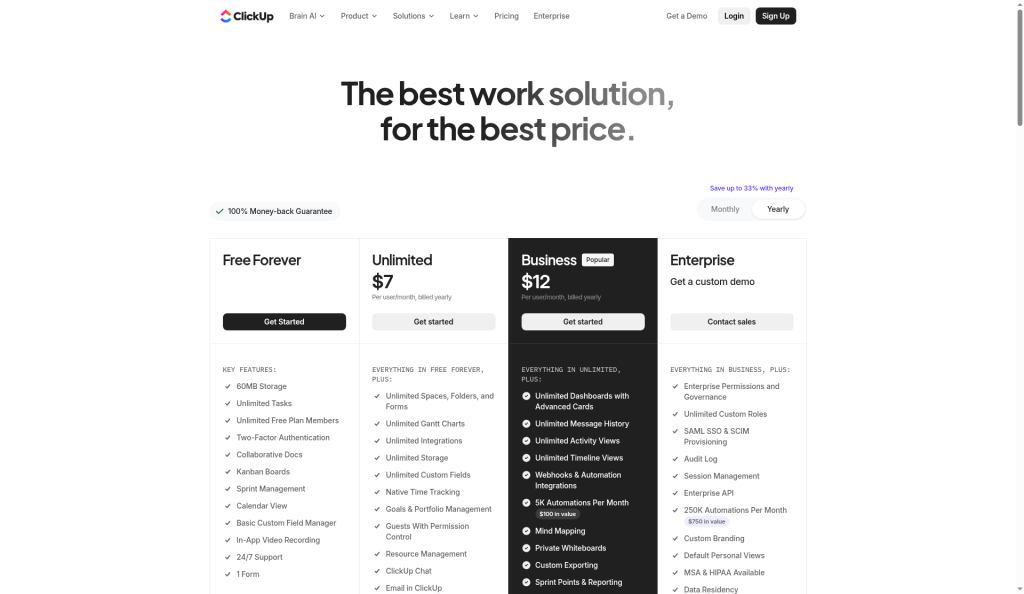
ClickUp’s long-running plans cost $0 (Free Forever), $7 per user per month for Unlimited billed yearly ($10 monthly), and $12 for Business billed yearly ($19 monthly). Enterprise is quoted by sales. On these plans, AI is an add-on: Brain AI at $9 per user per month or Everything AI at $28.
There’s a wrinkle in 2026. ClickUp’s pricing page now also shows a second lineup with AI included in every plan: Free, Core ($9 billed yearly, $12 monthly), Business ($17 yearly, $25 monthly), Enterprise (custom) and Max ($100 per user per month billed yearly). ClickUp’s help center says “some Workspaces see a new set of plans that include more ClickUp AI” and that existing plans don’t change. So what you’re offered depends on your workspace.
All figures below were checked on ClickUp’s pricing page and help center on October 12, 2026.
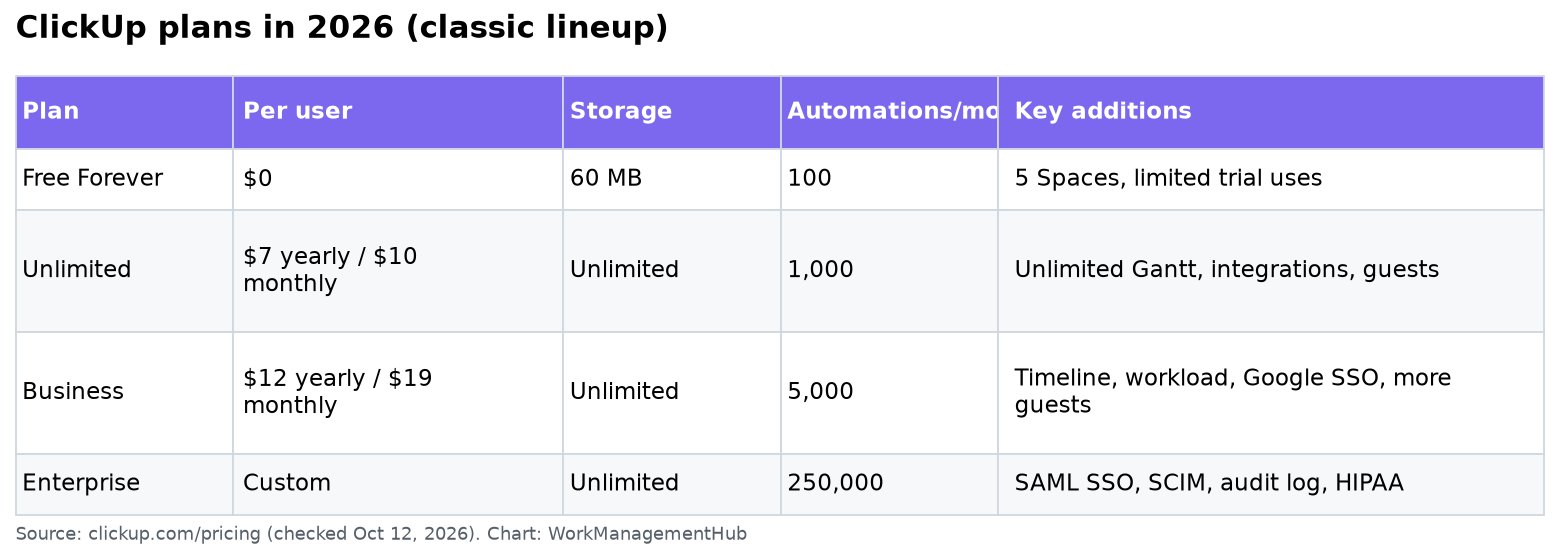
ClickUp plans at a glance (classic lineup)
| Free Forever | Unlimited | Business | Enterprise | |
|---|---|---|---|---|
| Price per user, billed yearly | $0 | $7/month | $12/month | Custom |
| Price per user, billed monthly | $0 | $10/month | $19/month | Custom |
| Storage | 60 MB | Unlimited | Unlimited | Unlimited |
| Spaces | 5 | Unlimited | Unlimited | Unlimited |
| Automation runs per month | 100 | 1,000 | 5,000 | 250,000 |
| Gantt, timeline, workload | Limited trial uses | Gantt unlimited; timeline and workload limited | Unlimited | Unlimited |
| Chat message history | 90 days | Unlimited | Unlimited | Unlimited |
| Guest seats | Unlimited, but full edit access only | 5 for the first paid user, +2 per extra user | 10 for the first paid user, +5 per extra user | Same as Business, advanced permissions |
| Sign-on | 2FA | 2FA | Google SSO, SMS 2FA | SAML SSO, SCIM |
“Trial” in ClickUp’s comparison table means a fixed number of uses. ClickUp says those uses don’t reset: once you reach the limit you keep your data but can’t create or edit with that feature until you upgrade.
The AI add-ons on classic plans
On Free, Unlimited and Business, ClickUp’s AI (Brain) is sold separately, per user:
| AI option | Price per user per month | What’s included |
|---|---|---|
| Free | $0 | Trial access to AI features |
| Brain AI | $9 | AI assistant, AI chat with several model choices, AI writing, enterprise search, +1,500 AI Super Credits per user |
| Everything AI | $28 | Adds AI Notetaker, AI fields, AI automations and dashboards, more Super Agent usage, +5,000 credits per user |
| Extra credits | $10 per 10,000 | Pooled across the workspace; used by agents, AI fields, automations, image generation |
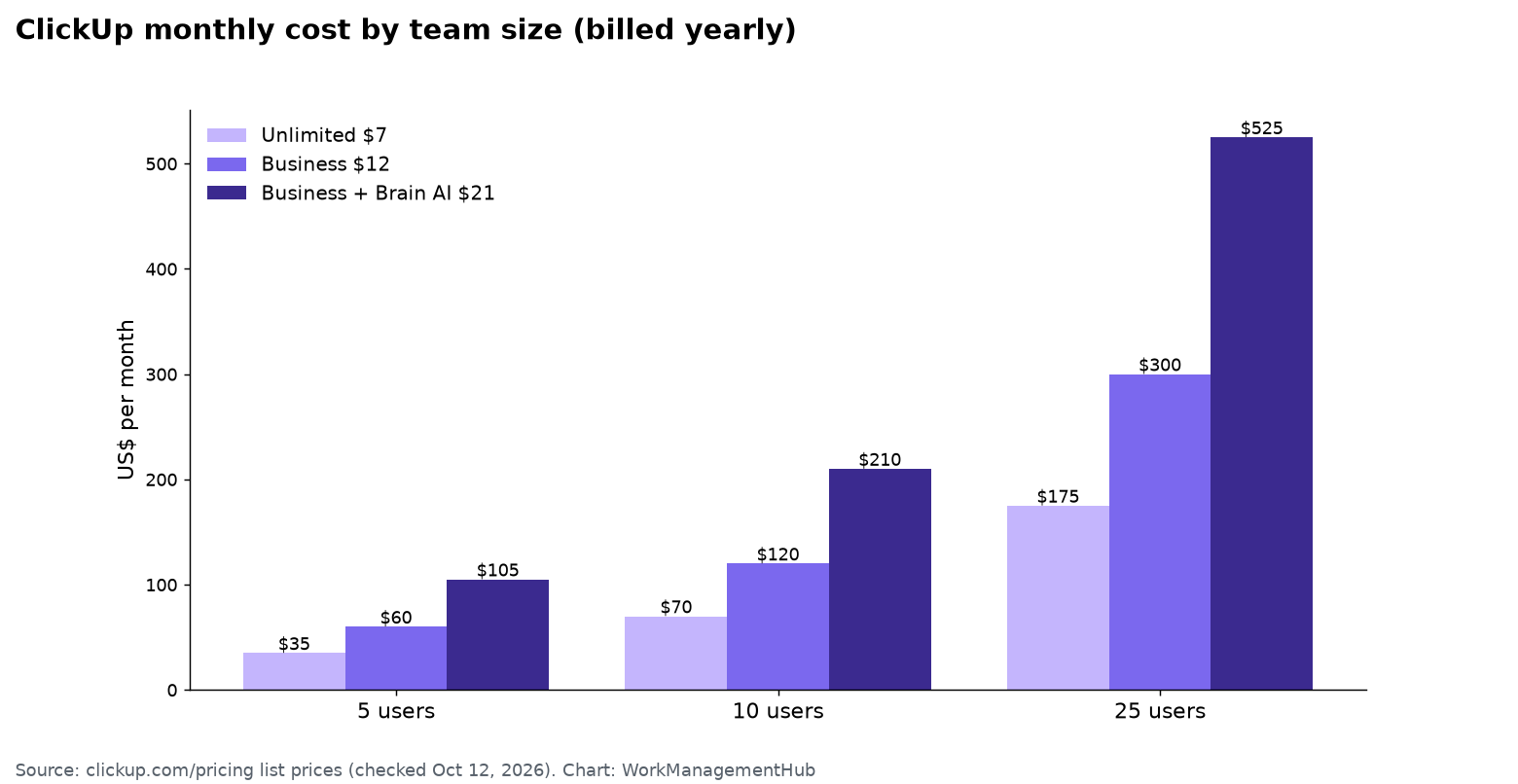
The catch: ClickUp bills paid plans for the whole workspace, so plan on paying for AI for everyone who needs it, not just one person. For a 10-person team on Business billed yearly, adding Brain AI moves the bill from $120 to $210 a month.
The new lineup some workspaces see
| Free | Core | Business | Enterprise | Max | |
|---|---|---|---|---|---|
| Listed price per user/month | $0 | $9 billed yearly ($12 regular) | $17 billed yearly ($25 regular) | Custom | $100 billed yearly ($120 regular) |
| AI credits | 500 per workspace (trial) | 1,000 per user, pooled | 1,500 per user, pooled | 3,000 per user, pooled | 10,000 per user, pooled |
| Automations per month | Limited | 1,000 | 10,000 | 1,000,000 | 1,000,000 |
| Notable | 60 MB storage, 1 form | Unlimited storage, Gantt, goals, guest permissions | Advanced dashboards, webhooks, timesheets, Google SSO | SAML/SCIM, custom roles, audit logs, HIPAA | Every Enterprise control plus maximum AI usage |
If your workspace shows these plans, the value math is simpler: Core at $9 includes some AI usage, which on the classic lineup would cost $7 + $9. If you don’t want AI at all, the classic Unlimited plan is cheaper, if your workspace still offers it.
What a team actually pays
| Team size | Unlimited (yearly) | Business (yearly) | Business + Brain AI |
|---|---|---|---|
| 5 users | $35/month | $60/month | $105/month |
| 10 users | $70/month | $120/month | $210/month |
| 25 users | $175/month | $300/month | $525/month |
These are list prices. ClickUp offers nonprofit, education and startup discounts through its pricing page FAQ.
Billing rules that catch people out
- The whole workspace upgrades together. You can’t put one person on Business and the rest on Free.
- Each workspace is billed separately. Two workspaces means two subscriptions.
- New members are prorated. Add someone mid-cycle and ClickUp bills the remaining time automatically.
- People from your own company are paid members, not guests. Guest seats are meant for clients and freelancers. Inviting a colleague as a guest still bills them as a user.
- Refunds: ClickUp offers a 30-day full refund on your first paid subscription; after that, no refunds, and plans auto-renew.
- Cancelling keeps your plan until the end of the billing cycle unless you downgrade immediately.
Which plan I’d pick
Free Forever works for one person or a tiny team testing ClickUp, but the 60 MB storage cap fills fast once people attach files.
Unlimited is the right default for small teams (roughly 2–10 people) who need unlimited storage, Gantt charts and integrations, and run fewer than about 1,000 automations a month across the workspace.
Business earns its price once you need timeline and workload views without limits, more automations, Google SSO, or more guest seats for clients. Most teams of 10+ end up here.
Enterprise is for SSO/SCIM, audit logs, data residency or HIPAA requirements.
AI: try the free trial uses first. Buy Brain AI only for the people who’ll use it daily, and only if your workspace lets you mix; otherwise budget it for everyone.
If you’re comparing tools, see how ClickUp stacks up in monday.com vs ClickUp and ClickUp vs Asana. Once you’ve picked a plan, my ClickUp automations guide helps you stay inside your monthly runs, and the complete ClickUp guide covers setup.
Common questions
How much does ClickUp cost per user?
On the classic plans, Unlimited is $7 per user per month billed yearly or $10 monthly, and Business is $12 yearly or $19 monthly. Enterprise is custom. Some workspaces see a newer lineup: Core $9, Business $17 and Max $100 per user per month billed yearly. ClickUp says the new plans go to new Workspaces, all Free Forever Workspaces and some paid ones, with a full rollout planned (ClickUp help).
Is ClickUp AI included in paid plans?
On the classic plans, no. Brain AI costs $9 per user per month and Everything AI $28. On ClickUp’s newer plan lineup, every plan includes a monthly AI credit allowance.
Is ClickUp’s free plan really free?
Yes, with limits: 60 MB of storage, 5 Spaces, 100 automation runs a month, and limited uses of features like Gantt and custom fields that don’t reset.
Can I upgrade only some users in ClickUp?
No. ClickUp upgrades the entire workspace, so every member is billed on the paid plan.
Does ClickUp offer refunds?
Yes, within 30 days of buying your first paid plan. After 30 days ClickUp doesn’t refund, and plans renew automatically.
Prices and limits checked against ClickUp’s pricing page and help center on October 12, 2026. ClickUp is changing its packaging, so confirm the plans your workspace sees before you buy.
Sponsored