Best Project Management Software 2026: 10 Tools Compared by Team Type, Real Monthly Cost and the Limits That Matter

There is no single best project management tool. There is a best tool for the way your team works, and most bad purchases happen because a team picks the most talked-about product instead of the one that matches its work. This guide compares the ten tools we see most often, on three things that decide whether a rollout sticks: what you actually pay, the limit that forces an upgrade, and the kind of team each one is built for.
All prices are list prices billed yearly, per user per month unless stated, taken from each vendor’s pricing page on October 1, 2026 (for example Asana, monday.com, Trello, Jira and Basecamp). Monthly billing usually costs 15 to 25 percent more.
ClickUp pricing note (checked October 16, 2026): ClickUp is changing its plans. New Workspaces, all Free Forever Workspaces and some paid ones now get Core at $9 and Business at $17 per user a month billed yearly ($12 and $25 monthly), with AI credits included and a new Max plan at $100. Many existing Workspaces still have the classic plans: Unlimited at $7 and Business at $12 billed yearly ($10 and $19 monthly), with ClickUp Brain as a $9 add-on. Prices in this article use the classic plans unless noted. See ClickUp’s new plans help article.
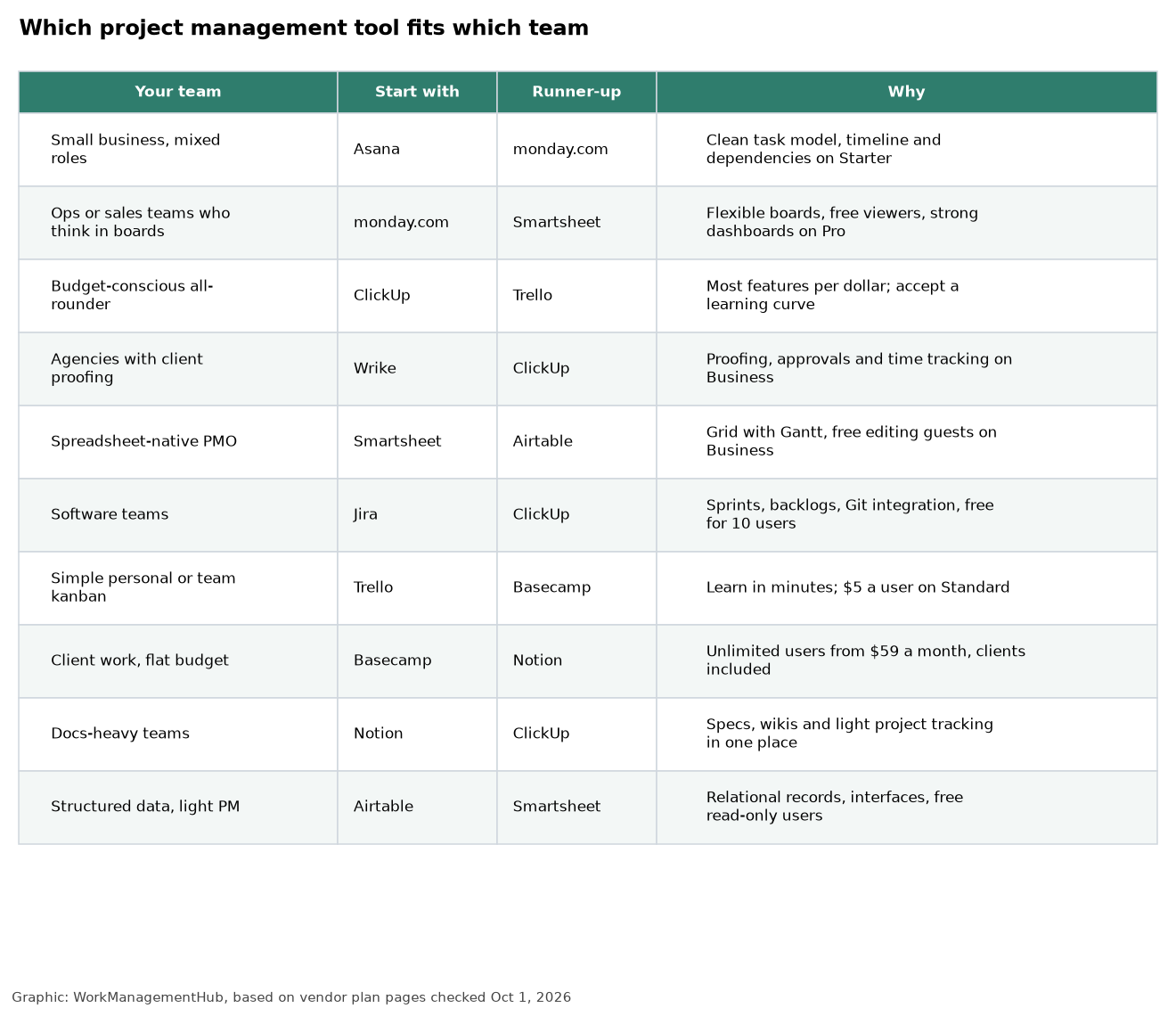
The short answer
- Most small and mid-size teams: Asana or monday.com. Both are easy to adopt and both put timelines, dependencies and automations on their second paid tier.
- Best value: ClickUp. The most features per dollar, at the cost of a steeper learning curve.
- Agencies and creative teams: Wrike, for proofing, approvals and time tracking.
- Spreadsheet people: Smartsheet.
- Software teams: Jira.
- Simple boards on a small budget: Trello.
- Lots of clients and a fixed budget: Basecamp, because it charges a flat fee instead of per user.
- Docs-heavy teams: Notion.
- Data-heavy operations: Airtable.
What a 10-person team really pays
The headline “from $X” price is rarely the plan you end up on. The chart below uses the first plan that gives a typical team what it expects from project software: a timeline or Gantt view, dependencies or unlimited projects, and usable automations.
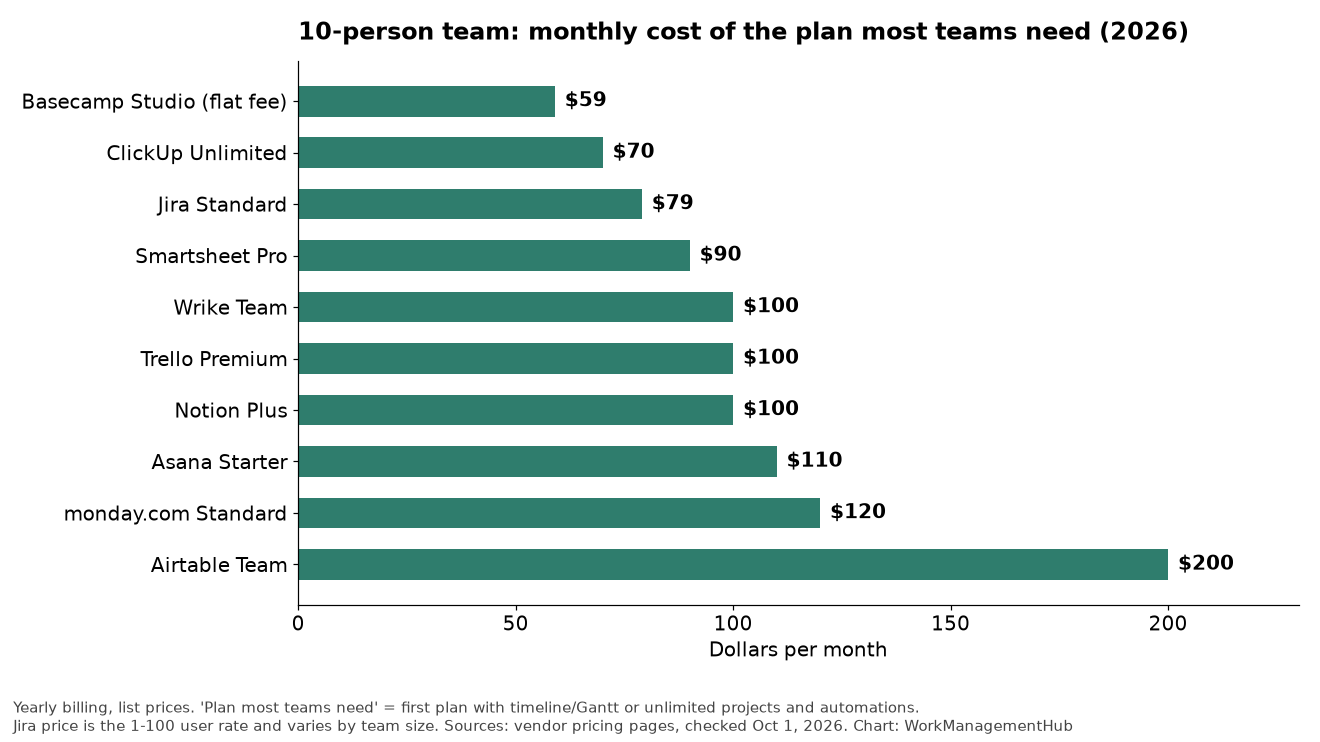
Three billing rules change these numbers more than the sticker price does:
- Who counts as a paid seat. monday.com and Airtable let read-only viewers in free. Asana includes unlimited free guests on paid plans. Smartsheet Business lets outside guests edit for free. Notion and Trello bill every workspace member (Trello also bills guests who are on more than one board).
- Seat bundles. Asana sells seats in steps of 5 above 5 users and monday.com sells them in fixed buckets, so 11 people can cost the same as 15. Wrike sells seats in groups of 5 below 30 users.
- Flat pricing. Basecamp charges by plan, not by person. Studio is $59 a month for 10 active projects and unlimited users; Pro is $99 for 25 projects.
The 10 tools compared
1. Asana: best all-rounder for small and mid-size teams
Asana’s Personal plan is free for up to 2 users. Starter ($10.99) removes the seat limit and adds timeline and Gantt views, task dependencies, custom fields, dashboards, forms and unlimited rules. Advanced ($24.99) adds portfolios, goals, resource management, approvals, proofing, built-in time tracking and the Power BI, Tableau and Salesforce integrations.
The limit that forces an upgrade: native time tracking and portfolios are Advanced-only. Timesheets, billable rates and project budgets are a separate add-on on every plan.
Pick it if you want structure without a long setup. Read Asana vs monday.com if those two are your shortlist.
2. monday.com: best for visual boards and non-technical teams
Free covers 2 seats and 3 boards. Basic ($9 a seat) gives unlimited items and free viewers. Standard ($12) is where most teams land: timeline, Gantt and calendar views, guest access, and 250 automation actions plus 250 integration actions a month. Pro ($19) raises that to 25,000 of each and adds private boards, time tracking and dependency columns.
The limit that forces an upgrade: 250 automation actions run out fast. A single “notify the owner when status changes” rule on a busy board can use that in a week.
Pick it if your team thinks in boards and dashboards and you want people productive on day one.
3. ClickUp: best value if you will invest in setup
The Free Forever plan allows unlimited members with limited storage. Unlimited ($7) removes the storage cap and adds unlimited integrations, dashboards and Gantt charts. Business ($12) adds advanced automations, time tracking with timesheets and workload views. ClickUp’s AI is sold separately: Brain AI at $9 per user or Everything AI at $28.
The limit that forces an upgrade: guests. Unlimited includes 5 guest seats plus 2 per paid user; Business includes 10 plus 5 per user.
Pick it if you want one tool for tasks, docs, goals and time, and someone on the team enjoys configuring software. Teams that skip the setup often find ClickUp cluttered. Our Wrike vs ClickUp comparison covers the agency use case in detail.
4. Wrike: best for agencies and approval-heavy work
Free includes unlimited users and up to 200 active tasks. Team ($10) is for 2 to 15 users. Business ($25) supports up to 200 users and adds proofing, approvals, time tracking, custom item types and blueprints. Viewers are free. Budgets and billable rates sit on the Pinnacle plan.
The limit that forces an upgrade: the 15-user ceiling on Team, and proofing being Business-only.
Pick it if you review creative work with clients and need an audit trail of who approved what.
5. Smartsheet: best for teams that live in spreadsheets
Pro ($9) allows up to 10 members and 250 automations a month. Business ($19, minimum 3 members) removes the member cap, allows unlimited automations and lets external guests edit at no charge. Each sheet holds up to 20,000 rows, 400 columns and 500,000 cells.
The limit that forces an upgrade: Pro stops at 10 members, so growing teams hit Business quickly.
Pick it if your project plans already live in Excel and you want Gantt charts, dependencies and reports without retraining everyone. See how it stacks up in Airtable vs Smartsheet.
6. Trello: best for simple kanban
Free covers up to 10 collaborators per workspace and 10 boards. Standard ($5) adds unlimited boards, custom fields and advanced checklists. Premium ($10) adds calendar, timeline, table, dashboard and map views plus AI. Enterprise is $17.50.
The limit that forces an upgrade: timeline and calendar views are Premium-only, so a team that needs dates on a schedule pays $10, not $5.
Pick it if your process fits on a board with a few columns. It is the easiest tool here to learn.
7. Jira: best for software teams
Free covers up to 10 users. Standard and Premium are priced on a sliding scale by team size, roughly $8 and $14.50 per user for small teams. Jira brings scrum and kanban boards, backlogs, sprint reports and deep Git integration.
The limit that forces an upgrade: the 10-user free cap, and advanced planning across teams being Premium-only.
Pick it if you ship software. For non-technical teams, Jira usually feels heavy. Compare it with Jira alternatives before committing a mixed team.
8. Basecamp: best for client work on a fixed budget
Free gives one project. Paid plans are flat monthly fees with no per-user charge on Studio and above: Freelancer $25 (3 projects, 20 users), Studio $59 (10 projects, unlimited users), Pro $99 (25 projects) and Unlimited $299 (unlimited projects, 1 TB). All are billed yearly and include time tracking.
The limit that forces an upgrade: active projects, not people. Archived projects do not count.
Pick it if you invite lots of clients or contractors and want the bill to stay put. It has no Gantt-style dependencies, so it suits teams that coordinate by conversation and to-do lists.
9. Notion: best when the work is mostly writing
Plus is $10 per member and Business is $20. Databases give you boards, timelines, calendars and relations, and every task can hold a full spec. Guests are free and unlimited on paid plans, but colleagues are billed members.
The limit that forces an upgrade: Notion is not built for dependencies, workload or time tracking. Teams with complex schedules usually pair it with a dedicated tool.
Pick it if specs, wikis and meeting notes are the center of your work. See Notion vs Airtable for the docs-versus-database decision.
10. Airtable: best for data-heavy operations
Free allows 5 editors and 1,000 records per base. Team ($20 per editor) raises that to 50,000 records and 25,000 automation runs a month. Business ($45) goes to 125,000 records. Read-only users are free on every plan.
The limit that forces an upgrade: records per base. Logs and request queues grow faster than most teams expect.
Pick it if your projects are really structured data (content calendars, asset tracking, request intake) and you want custom interfaces on top.

How to choose in an afternoon
- Write down your three must-haves. For example: Gantt with dependencies, client guests, time tracking. Ignore everything else for now.
- Count seats honestly. Split your people into editors, viewers and outside guests. That alone can halve the bill on monday.com, Airtable or Smartsheet Business.
- Find the plan that covers all three must-haves in each candidate and price it for your team. That is your real cost, not the starting price.
- Pilot two tools for two weeks with one live project each. Track how many people log in without being reminded.
- Buy monthly first, yearly later. Switch to annual billing once adoption holds for a full month.
Mistakes we see most often
- Over-building on day one. Ten custom fields and twenty automations before anyone has used the tool is the fastest way to lose a team. Start with one workflow and add structure when people ask for it.
- Paying for viewers. Check whether your tool offers free viewer or guest roles before inviting stakeholders as full members.
- Ignoring automation caps. monday.com Standard and Smartsheet Pro both cap automations at 250 a month. Count your rules before you buy.
- Choosing for the power user. The best tool is the one the least technical person on the team will open every day.
If you’re a small business choosing your first tool
Small teams usually fail with project software for one reason: nobody keeps using it after week two. So weigh adoption speed above feature count. A few practical rules:
- Start on a free plan and use it for real work for 30 to 60 days. Upgrade only when a limit actually blocks you (you run out of boards, need a timeline, or need automations), not because a feature looks nice on a pricing page.
- Watch seat minimums. monday.com’s paid plans start at 3 seats, per its pricing page, so a solo owner or a two-person shop pays for seats nobody uses. Its free plan covers up to 2 seats.
- Pick for the person who’ll resist most. If your office manager or field crew won’t touch something complicated, Trello or monday.com will get more use than a more powerful tool like ClickUp that needs an afternoon of setup.
- Count the tools it replaces. If you also pay for a wiki or a shared docs tool, Notion or ClickUp can cover both, which can make a slightly pricier plan the cheaper option overall.
For a deeper look at free options, see our best free project management tools roundup.
Related guides
- Best free project management tools
- Best project management software for small business
- Best project management software for remote teams
Frequently asked questions
What is the best project management software for a small team?
For most small teams, Asana Starter or monday.com Standard. Both cost $11 to $12 per user, include timeline views and dependencies, and are easy for non-technical people to learn. If budget is the main constraint, ClickUp Unlimited at $7 or Trello Standard at $5 cost less.
Which project management tool is cheapest?
For a team of 10 that needs real project features, Basecamp Studio ($59 a month flat) and ClickUp Unlimited ($70) are the cheapest options in this list. For very small teams, the free plans from ClickUp, Trello, Jira (up to 10 users) and Wrike (200 active tasks) go a long way.
Is there a free project management tool good enough for real work?
Yes, for small teams. Jira Free (10 users) suits software teams, Trello Free (10 collaborators) suits simple boards, and ClickUp Free Forever has the most features but limited storage. See our free tools ranking for the limits of each.
Which tool is best for client collaboration?
Basecamp, because clients do not add cost on Studio and above. Wrike and Smartsheet Business are strong alternatives when clients need to approve work or edit plans, and Asana includes unlimited free guests on paid plans.
Do I need Gantt charts?
Only if tasks depend on each other and dates move. If your work is a queue of independent tasks, a board view is simpler and every tool here has one on its cheapest plan.
For Airtable’s October 12, 2026 post-acquisition roadmap (core fixes, AI, admin controls, pricing unchanged), see our note on Airtable Back to Bases (Oct 2026).
Sponsored