Smartsheet vs Linear 2026: Which Is Better for Your Team?
- In the Smartsheet vs Linear decision, Linear is the clear winner for software engineering teams: sprint planning, native GitHub/GitLab sync, and issue triage via Linear Agent (April 2026) are first-class features with no equivalent in Smartsheet.
- Smartsheet’s AI Dashboard Builder and Scenario Planning (May 2026) give it an insurmountable advantage for cross-departmental portfolio reporting, executive visibility, and multi-project resource planning.
- Linear’s free tier and flat pricing save a 10-person dev team $80–120/month versus Smartsheet at equivalent feature tiers — a meaningful difference for startups and bootstrapped teams.
- Smartsheet Control Center enables repeatable project provisioning at enterprise scale — template stacks, governance controls, automated reporting roll-ups — a capability Linear has no equivalent for.
- The decision rule is almost binary: pure software engineering teams pick Linear; operations, enterprise PM, or cross-functional organizations managing 20+ simultaneous projects pick Smartsheet.
Linear wins for software engineering teams that need fast issue tracking, native GitHub sync, and sprint cycles. Smartsheet wins for operations leaders, enterprise PMOs, and cross-functional teams that need portfolio reporting, resource management, and repeatable project provisioning at scale. These tools are not actually competing for the same buyer.
- Smartsheet vs Linear: The Core Philosophical Divide
- Developer Workflow: GitHub Sync, Sprints, and Issue Tracking
- Enterprise PM and Portfolio Management
- AI Features Head-to-Head: May 2026 Smartsheet vs Linear Agent
- Smartsheet Control Center vs Linear at Scale
- Side-by-Side Comparison Table
- Pricing Breakdown 2026
- Which Tool Wins for Your Specific Scenario
- Verdict
- Frequently Asked Questions
Smartsheet vs Linear 2026: Which Is Better for Your Team?
The Smartsheet vs Linear debate trips up a lot of buyers because both products appear on “best project management tools” lists — but they were built for fundamentally different teams, workflows, and organizational contexts. Getting the Smartsheet vs Linear decision right means understanding which team you actually are. Putting them head-to-head without that framing is like comparing a cargo truck with a sports car and declaring one objectively better. They are optimized for different jobs.
I have evaluated both tools extensively for enterprise clients: Smartsheet for a 300-person operations and construction management firm running 40+ concurrent projects, and Linear for a 25-person product engineering team that needed to replace Jira without losing GitHub integration depth. The conclusions from those engagements are consistent with what I see across industries — the right answer depends almost entirely on what your team actually does day to day, not on feature checklists.
What makes this guide different from the thin aggregator pages you have already read: it addresses the features that actually matter in mid-2026, including Smartsheet’s new AI Dashboard Builder and Scenario Planning capability released in May 2026, and Linear’s Agent feature for AI-driven issue triage launched in April 2026. Neither appears in any competing comparison that ranks for this query.
Smartsheet vs Linear: The Core Philosophical Divide
Smartsheet was built on the insight that most business teams already think in rows and columns — they live in spreadsheets — and the best way to get them into structured project management was to meet them where they are. The result is a tool that looks like Excel but behaves like a real PM platform: cells become task rows, columns become field types, and the whole thing is connected to resource management, automations, dashboards, and a governance layer built for enterprise deployment. Smartsheet’s target market is explicitly operations, enterprise PMOs, marketing teams, IT teams, and finance departments. Software development is an afterthought.
Linear was built on the opposite conviction: that software engineering teams deserve a purpose-built tool that does not carry the baggage of generic project management. Every design decision in Linear — from its keyboard-first navigation to its local-first data sync to the way GitHub pull requests surface inside issues — was made with a software engineer as the primary user. Linear does not try to serve HR, finance, or marketing. That deliberate narrowness is a feature, not a limitation.
This philosophical divide is the single most important thing to understand before reading any feature comparison. When you understand it, most sections of this guide become obvious. When you ignore it, you end up evaluating Linear’s portfolio reporting (nonexistent) against Smartsheet’s GitHub integration (also nonexistent) and concluding that both tools are mediocre. They are not mediocre — they are excellent at entirely different jobs.
For a broader view of how these tools fit into the wider market, see our guide to the best project management tools in 2026.
Developer Workflow: GitHub Sync, Sprints, and Issue Tracking
This is the section where Linear wins so decisively that it should end the conversation for pure software teams — and where Smartsheet’s absence is most stark.
GitHub and GitLab integration
Linear’s GitHub and GitLab integration is native, bidirectional, and near-real-time. Opening a pull request automatically links it to the relevant Linear issue. Merging that PR triggers an automatic status update on the issue. Branch names created from Linear follow a consistent naming convention that keeps repositories organized without any manual discipline from developers. Commit messages referencing Linear issue IDs — for example LIN-412 — surface automatically in the issue activity timeline. For engineering teams running continuous deployment pipelines, this tight coupling between code activity and issue state is not a nice-to-have. It is the foundation of accurate sprint tracking.
Smartsheet has no native code repository integration. There is no GitHub connector in Smartsheet’s native feature set. You can build Zapier or Make automations that push GitHub events into Smartsheet rows, but this is not the same as first-class integration — it requires setup, maintenance, and it does not deliver the bidirectional issue-PR linking that makes Linear’s integration genuinely useful. If your team’s work lives primarily in GitHub or GitLab, Smartsheet is the wrong tool.
Sprint management and Cycles
Linear’s Cycles are the sprint primitive, and they are designed specifically for two-week engineering sprints: create a Cycle, populate it with issues, track burndown against the committed scope, and roll incomplete issues automatically to the next Cycle. The cycle progress view gives engineering managers at-a-glance sprint health — velocity, completion rate, scope creep — without any dashboard configuration. A team of six engineers can be running structured sprints in Linear within thirty minutes of signing up.
Smartsheet supports timeline and task management but does not have a sprint-cycle primitive. You can model sprint-like behavior using date columns, status columns, and filtered views, but it requires deliberate configuration and does not give you the automated burndown or rollover behavior that engineering teams expect from sprint tooling. For operations project managers, this is irrelevant. For software teams, it is a meaningful gap.
Linear Agent: AI issue triage (April 2026)
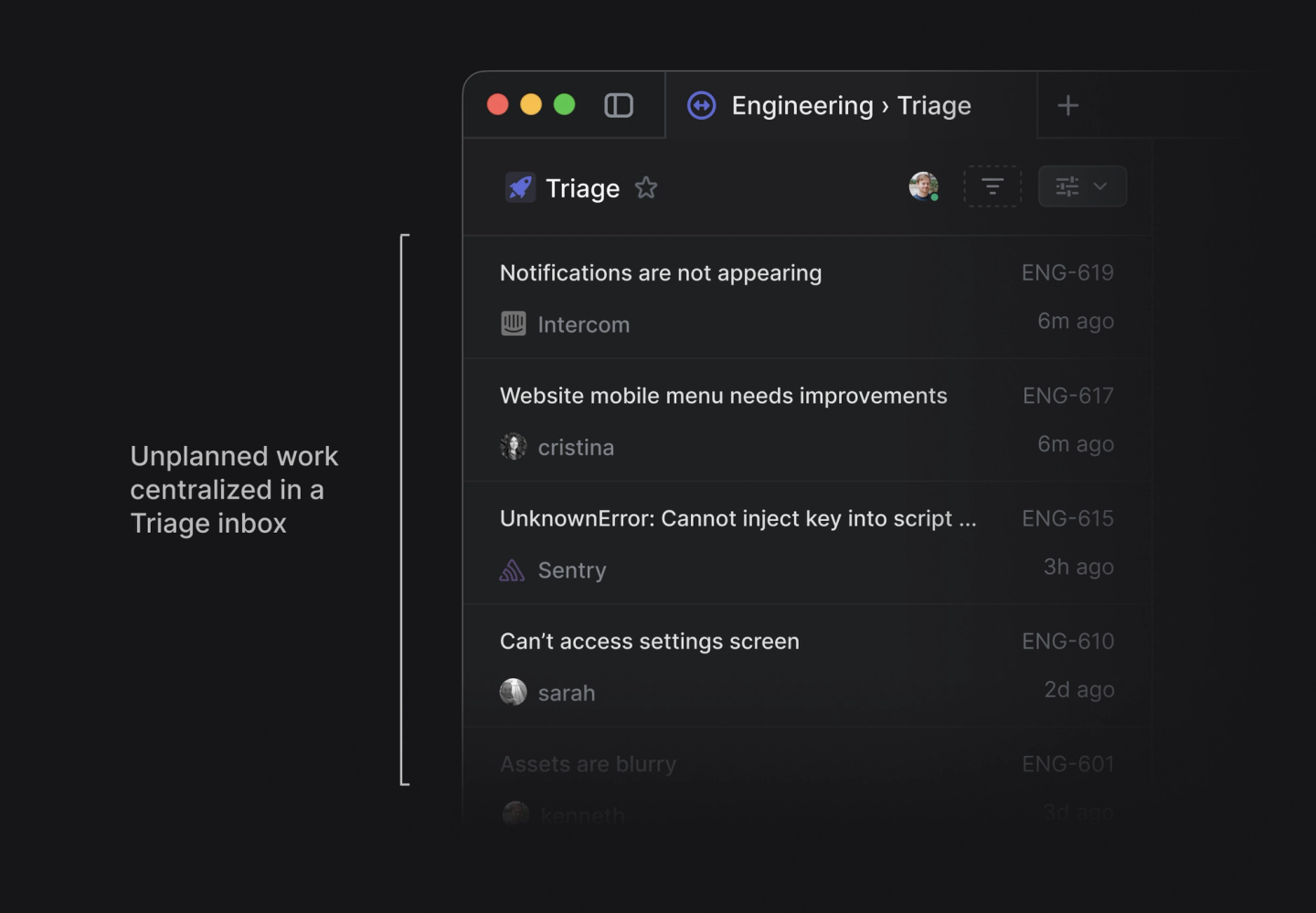
Linear’s most significant 2026 feature release is Linear Agent, launched in April 2026, which brings AI-driven issue triage directly into the workflow. Linear Agent can analyze incoming bug reports, customer feedback, and feature requests, automatically classify issue type and priority, assign to the appropriate team or cycle, and write a structured issue description from unstructured input. For engineering teams fielding inbound requests from customer success or product management, this dramatically reduces the triage overhead that typically consumes a senior engineer’s time every morning. Linear Agent operates within Linear’s existing permission model and does not require separate configuration — it activates from the team settings panel.
This feature has no equivalent in Smartsheet’s current release. Smartsheet’s AI capabilities are focused on reporting and scenario planning (addressed in the next section), not on issue triage for software development workflows.
For a deeper look at how Linear stacks up against a pure engineering alternative, see our Jira vs Linear 2026 comparison.
Enterprise PM and Portfolio Management
Smartsheet operates in a category that Linear does not compete in. Once you move beyond a single software team and into multi-department portfolio management, Smartsheet’s advantages accumulate quickly.
Portfolio and cross-project reporting
Smartsheet’s reporting layer is built for executives and PMO leaders who need visibility across dozens of simultaneous projects. A program manager can build a portfolio roll-up report that aggregates task status, budget variance, milestone completion, and resource allocation from 30 separate project sheets into a single dashboard — updated in real time, with drill-down capability to any individual project. This is a genuine enterprise capability that Smartsheet has refined over a decade.
Linear has project and roadmap views, which are excellent for a single product team’s planning horizon. But these views do not support cross-team portfolio aggregation at the organizational level. A VP of Engineering using Linear can see what their engineering org is building — but a COO overseeing construction, IT, marketing, and operations simultaneously cannot get portfolio visibility from Linear. Smartsheet was built for that COO.
Resource management
Smartsheet Resource Management (formerly 10,000ft, now deeply integrated into the Smartsheet platform) gives organizations a dedicated module for tracking team capacity, allocating people to projects, and forecasting whether upcoming project demand exceeds available hours. For professional services firms, agencies, or internal IT departments running more projects than they have staff to handle, this capacity planning capability is table-stakes. Linear has no resource management module.
Automations and approval workflows
Smartsheet’s automation engine handles multi-step conditional workflows including approval chains — a project manager submits a budget change request, it routes to a department head for approval, triggers a notification to finance upon approval, and updates the project record automatically. These workflows are common in operations, procurement, legal, and HR contexts. For a guide to building these, see our deep-dive on Smartsheet forms and approval workflows.
Linear’s automation layer handles issue state transitions and notification routing — appropriate for engineering team workflows — but it does not support the multi-stakeholder approval chains that operations and enterprise teams require.
AI Features Head-to-Head: May 2026 Smartsheet vs Linear Agent
Both tools made significant AI investments in the first half of 2026, but they invested in AI for completely different purposes — which maps directly to their respective user bases.
Smartsheet AI Dashboard Builder and Scenario Planning (May 2026)
Smartsheet’s most consequential 2026 update is the AI Dashboard Builder and Scenario Planning capability, released in May 2026. AI Dashboard Builder allows project managers and executives to describe the dashboard they want in plain language — “show me budget variance by department with a red/amber/green status indicator and a trend line for the last 12 months” — and Smartsheet’s AI assembles the dashboard automatically, selecting the appropriate widgets, connecting them to the relevant data sources, and formatting them for executive presentation. Teams that previously spent half a day configuring portfolio dashboards can now produce them in minutes.
Scenario Planning, released in the same update, allows program managers to model “what if” situations across their project portfolios: what happens to delivery dates and resource requirements if Project A is delayed by three weeks, or if budget is reduced by 20 percent? The AI layer runs the scenario analysis and presents the downstream impacts across dependent projects, flagging resource conflicts and milestone risks. This is sophisticated portfolio intelligence that previously required dedicated PPM (Project Portfolio Management) software costing orders of magnitude more than Smartsheet’s subscription price.
Neither feature has any equivalent in Linear. Linear’s AI investment is focused on issue triage and developer workflow — which is exactly the right investment for Linear’s target market.
Comparing the AI strategies
The contrast in AI investment strategy tells you everything about who each product serves. Smartsheet is investing AI into portfolio visibility, executive reporting, and scenario analysis — problems faced by operations leaders, PMO directors, and CFOs. Linear is investing AI into issue classification, triage, and developer workflow acceleration — problems faced by engineering managers and senior developers. These are not competing AI strategies. They are complementary investments in entirely different user personas.
For a comprehensive look at Smartsheet’s full AI capabilities beyond just the 2026 releases, see our complete Smartsheet AI features guide.
Smartsheet Control Center vs Linear at Scale
The most significant capability gap between Smartsheet and Linear — and the one most relevant to enterprise buyers — is Smartsheet Control Center.
What Smartsheet Control Center actually does
Smartsheet Control Center is an add-on module that enables enterprise organizations to provision new projects at scale using pre-configured template stacks. Here is what that means in practice: a PMO creates a master project template that includes pre-built sheets for project plan, budget tracker, risk register, RACI matrix, and stakeholder communication log — all connected to portfolio-level dashboard widgets and automated status reports. When a new project is initiated, Control Center provisions the entire template stack in seconds, with all formulas, automations, reporting connections, and column configurations already in place. The project manager fills in the project-specific details and begins executing immediately.
For an organization managing 20, 50, or 200 simultaneous projects, Control Center is the difference between a project management system that scales and one that fragments into inconsistent, ungovernable variations. Every project provisioned through Control Center follows the same structural template, which means portfolio reporting actually works — you are aggregating consistent data structures, not trying to reconcile 50 different project plans built by 50 different project managers with 50 different column naming conventions.
The gap between Smartsheet and Linear widens significantly as project volume increases. At five projects, both tools work fine. At 25 projects, the absence of Control Center-equivalent functionality in Linear starts to create real governance problems. At 50 projects, the difference is existential for portfolio management quality. For a full walkthrough of Control Center configuration, see our Smartsheet Control Center setup guide.
Linear at scale
Linear handles engineering team scale reasonably well through its Teams architecture — multiple engineering teams (frontend, backend, mobile, data) each get their own issue tracker, sprint cycles, and roadmap views, with cross-team linking for dependencies. This works excellently for a 50–150 person engineering organization. But Linear’s scaling story is entirely within the software engineering domain. It does not address the cross-departmental governance, template standardization, or portfolio aggregation challenges that enterprise organizations face when managing mixed portfolios of IT, operations, marketing, and product projects simultaneously.
Side-by-Side Comparison Table
| Feature | Smartsheet | Linear |
|---|---|---|
| Primary use case | Operations, enterprise PM, cross-functional portfolios | Software engineering, issue tracking, sprint management |
| GitHub / GitLab integration | No native integration; requires third-party automation | Native, bidirectional, near-real-time sync |
| Sprint / Cycle management | Manual configuration required; no sprint primitive | First-class Cycles with burndown and auto-rollover |
| Portfolio reporting | Cross-project roll-up dashboards, AI Dashboard Builder (May 2026) | Single-team roadmap views; no cross-org aggregation |
| AI features (2026) | AI Dashboard Builder, Scenario Planning (May 2026) | Linear Agent for AI issue triage (April 2026) |
| Resource management | Smartsheet Resource Management (full module) | No resource management module |
| Template provisioning at scale | Smartsheet Control Center (enterprise template stacks) | No equivalent capability |
| Free plan | Free — 1 user, 2 sheets (very limited) | Free tier — up to members with core features |
| Entry paid pricing | Pro — $7/user/month | Basic — $8/user/month (free tier available) |
| 10-person team monthly cost (mid-tier) | ~$250/month (Business plan) | ~$130–170/month (Basic/Plus tier) |
| Gantt charts | Native, full-featured with dependencies and baselines | Roadmap timeline view (lighter than Gantt) |
| Approval workflows | Multi-step approval chains with routing and notifications | No approval workflow functionality |
| Keyboard-first navigation | Spreadsheet-style navigation; limited shortcuts | Deep keyboard shortcut system; engineer-optimized |
| Mobile app quality | Functional but limited vs desktop | Polished, fast iOS and Android apps |
Pricing Breakdown 2026
Pricing is a real differentiator here — and the advantage shifts depending on team type and size.
Linear pricing 2026
Linear’s pricing is straightforward and favorable for small-to-mid-size engineering teams. The free tier supports a meaningful number of users with access to core features including Cycles, Projects, Roadmaps, and GitHub integration — enough to evaluate the tool seriously before committing. The paid tiers are:
- Basic: $8/user/month — all core features including Cycles, unlimited issues, GitHub sync, and roadmaps
- Business: $14/user/month — adds priority support, advanced admin controls, and Single Sign-On
- Enterprise: Custom pricing — adds dedicated support, enhanced security, and SLA guarantees
For a 10-person engineering team on Linear Basic, the monthly spend is approximately $80. For a 10-person team on Linear Business, it is approximately $140. These figures include full access to GitHub sync and sprint management — the features that engineering teams actually need.
Smartsheet pricing 2026
Smartsheet’s pricing reflects its enterprise positioning. There is no meaningful free tier for team use — the free plan limits you to one user and two sheets, which is exploration territory only. Paid plans are:
- Pro: $7/user/month — core sheets, views, automations, dashboards; limited to 10 users
- Business: $25/user/month — unlimited users, advanced reporting, premium integrations, Smartsheet AI
- Enterprise: Custom pricing — adds Control Center, Resource Management (at additional cost), and advanced governance
For a 10-person team, Smartsheet Pro is $70/month — actually cheaper than Linear Basic. But Pro is significantly limited: no unlimited users past 10, no Resource Management, no Control Center, and no AI features. The realistic paid tier for a team that needs Smartsheet’s differentiating capabilities is Business at $250/month for 10 users — roughly $80–120/month more than an equivalent Linear deployment.
Where the pricing calculus changes
At small scale (under 15 people), Linear wins on price for engineering teams. At enterprise scale, the comparison becomes more nuanced. Smartsheet Business at $25/user/month is paying for resource management, cross-project reporting, approval workflows, and AI dashboard capabilities that Linear simply does not offer — so comparing raw per-seat costs overstates Linear’s advantage for teams that actually need those features. The honest framing: Linear is cheaper for teams whose needs fit within its scope; Smartsheet is better value for teams whose needs require its broader feature set.
For the official current pricing, see Smartsheet’s pricing page and Linear’s pricing page.
Which Tool Wins for Your Specific Scenario
Scenario 1: A 12-person SaaS engineering team
Linear wins without contest. The team’s primary workflows — sprint planning, issue tracking, GitHub PR linking, bug triage — are first-class in Linear and unsupported or painful in Smartsheet. Linear Agent handles inbound triage. Cycles handles sprints. The free or Basic tier keeps costs under $100/month. There is no scenario where recommending Smartsheet to this team makes sense unless they are already deeply embedded in Smartsheet for non-engineering work and want to avoid a second tool.
Scenario 2: A 50-person operations organization running 30 concurrent projects
Smartsheet wins decisively. The organization needs cross-project portfolio reporting, resource capacity planning, approval workflows for budget and procurement, and a governance layer that ensures project consistency. Smartsheet Control Center provisions each new project from a master template in seconds. The AI Dashboard Builder generates executive status dashboards automatically. Linear cannot deliver any of this. The comparison does not even begin.
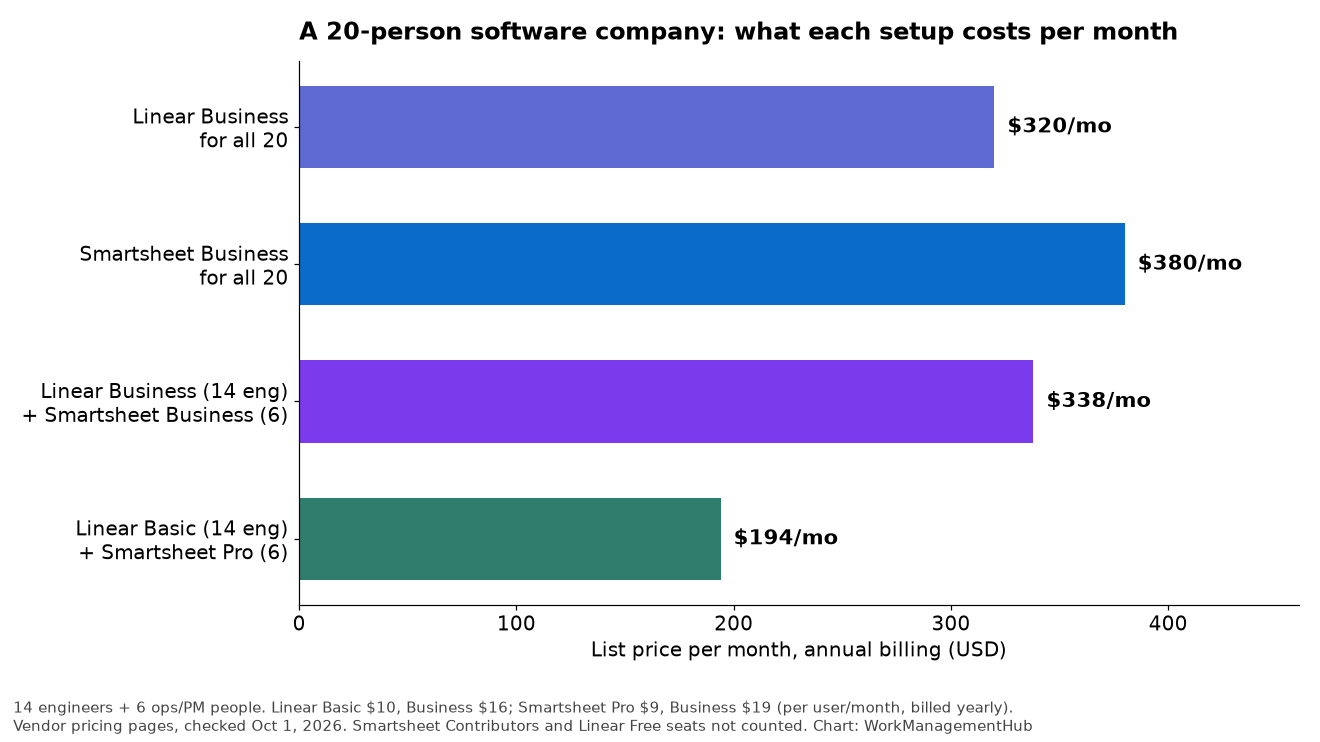
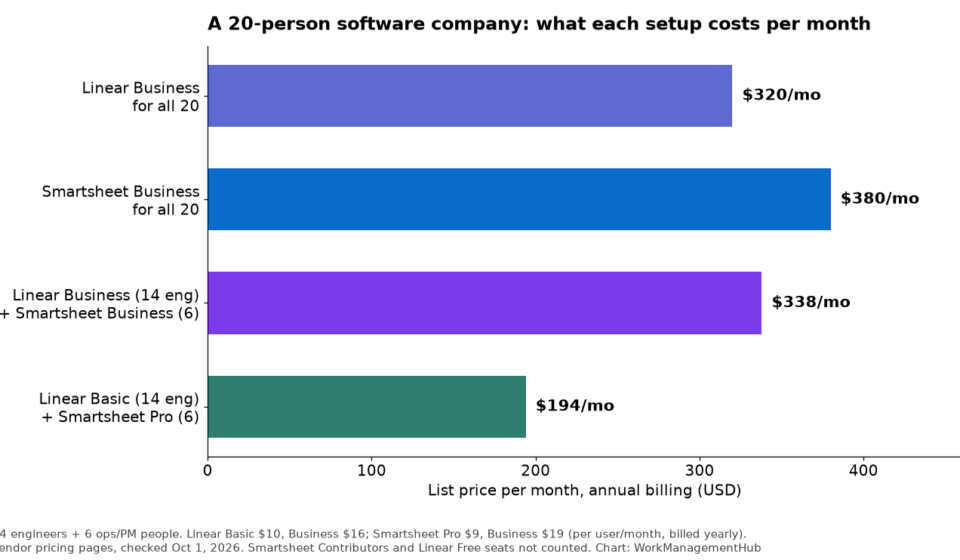
Scenario 3: A 20-person product company with a 10-person engineering team and a 10-person operations team
This is the genuinely difficult scenario — and it is more common than most comparison guides acknowledge. The engineering team wants Linear. The operations team wants Smartsheet. Forcing one tool on both sides creates friction and adoption problems.
The pragmatic answer depends on where leadership sits. If the engineering team is the primary delivery engine and operations is supporting them, Linear with light-touch project management for operations is workable. If the organization has a PMO or operations leader who needs portfolio visibility across both teams, Smartsheet is the better unifying platform — engineering teams can adapt to Smartsheet’s issue tracking with some configuration overhead, and the portfolio visibility benefit for leadership outweighs the developer experience cost. For a comparison that addresses the overlap between Smartsheet and the leading pure PM tool, see our Smartsheet vs Jira 2026 comparison.
Scenario 4: An enterprise IT department managing both infrastructure projects and software development
Smartsheet wins for the infrastructure and operations work. For pure software development sprints, a case can be made for running Linear alongside Smartsheet — connected via automation to push relevant milestones into Smartsheet’s portfolio dashboards. This hybrid approach is more common than vendors prefer to admit, and it serves both audiences better than forcing one tool to do everything.
Choose Linear if your team is a dedicated software engineering organization that runs sprints, tracks issues, and lives in GitHub or GitLab. Linear’s native code repo integration, Cycles sprint model, and April 2026 AI Agent for issue triage are unmatched in the market for this use case — and the flat pricing saves a 10-person team $80–120/month compared to an equivalent Smartsheet deployment.
Choose Smartsheet if your organization is managing cross-functional project portfolios, needs executive-level reporting across 20+ simultaneous projects, requires approval workflows, or is deploying at enterprise scale where Control Center’s template provisioning and the May 2026 AI Dashboard Builder and Scenario Planning capabilities create compounding ROI. Smartsheet serves operations leaders, PMO directors, and enterprise IT departments in ways Linear was never designed to match.
The decision rule is almost binary — and that clarity is a feature, not a compromise.
Frequently Asked Questions
Can Smartsheet replace Linear for a software development team?
Technically yes, practically no. Smartsheet can track tasks, manage project timelines, and handle status updates for software projects. But it has no native GitHub or GitLab integration, no sprint cycle primitive with automated burndown, and no equivalent to Linear’s keyboard-first developer UX. Engineering teams that switch to Smartsheet from a purpose-built issue tracker typically report higher administrative overhead and lower adoption among individual contributors. If your team is primarily software engineers who need sprint management and code repo integration, Smartsheet is the wrong tool — it was built for a different buyer persona entirely.
Does Linear work for non-engineering teams?
Linear works reasonably well for product management and design teams that operate within the same product delivery workflow as engineering. Its Projects and roadmap views support product planning, and its issue model handles design feedback cycles adequately. However, Linear is genuinely unsuitable for operations, HR, marketing, finance, or any team that needs approval workflows, resource management, or cross-departmental portfolio reporting. Linear has made no effort to serve these personas, and the product reflects that intentional narrowness.
What is the real cost difference between Smartsheet and Linear for a 10-person team?
At entry-level paid tiers, Smartsheet Pro runs $70/month for 10 users while Linear Basic runs $80/month — Smartsheet is actually slightly cheaper at the entry tier. However, Pro severely restricts Smartsheet’s differentiating features. For a meaningful Smartsheet deployment with AI, unlimited users, and advanced reporting, Business at $25/user/month brings the 10-person cost to approximately $250/month. An equivalent 10-person Linear Business deployment runs approximately $140/month — a savings of roughly $110/month. Over a year, that is $1,320 in favor of Linear, which matters for bootstrapped or early-stage engineering teams.
What did Smartsheet release in May 2026 that matters for this comparison?
Smartsheet’s May 2026 release introduced two significant capabilities: AI Dashboard Builder and Scenario Planning. AI Dashboard Builder allows users to generate portfolio dashboards from natural-language descriptions — reducing what was previously a half-day configuration task to minutes. Scenario Planning allows program managers to model the downstream impact of project delays, budget cuts, or resource changes across an entire project portfolio, with AI-generated risk flags for milestone and resource conflicts. Both features significantly extend Smartsheet’s advantage over Linear in the enterprise PM and portfolio management category. Neither feature has any equivalent in Linear’s current roadmap.
Should I use both Smartsheet and Linear simultaneously?
For organizations that have a significant engineering function alongside operations or enterprise project management needs, a hybrid approach is viable. Engineering teams run Linear for sprints, issue tracking, and GitHub integration. Operations and PMO teams run Smartsheet for portfolio reporting, resource management, and governance. The two tools connect via Zapier, Make, or the Smartsheet API — key engineering milestones push into Smartsheet’s portfolio dashboards automatically. This adds integration overhead but respects each tool’s strengths and avoids forcing either team onto a suboptimal platform. It is more common in practice than single-tool advocates admit.