Asana vs monday.com vs ClickUp AI 2026: Which Helps Real Work?
There is no single “best AI” among Asana, monday.com, and ClickUp. ClickUp Brain pushes hardest on broad AI assistance and agent-style workflows. monday AI focuses on accessible business automation and meeting-to-action patterns. Asana Intelligence leans into structured project plans, status updates, and goal-oriented writing. The right choice depends on whether your work looks like software delivery, ops pipelines, or portfolio goals.
I implement these tools for clients (SSPM is a Smartsheet partner, so weigh my bias when Smartsheet appears as a fourth option). I ignore launch-day adjectives and ask: what plan floor includes the AI, what does a credit cost, and can a project manager verify the output? Prices checked October 14, 2026: Asana Starter $10.99 / Advanced $24.99 per user/month yearly; monday Basic $9 / Standard $12 / Pro $19; ClickUp Unlimited $7 / Business $12 yearly (asana.com/pricing, monday.com/pricing, clickup.com/pricing). AI packaging and credit bundles change – confirm in each vendor’s AI feature list before procurement.
ClickUp pricing note (checked October 16, 2026): ClickUp is changing its plans. New Workspaces, all Free Forever Workspaces and some paid ones now get Core at $9 and Business at $17 per user a month billed yearly ($12 and $25 monthly), with AI credits included and a new Max plan at $100. Many existing Workspaces still have the classic plans: Unlimited at $7 and Business at $12 billed yearly ($10 and $19 monthly), with ClickUp Brain as a $9 add-on. Prices in this article use the classic plans unless noted. See ClickUp’s new plans help article.
Short answer
| If your work is… | Lean toward | Why |
|---|---|---|
| Structured projects, goals, status writing | Asana Intelligence | Strong on plans/status/goals copy |
| Business ops boards, meetings → actions | monday AI | Accessible on work OS boards |
| All-in-one workspace + aggressive AI agents | ClickUp Brain | Broadest “Brain / agent” push |
| Spreadsheet-grade ops data + AI later | Airtable / Smartsheet | Different category – see below |
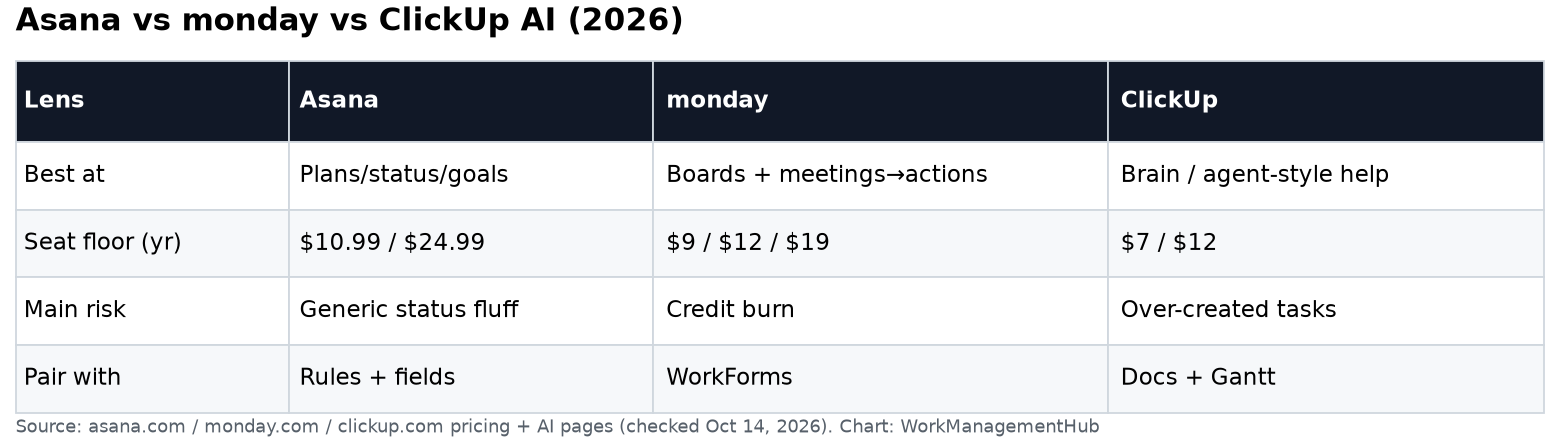
Side-by-side (practical, not marketing)
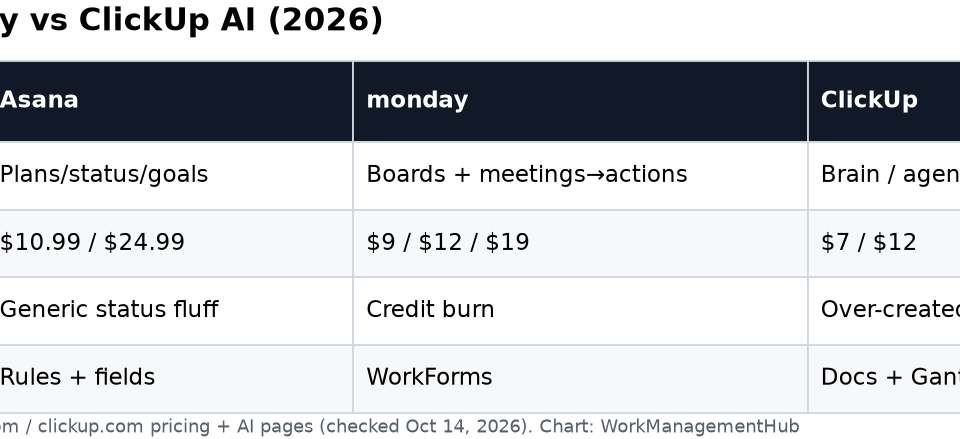
| Lens | Asana | monday.com | ClickUp |
|---|---|---|---|
| AI brand | Asana Intelligence / AI Studio direction | monday AI | ClickUp Brain / agents |
| Best at | Project briefs, status, goal language | Board automation + meeting capture narratives | Writing, summaries, agent-style task help inside ClickUp |
| Plan reality | Meaningful AI often paid-tier; AI Studio uses credits | AI credits scale by plan (see monday pricing calculator) | Brain bundled or add-on depending on SKU – verify |
| Risk | Generic status fluff if unchecked | Credit burn on noisy boards | Over-automation of tasks nobody wanted |
| Fits with | Rules + custom fields | WorkForms + board columns | Docs + Gantt + sprints in one workspace |
Sources: vendor pricing pages and product AI pages on October 14, 2026. For non-AI automation baselines, see Asana Rules, monday WorkForms, and ClickUp sprints.
Fold-in: “AI agents” wave without the hype
In 2026 every major work platform announced some form of agent. monday marketed an AI work platform story; ClickUp expanded Brain (including mobile) and shipped productivity features like Gantt baselines; Notion and Smartsheet pushed agents and governance in their own lanes. The differentiation is not the word “agent” – it is where the agent is allowed to write, what audit trail you get, and whether credits make the economics honest.
What I tell buyers:
- Read-only assistants (summarize this project) are safe pilots.
- Write assistants (create 20 tasks) need a human approve step.
- Meeting agents that invent action items must map to named owners.
- Governance (who can enable agents, which data they see) is an admin project, not an end-user toggle.
Smartsheet’s Smart Assist / agent direction is relevant if you already standardized on sheets – see our Smartsheet AI coverage on the site rather than forcing ClickUp Brain onto a PMO that lives in grid view. Notion agents matter if your wiki is the system of record; they are out of scope for this three-way except as a reminder that “AI in PM tools” is wider than this trio.
Cost sketch (seats only, before AI credits)
For 25 users, yearly list seats (multiply; taxes/discounts ignored):
| Stack | Seat math (yearly list) | Rough monthly |
|---|---|---|
| Asana Starter | 25 × $10.99 | ~$275 |
| Asana Advanced | 25 × $24.99 | ~$625 |
| monday Standard | 25 × $12 (watch 3-seat min rules on small teams) | ~$300 |
| monday Pro | 25 × $19 | ~$475 |
| ClickUp Unlimited | 25 × $7 | ~$175 |
| ClickUp Business | 25 × $12 | ~$300 |
AI credits can exceed the seat line on chatty teams. Ask vendors for credit calculators; do not take a Twitter screenshot as a quote. Full seat context: Asana pricing, monday pricing, ClickUp pricing.

What I would actually pick
- Marketing/ops company already on monday boards: turn on monday AI where credits are understood; do not migrate to ClickUp just for Brain.
- Product org living in Asana projects/goals: Asana Intelligence for status/goals; keep Rules for deterministic automation.
- Startup that wants one tool for docs + tasks + AI experiments: ClickUp Brain is the pragmatic bet – budget Business if you need the sprint/reporting floor.
- PMO on Smartsheet: stay; add Smartsheet AI features on Pro/Business rather than a fourth work OS.
Broader non-AI comparison: best project management software 2026.
Common questions
Which has better AI: Asana, monday, or ClickUp?
ClickUp pushes the broadest Brain/agent story; monday is strong for business-board AI and meeting-to-action narratives; Asana is strongest at structured project/status/goal writing. “Better” depends on your workflow.
Do I need the top plan for AI features?
Often you need a paid tier, and sometimes separate AI credits. Check each vendor’s pricing page for the current floor – packaging changed repeatedly in 2025-2026.
Can AI replace project managers?
No. These assistants draft and summarize. They do not own tradeoffs, stakeholder alignment, or accountability. Keep an approve step on anything that creates external commitments.
Should we switch tools just for AI?
Almost never. Switching work OS costs more than a year of AI credits. Add AI where you already have clean projects/boards, or choose Smartsheet/Jira/Airtable if those match the work shape better.
Seat prices checked on vendor pricing pages October 14, 2026. AI credit bundles change – confirm before you sign.
From our team: OneSmar for Smartsheet Teams