
Asana is free for one or two people. After that, Starter costs $10.99 per user a month and Advanced costs $24.99, both billed yearly. Pay month to month and those become $13.49 and $30.49. Enterprise and Enterprise+ have no public price.
That is the simple part. What changes the real bill is the 2-user free cap, the way seats are sold in blocks, and add-ons like Timesheets. I have moved teams onto Asana and moved a few off it. Below is what small teams actually pay, using prices from Asana’s pricing page, checked in October 2026.
ClickUp pricing note (checked October 16, 2026): ClickUp is changing its plans. New Workspaces, all Free Forever Workspaces and some paid ones now get Core at $9 and Business at $17 per user a month billed yearly ($12 and $25 monthly), with AI credits included and a new Max plan at $100. Many existing Workspaces still have the classic plans: Unlimited at $7 and Business at $12 billed yearly ($10 and $19 monthly), with ClickUp Brain as a $9 add-on. Prices in this article use the classic plans unless noted. See ClickUp’s new plans help article.
Asana prices at a glance
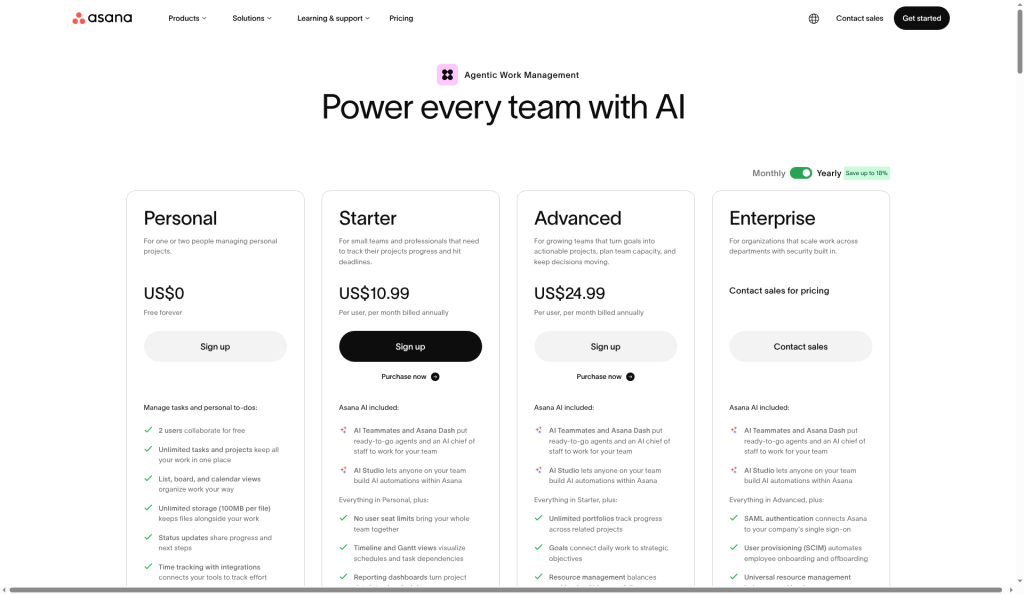
| Plan | Per user, yearly billing | Per user, monthly billing | Seat limit |
|---|---|---|---|
| Personal | $0 | $0 | 2 users |
| Starter | $10.99 | $13.49 | None |
| Advanced | $24.99 | $30.49 | None |
| Enterprise | Quote | Quote | None |
| Enterprise+ | Quote | Quote | None |
Add-on: Timesheets and Budgets costs about $5.99 per user a month on yearly billing. It works on Starter and up.
What teams really pay per year
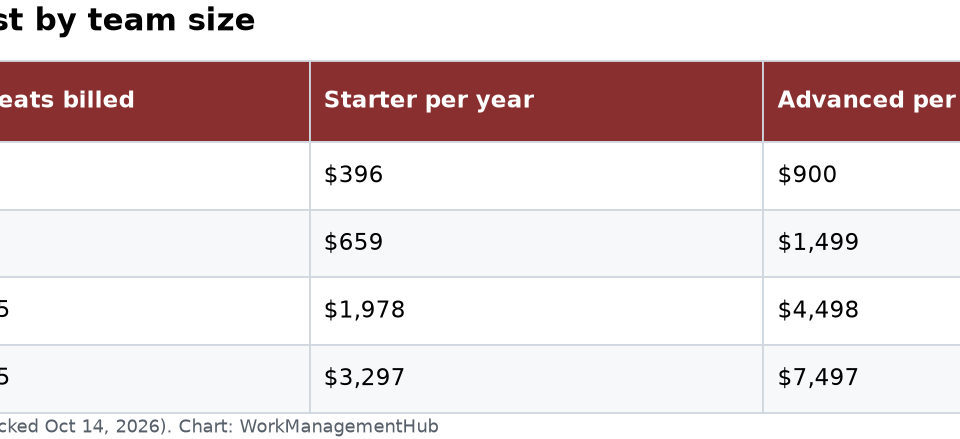
Here is the math on yearly billing. I rounded seat counts up to the blocks Asana sells (more on that below).
| Team size | Seats billed | Starter per year | Advanced per year |
|---|---|---|---|
| 3 people | 3 | $396 | $900 |
| 5 people | 5 | $659 | $1,499 |
| 12 people | 15 | $1,978 | $4,498 |
| 25 people | 25 | $3,297 | $7,497 |

The free plan is for pairs, not teams
Asana’s free tier is called Personal. It has unlimited tasks and projects, list, board and calendar views, and 100MB per file. Asana’s Personal plan details list what is included.
The catch: it allows only 2 users. Older blog posts still say the free plan holds 10 or 15 people. That has not been true for a while. If a third person needs an account, you need Starter.
Starter: where most teams land
Starter is the real starting point. You get:
- Timeline and Gantt views (the most common reason to upgrade)
- Dashboards and reporting
- Unlimited rules (automations)
- Forms, custom fields and custom templates
- Unlimited free guests, which is great for clients and freelancers
If your team works in lists and boards and just needs deadlines and dependencies to behave, stop here. Most teams under 20 people never need more.
Advanced: a big jump, so be sure
Advanced costs $14 more per user a month than Starter. That is $168 per person per year. For 15 people, it adds about $2,500 a year.
What you get: goals, unlimited portfolios, resource management, approvals and proofing, form branching, built-in time tracking and a two-way Jira Cloud sync.
These matter when one person is accountable for a dozen projects and needs one view of all of them. If nobody does that work, Advanced is money for features that sit idle. I have seen teams buy it because it sounded more capable, then use it exactly like Starter.
Enterprise: no public price
Both Enterprise plans are quote-only. Anyone showing you a fixed Enterprise price is guessing. Enterprise adds SAML single sign-on, SCIM user provisioning, view-only licenses and more admin control. Enterprise+ adds options like HIPAA support and data residency.
Five things that raise the bill
1. Seats are sold in blocks
You can add 1 seat at a time between 2 and 5 users. Above that, Asana sells blocks of 5 up to 30 users, blocks of 10 up to 100, and blocks of 25 up to 500. A team of 12 pays for 15. A team of 31 pays for 40.
2. Monthly billing costs about 23% more
Starter is $13.49 monthly vs $10.99 yearly. For 10 people, that is $300 more a year. Pay monthly only while you test.
3. AI requests are capped
Paid plans include 5 AI requests per user a month, but the account total is capped at 50 on Starter and Advanced. A 20-person team still shares 50. Extra requests cost $0.50 each prepaid or $0.60 on demand.
4. Time tracking needs Advanced or an add-on
Built-in time tracking starts on Advanced. On Starter, you need an integration like Harvest or Everhour. Those cost extra too.
5. No refunds
If you cancel, you keep paid features until the end of the term. You do not get money back. Avoid buying a year of extra seats you might not use.

A worked example
A 12-person marketing team wants timelines and workflow rules. On Starter, billed yearly, that is 12 × $10.99 × 12, or about $1,583 a year. If they need goals and portfolios, Advanced costs 12 × $24.99 × 12, or about $3,598. Since seats come in steps, hiring a 13th person may push the bill to the next step. Check the seat options before you add one person.
How to pay less
- Start monthly, then switch to yearly. Test for one or two months, then commit.
- Use guests. On paid plans, clients and outside helpers can join as free guests.
- Pause licenses. Starter and up let admins pause a member’s license. Use it for people on leave.
- Upgrade one team, not the whole company. Asana lets you upgrade a single team if only that team needs paid features.
- Ask about nonprofit pricing. Asana offers a discount on Starter and Advanced yearly plans for eligible nonprofits.
Is Asana worth the price?
For teams where getting people to use the tool is the main risk, yes. Asana is one of the easiest tools to adopt. For teams on a tight budget, ClickUp’s Business plan is $12 per user yearly and includes more features. Trello Standard is $5. If you want a closer look, compare Asana with other options in our Asana alternatives guide.
My rule: start on Starter. Move to Advanced only when someone needs portfolios or goals every week.
Common questions
Is Asana free for small teams?
Only for 1 or 2 people. The Personal plan caps at 2 users. Teams of 3 or more need Starter or higher.
How much is Asana per month?
Starter is $10.99 per user a month billed yearly, or $13.49 billed monthly. Advanced is $24.99 yearly or $30.49 monthly.
Why am I paying for more seats than people?
Asana sells seats in blocks. Above 5 users, you buy blocks of 5 up to 30. A team of 12 pays for 15 seats.
Does Asana charge for guests?
No. Starter and higher plans include unlimited free guests. Guests only see what you share with them.
Can I get a refund on Asana?
No. If you cancel, you keep access until the end of your current term, but Asana does not refund unused time.
Is Asana cheaper than monday.com?
On paper, close. monday.com Standard is $12 per seat yearly, with a 3-seat minimum. Asana Starter is $10.99. The real difference comes from seat blocks and which features you need.
Prices checked on asana.com/pricing on October 14, 2026. Vendors change plans; confirm before you buy.
Sponsored