GitHub Stacked PRs Are GA: What Changed Oct 6, 2026 (and How to Roll Them Out)

On October 6, 2026, GitHub moved stacked pull requests from public preview to general availability on github.com (Enterprise Server support is listed as upcoming). If your team still opens one giant PR per feature because “the next branch depends on the open one,” this is the week to change that habit.
I implement work-management platforms for a living (my firm, SSPM, is a Smartsheet partner). I care about this because oversized PRs are where reviews rot and where Linear/Jira status drifts from what actually merged. Figures and behavior below come from GitHub’s Oct 6 changelog and the stacked PRs docs, checked October 9, 2026.
The short answer
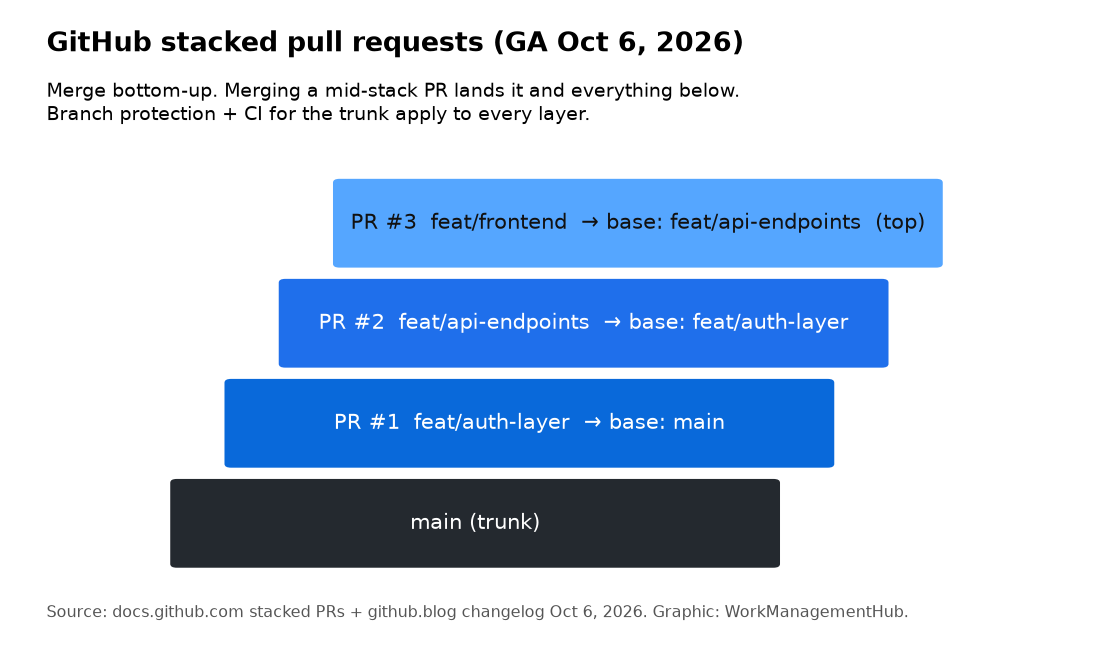
- What it is: a chain of PRs in one repo where PR #1 targets
main, PR #2 targets PR #1’s branch, PR #3 targets PR #2’s branch, and so on. - Why GA matters: rebases keep approvals when the diff is unchanged, replacement commits stay signed, stacks enter the merge queue as one group, and bypass permissions apply to the lowest unmerged PR.
- How you merge: bottom-up. Merge a mid-stack PR and everything below it lands together; anything above re-targets the trunk.
- Where it works: github.com web UI, Mobile,
gh stackCLI, REST/GraphQL/webhooks, and thegh-stackagent skill. Not GitHub Desktop. Not cross-fork.
What GA added (beyond the preview)
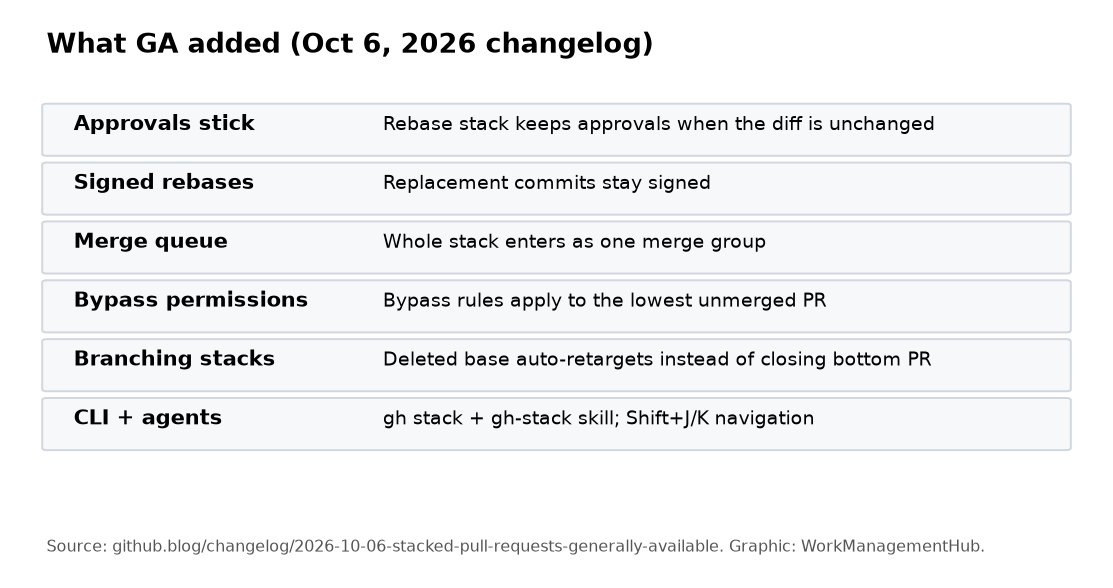
From GitHub’s changelog:
| Change | Why it matters |
|---|---|
| Approvals stay on unchanged code after Rebase stack | You can catch up to main without re-nagging reviewers – even when “dismiss stale approvals” is on |
| Rebased commits stay signed | Signature-required repos stop breaking mid-stack |
| Bypass permissions apply to the lowest unmerged PR | Admins aren’t stuck unable to land the bottom layer |
| Merge queue treats the stack as one merge group | Ordering stays correct; oversized stacks get a 50% buffer then spill to the next group |
| Branching stacks auto-retarget if a base branch is deleted | Fewer accidental closes when one stack forks off another |
Stack header + Shift+J / Shift+K | Moving between layers stops being a browser archaeology exercise |
gh stack improvements (worktrees, faster checkout) + agent skill | Local and agent workflows match the web model |
GitHub also reported preview-era stats in the changelog: repos using stacks saw a 9% increase in merged code vs peers, and over two-thirds of the top 1% of repos using stacks saw a 5% faster time-to-merge. Treat those as GitHub’s own preview metrics, not a promise for your repo.
Note on auto-merge: the changelog says auto-merge for stacks is rolling out over the following weeks. The merging docs still say auto-merge is not supported for stacked PRs – assume manual merge until your repo shows the option.
How stacking changes the review
Each PR shows only its layer diff against the branch below. Reviewers stop scrolling past 40 files of “prerequisite” work to find the three lines they own.
Branch protection and CI that normally apply to main apply to every layer in the stack. Mid-stack PRs don’t get a free pass. That’s the point.
If the stack history stops being linear (someone force-pushed a lower branch, or trunk moved), the merge box shows Rebase stack. Run it before you merge.
Merge rules you need on a sticky note
- You can merge any contiguous group starting from the lowest unmerged PR.
- You cannot merge a mid-stack PR alone without also merging everything below it.
- Merging the top PR can land the entire stack.
- After a partial merge, the next open PR is rebased to target the trunk and becomes the new bottom.
- Once every PR in a stack has merged, the stack is done – new branches on top become a new stack when you
gh stack submit. - API merges need the asynchronous merge API for stacks.
Details: Merging stacked pull requests.
Rollout checklist for a real team
Week 1 – one pilot squad
- Pick a repo already on branch protection + required checks.
- Install/update the
gh stackCLI extension; have two engineers open a 3-layer stack for a real feature. - Agree on layer boundaries: schema → API → UI is the boring pattern that works.
- Keep Linear/Jira issue IDs in every layer’s PR title so your tracker still links (see our Linear-GitHub sync guide if links flake).
Week 2 – protect the process
- Document “no cross-fork stacks” and “Desktop isn’t supported.”
- Decide merge style (merge commit / squash / rebase) before the first stacked release train.
- If you use a merge queue, watch group size; huge stacks may spill.
Week 3 – expand
- Add a short “when to stack” rule: stack when the next change depends on an unmerged PR; don’t stack unrelated cleanup.
- For AI-agent-heavy teams, map one agent task → one stack layer (GitHub’s docs call this out explicitly).
How this fits your tracker
- GitHub Issues / Projects only: stacks live entirely in GitHub. Pair with Projects views for the release train. See Jira vs GitHub Projects if you’re still choosing.
- Linear + GitHub: keep PR linking on; each stack layer should reference the same Linear issue or a sub-issue per layer. Don’t expect one magic word on the top PR to explain a three-layer land – put IDs on each PR.
- Jira: same idea – one work item per layer, or sub-tasks linked to each PR URL.
If you’re still deciding whether GitHub Issues is enough without Linear, start with Linear vs GitHub Issues. For sprint-style planning on Linear after the PRs land, see Linear Cycles.
FAQ
Are stacked PRs available on my plan?
GitHub says stacked pull requests are available on all github.com plans. Enterprise Server is listed as an upcoming release. Cross-fork stacks are not supported.
Do CODEOWNERS and required checks apply mid-stack?
Yes. Enforcement follows the stack’s trunk (usually main) for every layer.
What happens if I rebase onto a newer main?
Use Rebase stack. Approvals on unchanged layers should remain; replacement commits stay signed when signatures are required.
Can I use GitHub Desktop?
No. Use the web UI, Mobile, or gh stack.
Checked against GitHub’s Oct 6, 2026 changelog and stacked PR documentation on October 9, 2026. Confirm auto-merge availability on your repository – it was still rolling out at GA.
Sponsored