Skip to content
-
Subscribe to our newsletter & never miss our best posts. Subscribe Now!
Work Management Hub Work Management Hub

Expert Reviews, Comparisons & Guides for Smartsheet, Monday.com, Asana, ClickUp & More

Work Management Hub Work Management Hub

Expert Reviews, Comparisons & Guides for Smartsheet, Monday.com, Asana, ClickUp & More

  • Airtable
  • Asana
  • ClickUp
  • Jira
  • Monday.com
  • Notion
  • Smartsheet
  • Wrike
  • About
  • Contact
  • Airtable
  • Asana
  • ClickUp
  • Jira
  • Monday.com
  • Notion
  • Smartsheet
  • Wrike
  • About
  • Contact
Close

Search

  • https://www.facebook.com/
  • https://twitter.com/
  • https://t.me/
  • https://www.instagram.com/
  • https://youtube.com/
Project ManagementTool Comparisons

Linear vs GitHub Issues: Which Should Your Team Use in 2026?

By Shaik KB
May 27, 2026 26 Min Read
0

⚡ Key Takeaways

  • GitHub Issues is a legitimate choice for small-to-mid engineering teams already on GitHub — until around 500 open tickets, at which point the absence of enforced priority schema and structured workflows creates compounding triage overhead that teams consistently report as their breaking point.
  • Linear’s sub-100ms UI latency, five-level priority enforcement, and native SLA tracking are not marketing claims — they are structural product decisions that reduce standup time, sprint planning friction, and issue backlog rot in ways GitHub Issues cannot replicate with labels and milestones alone.
  • The real cost of GitHub Issues is not the price tag (it is free with your existing GitHub plan) — it is the invisible tax on engineering management time spent on triage, sprint admin, and backlog hygiene that Linear automates.
  • Linear’s paid tiers run $10–$16/user/month (annually) — a premium over GitHub Issues’ zero incremental cost, but one that pays back within the first month for teams spending more than three hours per sprint on manual issue management.
  • Migration from GitHub Issues to Linear is low-risk and reversible: the GitHub importer handles issues, labels, and milestones in under an hour for most teams, and Linear’s GitHub sync means you do not have to abandon your existing repository workflow.

Linear vs GitHub Issues: Which Should Your Team Use in 2026?

Published May 2026  |  Category: Work Management  |  Tools: Linear, GitHub Issues

Quick Answer:

GitHub Issues is the right default for cost-sensitive teams under 500 tickets already embedded in the GitHub ecosystem. Linear is the right choice the moment your backlog outgrows informal label systems, your sprints need velocity tracking, or your engineering manager is spending more than two hours per week on issue hygiene. Most growing engineering teams hit that threshold between 15 and 30 people.

Table of Contents

  1. The Real Question: When Does GitHub Issues Stop Being Enough?
  2. Quick Comparison at a Glance
  3. Issue Structure: Flexible Labels vs. Enforced Priority
  4. Sprints and Cycles: Linear’s Project Rhythm vs. GitHub Milestones
  5. Integrations: Where Both Tools Connect to Your Dev Stack
  6. Analytics and Reporting: Who Gives You Real Visibility?
  7. AI Features: Linear Agent vs. GitHub Copilot in Issues
  8. Pricing: What You’re Really Paying For
  9. Migration: Moving from GitHub Issues to Linear
  10. Who Should Use Linear vs. GitHub Issues (Decision Framework)
  11. Verdict
  12. FAQ

Linear vs GitHub Issues: When Does GitHub Issues Stop Being Enough?

The Linear vs GitHub Issues decision is one every growing engineering team faces. Almost every engineering team starts with GitHub Issues — it is already there, it is free, and when your team is small and your backlog is manageable, it works remarkably well. You create a label for bugs. You create another for features. You open a milestone for the next release. Engineers file issues as they surface problems, comment threads keep context alive, and everything lives next to the code. For a five-person team shipping a v1, this setup is genuinely adequate.

The problem is not that GitHub Issues is a bad product. It is that GitHub Issues was designed as a code repository companion — a place to track bugs and feature requests against a specific codebase — not as a full engineering workflow system. That distinction matters enormously as teams grow.

I have run engineering teams on both tools. The transition point is not about a specific headcount. It is about the compounding overhead that emerges when a flexible, label-based system has to carry the weight of actual sprint management. The symptoms are consistent: your backlog is full of issues that nobody has touched in four months, you cannot answer “what priority is this?” without reading the full label list, sprint planning takes three hours because there is no reliable velocity data, and your engineering manager has a weekly ritual of manually triaging a backlog that never actually gets smaller.

Teams consistently report hitting this wall around 500 open tickets. That tends to correlate with a team size of 15–30 engineers running consistent sprints, which typically occurs 18–36 months after a startup begins serious product development. At that point, the question is not whether GitHub Issues is free — it is whether the invisible tax of unstructured issue management is costing more than the sticker price of a dedicated tool.

The comparison most articles skip is this one: what is your engineering manager’s hourly cost, and how many hours per week are they spending on issue hygiene that a structured system would automate? For a $180,000-per-year engineering manager, that is roughly $87 per hour. If switching to Linear saves eight hours per month in triage and admin, the tool pays for itself at five engineers on a $10/user/month plan. The math is straightforward; the decision rarely is.

Quick Comparison at a Glance

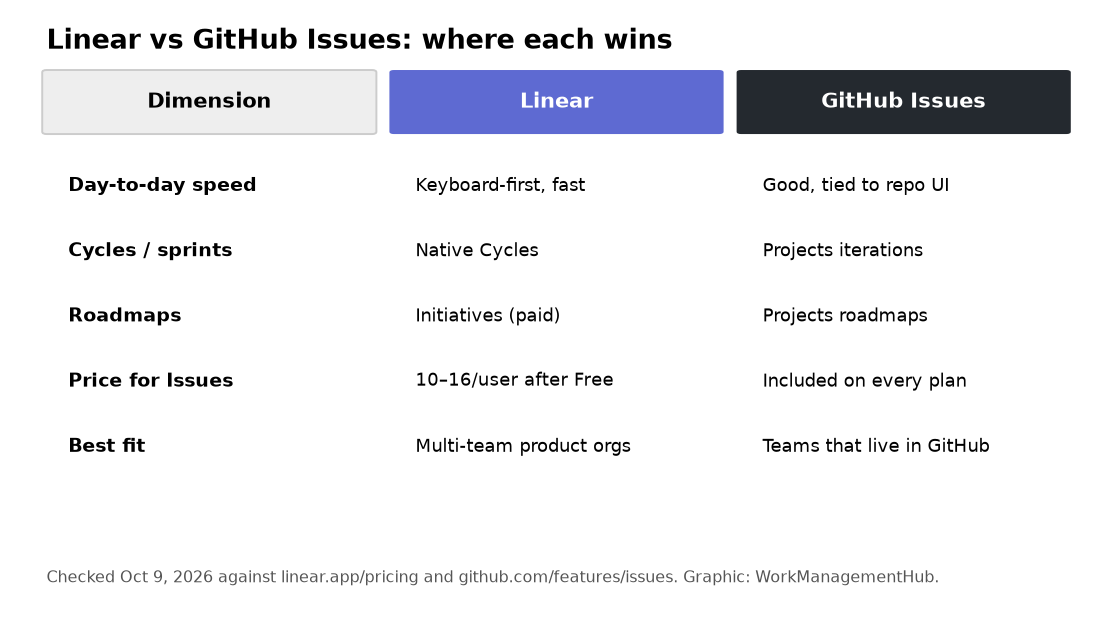
FeatureLinearGitHub Issues
UI LatencySub-100ms (local-first sync)Server-dependent, perceptible lag at scale
Priority SystemEnforced 5-level schema (No Priority, Urgent, High, Medium, Low)Flexible labels — no enforced priority, teams build their own schema
Sprint / Cycle ManagementNative Cycles with auto-rollover and velocity trackingMilestones only — no velocity, no auto-rollover
SLA TrackingBuilt-in (Business plan and above)Not available natively
Analytics and ReportingBuilt-in cycle burndown, velocity, throughput, lead/cycle timeMinimal native; requires GitHub Insights or third-party tools
AI FeaturesLinear Agent: automated triage, deduplication, issue draftingGitHub Copilot integration (limited issue-level AI context)
CI/CD IntegrationReleases feature for deployment tracking (native)GitHub Actions — deep, native, industry-leading
Codespaces IntegrationNot applicableNative — open dev environments directly from an issue
PricingFree plan; $10–$16/user/month (annual) paid tiersIncluded in GitHub Free, Team ($4/user/month), and Enterprise
Keyboard-First WorkflowExtensive — full command palette, single-key shortcutsLimited keyboard shortcuts; primarily mouse-driven
Backlog ScaleDesigned for large backlogs with filters, views, and triage toolingDegrades at scale — teams report pain around 500+ open issues
RoadmapsNative project-level and team roadmapsGitHub Projects roadmap view (limited compared to Linear)

Issue Structure: Flexible Labels vs. Enforced Priority

The most fundamental structural difference between these two tools is how they handle priority — and it cascades into almost every other workflow decision your team makes.

GitHub Issues gives you labels. That is the entire priority system: you create labels, name them whatever you like, apply as many as you want to an issue, and the priority of any given issue is whatever you can infer from reading its labels. On day one with a new team, this feels like flexibility. After six months with 400 open issues and eight engineers applying labels inconsistently, it feels like chaos.

I have seen teams build elaborate label taxonomies to compensate: priority: P0, priority: P1, priority: P2, priority: P3, critical, urgent, blocking all coexisting in the same repository because different engineers created different labels over time and nobody had the authority or the workflow momentum to rationalize the system. The practical effect is that “what is the highest priority issue in this backlog?” requires reading dozens of labels and making judgment calls that should have been encoded into the tool’s data model.

Linear enforces a five-level priority system at the product level: No Priority, Urgent, High, Medium, and Low. Every issue has exactly one priority value. There is no ambiguity, no label proliferation, and no silent inconsistency between team members who label differently. When you filter your backlog for Urgent issues, you get Urgent issues — not Urgent issues plus the ones that someone labeled critical or blocking or ASAP depending on when they filed the ticket.

This sounds like a small thing. It is not. It is the difference between a backlog you can trust and one you have to audit before every planning session.

Linear also enforces structured issue creation at the field level. By default, the issue creation modal prompts for title, description, assignee, label, status, and priority — presenting these as distinct fields with defined data types rather than asking you to encode all of this information into a free-text label string. The result is that issues created in Linear are consistently queryable and reportable from day one, without a team-wide label convention document that nobody reads and nobody enforces.

GitHub Issues has improved with the introduction of GitHub Projects — the expanded project management layer that adds custom fields, board views, and table views on top of the underlying issue data. Custom fields in GitHub Projects do allow teams to create a structured priority field. But this requires deliberate configuration work, team adoption discipline, and ongoing maintenance that Linear provides by default. For teams that have done this configuration correctly, GitHub Projects is meaningfully more capable than the base Issues experience. For teams that have not — which is most teams — the priority field does not exist and label chaos reigns.

For the full picture on what Linear’s structured issue model enables at the team level, our detailed Linear review for 2026 covers how the data model supports planning, triage, and reporting workflows that GitHub Issues cannot replicate without significant custom tooling.

Sprints and Cycles: Linear’s Project Rhythm vs. GitHub Milestones

GitHub Milestones are the closest analog to sprints in the GitHub Issues ecosystem, and the comparison is instructive in what it reveals about the tools’ relative ambitions.

A GitHub Milestone is a grouping container. You create a milestone with a title, a due date, and an optional description, then assign issues to it. The milestone view shows you which issues are open and which are closed, and displays a progress bar calculated as the percentage of issues closed. That is the complete feature set. There is no velocity tracking. There is no burndown chart. There is no automatic rollover of incomplete work. When a milestone closes, you manually move any incomplete issues to the next milestone — or you leave them in the closed milestone and forget them, which is what actually happens in practice.

Linear Cycles are architecturally different. A Cycle is not just a grouping container — it is an active sprint primitive that generates data over time. Linear tracks cycle velocity (issues completed per cycle), displays a real-time burndown chart without any dashboard configuration, and automatically rolls incomplete issues into the next active cycle when a cycle ends. The cycle history becomes a velocity record that informs capacity planning in concrete, quantitative ways. You can answer “how many issues does this team complete in a two-week cycle?” with a number, not an estimate.

The auto-rollover feature deserves particular attention because it eliminates a consistent source of engineering management overhead that teams on GitHub Issues rarely notice until they add it up. Every two weeks, at the end of a sprint, someone on GitHub Issues needs to review all incomplete issues, decide which carry forward, move them to the new milestone, and update due dates. For a team running 30 issues per sprint with a 70% completion rate, that is nine issues per sprint that need manual triage. Over 26 sprints per year, that is 234 manual issue moves — each requiring a context switch, a decision, and a tool interaction that Linear’s automation eliminates entirely.

GitHub Projects has partially addressed this gap with its iteration field type, which creates time-boxed periods that function more like sprints than milestones. The iteration field supports setting a duration, generates basic completion percentage data, and can be used in board and table views. It is a meaningful improvement over raw milestones. But it still does not provide native burndown charts, automatic rollover with configurable behavior, or velocity tracking that accumulates into historical cycle data. It is a better workaround, not a sprint system.

For teams that have tried to build sprint workflows on top of GitHub Issues and found them falling short, the migration path to Linear’s Cycles is one of the most immediately impactful improvements in the switch — and the one most commonly cited in retrospectives from teams that have made the transition.

Integrations: Where Both Tools Connect to Your Dev Stack

This is the one area where GitHub Issues holds a structural, potentially decisive advantage — and where the right answer genuinely depends on how deeply your team is embedded in the GitHub ecosystem.

GitHub Issues is not just integrated with GitHub. It is GitHub. When you open an issue in GitHub Issues, you are operating directly within the same platform that hosts your code, your pull requests, your Actions workflows, your Codespaces, your Packages, your Pages, and your security alerts. The single-source-of-truth argument for GitHub Issues is not marketing language — it is a real architectural advantage for teams that have committed fully to the GitHub platform.

The GitHub Actions integration is particularly powerful. You can write workflow automation that creates issues, updates issue state, assigns labels, closes issues, and posts comments all from within CI/CD pipeline logic. A failing test suite in a GitHub Actions workflow can automatically open a bug report in GitHub Issues, assign it to the last commit author, and apply the appropriate label — without any third-party middleware, without any API key management, and without any external dependency. This is native, reliable, and deeply configurable for teams that know GitHub Actions well.

GitHub Codespaces integration extends this further: engineers can open a development environment directly from a GitHub issue, work in a pre-configured container that matches the repository’s dev environment spec, and commit their fix back to the repository — all without leaving the GitHub platform. For teams that have adopted Codespaces, this workflow eliminates the context-switch overhead of moving between tools entirely.

Linear’s GitHub integration is excellent but differently positioned. Linear integrates bidirectionally with GitHub: PR status updates propagate to Linear issues automatically, branch naming flows from Linear issue IDs, and commit references create audit trails in Linear issue timelines. The Linear Releases feature extends this to deployment tracking, giving teams visibility into which Linear issues shipped in which deployment. But Linear is integrating with GitHub rather than being GitHub, and that distinction matters for teams with complex CI/CD automation baked into GitHub Actions.

Beyond GitHub, Linear integrates with Slack (bidirectional — create issues from Slack messages, get status updates in Slack channels), Figma, Sentry, PagerDuty, Zendesk, and Intercom. For teams that route customer-reported bugs from a support platform into engineering triage, the Zendesk and Intercom integrations create workflows that GitHub Issues cannot match without custom middleware. For a deeper look at how GitHub workflows interact with dedicated project tools, our analysis of GitHub integrations alongside structured project management is worth reading alongside this comparison.

The integration decision essentially reduces to one question: are you all-in on GitHub as your platform, or are you building a multi-tool engineering stack where your issue tracker needs to interoperate with support, observability, and design tools? The first answer favors GitHub Issues. The second favors Linear.

Analytics and Reporting: Who Gives You Real Visibility?

Reporting is where GitHub Issues shows its age most clearly and where Linear’s investment in engineering management workflows delivers the most tangible return.

GitHub Issues has no native analytics product. The base Issues interface shows you open vs. closed counts, milestone progress bars, and that is approximately the extent of it. GitHub Insights, available on Team and Enterprise plans, provides some repository-level metrics — contributor activity, commit frequency, code frequency — but these are code repository metrics, not issue management metrics. You cannot natively answer “what is our average cycle time from issue creation to close?”, “how many issues does this team complete per sprint?”, or “which labels are accumulating fastest?” from within GitHub Issues without exporting data and building your own analysis.

Teams on GitHub Issues typically address this gap with one of three approaches: exporting issue data to a spreadsheet periodically, setting up a GitHub Actions workflow to push issue data to a data warehouse, or using a third-party tool like LinearB, Swarmia, or Jellyfish that sits on top of GitHub’s API to provide engineering metrics. All three approaches require additional tooling, additional cost, and additional maintenance overhead.

Linear includes analytics as a native product feature. The Cycles view generates burndown charts automatically. The team analytics view shows throughput (issues completed over time), velocity trends across cycle history, lead time (from issue creation to completion), cycle time (from issue start to completion), and issue counts by priority, label, and assignee. These are not add-ons or paid upgrades — they are built-in outputs of Linear’s structured data model. Because Linear enforces consistent issue structure from creation through completion, the data needed to compute these metrics exists reliably, without the gaps and inconsistencies that make GitHub Issues data hard to analyze.

Linear also includes SLA tracking on the Business plan and above. For engineering teams that manage customer-reported issues with defined response time commitments — common in B2B SaaS companies where enterprise contracts include support SLAs — Linear’s native SLA tracking eliminates the need for a separate ticketing system for customer-facing issues. The SLA timer starts on issue creation, alerts fire as deadlines approach, and the analytics view shows SLA compliance rates over time. GitHub Issues has no equivalent feature.

For engineering leaders who need to report on team velocity in quarterly business reviews, justify headcount with throughput data, or identify which project areas are generating the most bugs, Linear’s analytics layer is a meaningful business tool rather than a reporting afterthought. The comparable GitHub Issues setup requires either manual data work or a third-party engineering analytics subscription that frequently costs more than Linear itself.

AI Features: Linear Agent vs. GitHub Copilot in Issues

Both tools have invested in AI during 2025–2026, but from fundamentally different positions that reflect their respective product philosophies.

Linear’s AI investment is concentrated in Linear Agent, the AI-powered triage and automation system built directly into the issue management workflow. Linear Agent handles several distinct tasks. It triages new issues by analyzing the issue content, comparing it against existing issues in the backlog, identifying probable duplicates, and suggesting the appropriate priority, label, and team assignment before a human reviews it. It drafts issue descriptions from brief prompts, reducing the friction of issue creation for engineers who need to file something quickly and return to their actual work. It can summarize long comment threads on issues that have accumulated significant discussion, surfacing the current state and any open questions without requiring a reviewer to read the entire history.

The deduplication capability is particularly valuable at scale. As a backlog grows past a few hundred issues, the probability that a new bug report duplicates an existing open issue increases significantly — but the cognitive overhead of searching for the duplicate before filing is enough friction that engineers often skip the check. Linear Agent performs the check automatically, flags probable duplicates, and reduces backlog inflation without requiring discipline changes from the engineering team. For teams running issue-heavy products — developer tools, infrastructure software, anything with external users who file bugs — this alone materially reduces triage workload.

GitHub’s AI investment is anchored in GitHub Copilot, which is primarily a code completion and code generation tool rather than an issue management tool. Copilot has received issue-adjacent features: it can generate issue summaries, suggest labels, and in some configurations help draft issue descriptions from natural language input. But Copilot’s issue management capabilities feel like extensions of a code-focused AI product rather than a purpose-built issue intelligence system. The triage automation, deduplication detection, and backlog management features that Linear Agent provides are not part of Copilot’s current feature set.

GitHub also benefits from the deep integration between Copilot and the repository context. When Copilot helps draft code to fix a bug filed in GitHub Issues, it can reference the issue content, the repository history, and the codebase structure simultaneously — a genuinely powerful capability that Linear cannot replicate because it operates outside the code repository. For AI-assisted coding workflows specifically, GitHub’s integrated AI story is stronger. For AI-assisted issue management workflows, Linear Agent is more capable.

The summary: if your AI priority is faster, better code generation with awareness of your issue context, GitHub wins. If your AI priority is reducing manual triage, preventing duplicate issues, and automating backlog hygiene, Linear Agent wins.

Pricing: What You’re Really Paying For

The pricing comparison between Linear and GitHub Issues is the most frequently cited reason teams stay on GitHub Issues longer than they should — and the comparison requires more nuance than the surface numbers suggest.

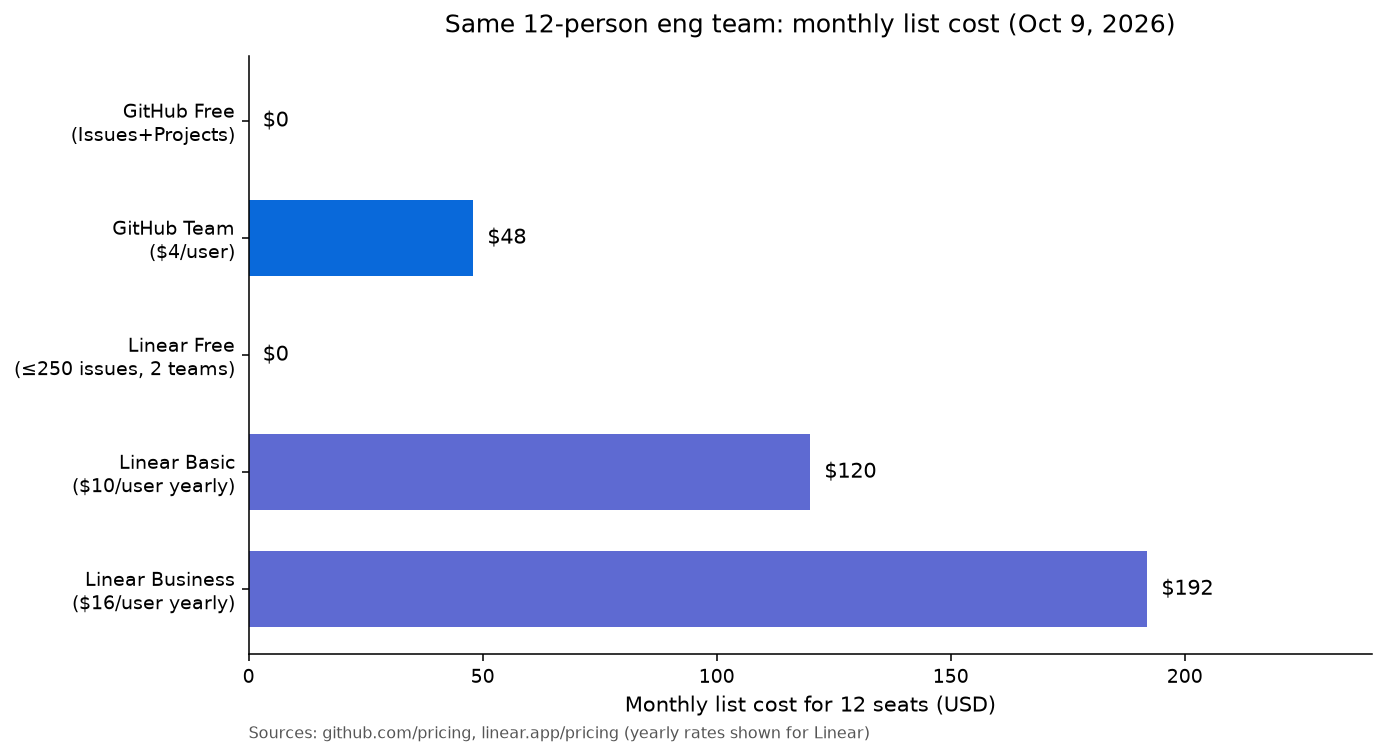
GitHub Issues is included in every GitHub plan. GitHub’s pricing starts at $0 for the Free tier, $4/user/month for GitHub Team (annual), and $21/user/month for GitHub Enterprise. If your team is already on GitHub Team for code hosting — which nearly every software team is — GitHub Issues has zero incremental cost. You are already paying for it. This is a genuinely compelling economic argument, especially for early-stage companies where every dollar of SaaS spend has a founder’s attention on it.

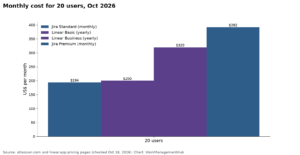
Linear’s pricing runs as follows: a Free plan is available for small teams with up to 250 active issues. The Basic plan is $10/user/month (billed annually), which covers most growing teams. The Business plan is $16/user/month (annually) and adds SLA tracking, advanced analytics, and admin controls. Enterprise pricing is available for larger organizations. For a 20-person engineering team on Linear Business, the annual cost is roughly $38,400 — versus $0 in incremental cost for the same team on GitHub Issues with an existing GitHub Team subscription.

That $38,400 is the number that stops CFOs from approving the switch. It is also the number that engineering leaders rarely put in context. The context is this: a 20-person engineering team with an average fully-loaded cost of $200,000 per engineer costs approximately $4 million per year in salary alone. If Linear saves each engineer 30 minutes per week in issue management overhead — a conservative estimate based on the automation it provides over GitHub Issues — that is 10 hours per week across the team, or roughly $500 per week in engineering time, or $26,000 per year. Against a $38,400 annual Linear bill, the tool is not fully paid for by that math alone, but it is substantially offset. And the 30-minute-per-engineer estimate does not account for the more significant time savings at the engineering manager layer, where triage automation, SLA tracking, and native analytics can save two to four hours per week of management time that compounds across sprint cycles.

The honest answer on pricing: GitHub Issues wins on cost for teams under 15 engineers or under 200 active issues. Linear wins on cost-adjusted value for teams where engineering management overhead is measurable and growing. The crossover point varies by team structure, but most teams that switch to Linear report recovering the cost in saved management time within the first two to three months.

Plan TierLinearGitHub Issues (via GitHub plan)
Free250 active issues, cycles, roadmaps, GitHub integration includedUnlimited issues, unlimited public repos; private repos limited on GitHub Free
Entry Paid$10/user/month (Basic, annual)$4/user/month (GitHub Team, annual) — Issues included at no extra charge
Advanced$16/user/month (Business, annual) — adds SLA tracking, advanced analytics$21/user/month (GitHub Enterprise) — Issues included; no SLA or velocity analytics added
20-Person Team Annual Cost$2,400/yr (Basic) — $3,840/yr (Business)$0 incremental (already paying for GitHub Team at ~$960/yr)

Migration: Moving from GitHub Issues to Linear

One of the most underappreciated facts about this comparison is how low-friction the migration from GitHub Issues to Linear actually is. Teams that have delayed the switch because migration feels risky are often surprised to discover that the actual transition takes an afternoon, not a quarter.

Linear provides a native GitHub Issues importer that handles the core data migration automatically. The importer brings over issues (including descriptions and comments), labels (mapped to Linear labels), milestones (mapped to Linear projects or cycles), and assignees (matched to Linear team members by GitHub username or email). For most teams, this gets 90% of the data into Linear in a single import run that takes under an hour.

What the importer does not automatically handle: custom GitHub Projects fields that are not standard issue metadata, complex Automation rules built on top of GitHub Actions that trigger on issue events, and any external tooling that points directly to GitHub Issues URLs. These require manual planning, but for most teams they represent a small fraction of the total migration scope.

The practical migration path I recommend for teams making this switch looks like this:

  1. Run a parallel period of two weeks: Import all open issues into Linear but keep GitHub Issues open. Have the team triage and update issues in both places during this period. This surfaces integration gaps and team workflow questions before you commit to the cutover.
  2. Migrate active sprint issues first: At the start of the parallel period, move the current sprint’s issues into a Linear Cycle and have the team work primarily from Linear for sprint management. GitHub Issues remains the historical record; Linear becomes the active workflow.
  3. Configure integrations before cutting over: Set up the Linear-GitHub PR sync during the parallel period so engineers can see that it works before you turn off GitHub Issues for active tracking. Confirm that the Slack integration, if you use it, is routing notifications correctly.
  4. Archive GitHub Issues at cutover: When you cut over, close all remaining open GitHub Issues with a comment linking to the corresponding Linear issue. Do not delete GitHub Issues — leave it as a searchable historical record accessible at the GitHub repository level. Engineers who need to reference old issue discussions can still find them.
  5. Update external references: Update any documentation, runbooks, or external tools that link to specific GitHub Issues URLs. Linear issue URLs are persistent and can be shared externally without any authentication wall for public workspaces.

The migration cost for most teams is two weeks of slightly elevated overhead during the parallel period, plus two to four hours of configuration work for integrations. For a team of 20 engineers, this is approximately 40–80 person-hours of transition cost — one-time, and typically recoverable within the first quarter of Linear use through saved management overhead. The risk of data loss is low because GitHub Issues remains accessible and read-only after the cutover; you are not deleting anything, only changing where active work lives.

For teams evaluating this switch in the context of a broader stack rationalization — for example, deciding whether to move from GitHub Issues to Linear, to Jira, or to a combination — our comparison of Linear against other dedicated project management tools provides additional context on how Linear’s workflow model compares across the spectrum of engineering-focused alternatives.

Linear vs GitHub Issues: Who Should Use Which Tool (Decision Framework)

Most comparison articles end with a hedged “it depends” that leaves the reader exactly where they started. This section makes the call explicitly, with specific criteria for each recommendation.

Choose GitHub Issues if:

  • Your team is under 15 engineers with fewer than 300 open issues and no dedicated engineering manager role. At this scale, the overhead of GitHub Issues is manageable and the cost savings are real.
  • You are deeply embedded in the GitHub platform — GitHub Actions for CI/CD, GitHub Codespaces for development environments, and GitHub Packages for artifact management. The single-platform advantage is genuine and valuable if you are using these tools actively.
  • Your team’s workflow is primarily repository-scoped — you work on one or two repositories, most issues are code bugs rather than feature development, and you do not need cross-team or cross-project visibility.
  • Budget constraints are a hard constraint, not a preference. Zero incremental cost is a real advantage for pre-revenue startups and open-source projects where every SaaS dollar has an alternative use.
  • You are running a developer tooling or open-source project where community contributors file issues through the GitHub interface. Changing to an external tool breaks the contribution workflow for people who are not on your team and reduces community participation.

Choose Linear if:

  • Your backlog has exceeded 400 open issues and triage is becoming a weekly pain point rather than a quick filter operation. This is the most reliable leading indicator of GitHub Issues outgrowth.
  • You are running structured sprints and need velocity data, burndown tracking, and auto-rollover to run them effectively. If your sprint retrospectives regularly include “we don’t know our velocity” or “issues keep falling through the cracks,” Linear’s Cycles model directly addresses the structural gap.
  • Your engineering team has grown to 15+ engineers across multiple projects or teams and you need cross-team visibility into priorities, assignments, and dependencies that GitHub Issues’ repository-scoped model cannot provide cleanly.
  • You manage customer-facing SLAs for issue resolution. Linear’s built-in SLA tracking replaces the need for a separate support ticketing system for engineering-tier issues and gives you compliance data that GitHub Issues cannot generate.
  • Your engineering manager is spending more than two hours per week on issue hygiene, triage, and sprint admin. This is the ROI threshold — once manual issue management overhead crosses this level, Linear pays for itself within a quarter.
  • You work across GitHub, Sentry, Figma, and Slack and need issue tracking that connects these tools rather than living exclusively inside one of them. Linear’s integration ecosystem serves multi-tool engineering stacks better than a GitHub-native approach.

The team-size inflection point in practice

Based on patterns I have observed across teams making this transition, the inflection point is rarely a single moment — it is a cluster of symptoms that appear within a few months of each other. The team’s backlog starts accumulating issues that nobody owns. Sprint planning sessions run long because the backlog is not reliably prioritized. An engineering manager starts spending Friday afternoons manually triaging issues that should have been addressed during the week. A bug that was filed three months ago resurfaces as a customer escalation because it had no priority and no owner and got lost in label noise.

When three of these four symptoms appear in the same sprint, that team is ready for Linear. Waiting another quarter costs more in engineering management time than the annual Linear subscription. For teams that need to compare Linear’s decision framework against other purpose-built alternatives, our broader Linear comparison guide walks through when Linear wins versus when a general-purpose tool is the better call.

Verdict

🏆 Verdict

GitHub Issues is the right choice for teams under 15 engineers, under 400 open issues, deeply committed to the GitHub platform, and working within tight budget constraints. For everyone else — and specifically for any team running consistent sprints, managing a growing backlog across multiple projects, or spending measurable time on manual issue hygiene — Linear is the better tool, and the premium is justified within the first quarter of use. The tipping point is not about feature count; it is about whether your current system can scale with your team. GitHub Issues cannot. Linear is built to.

The conventional wisdom on this comparison is that GitHub Issues is “good enough” for most teams and Linear is a premium for teams that care deeply about developer experience. That framing misses the actual cost structure. GitHub Issues is genuinely free — until the hidden costs of manual triage, absent velocity data, and structural label chaos start showing up in your sprint retrospectives and your engineering manager’s calendar. At that point, “free” is the wrong frame. The relevant question is total cost of ownership, and Linear wins that calculation for any team that has reached the inflection point described above.

The migration path is low-risk. The data model is better. The sprint tooling is purpose-built. The analytics exist natively. If your team is on GitHub Issues and you recognize two or more of the symptoms described in this article, the switch to Linear is not a bet — it is an engineering management decision with a clear positive return. For a comprehensive look at what that return looks like in practice, our full Linear review details the real-world workflow improvements teams report after making the switch.

FAQ

Can Linear fully replace GitHub Issues, or do you need both?

For most teams, Linear fully replaces GitHub Issues as the active issue management system. Linear’s bidirectional GitHub integration means that PR status, commit references, and branch naming all sync automatically between the two tools, so engineers continue working in GitHub for code while Linear serves as the issue tracker. Some open-source projects choose to keep GitHub Issues open for community-filed bug reports while using Linear for internal sprint management — a hybrid model supported by Linear’s GitHub importer and sync. For closed-source commercial teams, Linear alone handles the full issue lifecycle without requiring any parallel GitHub Issues workflow. See GitHub’s official Issues documentation for details on what the native feature set covers before deciding whether the hybrid approach is necessary.

Does Linear integrate directly with GitHub Actions?

Linear integrates with GitHub at the PR, branch, and commit level natively, but does not replace GitHub Actions as a CI/CD platform. Teams using GitHub Actions for their deployment pipelines can combine this with Linear’s Releases and deployment tracking feature to get end-to-end visibility from Linear issue through GitHub Action deployment. The two tools complement each other in this configuration rather than competing. If your workflow depends heavily on GitHub Actions issuing event-driven issue updates — automatically opening bug reports when tests fail, for example — you will need to update those workflows to call Linear’s API instead of the GitHub Issues API, which is a configuration change rather than a capability loss.

Is Linear’s free plan actually usable for a small team, or is it a trial disguised as a free tier?

Linear’s free plan is genuinely functional for small teams. It includes unlimited members, cycles, roadmaps, and GitHub integration — the core features that distinguish Linear from GitHub Issues. The primary limitation is 250 active issues, which is sufficient for teams under approximately eight to ten engineers running active sprints. The free plan does not include SLA tracking or advanced analytics, which are Business plan features. For teams evaluating Linear before committing to paid, the free plan provides enough functionality to run a real sprint and directly compare the workflow improvement over GitHub Issues without spending anything. You can review the current plan details at Linear’s pricing page.

How long does migrating from GitHub Issues to Linear actually take?

For a team of 10–20 engineers with a typical backlog of 200–500 issues, the actual import takes 30–60 minutes using Linear’s native GitHub importer. A recommended two-week parallel running period adds some workflow overhead as teams operate across both tools simultaneously, but this is an investment in change management rather than a technical requirement. Total elapsed time from decision to full cutover is typically two to three weeks. The migration does not require a consultant, a project plan, or a freeze on active development — it can be run incrementally during a normal sprint without disrupting velocity or requiring a formal migration project.

What happens to GitHub Issues history after switching to Linear?

Nothing happens to it — GitHub Issues remains fully accessible as a read-only historical record at the repository level after you stop using it for active tracking. All issue history, comments, label assignments, and cross-references remain searchable through the GitHub interface indefinitely. Linear’s importer copies the data into Linear; it does not delete or archive anything in GitHub. Teams that switch to Linear typically close all remaining open GitHub Issues with a comment linking to the corresponding Linear issue, then leave the GitHub Issues list in place as a searchable archive. Engineers who need to reference old discussions can always find them through the GitHub repository interface without any access to the Linear workspace.


Sponsored Smartsheet Expert Services – Implementation, Automation, Training
Sponsored Power BI & Tableau Analytics – Dashboards, Reporting, Insights
Sponsored AI Agents for Work Management – Automate Tasks, Integrate Tools

Categories

  • Airtable (12)
  • Alternatives (12)
  • Asana (33)
  • ClickUp (39)
  • How-To Guides (133)
  • Integrations (16)
  • Jira (27)
  • Monday.com (38)
  • Notion (25)
  • Pricing Guides (11)
  • Project Management (74)
  • Smartsheet (28)
  • Tool Comparisons (44)
  • Wrike (11)

Recent Post

  • ClickUp Sprints Not Working? Here’s How to Fix It (2026)
  • Notion Formulas 2.0: The Complete Guide to Functions and Syntax (2026)
  • Linear vs GitHub Issues: Which Should Your Team Use in 2026?
  • Smartsheet WorkApps: How to Build No-Code Apps in 2026
  • Asana Custom Fields: Complete Setup Guide for 2026
Work Management Hub

Independent expert reviews & comparisons of work management tools — helping 50,000+ teams choose the right software.

Tools We Cover

  • Smartsheet
  • Monday.com
  • ClickUp
  • Asana
  • Notion
  • Jira
  • Wrike
  • Airtable

Company

  • About Us
  • Contact Us
  • Privacy Policy
Copyright 2026 — Work Management Hub. All rights reserved. Blogsy WordPress Theme