Jira vs Linear in 2026: Real Prices, Sprint Tools and How to Pick for Your Dev Team

Pick Linear if you run a product or engineering team that wants a fast, opinionated tool that works on day one. Pick Jira if you need custom workflows, strict permissions, deep sprint reports, or you already run Confluence and the rest of Atlassian. On price they are close: on October 18, 2026, Jira Standard showed $9.70 per user a month for a 20-person team on monthly billing, and Linear Basic was $10 per user a month billed yearly.
I checked both pricing pages today: Jira pricing and Linear pricing. For features I used Linear’s docs on cycles, Jira import and Jira sync. Jira now calls projects “spaces” and issues “work items,” so I use those words for Jira.
An older version of this page claimed hands-on migrations I can’t back up, and used out-of-date Jira prices ($7.91 and $14.54). Both are fixed below.
Prices side by side
| Plan level | Jira (per user a month) | Linear (per user a month, yearly) |
|---|---|---|
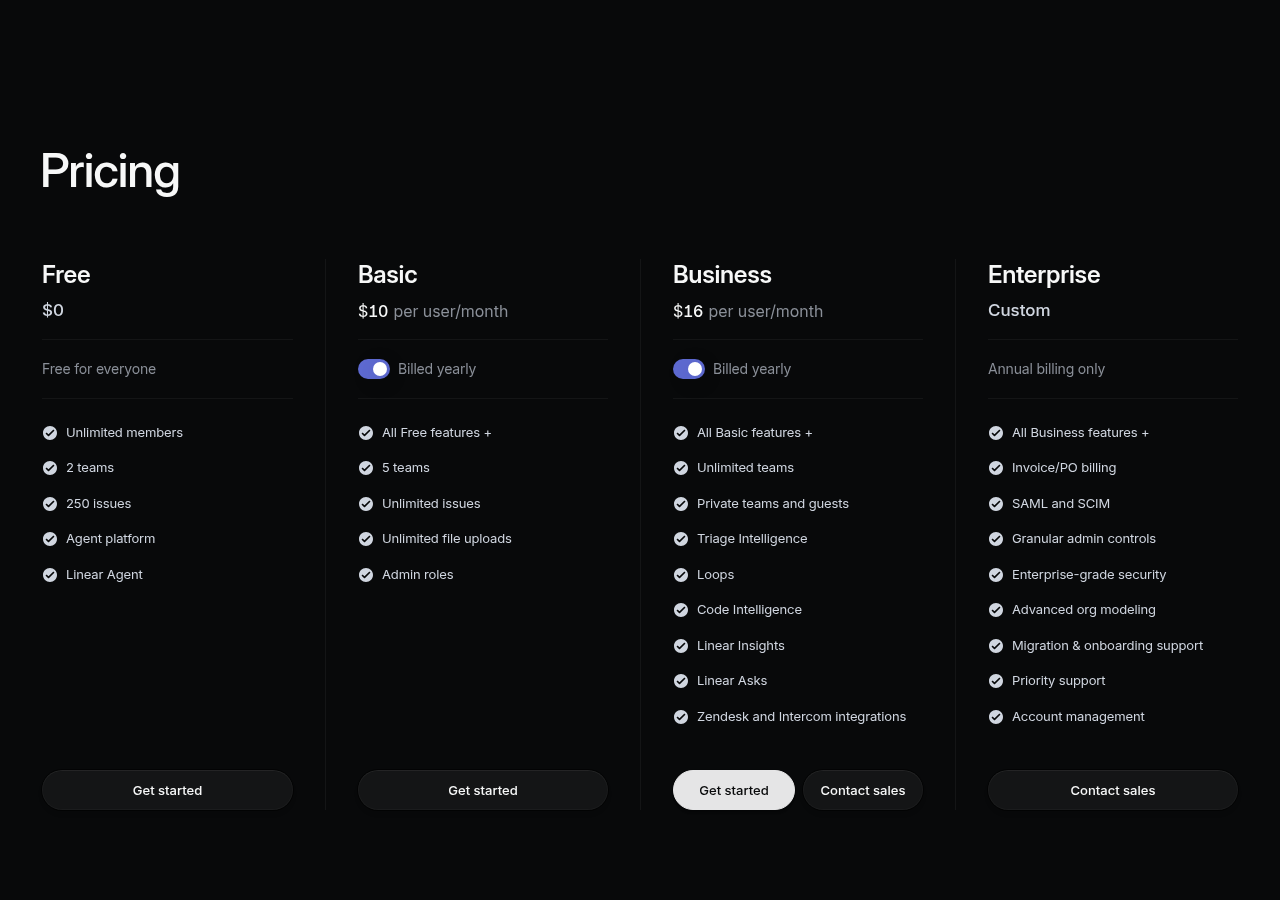
| Free | Up to 10 users, 2 GB storage | Unlimited members, 2 teams, 250 issues |
| Entry paid | Standard $9.70 (10 to 50 users, monthly) | Basic $10: 5 teams, unlimited issues |
| Mid tier | Premium $19.60 (10 to 50 users, monthly) | Business $16: unlimited teams, private teams, Insights |
| Top tier | Enterprise, yearly, by quote | Enterprise, yearly only, by quote |
Jira’s per-user price depends on team size. The page opens at 300 users and shows $8.48 and $15.56. When I typed 10, 20 or 50 users, it showed $9.70 and $19.60. Yearly billing saves up to 17%. Always type your own head count.
Linear bills every active user. Its billing docs say you pay for each unsuspended user in the workspace. Adding someone mid-month costs nothing until the next month. Removing someone mid-month gives no credit.
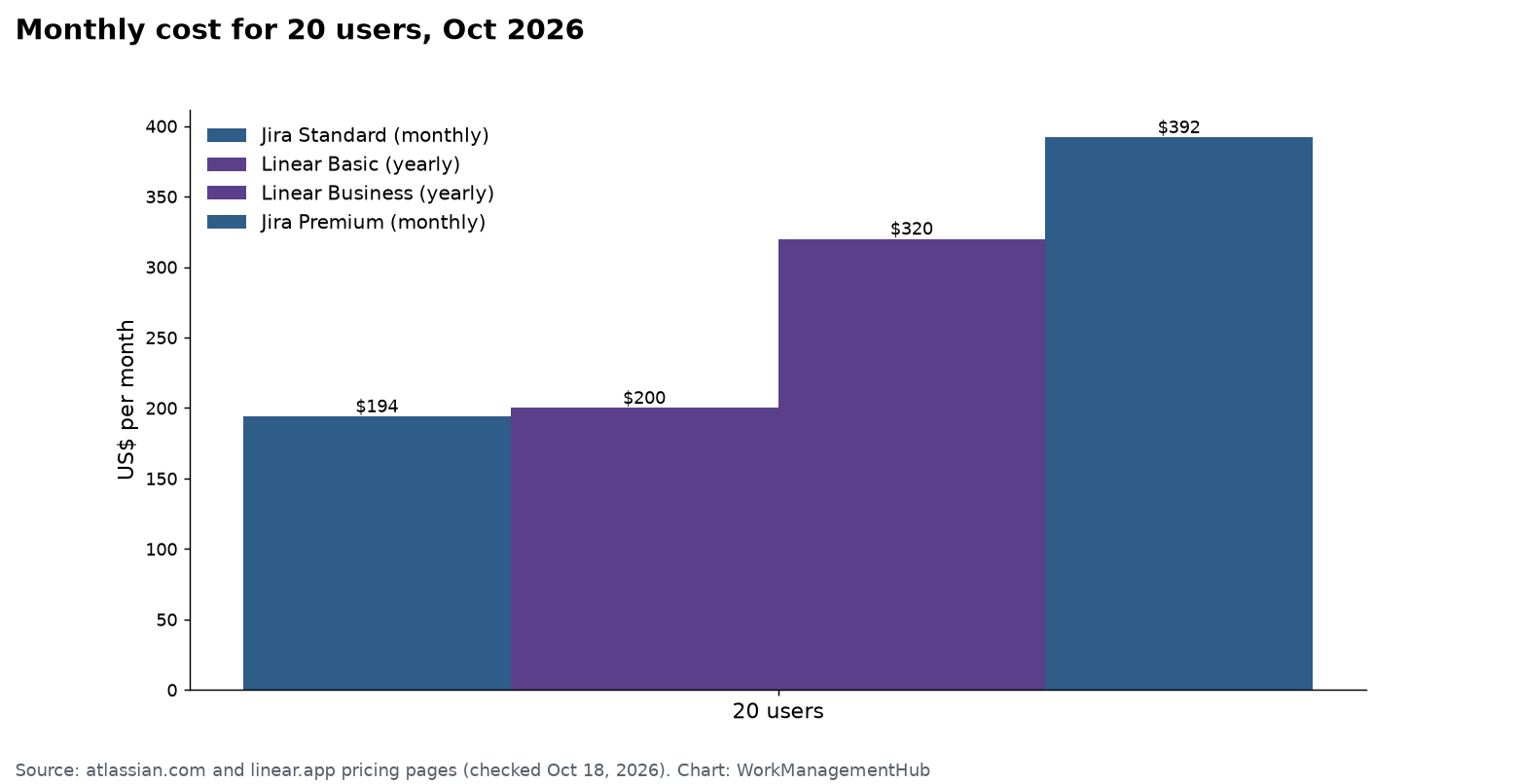
What a 20-person team pays
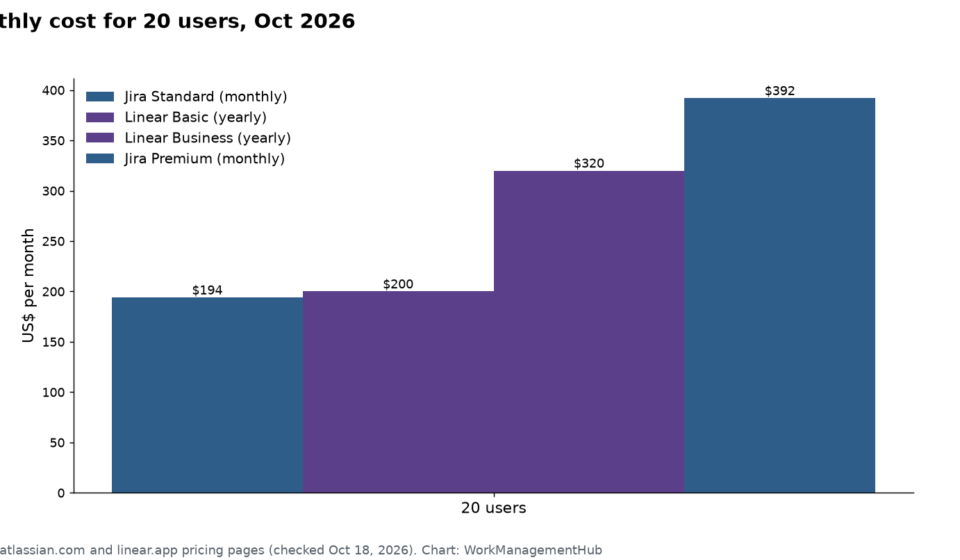
- Jira Standard: 20 × $9.70 = $194 a month (monthly billing).
- Linear Basic: 20 × $10 = $200 a month (billed yearly).
- Linear Business: 20 × $16 = $320 a month (billed yearly).
- Jira Premium: 20 × $19.60 = $392 a month (monthly billing).
At the mid tier, Linear Business is cheaper than Jira Premium. They buy different things, though. Jira Premium adds cross-team planning. Linear Business adds unlimited teams, private teams, guests, Insights and AI triage.
The real difference
Jira is built to be shaped. You can change workflows, fields, screens and permission rules for each space. That is why big companies can run many teams, with very different processes, on one site. The cost is admin time. Past about 50 users, someone usually owns Jira as part of their job.
Linear is built with strong defaults. Issues go into cycles. Cycles feed projects. Projects roll up into initiatives. New bugs land in a triage inbox first. You can’t build 40 custom statuses, and for most product teams that is a feature. A team can start the same afternoon, without an admin.
My rule: if your process must match an audit, a contract or a strict release gate, Jira. If your process is “ship small things often,” Linear.
Sprints vs cycles
Jira sprints are the standard. You get a backlog, story points, a sprint board, burndown and velocity charts. Plans (Jira’s advanced planning) adds cross-team views, but dependency links across spaces need Premium or Enterprise.
Linear cycles are Linear’s sprints. You set them up in Team Settings > Cycles. Here is how they work, per Linear’s docs:
- Each cycle lasts 1 to 8 weeks and repeats on a set start day.
- You can add a cooldown week between cycles for tech debt and planning.
- Linear creates up to 15 future cycles ahead.
- Unfinished issues roll over to the next cycle on their own. You can’t keep them in a closed cycle.
- Estimates (story points) are an optional issue property. Linear supports them, despite what some old reviews say.
What Linear reports less of: detailed velocity across many teams. If a VP needs to compare a dozen teams’ velocity in one chart, Jira does that better today.
GitHub and dev tools
Both link to code. Linear’s GitHub integration links pull requests and commits to issues and moves an issue’s status as the PR moves. It can also sync GitHub issues both ways, from the day you turn it on. A GitHub org owner must install it for org-wide access. GitHub Enterprise Server and Cloud setups need Linear Enterprise.
Jira connects to GitHub, GitLab and Bitbucket, and to the rest of the Atlassian suite. If you use Confluence and Bitbucket, that tie-in is hard to give up. See our Jira GitHub integration guide for the setup.
Moving from Jira to Linear
Linear has a built-in Jira importer, and it maps more than most people expect:
| Jira | Becomes in Linear |
|---|---|
| Summary, description, comments | Title, description (markdown), comments |
| Epic | Project |
| Issue type, components | Labels |
| Parent/child | Parent and sub-issues |
| Estimate, due date, priority | Same fields |
| Custom fields | Not imported |
Pick the API import if you can. It keeps the most data and lets you turn on Jira Sync after. It needs admin rights in Jira. The CSV import needs fewer rights but can’t sync. Either way, imported issues get a “Migrated” label, and you can delete the whole import within 7 days if it goes wrong.
Run both for a while. Linear’s Jira Sync keeps a Jira space and a Linear team in step during a pilot. Set the Jira API token to last one year, not the one-week default, or the sync stops quietly. Multiple Jira sites need Linear Enterprise.

Honest pros and cons
Jira pros – Most flexible workflows and permissions – Deep sprint, velocity and cross-team reports – Free for up to 10 users
Jira cons – Needs an owner once you grow – Docs live in Confluence, a separate bill – Price per user changes with team size
Linear pros – Fast and clean, with strong defaults – Triage inbox keeps the backlog tidy – Free plan allows unlimited members
Linear cons – Free stops at 250 issues and 2 teams – Custom fields don’t import from Jira – SAML and SCIM only on Enterprise
Which should you pick?
- Startup of under 10 engineers: Linear Free to start, or Jira Free if you need more than 250 issues for free.
- Product team of 10 to 50 that ships weekly: Linear Basic or Business.
- Several teams with strict workflows or audits: Jira Standard or Premium.
- Already on Confluence and Bitbucket: stay on Jira.
For more detail, see our Linear pricing guide, our Jira pricing guide, our Linear cycles guide and our best Jira alternatives.
Common questions
Is Linear cheaper than Jira?
At the entry level they are about the same. On October 18, 2026, Jira Standard showed $9.70 per user a month for 10 to 50 users on monthly billing, and Linear Basic was $10 billed yearly. At the next tier, Linear Business ($16) costs less than Jira Premium ($19.60).
Does Linear have story points?
Yes. Estimates are an optional issue property in Linear, and they import from Jira. Jira still has deeper velocity reports.
Can Linear import my Jira issues?
Yes. Linear’s importer brings over titles, descriptions, comments, epics as projects, parent and child links, estimates and due dates. Custom fields don’t import.
Can I use Jira and Linear at the same time?
Yes. Linear’s Jira Sync keeps a Jira space and a Linear team updated during a pilot or a slow move. Multiple Jira sites need Linear Enterprise.
Which is better for a large company?
Usually Jira. It has more workflow control, permissions and cross-team planning. Linear Enterprise adds SAML, SCIM and admin controls for big teams that want Linear’s style.
Prices and features checked on atlassian.com, linear.app/pricing and linear.app/docs on October 18, 2026.
Sponsored