Notion vs Linear 2026: Which Is Better for Developer and Product Teams?
- Linear’s local-first architecture makes issue creation, status changes, and sprint cycles near-instant — a measurable UX advantage over Notion’s database load lag for high-velocity dev teams.
- Notion’s May 2026 Developer Platform v3.5 introduced Workers, database sync from Salesforce, Zendesk, and Postgres, and external agent integrations — significantly narrowing the gap for teams wanting a unified docs-plus-data hub.
- Linear is priced at $8/user/month (Plus); Notion Business runs $15/user/month — both tools together still cost under $20/user/month when you account for Linear’s free tier handling most engineering needs.
- The winning pattern for most product teams in 2026 is not picking one tool — it is using both: Linear for issue tracking and sprint cycles, Notion for PRDs, specs, meeting notes, and team wikis.
- If you must choose just one: Linear wins for pure engineering execution; Notion wins for cross-functional teams where documentation, async communication, and product strategy live alongside task management.
For developer-heavy teams in 2026, Linear wins on speed, keyboard-driven workflows, and sprint management. Notion wins for documentation, cross-functional visibility, and AI-powered knowledge bases. Most mature product teams use both together for under $20/user/month combined.
- Tool Overview: What Each Product Actually Does in 2026
- Speed and Developer UX: Where Linear Dominates
- Notion in 2026: What the Developer Platform v3.5 Changes
- AI Features Head-to-Head
- Side-by-Side Comparison Table
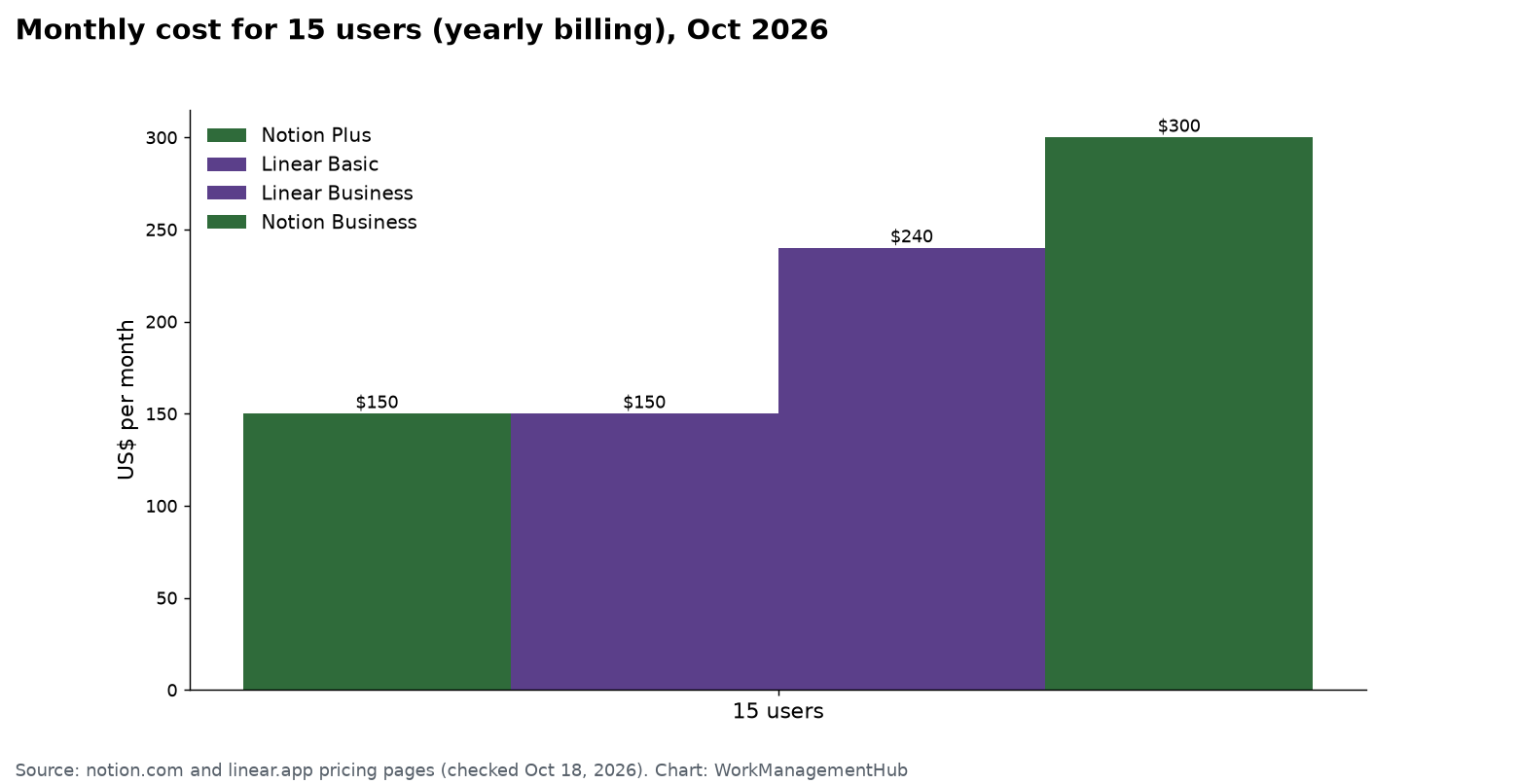
- Pricing Breakdown
- Which Tool Wins for Your Specific Use Case
- The Case for Using Both (and How to Stack Them)
- Verdict
- FAQ
Tool Overview: What Each Product Actually Does in 2026
Before getting into the line-by-line comparison, it is worth being precise about what problem each tool was actually designed to solve — because the framing of “Notion vs Linear” is, in many ways, a category error. These tools were not built to compete directly; they emerged from different pain points and have evolved in different directions.
Linear is a purpose-built issue tracker and project management tool designed for software engineering teams. It was founded on the principle that Jira is too slow, too configurable, and too enterprise-bloated for modern product development. Linear’s core promise is velocity: every action — creating an issue, moving it through a cycle, assigning it to a teammate — should feel instantaneous. That promise is backed by a local-first architecture where data is synced to your machine and interactions happen against a local cache, not a remote server.
Notion started as a flexible document and wiki tool, and has since evolved into what the company calls an “all-in-one workspace.” In 2026, that description is finally close to accurate. With the May 2026 Developer Platform v3.5 launch, Notion can now sync live data from external systems (Salesforce, Zendesk, Postgres), run serverless Workers, and connect to external AI agents. For product teams, Notion is where strategy lives: product requirements documents (PRDs), roadmaps, team wikis, OKRs, and meeting notes.
The reason this comparison matters for Notion vs Linear 2026 developer teams is that both products have been expanding into each other’s territory. Linear has added docs and project-level documentation. Notion has added task management databases, timeline views, and sprint-style project tracking. The question is whether either has crossed over convincingly enough to replace the other — or whether the smart play is to use both in tandem.
Speed and Developer UX: Where Linear Dominates
If you have spent time in both tools, the speed difference is visceral. Opening Linear feels like opening a native desktop app. Opening a Notion database with 400+ rows feels like loading a web page from 2018 — there is a visible render delay every time. This is not a minor annoyance for developers who live in their tools eight or more hours a day; it is a friction tax paid hundreds of times per sprint cycle.
Linear’s local-first architecture is the engineering foundation that makes this possible. When you create an issue in Linear, the UI updates immediately against the local cache and then syncs to the server in the background. When you change a status, it is instant. When you drag an issue from “In Progress” to “Done” in a cycle view, the transition is frame-rate smooth. Notion’s database views — despite significant performance investments in 2025 and 2026 — still require server round-trips for most operations.
Keyboard-shortcut navigation
Linear is designed from the ground up to be navigable entirely by keyboard. The shortcut system is consistent, learnable, and comprehensive: C to create an issue from anywhere, G then I to jump to your inbox, P to set priority, S to change status. Engineers who prefer their hands on the keyboard — which is most engineers — find Linear measurably faster to operate than Notion’s click-heavy database interface.
Notion does have keyboard shortcuts, but they are primarily document-editing shortcuts (slash commands for blocks, markdown formatting hotkeys). The task management interface — filtering a database, changing assignees, updating sprint fields — still requires mouse interaction in most workflows.
Sprint cycles and engineering workflows
Linear’s Cycles feature is a first-class sprint management system. You can set a cadence, auto-roll incomplete issues forward, track cycle velocity over time, and view burndown charts — all without leaving the issue tracker. Notion can replicate sprint-style views using database filters and timeline properties, but it requires significant manual setup and lacks native cycle velocity tracking. For a team that takes agile sprints seriously, Linear is the more disciplined tool. You can explore Linear’s sprint and agent capabilities in detail at this deep dive on Linear’s agent features.
Notion in 2026: What the Developer Platform v3.5 Changes
Notion’s May 2026 Developer Platform v3.5 release was the most significant product update the company has shipped since it introduced databases in 2019. Three features in particular change the calculus for technical teams evaluating whether Notion can handle more of their workflow:
Notion Workers
Workers are serverless JavaScript functions that run inside Notion and can respond to database events, form submissions, or scheduled triggers. In practical terms, this means you can automate multi-step workflows — auto-create a Linear issue when a PRD reaches “Ready for Engineering” status in Notion, or send a Slack notification when a spec is approved — without leaving the Notion environment or setting up a Zapier/Make bridge. This is a meaningful shift for product teams that previously needed glue code to connect Notion to the rest of their stack.
Database sync from external sources
Notion can now pull live data from Salesforce, Zendesk, and Postgres directly into a Notion database, with two-way sync for supported fields. This matters for product teams who want customer feedback, support tickets, and revenue signals visible alongside their roadmap and PRDs — without exporting CSVs or building a custom integration. Previously, this kind of unified view required a dedicated data tool like Retool or a custom dashboard. Notion Workers and database sync together make Notion’s “unified workspace” pitch finally credible for technical organizations. For more on how these agent features work in Notion, see this guide to Notion’s custom agents in 2026.
External agent integrations
Notion’s AI can now trigger and receive data from external agents — including the model APIs from Anthropic, OpenAI, and Google — turning Notion pages into interactive, context-aware documents. A product spec can now auto-summarize related customer feedback from Zendesk, pull in relevant GitHub issues, and surface similar historical PRDs, all through agent-powered references embedded in the document. This is ambitious, and some of the integration behaviors can be finicky in early rollout — see this troubleshooting guide for Notion Workers and agents if you hit issues during setup.
The honest assessment: these features close the gap between Notion and more specialized tools, but they add complexity. Teams adopting them should budget setup time and expect some rough edges in the first quarter of rollout.
AI Features Head-to-Head
AI is now a first-class product dimension for both tools, and the capabilities have diverged in ways that reflect each product’s core philosophy.
Linear AI
Linear’s AI features are tightly scoped to the engineering workflow. The standout capability is AI-powered issue drafting: describe a bug or feature request in natural language and Linear structures it into a properly formatted issue with title, description, priority suggestion, and label recommendations. Linear AI can also summarize a project’s open issues into a status report, identify duplicate issues automatically, and suggest which cycle an issue belongs in based on historical velocity data. The AI stays in its lane — it does not try to write your product docs or answer questions about your codebase. That restraint makes it fast and reliably useful. You can connect Linear to GitHub for full two-way sync; see this guide on Linear-GitHub sync issues if you run into common setup problems.
Notion AI
Notion AI is broader and more document-centric. It can draft, summarize, translate, and edit any page in your workspace, and in the v3.5 platform it can query across your entire workspace to surface relevant context. The new agent integrations mean Notion AI can now pull in external data — a customer support ticket from Zendesk, a Postgres query result — and incorporate it into a page response. For product managers who write a lot (PRDs, spec reviews, stakeholder updates), Notion AI is a genuine productivity multiplier. For engineers who track a lot (issues, sprint velocity, PR status), Linear AI is the more relevant tool.
Neither tool has a decisive AI advantage across all use cases. The winner depends entirely on where your team spends most of its time.
Side-by-Side Comparison Table
| Feature | Linear | Notion | Winner |
|---|---|---|---|
| UI Speed | Local-first, near-instant interactions | Server-round-trip on most DB operations; noticeable lag on large databases | Linear |
| Issue Tracking | Purpose-built; labels, priorities, assignees, sub-issues native | Database-based; fully customizable but requires manual setup | Linear |
| Sprint / Cycles | Native Cycles with velocity tracking and auto-rollover | Manual sprint setup via filtered database views; no native velocity | Linear |
| Documentation | Basic docs inside projects; no wiki-level depth | Best-in-class wiki and long-form docs with nested pages | Notion |
| Roadmapping | Timeline views tied to issues; lightweight but integrated | Flexible timeline views linked to any database; better for strategic roadmaps | Notion |
| AI Features | Issue drafting, duplicate detection, sprint summaries | Full doc AI, cross-workspace queries, external agent integrations (v3.5) | Tie |
| GitHub Integration | Native two-way sync: PRs, commits, branch status on issues | Limited; external embed or Zapier required for live GitHub data | Linear |
| External Data Sync | GitHub, Figma, Sentry native; others via API | Salesforce, Zendesk, Postgres native (v3.5); broad connector library | Notion |
| Keyboard Shortcuts | Comprehensive, consistent, covers all core actions | Strong for doc editing; limited for DB/task management | Linear |
| Automation | Rule-based automations within Linear; Webhooks for external | Notion Workers (v3.5): serverless JS, event-triggered, cross-tool | Notion |
| Pricing (paid) | $8/user/month (Plus) | $15/user/month (Business) | Linear |
| Mobile App | Solid iOS/Android apps; full issue management | Good mobile doc editing; DB views less optimized on mobile | Linear |
| Free Tier | Generous: unlimited members, 250 issues | Generous: unlimited pages for individuals; limited for teams | Tie |
| Cross-functional use | Best for engineering; other teams find it narrow | Usable by all teams: design, marketing, ops, finance | Notion |
Pricing Breakdown
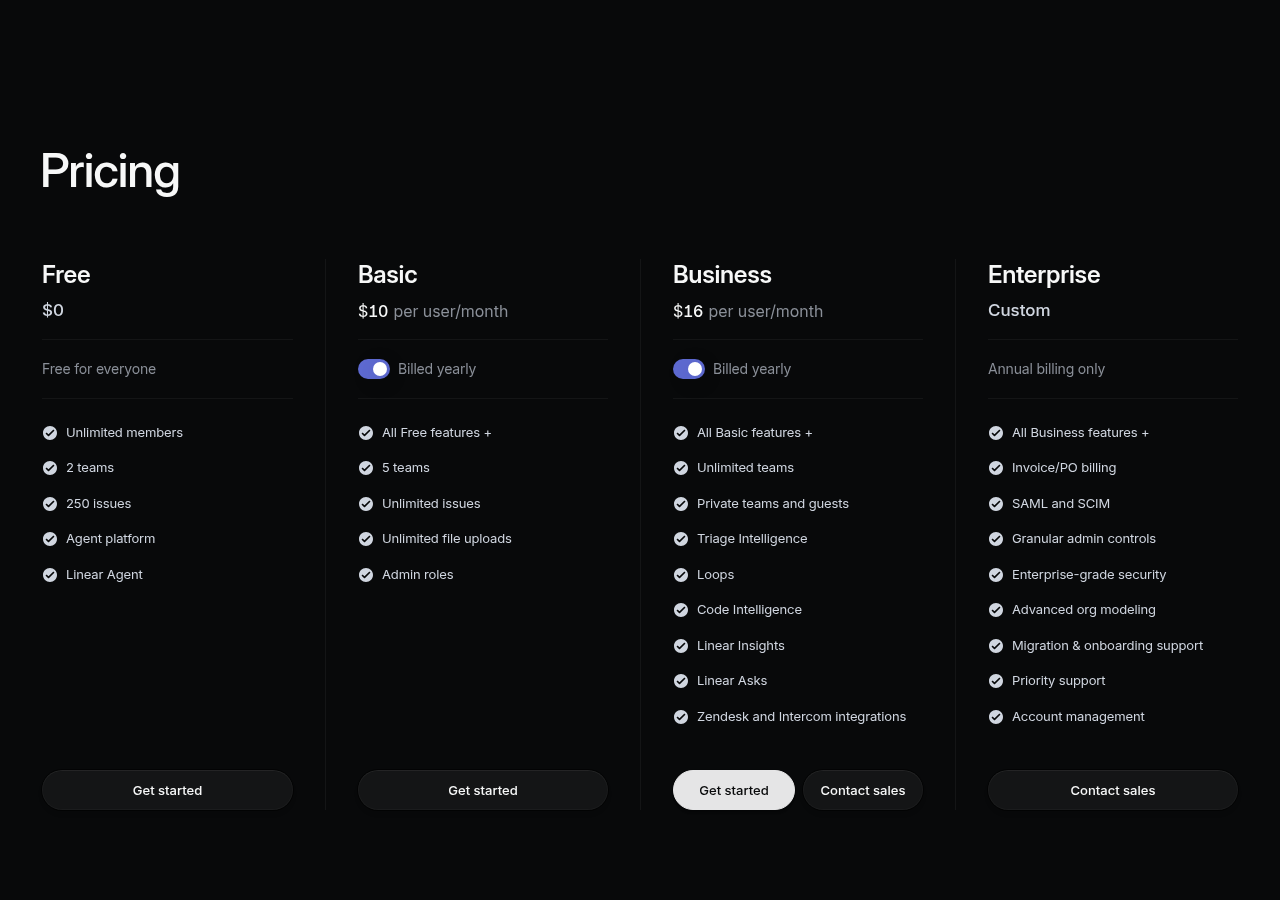
Linear offers four tiers as of 2026:
- Free: Unlimited members, 250 active issues, 3 months of issue history — genuinely usable for small teams.
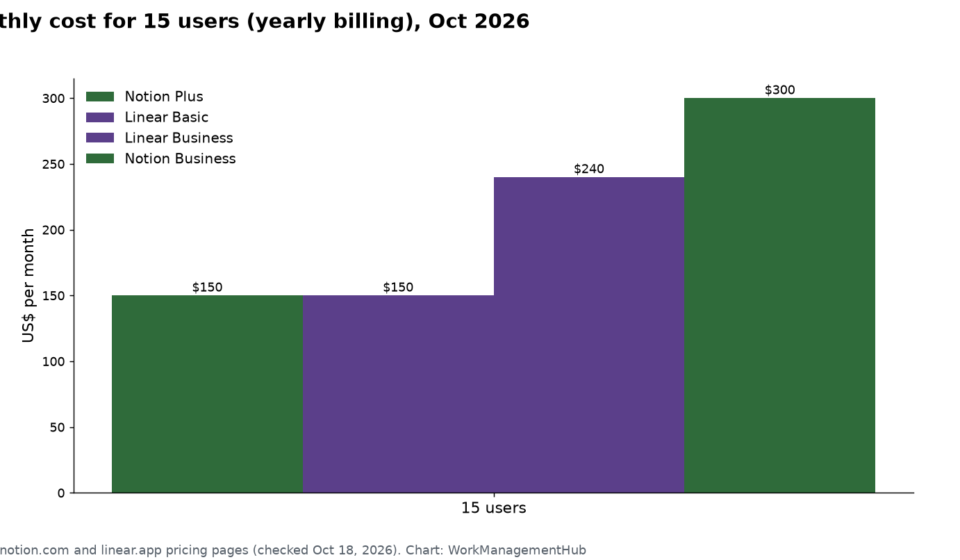
- Linear Plus ($8/user/month): Unlimited issues, full issue history, advanced analytics, priority support. This is the right tier for most product teams.
- Linear Business ($14/user/month): Adds SAML SSO, admin controls, and priority SLA. For larger orgs with compliance requirements.
- Enterprise: Custom pricing for dedicated infrastructure, audit logs, and enterprise SLAs.
Notion has similarly tiered pricing:
- Free: Unlimited pages and blocks for individuals, limited team collaboration features.
- Notion Plus ($10/user/month): Unlimited file uploads, 30-day page history, basic analytics — viable for small teams.
- Notion Business ($15/user/month): Unlimited version history, advanced permissions, SAML SSO, and access to the v3.5 Developer Platform features including Workers and external database sync. Required tier for technical teams wanting the full 2026 feature set.
- Enterprise: Custom pricing with dedicated support and advanced security controls.
The combined cost of Linear Plus ($8) and Notion Business ($15) is $23/user/month at full price — or closer to $18-20 when accounting for the fact that engineering-only users often work from Linear’s free or Plus tier while only PM and leadership roles need Notion Business. This is competitive with single-tool alternatives like ClickUp (see our ClickUp vs Asana 2026 comparison) and well below Jira + Confluence combined pricing at enterprise scale.
Which Tool Wins for Your Specific Use Case
Pure software engineering team (8-50 engineers, no dedicated PM)
Linear is the clear winner. The local-first speed, GitHub integration, Cycles feature, and keyboard-driven workflow are purpose-built for this context. Notion would add overhead without adding enough value to justify the cost or context-switching.
Early-stage startup (pre-product-market fit, mixed team)
Start with Notion. A single Notion workspace can hold your company wiki, product roadmap, investor updates, engineering notes, and task tracking for a small team. The flexibility is an asset when you do not yet know what process you need. Add Linear when your engineering team grows past five engineers and sprint discipline becomes important — typically around Series A.
Mature product team (PM plus engineering plus design)
Use both. Linear handles the engineering execution layer: issues, sprint cycles, GitHub sync, and velocity tracking. Notion handles the product strategy layer: PRDs, product specs, research synthesis, design briefs, and meeting notes. The integration between them is straightforward — reference a Notion page URL in a Linear issue description, or embed a Linear project link in a Notion doc. Many teams also use Notion Workers (v3.5) to auto-create Linear issues from approved PRDs.
Enterprise product organization (100+ users, compliance requirements)
Both tools have enterprise tiers with SAML SSO and audit logs. Linear Enterprise is purpose-built for engineering orgs that need centralized admin controls over multiple teams and projects. Notion Enterprise adds advanced security and dedicated support for the knowledge base layer. At this scale, the tooling decision is often dictated by existing vendor relationships and security reviews rather than feature comparisons.
The Case for Using Both (and How to Stack Them)
The most pragmatic advice for most product teams in 2026 is to stop thinking of this as an either/or decision. The tools serve complementary functions, and the combined cost — under $20/user/month for most configurations — is lower than the cost of forcing one tool to do both jobs badly.
Here is the workflow stack that works well for teams currently running both tools:
- Strategy in Notion: Product roadmap, quarterly OKRs, PRDs, user research, design specs, and stakeholder communications all live in Notion. This is where PMs and designers spend most of their time.
- Execution in Linear: Once a feature is scoped and the PRD is approved in Notion, the engineering work is managed in Linear. Issues are created (increasingly via AI-assisted drafting), assigned to cycles, and tracked through to deployment.
- Linking the two: Each Linear project links back to its Notion PRD. Each Notion PRD embeds the relevant Linear project view. Some teams use Notion Workers to trigger Linear issue creation automatically when a spec moves to “Approved” status.
- Async communication: Notion handles meeting notes, decision logs, and async updates. Linear handles engineering-specific status updates and blocker tracking.
This stack also happens to scale well. Early-stage teams can start with just Notion and add Linear later without disrupting the documentation layer. Mature teams can add Notion AI and Linear AI independently without breaking existing workflows.
Official documentation for both tools is worth bookmarking: the Linear changelog for engineering updates, and Notion’s product page for the latest platform features.
Verdict
For developer and product teams in 2026, Linear wins on engineering execution — the local-first speed, Cycles, GitHub integration, and keyboard-driven UX are purpose-built advantages that Notion cannot replicate. Notion wins on documentation, cross-functional reach, and strategic planning — and the v3.5 Developer Platform makes it a genuinely capable data hub for teams willing to invest in setup. The defensible position: if you are an engineering-only team, use Linear and skip Notion. If you have a PM, design, or product strategy function, run both. The combined cost is justified, the integration is lightweight, and the alternative — forcing one tool to do the other’s job — costs you either developer velocity or product clarity. That is a worse trade-off than a $20/user/month combined SaaS line item.
Frequently Asked Questions
Is Linear better than Notion for software development teams?
Yes, for pure software development workflows, Linear is the better tool. Its local-first architecture makes it significantly faster than Notion for issue creation, sprint management, and status tracking. Linear also has native GitHub integration and Cycles that Notion cannot match without significant manual setup. However, if your team also needs robust documentation and cross-functional collaboration, you will likely want Notion alongside Linear.
Can Notion replace Linear for engineering issue tracking?
Technically yes, but practically no for most teams. Notion’s database views can be configured as an issue tracker, but the load lag, lack of native sprint velocity tracking, and absence of deep GitHub sync make it an inferior experience for engineers compared to Linear. Teams that have tried Notion-only for engineering tracking typically migrate to Linear within two or three sprint cycles.
What did Notion’s Developer Platform v3.5 (May 2026) add for technical teams?
Notion’s May 2026 Developer Platform v3.5 added three major capabilities: Workers (serverless JavaScript functions triggered by database events), external database sync from Salesforce, Zendesk, and Postgres, and external AI agent integrations. These features make Notion a more credible unified workspace for technical teams and close the gap for organizations wanting a single environment for documentation plus live operational data.
What is the combined cost of using Linear and Notion together in 2026?
Linear Plus costs $8/user/month and Notion Business costs $15/user/month. For teams where only PMs and leads need Notion Business while engineers use Linear Plus or the free tier, the blended per-person cost typically comes in under $20/user/month — competitive with single-tool alternatives and significantly cheaper than Jira plus Confluence at enterprise scale.
How do Linear and Notion integrate with each other?
The most common integration method is URL-linking: Linear issues reference Notion PRDs by URL, and Notion docs embed Linear project links. More advanced teams use Notion Workers (v3.5) to auto-create Linear issues when a PRD reaches “Approved” status. There is also a Zapier/Make integration for bidirectional status updates. For common setup problems with Linear’s GitHub connection, see our Linear GitHub sync troubleshooting guide.