Microsoft Project Online Retired in 2026: What Now and the Best Alternatives

Microsoft Project Online retired on September 30, 2026. Microsoft’s final notice says that after retirement, “you will no longer be able to access your projects or any associated data within the service.” Microsoft has not announced a read-only period or a recovery process. If your team has not moved yet, act this week.
This change only affects Project Online. Project desktop, Project Server and Planner keep working. I have helped PMOs plan this move, and the teams that struggle are the ones that treat it as a software swap instead of a process change. This guide covers what to do now and which tool fits which team, using Microsoft’s lifecycle page and the final Message Center notice (MC1478955), checked in October 2026.
ClickUp pricing note (checked October 16, 2026): ClickUp is changing its plans. New Workspaces, all Free Forever Workspaces and some paid ones now get Core at $9 and Business at $17 per user a month billed yearly ($12 and $25 monthly), with AI credits included and a new Max plan at $100. Many existing Workspaces still have the classic plans: Unlimited at $7 and Business at $12 billed yearly ($10 and $19 monthly), with ClickUp Brain as a $9 add-on. Prices in this article use the classic plans unless noted. See ClickUp’s new plans help article.
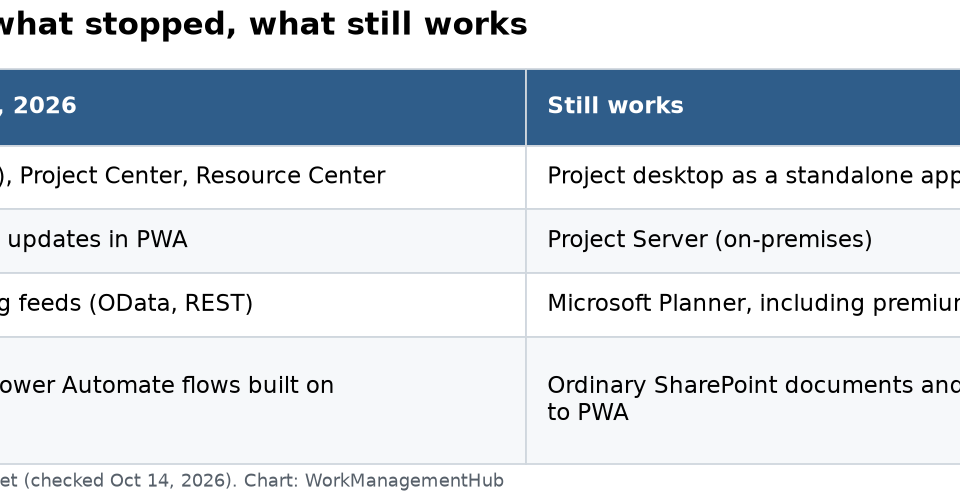
What stopped and what still works
| Stopped on Sept 30, 2026 | Still works |
|---|---|
| Project Web App (PWA), Project Center, Resource Center | Project desktop as a standalone app |
| Timesheets and status updates in PWA | Project Server (on-premises) |
| Project Online reporting feeds (OData, REST) | Microsoft Planner, including premium plans |
| Power BI reports and Power Automate flows built on those feeds | Ordinary SharePoint documents and lists not tied to PWA |
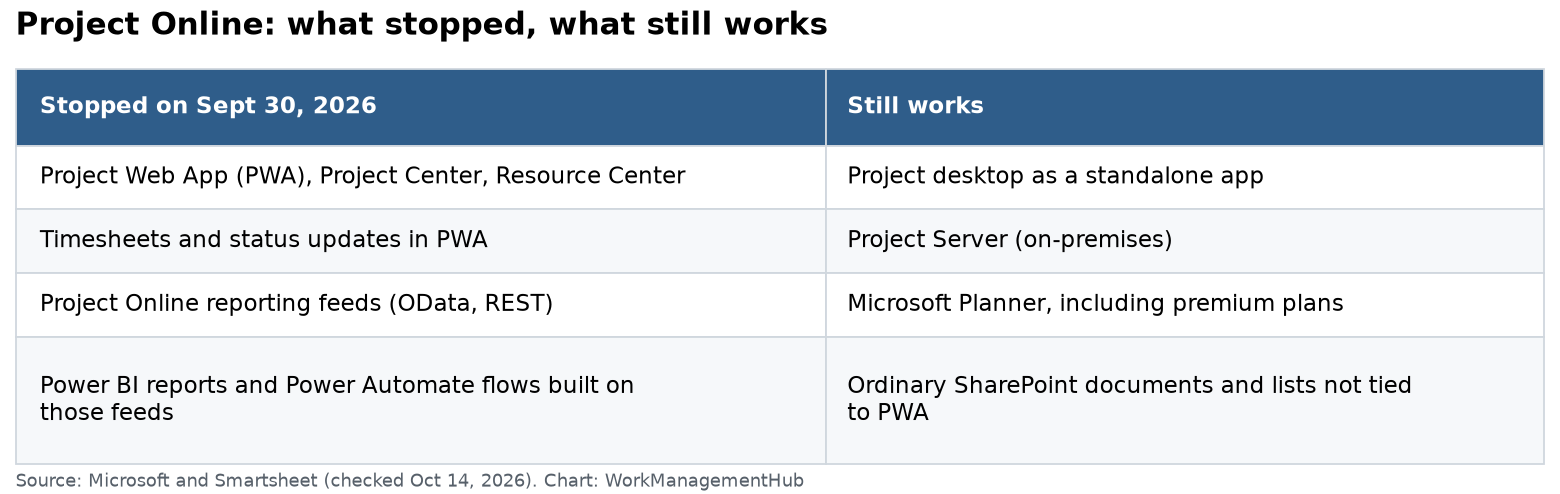
One trap: Project desktop still opens, but it can no longer connect to Project Online. And Microsoft’s export script needs a working Project Online connection, so it cannot help after shutdown.
If you have not migrated yet: do this now
- Test what you can still reach. Some tenants saw their instance open for a few days into October. If yours opens, export everything today.
- Save each plan as .mpp and XML from Project desktop while you can. XML imports into most other tools.
- Export timesheets and resource data to Excel. These are the hardest to rebuild.
- Call your Microsoft account team. Ask what can be retrieved. Get the answer in writing.
- Rebuild reports. Any Power BI report on Project Online feeds is now broken. Point it at your new tool’s data instead.
The main alternatives, with 2026 prices
| Tool | Entry price (yearly) | Gantt and dependencies | Resource planning | Best for |
|---|---|---|---|---|
| Microsoft Planner Plan 1 | $10/user/month | Yes, finish-to-start | Basic | Microsoft 365 teams |
| Planner and Project Plan 3 | $30/user/month | Advanced, baselines, critical path | Assignments view | PMs who need Project desktop |
| Smartsheet Business | $19/member/month | Yes | Add-on | Enterprise PMOs |
| Wrike Business | $25/user/month | Yes, critical path | Yes | Mid-size teams, agencies |
| monday.com Pro | $19/seat/month | Yes | Workload view | Cross-team work |
| Asana Advanced | $24.99/user/month | Yes, critical path | Yes | Marketing and ops |
| ClickUp Business | $12/user/month | Yes | Workload view | Budget-minded teams |
Prices come from each vendor’s pricing page: Microsoft Planner, Smartsheet, Wrike, monday.com, Asana and ClickUp.
Note on Plan 5: Planner and Project Plan 5 stopped selling to new buyers on May 1, 2026. Microsoft points Plan 5 users who need Project desktop to Plan 3. Some advanced portfolio features of Plan 5 are not in Plan 3.
What 10 seats cost per year
- Planner Plan 1: $1,200
- ClickUp Business: $1,440
- Smartsheet Business: $2,280
- monday.com Pro: $2,280
- Asana Advanced: $2,999
- Wrike Business: $3,000
- Planner and Project Plan 3: $3,600
How to choose, in plain terms
Stay with Microsoft if you live in Teams
Planner Plan 1 covers timelines, sprints and simple dependencies. Plan 3 adds baselines, critical path and Project desktop. It is the closest thing to what PMs had before. The upside: no new vendor, same sign-in, works inside Teams. The downside: portfolio and resource features are lighter than Project Online’s.
Smartsheet for PMOs with many projects
Smartsheet imports .mpp files and feels like a spreadsheet, so PMs adapt fast. Control Center (an add-on) builds new projects from templates at scale. Dashboards can be shared with people who have no license. It is the most common landing spot for PMOs I have seen.
Wrike for agencies and mid-size teams
Wrike has strong Gantt charts with critical path, workload views, time tracking and proofing. Business plans are yearly only. Seats are sold in groups of 5 up to 30 users.
monday.com or Asana for mixed teams
If most users are not trained PMs, these are easier to adopt. Both handle timelines and dependencies well. Neither matches Project’s scheduling engine.
ClickUp if budget comes first
ClickUp gives the most features per dollar. It needs a strong admin to keep it tidy.

Migration steps that work
- List what you really used. Most teams used Gantt and status, and almost no one used portfolio analysis. Check before you pay for depth you will not use.
- Pick one pilot team. Move one live project first. Fix templates before the rest move.
- Clean data before import. Close finished projects. Remove old custom fields. Import only active work.
- Rebuild timesheets early. People notice missing timesheets in a week.
- Rebuild reports last. Once the data is stable, rebuild Power BI on the new source.
Gotchas I see often
- Resource leveling does not carry over. Very few cloud tools level resources the way Project did. Expect to plan capacity differently.
- Custom fields map badly. Enterprise custom fields and lookup tables often need rebuilding by hand.
- Baselines get lost. Many imports bring the current plan only. Save a baseline report before you move.
- People keep using desktop files. Without a clear new home, PMs go back to emailing .mpp files. Set a firm rule.
When NOT to rush into a new tool
If your Project Online data is already gone and the team is managing fine in Excel for now, take two weeks to choose well. A rushed pick often means a second migration within a year. Use those two weeks to list needs and run a short trial of two tools, not five.
Common questions
Did Microsoft Project Online really shut down?
Yes. It retired on September 30, 2026, per Microsoft’s lifecycle page. Microsoft says you can no longer access projects or data in the service.
Can I still get my Project Online data back?
Microsoft has not published a recovery process. If your instance still opens, export right away. If not, contact your Microsoft account team and ask in writing.
Does Project desktop still work?
Yes, as a standalone app. It cannot connect to Project Online anymore.
What is Microsoft’s replacement for Project Online?
Microsoft points customers to Planner (Plan 1 or Plan 3), Project Server Subscription Edition, or Dynamics 365 Project Operations.
What is the cheapest good alternative?
Planner Plan 1 at $10 per user a month if you use Microsoft 365. Outside Microsoft, ClickUp Business at $12 per user a month billed yearly.
Can Smartsheet import Microsoft Project files?
Yes. Smartsheet imports .mpp files. Check dependencies and custom fields after import, since some do not map cleanly.
Dates and prices checked against Microsoft’s lifecycle page, the MC1478955 notice and vendor pricing pages on October 14, 2026. Confirm with vendors before you buy.
Sponsored

Related guides