
Smartsheet’s AI in mid-2026 splits into features you can use today and features that are still announcements. Smart Assist, Smart Columns, the AI dashboard builder, and the MCP Server connectors have shipped and work across paid plans. The headline Smart Agents, including the Project Manager agent, plus Smart Flows and Smart Hub, remain in early access.
That line between shipped and announced matters more than any feature description. I keep meeting teams who budgeted their 2026 operating model around an autonomous “AI project manager” they cannot actually buy yet. This guide covers what exists, what it costs, where each capability sits, and where I would not bother.
What Smartsheet announced versus what actually shipped
In November 2025 Smartsheet rebranded around “Intelligent Work Management” and announced a set of Smart-branded building blocks: Smart Assist, Smart Columns, Smart Flows, Smart Agents, and a governance console called Smart Hub, all sitting on a shared intelligence layer. The announcement was reasonably honest about timing. Smart Flows, Smart Columns, and Smart Agents were pointed at the Early Adopter Program, and Smart Hub was described as still in preparation.
Here is the scorecard as of July 2026. Generally available: Smart Assist (GA on June 3, 2026), Smart Columns, the AI dashboard builder, intelligent form fill, the older formula and text generators, and the MCP Server with connectors for Claude, ChatGPT, Microsoft Copilot, and Google Cloud Gemini Enterprise. Still not shipped to the public: Smart Agents, including the much-demoed Project Manager Smart Agent, plus Smart Flows and Smart Hub. Those three are heading to the Early Adopter Program “in the coming months.” If a consultant tells you to design this year’s delivery process around the Project Manager agent, they are selling you the keynote, not the product.
Smart Assist: the piece worth using today
Smart Assist is a chat panel built into the Smartsheet app. It reads the sheet or workspace you have open, so you skip the “here is my context” preamble that makes generic chatbots tedious. In practice it does a handful of things well: it summarizes a sheet you have never seen, surfaces what is at risk, makes bulk edits such as adding or updating rows and columns, and drafts stakeholder updates from live data. It runs on the same intelligence layer as the Smartsheet MCP Server, so its answers respect whatever your account can already see.
To start a conversation:
- Open a sheet in Table, Board, or Timeline view.
- In the top-right corner, select the AI sparkle button to open the chat panel.
- Select a suggested prompt, or type your own question such as “What is about to slip in the next two weeks?”
- Review any proposed change before you approve it. Smart Assist confirms actions before it writes, and you should actually read what it plans to do.
Two honest caveats from using it. First, it only sees what your account can see, which is correct behavior but confuses teams when two users get different answers to the same prompt. Second, its risk analysis is only as good as your sheet structure. If your dependencies and predecessors are sloppy, the “at-risk” flags are decoration. Get the schedule right first, using something like my Smartsheet Gantt chart setup walkthrough, before you ask an assistant to interpret it. The full capability list lives in Smartsheet’s conversational AI documentation.
Smart Columns: useful, narrow, and Table view only
Smart Columns are AI-powered column types that process every row automatically as data changes, with no separate automation rule to maintain. The shipped operations are summarize, translate, and sentiment analysis, each configurable with your own instruction. The official Smart Columns article gives away the first limitation in its title: this works in the newer Table view, not everywhere you might want it.
Where they earn their keep: intake sheets fed by forms, where a summary column turns rambling submissions into scannable one-liners, and multilingual teams, where a translate column removes a real coordination tax. Where I would be careful: sentiment scoring that feeds an executive dashboard. AI sentiment classification on short status comments is noisy, and once a red or green flag is machine-generated, people stop questioning it. If AI output is going into risk reporting, keep a human checkpoint in the loop; I walk through patterns for that in my guide to AI-assisted risk management in Smartsheet.
The AI dashboard builder
The dashboard builder takes a plain description (“portfolio health for Q3, milestones by owner, budget variance”), asks you to pick source sheets, and generates a populated dashboard you then refine. You can trigger it from inside Smartsheet, from Smart Assist, or from a connected AI tool. My experience matches the positioning exactly: it is a fast first draft, not a finished artifact. Expect to fix chart types and layout. For standardized portfolio reporting provisioned across many projects, template-driven rollout through Control Center is still the right tool. The AI builder is for the one-off views in between.
The MCP Server and external connectors
The most consequential 2026 shipping decision was not an agent. Smartsheet built an MCP (Model Context Protocol) server and released pre-built connectors: Claude and Gemini Enterprise support the server today for all customers, and connectors for ChatGPT and Microsoft Copilot went live for US customers on June 11, 2026, with other regions to follow. Connect one, and the AI tool your team already lives in can query live Smartsheet data, update rows, create sheets, and pull cross-portfolio reports through conversation, limited to what the authorizing user can access. Smartsheet reported more than 22,000 unique users and three million AI actions on the server since it launched, so this is real usage, not a demo.
Setup is similar across tools:
- Confirm your plan and that an admin has enabled AI features for your account.
- In your AI tool, open Settings and go to Connectors.
- Add the Smartsheet connector and select Connect.
- Authorize with your Smartsheet login when prompted. The connection inherits your existing sharing permissions.
- Run a read-only prompt first, such as “List the sheets in workspace X,” before you let it modify anything.
One boundary to understand: an MCP connection is conversational access, not data-pipeline infrastructure. Recurring, scheduled imports and exports between Smartsheet and your ERP or CRM still belong in Data Shuttle, which remains a separate premium add-on. Do not let the novelty of chatting with your data talk you into ripping out a working integration.
Availability and pricing, verified July 2026
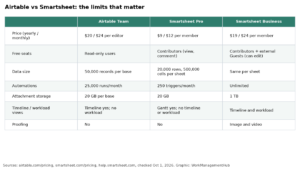
List pricing this month: Pro is $9 per member per month billed annually ($12 billed monthly), Business is $19 per member per month billed annually ($24 monthly), and Enterprise is custom-quoted. The important point for buyers is that Smart Assist is listed across Pro, Business, Enterprise, and Advanced Work Management, so the conversational AI you can actually use is not fenced behind the top tier. Here is where each capability stands, using only what Smartsheet documents:
| Capability | Status (July 2026) | Who can use it |
|---|---|---|
| Smart Assist | Generally available (June 3, 2026) | Pro, Business, Enterprise, Advanced Work Management |
| Smart Columns | Generally available | Table view |
| AI dashboard builder | Generally available | In-product and via connected AI tools |
| Intelligent form fill, formula and text generators | Generally available | Listed AI features in-product |
| MCP Server with Claude and Gemini Enterprise connectors | Generally available | All customers |
| MCP connectors for ChatGPT and Copilot | Generally available in the US | US customers now; other regions soon |
| Smart Agents (incl. Project Manager) | Not released | Early Adopter Program, coming months |
| Smart Flows | Not released | Early Adopter Program, coming months |
| Smart Hub | Not released | In preparation |
Plan gating on AI has moved more than once in the past two years, so if your renewal is coming up, confirm what your specific contract and region include rather than assuming continuity from an older quote.
When I would skip Smartsheet AI
- You run a few simple trackers with under ten users. Smart Assist saves you minutes, not hours. Spend the effort on clean sheet structure instead.
- Your automations must be deterministic. Approval chains, compliance notifications, and anything auditable belong in the classic automation builder, where the logic is explicit and testable. Natural-language automation via Smart Flows is not generally available anyway.
- You were promised autonomous agents. Nothing autonomous is generally available. The Project Manager Smart Agent exists in demos and the Early Adopter Program; write your plans around what you can provision today.
- Your work is mostly documents and knowledge rather than structured project data. Smartsheet AI operates on sheets. If your team primarily writes, the trade-off shifts, and my Smartsheet versus Notion comparison covers that decision.
What admins should check before switching it on
AI access is an administrator decision, not an automatic default, so the first practical step is confirming who controls the toggle for your account. Two facts worth internalizing before rollout. First, every generate-formula, generate-text, and Smart Assist request sends your input and the surrounding sheet context to a third-party generative model to produce its output; that is documented plainly in Smartsheet’s own AI help pages. Second, all of these features run inside your existing sheet permissions, which is the strongest argument for using them over pasting a project export into a public chatbot, which is what your team is otherwise probably already doing. For specific commitments on data retention and model handling, read Smartsheet’s Trust Center and your contract, because terms differ by plan and region.
Common questions about Smartsheet AI agents
Can I use the Project Manager Smart Agent today?
Not on a standard subscription. Smart Agents, including the Project Manager Smart Agent announced in November 2025, are heading to Smartsheet’s Early Adopter Program in the coming months rather than to general availability. If you need it at launch, apply to that program. Otherwise, build your plans around Smart Assist, which ships today.
Which plans include Smart Assist?
Smart Assist reached general availability on June 3, 2026 and is listed for the Pro, Business, Enterprise, and Advanced Work Management plans, with no separate AI add-on. Your system administrator still controls whether AI features are switched on for the account, so confirm access is enabled before you promise the capability to a team.
How is Smart Assist different from connecting Claude to Smartsheet?
Both run on the same Smartsheet intelligence layer. Smart Assist lives inside the Smartsheet interface and automatically reads the sheet you have open. The MCP connectors bring live Smartsheet data into Claude, ChatGPT, Copilot, or Gemini Enterprise, which suits teams who already work in those tools. Either way, results respect your existing permissions.
What happened to Smart Flows and Smart Hub?
Both were announced in November 2025 and neither is generally available in mid-2026. Smart Flows, natural-language workflow building, is slated for the Early Adopter Program alongside Smart Agents. Smart Hub, the console for configuring and governing AI components, is still in preparation. Neither appears as a shipped feature on Smartsheet’s current AI pages.
Does Smartsheet AI cost extra?
The shipped conversational features, Smart Assist, Smart Columns, the AI dashboard builder, and intelligent form fill, are part of the standard plans rather than a separate AI purchase. Data Shuttle and other premium apps remain separate. Pricing runs about $9 per member monthly on Pro and $19 on Business, both billed annually.
Sponsored

Related guides