Every year, thousands of project managers, operations leads, and team leaders ask the same question: Smartsheet or Monday.com? Both tools promise to transform how your team works. Both cost roughly the same. Both have hundreds of five-star reviews. Yet they are fundamentally different products built for fundamentally different types of work.
After testing both platforms extensively and analyzing what thousands of real users say about each, here’s the unfiltered truth: Monday.com wins for teams that want speed, visual clarity, and ease of adoption. Smartsheet wins for teams managing complex, multi-layered projects with enterprise-grade reporting needs. Neither is universally “better” — the right choice depends entirely on how your team works.
This guide goes deep. We’ll cover pricing (including the hidden costs both platforms don’t advertise), feature breakdowns, real use cases, what actual users love and hate, and a clear decision framework to help you choose confidently.
Smartsheet vs Monday.com: Quick Verdict
| Category | Smartsheet | Monday.com | Winner |
|---|---|---|---|
| Ease of Use | Moderate (spreadsheet logic) | Very easy (visual boards) | Monday.com |
| Project Complexity | Excellent (dependencies, critical path) | Good (basic dependencies) | Smartsheet |
| Automation | Advanced, rule-based | Visual, intuitive, AI-assisted | Tie |
| Reporting & Dashboards | Powerful, enterprise-grade | Visual, good for stakeholders | Smartsheet |
| AI Features | None currently | Monday AI (summaries, automation) | Monday.com |
| Mobile App | Functional, not elegant | Excellent, full-featured | Monday.com |
| Integrations | 200+ (Salesforce, Jira, SAP) | 200+ (Slack, HubSpot, Salesforce) | Tie |
| Starting Price | $9/user/mo (Pro) | $9/user/mo (Basic, 3-seat min) | Smartsheet (slightly) |
| Free Plan | Yes (1 user + 2 editors) | Yes (2 users only) | Smartsheet (slightly) |
| Best For | Enterprise, construction, ops | Marketing, creative, cross-team | Depends on use case |
What Is Smartsheet? (And Who Is It Really For?)
Smartsheet launched in 2006 and was built with a core philosophy: give spreadsheet-savvy professionals the power of project management without forcing them to abandon the familiar grid interface. If your team lives in Excel today and wishes it had automation, real-time collaboration, Gantt charts, and workflow triggers — Smartsheet is exactly that product.
Today, Smartsheet serves over 90,000 organizations globally, including Boeing, Pfizer, Cisco, and the U.S. federal government. Its enterprise credentials are serious: it holds FedRAMP authorization, SOC 2 Type II compliance, HIPAA compliance, and ISO 27001 certification. For regulated industries or companies with strict data governance requirements, these are not just checkboxes — they’re decision-makers.
Smartsheet’s Core Strengths
Gantt Chart and Critical Path Analysis: Smartsheet’s Gantt charts are among the most powerful available in any work management tool outside of dedicated PPM (Project Portfolio Management) software. You can set task dependencies, define the critical path, track baseline vs. actual progress, and drill into predecessor relationships — all in a clean visual interface. For teams managing construction timelines, product launches, or multi-phase IT implementations, this alone justifies the tool.
Cross-Sheet Formulas and Cell Linking: One of Smartsheet’s most underappreciated features is the ability to link cells across different sheets and build cross-sheet formulas. This means you can pull live data from a budget tracker into an executive dashboard, or roll up status from 20 department sheets into a single master project sheet. It’s a level of data connectivity that Monday.com simply does not offer.
Enterprise Reporting: Smartsheet’s Report Builder lets you consolidate rows from multiple sheets into a single, real-time report filtered by any criteria — assignee, status, date range, department. Combined with the Dashboard feature (which supports charts, graphs, metric widgets, and live sheet data), Smartsheet gives executives and PMOs a live pulse on every project without needing to open a single individual sheet.
Resource Management (via Resource Views + Integration): At the Business and Enterprise tiers, Smartsheet provides resource views that show team member workload across projects. Combined with the Resource Management by Smartsheet add-on (formerly 10,000ft), it becomes a full capacity planning tool — letting resource managers see who is over-allocated, who has bandwidth, and what projects are at risk due to staffing.
Forms and Automated Intake Workflows: Smartsheet forms are a quiet superpower. You can create a form that, when submitted, automatically triggers a workflow: assigns the row to a team member, sets a due date based on the submission date, sends a confirmation email to the submitter, and notifies the project manager — all without a single line of code. This makes Smartsheet excellent for service request management, HR onboarding checklists, client intake processes, and IT change management.
Where Smartsheet Falls Short
Smartsheet’s interface, while familiar to spreadsheet users, can feel rigid and outdated compared to modern alternatives. Non-technical users — especially those who’ve never used Excel for project management — often find the learning curve steeper than expected. The grid-first view doesn’t immediately communicate “project management” the way a visual Kanban board does.
Smartsheet has also been notably slow to adopt AI. As of 2025, it has no native AI writing, summarization, or smart automation features — a significant gap when competitors like Monday.com, ClickUp, and Asana have integrated AI into their core workflows. If your team cares about AI-powered productivity, Smartsheet is behind.
Mobile experience is another weak point. While the Smartsheet mobile app has improved, it still doesn’t offer the fluid, full-featured experience that Monday.com’s mobile app delivers. For teams that need to manage work on the go — field crews, traveling sales teams, remote workers — this is a real limitation.
What Is Monday.com? (And Who Is It Really For?)
Monday.com launched in 2014 under the name “dapulse” and rebranded in 2017 with a clear mission: make work management software that people actually want to use. It went public on the Nasdaq in 2021 and today serves over 225,000 customers across 200+ countries, including Uber, Hulu, Canva, and Universal Music Group.
Monday.com’s design philosophy is radically different from Smartsheet’s. Where Smartsheet gives power users a precision tool, Monday.com gives entire organizations — including non-technical teams — a colorful, intuitive workspace they can customize without a training manual.
Monday.com’s Core Strengths
Ease of Adoption (The Real Differentiator): Monday.com’s biggest competitive advantage isn’t any single feature — it’s that people actually use it. Internal adoption studies consistently show 80-90% active usage rates within 30 days of deployment. That matters enormously because a project management tool that sits unused is worth nothing. Monday.com’s visual boards, color-coded statuses, and drag-and-drop interface make it intuitive for everyone from the CEO to the intern.
Visual Boards and Multiple Views: Monday.com offers 10+ ways to view your data: Board (Kanban), Table (spreadsheet), Timeline (Gantt-style), Calendar, Chart, Map, Files, Workload, and Form. Each view updates in real time and is available to all team members without switching tools. Unlike Smartsheet where Gantt is a dedicated “view,” Monday.com’s Timeline is simply another lens on the same underlying data — no reformatting required.
Automation Builder (No-Code, Visual, Powerful): Monday.com’s automation builder uses an intuitive “When [trigger] → Then [action]” recipe format that non-technical users can configure in minutes. Recipes like “When status changes to Done → move item to Archive board → notify item owner” are set up with three clicks. More advanced automations support custom intervals, conditional logic branches, and integration triggers from connected apps. As of 2025, Monday AI can also generate automation recipes from plain-English descriptions.
Monday AI (2024-2025 Addition): Monday.com has integrated AI throughout the platform. AI Blocks can summarize long text fields, extract key information from documents, classify items, and generate content directly inside board cells. AI is also available in the automation builder — describe what you want to automate in plain English and Monday.com generates the recipe. While not perfect, this genuinely saves time for teams managing large volumes of items.
Industry-Specific Products: Monday.com has built three distinct product lines on top of its core platform: Monday CRM (for sales pipeline management), Monday Dev (for software development with sprint planning and backlog management), and Monday Service (for IT service management). Each comes pre-configured with industry-specific templates, workflows, and views. If your organization needs multiple tools, Monday.com can replace several.
Where Monday.com Falls Short
Monday.com’s pricing structure has a significant friction point for small teams: there is a 3-seat minimum on all paid plans. That means a solo founder or a 2-person team pays for at least 3 seats, even if they only need 2. At $9/seat/month on the Basic plan, that’s a $27/month floor — not terrible, but it’s an important consideration. Prices jump significantly at higher tiers.
For teams managing very complex, multi-dependency projects with strict baseline tracking and critical path analysis, Monday.com’s Timeline view, while good, doesn’t fully replace Smartsheet’s dedicated Gantt capabilities. Advanced dependency logic, predecessor relationships, and lag times require workarounds in Monday.com that Smartsheet handles natively.
Cross-board data aggregation — pulling data from multiple boards into a master report — is possible in Monday.com but requires the paid WorkForms or reporting add-ons and doesn’t reach the depth that Smartsheet’s cross-sheet linking offers. For PMOs that need enterprise-wide portfolio visibility, Monday.com’s native tools may not be sufficient without additional investment.
Pricing Comparison: What You’ll Actually Pay
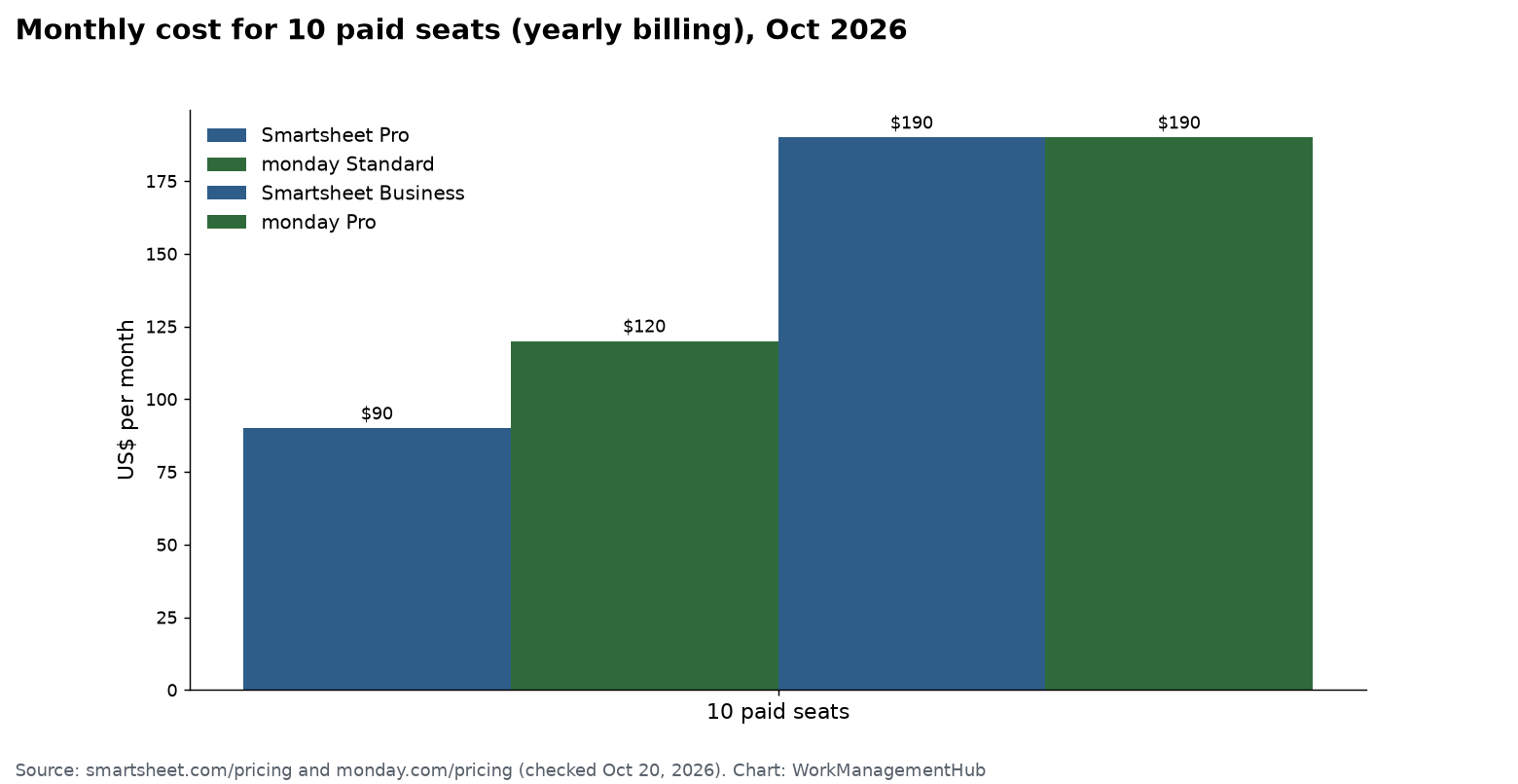
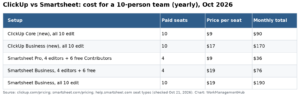
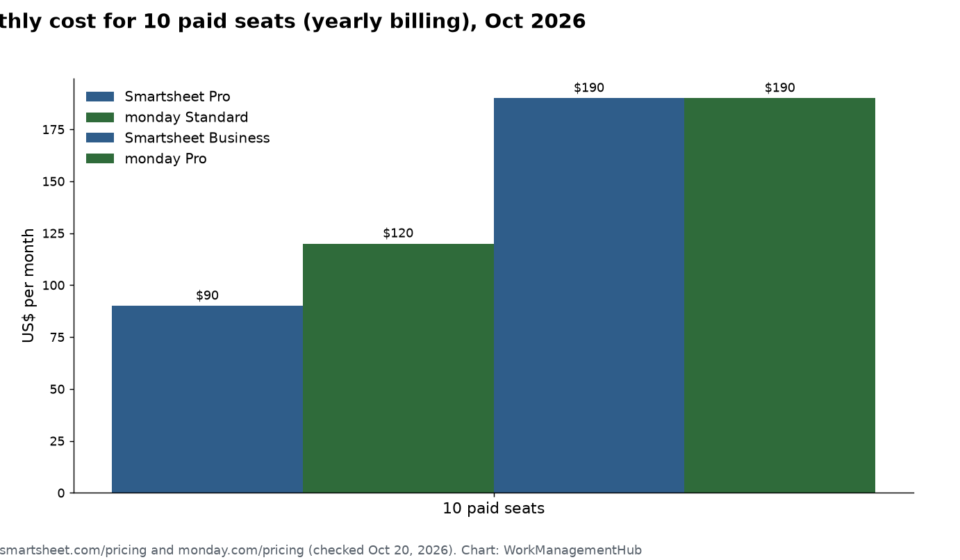
Both tools advertise similar entry prices, but the real cost of ownership differs significantly at scale. Here’s the honest breakdown:
Smartsheet Pricing (2025)
- Free: 1 licensed user + 2 editors. 2 sheets, limited rows, no automations. Good for evaluating the platform but not production use.
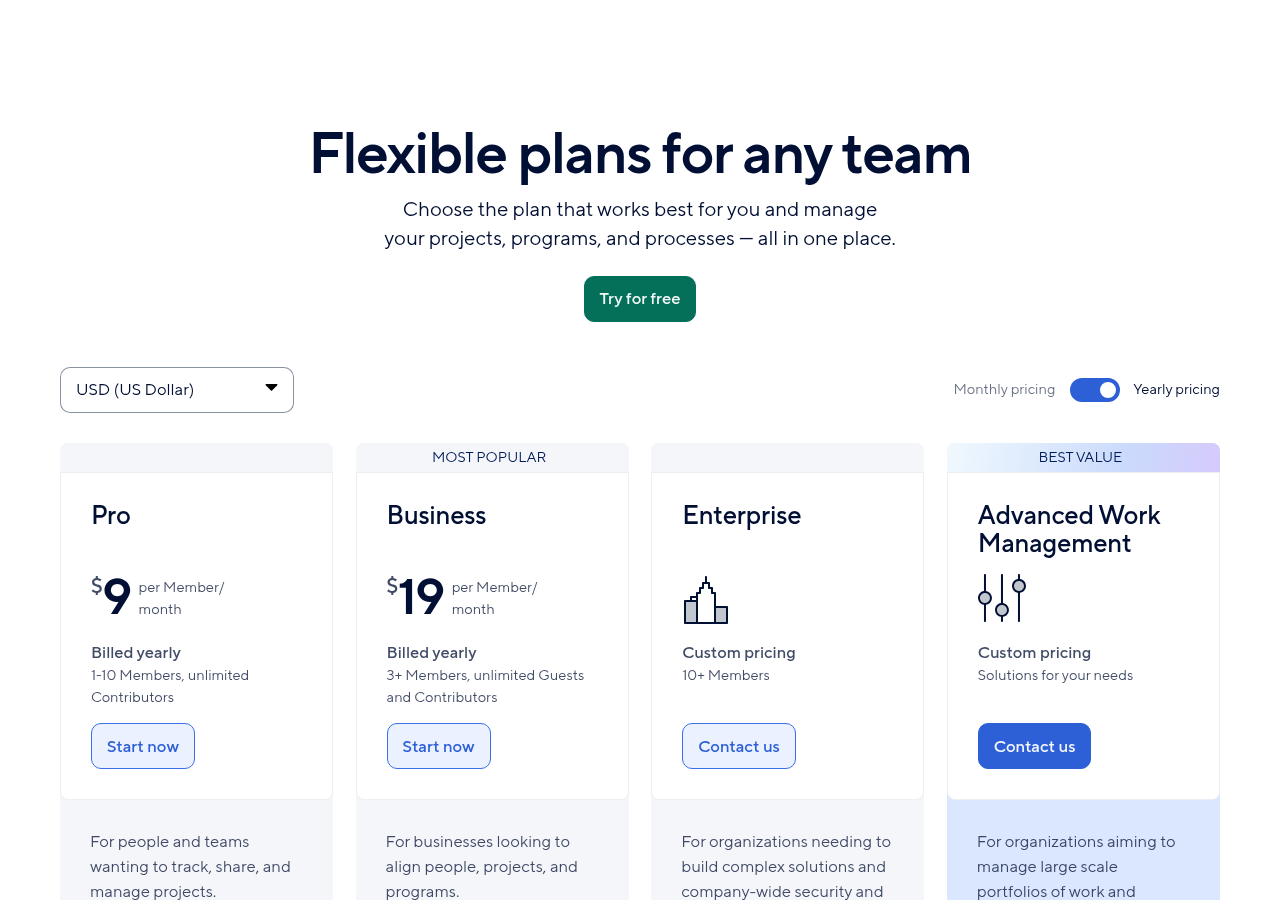
- Pro — $9/user/month (annual): Unlimited sheets, 250 automations/month, 20GB storage, Gantt view, basic reporting. Best for individuals and small teams.
- Business — $19/user/month (annual): Unlimited automations, forms, dashboards, resource management views, advanced reporting, unlimited editors. This is where Smartsheet becomes truly powerful.
- Enterprise — Custom pricing: SSO, directory integration, DLP, FedRAMP, custom permissions, dedicated account manager. Pricing typically ranges from $25-45/user/month depending on volume and contract length.
Hidden cost to watch: Resource Management by Smartsheet (formerly 10,000ft) is a separate paid product starting at $10/user/month on top of your Smartsheet plan. If capacity planning is critical to your workflow, budget for this additional cost.
Monday.com Pricing (2025)
- Free: Up to 2 users, 3 boards, limited views. Very restricted — mainly useful for evaluating the interface.
- Basic — $9/seat/month (annual, 3-seat min): Unlimited boards, unlimited items, 5GB storage, basic views. Lacks automations and integrations — most teams find this tier limiting quickly.
- Standard — $12/seat/month (annual, 3-seat min): Timeline view, Calendar view, Guest access (up to 3), 250 automations/month, 250 integration actions/month. This is the realistic starting point for most teams.
- Pro — $19/seat/month (annual, 3-seat min): Private boards, time tracking, formula columns, unlimited automations (25,000/month), dependency columns, Workload view. The tier where Monday.com truly shines.
- Enterprise — Custom pricing: Advanced analytics, enterprise-grade security, multi-level permissions, premium support. Comparable to Smartsheet Enterprise pricing.
Hidden cost to watch: Monday AI is an add-on at approximately $12/seat/month. Monday Dev and Monday CRM are separate product plans. If you need the full Monday.com ecosystem, your total cost can escalate quickly.
Feature Deep-Dive: The 6 Critical Comparison Points
1. Gantt Charts and Project Planning
Smartsheet: Native Gantt with dependency tracking, critical path highlighting, baseline comparison, and lag/lead time. Enterprise-grade for complex program management.
Monday.com: Timeline view (Gantt-style) with basic dependencies available on Standard plan and above. Good for straightforward project timelines, not suitable for complex program management with many interdependencies.
Winner: Smartsheet — by a significant margin for complex projects.
2. Automation
Smartsheet: Rule-based automation with powerful conditional logic. Can trigger automations based on date changes, status changes, cell value changes. Supports approval workflows and multi-step automation chains. More complex to configure but more powerful for enterprise workflows.
Monday.com: Visual recipe-based automation that non-technical users can configure in minutes. Supports integrations (Slack, email, HubSpot) natively within automations. AI-assisted automation generation added in 2024.
Winner: Tie — Monday.com for ease of setup; Smartsheet for complex logic.
3. Collaboration and Communication
Smartsheet: Comments on rows, @mentions, update requests (send a form-based request for info to anyone — even non-users), proof review for creative assets. Solid but not as real-time as Monday.com.
Monday.com: Updates section on every item functions like a task-specific thread. Guests can be added to specific boards. Integrates deeply with Slack for two-way communication. Monday Workdocs enable collaborative document creation directly inside the platform.
Winner: Monday.com — especially for cross-functional teams and external collaboration.
4. Reporting and Analytics
Smartsheet: Report Builder consolidates data across hundreds of sheets into a single live report. Dashboards support multiple widget types including charts, metrics, shortcuts, and embedded content. PMOs can build executive dashboards that pull live KPIs from every project simultaneously.
Monday.com: Dashboards provide visual summaries including battery widgets, numbers, charts, and workload views. Excellent for team-level visibility. Cross-board reporting available but not as granular as Smartsheet’s cross-sheet capabilities at scale.
Winner: Smartsheet — for enterprise-level portfolio reporting.
5. Integrations
Both platforms offer 200+ native integrations. Smartsheet has stronger enterprise integrations: SAP, Salesforce (with bi-directional sync), Jira, ServiceNow, and Microsoft SharePoint. Monday.com has stronger SMB/marketing integrations: HubSpot, Mailchimp, Shopify, Stripe, and a more refined Slack integration. Both connect to Zapier and Make (formerly Integromat) for thousands of additional integrations.
Winner: Tie — depends entirely on your existing tech stack.
6. Security and Compliance
This is where Smartsheet’s enterprise credentials pull significantly ahead. Smartsheet holds FedRAMP Moderate authorization (required for U.S. federal agencies), HIPAA compliance, ISO 27001, SOC 2 Type II, and GDPR compliance. Monday.com holds SOC 2 Type II, ISO 27001, and GDPR compliance but does not hold FedRAMP authorization. For government contractors, healthcare organizations, or companies with strict data residency requirements, Smartsheet is often the only option.
Winner: Smartsheet — for regulated industries and government use.
Real-World Use Cases: Who Should Use Which
Use Smartsheet if your team looks like any of these:
- A construction or engineering firm managing multi-phase projects with strict dependency tracking and resource allocation
- A government contractor or healthcare organization that requires FedRAMP or HIPAA-compliant project management
- A PMO (Project Management Office) that needs to roll up status from 50+ projects into executive dashboards
- An operations team that lives in Excel and needs to add automation, collaboration, and workflows without changing how they think about data
- An IT team running change management processes, service request intake, or compliance tracking at scale
Use Monday.com if your team looks like any of these:
- A marketing team managing campaigns, content calendars, and creative production workflows
- A growing startup that needs every team (product, marketing, sales, HR) on one platform within days — not weeks
- A sales team that wants to manage pipeline in a visual board and eventually upgrade to Monday CRM without switching platforms
- A software development team that wants Kanban-style sprint management that non-technical stakeholders can also use
- An agency managing client-facing projects where visual clarity and real-time updates matter for account management
What Real Users Say
On G2 and Capterra, both tools score 4.4-4.5 stars out of 5. But the nature of their reviews is revealing.
Smartsheet users frequently praise its power: “Once you understand the logic, nothing else comes close for complex project management,” writes one senior PMO analyst. But they also note the learning curve: “It took our team 3 weeks to really get comfortable. New hires need proper training.”
Monday.com users consistently praise adoption speed and visual appeal: “We had the whole company using it within a week — including people who had never used a PM tool before.” The criticism is predictable: “The pricing adds up fast when you have a large team, and some features we need are only on the Enterprise plan.”
Frequently Asked Questions
Can I migrate from Smartsheet to Monday.com (or vice versa)?
Yes. Monday.com offers an importer that can bring in CSV exports from Smartsheet. Complex sheet structures, formulas, and automation rules will not migrate automatically — those need to be rebuilt. Most migration projects for teams of 20-50 people take 2-4 weeks with dedicated effort.
Which is better for Microsoft 365 users?
Smartsheet has a deeper native integration with Microsoft 365, including Microsoft Teams, Outlook, SharePoint, and OneDrive. If your organization is standardized on Microsoft, Smartsheet integrates more seamlessly into your existing workflow.
Does Monday.com have Gantt charts?
Yes, Monday.com has a Timeline view which is a Gantt-style chart. It’s available from the Standard plan and supports basic task dependencies. However, it does not offer the critical path analysis, baseline tracking, or advanced predecessor logic that Smartsheet’s dedicated Gantt view provides.
Is Smartsheet worth it for small teams?
For teams under 10 people with straightforward project needs, Smartsheet can feel like overkill. The Pro plan at $9/user/month is affordable, but small teams often don’t need enterprise reporting and advanced dependency tracking. Monday.com or even a lighter tool like Notion or Trello may better serve small teams.
Which has a better free plan?
Smartsheet’s free plan allows 1 licensed user with 2 additional editors — making it slightly more useful for a very small team testing the platform. Monday.com’s free plan supports only 2 users with very limited features. Neither free plan is suitable for real production use; they’re primarily for evaluation.
Final Verdict: Smartsheet vs Monday.com
Choose Smartsheet if: You manage complex, multi-phase projects with strict dependencies; you need enterprise-grade compliance (FedRAMP, HIPAA); your team thinks in spreadsheets; or you need powerful cross-project reporting for a PMO or executive audience.
Choose Monday.com if: You need the whole organization — not just project managers — using the tool within days; you value visual design and intuitive workflows; your team spans multiple functions (marketing, sales, HR, product); or you want AI features built into your work management platform today.
The good news: both offer free trials without a credit card. The best way to decide is to take the same real project and build it in both tools over a week. You’ll know within days which one your team will actually use — and adoption is ultimately what makes any work management tool successful.