Smartsheet vs Jira 2026: Which Tool Fits Your Team (or Both)?
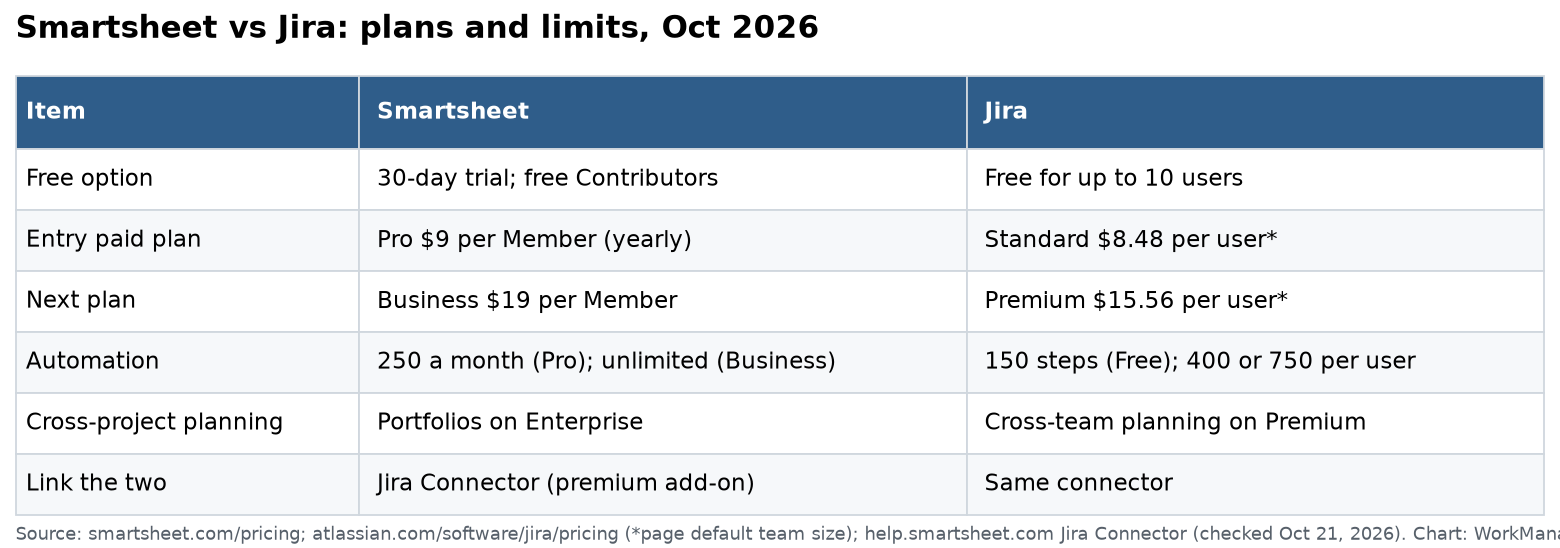
Jira is built for software teams: backlogs, sprints, bugs and releases. Smartsheet is built for business and operations teams: schedules, intake, budgets and status reports. Jira is free for up to 10 users, then about $8.48 per user a month on Standard. Smartsheet Pro is $9 per Member a month, billed yearly, with free Contributor seats. Many larger companies use both and connect them.
I checked Atlassian’s Jira pricing page, Smartsheet’s pricing page and Smartsheet’s Jira Connector setup guide on October 21, 2026. Disclosure: my company, SSPM, is a Smartsheet partner. Where Jira is the better tool, I say so.
The core difference
Jira thinks in work items and workflows. A bug or story moves through statuses like To Do, In Progress and Done. Teams plan sprints from a backlog, track velocity and link work to code. It has board, backlog, list, timeline, calendar and summary views on every plan.
Smartsheet thinks in rows, dates and reports. Each row is a task with an owner, dates and status. Dependencies drive a Gantt chart and critical path. Reports and dashboards roll many sheets up for leaders.
If your work ends in shipped code, Jira fits. If it ends in a finished project, event, rollout or approved request, Smartsheet fits.
Prices in October 2026
Jira:
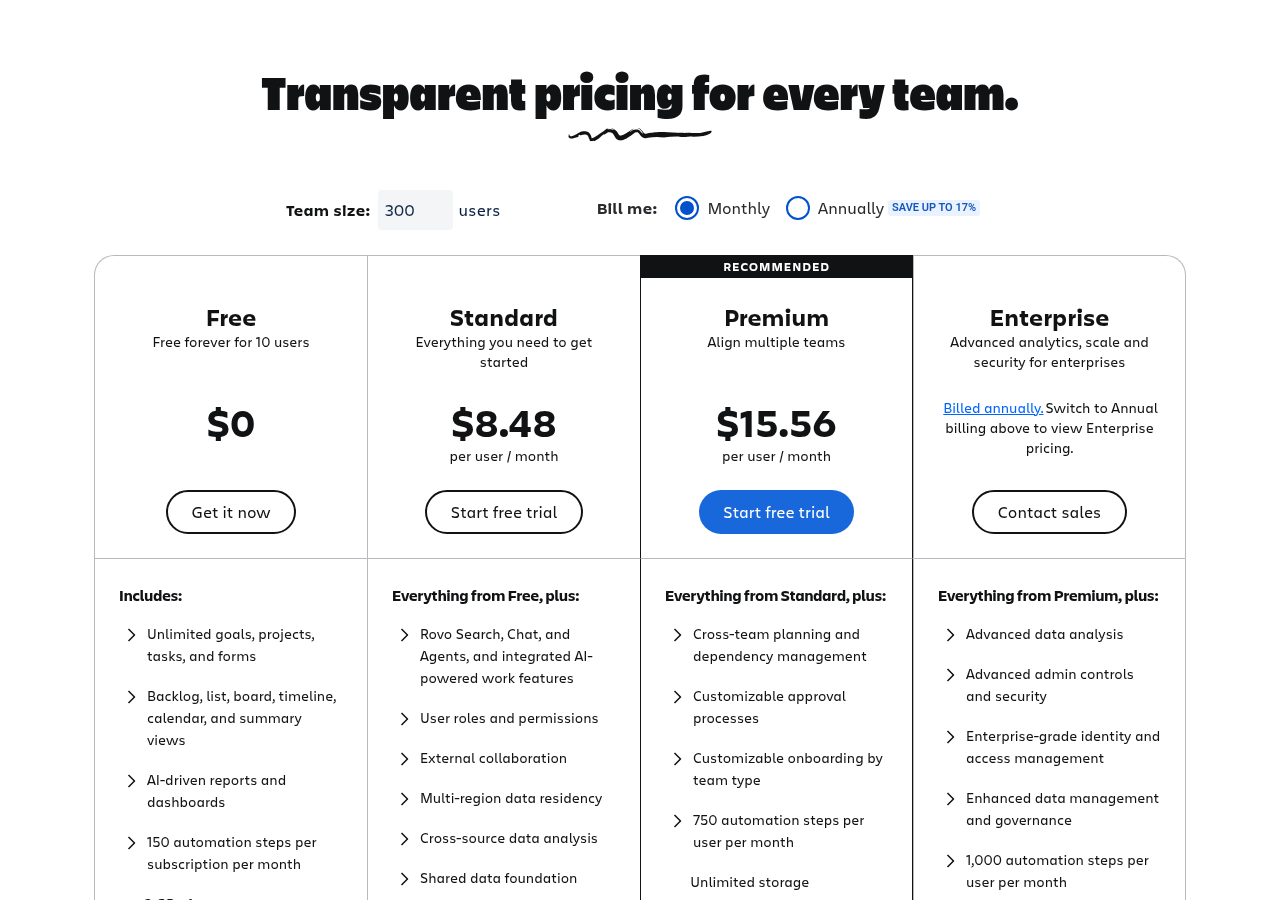
- Free: up to 10 users, 150 automation steps per month for the whole site, 2 GB of storage, 100 emails a day.
- Standard: about $8.48 per user a month. 400 automation steps per user a month, 250 GB of storage, user roles and external collaboration.
- Premium: about $15.56 per user a month. Cross-team planning and dependency management, approvals, 750 steps per user, unlimited storage, 99.9% uptime SLA.
- Enterprise: annual quote. 1,000 steps per user, up to 150 sites.
Atlassian’s per-user rate depends on team size and billing choice. These are the rates the page showed at its default team size when I checked, so price your real headcount on the page.
Smartsheet (yearly):
- Pro: $9 per Member. 1 to 10 Members, free Contributors, 250 automations a month.
- Business: $19 per Member. 3+ Members, free Guests, Timeline view, workload tracking, unlimited automations.
- Enterprise: quote, 10+ Members. Portfolios, scenario planning, SAML SSO.
- Advanced Work Management: quote. Control Center, Dynamic View, Data Shuttle and connectors.
Where Jira wins
- Software delivery. Backlogs, sprints, story points, releases and bug tracking are the core product.
- Free for small dev teams. Up to 10 users at $0 is hard to beat.
- Workflow control. Custom workflows with rules on each transition.
- Developer tools. Deep links with code tools, and AI through Atlassian Rovo on paid plans: 70 credits per user a month on Standard and 150 on Premium.
- Scale. Up to 100,000 users per site on paid plans.
Where Smartsheet wins
- Date-driven projects. Dependencies, auto-shifting dates and a critical path on Pro.
- Non-technical users. The grid looks like a spreadsheet. Finance, HR, marketing and PMO teams pick it up fast.
- Cheap outside access. Contributors are free, so clients and vendors can view and comment at no cost.
- Portfolio reporting. Reports across many sheets, and Control Center for standard project blueprints at scale.
- Unlimited automation on Business. No step budget to watch.
Automation limits side by side
| Plan | Monthly automation |
|---|---|
| Jira Free | 150 steps for the whole site |
| Jira Standard | 400 steps per user |
| Jira Premium | 750 steps per user |
| Smartsheet Pro | 250 automations |
| Smartsheet Business | Unlimited |
Jira Free’s 150 steps are shared by everyone. A team of 8 with a few rules can use that in the first week. If automation matters, budget for Standard.
The hybrid setup: use both
Many enterprises run engineering in Jira and the business side in Smartsheet. The Smartsheet Jira Connector syncs data both ways. It links Jira issues to rows, columns and cells in a sheet. A program manager sees engineering progress in a Smartsheet portfolio without asking for status in meetings.
What you need to know before you buy it:
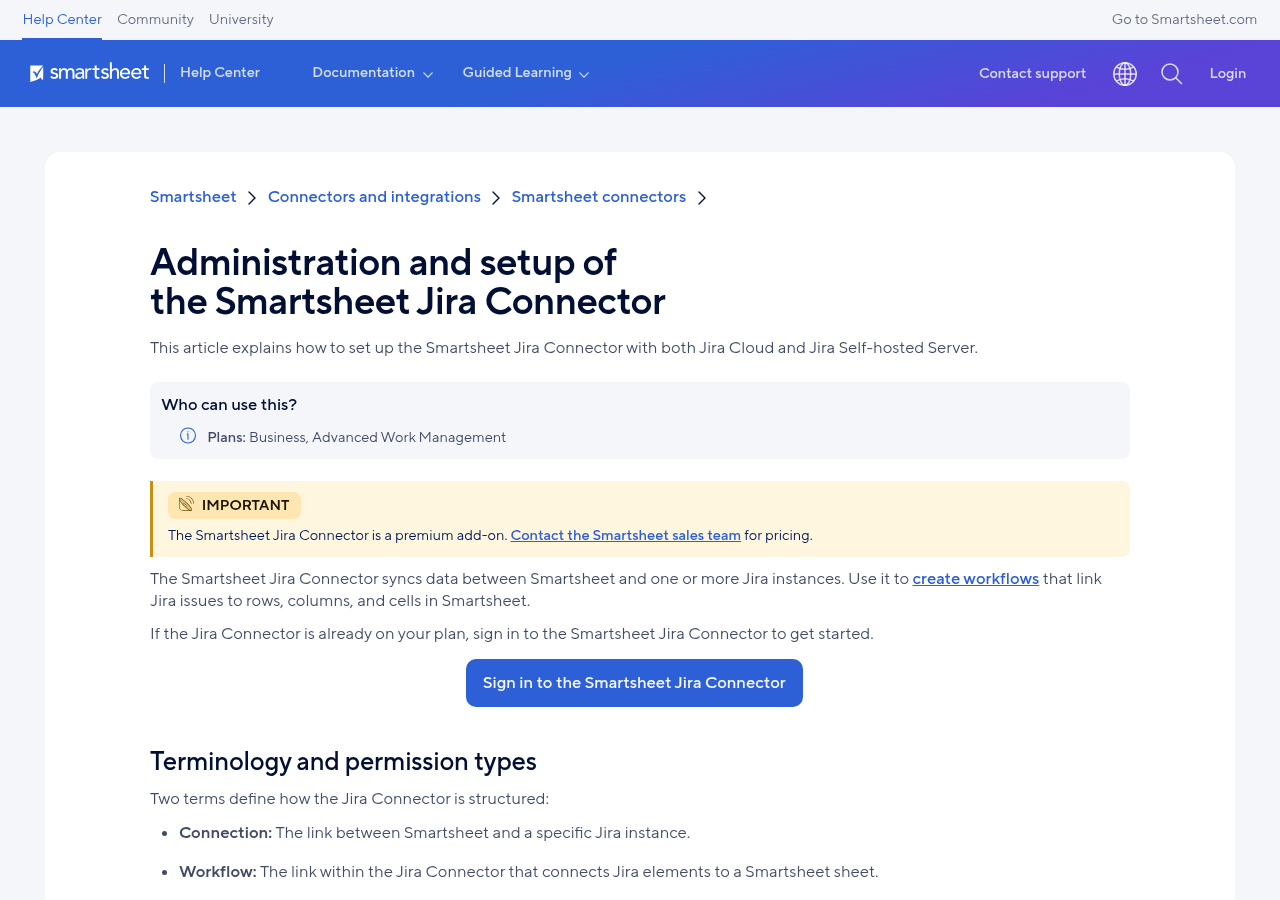
- It is a premium add-on. Smartsheet’s setup guide says to contact sales for pricing. It is for Business and Advanced Work Management plans, and the FAQ also lists Enterprise.
- It works with Jira Cloud and self-hosted Jira.
- Three roles: a Smartsheet System Admin manages access, a Jira Connector Admin creates the connection, and Jira Connector Users build sync workflows.
- Use a shared account for setup. Smartsheet says connection ownership cannot be transferred. If the person who created it leaves, you have a problem. Use a shared, licensed email such as smartsheet-jira@yourcompany.com for both tools.
- Workflow users need Editor access or higher on the mapped sheets and the right access in the Jira projects.
My advice: sync only the fields leaders need, such as summary, status, assignee, sprint and due date. Syncing every field both ways creates conflicts and noise.
Five questions to settle it
Ask your team these before a trial:
- Does most of our work end in code? If yes, start with Jira.
- How many people only need to view or comment? The more there are, the more Smartsheet’s free Contributors save.
- Do we schedule with fixed dates and dependencies? Smartsheet’s Gantt and critical path are stronger for that.
- How many automations will we run? Count them per month. Jira Free’s 150 site-wide steps go fast. Smartsheet Business has no cap.
- Who will own the tool? Jira usually needs an admin who knows workflows and schemes. Smartsheet needs someone who keeps sheets tidy and reports current.
When to choose just one
Choose only Jira if your company is mostly engineering and your project managers are comfortable in Jira. Jira Premium’s cross-team planning covers a lot of program work.
Choose only Smartsheet if you have no software team, or your developers are a small group with simple needs. Smartsheet can track a light backlog, but it has no sprint reports or code links.
Choose both if you have more than one engineering team plus a PMO or operations group that reports to leaders. This is a common setup at larger companies, and it is where the Jira Connector pays for itself.
Related guides
- Jira pricing 2026
- Smartsheet review 2026
- Smartsheet and Jira integration guide
- Jira sprint planning guide
Common questions
Can Smartsheet replace Jira for software teams?
For a small team with simple tasks, maybe. For sprints, velocity, releases and code links, Jira is the better tool.
Can Jira replace Smartsheet for operations teams?
It can, but non-technical teams often find Jira harder to use, and outside viewers are cheaper in Smartsheet with free Contributors.
Is Jira free?
Yes, for up to 10 users, with 150 automation steps a month for the site and 2 GB of storage.
How much is the Smartsheet Jira Connector?
Smartsheet does not publish a price. It is a premium add-on, so you contact Smartsheet sales.
Which is better for large enterprises?
Usually both: Jira for engineering and Smartsheet for portfolio, operations and executive reporting, linked by the Jira Connector.
Sources
- Atlassian: Jira pricing (checked Oct 21, 2026)
- Smartsheet pricing
- Smartsheet Help: Admin setup of the Smartsheet Jira Connector
- Smartsheet Help: Jira Connector FAQs
- Smartsheet Help: Seat types
From our team: OneSmar for Smartsheet Teams