Asana AI Studio in 2026: Credits, Rules, Teammates and When to Use Them
Asana AI Studio lets you put AI steps inside workflows. It is not the same as a normal Rule, and it is not the same as an AI Teammate. Rules without AI still solve most busywork. Use AI Studio when the step needs reading language or messy context. Watch your monthly credits.
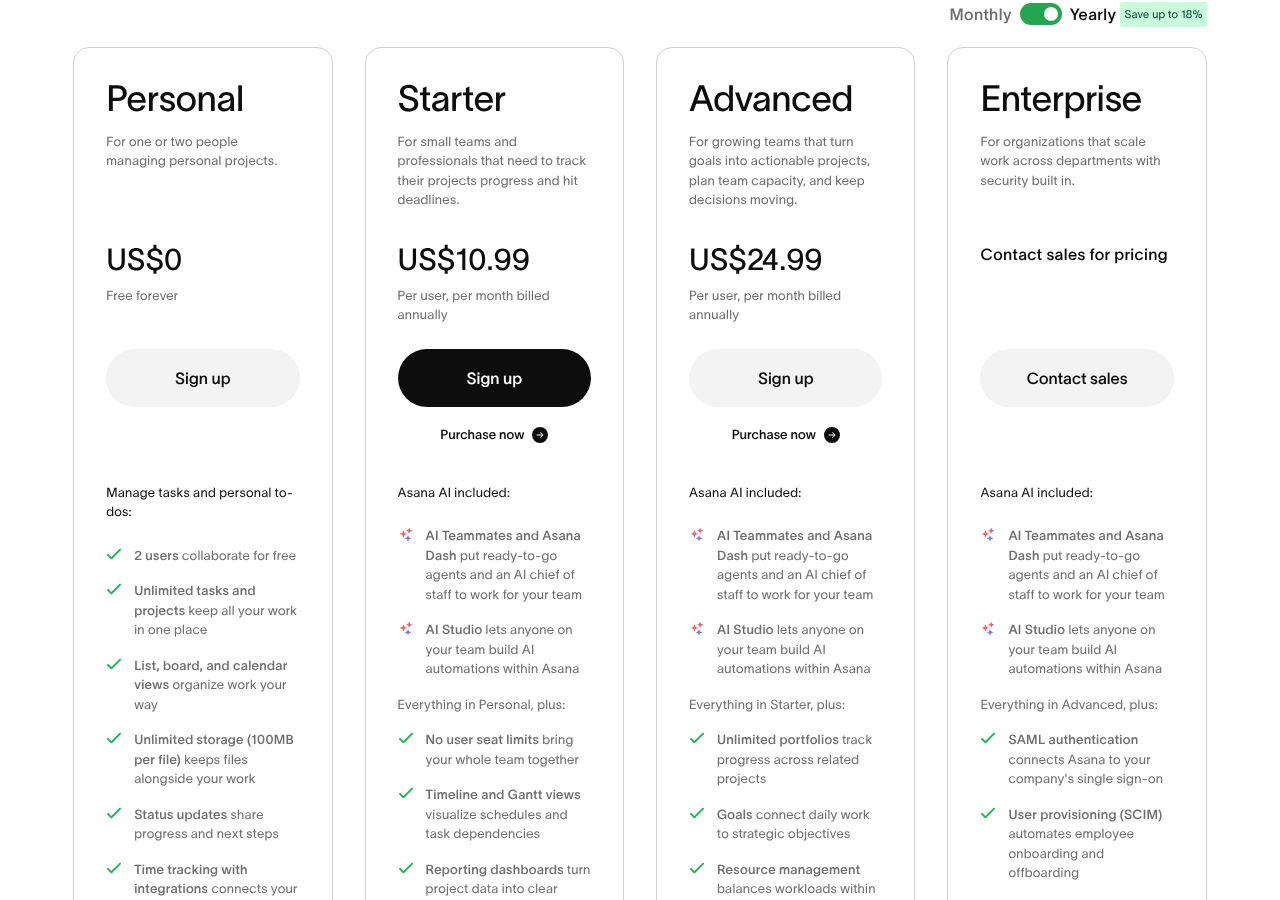
I checked Asana pricing on October 19, 2026. AI Studio credit buckets by plan: Starter 50,000, Advanced 75,000, Enterprise 200,000 credits per billing account per month. AI Teammates share a separate request pool (5 per user per month, with account caps). Extra AI requests cost $0.50 prepaid or $0.60 pay as you go. Related posts: Asana AI Teammates setup, our Asana guide, our Asana guide and Asana custom fields.
This rewrite also folds unique points from an older automation guide (former post 4122): treat Rules, AI Studio and AI Teammates as three layers with different prices and governance.

The three automation layers
| Layer | What it does | Best for |
|---|---|---|
| Standard Rules | If X then Y, no AI | Assign, move section, set field |
| AI Studio | AI steps inside a workflow | Summarize, classify, draft from text |
| AI Teammates | Agents you assign work to | Ongoing ownership of a class of tasks |
My advice: build the Rule first with no AI. Only add an AI step when a normal condition cannot read the comment or attachment.
Plan and credit facts (Oct 19, 2026)
From asana.com/pricing:
- Starter $10.99/user/mo yearly includes AI Studio Basic with 50K credits/account/mo
- Advanced $24.99/user/mo yearly includes 75K credits/account/mo
- Enterprise (quote) includes 200K credits/account/mo
- Asana also sells AI Studio Plus/Pro options for higher usage and billing controls
- AI Teammate requests: 5 per user per month (account max 50 on Starter/Advanced, 250 on Enterprise)
Credits and Teammate requests are easy to confuse. Credits power Studio workflows. Requests power Teammates and Dash work that counts as a completed AI request.
How to set up a safe first Studio workflow
- Confirm an admin enabled Asana AI for the domain.
- Open a project → Customize → workflows / AI Studio entry point (labels move; look for AI Studio or smart workflows).
- Start from a template if Asana offers one for intake triage.
- Trigger on something clean: form submit or task created in a section.
- Add one AI step (for example: classify request type from the description).
- Write the result into a custom field.
- Follow with a normal Rule action: assign by that field.
- Test with five real tasks. Check credit use in admin tools.
Gotcha: garbage in, garbage out. If descriptions are empty, the AI step invents noise. Require a long description on the form first.
Update, November 10, 2026: Asana added AI Meetings and Tables on Advanced and higher. Meeting summaries use AI requests (one per 60 minutes), not AI Studio credits. Read our AI Meetings and Tables guide before you plan AI spend.
Governance people forget
- Turn AI off for projects with payroll or health data unless legal signed off.
- Limit who can publish Studio workflows. One bad prompt can spam assignees.
- Cap on-demand AI spend. Asana documents spend caps and usage alerts on paid AI requests.
- Log what the AI wrote into a comment so humans can audit.
When AI Studio is the wrong buy
- Your pain is missing due dates → fix process, not AI.
- You need deterministic compliance steps → use normal Rules only.
- You are on Personal free → upgrade to Starter before any Studio talk.
- You mainly want chat summaries → that may be Dash/Teammate usage, not Studio credits.
Fold-in lessons from classic Asana rules (ex-4122)
- Triggers live under project Customize.
- Branching forms need Advanced.
- Unlimited rules start on Starter; that alone solves many “we need AI” tickets.
- Script actions and workflow bundles are Enterprise territory.
Real use cases that pay for themselves
Intake triage. A form lands in a triage project. AI Studio reads the description, sets a Request type field, then a normal Rule assigns the team. Humans only handle the odd cases.
Meeting follow-up. After a status meeting, paste notes into a task. An AI step extracts action items into subtasks. A person still owns due dates.
Bug sentiment routing. Customer quotes in a task get a sentiment tag. Angry accounts go to a senior queue. Do not auto-email customers from AI text.
Weekly summary comment. On Fridays, an AI step drafts a project summary into a comment. The PM edits it before leadership sees it.
If the workflow cannot name the human who checks the output, do not ship it.
Credit math without marketing fluff
Suppose Advanced gives 75,000 credits a month for the whole billing account. That pool is shared. One noisy project can burn the company allotment. Put Studio workflows only on high-value projects first. Review usage weekly for the first month.
If you need more than the included bucket, Asana sells extra AI requests and higher Studio tiers. Read the live pricing FAQ before you assume a unit price. The public page lists prepaid AI requests at $0.50 and on-demand at $0.60 when we checked October 19, 2026.
Prompt and field design tips
- Tell the AI which custom field values are allowed. Free text categories drift.
- Keep prompts short. Long prompts with company novels waste credits.
- Write failure behavior: if confidence is low, set field to Needs human review.
- Never let AI change due dates without a Rule condition you understand.
Rollout plan for a 30-person workspace
Week 1: enable AI for a pilot team only.
Week 2: ship one triage workflow. Measure credits and error rate.
Week 3: train builders on Rules-first design.
Week 4: decide expand, pause, or buy more capacity.
Skip company-wide AI Day launches. Quiet pilots beat noisy failures.
Comparison to ClickUp and monday AI
ClickUp is mid-shift between classic plans (AI as add-on) and new plans (AI credits bundled). monday.com bundles AI credits by plan on the work platform. Asana’s split between Studio credits and Teammate requests is clearer once you learn it, but it is still two meters to watch. Compare seats and AI meters on the same spreadsheet before you switch tools.
Sources
- Asana pricing (checked Oct 19, 2026)
- Asana AI Teammates help
- Asana product: AI Studio
Common questions
How is AI Studio priced?
Paid plans include a monthly credit bucket. Starter 50K, Advanced 75K, Enterprise 200K per account. Asana also sells higher Studio tiers and extra AI requests at $0.50 prepaid or $0.60 on demand.
Do AI Studio and AI Teammates share the same limit?
No. Studio uses credits. Teammates use AI requests (with per-user and account caps). Dash shares the request pool for work that counts as an AI request.
Can I build Studio flows on the free plan?
No. AI Studio is listed on Starter and above on Asana’s pricing page.
Should every rule use AI?
No. Prefer normal Rules. Add AI only when the step must read free text or messy context.
What burns credits fastest?
Broad workflows that run on every task edit, plus long prompts on busy projects. Narrow the trigger.
Where do I see usage?
Admins get live usage views in the admin console. Set alerts before you hit 100%.
From our team: OneSmar for Smartsheet Teams