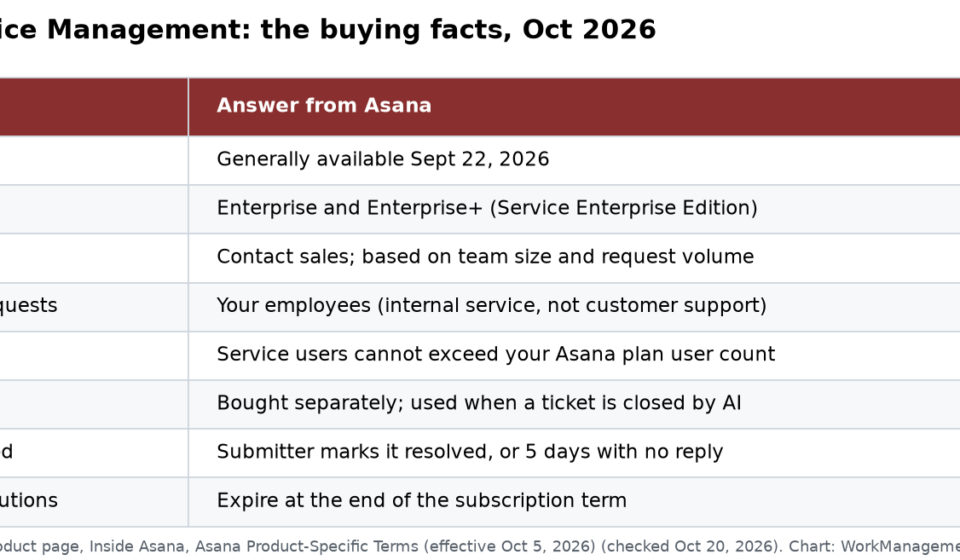

Asana Service Management is a new Asana product. It handles staff requests to IT, HR, facilities, finance and legal. It went live on September 22, 2026. It is sold to Enterprise and Enterprise+ customers, and you must ask sales for a price. It is for your own staff, not your customers. AI ticket work is billed with add-on units called “AI Resolutions.”
I read Asana’s product page, the launch post, the community announcement and Asana’s Product-Specific Terms on October 20, 2026. Everything below comes from those pages. I have not used it in a live account. It is not sold on self-serve plans.
What Asana Service Management does
Asana describes four core pieces:
- One front door for requests. Employees submit through the Asana portal, Slack or email. They don’t need to know which team owns it. AI sends it to the right queue.
- A 24/7 AI agent. It uses your help articles to handle simple asks. Think password resets, access requests and policy questions. A person never has to touch them.
- A self-learning knowledge base. When a request is closed, the product drafts a help article from it. Over time, the AI can answer more.
- Request to project in one click. Some requests need several teams, like an office move. That request can become an Asana project with owners, approvals and due dates. The details carry over.
Asana also says every request and ticket keeps a full audit trail.
Who it is for (and who it is not for)
Many early readers got this wrong. On Asana’s forum, a well-known Asana partner said you need a license to submit a ticket. An Asana product marketing manager replied on October 1, 2026: “This is an internal employee service product, not a customer service product.”
So:
- Good fit: a company on Asana Enterprise that wants staff requests for IT, HR and facilities in one place.
- Not a fit: teams that need clients or the public to open tickets. Use a customer help desk for that.
One more open question. On October 5, a forum user asked if teams can reply to requesters by email, without the requester using Asana. As of October 20, 2026, that thread has no answer.
Plans and pricing
From the product page and the terms:
- Edition: “Service Enterprise Edition.”
- Plans: available on Enterprise and Enterprise+. It is not on Personal, Starter or Advanced.
- Price: not listed. Asana’s forum post says to talk to your Account Manager about pricing.
- What the add-on includes: Asana’s terms say the Enterprise Add-On has two parts: the Self-Learning Knowledge Base and the Enterprise Platform.
- User cap: you can’t have more Service Management users than users on your current Asana plan.
How AI Resolutions are billed
This is the part finance teams should read. The Product-Specific Terms (last updated October 1, 2026, effective October 5, 2026) say:
- AI Resolutions are bought separately. They are an optional add-on.
- When one is used: the AI closes a ticket, and the person who sent it marks it done or does nothing for 5 days.
- What doesn’t count: timed-out errors, service failures and failed requests.
- Pooling: AI Resolutions are pooled. Any user can use them during the term.
- Expiry: unused AI Resolutions expire at the end of your subscription term. No refunds, credits or carryover.
- Not AI Requests: a ticket closed by an AI agent uses an AI Resolution. It does not use Asana’s general AI Requests.
What this means for you: the “5 days with no reply” rule counts silence as a fix. Say a worker ignores the AI’s answer and emails IT instead. You may still use up a unit. Track how many AI-closed tickets come back another way.
How it compares with what you may run today
| If you use | What to weigh |
|---|---|
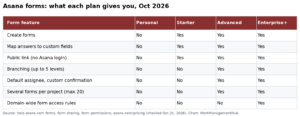
| Asana forms plus rules | Cheaper and fine for one team. See our Asana forms intake guide. |
| Jira Service Management | Mature ITSM. See our Jira Service Management guide. |
| monday service | Similar “one platform” pitch. See our monday service guide. |
| Email aliases and Slack channels | The exact problem Asana says it is solving |
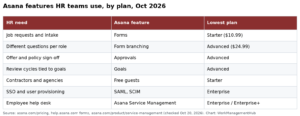
For HR teams already on Asana, our Asana for HR guide shows what you can do with forms and templates before you buy anything new.
Other Asana launches the same month
Asana shipped several products around the same time in fall 2026:
- Command by Asana (September 24, 2026).
- Asana Client Management, generally available September 28, 2026. This one is aimed at work with outside clients.
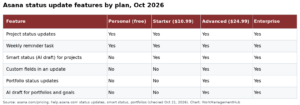
- Subtask date rollups (October 8, 2026).
Questions to ask Asana sales
- What is the price per user, and how is request volume counted?
- How many AI Resolutions come in a pack, and what does each pack cost?
- Can requesters reply by email without an Asana license?
- Which SLA reports come built in?
- How do we move open tickets from our current tool?
- Can we start with one department, like IT, and add HR later?
What I would do now
- On Asana Enterprise already? Ask for a demo with one real IT or HR queue. Bring last month’s ticket count, so the AI Resolution quote fits your volume.
- On Starter or Advanced? This product is not for your plan. Build a request form with rules first. It costs nothing extra.
- Need tickets from clients? Skip this. It is built for staff only.
I will update this post when Asana posts public prices or answers the email question.
Common questions
What is Asana Service Management?
An Asana product for staff requests to IT, HR, facilities, finance and legal. It has AI routing, a 24/7 AI agent and help articles that build themselves.
When did Asana Service Management launch?
Asana made it generally available on September 22, 2026.
Which Asana plans include Service Management?
It is offered as the Service Enterprise Edition on Enterprise and Enterprise+ plans. Pricing is through Asana sales.
Can customers outside my company submit tickets?
No. Asana says it is an internal employee service product, not a customer service product. A license is needed to submit a ticket.
What is an AI Resolution in Asana?
A paid unit. One is used when Asana’s AI closes a ticket and the sender marks it done or doesn’t reply for 5 days. Unused ones expire at the end of the term.
Sources
- Asana: Asana Service Management product page
- Inside Asana: Asana Service Management, now generally available
- Asana Community: Asana Service Management is here
- Asana Product-Specific Terms (effective Oct 5, 2026)
Sponsored