Asana AI Meetings and Tables: What They Cost and Who Gets Them
Asana launched AI Meetings on November 4, 2026. It records Zoom, Google Meet and Microsoft Teams calls, writes a summary and turns action items into draft tasks. Tables, a new place to keep shared records like vendors or assets, came out next to it. Both need the Advanced plan ($24.99 per user per month, billed yearly) or higher. Each meeting summary uses AI requests, and Advanced accounts get at most 50 included requests a month.
I read Asana’s launch posts, the live pricing page and the AI Meetings feature page on November 10, 2026. This guide covers what each feature does, what it really costs, how to set it up and when I would not upgrade for it.
What Asana launched
Asana posted the AI Meetings launch in its community forum on November 4. Its blog post presents AI Meetings and Tables as one release. Here is the short version:
- AI Meetings transcribes calls (writes down what was said), writes a summary and suggests tasks. Each suggested task can have a suggested owner, either a person or an AI Teammate (an Asana agent that does assigned work).
- Tables store records, such as a vendor list or an equipment list. A record sits next to your projects, portfolios and goals. You link records to tasks, and details show up in every linked project.
- Both feed what Asana calls the Work Graph (its map of people, projects, goals and tasks). That means Asana Dash and AI Teammates can use meeting notes and table records as context.
Which plans get AI Meetings and Tables
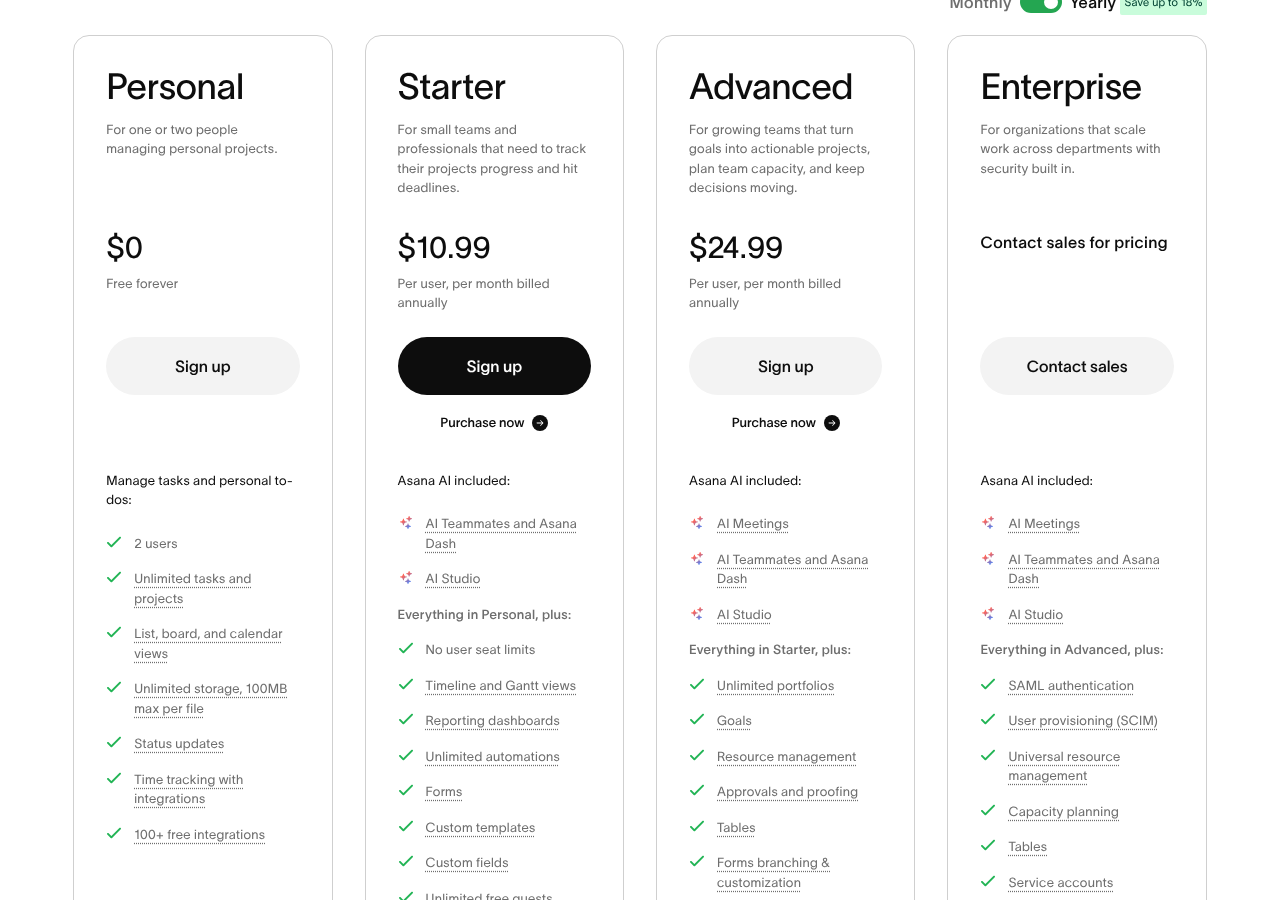
Neither feature is on Personal or Starter. Here is what the pricing page showed on November 10, 2026:
| Plan | Price per user / month | AI Meetings | Tables | Included AI requests |
|---|---|---|---|---|
| Personal | $0 (up to 2 users) | No | No | None |
| Starter | $10.99 yearly, $13.49 monthly | No | No | 5 per user, max 50 per account |
| Advanced | $24.99 yearly, $30.49 monthly | Yes | Yes | 5 per user, max 50 per account |
| Enterprise | Custom | Yes | Yes | 5 per user, max 250 per account |
| Enterprise+ | Custom | Yes | Yes | 5 per user, max 250 per account |
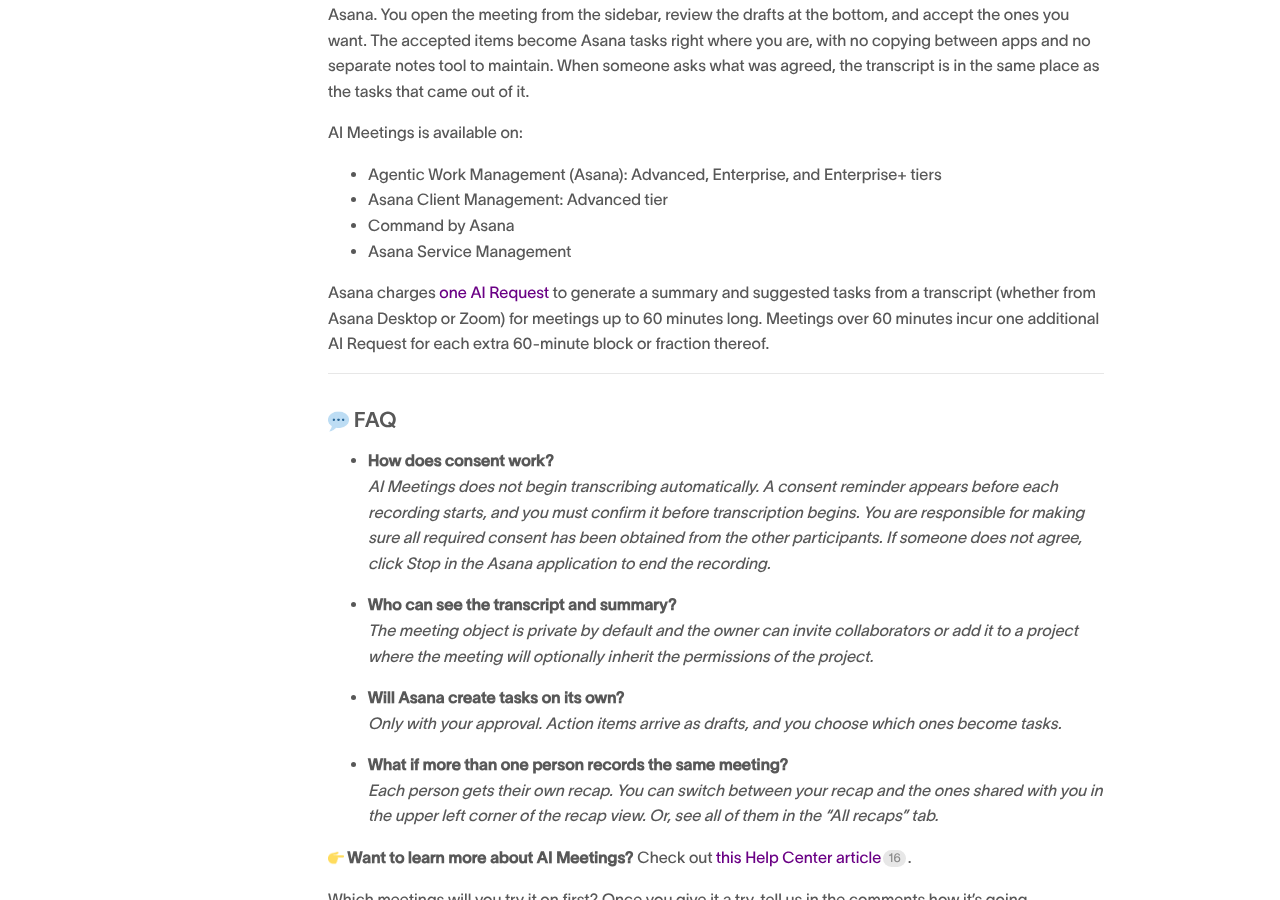
The launch post also lists AI Meetings on Asana Client Management (Advanced tier), Command by Asana and Asana Service Management. If you are new to that last product, see our Asana Service Management launch guide. For the full plan breakdown, see our Asana pricing guide.
How AI Meetings works
Here is the flow, based on the launch post:
- Connect a calendar. Link Google Calendar or Outlook. Your meetings then show under Knowledge > Meetings in the left sidebar.
- Pick how to capture the call. Record with the Asana Desktop app for Zoom, Google Meet or Teams. Or connect Zoom so cloud recordings from meetings you host come in on their own. The calendar event needs a Zoom, Meet or Teams link.
- Confirm consent. A consent reminder shows up before each recording. Transcription does not start until you confirm it.
- Review the drafts. Suggested tasks show up as drafts at the bottom of the meeting. You edit, accept or decline each one. You can also accept them all at once.
- Share on purpose. The meeting is private by default. You can add people or add the meeting to a project. Anyone you add sees the whole thing: summary, transcript and action items.
If two people record the same meeting, each gets their own recap. You can switch between them in the All recaps tab.
What AI Meetings really costs
The seat price is only part of it. Per Asana’s launch post, each summary with suggested tasks uses one AI request for a meeting of up to 60 minutes. Every extra 60 minutes, or part of 60 minutes, adds one more request. So a 61-minute meeting uses 2 requests, and a 2.5-hour workshop uses 3.
The pricing page lists one pool of included AI requests: 5 per user per month, with a cap of 50 per account on Starter and Advanced and 250 on Enterprise. Past that, you pay:
- $0.50 per request if you buy prepaid usage packs.
- $0.60 per request if you pay as you go, billed monthly. You can set a monthly spend cap.
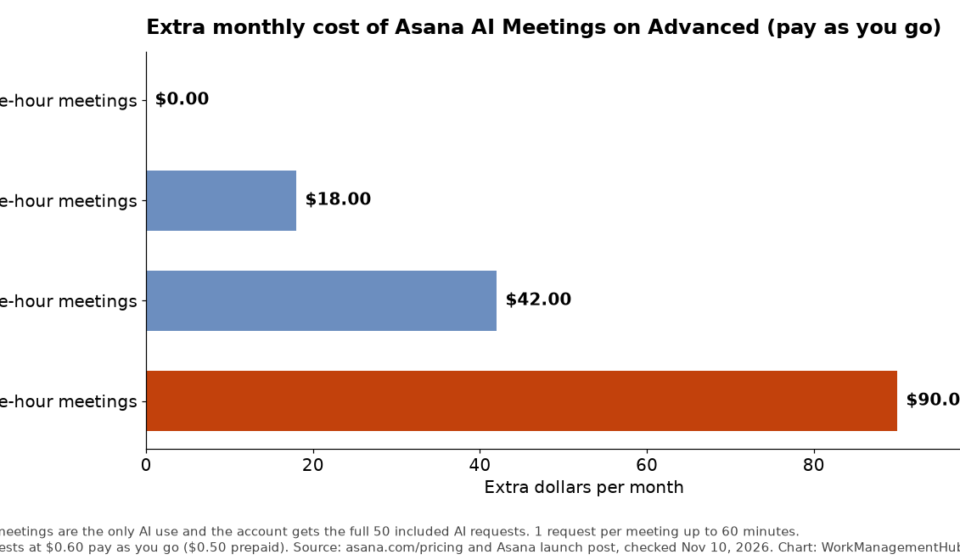
Here is the extra bill for an Advanced account of 10 or more users, if meetings were the only AI use:
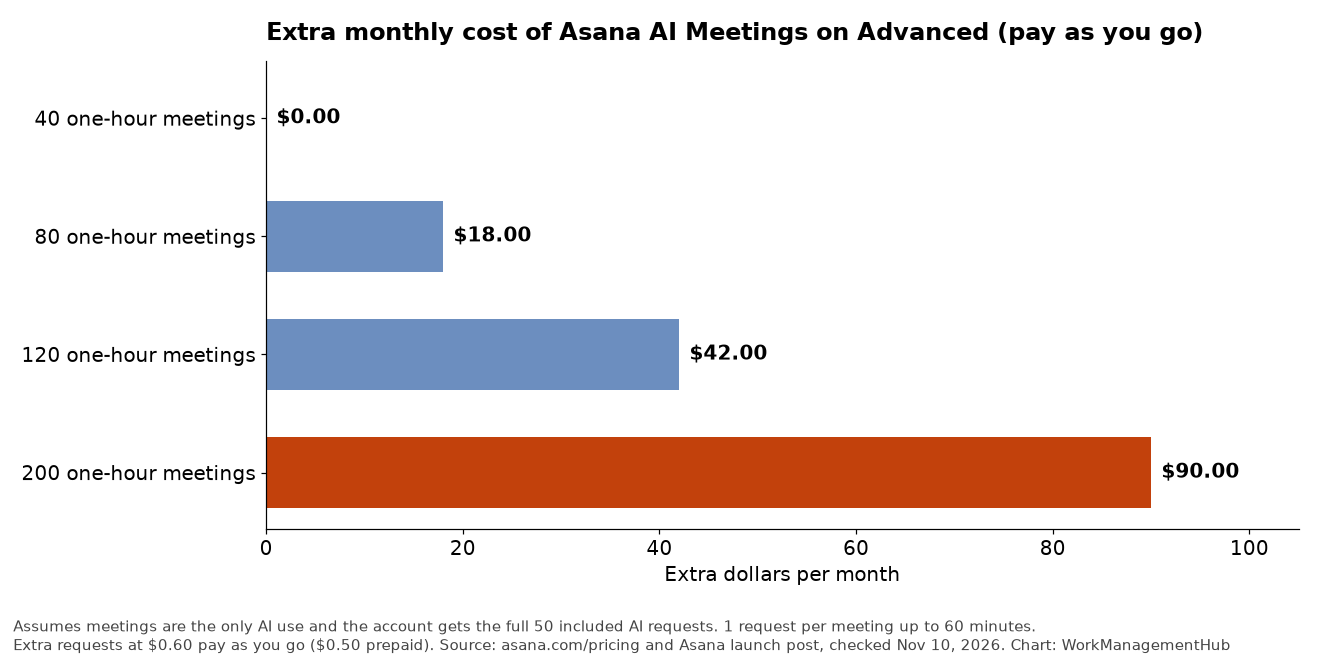
The meeting cost is small next to seats. A 10-user team pays $249.90 a month on Advanced (yearly billing) versus $109.90 on Starter. That is a $140 jump each month, or $1,680 a year. The real question is whether Advanced is worth it for you, not the AI requests.
One more catch: AI Teammates and Asana Dash draw from the same pool. A 25-person Advanced team still gets only 50 included requests, not 125. If your team already uses AI Teammates heavily, meeting summaries will push you into paid usage sooner.
How Tables works
Tables is for data that exists whether or not a task does. Think vendors, office sites, customers or brand assets. Asana’s own forum post says it is not meant to replace a CRM (a sales contact system) or a formula-heavy spreadsheet.
To set one up:
- Start a table. Build it from scratch, import a CSV file, or open a project, click the drop-down next to its name and pick Create table from project. You can also load records by API or MCP (a standard way for AI tools to connect to apps).
- Add fields. Add custom fields like owner or category, so every record has the same details.
- Link records to work. Add a reference field (a field that points to a record) to your project.
- Show record details. Add a lookup field. It pulls a value, like an address, from the linked record. Change the record once, and every linked project shows the new value.
Tables uses Asana’s normal permissions at the table and record level. People only see records they can access. If you are deciding between a table and a plain custom field, our Asana custom fields guide explains how fields behave today.
Gotchas I would check before you roll it out
- Consent is on you. Asana shows a reminder, but you are responsible for getting consent from everyone on the call. Some US states require every person to agree. If someone says no, click Stop in Asana.
- Zoom import only covers meetings you host. Calls you join as a guest need the Asana Desktop app to record.
- Shared means fully shared. Add a meeting to a project, and project members can read the full transcript, not just the summary. Keep HR and client-sensitive calls private.
- Long meetings cost more. A 90-minute call is 2 requests. Weekly half-day workshops add up fast.
- Lookup fields have early limits. In an Asana forum thread on lookup fields, forum leaders reported that a lookup returns only the first match when a reference field holds more than one record. They also said the quick way to add a lookup works in List view, not Board view. Test with your own data first.
- Drafts still need a human. Tasks are never created without your approval. Plan who reviews drafts after each meeting, or they will pile up.
Who should upgrade, and who should wait
Upgrade to Advanced (or turn these on) if:
- You already pay for Advanced. Both features are included. Turn on AI Meetings for one recurring meeting first.
- Your team keeps copying action items from notes into Asana by hand.
- You track vendors, assets or locations in spreadsheets and paste the same details into many projects.
Stay on Starter for now if:
- You only want meeting notes. A $140 a month jump for 10 users is a lot to pay for summaries alone.
- You already pay for a meeting notetaker and your team is happy with it.
- Your calls are mostly sensitive, like legal, HR or client calls, and you cannot get consent each time.
If you are weighing AI features across tools, our Asana vs monday.com vs ClickUp AI comparison covers the bigger picture. To set up the agents that can take meeting tasks, see our Asana AI Teammates setup guide.
What I would do this week
- Check your plan in the admin console. If you are on Advanced or higher, you already have both features.
- Look at AI request usage in the admin console. Alerts fire at 65%, 85% and 100% of your allowance.
- Set a spend cap on pay-as-you-go billing before anyone turns on recording.
- Pilot AI Meetings on one weekly team meeting for two weeks. Count how many drafts you accept.
- Move one shared list, like your vendor list, into a Table. Link it to two projects and test a lookup field.
Common questions
Is Asana AI Meetings free?
It comes with Advanced, Enterprise and Enterprise+ plans. Each summary uses AI requests. Advanced accounts get up to 50 included requests a month, then $0.50 to $0.60 per extra request.
Can I use AI Meetings on the Starter plan?
No. As of November 10, 2026, the pricing page lists AI Meetings and Tables only on Advanced and higher plans.
Which meeting apps does it work with?
Zoom, Google Meet and Microsoft Teams. Your calendar must be Google Calendar or Outlook, and the event needs a meeting link.
Does Asana create tasks on its own?
No. Action items arrive as drafts. You accept or decline each one before it becomes a task.
Who can see my meeting transcript?
Only you, by default. If you add people or add the meeting to a project, they see the summary, the transcript and the action items.
Are Asana Tables a CRM?
No. Asana says Tables works best for reference data that supports your work, like vendors or assets. It is not meant to replace a CRM or a heavy spreadsheet.
Sources
- Asana: Introducing AI Meetings and Tables (November 2026; checked Nov 10, 2026)
- Asana Community: AI Meetings is here (Nov 4, 2026)
- Asana Community: Introducing Tables (Oct 29, 2026)
- Asana Community: How to create and use a Lookup field (Oct 28-30, 2026)
- Asana pricing (checked Nov 10, 2026)
- Asana AI Meetings feature page (checked Nov 10, 2026)
From our team: OneSmar for Smartsheet Teams