Smartsheet ENGAGE 2026: Seat Pricing vs the New Credits Model
At ENGAGE 2026 on November 4, Smartsheet announced a consumption pricing option: a base platform fee plus flexible credits for AI, automations and public API use. The public pricing page still sells seats (Pro $9 and Business $19 per Member per month billed yearly). Credit dollar rates are not listed yet. Early converters in the next six months get overage protection.
I read Smartsheet’s ENGAGE product post, the release notes, the live pricing page, and two independent write-ups on November 6, 2026. This guide covers what is live today, what the new model is trying to fix, and what I would ask your Smartsheet rep before you switch.
What ENGAGE announced on November 4
Smartsheet’s chief product and technology officer, Pratima Arora, posted the ENGAGE lineup the same day. The commercial change sits next to several product launches:
- Consumption pricing as an option: base platform fee + pooled credits, instead of counting every login as a full seat.
- vsActual, an AI planning product that reads strategy and live work across tools. Pricing and general availability were not published.
- Agentic Workflows and specialized agents (Creation, Data Quality, Automations) that run from Smart Assist or connected AI tools.
- Native integrations to ServiceNow, Microsoft Dynamics 365, HubSpot and Workday (listed as available), plus an Integrations Agent entering early access for GitHub, Zendesk, Airtable and monday.com.
- ISO/IEC 42001 certification for AI management, plus sensitivity labels and security event streaming for Safeguard customers.
The release notes for November 4 also list scheduled AI prompts and sensitivity labels for sheets. Those ship on the core product, not only on the new pricing track.
Seat prices that are still on the public page
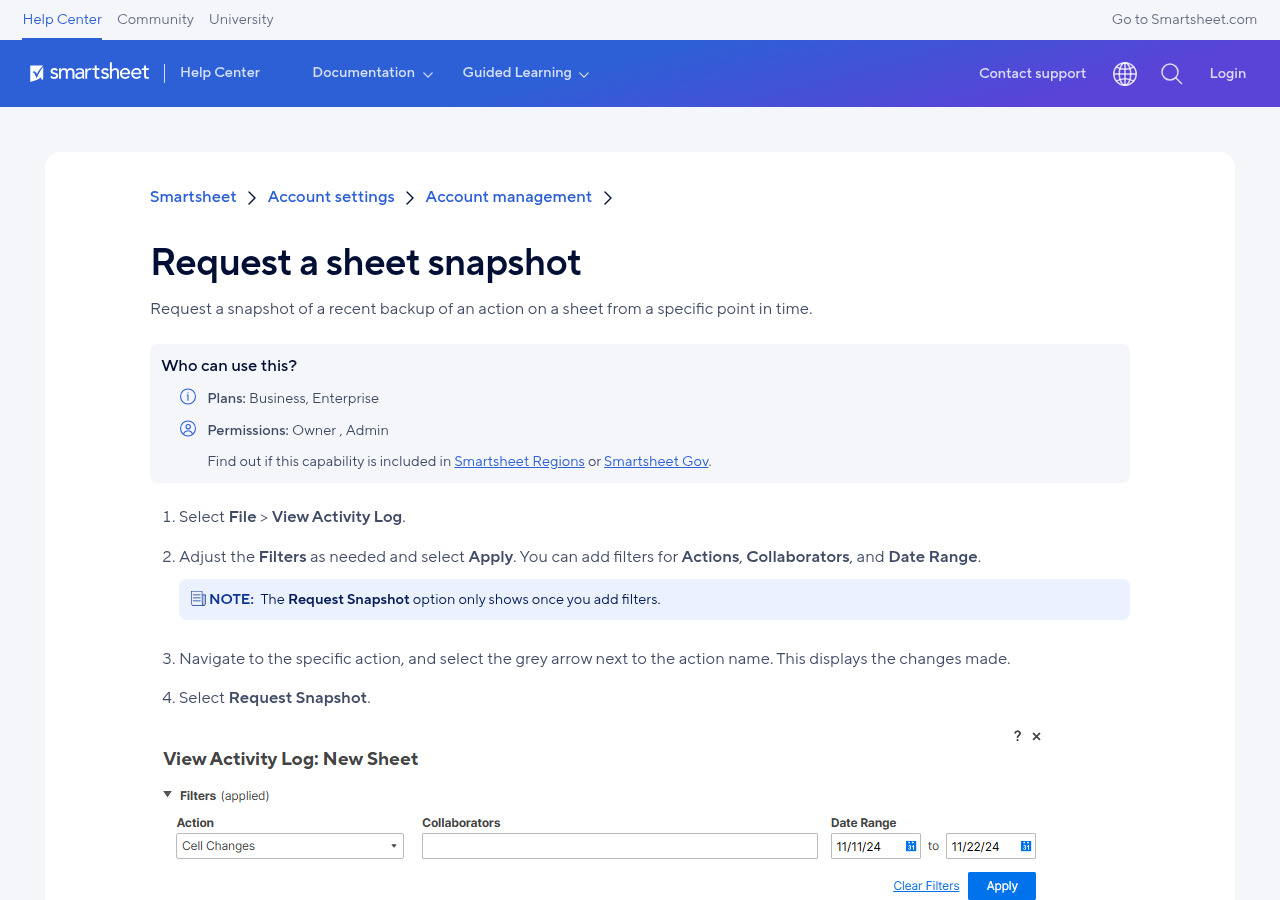
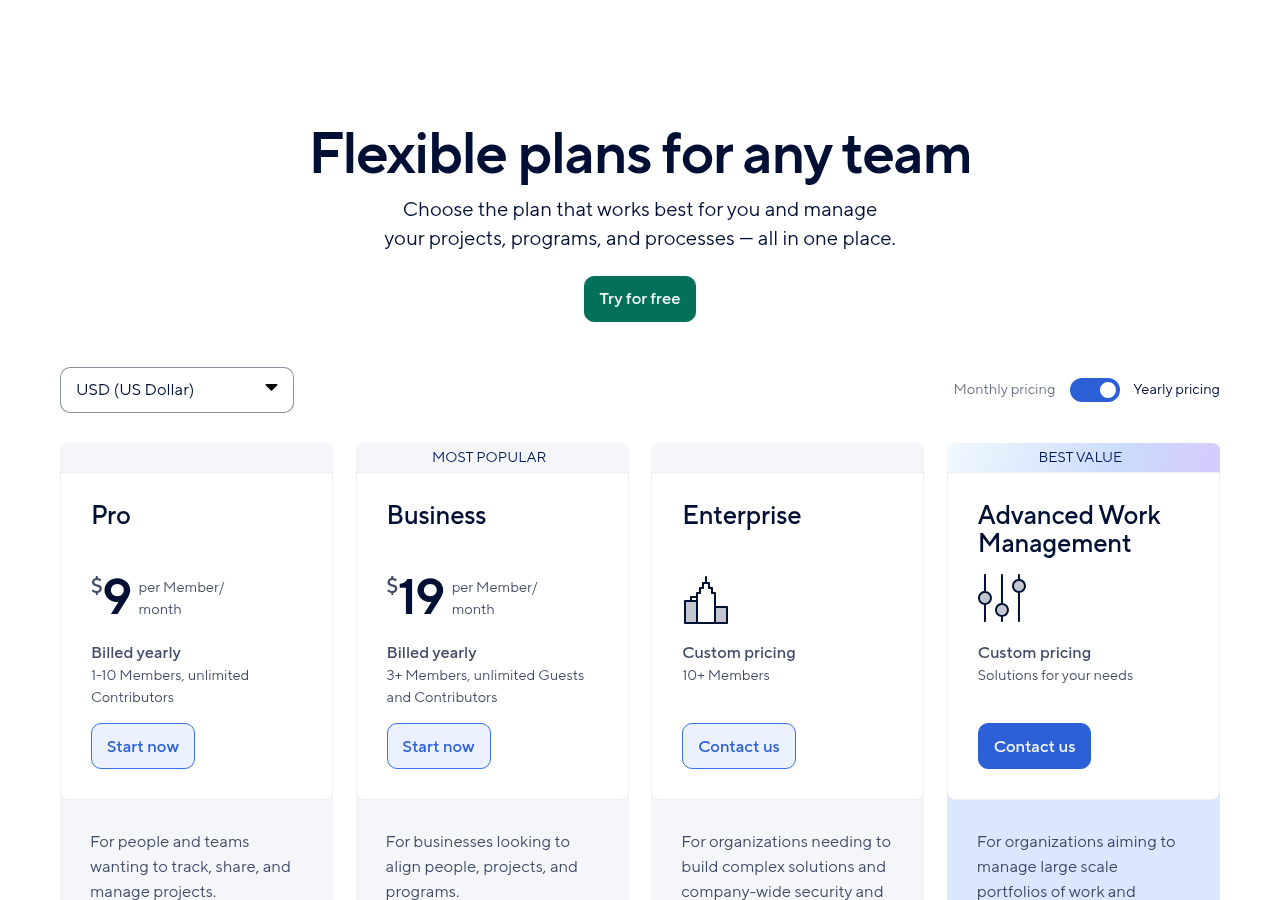
Nothing on the public pricing page was replaced by credits. On November 6 I still see:
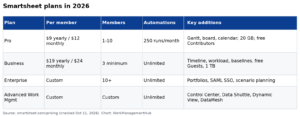
| Plan | Yearly (per Member / month) | Monthly | Notable limit |
|---|---|---|---|
| Pro | $9 | $12 | Max 10 Members; 250 automations / month |
| Business | $19 | $24 | Min 3 Members; unlimited automations |
| Enterprise | Custom | Custom | Portfolios, SAML SSO, Scenario Planning |
| Advanced Work Management | Custom | Custom | Advanced Portfolios, Dynamic View, Data Shuttle included |
Dynamic View still starts at $125 / month and Data Shuttle at $100 / month on Business and Enterprise. Unlimited free Contributors remain on the seat model, which already softens light-user cost for many teams. For the full seat breakdown, see our Smartsheet pricing guide.
Why seat bills get expensive for quiet users
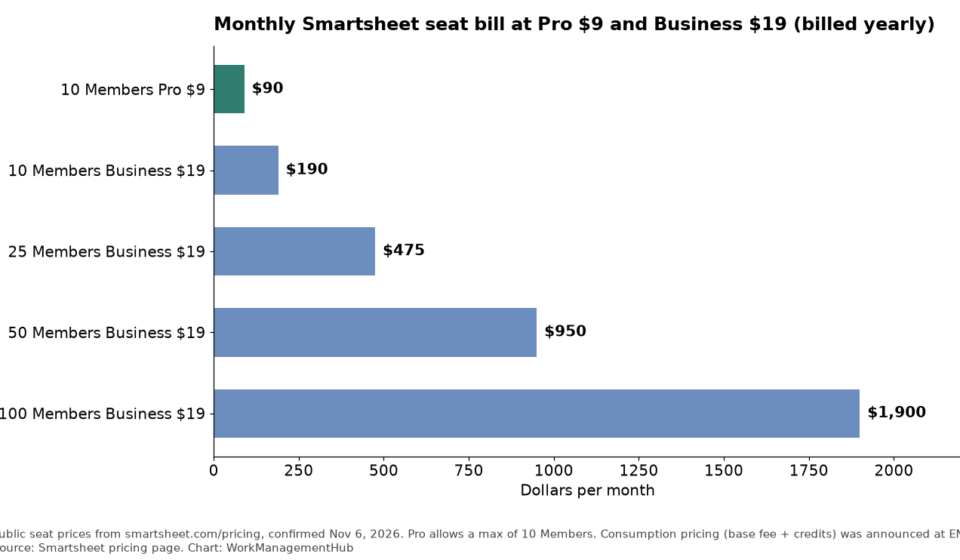
Here is the monthly seat bill at the yearly rates above. Pro stops at 10 Members, so larger teams move to Business.
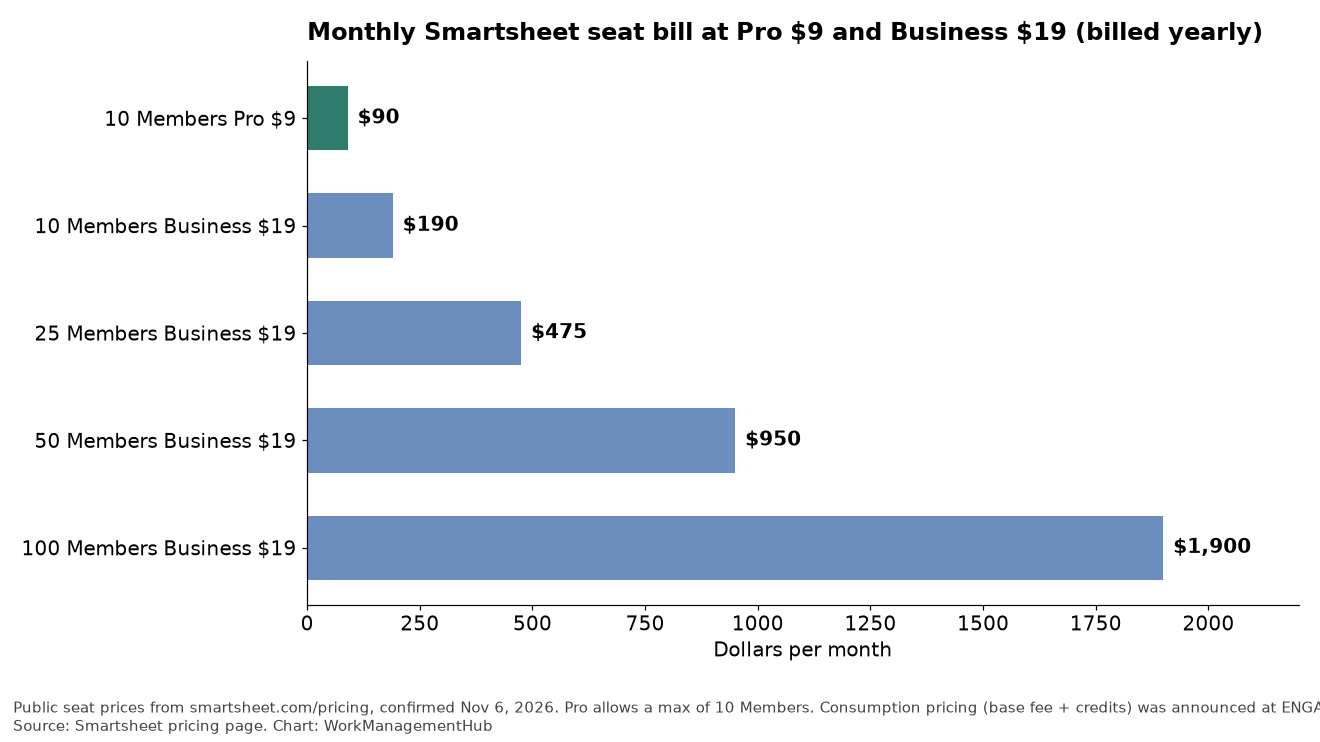
A 50-Member Business plan is $950 a month before add-ons. If 15 of those people open Smartsheet twice a month, you still pay full Member price for each of them. That is the complaint CEO Rajeev Singh repeated on stage, and it matches what we hear from Smartsheet customers as a Premier Partner: admins spend hours managing seats, light users inflate the bill, and true-ups arrive as a surprise.
Consumption pricing is Smartsheet’s answer. You fund a base platform fee and a pool of credits. Credits cover AI, automations and public API activity. The admin center shows usage by plan and by person before the bill lands. Smartsheet also says a teammate can run dashboards from an AI assistant without buying that person a full license. Early customers converting in the next six months get overage protection.
What Smartsheet has not published yet
Be careful here. As of November 6, 2026:
- The public pricing page does not list a base fee dollar amount.
- Credit rates (how many credits per AI run, automation or API call, and what a credit costs) are not public.
- vsActual pricing and ship date are not public.
- Seat plans remain available. Smartsheet says customers who are not ready can stay on current licenses.
So you cannot rebuild your 2027 budget from the website alone. You need a written quote from your Smartsheet account team that shows the base fee, the credit entitlement, what burns credits, overage rates after the protection window, and whether Dynamic View, Data Shuttle, Resource Management and Brandfolder stay as separate line items.
Who should consider switching, and who should wait
Consider talking to your rep if:
- You pay for many Members who rarely edit sheets.
- AI and automation use is growing faster than headcount.
- You already buy several premium apps and want one pooled bill.
- You can move inside the six-month overage-protection window.
Stay on seats for now if:
- You are on Pro with a small team under 10 Members. The math is simple and the bill is low.
- You need a fixed annual number for finance and cannot model credit burn yet.
- Your main cost is seats for heavy editors, not light viewers. Contributors already cover many light cases on the seat model.
- You depend on a premium app whose consumption treatment is unclear.
This is the same pattern as other 2026 vendor shifts. Atlassian’s fall cloud changes moved list prices first and usage meters later. Smartsheet is doing the reverse: usage pricing first, public list rates later. Do not sign a conversion until the meter rules are in writing.
Product changes that matter even if you keep seats
Even if you stay on Pro or Business, ENGAGE shipped product work you can use today:
- Agentic Workflows. Schedule a plain-language prompt (weekly status, risk check, change recap) so it runs without you.
- Creation Agent. Ask for a project and get sheets, dashboards, reports and automations built in minutes.
- Data Quality Agent. Rank sheet issues by severity on demand or on a schedule.
- Automations Agent. Build workflows by asking, from Smart Assist or a connected AI tool. Pair this with our automation troubleshooting guide when a rule misfires.
- New Gantt and larger table-view sheets. Release notes for November 3 cover the new Gantt and Enterprise sheets over 500,000 cells.
- Board view after Card view. If you still have Card view sheets to move, follow our Card view to Board view guide.
- Smart Assist and AI features by plan. Plan gates for AI still matter on seats. See our Smartsheet AI deep dive.
Smartsheet says customers have completed more than 50 million AI actions since February 2026. That number is vendor-reported. Treat it as a usage signal, not a quality guarantee.
Gotchas I would put in every conversion checklist
- Credits mix AI and core usage. Futurum’s coverage notes buyers often want per-seat for AI and consumption for core software. One pool can hide which part of the bill is AI burn.
- Overage protection is time-boxed. The six-month window is a thank-you for early movers. Ask what happens on month seven.
- Seat plans are not retired. Do not assume your renewal auto-converts.
- vsActual is separate. Singh and Arora pitched it as more than a dashboard, and it can connect to systems outside Smartsheet. Do not bake it into a core platform quote until you have a separate scope.
- Human-in-the-loop is the default. Agents recommend and draft; Smartsheet says consequential changes still need a person. Keep that in your risk policy.
- Premium apps may still bill separately. Confirm Dynamic View, Data Shuttle, Connectors and Brandfolder on the new model.
What I would do this month
- Export your last 90 days of Member activity from Admin Center. Mark heavy editors, light openers and people who never log in.
- Count AI actions and automation runs for the same window. If you cannot see them, ask support how to pull the report.
- Ask your Smartsheet rep for a side-by-side: current seat quote vs consumption quote with credit assumptions at 1x and 2x current AI use.
- Get overage rates, the protection end date, and whether Contributors still exist on the consumption track.
- If the quote is unclear, stay on seats through your next renewal and revisit after more public rates land.
Common questions
Did Smartsheet replace Pro and Business with credits?
No. On November 6, 2026 the public pricing page still lists Pro at $9 and Business at $19 per Member per month billed yearly. Consumption is an optional model you convert into with your Smartsheet team.
How much does the new consumption plan cost?
Smartsheet has not published the base fee or credit rates on its website. You need a written quote. Early converters in the next six months get overage protection.
What do credits pay for?
Smartsheet says credits cover AI, automations and connecting through public APIs. Ask for the full burn table before you sign.
Should a 10-person Pro team switch?
Usually no, not yet. Pro at $9 yearly is $90 a month for 10 Members, with free Contributors for light users. Wait until credit rates are public and you can model AI use.
Is vsActual included in Smartsheet Business?
Not from anything Smartsheet has published. vsActual was announced as its own AI-native planning platform with design partners. Pricing and availability were not listed on November 6, 2026.
Will AI agents change my sheets without approval?
Smartsheet’s default stance is human in the loop for consequential actions. Agents can draft and recommend. Keep approval rules in place and test on a sample workspace first.
Sources
- Smartsheet: The AI-Powered Future of Work Execution (ENGAGE 2026) (Nov 4, 2026; checked Nov 6, 2026)
- Smartsheet pricing (checked Nov 6, 2026)
- Smartsheet product release notes (checked Nov 6, 2026)
- SiliconANGLE: Smartsheet AI-powered platform bridges gap between planning and results (Nov 4, 2026)
- Futurum: Are Smartsheet Core Platform Fixes Its Real ENGAGE News? (checked Nov 6, 2026)
From our team: OneSmar for Smartsheet Teams