Smartsheet Jira Integration 2026: Native Connector Setup, Field Mapping, and Limits

If engineering lives in Jira and program reporting lives in Smartsheet, someone is copying status by hand unless you connect them. The Smartsheet Jira Connector is Smartsheet’s native answer: workflows that sync Jira issues to sheet rows, with optional bidirectional updates.
I checked Smartsheet’s Learning Center articles for admin setup and creating workflows on October 13, 2026. Connector pricing is sales-quoted (not on the public Smartsheet pricing page). Expect Business or Enterprise plus the premium Connector entitlement — Pro alone is not enough.
Who has to be in the room
| Role | Why |
|---|---|
| Smartsheet System Admin | Enable the Connector premium app; manage who can build workflows |
| Jira admin (Cloud site admin / System Admin on Data Center) | Authorize the connection; Application Link for DC |
| Sheet Owner or Admin (Editor minimum) | Build the workflow; Admin recommended so you can add columns while mapping |
Smartsheet recommends a shared licensed service account with admin rights on both products for the initial connection, and keeping that account active. If that account is deactivated later, workflows break in ways that look like “Jira stopped syncing.”
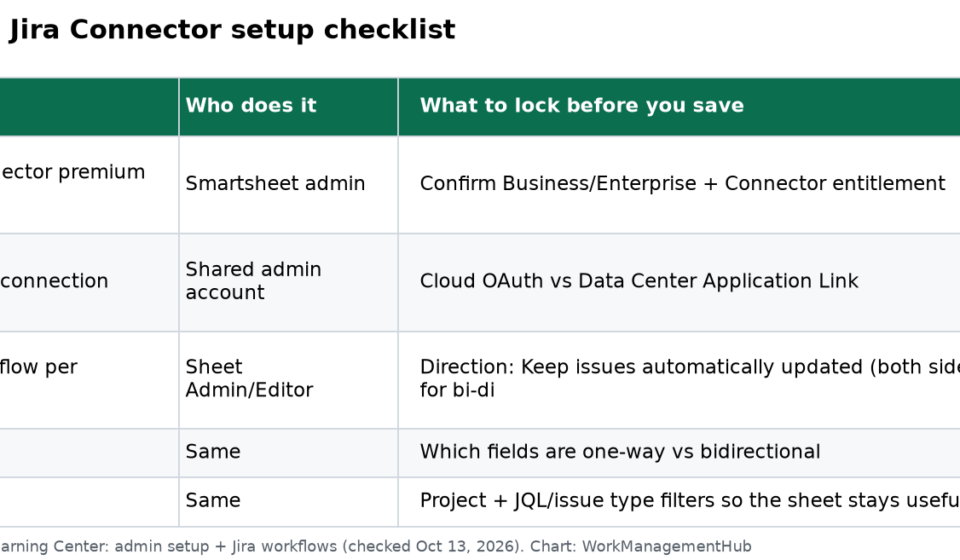
Setup checklist
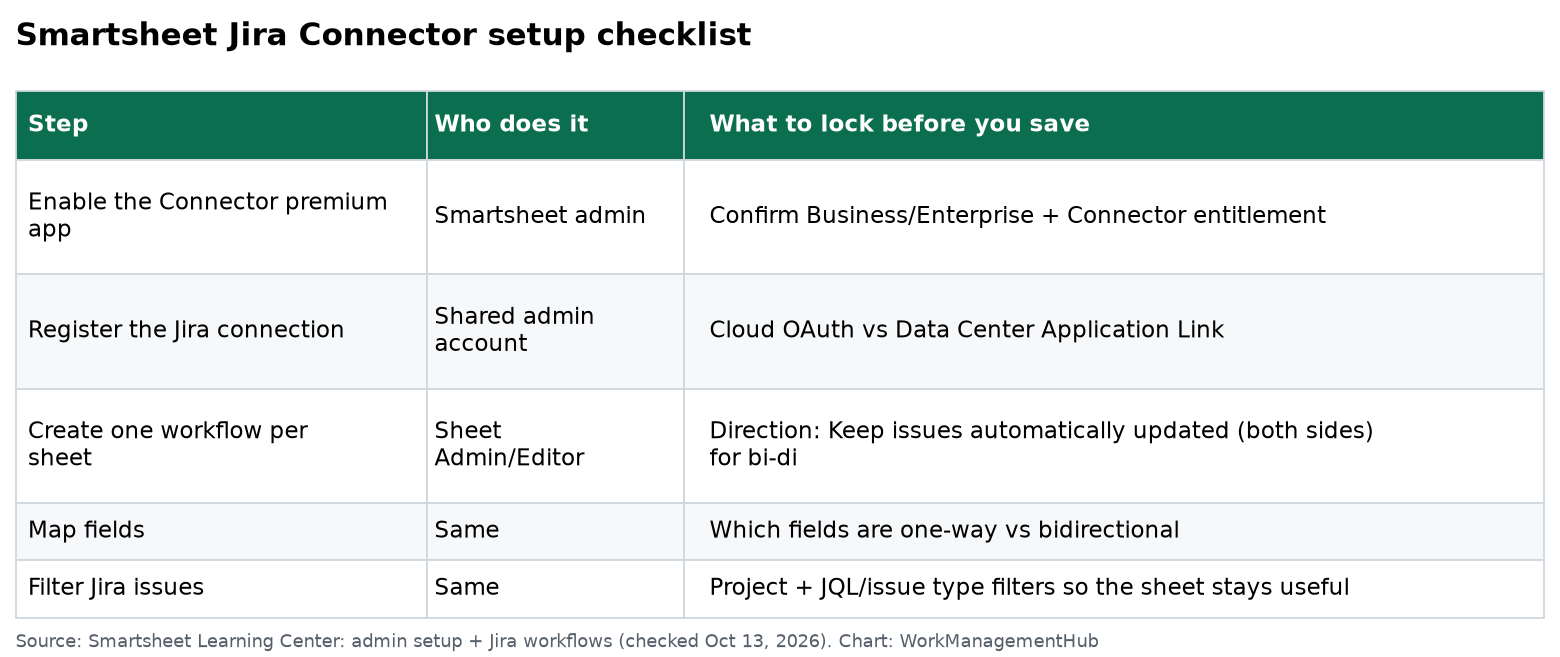
- Confirm entitlement — Business/Enterprise plan and Connector enabled in Admin Center / Marketplace as your account team documents.
- Register Jira in the Connector — Cloud uses OAuth; Data Center needs an Application Link and the correct host/API URL. Self-hosted needs HTTPS and the firewall paths Smartsheet lists for
/rest/*,/auth/*, and/plugins/*. - Open the Connector → Add Workflow (or Data Integrations → Create workflow).
- Pick direction — for true two-way sync, choose Keep issues automatically updated on both Smartsheet and Jira. You cannot change workflow direction after save.
- Pick the sheet — existing or create new. One Connector workflow per sheet. You cannot change the sheet later.
- Pick Jira projects — also locked after save.
- Map fields — set each field one-way or bidirectional.
- Filter — issue types / JQL-style filters so the sheet is a working view, not a dump of every bug since 2019.
- Save and turn the workflow on — spot-check 10 issues before you announce it.

Field mapping that survives month three
Map the boring fields first: Issue Key, Summary, Status, Assignee, Due date, Priority, Issue Type. Then custom fields your PMO actually reports on.
Rules of thumb I use with clients:
- Status is usually Jira → Smartsheet for engineering truth, unless PMs are allowed to reopen work from the sheet (rare, and worth a written rule).
- Dates need a single owner. Bidirectional due dates create ping-pong when someone “fixes” a date in the other tool.
- Story points / estimates belong in Jira; roll them up in Smartsheet with reports, don’t invent a second estimate column people edit.
- Add a Smartsheet column for last sync error / workflow name if you run multiple Jira projects into related sheets — debugging without it is miserable.
For GitHub link-ups on the Jira side, see our Jira–GitHub guide. For roadmap views once issues are in Jira, see the Jira roadmap guide.
Hard limits (read before you buy)
- One workflow per sheet. Need two Jira projects with different maps? Use two sheets or one carefully filtered workflow.
- Direction, sheet, and projects are fixed after save. Build a disposable test sheet first.
- Connector is a premium add-on. Public list price is not published; talk to Smartsheet sales.
- Server/Data Center still works per Smartsheet’s docs, but certificate and firewall mistakes are the usual failure mode — not field mapping.
- Manual “push” workflows exist for controlled updates; automatic bi-di is what most PMOs want and also what amplifies a bad map.
Native Connector vs a third-party sync
| Native Connector | Third-party (e.g. Unito-class tools) | |
|---|---|---|
| Best when | You’re already on Smartsheet Business+ and want vendor-supported Jira sync | You’re on Pro, or you need multi-tool graphs the Connector doesn’t cover |
| Admin model | Smartsheet + Jira admins | Third-party OAuth + its own billing |
| Field control | Workflow field map + filters | Often finer filters; another product to govern |
| Cost shape | Smartsheet add-on (quoted) | Per-sync subscription |
I default to native when the only pair is Smartsheet ↔ Jira and the account already pays for Business. I look at third-party when the same issues also need to touch something Smartsheet’s Connector doesn’t speak.
Common questions
What Smartsheet plan do I need for Jira integration?
The native Connector is a premium add-on aimed at Business and Enterprise accounts. Confirm entitlement with Smartsheet — it is not a Pro checkbox on the public pricing page.
Can I change the Jira project after the workflow is saved?
No. Smartsheet’s workflow article states you can’t change the sheet or the Jira projects after save. Create a new workflow on a new sheet if the scope changes.
Is sync always bidirectional?
Only if you choose automatic updates on both sides and mark specific fields bidirectional. You can keep some fields one-way (typical for Status or Issue Key).
Why did sync stop after an employee left?
If the connection was built under a personal admin account that was deactivated, re-authenticate with a shared service account and confirm the Connector app is still enabled.
Checked against Smartsheet Learning Center (admin setup + Jira workflows) and smartsheet.com/pricing on October 13, 2026.
Sponsored