
Pick Confluence if your team lives in Jira and needs controlled, permission-heavy documentation. Pick Notion if you want flexible databases, a lighter setup and one place for docs, wikis and projects. Most engineering orgs end up on Confluence. Most startups and cross-team groups are happier in Notion. A wrong pick can cost months of migration, so read past the feature list.
I have set up wikis in both tools for teams from 8 to 400 people. Both are good. Each one breaks in a different, predictable place. Notion details come from notion.com/pricing. Confluence details come from Atlassian’s Confluence pricing and Cloud plans pages, checked in October 2026.
The short comparison
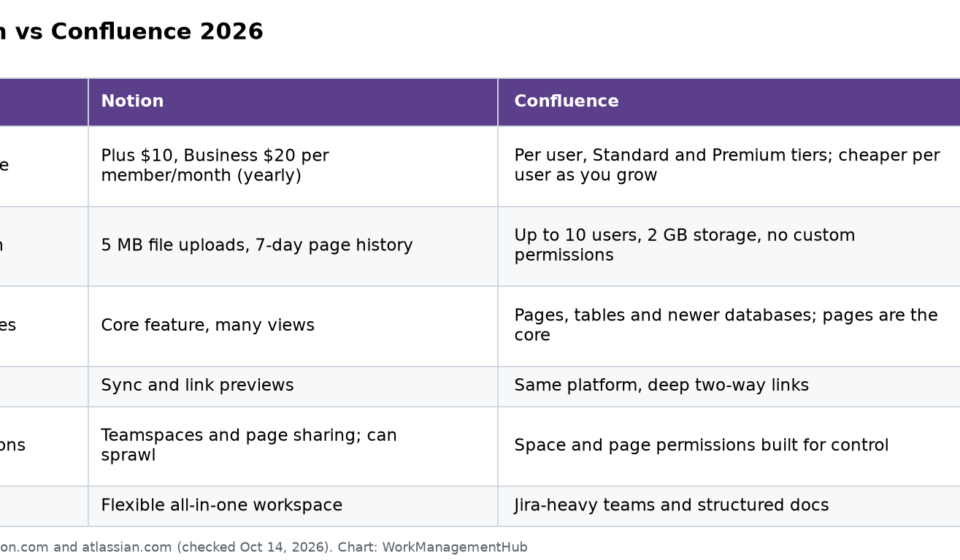
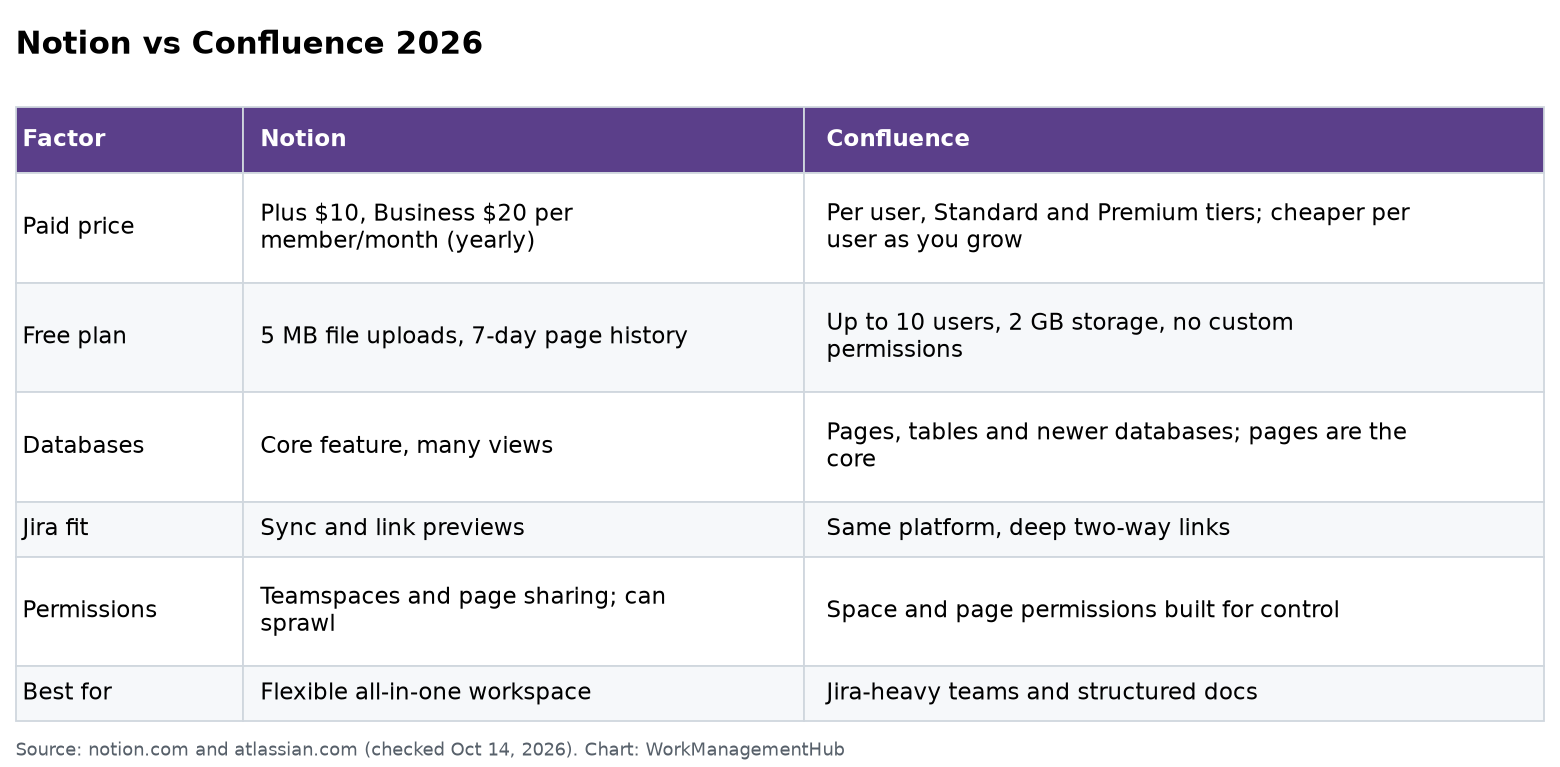
| Factor | Notion | Confluence |
|---|---|---|
| Paid price | Plus $10, Business $20 per member/month (yearly) | Per user, Standard and Premium tiers; cheaper per user as you grow |
| Free plan | 5 MB file uploads, 7-day page history | Up to 10 users, 2 GB storage, no custom permissions |
| Databases | Core feature, many views | Pages, tables and newer databases; pages are the core |
| Jira fit | Sync and link previews | Same platform, deep two-way links |
| Permissions | Teamspaces and page sharing; can sprawl | Space and page permissions built for control |
| Best for | Flexible all-in-one workspace | Jira-heavy teams and structured docs |
Pricing and free plans
Notion charges per member. Plus is $10 and Business is $20 per member a month, billed yearly. Monthly billing costs more. Page history is 7 days on Free, 30 on Plus and 90 on Business.
The Free plan hurts teams in two places. Each file upload is capped at 5 MB. One design file or short screen recording passes that. Page history only goes back 7 days. Paid plans allow uploads up to about 5 GB per file.
Confluence charges per user on Standard and Premium. The price per user drops as you add users, so check the pricing page with your real seat count. The Free plan covers up to 10 users and 2 GB of storage. The part teams miss: on Free you cannot set custom permissions, so everyone can see and edit everything.
Cost for a 20-person team: Notion Business is $400 a month billed yearly. Confluence Standard is usually less per user. If you already pay for Jira, Confluence often comes in cheaper through Atlassian bundles.
Where Notion breaks
- Large workspaces get messy. Without rules, you get duplicate pages, abandoned databases and five “Team Wiki” pages. Search gets worse as it grows.
- Permissions at scale. Page-by-page sharing is easy for 15 people and hard for 300. Mistakes happen when someone shares a parent page.
- Big databases slow down. Databases with many thousands of rows and lots of formulas or rollups can get sluggish.
- Approval workflows. There is no built-in “draft, review, publish” process like regulated teams want.
Where Confluence breaks
- Structured data. Tracking things in tables is clumsy compared to Notion databases.
- It feels heavy for small teams. Spaces, permissions and templates are a lot of setup for 6 people.
- Writing feels formal. People write less in Confluence than in Notion. That matters, because a wiki is only as good as what people put in it.
- Outside Atlassian, the value drops. If you do not use Jira, a big reason to pick Confluence goes away.

Real costs beyond the license
The seat price is only part of the bill. In my experience, three other costs matter more:
- Setup time. Confluence takes longer to set up well. Plan a week of an admin’s time for spaces, permissions and templates. Notion takes a day or two, but needs rules from the start.
- Cleanup time. Both tools rot without an owner. Budget an hour a week for someone to archive, merge and fix stale pages.
- Apps. Confluence teams often add paid Marketplace apps for diagrams or approvals. Notion teams more often connect outside tools like Slack or Google Drive. Count these before you compare prices.
Jira and engineering teams
Confluence and Jira share one platform. You can create Jira issues from a page, show live issue lists and link specs to epics both ways. For an engineering team already on Jira, this alone often settles it.
Notion can sync Jira items into a database and show link previews. It works for visibility. It is not as deep.
AI features
Both tools now include AI. Notion AI covers writing, Q&A across your workspace and meeting notes on Business and up. Confluence includes Atlassian’s Rovo AI from Standard, with higher limits on Premium. Both can answer “Where is our refund policy?” from your own pages. Results depend on how clean your content is.
How experts set up each one
Notion:
- Make one Wiki teamspace with a clear owner.
- Use database templates for meeting notes, specs and docs.
- Add a Verified property and review dates for key pages.
- Archive old pages every quarter.
Confluence:
- Create one space per team plus one company space.
- Set space permissions before inviting people.
- Build page templates for specs, how-tos and decisions.
- Use labels so search and reports work.
How to choose
- Mostly engineers on Jira: Confluence.
- Mixed team with no Jira: Notion.
- Strict access rules or audits: Confluence Premium or Enterprise.
- You want docs plus project tracking in one tool: Notion.
- Under 10 people, tight budget: either free plan. Notion’s Free plan suits people who do not upload big files. Confluence Free suits small Jira teams that trust each other.
Moving between them
Notion can import Confluence spaces. Confluence can import from Notion as well. In both cases, expect broken formatting on complex pages. Move your top 50 pages by hand, then bulk import the rest and clean up as people find problems.
My pick for most teams
If I had to choose for a typical 30-person company with a small engineering team on Jira: Confluence for engineering docs, plus Notion only if another team truly needs databases. Two wikis cost more and split knowledge, so start with one and add a second only when the pain is real.
Common questions
Is Notion cheaper than Confluence?
Not usually for large teams. Confluence’s per-user price tends to be lower, especially if you already use Jira. Notion Business is $20 per member a month billed yearly.
Is Confluence free?
Yes, for up to 10 users with 2 GB of storage. Custom permissions are not available on Free.
Can Notion replace Confluence for engineering teams?
It can for small teams. Larger teams on Jira usually prefer Confluence for its deep links and permissions.
What is the file limit on Notion’s free plan?
5 MB per upload. Paid plans allow files up to about 5 GB each.
Which is better for a company wiki?
For a small, flexible team, Notion. For a large or regulated company, Confluence.
Do both have AI?
Yes. Notion AI is fullest on Business and up. Confluence includes Rovo from Standard.
Plans checked on notion.com and atlassian.com on October 14, 2026. Vendors change plans; confirm before you buy.
Sponsored