ClickUp vs Microsoft Project 2026: Pricing, Planner Plans, and an Honest Verdict

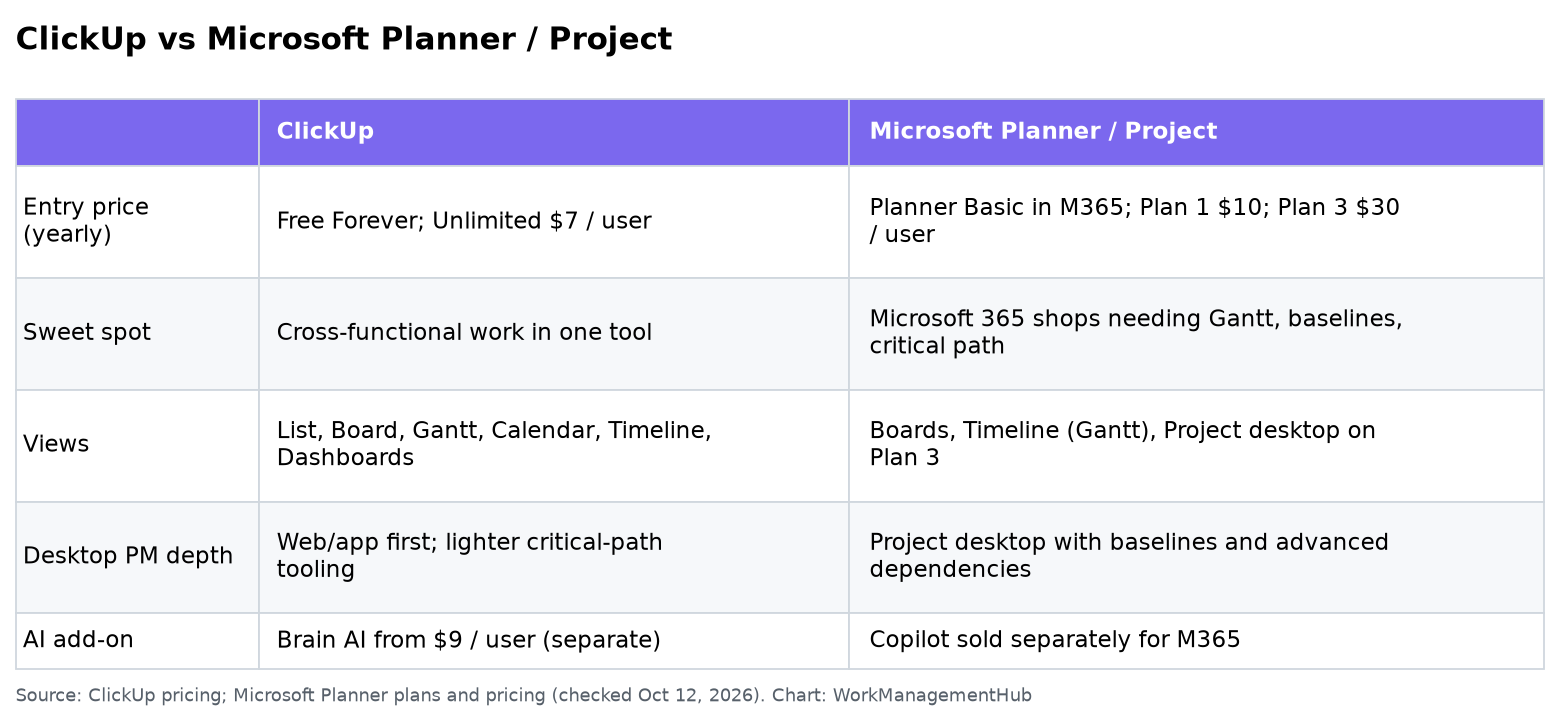
Use ClickUp if your teams manage ongoing, collaborative work and you want one tool for lists, boards, docs and light Gantt charts from $7 per user (Unlimited, billed yearly). Use Microsoft Planner and Project when your organization already runs on Microsoft 365 and you need premium Planner timelines, baselines, critical path and the Project desktop app on Planner and Project Plan 3 at $30 per user per month, paid yearly.
Microsoft no longer markets a separate “Project only” cloud brand the way older comparison posts describe it. The SKUs to compare in 2026 are Planner Plan 1 ($10) and Planner and Project Plan 3 ($30), both paid yearly on Microsoft’s US plans page, plus Planner Basic inside many Microsoft 365 licenses. Project Plan 5 has been moving off the new-purchase list; verify current SKUs with Microsoft before you renew.
I implement work-management platforms for a living (SSPM is a Smartsheet partner). Bias check: I am not a Microsoft partner. Prices below were checked October 12, 2026.
ClickUp pricing note (checked October 16, 2026): ClickUp is changing its plans. New Workspaces, all Free Forever Workspaces and some paid ones now get Core at $9 and Business at $17 per user a month billed yearly ($12 and $25 monthly), with AI credits included and a new Max plan at $100. Many existing Workspaces still have the classic plans: Unlimited at $7 and Business at $12 billed yearly ($10 and $19 monthly), with ClickUp Brain as a $9 add-on. Prices in this article use the classic plans unless noted. See ClickUp’s new plans help article.
The short verdict
- ClickUp wins for mixed product, marketing and ops teams that want one workspace, flexible views and a lower seat price.
- Microsoft Planner / Project wins for PMO-style schedule management inside Teams and for project managers who need Project desktop, baselines and advanced dependencies.
- If everyone already has Planner Basic via Microsoft 365 and only a few people need Gantt depth, paying Plan 1 or Plan 3 for those seats often beats moving the whole company to ClickUp.
Pricing side by side (US, yearly)
| Plan | Price | What you get |
|---|---|---|
| ClickUp Free Forever | $0 | Tasks, boards, docs basics; storage and feature caps |
| ClickUp Unlimited | $7 / user / month | Unlimited storage, integrations, Gantt, custom fields, guests with permissions |
| ClickUp Business | $12 / user / month | Advanced dashboards, more automations, Google SSO, workload |
| ClickUp Enterprise | Custom | SAML, SCIM, audit log, higher automation ceilings |
| ClickUp Brain AI | From $9 / user / month add-on | AI assistant / agents (separate from base plans) |
| Planner Basic (in many M365 plans) | Included | Boards, buckets, basic task views in Teams |
| Planner Plan 1 | $10 / user / month | Premium Planner: Timeline (Gantt-style), dependencies |
| Planner and Project Plan 3 | $30 / user / month | Baselines, critical path, advanced dependencies, Project desktop |
Sources: ClickUp pricing and Microsoft Planner plans and pricing. ClickUp’s monthly billing is higher (Unlimited $10, Business $19). Full ClickUp math is in our ClickUp pricing guide.
For a 10-person delivery team on yearly billing: ClickUp Unlimited is about $70 / month. Ten Plan 3 seats are $300 / month. Ten Plan 1 seats are $100 / month. The Microsoft bill only looks “free” when Planner Basic already covers the work.
Where ClickUp wins
One tool for mixed work. Tasks, Docs, Whiteboards, Chat, Dashboards and Goals in one hierarchy of Spaces and Folders. Marketing, CS and product can share a workspace without learning Project desktop.
Views for how people actually work. List, Board, Calendar, Gantt, Timeline, Mind Maps and Dashboards on paid plans. Our ClickUp dashboards guide and ClickUp templates guide show setups that hold up.
Faster onboarding for non-PMOs. People who live in Asana- or Trello-shaped tools ramp faster in ClickUp than in Project desktop.
AI as an optional add-on. Brain AI is priced separately, so you can keep base seats cheaper until you need agents. See ClickUp Brain.
Where Microsoft Planner / Project wins
Microsoft 365 gravity. If work already happens in Teams, Outlook and SharePoint, Planner Basic is already under people’s noses. Adding Plan 1 or Plan 3 seats is an incremental license change, not a migration.
Schedule management depth on Plan 3. Baselines, critical path, advanced dependencies with lead and lag, and the Project desktop app are why PMOs still buy Microsoft. ClickUp’s Gantt is useful; it is not the same as Project Professional-style scheduling.
Enterprise IT controls. For organizations standardized on Entra ID, compliance and desktop tooling, Microsoft’s stack is the path of least resistance.
Hybrid with lighter tools. Some teams keep engineering in Jira or Linear and only give Plan 3 to program managers. That is often saner than forcing every engineer into Project.

Honest limitations
ClickUp: Power-user flexibility becomes clutter without naming conventions and a Space architecture. Automation and AI credits need watching on busy workspaces. It will not replace a formal earned-value PMO process out of the box.
Microsoft: Plan 3 is expensive if you seat people who only needed a board. Product branding shifted toward Planner Premium, so older “Project Plan 3 / Plan 5” docs can confuse buyers. Confirm whether Project Online features you rely on are still in your SKU, especially with Project Online’s retirement timeline Microsoft has announced for September 30, 2026.
What I’d actually pick
- 10 to 40 people, mixed functions, no M365 mandate: ClickUp Unlimited or Business.
- Company standard is Microsoft 365, light task boards: Planner Basic first; Plan 1 only for people who need Timeline and dependencies.
- Construction, IT PMO, or critical-path heavy programs: Plan 3 for project managers; do not buy Plan 3 for every stakeholder.
- Already comparing ClickUp to other work hubs: see ClickUp vs Asana and Microsoft Planner vs monday.com.
Common questions
Is Microsoft Project the same as Planner?
Planner Basic is the task board included with many Microsoft 365 plans. Planner Plan 1 and Planner and Project Plan 3 add premium planning features; Plan 3 includes Project desktop. People still say “Microsoft Project” when they mean Plan 3 or the desktop app.
Is ClickUp cheaper than Microsoft Project?
Per seat for collaborative work, yes: Unlimited at $7 yearly undercuts Plan 1 at $10 and Plan 3 at $30. Total cost depends on how many people need premium scheduling versus how many already have Planner Basic.
Does ClickUp have critical path and baselines?
ClickUp offers Gantt and dependencies on paid plans. Microsoft’s Plan 3 is the clearer choice when baselines, critical path and Project desktop are requirements.
Can I migrate from Microsoft Project to ClickUp?
Yes, usually via export/import and rebuilding views. Expect to recreate dependencies and custom fields carefully. Budget time for training if your PMs are desktop-Project native.
Prices checked against ClickUp and Microsoft US pages on October 12, 2026. Confirm SKUs before purchase; Microsoft has been simplifying Planner/Project licensing.
Sponsored

Related guides