
Choose ClickUp if your team wants one app for tasks, docs, chat and sprints at a low price per seat. Choose Smartsheet if you run date-driven projects with dependencies, many outside stakeholders and reports for leaders. Seat prices look similar ($9 for ClickUp Core and $9 for Smartsheet Pro), but Smartsheet only bills people who build and edit. Viewers and commenters can be free Contributors.
I checked ClickUp’s pricing page, Smartsheet’s pricing page and Smartsheet’s seat types article on October 21, 2026. Prices are per user per month, billed yearly, in US dollars. Disclosure: my company, SSPM, is a Smartsheet partner. I have tried to be fair to both.
How each tool thinks
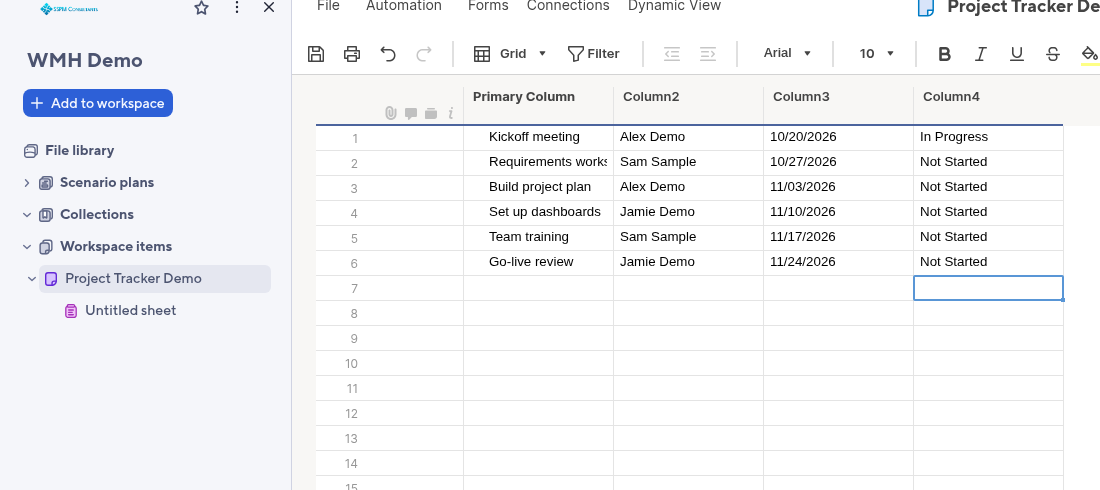
Smartsheet starts from a grid. Rows are tasks, columns hold dates, owners and status. Add start and end dates and predecessors, and you get a Gantt chart with a critical path. It feels like a spreadsheet that learned project management.
ClickUp starts from a task. Tasks live in Lists, inside Folders and Spaces. Each task can have subtasks, checklists, comments, time tracking and Custom Fields. Docs, whiteboards and chat sit next to the work.
Plans and prices
ClickUp has two lineups right now. New workspaces start on the new plans. Some older workspaces keep the classic plans. Check your billing page.
- New (yearly): Free Forever ($0), Core ($9), Business ($17), Enterprise (quote), Max ($100).
- Classic (yearly): Free Forever, Unlimited ($7, or $10 monthly), Business ($12, or $19 monthly), Business Plus, Enterprise.
Smartsheet (yearly):
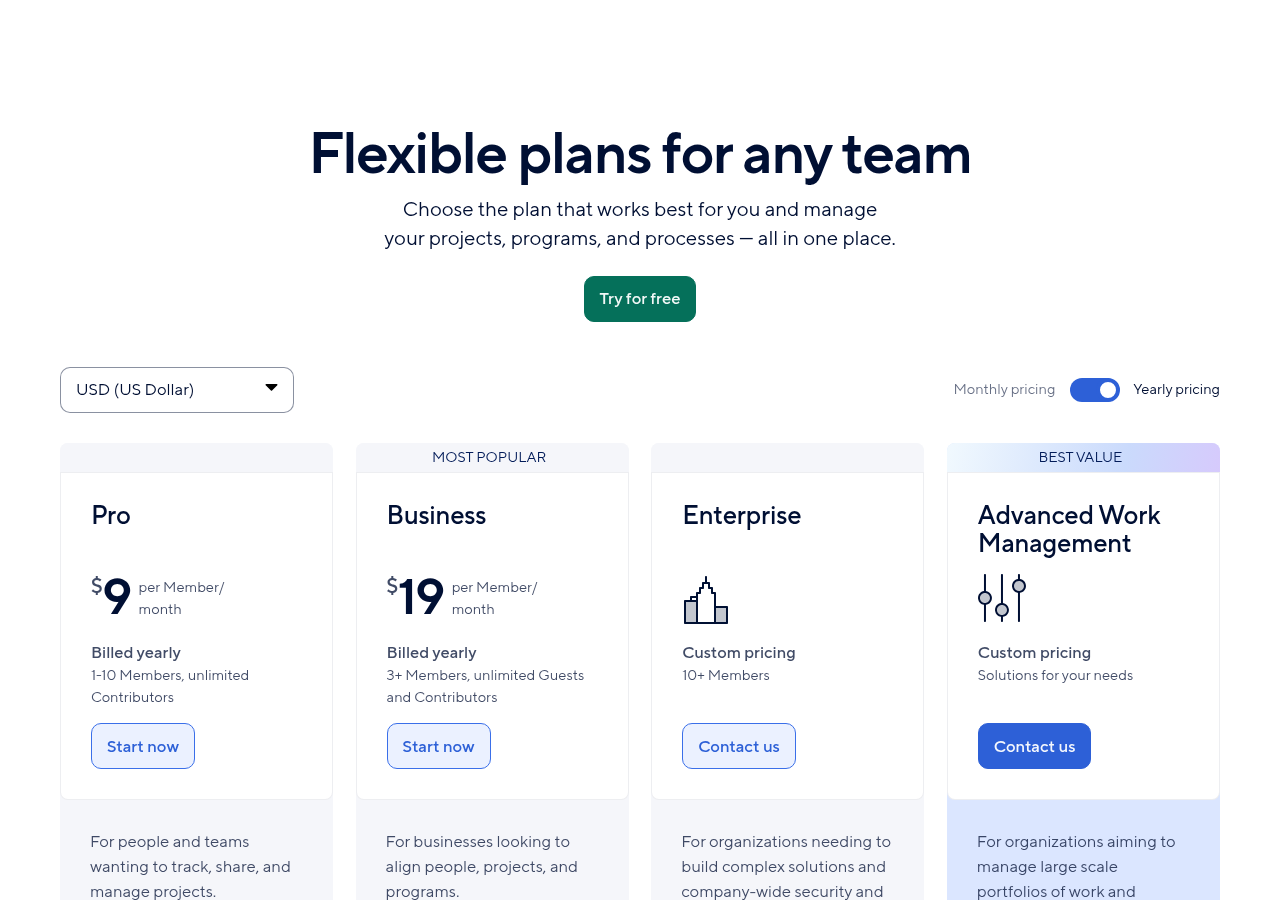
- Pro: $9 per Member. 1 to 10 Members, unlimited free Contributors, Gantt, board and calendar views, 250 automations a month.
- Business: $19 per Member. 3 or more Members, unlimited free Guests, Timeline view, workload tracking, unlimited automations, 1 TB of storage.
- Enterprise: quote, 10 or more Members. Portfolios, scenario planning, SAML SSO.
- Advanced Work Management: quote. Adds Control Center, Dynamic View, Data Shuttle and connectors.
The seat rule that changes the math
Smartsheet has paid Members and free Contributors. Members build sheets, share them and create automations. Contributors can view what is shared with them, and with Commenter access they can comment and add files.
Watch out for Provisional Members. When a free user takes a qualifying action, such as creating something that needs a paid seat, Smartsheet gives them full access free until the end of the billing cycle. By default they drop back to a free seat after that. But an admin can set them to auto-upgrade, and then the cost lands on your next bill. Check this setting in Admin Center before rollout.
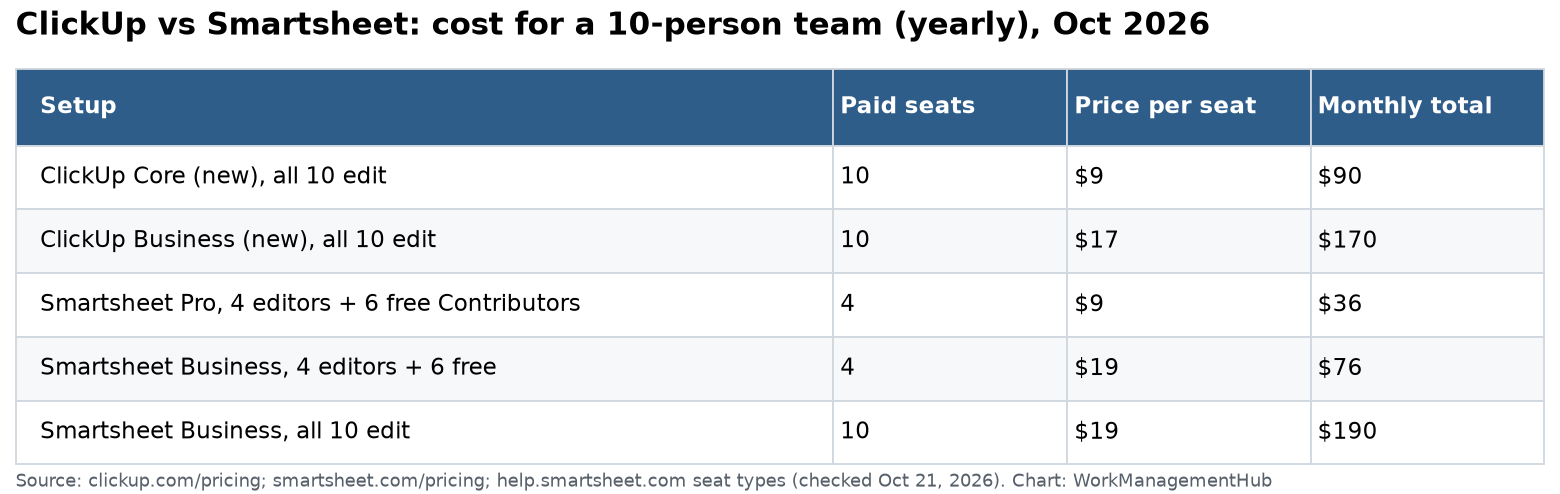
Example: a 10-person team where 4 people plan and 6 only update or view. On Smartsheet Pro you pay for 4 Members: $36 a month. On ClickUp Core, if all 10 need to edit tasks, you pay $90. If all 10 must edit on Smartsheet Business, you pay $190.
Automations compared
| Plan | Automations a month |
|---|---|
| Smartsheet Pro ($9) | 250 |
| Smartsheet Business ($19) | Unlimited |
| ClickUp Unlimited (classic, $7) | 1,000 actions |
| ClickUp Business (classic, $12) | 5,000 actions |
| ClickUp Core (new, $9) | 1,000 |
| ClickUp Business (new, $17) | 10,000 |
Smartsheet workflows are built like a flowchart: a trigger block, condition paths and action blocks. You open them from Automations in the sheet toolbar. ClickUp rules have one trigger, up to 15 conditions (Business and up) and up to 6 actions.
My view: for heavy automation, Smartsheet Business is the simplest buy because it has no cap. ClickUp is cheaper if your volume fits inside its limits.
Where Smartsheet wins
- Scheduling. Dependencies, auto-shifting dates and a critical path highlighted in red on the Gantt view, all on Pro.
- Outside people. Free Contributors and, on Business, free Guests make it cheap to include clients and subcontractors.
- Reports and dashboards for leaders. Roll up many sheets into one report.
- Scale. Control Center builds every new project from a standard blueprint. This is why large PMOs pick Smartsheet.
Where ClickUp wins
- Price for all-editor teams. $7 to $9 a seat when everyone works in the tool daily.
- All in one place. Docs, chat, whiteboards and forms without add-ons.
- Task depth. Subtasks, checklists, multiple assignees and sprints are built in.
- AI included on the new plans. Core includes 1,000 AI credits per user a month, pooled.
Where each one hurts
Smartsheet: the grid can feel old-fashioned to teams used to modern task apps. Many advanced tools (Control Center, Dynamic View from $125 a month, Data Shuttle from $100 a month) are paid add-ons or need Advanced Work Management.
ClickUp: so many features that new users get lost. Plan your Spaces and statuses before you invite the team. The move between plan lineups also makes budgeting harder until it settles.
What rollout looks like in each
From client rollouts, here is how the first month usually goes.
Smartsheet, weeks 1 to 4:
- Build one project sheet with Task, Owner, Start, End, Duration, Predecessors and Status columns.
- Turn on dependencies in the sheet settings so dates shift when a task slips.
- Add one workflow, such as “alert the owner when Status is Blocked”.
- Share with Editors for the planners and Contributors for everyone else.
- Build one dashboard for leaders, then copy the setup to the next project.
ClickUp, weeks 1 to 4:
- Plan Spaces by team and Lists by project before you invite anyone.
- Agree on 4 to 6 statuses and lock them in.
- Add Custom Fields only for things you will filter or report on.
- Build two or three automations and watch the Usage tab for a week.
- Move docs and meeting notes in last, once tasks are working.
The common failure is the same in both: too many columns or fields on day one. Start small and add what people ask for.
Who should choose which
Choose Smartsheet if:
- You manage projects with fixed dates and dependencies, such as construction, events or IT rollouts.
- Many people only need to view or comment.
- Leaders want roll-up reports across projects.
Choose ClickUp if:
- Everyone on the team edits tasks every day.
- You want docs and chat in the same tool.
- You run agile sprints.
Related guides
- Smartsheet review 2026
- ClickUp pricing 2026
- Smartsheet automations setup guide
- ClickUp automations guide
Common questions
Is ClickUp cheaper than Smartsheet?
Per seat, ClickUp is cheaper or equal: $7 to $9 a seat against $9 on Smartsheet Pro. But Smartsheet does not charge Contributors, so teams with many viewers often pay less on Smartsheet.
Does Smartsheet have a free plan?
Smartsheet offers a 30-day free trial. Contributors are free on paid plans.
Which is better for Gantt charts?
Smartsheet. Dependencies and the critical path are available from Pro at $9.
Which has better automation limits?
Smartsheet Business has unlimited automations. ClickUp’s caps run from 1,000 to 10,000 a month on its main team plans.
Can I use ClickUp and Smartsheet together?
Yes, through integration tools. Most teams pick one as the source of truth to avoid double entry.
Sources
- ClickUp pricing (checked Oct 21, 2026)
- ClickUp Help: Intro to pricing
- ClickUp Help: Automations limits
- Smartsheet pricing
- Smartsheet Help: Seat types
- Smartsheet Help: Track the critical path
Sponsored