
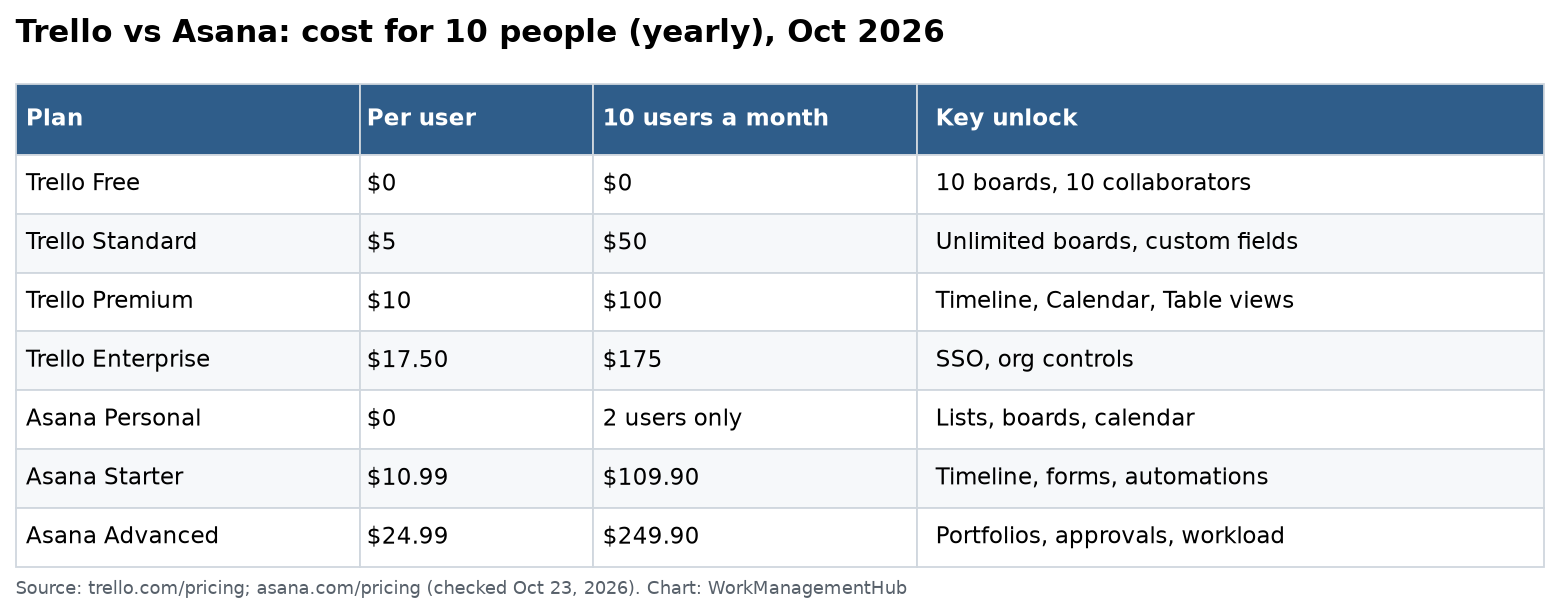
Trello is the better pick for small teams that want simple Kanban boards at a low price, starting at $5 per user. Asana is the better pick once you have several projects, deadlines that depend on each other, or managers who need reports. For 10 people, Trello Standard costs $50 a month and Asana Starter costs $109.90.
I checked Trello pricing and Asana pricing on October 23, 2026. Prices are per user per month, billed yearly, in US dollars.
The quick answer
| Trello | Asana | |
|---|---|---|
| Best for | Simple boards, small teams | Structured projects, many teams |
| Free plan | Up to 10 collaborators, 10 boards | Up to 2 users |
| Entry paid price | $5 (Standard) | $10.99 (Starter) |
| Timeline view | Premium, $10 | Starter, $10.99 |
| Automations | 250 to 1,000 runs, unlimited on Premium | Unlimited rules on Starter |
| Free guests | Single board guests on Standard | Unlimited on Starter |
| Reports and goals | Dashboard view on Premium | Portfolios and goals on Advanced |
Trello plans in 2026
Trello’s plans start cheap and add views and admin tools as you go up.
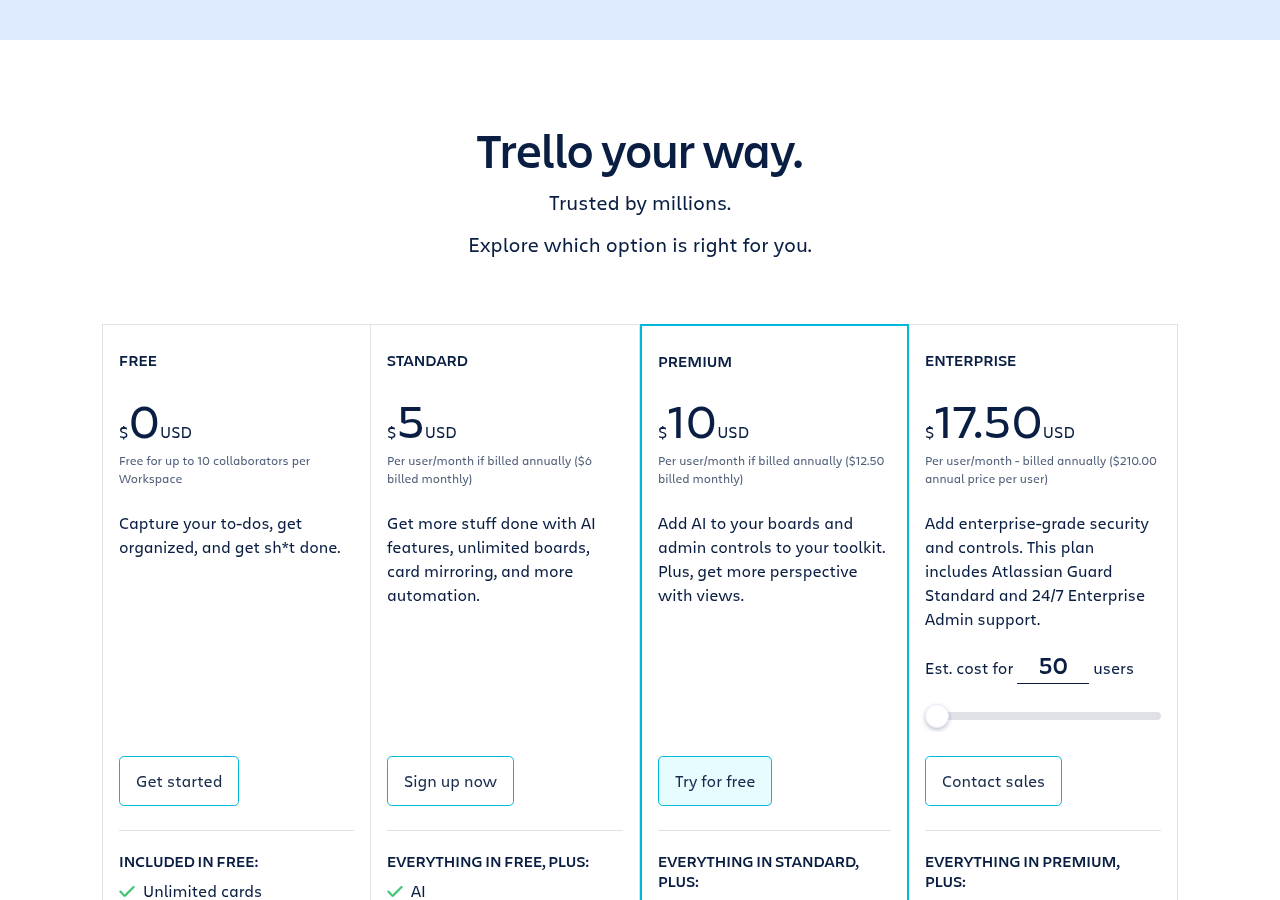
- Free: up to 10 collaborators per Workspace, 10 boards, unlimited cards, 10 MB per file and 250 Workspace command runs a month.
- Standard, $5 per user ($6 monthly): unlimited boards, custom fields, card mirroring, AI features, 250 MB per file, 1,000 command runs a month and single board guests.
- Premium, $10 per user ($12.50 monthly): Calendar, Timeline, Table, Dashboard and Map views, unlimited command runs, admin and security tools, and observers.
- Enterprise, $17.50 per user: billed yearly at $210 per user, with unlimited Workspaces, organization-wide permissions and SSO through Atlassian Guard.
Asana plans in 2026
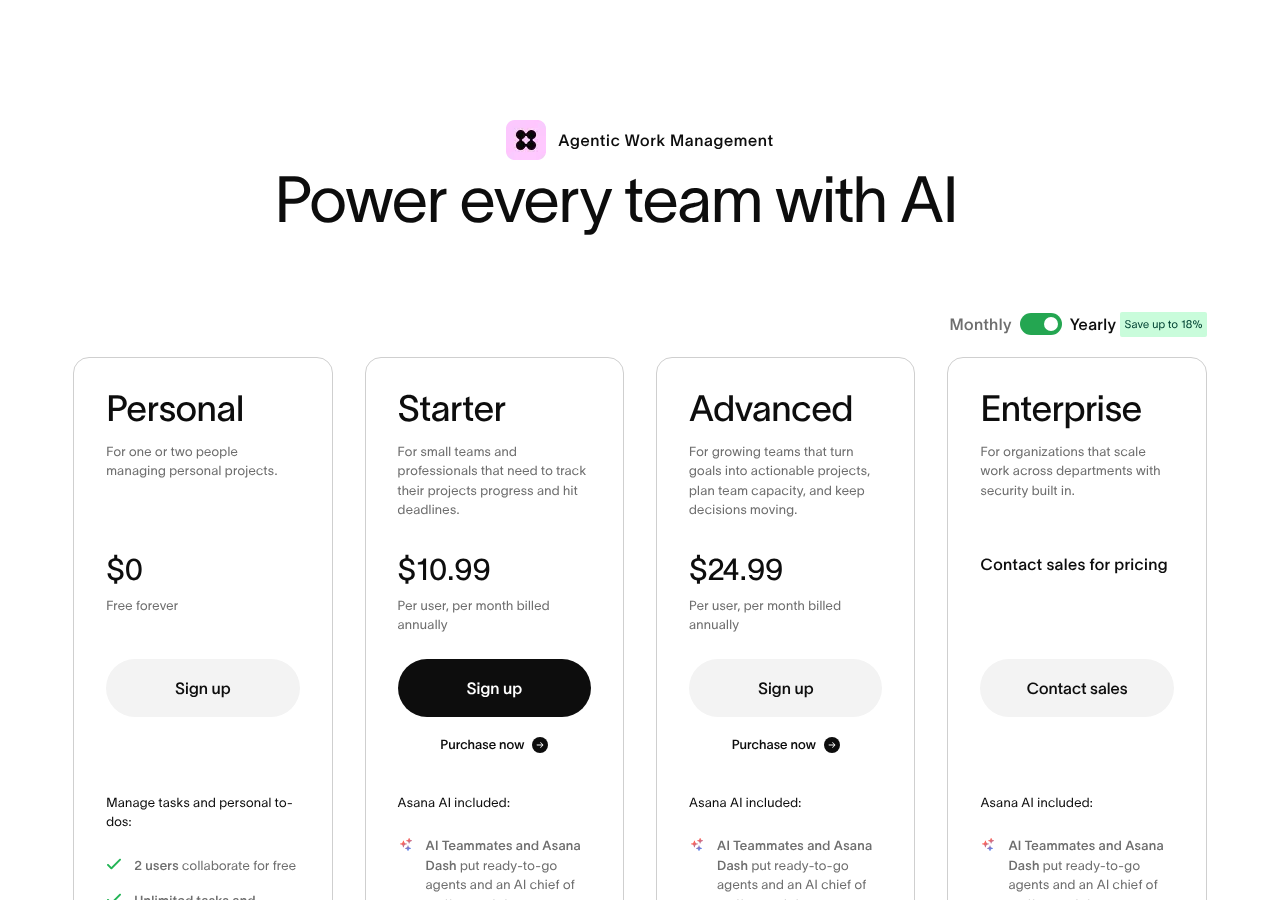
- Personal, free: for up to 2 users, with lists, boards and calendar views.
- Starter, $10.99 per user: timeline and Gantt, unlimited automations, forms and unlimited free guests.
- Advanced, $24.99 per user: portfolios, goals, approvals and proofing, time tracking and workload.
- Enterprise: quoted, with view-only licenses, SAML and data controls.
Yearly billing saves up to 18% on Asana.
What 10 people pay
| Plan | Monthly | Yearly |
|---|---|---|
| Trello Free | $0 | $0 |
| Trello Standard | $50 | $600 |
| Trello Premium | $100 | $1,200 |
| Trello Enterprise | $175 | $2,100 |
| Asana Personal | Not allowed (2 users max) | |
| Asana Starter | $109.90 | $1,318.80 |
| Asana Advanced | $249.90 | $2,998.80 |
The fair match is Trello Premium against Asana Starter, since both give you a timeline view. Trello is about $10 a month cheaper at that level for 10 people.
Where Trello wins
It is the simplest tool in this space. A board, some lists and cards is all most people need to see, and new users rarely need training.
The free plan is generous for small teams. Ten collaborators can share up to 10 boards for free, while Asana’s free plan stops at 2 users.
Power-Ups fill the gaps. Trello allows unlimited Power-Ups per board even on Free, so you can add calendars, voting or time tracking from the directory.
Where Asana wins
Structure for real projects. Sections, subtasks, dependencies and a proper timeline make it easier to run work that has many steps and deadlines that depend on each other.
Automations are not metered the same way. Asana Starter includes unlimited rules, while Trello counts command runs. A busy Trello Workspace can burn through 1,000 runs on Standard and stop automating until next month.
Managers get a real overview. Portfolios, goals and workload on Advanced show many projects at once, which Trello can’t really match even with its Dashboard view.
The honest downsides
Trello: the 10-board cap on Free, command runs that cap automation on Free and Standard, and views like Timeline and Table that only arrive on Premium. Large boards also get hard to scan once you have hundreds of cards.
Asana: the 2-user free plan, a higher starting price, and the big jump to Advanced at $24.99 for portfolios and time tracking.
Gotchas before you choose
- On Trello, count your boards. Many teams outgrow 10 boards in a few weeks, which forces the Standard plan.
- On Trello, check your usage after a month from any board menu under Automation, then Activity, then Workspace activity. Quotas are pooled across the Workspace and reset on the first of each month, and there is a second cap on operations: 2,500 on Free and 20,000 on Standard.
- On Asana, count how many people really need to edit. Unlimited free guests on Starter can cut the bill a lot for client work.
- In both tools, check what AI features cost, because both now push AI on the paid plans.
A simple way to decide
Ask how your team describes its work. If people talk in “to do, doing, done” and rarely plan more than a few weeks ahead, Trello will feel natural and stay cheap. If people talk about launch dates, dependencies, owners and status reports, Asana will save you from building a project plan out of cards and labels. Many teams start in Trello and move to Asana once they run more than a handful of projects at the same time.
Who should pick which
Pick Trello if you are a small team or a solo user, your work fits on boards, and you want the lowest price.
Pick Asana if you run several projects at once, need a timeline with dependencies, or managers need reports across teams.
Related guides
- Trello pricing 2026
- Trello review 2026
- Asana pricing 2026
- Trello Butler not working fix
- ClickUp vs Asana 2026
Common questions
Is Trello cheaper than Asana?
Yes. Trello Standard is $5 per user and Premium is $10, while Asana Starter is $10.99. For 10 people, Trello Standard is $50 a month against $109.90 for Asana Starter.
Is Trello’s free plan better than Asana’s?
For teams of 3 to 10, yes. Trello Free allows 10 collaborators and 10 boards, while Asana Personal is limited to 2 users.
Does Trello have a timeline or Gantt view?
Yes, Timeline view is on Premium at $10 per user. Asana includes timeline on Starter at $10.99.
What are Trello command runs?
Each time an automation triggers, it uses one run from a pool shared by the whole Workspace. Free gets 250 runs a month, Standard gets 1,000 and Premium is unlimited, though Premium still caps operations.
Can I move from Trello to Asana?
Yes. Asana can import Trello boards, and lists become sections. Check labels and checklists after the import, as they may not map cleanly.
Sources
- Trello pricing (checked Oct 23, 2026)
- Asana pricing (checked Oct 23, 2026)
- Trello Help: Automation quotas and limits (checked Oct 23, 2026)
Sponsored