GitHub Copilot Projects vs GitHub Projects: What Universe 2026 Changed

GitHub now has two things called “Projects.” GitHub Projects is the planning board you already know. Copilot Projects, launched in public preview on October 28, 2026, is a place in the GitHub Copilot app where you give Copilot a goal and it runs the agent work. The same day, GitHub said Enterprise customers can get Copilot with no seat charge and pay only for the AI credits they use.
I read GitHub’s Universe 2026 announcement, the Copilot app changelog, the Enterprise billing changelog and the matching GitHub Docs pages on October 30, 2026. Below is what changed for teams that plan and track work on GitHub, and the cost math behind the new billing.
Two different tools with the same name
The names will confuse people, so start here. One tool plans work for humans. The other one runs work with agents.
| GitHub Projects | Copilot Projects | |
|---|---|---|
| Where it lives | github.com, at the user or org level | The GitHub Copilot app |
| What it holds | Issues, pull requests and draft issues | A goal, repos, files and agent sessions |
| Who does the work | Your team | Copilot agents, with you reviewing |
| Views | Table, board and roadmap | Overview, Library and Automations tabs |
| Status | Generally available | Public preview, subject to change |
| Cost | Included on Free, Team ($4) and Enterprise ($21) | Uses AI credits for the agent work |
GitHub Projects stays the same. You still get up to 50 fields per project, built-in workflows, charts and status updates. Nothing at Universe replaced it. If you are choosing a planning tool, our Jira vs GitHub Projects comparison still applies.
How Copilot Projects work
The Copilot Projects docs describe a simple flow:
- Open the GitHub Copilot app and create a new project.
- Add repos if the work needs code. You can skip this. A project can be pure research, such as sorting customer feedback.
- Write a prompt with the goal, the result you want and the limits, like “Do not make code changes.”
- Add files or folders to the Library tab so Copilot works from your specs, notes or feedback.
- Send it. Copilot starts as many sessions as the work needs and brings back results, like pull requests, for you to review.
The Overview tab groups the work into four buckets: Needs input, Open (work with an open pull request), Working and Done. You can open any session to see the plan, the changes and the pull request, then steer it with a new message.
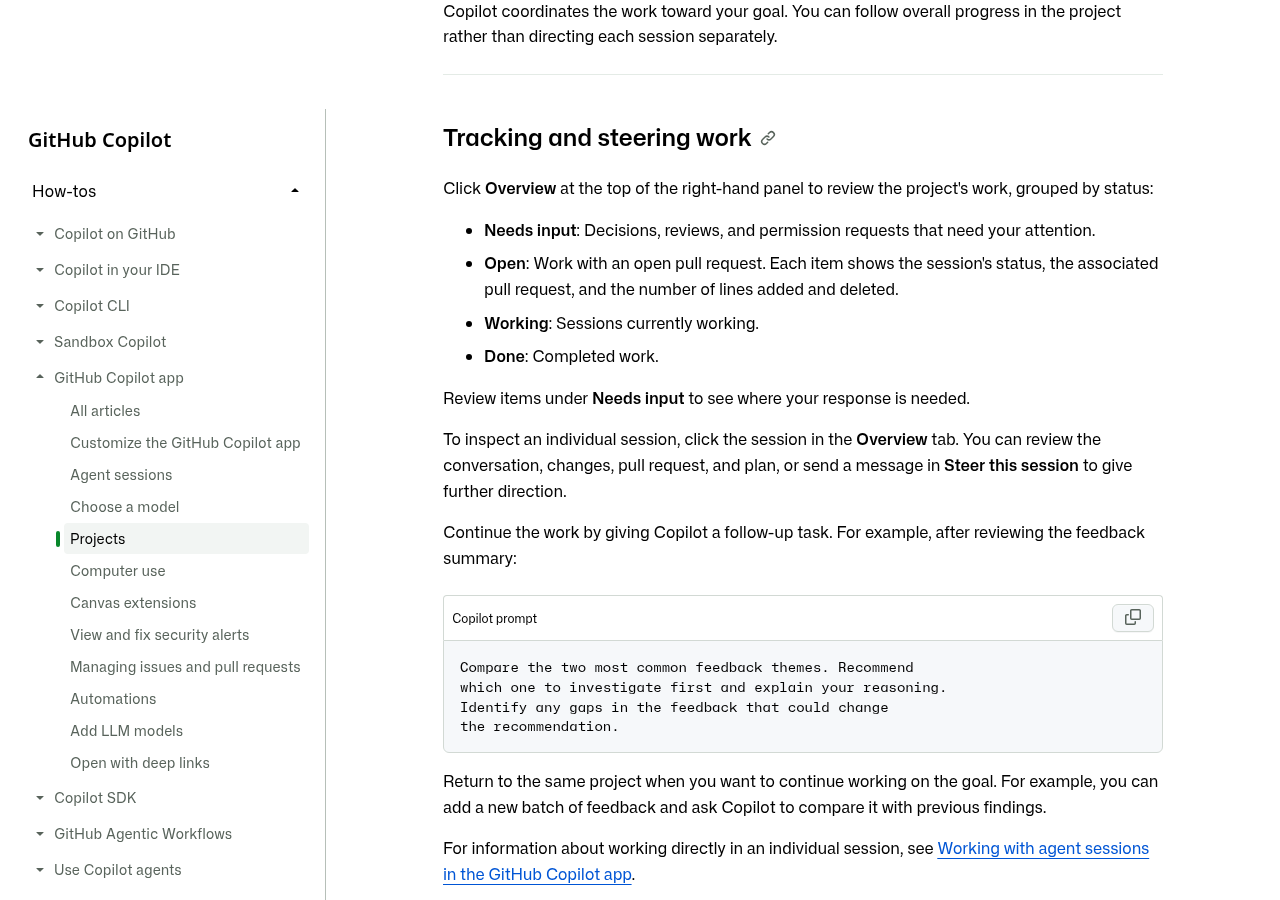
For repeat jobs, you ask in plain words, such as “Every Monday at 9 AM, summarize the new feedback by theme.” The task then shows in the Automations tab, where you can pause it, change the schedule or delete it. The changelog also says Copilot can pull context from connected tools like Slack and Figma.
So where does it fit? Think of it as a run log for agent work, not a backlog. It does not have custom fields, roadmaps or sprint iterations. Your plan still lives in GitHub Projects, Jira or Linear. Copilot Projects is where the agent does the tasks you hand it.
What changed in Copilot billing
The bigger news for budgets is “Copilot access.” Here is GitHub’s own comparison from the billing docs:
| Billing model | Seat charge per user | Included AI credits |
|---|---|---|
| Copilot Business | $19 a month | 1,900 per user per month, pooled |
| Copilot Enterprise | $39 a month | 3,900 per user per month, pooled |
| Copilot access, with a GitHub Enterprise Cloud license | $0 | None |
| Copilot Standalone, without that license | $10 a month | None |
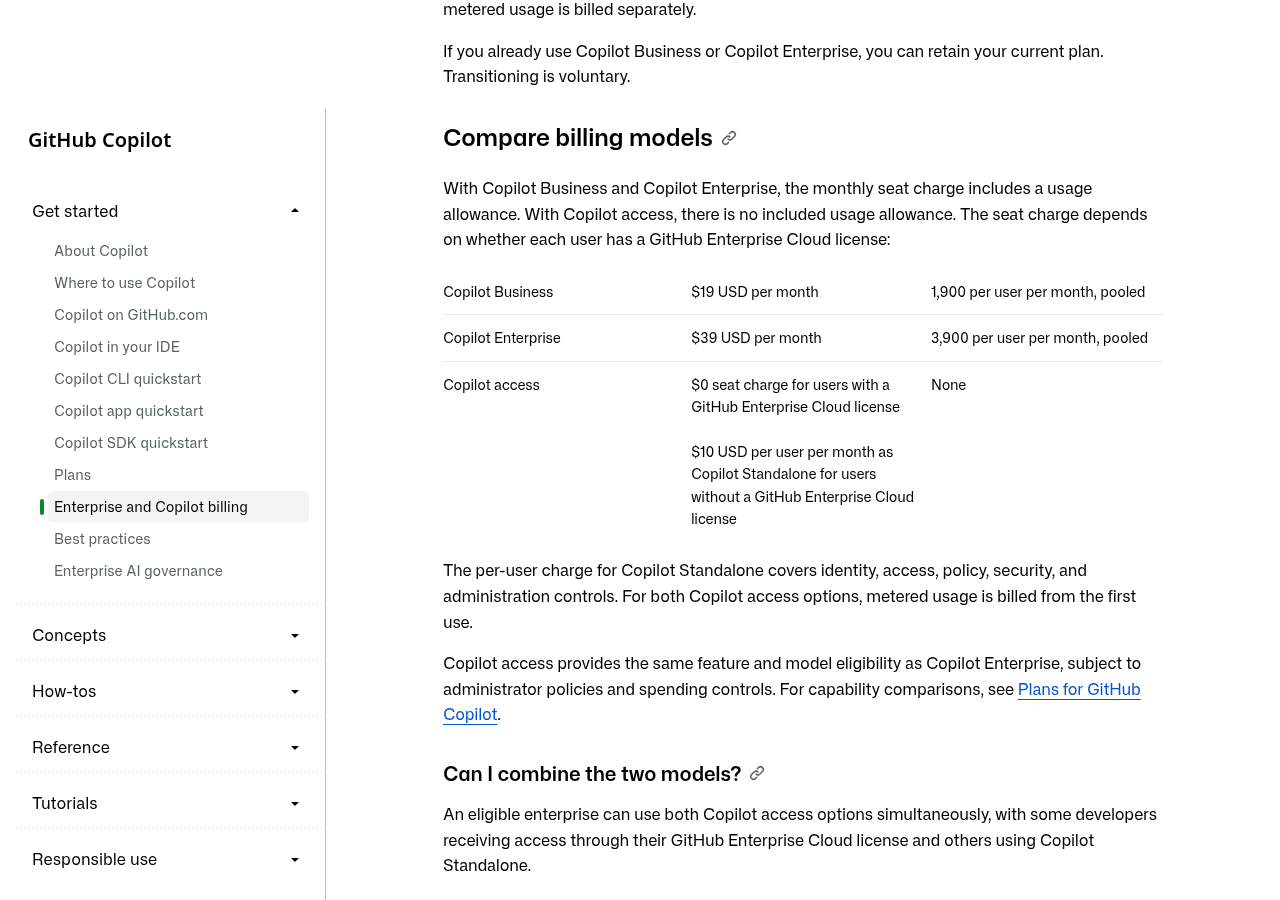
One AI credit equals $0.01, per the usage-based billing docs. So the $19 Business seat comes with $19 of usage, and the $39 Enterprise seat comes with $39. With Copilot access, you pay for usage from the very first credit. Copilot access gets the same features and models as Copilot Enterprise.
What still works with no budget left: code completions and next edit suggestions. What stops: Copilot Chat, code review and cloud agent work. GitHub says an empty budget never removes the seat.
The cost math for a 50-person team
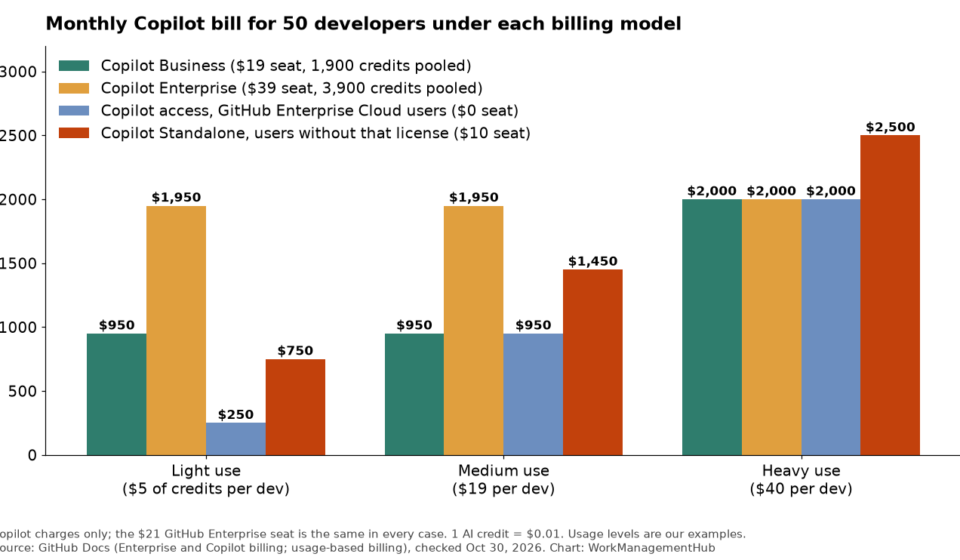
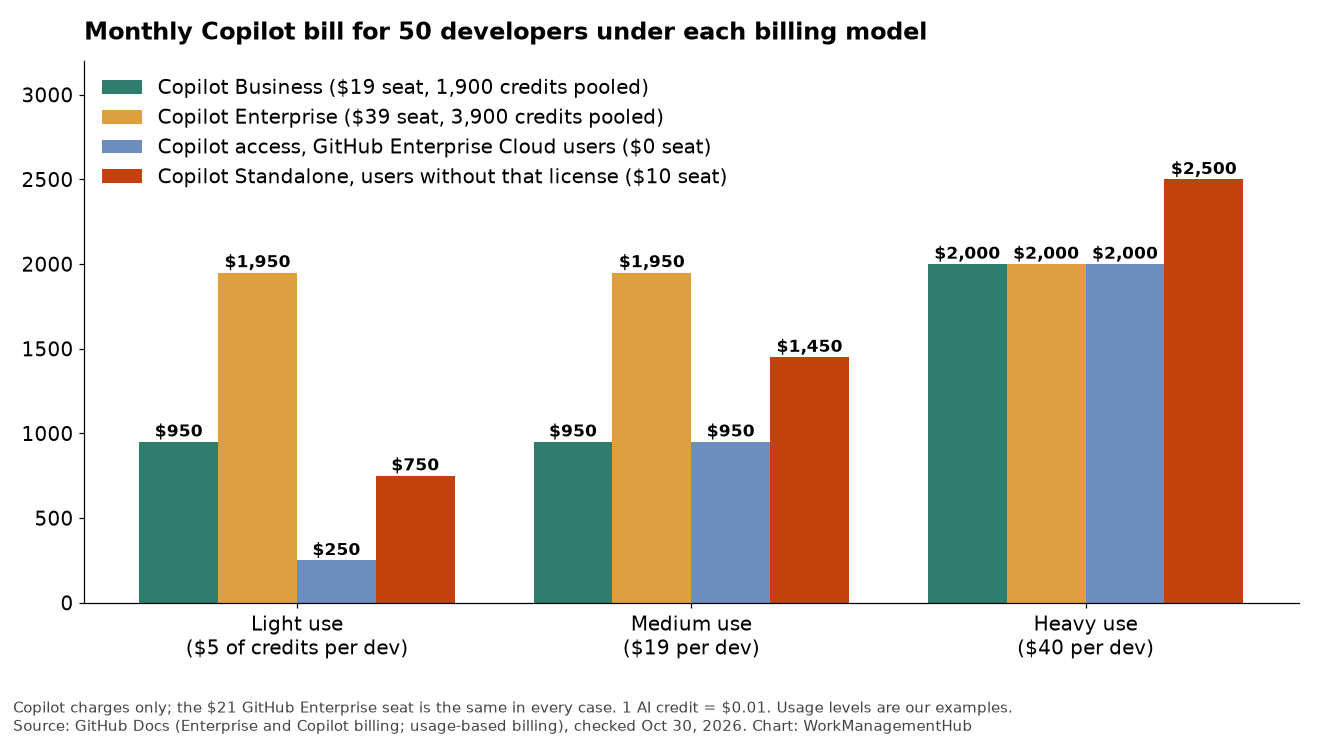
The chart at the top runs three examples for 50 developers. The $21 GitHub Enterprise seat is the same in every case, so it is left out.
- Light use ($5 of credits per developer): Copilot Business costs $950 a month because you pay for seats. Copilot access costs $250.
- Medium use ($19 each): Business and Copilot access both land at $950.
- Heavy use ($40 each): Business, Enterprise and Copilot access all cost $2,000. Past the pool, overage bills at the same credit rates.
Two simple rules come out of this:
- For people who already hold a GitHub Enterprise Cloud license, Copilot access never costs more than Business for the same usage. The savings come from light users.
- For people without that license, Standalone at $10 beats Business only when average usage stays under $9 per person a month. Above $19, Standalone costs $10 more per person.
Your real usage is the only number that matters. Pull it from the AI usage dashboard or usage export before you decide.
Gotchas to check first
- Not open to everyone yet. Today it is only for customers who work with a GitHub or Microsoft account team. Self-serve customers get it later, and GitHub has not given dates. GitHub Free and GitHub Team organizations can’t use it.
- No mixing. The billing model applies to the whole enterprise. You can’t keep some orgs on Copilot Business and move others to Copilot access.
- First of the month. Switches take effect on the first day of a month. Your account team sets the date.
- Seats are still assigned. Even users with an Enterprise Cloud license don’t get Copilot until an owner assigns it.
- The paid usage policy must stay on. With no included credits, turning it off blocks Chat and agents.
- Firewall rules. If you only allow
*.business.githubcopilot.com, add*.enterprise.githubcopilot.comfirst. - Budgets before launch. Set user and cost-center budgets before people start, since spending starts at the first request.
- Preview risk. Copilot Projects and computer use are in public preview. Don’t build a team process on them yet.
What I would do this quarter
- Keep your plan in GitHub Projects or your current tool. If you link GitHub with Jira, our Jira GitHub integration guide covers the setup.
- Pick one repeat task, like a weekly feedback summary, and test it in a Copilot Project for two weeks.
- Export last month’s Copilot usage and rerun the 50-developer math with your own numbers.
- If Copilot access wins, ask your account team for the next first-of-month date. Set budgets and the firewall rule before that day.
- If you are on Copilot Business through self-serve, wait. GitHub says your plan is unaffected.
Teams that ship in small pull requests should also read our guide to GitHub stacked pull requests, since agent sessions tend to produce many small changes. If you are weighing GitHub against Linear for issue tracking, see Linear vs GitHub Issues.
Common questions
Is Copilot Projects the same as GitHub Projects?
No. GitHub Projects is the table, board and roadmap tool for issues and pull requests. Copilot Projects lives in the GitHub Copilot app and organizes agent work toward a goal.
Does Copilot Projects cost extra?
There is no separate fee listed for it. The agent work it starts, such as cloud agent sessions and chat, uses AI credits under your Copilot plan.
Can my team on GitHub Team get Copilot with no seat charge?
No. Copilot access needs GitHub Enterprise Cloud. GitHub Free and GitHub Team organizations are not eligible.
Do I have to switch from Copilot Business?
No. The switch is voluntary, and Copilot Business and Copilot Enterprise remain on sale for new and current customers.
What happens when our Copilot budget runs out?
Code completions and next edit suggestions keep working. Chat, code review and cloud agent work stop until budget is added. The seat stays assigned.
Sources
- GitHub Blog: GitHub Universe 2026, Evolving every layer of the stack (Oct 28, 2026)
- GitHub Changelog: GitHub Copilot app, Universe releases (Oct 28, 2026)
- GitHub Changelog: GitHub Enterprise now includes access to GitHub Copilot (Oct 28, 2026)
- GitHub Docs: What’s changing with GitHub Enterprise and Copilot billing (checked Oct 30, 2026)
- GitHub Docs: Usage-based billing for organizations and enterprises (checked Oct 30, 2026)
- GitHub Docs: Working with projects in the GitHub Copilot app (checked Oct 30, 2026)
- GitHub Docs: About Projects (checked Oct 30, 2026)
- GitHub pricing (checked Oct 30, 2026)
Sponsored