
An Airtable automation is a trigger plus up to 25 actions, and Airtable executes it on its own servers, so it fires whether or not anyone has the base open. You build one from the Automations tab: choose a trigger, test it, add actions, test each action, then toggle the automation on.
That is the whole shape of it. The part that catches people out is not the building — it is the accounting. Airtable counts a run every time a trigger fires, regardless of whether the actions inside succeed. A badly scoped automation on a Free workspace can burn its entire monthly allowance before lunch.
What actually counts as a run
One trigger firing equals one run. The number of actions inside the automation is irrelevant to the count. An automation with a single Send an email action costs the same as one with twenty steps. A repeating group that loops over fifty records still counts as one run, which is the single most useful thing to know about Airtable’s billing model.
Failed runs count too. So do runs where the trigger fired but every downstream action errored out. Airtable is explicit about this in its automations getting-started documentation: the counter increments when the trigger is invoked, not when the work completes.
Run allowances reset on the first day of each calendar month, not on your billing anniversary. If you exhaust them on the 15th, you wait until the 1st. There is no documented way to buy more runs mid-month — the only lever Airtable offers is moving to a higher plan.
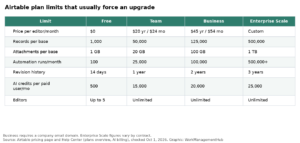
Automation runs by plan
| Plan | Runs per month, per workspace | Run history kept | Automation restrictions |
|---|---|---|---|
| Free | 100 | 2 weeks | No Run a script action; Send an email can only reach base collaborators |
| Team | 25,000 | 6 months | Up to 100 unique non-collaborator email addresses per day |
| Business | 100,000 | 1 year | Up to 1,000 unique non-collaborator email addresses per day |
| Enterprise Scale | 500,000 | 3 years | No limit on non-collaborator emails per day |
The Free tier’s 100 runs is not a working allowance — it is a demo. Anything with a When a record is updated trigger on a table people actually touch will chew through it. If automations are the reason you are on Airtable, budget for Team at minimum; our breakdown of Airtable’s 2026 pricing tiers covers what else changes at each step.
Note the run-history column separately. On Free, a failure from sixteen days ago is simply gone — you cannot debug what you cannot see.
Building an automation, start to finish
- Open the base and click Automations in the top-center of the screen.
- Click Create new …, then Create automation to start from scratch rather than from the AI catalog.
- Rename it immediately. “Automation 1” is how bases become unmaintainable.
- Click + Add trigger and pick a trigger type, then select the table it watches.
- Test the trigger. Airtable requires this. Click Use suggested record to let it pick, or Choose record to select one yourself. At least one record must satisfy every trigger condition or the test cannot find anything.
- Click + Add advanced logic or action and choose your action.
- Configure the action, using the blue plus icon to insert values from the triggering record instead of typing them.
- Click Test action. Every step must pass before the automation can be enabled.
- Open the three-dot menu and choose Edit description. Write what it does and why. The default description only lists the step types.
- Flip the toggle from OFF to ON.
One caveat on step 5: if you change a field or add a column after testing, retest every step. The test result is a snapshot of the base at the moment you ran it, and a stale snapshot will pass while the live automation fails.
Choosing a trigger
| Trigger | Reach for it when | Watch out for |
|---|---|---|
| When a record is created | Records arrive fully formed — usually via a form or an integration | Fires as soon as the first few characters are typed, so manual entry triggers it half-finished |
| When a record is updated | You need to react to a specific field changing | Same premature-firing problem; the noisiest trigger in Airtable |
| When a record matches conditions | A record reaches a defined state, such as Status = Approved | Only fires on transition into the matching state, never retroactively |
| When a record enters a view | Your logic is already expressed as view filters | Records that leave and re-enter trigger again, every time |
| When a form is submitted | Intake workflows where all fields land at once | Nothing significant — this is the cleanest trigger Airtable offers |
| At a scheduled time | Digests, reminders, recurring record creation | Runs on the schedule even when there is no work to do, consuming runs |
| When a webhook is received | An external system needs to push into Airtable | Separate setup path from the record-based triggers |
| When a button is clicked | A human should decide when the automation fires | Tied to a button element built in Airtable’s Interface Designer |
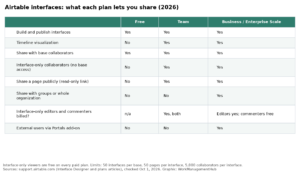
Airtable also ships Google Workspace and Outlook triggers for cross-app work. On the action side you get Create record, Update record, Find records, Send an email, Run a script, plus first-party actions for Slack, Microsoft Teams, Outlook, Google Workspace, Jira Cloud, Jira Server, Salesforce, GitHub, Twilio SMS, Hootsuite, Facebook Pages, and the document automator.
A practical habit: build a dedicated, locked view for any automation that reads from one. Someone editing filters on a shared view can silently redirect what an automation acts on, and that is a genuinely painful bug to trace. Our guide to Airtable views and filtering covers locking and view-level conditions in detail.
Three automations worth the effort
Route intake records to the right owner
- Set the trigger to When a form is submitted on your intake table.
- Click + Add advanced logic or action, then Conditional logic.
- In the first group, set the condition to your category field equalling your first bucket, then add an Update record action that writes the matching owner into an assignee field.
- Click the three-dot menu and choose Add group below for each remaining category.
- Add a final group configured as If no other conditions are met, with a Slack: Send message or Send an email action that flags the unrouted submission.
- Click Test condition on each group individually, then enable the automation.
Only one conditional group runs per automation run — the first whose conditions match. Order your groups from most specific to most general, because a broad rule sitting above a narrow one will swallow it. Nesting groups inside other groups is not supported.
Send each person only their own weekly tasks
- Set the trigger to At a scheduled time and configure the interval, timing, and start date.
- Add a Find records action pointed at your people table, filtered to active team members.
- Click + Add advanced logic or action, then Repeating group.
- Click Select input list, choose the Find records step under “Use data from…”, then click Use as list.
- Click Test input list and confirm the array looks right.
- Inside the group, add a second Find records action filtered to tasks assigned to Current item, then a Send an email action that pulls the recipient address from Current item.
- Test each step individually — the Test automation button is disabled once a repeating group exists — then enable.
The whole loop costs one run no matter how many people it emails. Airtable’s repeating-groups documentation caps an input list at 8,000 items, and Find records returns at most 1,000 records per run, so that action is your real ceiling.
Timestamp a status change without a formula
- Add a date field to hold the stamp, then set the trigger to When a record matches conditions with your status field equalling the target value.
- Add an Update record action on the same table.
- For Record ID, click the blue plus icon and insert the record ID from the trigger step.
- Click + Choose field, pick your date field, then insert the Actual run time token as its value.
- Test and enable.
Use the Actual run time token rather than a created-time reference. Automation date handling defaults to GMT regardless of how the field displays, and this token is the documented way to get a locally sensible timestamp.
Where automations fail quietly
Airtable emails a failure notice only to the last person who toggled the automation on. If that person has left, notices go to workspace owners. You can add further subscribers, but they must hold Creator permissions or higher. Until someone does that, a broken automation can sit failing for weeks with nobody watching.
The failure modes documented in Airtable’s automation troubleshooting article that cost the most time:
- Infinite loops. An action that re-triggers its own trigger — for example, a Create record action producing a record that enters the watched view — will run until the workspace’s monthly allowance is gone.
- Race conditions. Two automations firing at once have no guaranteed order. If sequence matters, merge them into one automation or delay the second.
- Computed fields not yet resolved. A Send email action can fail with an empty recipient because a formula or lookup had not finished calculating when the trigger read the record. Map the address to a plain email field, or insert a Find records step before the email action to re-fetch. If your formulas themselves are misbehaving, our notes on fixing Airtable formulas that return wrong results apply here too.
- Attachment timing. Automations trigger when an attachment starts uploading, not when Airtable finishes processing it. Large files break downstream steps.
- Synced tables. Data synced from another base is read-only in the destination, so an automation writing to it fails on permissions. See our Airtable sync troubleshooting notes if writes are vanishing.
- Script timeouts. A Run a script action times out at 30 seconds. Updating records one at a time inside a loop is the usual cause; batch them instead.
When something breaks, open Automation history and then Run History, filter to failed, and expand the arrows until you reach the error. Our dedicated walkthrough on diagnosing Airtable automations that stop working goes step by step through the common error strings.
What automations cannot do
They do not run retroactively. Turning an automation on has no effect on records that already satisfy the conditions — those records must leave the matching state and re-enter it. For bulk backfills, Airtable points you at the Batch update extension instead.
The Update record action modifies one record per run; multi-record updates require a repeating group. Automations cannot write into computed fields, and they will not evaluate arithmetic you type into an action input — do the maths in a formula or rollup field first, then map the result. Comments cannot trigger anything, because Airtable treats them as metadata. And a repeating group replaces a field value on each iteration rather than appending to it, which rules out the “build a running list” pattern people keep attempting.
Finally, the hard ceilings: 50 automations per base including disabled ones, and 25 actions per automation, with conditional actions counting toward that 25. Large bases hit the per-base limit sooner than you would expect. Also worth knowing: if you need a workflow that assigns and monitors work rather than just moving fields around, Airtable’s agent features sit alongside automations rather than replacing them.
FAQ
Do Airtable automations run when nobody has the base open?
Yes. Airtable documents automations as server-side, meaning they run even when nobody has the base open. They also do not depend on any individual user’s credentials, so an automation keeps running after its creator is removed from the base or leaves the workspace entirely.
Does a failed automation still count against my run limit?
Yes. Airtable increments the counter each time a trigger is invoked, whether or not the actions succeed. A single broken automation firing repeatedly can consume a workspace’s whole monthly allowance. Run allowances reset on the first of each calendar month and cannot be topped up mid-month.
Why did my automation not run on existing records?
Automations only act on records that meet the trigger conditions after the automation is switched on. Records already in the matching state at that moment are skipped permanently. To include them, change each record so it stops matching, then change it back — or use the Batch update extension.
How many records can one automation update?
The Update record action handles one record per run. To update many, add a Find records action feeding a repeating group, which loops the update across every result. Find records returns a maximum of 1,000 records per run; beyond that you need a script to fetch them.
Can two conditional groups run in the same automation run?
No. Airtable evaluates conditional groups top to bottom and executes only the first group whose conditions are satisfied, then stops checking. Nesting conditional groups is unsupported. Order groups from most specific to least specific, and use an “If no other conditions are met” group as a catch-all.
Sponsored

Related guides