Microsoft To Do Is Retiring on June 30, 2027: What Planner Users Should Do
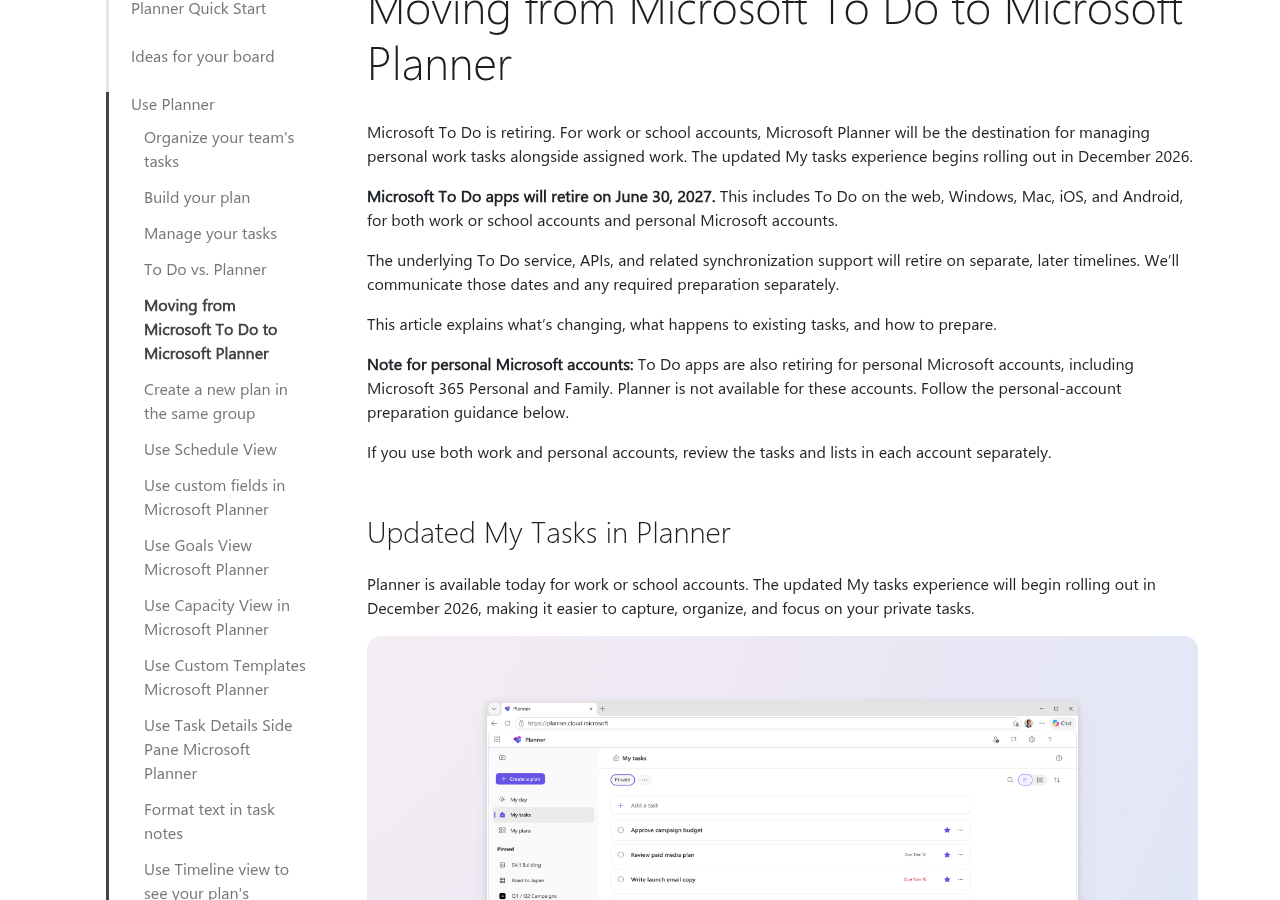
Microsoft will retire the To Do apps on June 30, 2027. That covers the web, Windows, Mac, iOS and Android. For work and school accounts, Planner becomes the home for personal tasks, and a new My tasks view starts rolling out in December 2026. Your existing To Do tasks will not move over. And if you use a personal Microsoft account, Planner is not an option at all.
Microsoft shared the news on November 18, 2026. The same post holds a second change for project teams: Premium plans in Planner will not get new features. I read the blog post, the To Do transition help article and the Planner pricing page on November 20, 2026. As a work management implementer, I want to know what breaks, who pays and what to do first. This guide covers all three.
What Microsoft announced and when
The source is Microsoft’s unified tasks and plans blog post. “Unified plans” is Microsoft’s new name for one shared system behind To Do, basic plans and premium plans. Here is the timeline:
- February 2026: Basic plans in Planner moved to the new unified base.
- October 2026: Timeline view and Capacity view reached unified plans.
- November 18, 2026: Microsoft announced the To Do retirement and the shift away from Premium plans.
- December 2026: The updated My tasks view in Planner starts rolling out.
- June 30, 2027: The To Do apps retire. You can no longer see old To Do tasks in Planner after this date.
- Later, date not set: The To Do service, APIs and sync retire. Microsoft says it will give separate notice.
What happens to your existing To Do tasks
This is the part most people miss. Microsoft’s To Do to Planner help article says it plainly: “Existing To Do tasks and lists will not migrate to Planner.”
- Your old To Do tasks stay visible in Planner until June 30, 2027. After that, you cannot view or manage them there.
- New private tasks you create in Planner go into a private plan just for you.
- Microsoft will add an export option before the apps retire. The details are not out yet. An export is a copy of your data. It does not mean you can import it into Planner.
- June 30 is not a deletion date. Microsoft says data retention is a separate matter.
- Tasks in classic Outlook are separate from To Do. They keep working and syncing with Exchange.
What you lose when you move to Planner
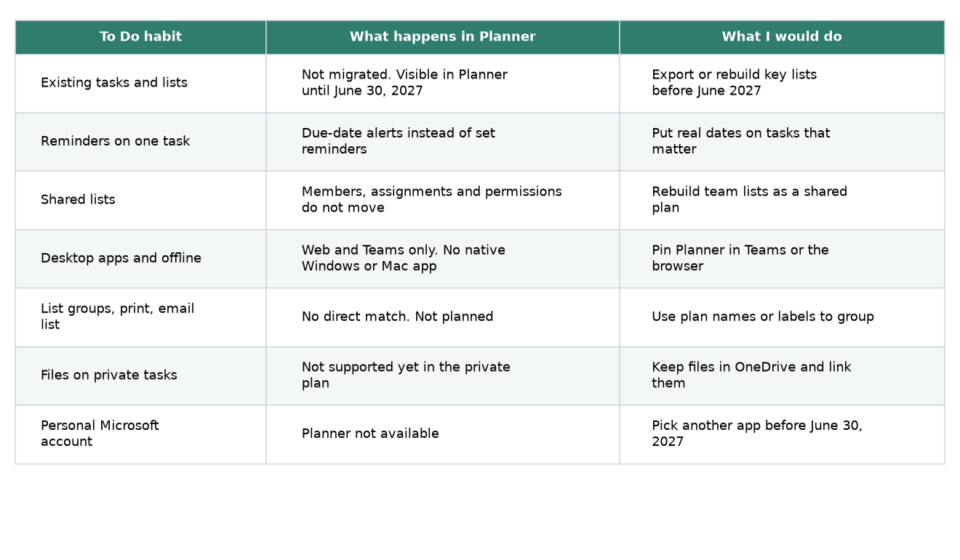
To Do and Planner work in different ways. The help article lists the gaps, and I put them in one table with what I would do about each.
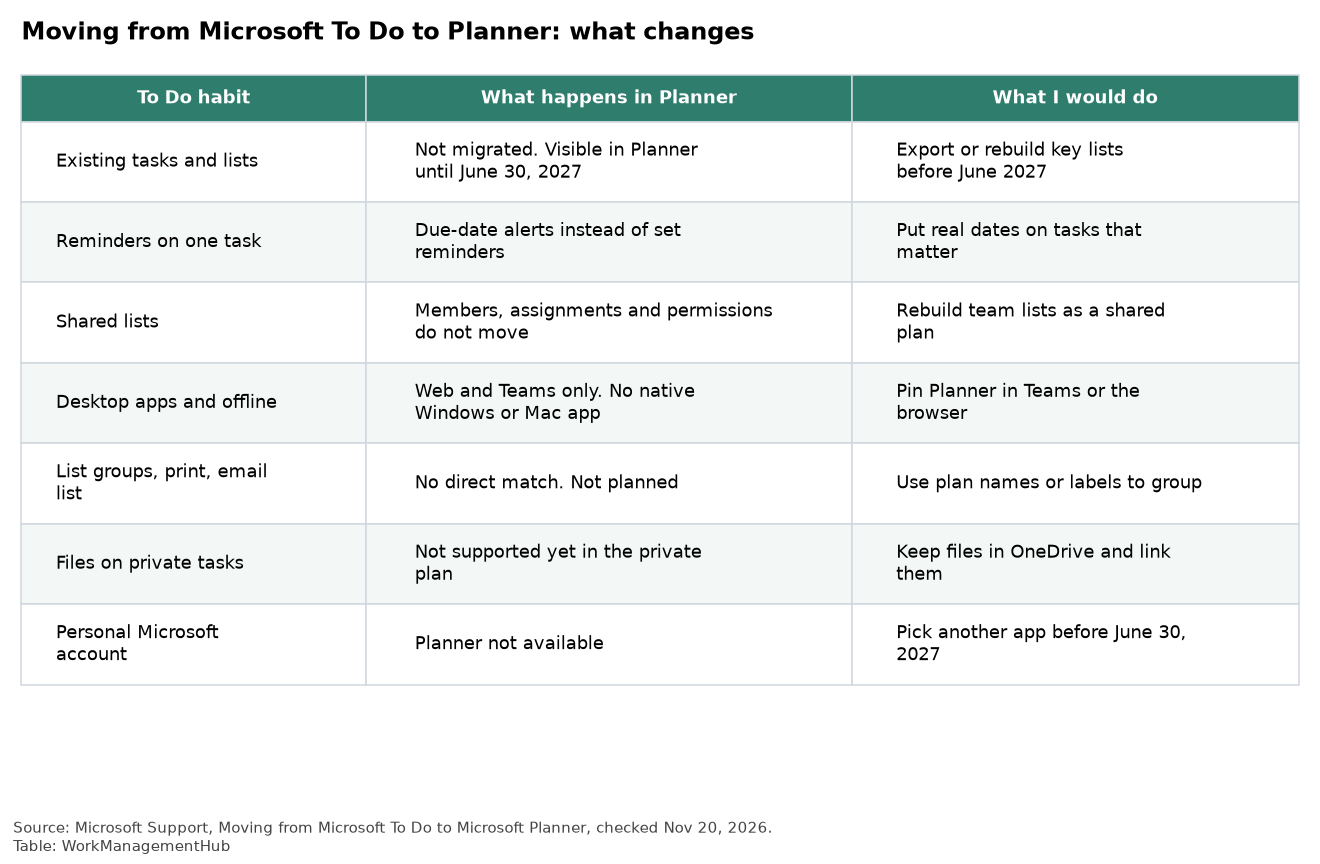
Three gaps stand out to me:
- No desktop apps. Planner runs on the web and in Teams. Microsoft says native Planner apps for Windows and Mac are not planned. The web and Teams versions do not work offline the way To Do’s desktop apps did.
- Shared lists do not carry over. Members, assignments and permissions on shared To Do lists will not transfer. Someone has to rebuild them as shared plans.
- Reminders work differently. In To Do, you set a reminder on one task for a set time. Planner sends due-date alerts instead. If people rely on “remind me at 3 PM,” they will feel this.
Also gone: list groups, printing a list and emailing a list. Microsoft says it does not plan to add those. File attachments are not supported yet on tasks in the new private plan.
Personal accounts have no Microsoft replacement
If you use To Do with a free Microsoft account or with Microsoft 365 Personal or Family, the news is worse. Planner is not available for those accounts. Microsoft’s advice is to choose another task app. Neowin pointed out that when Microsoft closed Wunderlist in 2020, it gave users an import tool into To Do. This time there is no move path to Planner.
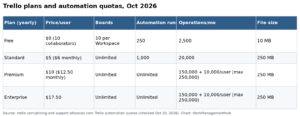
9to5Mac suggests Apple Reminders or Todoist. For a small shared to-do list, the Trello Free plan also works. Our Trello review covers its limits.
The bigger change: Premium plans stop growing
In Planner today, you pick a Basic or a Premium plan when you create one. Microsoft says all new features will now go to unified plans, which are today’s basic plans. Premium plans stay supported for now, but they will not get new features.
What that means in practice:
- Already in unified plans: Goals view, Timeline view (a Gantt-style chart) and custom fields.
- Rolling out now: Task history and conditional coloring. Conditional coloring works like conditional formatting in Excel.
- On the roadmap, no date: Sprints and backlogs, task hierarchy (subtasks) and dependencies.
- Not mentioned at all: Automatic scheduling. Neowin noticed this too. If your schedule depends on Premium’s auto scheduling, plan for a long wait.
- AI only in unified plans: Planner Agent, the Cowork plugin and the Planner MCP server work only with basic plans. MCP is a standard way for AI agents to connect to apps.
Admins get one win: unified plans do not need Dataverse, the Power Platform database that Premium plans run on.
What each Planner license costs
Microsoft says licensing is not changing. Here is what the Planner pricing page showed on November 20, 2026, in US dollars:
- Planner in Microsoft 365: Included in Microsoft 365. Grid, Board, Schedule and Chart views.
- Planner Plan 1: $10 per user a month, paid yearly. Adds Timeline (Gantt), sprints, goals, milestones and finish-to-start dependencies.
- Planner and Project Plan 3: $30 per user a month, paid yearly. Adds portfolios, baselines, critical path and dependencies with lead and lag.
- Microsoft 365 Copilot add-on: $30 per user a month, paid yearly. Needed for Planner Agent features in your plans.
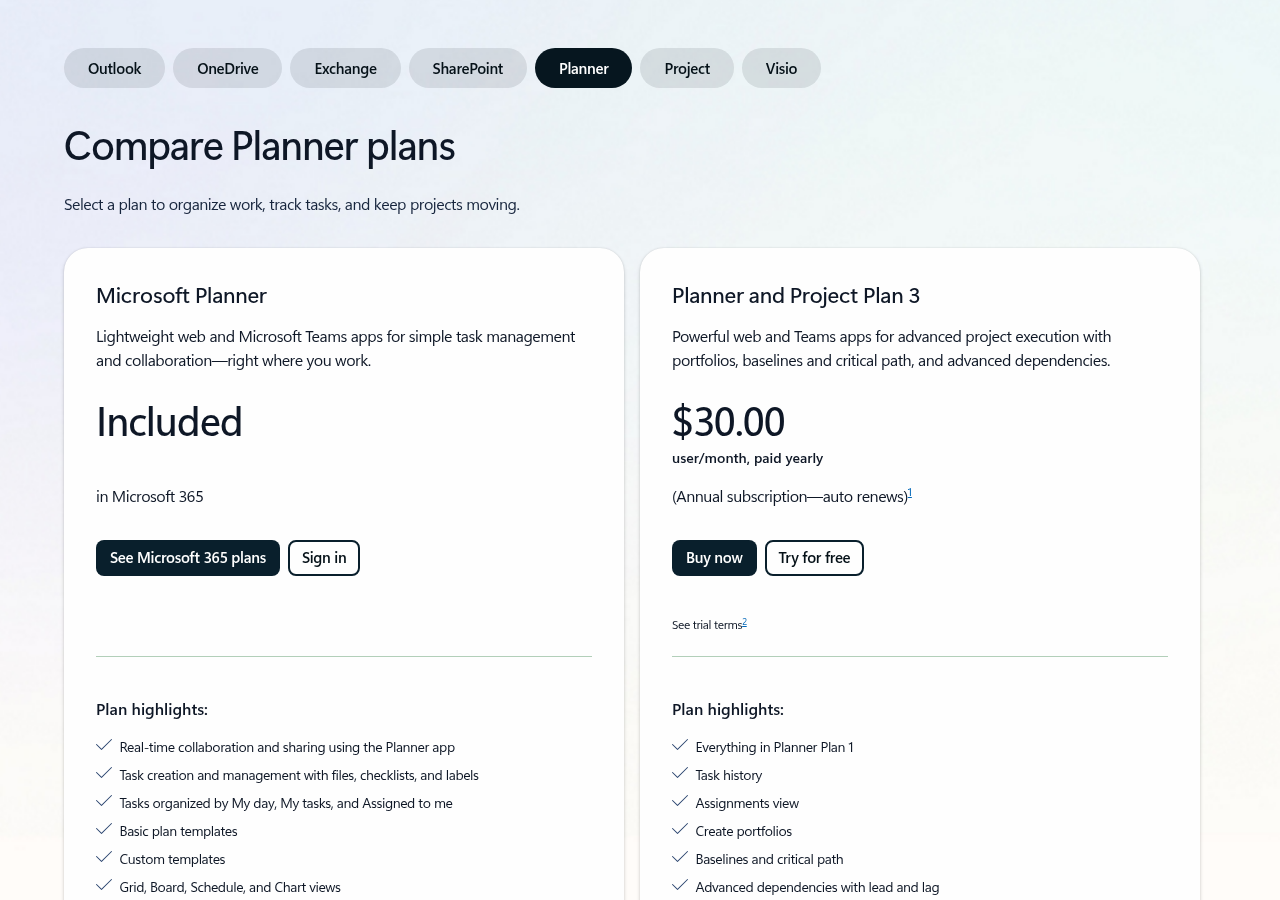
Good news for mixed teams: people can share one plan even with different licenses. A lead with Plan 1 can set goals while teammates on the included Planner track the tasks.
A switch plan for your team
Here is what I would do now, before the December rollout:
- Find your To Do users. Ask who keeps work in To Do. Look hardest for shared lists, since those do not move.
- Confirm Planner is turned on. Microsoft says no new setup is needed. But if Planner is disabled in your tenant, users have nowhere to go.
- Make new plans basic. For new projects, pick a basic (unified) plan. Microsoft plans to drop the “Basic” label soon.
- Do not rush Premium plans. If a plan uses auto scheduling, sprints or lead and lag dependencies, leave it on Premium. Unified plans cannot match those yet.
- Check Power Automate flows. Any flow that uses To Do tasks may need changes. The To Do APIs retire later, on a date Microsoft has not shared.
- Watch Message Center. Microsoft will post the export steps and rollout dates there.
Honest pros, cons and when to look elsewhere
Pros: – One place for personal and team tasks in Microsoft 365. – New features, including AI, land in the plan type most teams already use.
Cons: – No migration for old To Do tasks or shared lists. – No desktop or offline app. – Premium plan users are stuck between a plan type that is not growing and one that is not finished.
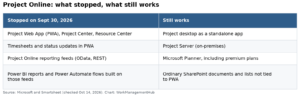
When to look elsewhere: If you run real schedules with critical paths, Planner’s direction is not settled yet. Our Smartsheet vs Microsoft Project guide and ClickUp vs Microsoft Project comparison show the license math. If you are also leaving Project Online, start with our Project Online alternatives guide. If your team lives in Teams, our Smartsheet and Microsoft Teams setup guide shows another way to keep tasks inside Teams.
Common questions
When does Microsoft To Do retire?
The To Do apps retire on June 30, 2027, on the web, Windows, Mac, iOS and Android. The To Do service and APIs retire later, on dates Microsoft has not shared yet.
Will my To Do tasks move to Planner?
No. Existing tasks and lists will not migrate. You can still see them in Planner until June 30, 2027, and Microsoft plans an export option before then.
Can I use Planner with a personal Microsoft account?
No. Planner is not available for personal accounts, including Microsoft 365 Personal and Family. Microsoft says those users should pick another task app.
Are Planner Premium plans going away?
Microsoft has not set an end date. Premium plans stay supported, but new features go only to unified (basic) plans, and Microsoft suggests creating new plans as basic plans.
How much does Planner Plan 1 cost?
Planner Plan 1 is $10 per user a month, paid yearly. Planner and Project Plan 3 is $30 per user a month, paid yearly.
Sources
- Microsoft Tech Community: Introducing unified tasks and plans for Copilot and Microsoft 365 (Nov 18, 2026; checked Nov 20, 2026)
- Microsoft Support: Moving from Microsoft To Do to Microsoft Planner (checked Nov 20, 2026)
- Microsoft 365: Planner plans and pricing (checked Nov 20, 2026)
- Neowin: Microsoft is killing To Do, sidelining Planner Premium (Nov 19, 2026)
- 9to5Mac: Microsoft To Do is retiring, including Mac and iOS apps (Nov 19, 2026)
From our team: OneSmar for Smartsheet Teams