Notion Custom Agents 2026: Full Feature Deep Dive and What They Can Actually Automate

- Notion 3.3 (February 24, 2026) introduced Custom Agents with a dedicated Library, native Slack channel read/write, and Plan Mode — agents build a verified step-by-step plan before executing, eliminating runaway automation errors.
- Running costs dropped 35–50% with the April 2026 update. Agents using GPT-5.4 Mini, Haiku 4.5, or MiniMax M2.5 consume up to 10x fewer credits than premium models.
- Eight new API endpoints for database views and a meeting notes query endpoint with filtering shipped in April 2026, enabling programmable agent workflows at enterprise scale.
- Agents can read and write Slack channels directly — no Zapier or Make layer required — making Notion the central nervous system for multi-channel workflows.
- Most competitor articles cover only the February launch. The Plan Mode architecture, cost reduction, new model options, and API expansion covered here are largely unreported.
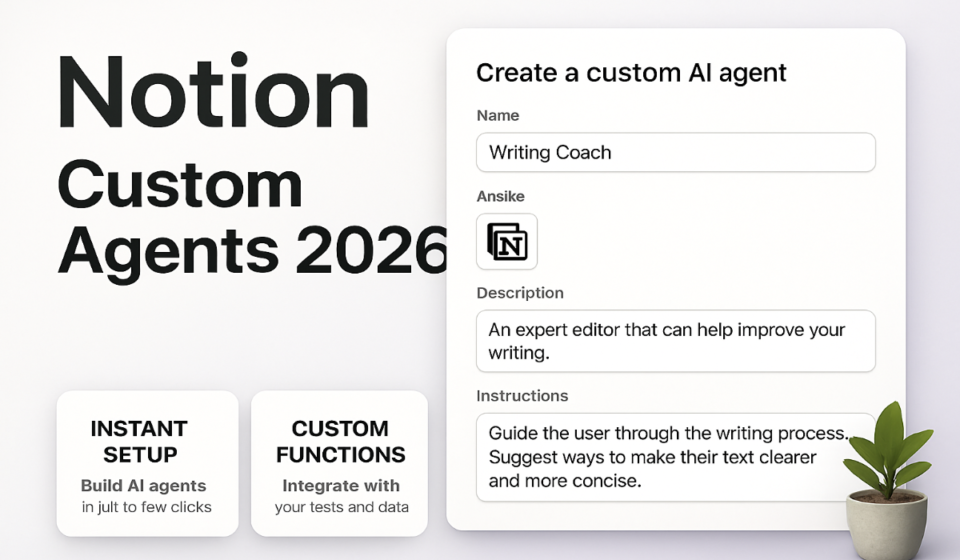
Notion Custom Agents are AI workers you configure inside Notion to autonomously execute multi-step workflows — querying databases, writing content, sending Slack messages, and calling the Notion API — without requiring code or third-party automation tools. Launched February 2026, they are production-ready after the April 2026 cost and API update.
What Are Notion Custom Agents — And Why They Matter in 2026
When Notion launched version 3.3 on February 24, 2026, it crossed a threshold that no other all-in-one workspace tool had reached: autonomous, configurable AI workers embedded directly inside the platform where work actually lives. Not a bolt-on chatbot. Not a Zapier integration that happens to use AI. Genuine agents that can plan, reason, query your databases, generate content, and communicate through Slack — all without leaving your Notion workspace.
The practical significance is larger than the feature announcement suggests. Most teams that use Notion heavily maintain a parallel stack: Zapier or Make for automation, a separate AI writing tool, manual Slack updates triggered by database changes. Custom Agents compress that stack significantly. A single agent can watch a CRM database for deals that hit a specific stage, pull supporting context from linked pages, draft a personalised follow-up message, post it to the relevant Slack channel, and log the action — all within one configured workflow running inside Notion natively.
The February launch attracted coverage, but the majority of that coverage captured only the announcement details. The April 2026 update — which cut running costs by 35–50%, introduced three new model options including GPT-5.4 Mini and Haiku 4.5, and shipped eight new API endpoints — has received almost no coverage. Teams evaluating Notion Custom Agents based on February articles are making decisions with incomplete information. This guide covers the full picture as of May 2026.
Core Features: Library, Plan Mode, and Slack Integration
Three architectural decisions distinguish Notion Custom Agents from generic AI assistant features bundled into project management tools.
The Agent Library gives every workspace a dedicated home for managing, configuring, and monitoring agents. You access it via the left sidebar under Settings → AI → Custom Agents. The Library shows each agent’s name, description, assigned tools, recent run history, credit consumption, and current status. Every agent has a documented purpose, owner, and audit trail.
Plan Mode is the feature that most separates Notion’s approach from competitors, and it is almost entirely absent from existing coverage. When an agent receives a trigger or instruction, it does not immediately execute actions. Instead, it generates a structured plan and surfaces that plan for review before any actions run.
Native Slack channel read/write is the third pillar. Agents can read messages from specified Slack channels and post messages to them without any external integration layer. This is a direct Notion-native connection that persists with the agent configuration.
Plan Mode: The Architecture That Prevents Runaway Automation
Runaway automation — an agent that misinterprets intent and modifies hundreds of database records, spams a Slack channel, or generates and publishes a large volume of incorrect content — is the primary operational risk in any agentic system. Notion’s Plan Mode directly addresses this failure mode.
When an agent is triggered, it enters a planning phase before taking any action. During planning, it analyses the trigger, identifies the relevant databases and pages it will need to interact with, and generates an ordered list of intended actions with the reasoning behind each step. This plan is presented in the agent’s run panel with explicit approval controls.
Teams can configure Plan Mode at three levels:
- Always review: Every run surfaces the plan for human approval before any action executes. Recommended for new agents and agents with write access to production databases.
- Review on first run: The plan is approved once and stored; subsequent identical runs proceed automatically. Useful for high-frequency, low-risk repetitive tasks.
- Auto-execute: Plans are generated and logged but executed without approval. Appropriate only for well-tested agents operating on low-stakes data.
The Plan Mode log is retained in the Agent Library run history. This means every action an agent has taken — and the plan it generated before taking it — is auditable. For teams in regulated industries or those managing client data, this is a genuine compliance advantage over most third-party automation platforms.
Native Slack Read/Write: What It Replaces
Notion already has a Slack integration for basic notifications. Custom Agents’ native Slack capability is a different thing entirely. Where the standard integration sends one-way alerts triggered by page or database changes, Custom Agents can participate in Slack channels as a first-class actor — reading context from a channel, reasoning about that context alongside Notion data, and posting outputs that synthesise both sources.
A concrete example: a project status agent configured to run every Monday morning can read the #project-updates Slack channel for the past seven days, cross-reference those updates against the project database in Notion, identify gaps where work was discussed in Slack but not logged in Notion, generate a status summary, and post that summary back to #project-updates — all without any human in the loop beyond the initial configuration.
From a tool consolidation standpoint, this replaces the most common pattern teams use Make or Zapier for in Notion workflows: routing information between Slack and Notion databases. A single well-configured Custom Agent replaces that entire automation surface.
What Notion Custom Agents Can Actually Automate
Database operations: Agents can query, filter, sort, create, update, and delete database entries. They can traverse relations — moving from a project record to its linked tasks, team members, and associated meeting notes.
Page and document generation: Agents can create new pages, populate them with structured content, apply templates, and update existing page content. This includes generating meeting summaries, status reports, briefing documents, and knowledge base articles based on source data in connected databases.
Slack communication: Reading from specified channels and posting to them, with full awareness of Notion data context.
Conditional logic and branching: Agents are not limited to linear workflows. A single agent can evaluate conditions in your database data and take different action paths depending on what it finds.
Scheduled execution: Agents can be triggered on a recurring schedule — hourly, daily, weekly, or on a custom cron expression. This enables genuinely autonomous operations such as weekly reporting, daily standup summaries, or monthly database cleanup routines.
Event-based triggering: Agents can fire in response to database property changes — when a status field changes, a due date is set, or a new record is created.
April 2026 Cost Reduction: 35–50% Cheaper with New Model Options
The February 2026 launch attracted justified scrutiny around credit consumption. Running complex multi-step agents on premium models was expensive enough that many teams testing the feature in the first weeks hit credit limits faster than expected. The April 2026 update addressed this directly.
Notion now offers three model tiers for Custom Agents:
- Standard models (default): Best reasoning quality for complex, judgment-heavy workflows. Higher credit consumption.
- GPT-5.4 Mini: OpenAI’s efficiency-optimised model. Suitable for structured, rule-based workflows. Up to 10x fewer credits per run than premium models.
- Haiku 4.5 (Anthropic): Claude-based lightweight model. Strong performance on document generation and database summarisation tasks. Up to 10x fewer credits.
- MiniMax M2.5: Efficient for high-volume, repetitive automation tasks. Up to 10x fewer credits.
In aggregate, teams that profile their agent workloads and assign models appropriately can reduce monthly AI credit expenditure by 35–50% against a February-baseline all-premium-model configuration.
New API Endpoints: Eight Database View Endpoints and Meeting Notes Filtering
The April 2026 API expansion is the most technically significant update in the Custom Agents release cycle. Eight new endpoints for database views and a meeting notes query endpoint with filtering capability fundamentally change what is possible for teams building programmable agent workflows.
Database view endpoints: Previously, the Notion API could retrieve database records but had no concept of views. The new endpoints expose database views as first-class API objects. This means an agent can now list all views associated with a database, query a specific view respecting its filters and sort order, create and update views programmatically, and retrieve view metadata including filter configurations.
Meeting notes query endpoint with filtering: Meeting notes in Notion have historically been page objects with no query capability beyond basic text search. The new endpoint allows structured queries against meeting notes with filters on date range, participants, associated projects, and custom properties.
How to Set Up Your First Notion Custom Agent
The following steps cover configuration of a functional Custom Agent from a blank state. This assumes a Notion Plus, Business, or Enterprise plan (Custom Agents are not available on the Free plan).
- Open your Notion workspace and navigate to Settings in the left sidebar.
- Select AI from the settings menu, then choose Custom Agents. This opens the Agent Library.
- Click New Agent in the top right corner of the Library.
- Enter a descriptive Agent Name (e.g., “Weekly Pipeline Summary Agent”).
- In the Instructions field, write the agent’s operating brief in plain language. Be specific: describe the trigger condition, the data sources to consult, the logic to apply, and the output to produce.
- Under Tools, enable the capabilities this agent needs: Database Access, Page Read/Write, and Slack if the agent will communicate through channels.
- If enabling Slack, click Configure Slack and authorise the workspace connection. Select the specific channels the agent is permitted to read from and post to.
- Under Model, select the appropriate tier based on the task type. Default to a standard model for your first agent.
- Set the Trigger: choose from Schedule (recurring), Database Event (property change), or Manual (run on demand).
- Under Plan Mode, set the review level. Set to Always Review for your first agent.
- Click Save Agent. The agent now appears in the Agent Library with a status of Active.
- Run the agent manually using the Run Now button. Review the generated plan, then click Approve and Execute to confirm the first run.
- Review the run log after completion. Check the Actions Taken tab for a full audit trail.
High-Value Use Cases by Team Function
Operations and project management: Weekly status report agents that query all active projects, identify items past due or at risk, and post a formatted summary to the #ops-updates Slack channel. Configure to run every Friday at 4pm. Replace the 30-minute manual pull that an ops manager currently performs.
Sales and revenue: Pipeline hygiene agents that scan the CRM database daily, flag deals with no activity in 14+ days, create follow-up tasks assigned to the deal owner, and post a digest to #sales-team.
Marketing and content: Content operations agents that monitor the content calendar database, identify pieces moving from Draft to Review, pull the brief from the linked Brief page, generate an editorial checklist in the page, and notify the assigned editor via Slack.
Engineering and product: Sprint preparation agents that, each Monday, query the backlog database for items marked Ready for Sprint, generate a prioritised sprint candidate list using velocity data from linked databases, and create a Sprint Planning meeting notes page.
HR and people operations: Onboarding agents that trigger when a new employee record is created in the HR database. The agent creates a personalised onboarding page from template, assigns the standard 30-60-90 day task list, and posts a welcome message to #general.
Current Limitations and What to Watch For
Context window limits on large databases: Agents querying databases with hundreds of thousands of records may hit context limits when trying to reason over large result sets. The workaround is to use database view filtering to pre-scope the data the agent works with.
No native email integration: As of May 2026, agents can communicate through Slack but cannot send emails directly. Teams that need email notifications as part of agent workflows still require an external layer (Zapier, Make, or a custom API call) for that specific action.
External database connections are limited: Agents operate within the Notion data graph. If critical workflow data lives in Salesforce, HubSpot, or Google Sheets and is not already synced into Notion databases, agents cannot reach it natively.
Plan availability: Custom Agents are available on Plus, Business, and Enterprise plans. The Free plan has no agent access.
Agent debugging is still maturing: When an agent produces unexpected output, the run log provides an action-level audit trail but limited insight into the agent’s reasoning at each step.
📘 New here? Start with our The Ultimate Guide to Notion in 2026: The Flexible Workspace That Rewards Depth.
🏆 Verdict
Notion Custom Agents are production-ready as of the April 2026 update — not a beta feature to monitor, but a capability to actively deploy. Plan Mode resolves the primary risk concern that should accompany any agentic automation system, and the 35–50% cost reduction with efficient model options makes the economics work for teams running high-frequency workflows. The eight new API endpoints and meeting notes filtering give engineering teams enough surface area to build genuinely sophisticated integrations. The most significant remaining gap is email, which still requires an external automation layer. For teams already invested in Notion as their primary workspace, Custom Agents represent the most direct path to meaningful automation ROI available in the platform today — and their native Slack integration makes them a legitimate alternative to maintaining a separate Zapier or Make stack for Notion-to-Slack routing.
Frequently Asked Questions
Do Notion Custom Agents require coding or API knowledge?
No. The core agent configuration — instructions, tool selection, triggers, and model choice — is done through the Agent Library interface in plain language. Coding and API knowledge are only required if you want to interact with the new April 2026 API endpoints programmatically, which is an advanced use case beyond the standard agent setup workflow.
How does Plan Mode prevent automation errors?
Before executing any actions, an agent in Plan Mode generates a structured step-by-step plan of what it intends to do and surfaces that plan for review. The agent takes no actions until the plan is approved. This gives team members an opportunity to catch misinterpretations of intent before any data is modified or messages are sent. Plans are logged in run history for auditing regardless of the review setting.
Which Notion plan is required to use Custom Agents?
Custom Agents require a Notion Plus, Business, or Enterprise plan with the Notion AI add-on active. They are not available on the Free plan. Credit consumption varies by model; teams can reduce costs by 35–50% by using efficient model options like GPT-5.4 Mini, Haiku 4.5, or MiniMax M2.5.
Can Notion Custom Agents replace Zapier or Make for Notion workflows?
For workflows that are entirely Notion-native or involve Notion-to-Slack routing, Custom Agents can replace Zapier and Make in most cases. They cannot currently replace those tools for email sending, non-synced external database access, or integrations with tools outside Notion’s native connection set.
Are there limits on how many Custom Agents a workspace can have?
Notion has not published a hard cap on the number of agents per workspace as of May 2026. Practical limits are governed by credit consumption — each agent run consumes AI credits shared across all AI features on your plan. Enterprise plans include higher credit allocations with the option to purchase additional credits.
📚 Related Reading on WorkManagement Hub
Sponsored