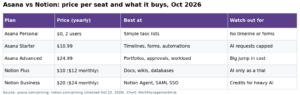

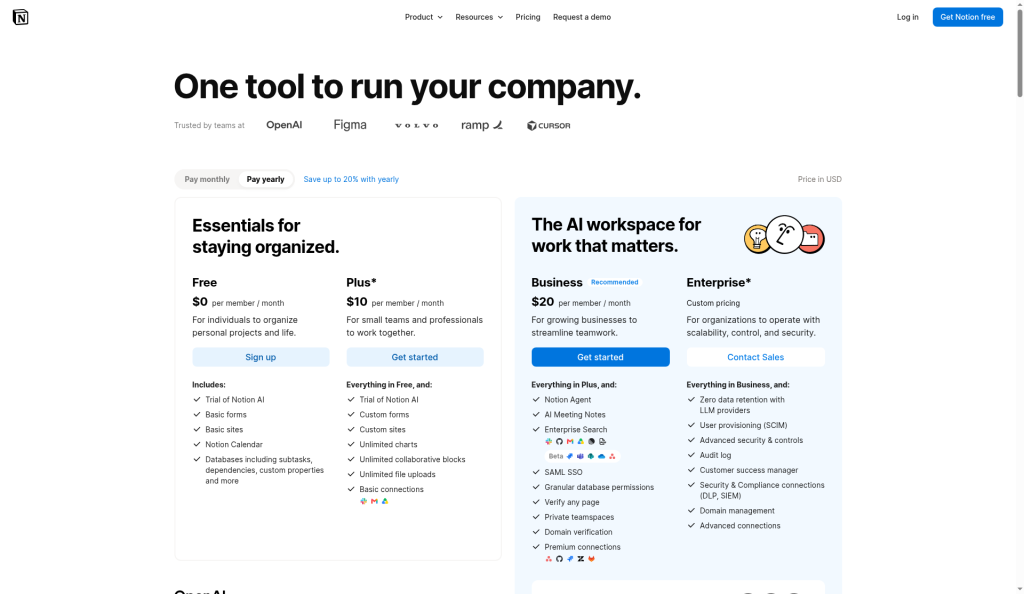
Notion is a flexible workspace for docs, wikis and simple databases. In 2026 it costs $0 (Free), $10 (Plus) or $20 (Business) per member a month on yearly billing, with Enterprise on quote. It is best for teams that want one home for notes, knowledge and light project tracking. It is weaker for strict project management with heavy reporting.
I have set up Notion for startups, agencies and a 200-person ops team. The pattern is always the same. Notion rewards the team that spends a day on structure, and it punishes the team that just starts making pages. This guide covers both the decision and the setup. It uses Notion’s pricing page, its help articles on teamspaces and offline pages, and its Custom Agents guide, all checked on October 15, 2026.
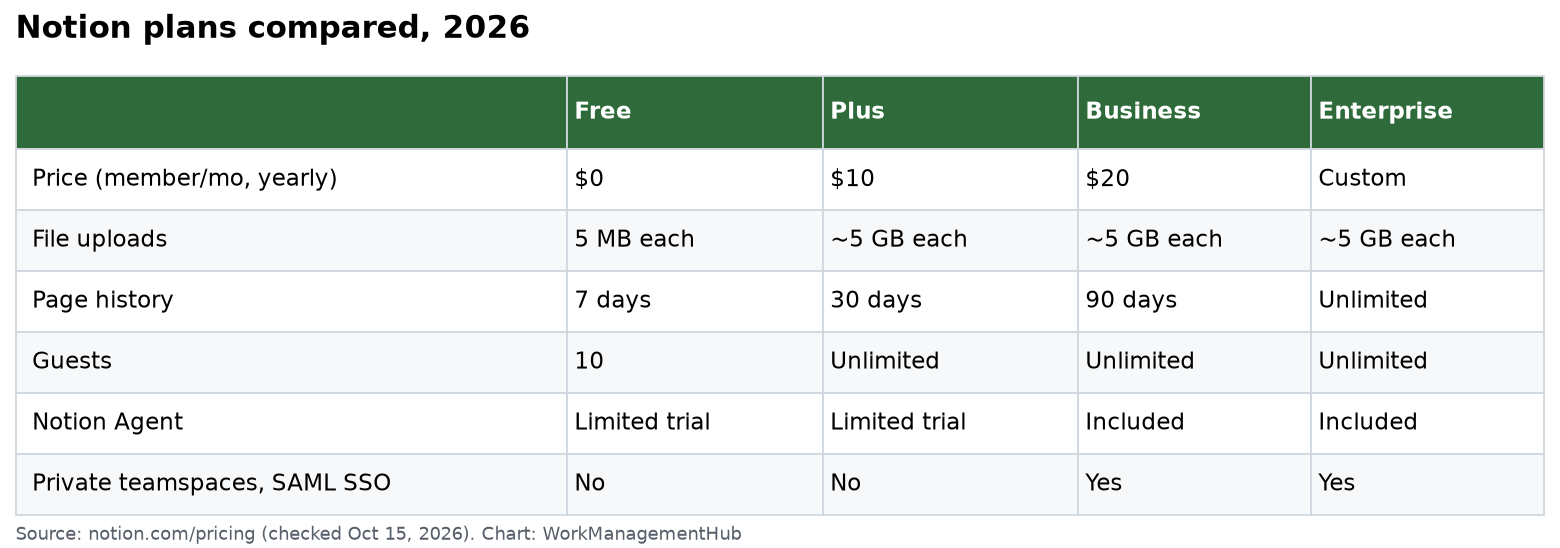
Notion plans in 2026
| Free | Plus | Business | Enterprise | |
|---|---|---|---|---|
| Price (per member/mo, yearly) | $0 | $10 | $20 | Custom |
| File upload size | 5 MB each | About 5 GB each | About 5 GB each | About 5 GB each |
| Page history | 7 days | 30 days | 90 days | Unlimited |
| Guests | 10 | Unlimited | Unlimited | Unlimited |
| Notion Agent and meeting notes | Limited trial | Limited trial | Included | Included |
| Private teamspaces, SAML SSO | No | No | Yes | Yes |
A few things stand out:
- Free is for one person. Pages and blocks are unlimited for individuals but limited once you add a second member.
- Business is where AI lives. Notion Agent (chat, writing, database autofill), AI meeting notes and Enterprise Search are full features on Business. Free and Plus only get a trial.
- Custom Agents cost extra on every plan. They run on Notion credits at $10 per 1,000 credits a month.
For more detail on what each tier costs as you grow, see our Notion pricing guide.
What Notion is good at
Wikis and knowledge. This is still Notion’s strongest use. Pages nest inside pages, links are easy and search is fast. Verified pages on Business show a badge so people know the content is current.
Light project tracking. A database can be a table, board, timeline, calendar or chart. One tasks database with a status, owner and date covers most small teams. Our Notion database guide shows how.
Forms and simple automations. Forms feed straight into a database. Plus and above get custom forms. Business adds conditional logic. Database automations can set properties, create pages and notify people.
Writing with AI in context. On Business, Notion Agent can draft from your own pages and fill database properties. That is useful for summaries and meeting notes.
Where Notion struggles
- Reporting. Charts exist, but there are no workload views, portfolio rollups or time tracking like you get in Asana or monday.com.
- Dependencies and resource planning. Timeline view shows dates, but true critical path planning is not its strength.
- Speed on huge databases. Databases with tens of thousands of rows and many formulas load slowly. Our slow database fix guide covers what helps.
- Offline. Offline only works in the desktop and mobile apps, not the web. On Free you download pages one at a time. Paid plans also auto-download recent and favorite pages. Subpages do not download on their own.
How to set up a team workspace (the one-day plan)
1. Plan your teamspaces
Every workspace starts with one teamspace that includes everyone. Add one per team, not one per project. Each teamspace can be:
- Open: anyone can join and view.
- Closed: visible, but people must be invited.
- Private: hidden from non-members. This needs Business or above.
I usually start with General, then one teamspace per department.
2. Build three core databases
- Projects: name, owner, status, dates, team.
- Tasks: linked to Projects with a relation.
- Docs: meeting notes, specs and how-tos, tagged by team.
Teams that make a new database per project end up with 40 databases nobody can report on. Keep it to a few shared ones and use filtered views.
3. Set permissions on purpose
Give teamspace owners control of their spaces. On Business, use permission groups by role. Granular database permissions let a contractor see only the rows assigned to them. If something looks wrong, our permissions troubleshooting guide walks through common causes.
4. Write a one-page “how we use Notion”
Where tasks go, how to name pages, which template to use. This page saves more time than any feature.
Moving to Notion from another tool
Most teams I help are coming from Google Docs, Confluence or Trello. A few tips:
- Import, then clean. Notion imports from many tools, but the structure rarely fits your new teamspaces. Plan a cleanup day.
- Move active work first. Old archives can stay where they are for a few months.
- Rebuild, do not copy, your task board. A fresh tasks database with 5 properties beats an import with 30.
- Pick one owner per teamspace who decides what lives there.
Expect two to four weeks before the team stops asking where things are. Keep the “how we use Notion” page pinned in the sidebar during that time.
Notion AI and agents: what you actually pay
- Notion Agent is part of Business and Enterprise. Free and Plus get a limited trial.
- Custom Agents run tasks on their own, such as triaging a request database every morning. They use Notion credits, sold at $10 per 1,000 a month on top of your plan.
My advice: start with Notion Agent on Business. Add Custom Agents only for a job you can describe in one sentence and measure. For a deeper look, read our Notion AI guide.
Honest verdict
Pros
- Best-in-class docs and wiki for the price
- Flexible databases that cover light project work
- Unlimited guests on paid plans
- Strong AI on Business
Cons
- Reporting and resource planning are thin
- AI beyond the trial needs Business at $20
- Large databases can be slow
- Freedom leads to mess without a plan
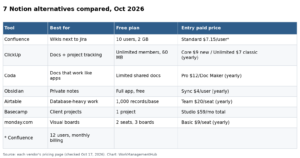
Choose Notion if your team writes a lot and tracks simple projects. Look elsewhere if you need workload, portfolios or client-ready reports. See Asana vs Notion or best Notion alternatives.
Common questions
Is Notion free for teams?
The Free plan works for one person. Once you add a second member, blocks are limited, so most teams need Plus at $10 per member a month.
Does Notion include AI in 2026?
Notion Agent is a full feature on Business and Enterprise. Free and Plus get a limited trial. Custom Agents cost extra credits on any plan.
Can I use Notion offline?
Yes, in the desktop and mobile apps only. Download pages one by one. Paid plans also auto-download recent and favorite pages.
How long does Notion keep page history?
7 days on Free, 30 on Plus, 90 on Business and unlimited on Enterprise.
Is Notion good for project management?
For small teams with simple workflows, yes. For workload, dependencies and portfolio reports, a dedicated tool is usually better.
This guide replaces our earlier Notion review. Prices and limits checked on notion.com on October 15, 2026.
Sponsored