Best Project Management Software for Remote Teams in 2026: 6 Tools Compared

For most remote teams, Asana is the safest pick: clear tasks, status updates, timelines and unlimited free guests from $10.99 per user a month. ClickUp is the best value if you want tasks, docs and chat in one app. monday.com suits teams that like visual boards. Notion fits teams that write a lot. Smartsheet fits spreadsheet-minded ops teams. Basecamp is best for small agencies that want one flat price with unlimited users. All prices below were checked on each vendor’s pricing page on October 18, 2026.
I used the vendors’ own pages: Asana pricing, ClickUp pricing and its new plans help article, monday.com pricing, Notion pricing, Smartsheet pricing and Basecamp pricing. An older version of this page gave each tool a score out of 10. Those scores had no clear method, so I removed them.
What remote teams need most
A remote team can’t lean over a desk to ask “where are we?” The tool has to answer that. In practice, five things matter more than any feature list:
- Clear ownership. Every task has one owner and a due date.
- Async updates. A written status update replaces the daily check-in call, so people in other time zones aren’t stuck waiting.
- Docs next to tasks. Decisions and specs live beside the work, not in someone’s inbox.
- Cheap or free guests. Contractors and clients need access without a full seat.
- Good mobile apps for people who work on the move.
The six tools at a glance
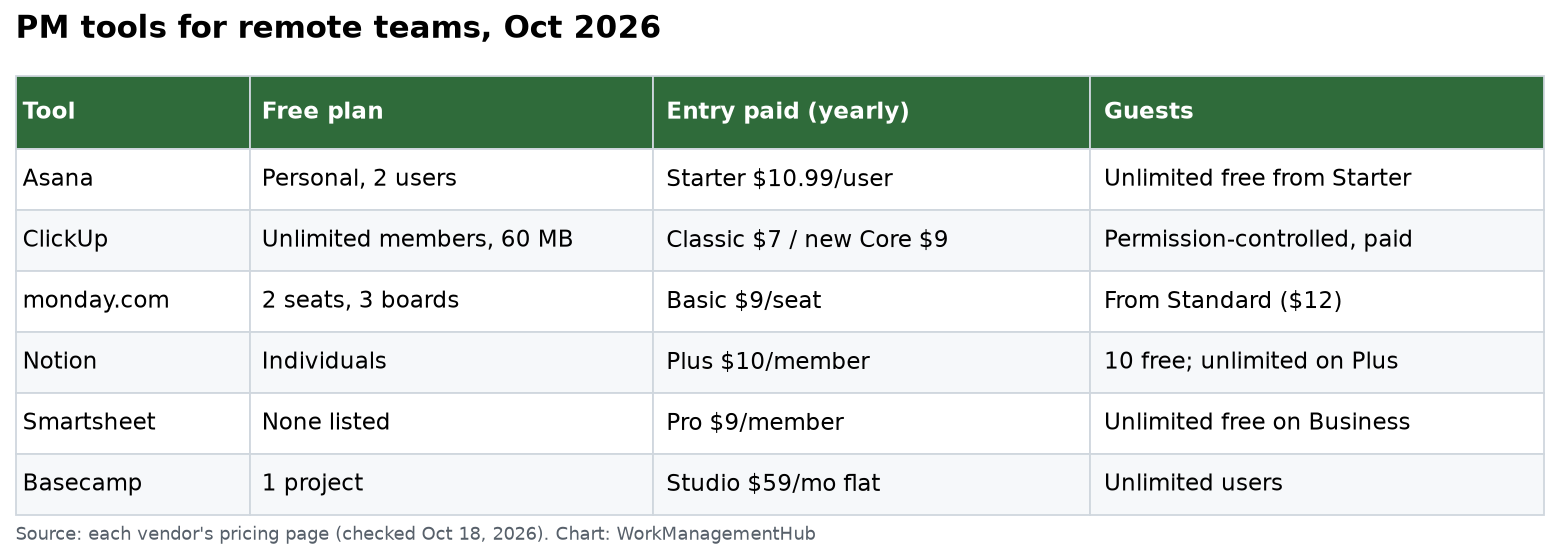
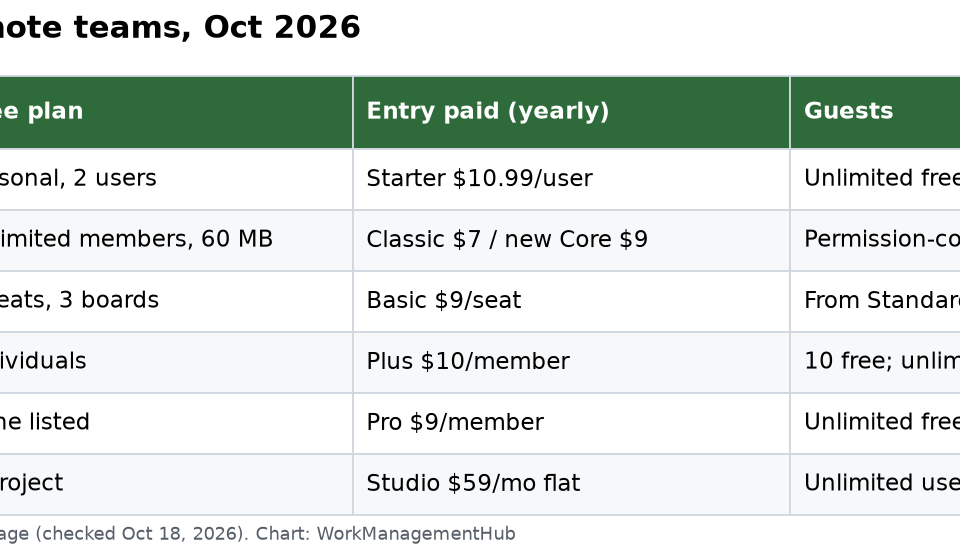
| Tool | Free plan | Entry paid price (yearly) | Guests |
|---|---|---|---|
| Asana | Personal: 2 users | Starter $10.99 per user | Unlimited free guests from Starter |
| ClickUp | Unlimited members, 60 MB storage | Classic Unlimited $7, or new Core $9 per user | Permission-controlled guests on paid plans |
| monday.com | Up to 2 seats, 3 boards | Basic $9 per seat | Guest access from Standard ($12) |
| Notion | Free for individuals; shared blocks capped | Plus $10 per member | 10 guests free; unlimited on Plus |
| Smartsheet | No free plan listed | Pro $9 per member (1 to 10 members) | Unlimited free guests on Business ($19) |
| Basecamp | 1 project | Studio $59 a month, flat | Unlimited users on every paid plan |
1. Asana: best all-round pick
Asana makes ownership clear. Each task has one assignee, a due date and a place in a project. Status updates are on every plan, even the free Personal plan, so leads can post a short written update each week instead of holding a meeting.
- Starter ($10.99): timeline and Gantt views, dashboards, unlimited automations, forms and unlimited free guests.
- Advanced ($24.99): goals, unlimited portfolios, resource management, approvals and proofing, and time tracking.
Watch out: AI Teammates are capped at 5 requests per user a month, up to 50 per account, on Starter and Advanced. See our Asana pricing guide.
Best for: remote teams of 10 to 200 who want clear tasks and written updates.
2. ClickUp: best value for an all-in-one app
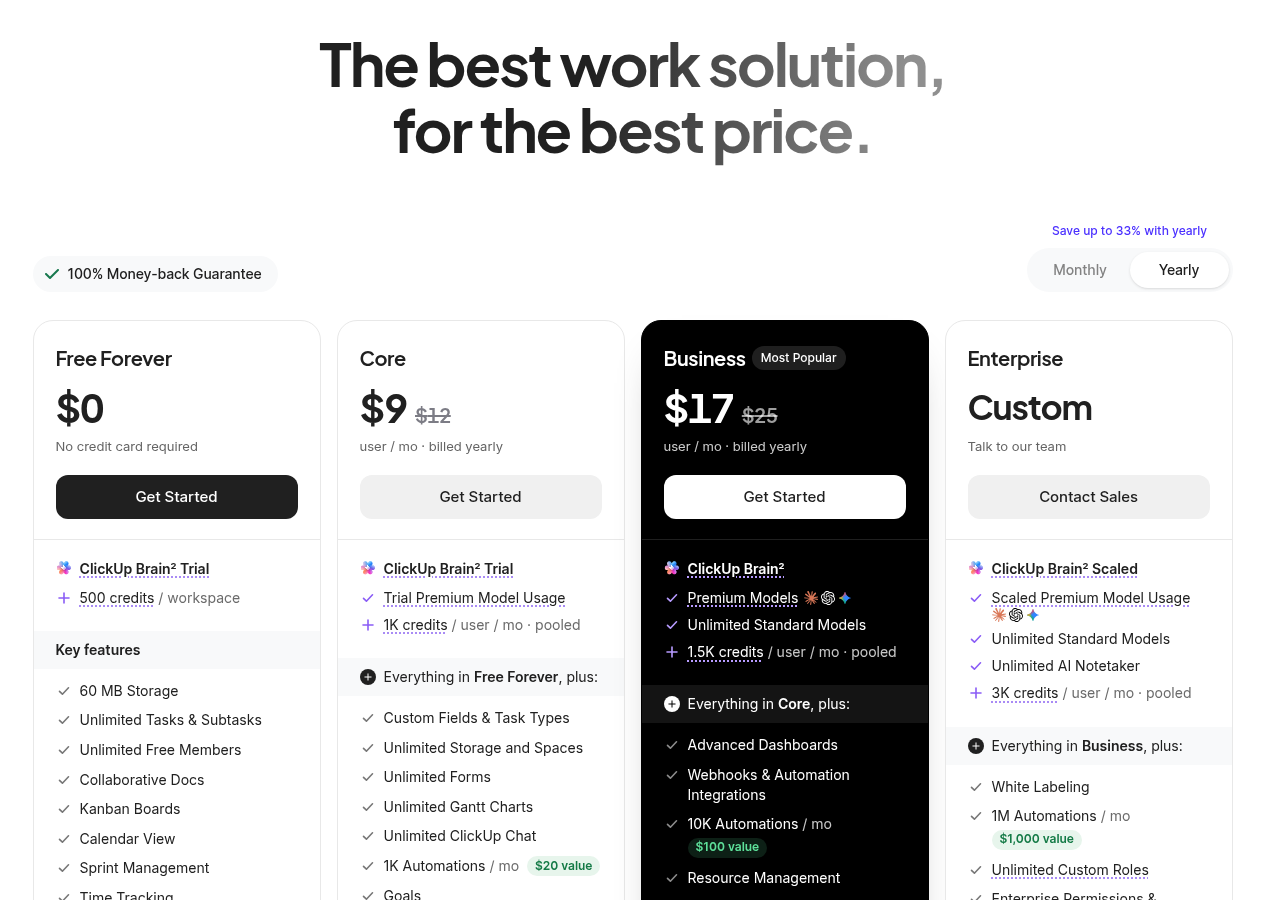
ClickUp puts tasks, docs, whiteboards and chat in one place, which helps remote teams cut down on tool switching. The Free plan allows unlimited members and includes docs and in-app video recording, but only 60 MB of storage.
ClickUp is changing its plans, so check which lineup your workspace has:
- New plans (new workspaces and some upgraded ones): Core $9 per user a month billed yearly ($12 monthly), Business $17 ($25 monthly), with AI credits included.
- Classic plans (many existing workspaces): Unlimited $7 billed yearly ($10 monthly), Business $12 ($19 monthly). AI is an add-on.
ClickUp says upgraded workspaces keep their price until the date in their notice, with price changes starting no earlier than January 2027.
Watch out: ClickUp has a lot of settings. Remote teams without an admin can end up with a messy workspace. Our ClickUp remote team guide covers a clean setup.
Best for: budget-minded teams that want one app for tasks, docs and chat.
3. monday.com: best for visual teams
monday.com is easy to read at a glance. Colored status columns make it obvious what is stuck, which helps when nobody is in the same room.
- Free: up to 2 seats and 3 boards.
- Basic ($9 per seat): unlimited items and free viewers.
- Standard ($12): timeline and Gantt views, calendar view, guest access, and 250 automation actions a month.
- Pro ($19): private boards, time tracking and 25,000 automation actions a month.
Watch out: monday.com sells seats in set team sizes, so check the price for your exact head count. Guests need Standard or higher. See our monday.com pricing guide.
Best for: ops, sales and marketing teams that like boards and dashboards.
4. Notion: best for teams that write
Many remote teams run on documents: specs, meeting notes, onboarding guides and decision logs. Notion is the best tool here. Databases on every plan can hold tasks with subtasks and dependencies.
- Plus ($10): unlimited collaborative blocks and file uploads, custom forms, unlimited guests.
- Business ($20): Notion Agent, AI meeting notes, private teamspaces and SAML SSO.
Watch out: the Free plan caps shared blocks for teams, and Plus is where they become unlimited. Notion’s task tools are lighter than Asana’s or ClickUp’s. See our Notion pricing guide.
Best for: startups and knowledge teams where writing is the main work.
5. Smartsheet: best for spreadsheet-minded ops teams
Smartsheet looks like a spreadsheet but adds Gantt, board and calendar views, forms and automations. Remote ops and PMO teams that already live in Excel adapt fast.
- Pro ($9 per member, 1 to 10 members): unlimited free contributors, Gantt, table, board and calendar views, and 250 automations a month.
- Business ($19 per member, 3+ members): unlimited free guests, timeline view, workload tracking and unlimited automations.
Watch out: Pro caps at 10 members. As a Smartsheet partner, I usually point growing teams straight to Business for the workload view and unlimited automations.
Best for: operations, construction and PMO teams with structured, date-driven work.
6. Basecamp: best flat price for small agencies
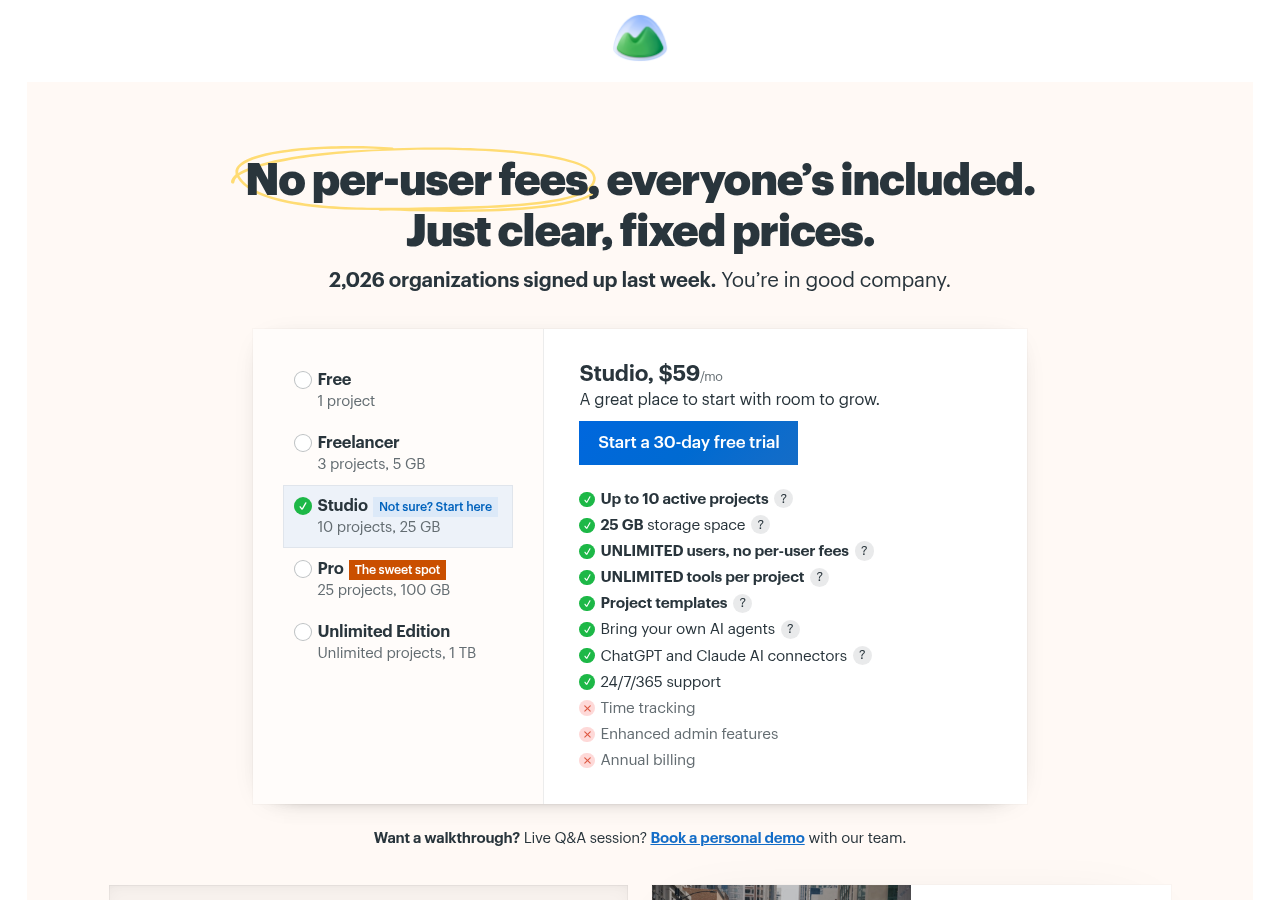
Basecamp has no per-user fees. Everyone is included on every paid plan, which is great when you invite many clients.
- Free: 1 project.
- Studio ($59 a month): up to 10 active projects and 25 GB, unlimited users.
- Unlimited Edition: unlimited projects and 1 TB. Basecamp’s FAQ puts it at $300 a month total.
Watch out: Basecamp has no Gantt charts, workload views or custom fields. Studio also lacks time tracking. See our ClickUp vs Basecamp comparison.
Best for: agencies and small firms with lots of clients and simple projects.
What a 12-person remote team pays
Monthly cost with yearly billing:
- ClickUp classic Unlimited: 12 × $7 = $84
- ClickUp new Core: 12 × $9 = $108
- monday.com Basic: 12 × $9 = $108 (check the seat bucket price)
- Smartsheet Business: 12 × $19 = $228
- Notion Plus: 12 × $10 = $120
- Asana Starter: 12 × $10.99 = $131.88
- Basecamp Studio: $59 flat
How to roll out a tool to a remote team
- Pick one real project and run it in two free trials for two weeks.
- Write a one-page “how we work” doc. Where tasks live, how to post updates, and which channel is for urgent issues.
- Replace one meeting with a written weekly status update in the tool.
- Set a response norm, like “reply to task comments within one working day.”
- Review after 30 days. Keep what people use. Cut fields and boards nobody touches.
Common questions
What is the best free project management tool for remote teams?
ClickUp’s Free plan allows unlimited members, which is rare. It has only 60 MB of storage. Asana’s free Personal plan is limited to 2 users, and monday.com’s Free plan to 2 seats.
Which tool is cheapest for a team with many clients?
Basecamp, because it charges a flat price with no per-user fees. Studio is $59 a month for up to 10 active projects.
Do remote teams still need Slack or Teams?
Usually yes, for quick questions. Keep decisions and status updates in the project tool so they don’t get lost in chat.
Which tools let contractors join for free?
Asana gives unlimited free guests from Starter. Smartsheet gives unlimited free guests on Business. Basecamp includes unlimited users on every paid plan.
Is ClickUp’s price $7 or $9?
Both, depending on your workspace. Classic Unlimited is $7 per user a month billed yearly. The new Core plan is $9 per user a month billed yearly.
Prices checked on asana.com, clickup.com, monday.com, notion.com, smartsheet.com and basecamp.com on October 18, 2026.
Sponsored