

Teamwork.com has one clear idea, and it sticks to it: client work should be run in the same place you track time, budgets and invoices. If you run an agency, a consultancy or an in-house services team that charges back hours, that idea saves a lot of spreadsheet glue. If your work is mostly internal, it’s a tool built for someone else.
I implement work-management platforms through SSPM, a Smartsheet Premier Aligned Partner, so I spend a lot of time comparing how different tools handle the same job. This review sticks to what Teamwork.com sells today. Plan names, prices and limits come from Teamwork.com’s pricing page and its support docs, checked October 6, 2026.
One heads-up if you’ve read older reviews, including the earlier version of this one: they talk about Deliver, Grow and Scale plans. The current pricing page uses Basics, Accelerate and Optimize, plus Enterprise. Some prices and limits changed along with the names, so ignore any figures you see attached to the old ones.
The short verdict
- Good fit: agencies, studios and professional-services teams of roughly 5 to 50 people who bill by the hour or run retainers, and want time, budgets and invoices next to the tasks.
- Plan most teams should buy: Accelerate ($24.99 per user/month, billed yearly). That’s where budgets, retainers, invoicing and capacity planning live.
- Skip it if: your projects are internal (IT rollouts, HR programs, product work), or you need deep cross-department portfolio reporting. You’d be paying for client features you won’t use.
Teamwork.com plans and pricing in 2026
| Plan | Price per user/month (billed yearly) | Users | Projects | Storage | Automations/month |
|---|---|---|---|---|---|
| Free | $0 | Up to 5 | 5 | 100 MB | 100 |
| Basics | $9.99 | Minimum 3 | 300 | 100 GB | 5,000 |
| Accelerate | $24.99 | Minimum 5 | 600 | 250 GB | 20,000 |
| Optimize | Contact sales | Contact sales | Unlimited | 500 GB | 100,000 |
| Enterprise | Contact sales | Contact sales | Unlimited | 1,000 GB | 100,000 |
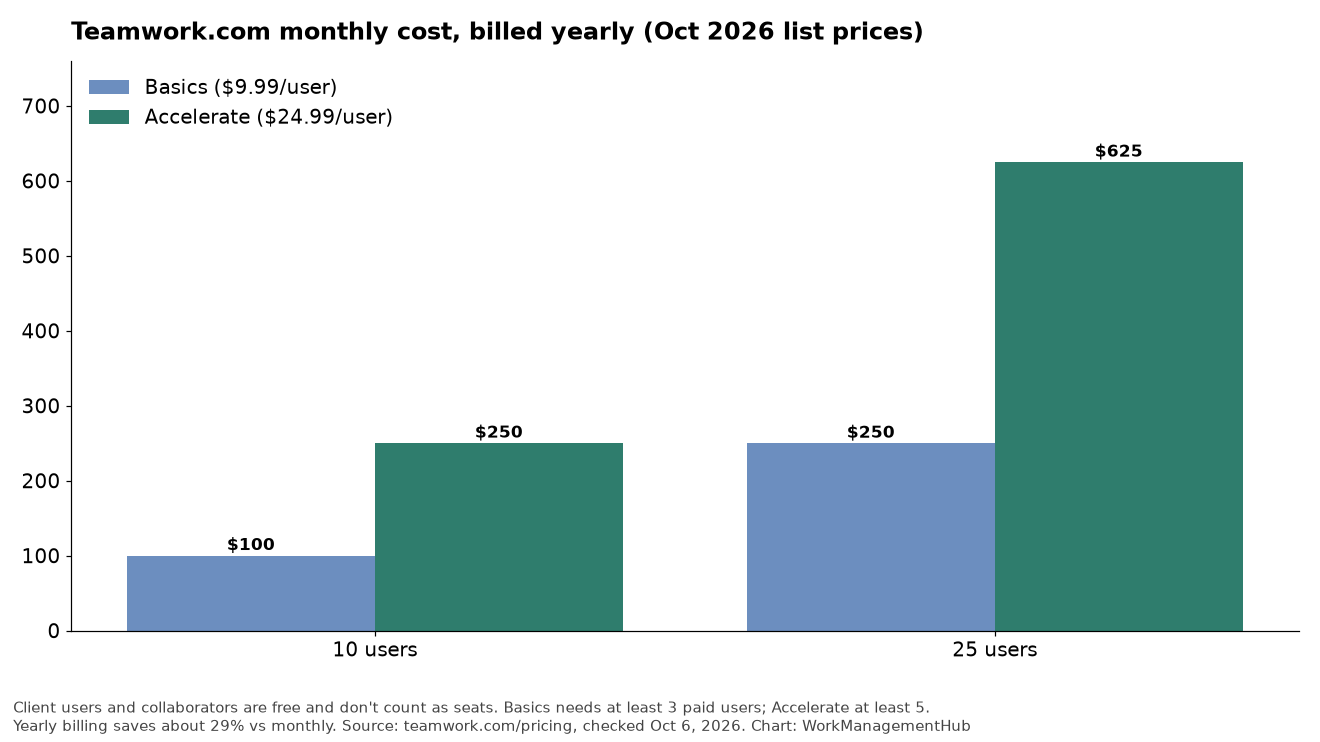
Paying yearly saves about 29% compared with monthly, according to Teamwork.com. Every paid plan has a 14-day trial with no credit card. Monthly billing has no long-term commitment, while yearly is prepaid for the full term.
For a 10-person team, that works out to about $100 a month on Basics and $250 a month on Accelerate. At 25 people it’s about $250 and $625.
What each plan adds
Free is a real plan, not a 14-day teaser: up to 5 users and 5 projects, list, board, Gantt and table views, time logging, and the ability to organize work by client. The 100 MB storage cap is the first wall you’ll hit if you share design files.
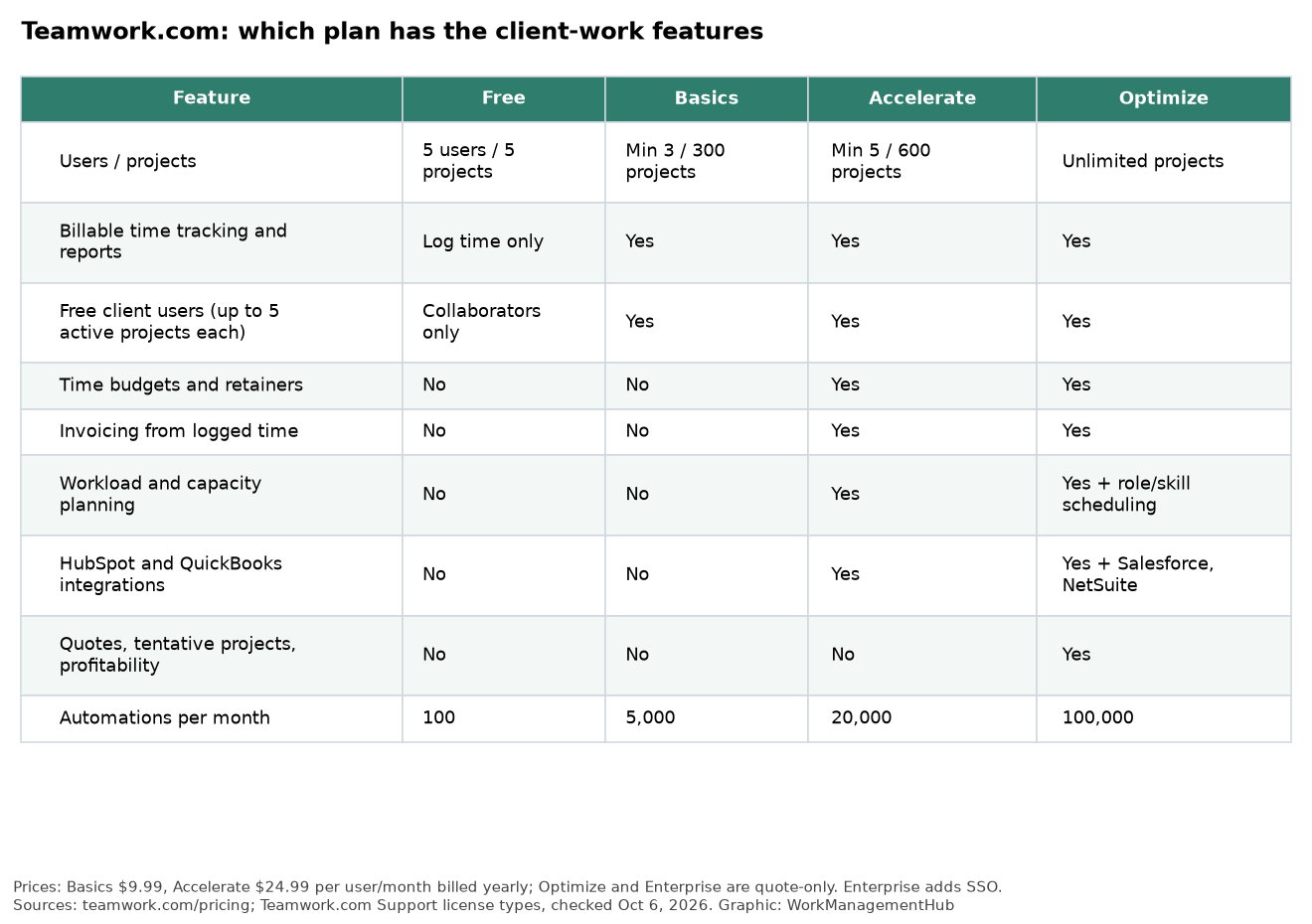
Basics adds billable time tracking and reporting and unlimited project templates. It’s a sensible starting point for a small studio that wants to see where hours go before it starts billing from the tool.
Accelerate is the one I’d shortlist for most agencies. It adds intake forms, workload and live capacity planning, time budgets and retainers, client invoicing from logged time, and the HubSpot and QuickBooks integrations.
Optimize is for services businesses that manage margin, not just hours: quotes, turning CRM pipeline into projects, tentative and active resource planning, scheduling by role or skill, multi-currency financial budgets, and revenue, cost and profitability insights. It also adds Salesforce and NetSuite connections.
Enterprise adds SSO, stricter security enforcement, a dedicated success manager and priority support.
Free client users are the underrated feature
This is the part I’d test first in a trial, because it changes the math.
Teamwork.com has three kinds of people on a site, explained in its user license types guide:
- Standard users are paid seats. These are your staff.
- Client users are free and get project-level permissions similar to standard users, but no admin rights. They can only belong to external client companies, and each one can be on up to five active projects. Teamwork.com lists them on Basics, Accelerate, Optimize and Enterprise.
- Collaborators are free on every plan, with tighter limits. They can complete tasks assigned to them, comment, post messages and view files, but they can’t create tasks, edit task properties or log time.
In practice, that means a 10-person agency can bring a client’s marketing lead into the project to approve milestones and answer questions without buying an eleventh seat. Other tools can do guest access too, but tying the client to a client company record, next to that client’s budgets and invoices, is where Teamwork.com feels purpose-built.
Two things to watch. The five-active-project limit matters if one client contact oversees many jobs at once. And if you give anyone budget visibility, read Teamwork.com’s permissions guide first: it warns that some budget permissions can let people work out a colleague’s cost rate.
Where Teamwork.com earns its price
Money and work in one place. On Accelerate, you set time budgets or retainers on a project, your team logs time against tasks, and you invoice from those logs. For a shop whose profit depends on utilization, that loop is the main reason to buy it.
Capacity planning that agencies actually use. Workload views on Accelerate show who is over-booked before you promise a client a date. Optimize goes further with tentative projects, so you can plan people for work you haven’t won yet. Teamwork.com’s February 2026 release notes also added margin visibility in quotes and a HubSpot link that updates project status by deal stage. Those features sit on the top tiers.
Sensible defaults. Role-based permissions, US or EU data hosting, two-factor authentication and SOC 2 compliance are included on every plan. You don’t have to upgrade to get the basics of a security review.
Easy to switch in. Teamwork.com offers one-click project import from Wrike, Asana, Basecamp, ClickUp, Trello and monday.com. Imports never come over perfectly, but it beats rebuilding projects by hand.
Where it falls short
It’s opinionated about client work. If most of your projects don’t have a client, budget or invoice attached, Accelerate’s best features go unused. An internal PMO is usually better served by Smartsheet, Wrike or Asana.
Profitability is a top-tier feature. Many agencies want margin reporting on day one. On Teamwork.com that’s Optimize, which is quote-only, so budget for a sales conversation.
AI is in transition. Teamwork.com sells named AI teammates by plan: Scout and Flo from Basics, Remi for resource management on Accelerate, and Kash and Jack on Optimize and Enterprise. The pricing page says AI was included for an introductory period, with usage-based AI credits launching in September 2026. Before you count on any AI feature, check how many credits your plan includes and what extra credits cost.
Seat minimums. Basics needs at least 3 paid users and Accelerate at least 5. That’s fine for most agencies, but a two-person shop pays for empty seats on Accelerate.
How it compares
If you’re also looking at Wrike, our Wrike vs Teamwork.com comparison runs the numbers for a 12-person agency. For a lighter, flat-priced option, see our Basecamp review. Agencies already on Asana should read Asana for agencies and our Asana timesheets and budgets guide before switching, because Asana’s add-on may close the gap for you. If cost is the main driver, the Zoho Projects review covers a cheaper alternative.

How I’d run the trial
Fourteen days goes fast. Here’s how I’d spend it:
- Pick one real client project, not a sample. Start the trial on Accelerate, since that’s the plan you’ll most likely buy.
- Add the client as a client user and see whether they actually log in, comment and approve work.
- Set a time budget or retainer and have two or three people log a week of real time against it.
- Create a draft invoice from that logged time and have your finance person check it against how you bill today.
- Check the workload view in week two. If it shows a problem you didn’t know about, the tool is doing its job.
If the invoice step works and the client participates, Teamwork.com is probably your tool. If you find yourself exporting time to a spreadsheet anyway, look elsewhere.
FAQ
How much does Teamwork.com cost in 2026?
Teamwork.com has a Free plan for up to 5 users and 5 projects. Paid plans are Basics at $9.99 and Accelerate at $24.99 per user per month, billed yearly. Optimize and Enterprise are quote-only. Yearly billing saves about 29% compared with monthly.
Do clients need a paid Teamwork.com license?
No. Client users and collaborators don’t count toward your subscription. Client users can work on up to five active projects for their company, while collaborators have more limited permissions and are available on every plan.
Can Teamwork.com create invoices?
Yes. Client invoicing from logged time is part of Accelerate and higher plans, and Accelerate also connects to QuickBooks.
What happened to Teamwork.com’s Deliver, Grow and Scale plans?
The current pricing page lists Basics, Accelerate, Optimize and Enterprise instead. Features that earlier release notes listed for Scale, such as Tentative Projects and Quotes, now appear under Optimize. Use the current pricing page rather than older reviews.
Is Teamwork.com good for internal teams?
It works, but it isn’t where it shines. Its strongest features (retainers, budgets, invoicing, client users) are built for client services. Internal teams usually get more value from a general work-management platform.
Pricing, plan limits and license rules checked against Teamwork.com’s public pricing page and support center on October 6, 2026. Prices change; confirm a current quote before you buy.
Sponsored

Related guides