Skip to content
-
Subscribe to our newsletter & never miss our best posts. Subscribe Now!
Work Management Hub Work Management Hub

Expert Reviews, Comparisons & Guides for Smartsheet, Monday.com, Asana, ClickUp & More

Work Management Hub Work Management Hub

Expert Reviews, Comparisons & Guides for Smartsheet, Monday.com, Asana, ClickUp & More

  • Airtable
  • Asana
  • ClickUp
  • Jira
  • Monday.com
  • Notion
  • Smartsheet
  • Wrike
  • About
  • Contact
  • Airtable
  • Asana
  • ClickUp
  • Jira
  • Monday.com
  • Notion
  • Smartsheet
  • Wrike
  • About
  • Contact
Close

Search

  • https://www.facebook.com/
  • https://twitter.com/
  • https://t.me/
  • https://www.instagram.com/
  • https://youtube.com/
AlternativesProject Management

Teamwork.com Review 2026: The PM Tool Built for Client Work (Complete Analysis)

By Khasim
May 1, 2026 11 Min Read
0

I’ve been on the ground deploying Teamwork.com across diverse client-focused environments, and let me tell you — it’s a double-edged sword designed for precision work but requires skillful handling. Imagine a creative agency managing a bustling client roster: the Free Plan seems like a no-brainer for startups, but quickly hits the ceiling with its 5-project limit. Here’s the kicker: the Deliver Plan’s 5,000 automations can streamline, yet it’s easy to misuse without understanding workflow intricacies. If your team is automation-hungry or requires intricate budgeting, you’d need the Grow Plan at $19.99/user/month, offering 20,000 automations — but consider if your team can truly justify the jump before committing.

Introduction to Teamwork.com in 2026

Teamwork.com has established itself as a robust project management tool specifically tailored for client-facing teams. The platform’s evolution in 2026 reflects an acute understanding of the nuanced needs of client work — from managing multiple projects to ensuring seamless client communication and satisfaction. A standout feature this year is the introduction of Tentative Projects, which enables teams to forecast pipeline demand more accurately, a critical advantage for agencies managing fluctuating workloads (source).

One of the critical strengths of Teamwork.com lies in its scalability across different tiers, allowing teams to start small and expand as needed. The Free Plan is a no-brainer for startups or small teams with limited projects, but it’s the Deliver Plan where the platform starts to show its true potential. With 5,000 automations, it supports growing teams that need to streamline repetitive tasks. However, be mindful of automation limits — exceeding them can disrupt workflows, so it’s crucial to monitor usage through the Project Settings > Automations path.

For teams with more complex needs, the Grow Plan’s advanced budgeting and detailed reporting provide insights that are often omitted in basic project management tools. Yet, for larger enterprises, the Scale and Enterprise Plans offer unmatched customizability and support, though they come with a higher price tag. Remember that with increased complexity, the risk of misconfigurations rises, particularly in user roles and data compliance. Always verify role assignments and choose your data hosting location wisely to align with regulatory requirements.

In essence, Teamwork.com in 2026 is not just about managing tasks — it’s about fostering collaboration, predicting workload, and ensuring that client projects are delivered efficiently and effectively.

Pricing Plans and Tiers: A Detailed Comparison

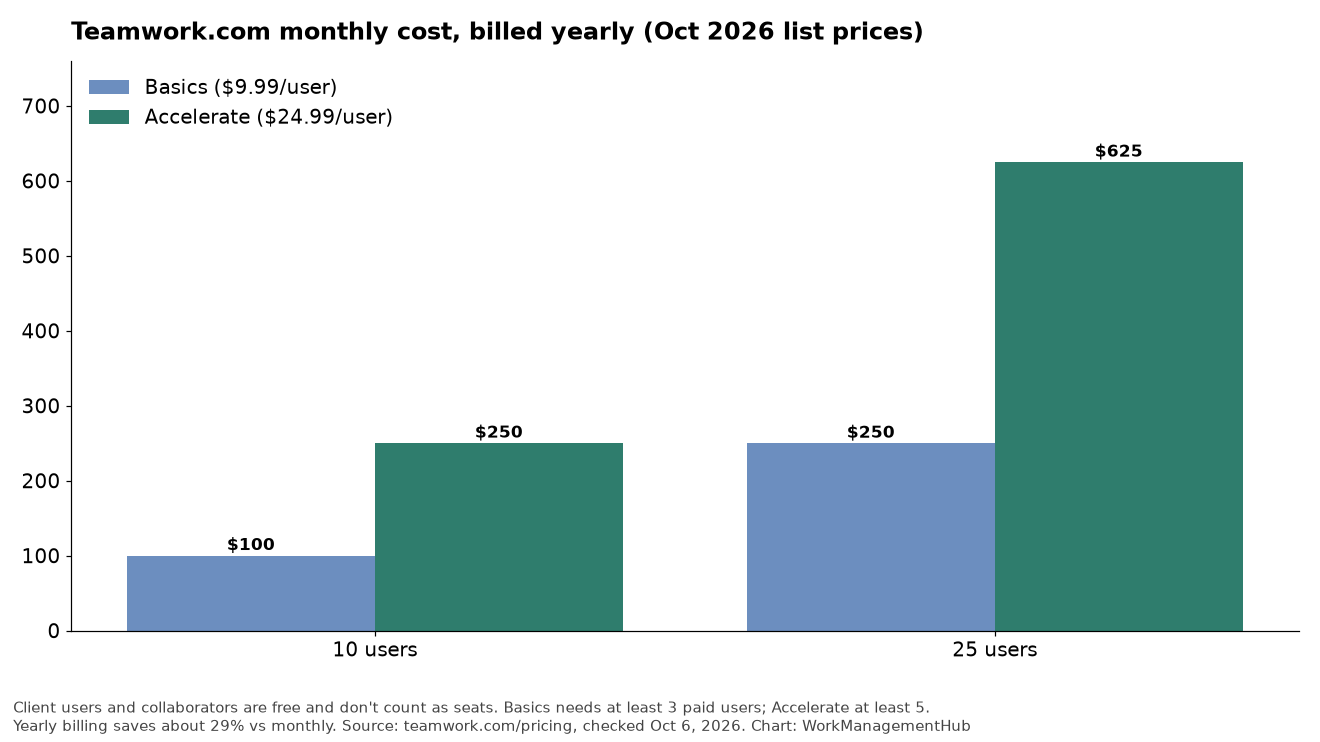
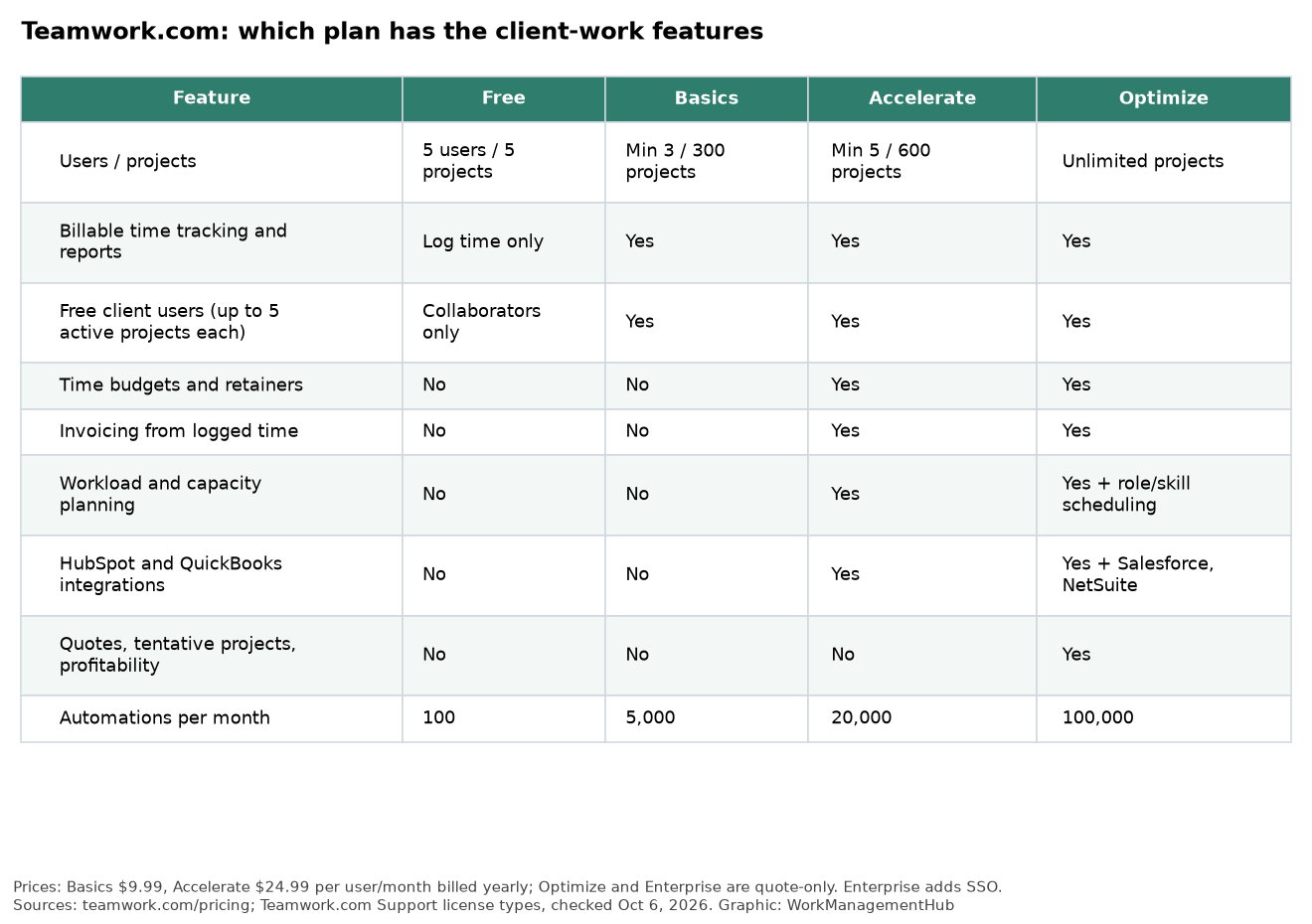
PlanUsers/ProjectsAutomationsStorageIntegrations
Free5/5100/monthN/ALimited
DeliverUnlimited5,000/month100 GBQuickBooks, Harvest
GrowUnlimited20,000/month250 GBQuickBooks, Harvest, HubSpot
ScaleUnlimited100,000/month500 GBAll Integrations
EnterpriseCustomCustomCustomCustom

As a consultant who has navigated the nuances of Teamwork.com with various teams, the choice between plans hinges on team size and project complexity. For client-focused work, the Grow Plan offers the best balance of features, especially with its advanced budgeting and expanded integrations like HubSpot. However, if your workflows heavily rely on automations, the Scale Plan’s 100,000 automation actions may justify its cost. Always consider future growth; underestimating storage or automation needs can lead to costly mid-cycle upgrades. For detailed pricing and features, visit the Teamwork.com pricing page.

Key Features and Limits for Each Plan

Understanding the nuanced differences between Teamwork.com’s plans can significantly impact your project management efficiency. The Free Plan is a great entry point for small teams, but with only 5 projects and 100 automations monthly, you’ll outgrow it quickly if your workload scales. The Deliver Plan ($10.99/user/month) offers a good balance for growing teams, with 5,000 automations and essential integration capabilities with QuickBooks and Harvest. However, remember to actively monitor your automation usage; exceeding your quota can disrupt workflows.

The Grow Plan ($19.99/user/month) is where you start to see significant enhancements for client-focused work. With 20,000 automations and integrations adding HubSpot, this plan suits teams needing robust client relationship management. The workload management and advanced budgeting tools are particularly useful for agencies juggling multiple client accounts. A tip: regularly check Project Settings > Automations to optimize and prevent automation overload.

For enterprises, the Scale and Enterprise Plans offer custom pricing and features like unlimited projects and advanced security. These plans are designed for companies that require extensive resources and detailed reporting. If you’re considering this tier, evaluate your need for profitability reports and resource scheduling. These features can dramatically improve project insight but require a commitment to regular data entry and analysis.

Finally, keep a close eye on your storage limits, especially if you’re dealing with large files. If you hit the storage cap on your current plan, consider either upgrading or archiving older projects. This can be managed via Dashboard > Reports to identify storage-heavy projects. Ensure to choose your data hosting location wisely to adhere to compliance regulations, which can be crucial for international teams.

2026 Updates and New Features

February 2026 brought a couple of significant enhancements to Teamwork.com, notably the introduction of Tentative Projects and AI-powered custom reports. These updates are designed to bolster project forecasting and enhance reporting capabilities, respectively.

Tentative Projects is a feature aimed at forecasting pipeline demand more effectively. It lets teams plan projects that are not yet confirmed, offering a visual placeholder within the project pipeline. This is particularly useful for client-based work, where project initiation often hinges on client approval. However, it’s essential to manage Tentative Projects judiciously to avoid cluttering the pipeline, which could lead to confusion. Regularly review and resolve these placeholders to maintain a clear view of upcoming work.

AI-powered custom reports are another breakthrough, providing deeper insights through machine learning algorithms that analyze project data. This feature allows for more granular report customization, offering teams a strategic advantage in identifying trends and inefficiencies. To leverage this, navigate to

  1. Dashboard — Access the main overview.
  2. Reports — Select the reports section.
  3. Create Custom Report — Initiate a new AI-powered report.

The AI component suggests report parameters based on historical data patterns, making it easier to identify actionable insights.

These updates are not just bells and whistles; they are powerful tools that, if used correctly, can significantly streamline operations and enhance your strategic planning. Be proactive in adopting these new features, but also vigilant about their integration into your existing workflows. For further details, visit the official release notes.

Step-by-Step UI Navigation

For those actively managing projects in Teamwork.com, understanding and efficiently navigating the UI is crucial. Here’s a detailed guide to performing essential tasks effectively using the Teamwork interface.

  1. Dashboard — Start at the Dashboard, your central hub displaying all project activities. Customize widgets here for at-a-glance insights into task statuses and deadlines.
  2. Projects — Navigate to Projects from the main menu. Click on Add Project to initiate a new project. A pop-up will guide you through naming your project and setting initial parameters. Remember, exceeding your project limit on a Free Plan can halt new project creation.
  3. Project Settings — Once a project is created, head to Project Settings to tailor workflows. Here, access Automations to streamline repetitive tasks. Ensure your automations are well-configured to avoid workflow disruptions, as conflicts can occur if rules overlap.
  4. Reports — For insights, go to Dashboard > Reports. Customizable reports are vital for tracking project health. Use the recently introduced AI-powered custom reports to forecast pipeline demand and adjust resources accordingly. This feature, added in February 2026, can be a game-changer for anticipating client needs.

Be mindful of the automations quota specific to your plan. Regularly check Project Settings > Automations to monitor usage. Exceeding limits can abruptly halt processes, affecting project timelines. For debugging, ensure API keys for third-party integrations, such as QuickBooks on the Deliver Plan, are correctly configured.

Lastly, when dealing with storage issues, navigate to Account Settings and review current usage. Consider archiving older projects or upgrading to a higher plan if you’re nearing your limit.

For further guidance, refer to the official Teamwork Support Center. This resource can provide additional troubleshooting steps and updates on new feature rollouts.

Common Issues and Troubleshooting

Navigating Teamwork.com’s features can be seamless, but certain pitfalls can disrupt operations if not addressed. One frequent issue is exceeding the monthly automations quota. This can halt workflows unexpectedly. Regularly monitoring your usage is crucial. To do this, follow these steps:

  1. Dashboard — Click on your profile picture in the top right corner.
  2. Billing & Plans — Select ‘Usage’ to review your current automation count.

If automations are nearing their limit, consider upgrading to the next plan tier or restructuring existing automation workflows.

Another challenge is integration glitches, often due to incorrect API keys or permissions. Ensure that your third-party integrations, such as QuickBooks or HubSpot, have valid and correctly configured API keys. For instance, revisit the Integrations settings page to verify credentials.

Storage capacity is another common stumbling block. Each plan has a defined storage limit, and hitting this cap can obstruct new uploads. Archiving older projects is a practical approach to free up space. Navigate to Projects > Archive to manage old projects effectively.

User roles are pivotal for access management but can be a double-edged sword if misconfigured. Assign roles that align with team members’ responsibilities to avoid unnecessary restrictions. Revisit Team Management to adjust roles as needed.

Lastly, pay attention to data hosting locations, especially if compliance with data protection regulations like GDPR is a concern. Choose between US or EU data centers during initial setup to align with your organization’s compliance needs.

Addressing these issues proactively can ensure smoother operation and more effective use of Teamwork’s capabilities. For further details, visit the Support Center.

Insider Tips and Best Practices

Using Teamwork.com efficiently requires more than just understanding its features—it’s about adapting the tool to fit the workflows of client-focused teams. Here are some practical insights from my experience:

1. **Automations Management**: Regularly monitor your automations usage to avoid workflow interruptions. For teams on the Deliver Plan, 5,000 automations may seem extensive, but frequent triggers like task updates can quickly consume this quota. Set up a dashboard widget to track usage and adjust automations accordingly.

2. **Project Forecasting**: With the introduction of Tentative Projects, you can now forecast pipeline demand more accurately. This feature is invaluable for agencies needing to allocate resources proactively. Be sure to engage all stakeholders in this process to leverage the AI-powered reports for better decision-making.

3. **Data Hosting Location**: Choosing the correct data hosting location is critical for compliance. If you operate in industries with stringent data regulations, select the EU option to align with GDPR requirements. This can be configured during account setup or through the Account Settings menu.

4. **Role Assignments**: Misconfigured user roles can lead to access issues. Ensure that team members have the correct permissions tailored to their responsibilities. It’s best to conduct a quarterly audit of user roles via People in the main navigation to maintain operational efficiency.

5. **Third-Party Integrations**: When integrating with tools like QuickBooks or HubSpot, double-check API key permissions. A common pitfall is outdated credentials causing sync failures. Regularly review and update these keys through the Integrations tab under Settings.

By focusing on these areas, you can optimize Teamwork.com to not just manage projects, but to enhance team productivity and client satisfaction.

Security and Compliance Features

In the realm of client-centric project management, security and compliance are non-negotiable. Teamwork.com offers robust security features that cater to teams handling sensitive client data. The Enterprise Plan, with its advanced security measures, is particularly suitable for organizations requiring stringent compliance. This plan includes dedicated infrastructure and premium support, ensuring that your data is not only secure but also readily accessible when you need expert assistance.

One critical aspect to consider is the data hosting location. Teamwork.com allows you to choose between US or EU data centers, which is crucial for GDPR compliance if you’re operating within the EU. This choice can be made during the initial setup process or adjusted later by contacting support. Be mindful, however, that changing data locations after setup may involve downtime or data migration processes.

User roles and permissions are another cornerstone of Teamwork’s security strategy. Incorrect role assignments can inadvertently expose sensitive information. Assign roles carefully, using the Team Management feature to delineate permissions and ensure that users only access what they need. Regular audits of user roles are recommended to maintain security integrity.

For teams looking to leverage integrations, it’s vital to verify API keys and permissions. Integration mishaps can lead to unauthorized data access, so ensure that each third-party app complies with your security policies.

Monitoring automation usage is another aspect often overlooked. Automations can fail if they exceed quotas, potentially exposing data during incomplete processes. Regularly check your automation usage under Project Settings > Automations to avoid such pitfalls.

Employing these security and compliance features effectively will safeguard your projects and client data, allowing your team to focus on delivering exceptional results without security concerns.

Conclusion and Recommendations

In evaluating Teamwork.com for 2026, it’s crucial to match the tool’s capabilities with your specific workflow needs—especially if you’re managing client work. If you’re a small team or just starting, the Free Plan offers a low-risk entry point with basic functionalities. However, keep a close eye on the 100 automation limit, as exceeding it might disrupt your operations. For more established teams, the Deliver Plan at $10.99 per user/month provides a balance of cost and capability, offering 5,000 automations and essential integrations like QuickBooks and Harvest. This is ideal for teams that need a bit more muscle without breaking the bank.

The Grow Plan, at $19.99 per user/month, should appeal to teams needing advanced budgeting and detailed reporting, especially if your client demands require precise financial tracking. It also includes HubSpot integration, which could be a game-changer if your sales workflows are already entrenched in that ecosystem. Yet, if your projects involve heavy automation or complex resource scheduling, the Scale Plan, with its 100,000 automations, is a more suitable choice. Remember, with custom pricing, it’s crucial to negotiate terms that align with your projected growth and usage.

When considering data hosting, assess your compliance requirements carefully. Choose between US or EU hosting to ensure data sovereignty aligns with your legal obligations. Lastly, always monitor your automation usage through Project Settings > Automations to avoid unexpected workflow interruptions. Regularly review user roles to maintain optimal access and efficiency for your team. For further insights on plan specifics, explore the official pricing page.

Related guides

  • Zoho Projects Review 2026: Is It the Best Budget PM Tool? (Honest Analysis)
  • Microsoft Planner vs Monday.com 2026: Which Work Platform Wins for Your Team?
  • How to Set Up Monday.com Subitems in 2026: Organize Complex Tasks & Nested Work

Frequently Asked Questions

How does Teamwork.com handle large file storage?

The Deliver Plan provides 100 GB, the Grow Plan offers 250 GB, and the Scale Plan includes 500 GB of storage. For teams handling extensive multimedia projects, the Scale Plan’s 500 GB might be necessary. Consider your team’s storage needs carefully, as exceeding limits can impede project management efficiency.

What are the automation capabilities in Teamwork.com?

Automations allow repetitive tasks to be streamlined. The Free Plan includes 100 automations per month, while the Deliver Plan offers 5,000. The Grow Plan provides 20,000, and the Scale Plan includes 100,000. Automations significantly reduce manual workload but ensure your team has the technical capability to set them up effectively.

Can Teamwork.com integrate with other tools?

The Deliver Plan integrates with QuickBooks and Harvest. The Grow Plan adds HubSpot integration. Consider your existing tools and workflows when selecting a plan, as seamless integration can boost productivity. Ensure your team is prepared for any integration setup challenges.

What features support client work management in Teamwork.com?

Teamwork.com shines in client work with Tentative Projects for forecasting, AI-powered custom reports, and detailed project status reports. These features help maintain transparency and deliverables clarity, crucial for client satisfaction. However, if your team doesn’t frequently manage client projects, these features might be underutilized.

Is Teamwork.com suitable for small teams?

The Free Plan is ideal for small teams, offering up to 5 users and 5 projects. It’s a cost-effective choice but has limitations in automations and storage. Evaluate if these constraints align with your team’s needs. For growing teams, consider upgrading to the Deliver Plan for expanded capabilities.

Tags:

2026agenciesClient Managementproject managementReviewTeamwork
Author

Khasim

Khasim is a work management expert and entrepreneur with a deep passion for project management tools. He works hands-on with platforms like Smartsheet, Monday.com, Asana, ClickUp, Jira, Notion, Wrike and Airtable every day, and loves automating workflows to save teams and customers a ton of time. On WorkManagementHub he shares practical setup guides, honest tool comparisons, and real-world troubleshooting drawn from daily use.

Follow Me
Other Articles
Previous

Basecamp Review 2026: Is It Still Worth It? (Honest Expert Analysis)

Next

Zoho Projects Review 2026: Is It the Best Budget PM Tool? (Honest Analysis)

No Comment! Be the first one.

    Leave a Reply Cancel reply

    Your email address will not be published. Required fields are marked *

    Sponsored Smartsheet Expert Services – Implementation, Automation, Training
    Sponsored Power BI & Tableau Analytics – Dashboards, Reporting, Insights
    Sponsored AI Agents for Work Management – Automate Tasks, Integrate Tools

    Categories

    • Airtable (18)
    • Alternatives (12)
    • Asana (40)
    • ClickUp (45)
    • How-To Guides (174)
    • Integrations (16)
    • Jira (33)
    • Monday.com (45)
    • Notion (31)
    • Pricing Guides (11)
    • Project Management (79)
    • Smartsheet (35)
    • Tool Comparisons (57)
    • Wrike (17)

    Recent Post

    • Linear vs Wrike 2026: Which Tool is Better for Fast-Growing Tech Startups?
    • How to Use Monday.com for Non-Profit Organization Management in 2026: Streamline Volunteer Coordination, Fundraising, and Events
    • Asana vs Linear for Product Development in 2026: Which Platform Drives Innovation?
    • Asana vs Wrike for Remote Team Collaboration in 2026: Which Platform Enhances Productivity Best?
    • How to Use Smartsheet for Event Planning in 2026: Organize, Collaborate, and Execute Seamlessly
    Work Management Hub

    Independent expert reviews & comparisons of work management tools — helping 50,000+ teams choose the right software.

    Tools We Cover

    • Smartsheet
    • Monday.com
    • ClickUp
    • Asana
    • Notion
    • Jira
    • Wrike
    • Airtable

    Company

    • About Us
    • Contact Us
    • Privacy Policy
    Copyright 2026 — Work Management Hub. All rights reserved. Blogsy WordPress Theme