Wrike vs Teamwork 2026: Which Is Better for Agency Project Management?
- Teamwork wins decisively for agencies doing client billing: billable hours, invoicing, and time budgets are available at the Deliver plan ($19.99/user/month), while Wrike locks the equivalent features behind Pinnacle or the new Apex tier—effectively $50–$80+/user/month.
- Wrike restructured its pricing in January 2026, retiring its Enterprise plan for new customers and introducing the Apex tier. Most published comparisons still reference the old plan structure—making them unreliable for any agency evaluating both tools today.
- Teamwork scores 9.4/10 on task management and 8.9/10 on reporting vs Wrike’s 8.9 and 7.7 respectively (G2, 2026)—a meaningful gap on the two dimensions that matter most to client-service PMs.
- For a 10-person agency that needs billing and invoicing, Teamwork Deliver costs $199.90/month vs Wrike Pinnacle at roughly $500–$800/month—a $3,600–$7,200 annual gap for identical core functionality.
- Wrike is the better fit for large, mixed-function organizations—especially those already using Microsoft 365, Salesforce, or Adobe Creative Cloud—where its enterprise integrations and resource management depth justify the cost.
For most agencies doing client work in 2026, Teamwork is the better choice. It delivers billing, invoicing, and time budgets at the $19.99/user/month Deliver tier—features Wrike gates behind Pinnacle or Apex plans costing two to four times more. Wrike is the stronger option for large enterprise organizations where deep Microsoft 365 integration and advanced resource management outweigh the billing cost gap.
- Who This Comparison Is For
- Wrike vs Teamwork 2026 at a Glance
- Pricing Comparison: 2026 Updated Tiers
- Task Management and Project Hierarchy
- Time Tracking and Billable Hours
- Billing and Invoicing: The Tier Gap That Changes Everything
- Gantt Charts and Project Planning
- AI Features: Wrike AI Elite vs Teamwork AI
- Integrations: Enterprise Stack vs Agency Stack
- Reporting and Client Dashboards
- Mobile Apps
- Which Team Size and Type Should Choose Which Tool
- Verdict
- FAQ
Wrike vs Teamwork 2026: Which Is Better for Agency Project Management?
If you run a digital agency, creative studio, or client-service firm, the project management software decision is not an abstract technology question—it is a billing and profitability question. Every hour your account managers spend wrestling with a tool that was not designed for client work is time not logged, not billed, and not recovered. The gap between the right tool and the wrong one compounds over 12 months in ways that make the cost of the software itself irrelevant by comparison.
The Wrike vs Teamwork matchup comes up constantly when agencies graduate from spreadsheets or outgrow simpler tools like Trello or Asana. Both are serious platforms with real pedigree. But most published comparisons fail agencies in two specific ways: they use pricing that was accurate 18 months ago, and they completely miss the billing-and-invoicing tier gap—the single most important differentiator for a client-service business.
I have implemented both platforms across agency environments ranging from 8-person creative studios to 200-person full-service agencies. This comparison uses pricing current as of Q2 2026 and focuses on the features that determine whether your agency can actually run its operations inside the tool rather than alongside it.
Who This Comparison Is For
This guide is written for agency owners, operations directors, and project managers at client-service firms where the following things matter: tracking time by client and project, managing budgets against retainer hours, generating reports for client billing, and keeping project profitability visible in real time. If you are evaluating project management software for a product team, a software engineering department, or an internal corporate PMO, the calculus is different and this specific comparison is less useful to you.
The Wrike vs Teamwork question most frequently surfaces at agencies in the 10–75 person range that have real client work—retainers, project billing, or hourly engagements—and need a platform that can serve simultaneously as a project management hub, a time tracking system, and a client reporting layer. That is the specific context this guide addresses.
Wrike vs Teamwork 2026 at a Glance
| Feature | Wrike | Teamwork |
|---|---|---|
| Pricing (entry paid) | $10/user/month (Team) | $10.99/user/month (Starter, annual) |
| Free Plan | Yes — unlimited users, limited features | Yes — up to 5 users |
| Task Management (G2) | 8.9/10 | 9.4/10 |
| Time Tracking | Team plan and above | Starter plan and above |
| Billing & Invoicing | Pinnacle/Apex only (~$50–$80+/user/month) | Deliver plan ($19.99/user/month) |
| Gantt Charts | Business plan and above ($25/user/month) | Deliver plan and above ($19.99/user/month) |
| AI Features | Wrike AI Elite (quota-limited from April 2026) | Teamwork AI (included in paid plans) |
| Reporting (G2) | 7.7/10 | 8.9/10 |
| Integrations | Microsoft 365, Adobe CC, Salesforce, Slack | HubSpot, Slack, Google Drive, Dropbox, Zapier |
| Best For | Enterprise, large cross-functional teams | Agencies, client-service firms |
Pricing Comparison: 2026 Updated Tiers
Wrike made a significant structural change to its pricing in January 2026 that almost no published comparison has caught up to. The Enterprise plan was retired for new customers, and a new Apex tier was introduced above Pinnacle. As of Q2 2026, Wrike’s plan structure is as follows:
- Free: Unlimited users, limited to basic task management and views
- Team: $10/user/month — for small teams, covers basic task management, dashboards, and integrations
- Business: $25/user/month — requires a 5-seat minimum, meaning the floor cost is $1,500/year; includes custom workflows, advanced analytics, and project-level reporting
- Pinnacle/Apex: Custom pricing, broadly quoted in the $50–$80+/user/month range; includes advanced resource management, budget tracking, billing features, and AI Elite access
Note also that Wrike’s AI Elite usage quotas went into effect in April 2026, meaning even customers on Pinnacle/Apex are now subject to consumption limits on AI-powered features rather than unlimited access.
Teamwork’s 2026 pricing is structured differently:
- Free: Up to 5 users, limited projects
- Starter: $10.99/user/month (annual) or $13.99/month on monthly billing
- Deliver: $19.99/user/month (annual) or $25.99/month; includes billable hours, invoicing, time budgets, project forecasting, and client user access
- Scale: Custom pricing for larger teams needing advanced resource planning
- Enterprise: Custom
Annual billing on Teamwork saves approximately 29% compared to monthly rates.
The Math for a 10-Person Agency
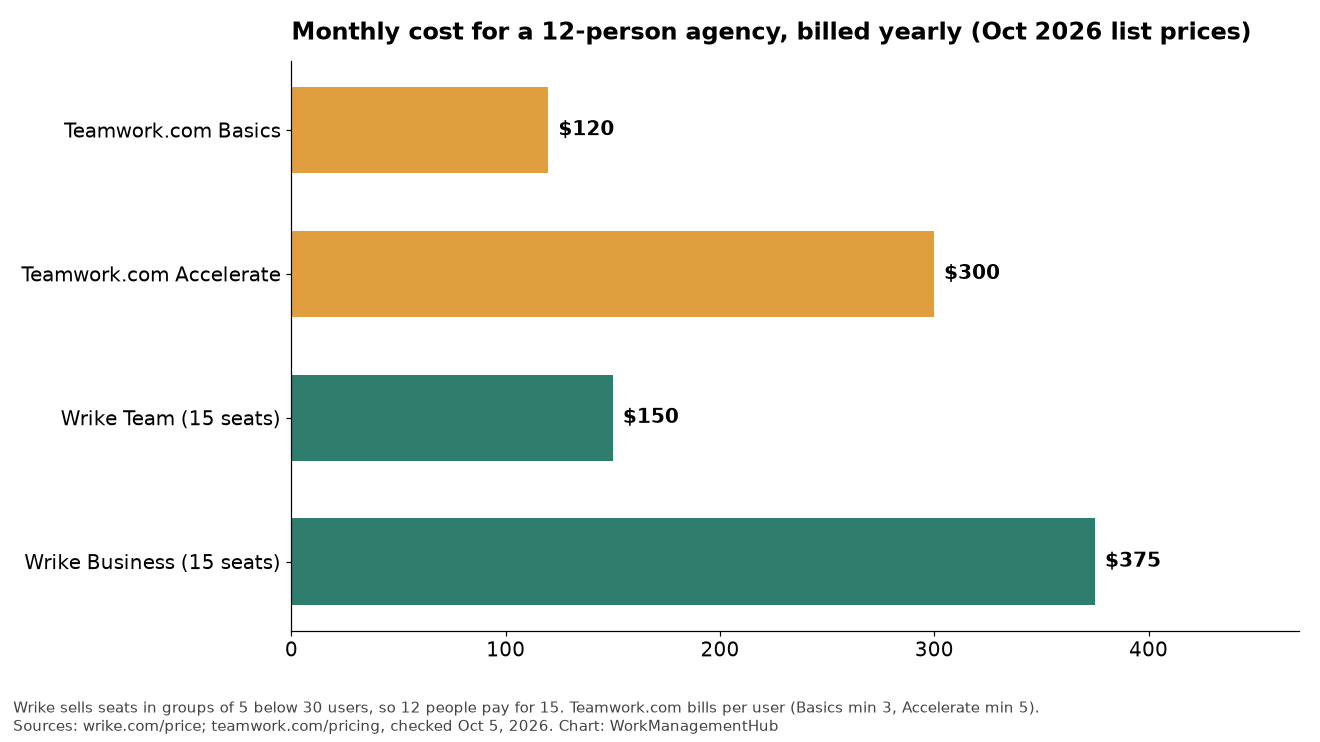
To make this concrete, consider a 10-person agency that needs time tracking, billable hours, and invoicing—standard requirements for any client-service firm:
- Teamwork Deliver: 10 users × $19.99 = $199.90/month ($2,398.80/year)
- Wrike Business: 10 users × $25 = $250/month ($3,000/year)—but this does not include billing or invoicing features
- Wrike Pinnacle/Apex (to get billing features): 10 users × ~$50–$80 = $500–$800/month ($6,000–$9,600/year)
The annual cost gap between Teamwork Deliver and Wrike Pinnacle for a 10-person team is $3,600–$7,200—for the same core billing functionality. That is not a marginal pricing difference. It is a structural cost disadvantage for agencies evaluating Wrike at face value without understanding where the relevant features actually sit in the tier stack.
For further context on what Wrike’s paid plans actually deliver, the full Wrike 2026 review covers each tier in depth.
Task Management and Project Hierarchy
Both tools support sophisticated task hierarchies, but they organize them differently and with different strengths at the agency workflow level.
Wrike uses a folder-and-project structure with tasks and subtasks nested inside. It supports multiple task views—list, board, table, Gantt, and calendar—and allows tasks to exist in multiple parent folders simultaneously, which is useful for cross-functional work. Custom item types, introduced as part of Wrike’s 2025 platform overhaul, allow teams to define work objects that match their process rather than forcing everything into a generic task shape. See the Wrike Blueprints guide for how templates layer on top of this structure to accelerate project setup.
Teamwork structures work around projects, task lists, and tasks, with milestones and subtasks layered in. The hierarchy maps directly to how most agency engagements actually operate: a client becomes a company, each engagement becomes a project, and work is organized into deliverable-based task lists. This alignment is not accidental—Teamwork was built from the ground up for client-service work, and the hierarchy reflects that DNA.
G2 reviewers score Teamwork at 9.4/10 on task management versus Wrike’s 8.9. The gap reflects Teamwork’s advantage in the specific workflows agencies run most: intake, briefing, production, review, and delivery organized by client and project. Wrike’s flexibility is genuine and powerful, but it requires more configuration to achieve what Teamwork ships as the default experience.
Time Tracking and Billable Hours
Time tracking is where the tools begin to diverge meaningfully. Both offer native time tracking without requiring a third-party integration, but the implementation and the tier at which features unlock differ significantly.
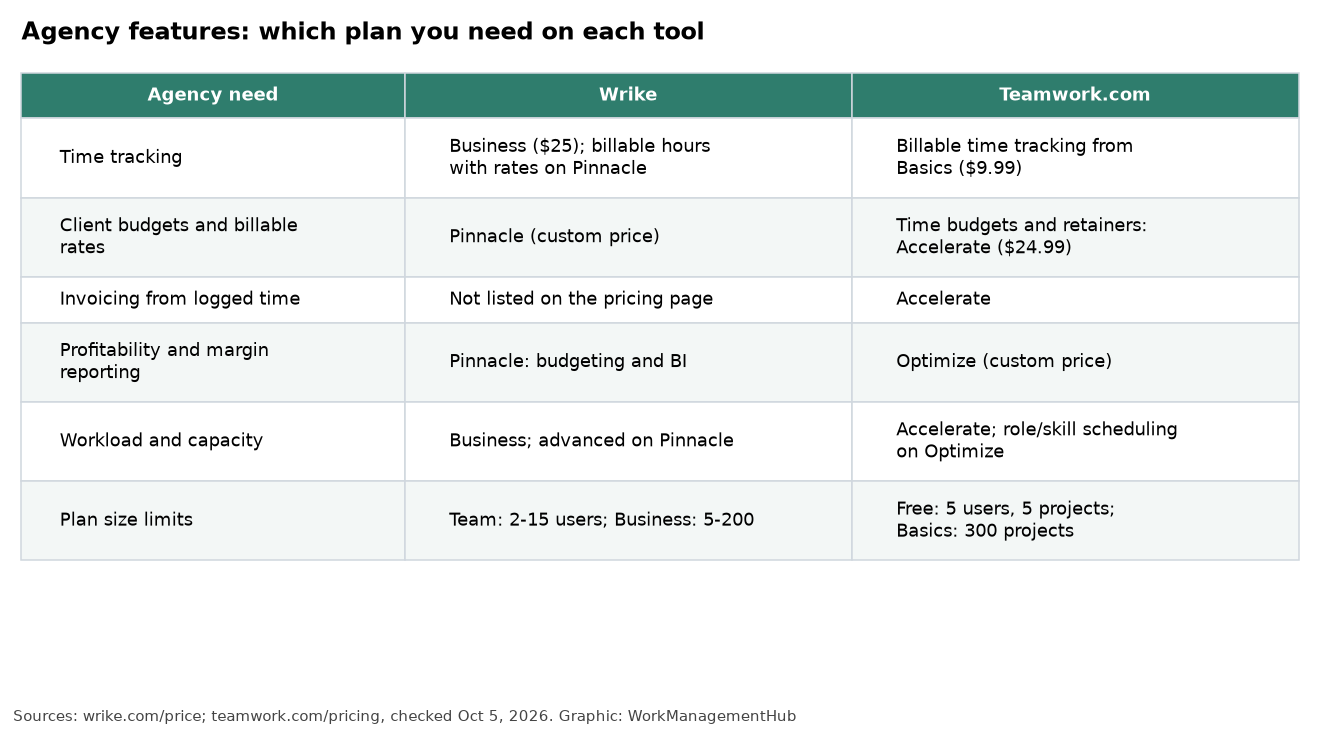
Wrike includes time tracking from the Team plan onward. Team members can log time directly on tasks with a built-in timer or manual entry. The data flows into project-level time reports. However, distinguishing billable from non-billable time and setting billable rates requires the Business plan at minimum—and true project budget tracking tied to billable hours sits at Pinnacle/Apex.
Teamwork’s time tracking is architecturally richer for agencies. From the Starter plan, you can log time with billable/non-billable distinction. The Deliver plan adds time budgets per project, budget vs actual tracking, and the ability to set billing rates by user, role, or project—all visible in real time as the project runs. Account managers can see at a glance whether a retainer is on track or burning faster than forecast, without exporting data to a spreadsheet.
For agencies that sell time—whether on retainer, time-and-materials, or project-fee structures—Teamwork’s time tracking architecture is simply better suited to the day-to-day reality of client work.
Billing and Invoicing: The Tier Gap That Changes Everything
This is the decision point for most agencies, and it is the section most published comparisons skip entirely. The question is not just whether a tool has billing and invoicing—it is at what price tier that functionality becomes accessible.
Teamwork includes invoicing natively from the Deliver plan ($19.99/user/month). You can generate invoices from logged time, apply billing rates, export to PDF, and push invoice data to accounting integrations like QuickBooks and FreeAgent. Project forecasting tools let you project revenue and cost forward based on current burn rate. Time budgets with visual burn indicators are standard. For an agency billing clients monthly against retainer hours, this is a complete workflow—from time log to invoice—inside a single platform.
Wrike does not include billing or invoicing at the Business plan level. These capabilities are gated at Pinnacle and the new Apex tier. At those price points, Wrike does deliver budget management and time-to-cost tracking, but the audience is typically a large enterprise PMO managing capital expenditure, not a 20-person agency sending monthly client invoices. The feature set was built for a different buyer.
The practical consequence: agencies that evaluate Wrike Business as their target tier and then discover the billing gap mid-implementation face a choice between paying significantly more to upgrade or maintaining a parallel invoicing workflow outside the tool. Neither outcome is good. Teamwork eliminates this problem by treating client billing as a mid-tier feature rather than an enterprise add-on.
Gantt Charts and Project Planning
Gantt charts are a standard expectation for agency project planning—particularly for larger campaigns, product launches, or multi-phase engagements where dependencies and timelines need to be communicated visually to clients.
Wrike’s Gantt charts are among the strongest in the market. They support task dependencies with lag and lead times, baseline tracking to compare planned vs actual progress, and critical path visualization. The interactive timeline editor makes rescheduling drag-and-drop simple. However, Gantt access requires the Business plan at $25/user/month—it is not available on the Team plan.
Teamwork’s Gantt charts are solid and fully functional, with dependency management, milestone markers, and zoom levels from daily to quarterly views. They are not quite as visually polished or feature-dense as Wrike’s, but they cover the full range of what most agencies need for client-facing project timelines. Gantt access is included from the Deliver plan at $19.99/user/month.
On this dimension, Wrike has a qualitative edge in Gantt depth, and Teamwork has a pricing edge in access tier. For resource management layered on top of Gantt planning, Wrike’s workload view is particularly strong—covered in detail in the Wrike resource management guide.
AI Features: Wrike AI Elite vs Teamwork AI
Both platforms have invested in AI features, though with different architectures and different pricing treatments.
Wrike’s AI capabilities are marketed under the AI Elite umbrella and include AI task generation from briefs, smart risk prediction, content drafting within tasks, and automated status summaries. As of April 2026, AI Elite usage is subject to consumption quotas even at Pinnacle and Apex tiers—meaning heavy AI users may hit limits that were not present when the feature first launched. For marketing teams running Wrike, AI-assisted content workflow is one of the more compelling use cases, explored in the Wrike for marketing teams guide.
Teamwork AI, available on paid plans, covers task auto-generation, meeting note summarization, and intelligent project health reporting. It is less ambitious in scope than Wrike’s AI roadmap, but it is also less likely to hit quota walls mid-month. For most agencies, the AI features in either tool are useful-but-supplementary rather than mission-critical—the billing and time tracking architecture matters far more to daily operations than AI task suggestions.
Neither platform’s AI offers a decisive advantage for agency project management as of mid-2026. This is an area worth monitoring as both products evolve.
Integrations: Enterprise Stack vs Agency Stack
The integration ecosystems of Wrike and Teamwork reflect their target markets with unusual clarity.
Wrike’s integration portfolio skews enterprise: Microsoft Teams, Microsoft 365, Adobe Creative Cloud, Salesforce, Slack, Google Drive, and Box are among the headline connections. For a large organization where work flows through enterprise systems, these integrations are genuinely valuable. The Adobe Creative Cloud integration in particular is relevant for in-house creative departments at large companies—less so for independent agencies.
Teamwork’s integrations skew agency and client-work: HubSpot CRM (for connecting project delivery to the sales pipeline), Slack, Google Drive, Dropbox, Zapier, QuickBooks, and FreeAgent. The HubSpot integration is meaningful for agencies that manage both sales and delivery—it creates a handoff point where a won deal in the CRM automatically initiates a project in Teamwork. That workflow does not exist natively in Wrike.
Both platforms connect to Zapier for custom automation, which extends the integration surface substantially. But the native integrations tell you what each company thinks its core customer looks like. Wrike’s native integrations serve the enterprise buyer. Teamwork’s serve the agency.
Reporting and Client Dashboards
Reporting is the second area—after billing—where Teamwork holds a meaningful advantage for client-service work, and the G2 scores reflect it: Teamwork 8.9/10 vs Wrike 7.7/10 on reporting.
Teamwork’s reporting suite includes project health reports, time utilization reports by client or team member, budget vs actual reports, and utilization forecasting. These are the reports an agency principal or account director needs to run a profitable operation—and they are available in a format that can be shared directly with clients without significant reformatting.
Wrike’s reporting is capable but requires more configuration. Custom dashboards with widgets are flexible, and the advanced analytics available at Business and above are genuinely powerful for internal operational visibility. The weakness is in client-facing reporting: Wrike was not designed to produce the kind of clean, client-digestible summaries that agencies need to send to clients monthly. Producing those typically requires either a Pinnacle-tier analytics export or manual assembly outside the tool.
For agencies that send regular project status reports to clients—whether monthly, weekly, or at project milestones—Teamwork’s reporting layer reduces that effort meaningfully.
Mobile Apps
Both Wrike and Teamwork offer iOS and Android mobile applications. Wrike’s mobile app covers the core task management, notification, and time logging workflows with a clean interface, though some of the more complex features like Gantt editing are desktop-only. Teamwork’s mobile app covers time logging—including billable time entry—task management, and project-level reporting views. For field-based project managers or account managers who log time while traveling between client sites, Teamwork’s mobile time entry with billable designation is particularly practical.
Neither app is a full desktop replacement, and neither is a meaningful differentiator in the overall decision. Both are functional for on-the-go task management and time logging.
Wrike vs Teamwork: Which Team Size and Type Should Choose Which Tool
Choose Teamwork if:
- You run a client-service agency (digital, creative, PR, consulting, web development) with 5–150 staff
- Billing, invoicing, and time-budget tracking are non-negotiable features at a mid-tier price point
- Your team is already using HubSpot for CRM and needs a clean handoff from sales to project delivery
- You need client-facing reporting that does not require manual reformatting before it leaves the building
- You want G2’s top-rated task management experience for client project workflows
Choose Wrike if:
- You are part of a larger enterprise organization (150+ staff) with mixed departmental needs beyond agency work
- Your organization runs on Microsoft 365 and needs deep Teams and SharePoint integration
- You have a creative production department that needs Adobe Creative Cloud workflow integration
- Advanced resource management and workload planning across multiple teams are a primary requirement
- You can budget for Pinnacle/Apex pricing and need the full platform capability it unlocks
If you are evaluating other options beyond these two, the best Wrike alternatives for 2026 covers a broader competitive landscape including tools that may fit specific agency sub-niches more precisely.
For agencies doing client billing in 2026, Teamwork is the clear winner. The argument is not close. At $19.99/user/month on the Deliver plan, Teamwork gives you billable hours, invoicing, time budgets, project forecasting, and client-facing reporting—the complete operational stack for a client-service firm. To get equivalent billing functionality in Wrike, you are looking at Pinnacle or Apex pricing of $50–$80+/user/month. For a 10-person agency, that is a $3,600–$7,200 annual premium for the same core capability. Teamwork also scores higher on task management (9.4 vs 8.9) and reporting (8.9 vs 7.7) on G2—the two dimensions that matter most to agency PMs. Wrike is the right choice for large enterprise organizations where Microsoft 365 depth, Adobe Creative Cloud integration, and cross-departmental resource management justify the premium. But if you run an agency that bills clients for time and needs to track profitability per project, Teamwork Deliver is a better platform at a fraction of the price. The decision should be obvious.
FAQ
Is Wrike or Teamwork better for agencies?
Teamwork is better for most agencies. It was purpose-built for client-service work and delivers billing, invoicing, and time budgets at the mid-tier Deliver plan ($19.99/user/month). Wrike is a more powerful general-purpose platform, but it gates the agency-critical billing features at Pinnacle/Apex pricing—typically $50–$80+/user/month—making it a poor cost fit for small and mid-sized agencies that need those features as standard.
Does Teamwork have a free plan?
Yes. Teamwork offers a free tier for up to 5 users with limited projects and features. It is suitable for very small teams or for trialing the platform before committing to a paid plan. For agencies that need time tracking, billable hours, and invoicing, the Deliver plan at $19.99/user/month (annual billing) is the minimum recommended tier.
Can Teamwork handle billing and invoicing?
Yes, and this is one of Teamwork’s strongest differentiators. From the Deliver plan onward, Teamwork supports billable hours tracking, billing rate configuration by user or role, project time budgets with burn tracking, invoice generation from logged time, and integrations with QuickBooks and FreeAgent for accounting sync. The entire client billing workflow—from time log to invoice—can run inside Teamwork without a third-party tool.
Which tool has better Gantt charts—Wrike or Teamwork?
Wrike has qualitatively stronger Gantt charts, with more advanced dependency management, baseline tracking, and critical path visualization. However, Wrike’s Gantt requires the Business plan ($25/user/month), while Teamwork’s Gantt is available from the Deliver plan ($19.99/user/month). For most agencies, Teamwork’s Gantt covers 90% of use cases at a lower price point; teams that need the advanced scheduling depth Wrike offers should factor in the Business plan cost accordingly.
Is Wrike worth the price compared to Teamwork?
For large enterprise organizations that need deep Microsoft 365 integration, Adobe Creative Cloud workflow, and advanced cross-departmental resource management, Wrike is worth the premium at Business or Pinnacle tier. For agencies and client-service firms, Wrike’s pricing structure makes it difficult to justify: the features agencies need most—billing and invoicing—are locked at Pinnacle/Apex pricing that is two to four times more expensive than Teamwork Deliver. Wrike is worth the price for the buyer it was designed for; it is not worth the price for most agencies.