Wrike vs Airtable 2026: Which Is Better for Project-Driven Teams?
- Wrike wins for structured, deadline-driven project teams: its Gantt charts, proofing tools, approval workflows, and resource management are purpose-built for agencies, PMOs, and enterprise delivery teams.
- Airtable wins for data-heavy operations teams: its flexible relational database, programmable interfaces, and Extensions SDK give ops, product, and marketing teams a platform they can model to their exact workflows.
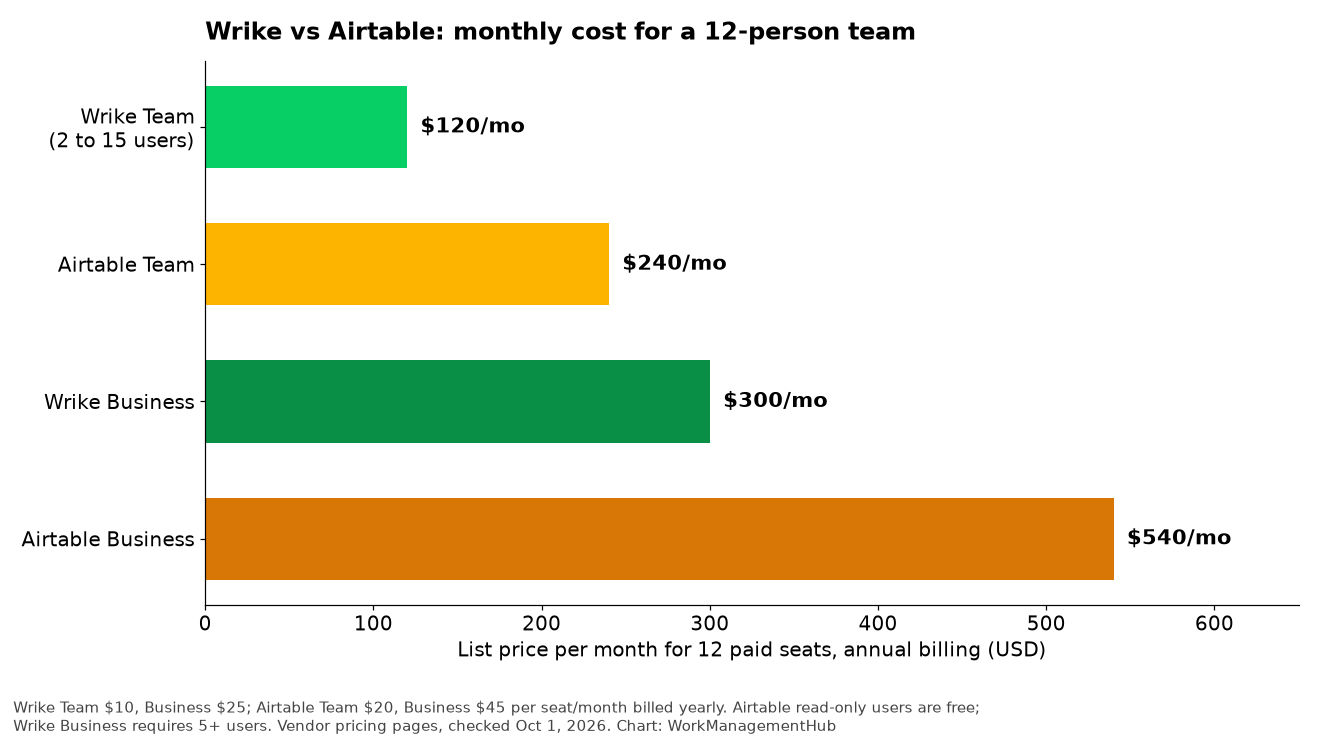
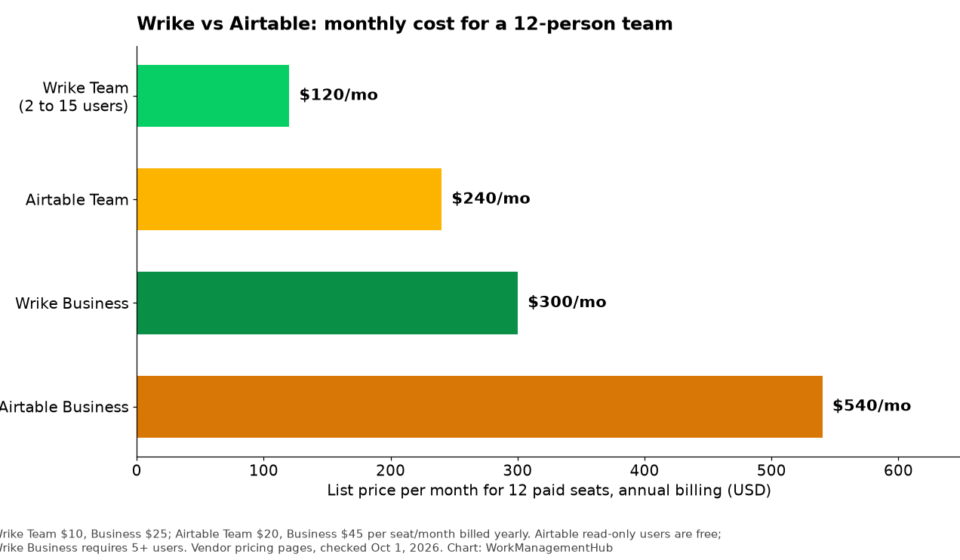
- Pricing is a significant differentiator — Wrike Team starts at ~$9.80/user/month while Airtable Team costs $20/user/month, making Wrike considerably cheaper for larger delivery teams.
- Wrike AI Agents (generally available since 2025) automate project risk detection, task creation, and workflow orchestration; Airtable Field Agents (2026) focus on ambient data enrichment directly inside database cells.
- Most teams running complex client delivery or cross-functional ops do not need to choose — the real mistake is forcing one tool to do both jobs poorly instead of deploying each where it excels.
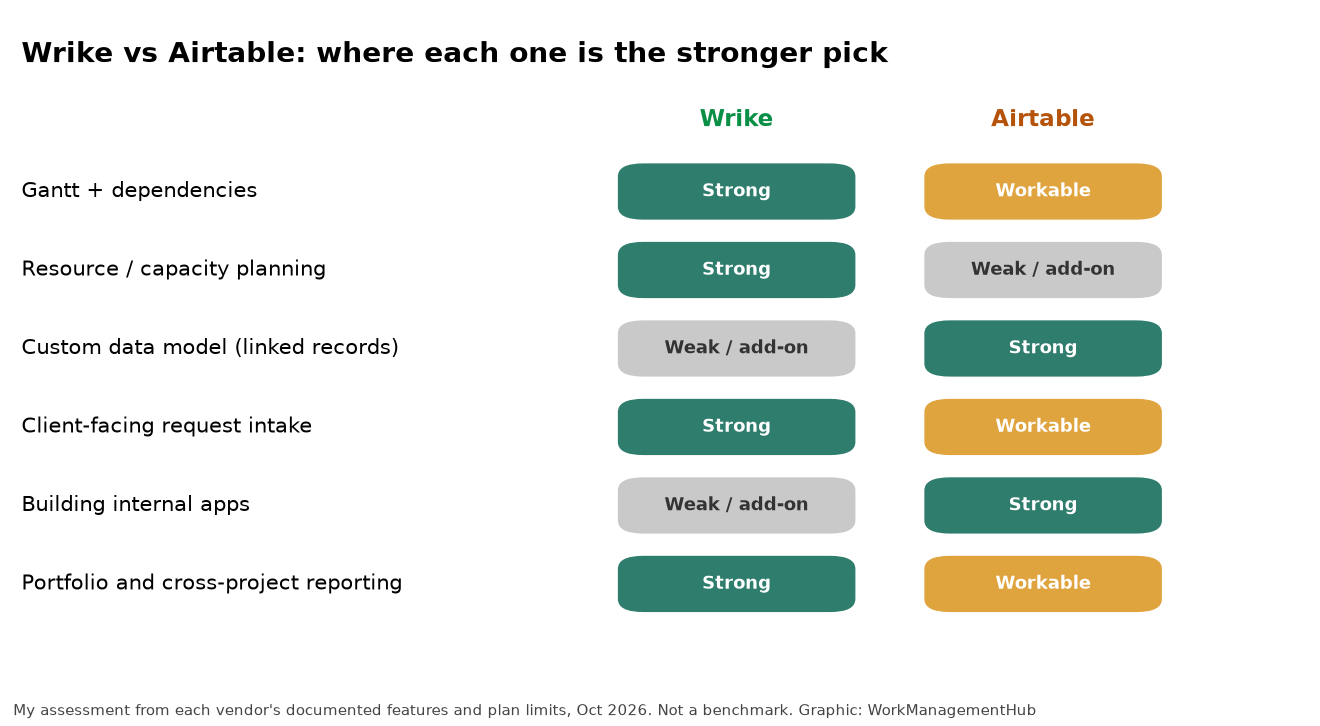
Choose Wrike if your team runs structured, deadline-driven projects — especially in agencies, marketing, or enterprise PMOs. Choose Airtable if your work is data-intensive and cross-functional, requiring flexible database views and custom-built interfaces. Wrike is the better project manager; Airtable is the better operational platform. The difference is architectural, not cosmetic.
- The Core Difference: Project Manager vs. Operational Database
- Where Wrike Dominates: Structured Project Delivery
- Where Airtable Wins: Flexible Data Operations
- AI in 2026: Wrike AI Agents vs. Airtable Field Agents
- Pricing Breakdown: What You Actually Pay at Scale
- Full Feature Comparison Table
- Which Tool for Which Team? Real-World Scenarios
- Verdict
- Frequently Asked Questions
Wrike vs Airtable 2026: Which Is Better for Project-Driven Teams?
The Wrike vs Airtable question comes up constantly in the teams I advise — and the frustrating truth is that most comparison articles get the framing wrong from the first paragraph. They treat both tools as interchangeable project management platforms fighting for the same seat at your company’s software budget table. They are not the same category of tool. Wrike is a project management platform built around structured delivery: Gantt charts, milestones, approvals, proofing, and resource management. Airtable is a no-code relational database that happens to support project views. Both can track tasks. That is roughly where the overlap ends.
In this guide, I will give you the direct evaluation I give clients — grounded in how these platforms have evolved in 2026, including their AI capabilities, pricing changes, and the specific team profiles each tool actually serves well. By the end, you will have a definitive answer for your organization, not a hedged “it depends” conclusion.
The Core Difference: Project Manager vs. Operational Database
The architectural divide between Wrike and Airtable is the single most important thing to understand before evaluating any individual feature. Wrike was designed with a project hierarchy at its core: workspace → space → folder → project → task → subtask. Every piece of work fits into that structure. Dependencies flow through it, timelines are derived from it, and reporting aggregates up through it. This is extraordinarily powerful when your work is genuinely project-shaped — when there are clear start dates, end dates, deliverables, owners, and handoffs.
Airtable was designed with a database at its core: tables, records, fields, and relationships between them. Views — grid, kanban, gallery, calendar, Gantt, form — are simply different lenses on the same underlying data. This is extraordinarily powerful when your work is data-intensive and cross-functional — when the same records need to be seen differently by different teams, enriched over time, and connected to other datasets across the organization.
The practical consequence: Wrike makes structured project delivery effortless and flexible data modeling painful. Airtable makes flexible data modeling effortless and structured project delivery possible but cumbersome. Neither platform has closed this gap in 2026 despite significant AI investment on both sides. The question is which set of trade-offs your team can live with — and for most teams, that answer is clear once you map your actual work to either architecture.
A third consideration is adoption. Wrike’s project-centric interface is immediately legible to anyone who has used any project management tool — the learning curve is about mastering advanced features, not understanding the paradigm. Airtable’s database paradigm requires more conceptual onboarding for non-technical users, but rewards that investment with a level of customization Wrike simply cannot match.
Where Wrike Dominates: Structured Project Delivery
Wrike’s strongest competitive advantages are concentrated in the areas that matter most to agencies, marketing teams, PMOs, and enterprise delivery organizations. These are not features that Airtable is actively trying to replicate — they reflect a fundamentally different set of design priorities.
Gantt charts with real dependency management. Wrike’s Gantt chart is not a visualization layer bolted onto a task list. It is a live planning surface where you can set finish-to-start, start-to-start, finish-to-finish, and start-to-finish dependencies, adjust timelines by dragging bars, and cascade date changes downstream automatically. For project managers running complex multi-phase campaigns or client deliveries with hard deadlines, this is the operational core of the platform — not an optional add-on.
Proofing and approvals. Wrike’s built-in proofing tool lets reviewers annotate directly on images, PDFs, and video files within the platform — no external tools required. Approval workflows route assets to the right stakeholders, track revision rounds, and log every decision with a timestamp. For creative agencies and marketing teams, this alone can eliminate entire categories of email threads and revision miscommunication. Airtable has no native equivalent. You can attach files and add comment fields, but there is no structured proofing surface.
Resource management and workload balancing. Wrike’s resource management gives team leads a real-time view of capacity across projects. You can see which team members are over-allocated, redistribute tasks with drag-and-drop, and model the impact of timeline changes on headcount. For organizations managing multiple concurrent client engagements or product launches, this visibility is operationally essential.
Blueprints for repeatable project delivery. Wrike’s Blueprints allow teams to turn any successful project structure into a reusable template — complete with tasks, subtasks, assignees, dependencies, and timelines that reschedule automatically from a new start date. For agencies onboarding a new client or marketing teams launching the same campaign type quarter after quarter, Blueprints eliminate the setup overhead that kills team momentum. We have a full breakdown of this capability in our Wrike Blueprints guide for 2026.
Cross-tagging and multi-project task visibility. Wrike’s cross-tagging lets a single task live in multiple project folders simultaneously — so a design asset can appear in both the client project folder and the design team’s workload view without duplication. This is a deceptively powerful feature for organizations with matrix teams where the same people deliver work across multiple concurrent projects.
Where Airtable Wins: Flexible Data Operations
Airtable’s ceiling is considerably higher than Wrike’s for teams whose work requires modeling complex, interconnected data across multiple functions. The platform has been investing heavily in its developer and builder ecosystem, and in 2026 those investments are paying off for operations teams, product orgs, and marketing departments that need more than a task tracker.
Relational data modeling without engineering resources. Airtable’s linked record fields create genuine relational database relationships between tables — without SQL. A content team can link articles to campaigns, campaigns to product launches, and product launches to client accounts, then build views that pull from any combination of those relationships. This is the kind of data architecture that typically requires a dedicated database or a custom-built internal tool. Airtable makes it accessible to non-technical operators.
Interface Designer and Extensions SDK. Airtable’s Interface Designer lets teams build custom application-like views on top of their data — with forms, buttons, charts, and record detail pages — without writing code. The Extensions SDK goes further, allowing developers to build fully custom components that embed inside Airtable interfaces. For organizations that need an internal tool tailored to a specific workflow, this combination eliminates the need to build and host a separate app. We cover this in depth in our Airtable Interface Extensions SDK deep dive.
Multiple view types on the same dataset. The same Airtable base can surface a kanban board for the project team, a gallery view for the creative team, a calendar view for the account manager, and a locked read-only interface for the client — all showing filtered subsets of the same underlying records. This multi-stakeholder view model is something Wrike approximates with dashboards but cannot match in terms of flexibility and depth.
Automation and integration depth. Airtable’s native automation engine handles conditional branching, multi-step sequences, and webhook-triggered workflows without a third-party automation tool. Combined with its official integrations and REST API, operations teams can build sophisticated data pipelines that keep CRM records, marketing databases, and project tracking synchronized in real time. Wrike has automation capabilities, but they are oriented toward project workflow management rather than data orchestration.
AI in 2026: Wrike AI Agents vs. Airtable Field Agents
Both platforms have made significant AI investments, but their AI strategies reflect the same architectural priorities as the rest of the product — which means they solve very different problems.
Wrike AI Agents became generally available in 2025 and focus on project management intelligence: automated risk detection, intelligent task creation from meeting notes or project briefs, workflow orchestration across project phases, and predictive insights about timeline slippage before it happens. Wrike AI Agents are embedded into the project delivery flow — they act as a proactive project manager layer that monitors your work and surfaces issues before they become crises. This is an exceptionally high-value capability for PMOs and delivery teams managing large portfolios where manual monitoring creates blind spots. Our full analysis is in the Wrike AI Agents deep dive.
Airtable Field Agents launched in 2026 and take a distinctly different approach: they operate at the cell level within your database, autonomously enriching records by browsing the web, extracting data from documents, and synthesizing information from multiple sources. A competitive intelligence database can have company records auto-populated with the latest funding data, employee count, and key executive changes without manual research. A content operations base can have briefs automatically enriched with SEO data and competitor coverage gaps. This ambient data enrichment capability has no equivalent in Wrike. For ops teams managing large datasets, it fundamentally changes the economics of data maintenance. Our setup guide covers this in detail: how to set up Airtable Field Agents in 2026.
The verdict on AI: Wrike’s AI makes project delivery smarter and less risky. Airtable’s AI makes data operations faster and more comprehensive. Neither is clearly “better” — they are solving different problems. If your team’s primary pain is missed deadlines and project blind spots, Wrike AI Agents deliver more direct value. If your team’s primary pain is manual data entry and research overhead, Airtable Field Agents win decisively.
Pricing Breakdown: What You Actually Pay at Scale
Pricing is where Wrike holds a clear structural advantage for most team sizes. The gap is large enough to materially affect platform decisions at mid-market and above.
| Plan | Wrike | Airtable | Key Difference |
|---|---|---|---|
| Free | Yes (unlimited users, limited features) | Yes (up to 5 editors) | Wrike’s free tier allows unlimited users |
| Team / Starter | ~$9.80/user/mo | $20/user/mo | Wrike is 51% cheaper per seat |
| Business | ~$24.80/user/mo | $45/user/mo | Airtable Business adds advanced automations and sync |
| Enterprise | Custom pricing | Custom pricing | Both require sales conversation |
| AI Add-ons | Included in higher tiers / add-on | AI add-on required for Field Agents | Both platforms charge extra for full AI access |
At a team of 25 people on the Team/Starter tier, you are paying roughly $2,940/year for Wrike versus $6,000/year for Airtable — a $3,060 annual difference. That delta grows significantly at Business tier. For budget-conscious teams evaluating the two platforms on a cost-per-outcome basis, Wrike’s pricing advantage is real and meaningful.
The important caveat: Airtable’s higher price reflects different buying logic. You are not buying a project management seat — you are buying a flexible operational platform that may eliminate the need for other tools in your stack. If Airtable’s database replaces a separate CRM, content management system, and internal tool, the total cost of ownership picture shifts. Evaluate both platforms in the context of what they replace, not just what they cost in isolation. For a broader comparison on Airtable’s competitive pricing position, see our Airtable vs Monday.com analysis.
Full Feature Comparison Table
| Feature | Wrike | Airtable |
|---|---|---|
| Gantt charts with dependencies | Full native support | Basic Gantt view only |
| Proofing and markup tools | Built-in for images, PDFs, video | Not available |
| Approval workflows | Native multi-step approvals | Via automations (manual setup) |
| Resource management | Built-in workload balancing | Not available natively |
| Project templates | Blueprints with auto-scheduling | Base templates (no date cascade) |
| Relational database modeling | Limited (task hierarchies only) | Full relational tables with linked records |
| Custom interface builder | Dashboards with widgets | Interface Designer + Extensions SDK |
| AI capabilities | AI Agents (risk, workflow, task creation) | Field Agents (data enrichment, research) |
| Multiple view types | List, board, Gantt, table, dashboard | Grid, kanban, gallery, calendar, Gantt, form, timeline |
| Time tracking | Built-in time logging | Via extensions / third-party |
| Guest / external collaborator access | Free external collaborators | Read-only shares; editors billed |
| API and automation depth | Strong workflow automation | REST API + scripting + webhooks |
| Starting price (paid tier) | ~$9.80/user/mo | $20/user/mo |
Which Tool for Which Team? Real-World Scenarios
Abstract feature comparisons only go so far. Here is how I frame this decision for specific team types I encounter in the field:
Creative and marketing agencies: Choose Wrike. Agencies live and die by deadline management, revision tracking, client deliverable approvals, and resource utilization. Wrike’s proofing, Gantt dependencies, Blueprints, and time-tracking were designed for exactly this operating environment. Airtable can be configured for agency work, but the setup investment is substantial and the proofing gap never closes without a third-party integration.
Enterprise PMOs and delivery organizations: Choose Wrike. Portfolio-level resource management, cross-project dependency tracking, and standardized delivery frameworks are Wrike’s native territory. Enterprise Wrike deployments benefit directly from AI-powered risk detection across large project portfolios where manual oversight at scale is impossible. The Wrike AI Agents deep dive covers the portfolio risk detection capabilities in detail.
Product and operations teams: Choose Airtable. Teams managing product roadmaps alongside research repositories, customer feedback databases, and go-to-market coordination need relational data — not a task hierarchy. Airtable’s ability to connect these datasets and surface custom views for different stakeholders (engineers see sprint-style views, executives see roadmap timelines, customers see a form-based intake) is unmatched. The Airtable Interface Extensions SDK makes this multi-stakeholder model genuinely practical.
Marketing operations and content teams: Choose Airtable. Content calendars, campaign databases, asset libraries, and editorial workflows require the kind of flexible data modeling that Airtable enables natively. Field Agents in 2026 dramatically reduce manual content research and briefing overhead. Wrike can track content production tasks, but it cannot serve as the operational database that these teams need.
Cross-functional enterprise teams: Consider both. Large organizations often have delivery teams (agencies, campaigns, software projects) that belong on Wrike and operational teams (product ops, HR ops, marketing ops) that belong on Airtable. The decision is not platform-wide — it is team-specific. Both platforms offer enterprise-grade security, SSO, and audit logging, so running them in parallel is operationally viable. The integration layer between Wrike and Airtable via Zapier or direct API connections is well-established.
Small teams on a tight budget: Default to Wrike. At $9.80/user/month versus $20/user/month, Wrike’s pricing advantage is decisive for teams that need a solid, full-featured project management platform without complex customization requirements. The free tier’s unlimited-user access also makes Wrike an easy starting point for growing teams.
For project-driven teams — agencies, PMOs, marketing delivery, and enterprise project delivery organizations — Wrike is the better platform. Its proofing tools, Gantt dependency management, Blueprints, and AI-powered project risk detection are purpose-built for structured work at scale, and its pricing is meaningfully more accessible. For data-intensive operational teams — product operations, marketing ops, content, and research functions — Airtable’s relational database architecture, Interface Designer, Extensions SDK, and Field Agents make it the superior choice. The mistake is treating this as a single-tool decision for an entire organization. The smartest enterprise deployments use Wrike for delivery teams and Airtable for operational teams, with lightweight integrations connecting the two. If you can only pick one: agencies and project teams, go with Wrike. Operations and data teams, go with Airtable. This position is defensible because the tools are architecturally distinct — and no amount of configuration on either side fully bridges that gap.
Frequently Asked Questions
Can Airtable replace Wrike for a full-service creative agency?
Airtable can track agency projects, but it cannot replace Wrike’s native proofing and markup tools, approval workflows, or resource management without significant third-party integrations and custom setup. For agencies where client deliverable review is a daily workflow — annotating PDFs, managing revision rounds, routing for sign-off — Wrike’s built-in proofing eliminates an entire category of friction that Airtable requires external tools to address. The setup cost and ongoing maintenance overhead of making Airtable work for agency delivery usually exceeds the platform price difference.
Is Wrike good for non-project teams that need a database?
No. Wrike’s data model is hierarchical and project-centric — it is not designed to function as a relational database. Teams that need to link records across multiple tables, build custom data relationships, or model operational datasets (CRM-adjacent systems, content libraries, research repositories) will hit hard structural limits in Wrike quickly. The platform’s reporting and dashboard capabilities are strong for project-level data, but they cannot replace a purpose-built database platform like Airtable for operations work.
How do Wrike AI Agents and Airtable Field Agents compare in practical terms?
Wrike AI Agents are project-intelligence tools: they monitor your project data, detect timeline risks, suggest task structures from briefs, and orchestrate workflow automation across project phases. They make project managers more effective by surfacing issues before they escalate. Airtable Field Agents are data-enrichment tools: they operate autonomously at the cell level, populating record fields by browsing the web, reading documents, and extracting structured data without human input. They make operations teams more efficient by eliminating manual research. The right framing is not which AI is better — it is which problem you need AI to solve. See our guides on Wrike AI Agents and Airtable Field Agents for full technical breakdowns.
Which platform has better external collaborator access for clients?
Wrike has a meaningful advantage here: external collaborators can be added as guests at no charge on paid plans, with access scoped to specific projects. This makes client-facing delivery straightforward without inflating your per-seat costs. Airtable’s sharing model allows read-only public links or shared views, but anyone who needs to edit records must be a paid user on your plan. For agencies and client-services teams that regularly collaborate with clients on deliverable review and approval, Wrike’s free guest model is a genuine budget advantage.
What do Wrike and Airtable’s official resources say about enterprise suitability?
Both platforms publish detailed enterprise security and compliance documentation. Wrike’s official feature overview covers its enterprise-grade security, SSO, audit reports, and data residency options. Airtable’s enterprise documentation details its admin controls, SCIM provisioning, and advanced permission management. Both platforms are enterprise-ready from a security standpoint — the decision should rest on workflow fit, not security concerns.