Skip to content
-
Subscribe to our newsletter & never miss our best posts. Subscribe Now!
Work Management Hub Work Management Hub

Expert Reviews, Comparisons & Guides for Smartsheet, Monday.com, Asana, ClickUp & More

Work Management Hub Work Management Hub

Expert Reviews, Comparisons & Guides for Smartsheet, Monday.com, Asana, ClickUp & More

  • Airtable
  • Asana
  • ClickUp
  • Jira
  • Monday.com
  • Notion
  • Smartsheet
  • Wrike
  • About
  • Contact
  • Airtable
  • Asana
  • ClickUp
  • Jira
  • Monday.com
  • Notion
  • Smartsheet
  • Wrike
  • About
  • Contact
Close

Search

  • https://www.facebook.com/
  • https://twitter.com/
  • https://t.me/
  • https://www.instagram.com/
  • https://youtube.com/
AirtableJiraTool Comparisons

Airtable vs Jira 2026: Which Is Better for Product and Dev Teams?

By Shaik KB
May 26, 2026 13 Min Read
0
⚡ Key Takeaways

  • Jira is purpose-built for software engineering teams: native sprint management, backlog grooming, velocity charts, and deep Git integrations make it the default choice for pure dev shops.
  • Airtable is a database-first platform that excels when product work crosses functional boundaries — roadmaps, research repositories, content pipelines, and launch coordination all live in one place.
  • Pricing is a real factor: Jira Standard costs $7.75/user/month vs. Airtable Team at $20/user/month — at 30 engineers, that is a $4,575/year difference.
  • Airtable’s 2026 Field Agents can auto-fill cells by browsing the web and extracting data from documents — no Jira equivalent exists for this kind of ambient AI data enrichment.
  • Most comparison articles get this wrong: Airtable and Jira do not compete for the same jobs. Choosing the right tool depends entirely on where your team’s work actually lives.
Quick Answer:

For pure engineering teams shipping code daily, Jira wins on depth, integrations, and price. For cross-functional product teams managing roadmaps, research, content, and stakeholder reporting alongside development, Airtable’s flexibility justifies the premium. The real question is: does your work live inside a codebase or across the whole organization?

Table of Contents

  1. The Real Difference Most Comparisons Miss
  2. Where Jira Dominates: Engineering-Native Workflow
  3. Where Airtable Wins: Cross-Functional Product Operations
  4. AI Features in 2026: Field Agents vs. Rovo
  5. Pricing Breakdown: The True Cost at Scale
  6. Integrations: Native Code Tools vs. Third-Party Connectors
  7. Full Feature Comparison Table
  8. Which Tool for Which Team? Real Scenarios
  9. Verdict
  10. Frequently Asked Questions

The Airtable vs. Jira debate has been alive for years, and most of the content covering it makes the same fundamental error: it treats both tools as project management software competing for the same shelf space. They are not. Jira was architected from the ground up for software development teams running Agile and Scrum workflows. Airtable was built as a programmable database that happens to support project tracking. Once you understand that distinction, the choice becomes significantly clearer — and the remaining decision is really about where your team’s work actually lives.

This guide cuts through that confusion. We have evaluated both platforms as they stand in 2026, including their latest AI capabilities, pricing structures, and integration ecosystems. We will tell you plainly which team types should pick which tool — and why running both simultaneously is often the smartest answer.

The Real Difference Most Comparisons Miss

Here is the framing that makes everything else click into place. Jira operates at the execution layer of software development. It is optimized for the moment when a requirement becomes a ticket, a ticket enters a sprint, and a sprint ships code. Every Jira concept — issue types, epics, story points, sprint velocity, release notes — maps directly to software delivery methodology. Its information model assumes you are building software.

Airtable operates at the coordination layer of product organizations. It is optimized for the moment when strategy needs to be captured, research needs to be synthesized, roadmaps need to be communicated to finance and marketing, and launch content needs to be tracked alongside feature work. Its information model assumes nothing — you define what your data looks like, what relationships matter, and what views different stakeholders need.

This is not a minor philosophical distinction. It is the entire evaluation. A team of 40 engineers shipping microservices daily should be on Jira. A team of 12 product managers coordinating roadmaps, user research, and go-to-market execution across five departments should strongly consider Airtable. A fast-growing SaaS company will often find that it needs both — Jira for the engineering org and Airtable for product operations — with a lightweight integration connecting the two.

Where Jira Dominates: Engineering-Native Workflow

Jira’s Agile DNA is not a marketing claim — it is structural. The platform has been refined by Atlassian over two decades to match how engineering teams actually ship software. In 2026, that means several specific capabilities that Airtable simply cannot replicate without heavy customization.

Sprint management and velocity tracking. Jira’s sprint board is not a kanban clone. It supports sprint planning ceremonies natively: backlog refinement, capacity planning, sprint reviews, and retrospectives all have dedicated surfaces. Velocity charts automatically track story point completion across sprints, giving engineering managers real predictive data about what the team can ship in the next cycle. This data-driven delivery approach requires zero configuration — it is built into the platform’s core.

Issue type hierarchy. Epics, stories, tasks, subtasks, and bugs are first-class citizens in Jira with distinct workflows, custom fields, and reporting. You can define different lifecycle stages for a bug versus a feature request, apply different SLA targets, and route them to different teams — all within the same project. Airtable can approximate this with linked records and custom fields, but it requires significant setup time and ongoing maintenance by someone who understands database design.

Release management. Jira’s version and release tracking lets engineering leads plan which features and bug fixes ship in which release, track deployment readiness, and generate release notes automatically. For teams managing multiple parallel releases — common in enterprise software shops — this capability alone justifies the platform choice.

For a deeper look at Jira’s full capability set, see our complete Jira guide for 2026, which covers advanced configuration, automation rules, and the Atlassian ecosystem in detail.

Where Airtable Wins: Cross-Functional Product Operations

Airtable’s value proposition is almost the inverse of Jira’s: maximum flexibility for teams whose work spans multiple disciplines and cannot be fully described by a single information model. In practice, this shows up most powerfully in three areas.

Interface Designer for non-technical stakeholders. One of Airtable’s most underappreciated features is Interface Designer, which lets product managers and operations leads build custom-branded views of underlying data — without writing a single line of code. A PM can create a roadmap view for the executive team that shows only strategic initiative status, a separate view for engineering that shows sprint-level detail, and a third view for marketing that shows launch dates and messaging status — all pulling from the same underlying database. Jira requires admin-level configuration for most view customizations, and those customizations are typically global rather than audience-specific.

Multi-domain data modeling. A product team’s work is never just tickets. It includes user research sessions, customer feedback, competitive analysis, content briefs, launch checklists, and stakeholder communications. Airtable’s relational database model allows all of these to be connected: a feature on the roadmap can be linked to the user research studies that informed it, the competitive signals that prioritized it, the content assets being created for its launch, and the engineering tickets in progress. This kind of cross-domain visibility is impossible in Jira, which models everything as issues within projects.

Automation without code. Airtable’s native automation builder supports conditional logic, multi-step workflows, and integrations with tools like Slack, Gmail, and Salesforce — all through a visual interface. For product teams running on a lean operations stack, this means launch workflows, status update notifications, and stakeholder report generation can all be automated by a PM, not an engineer. Our in-depth Airtable review for 2026 covers the full automation capabilities, including the new AI triggers available in the Team and Business plans.

AI Features in 2026: Field Agents vs. Rovo

Both platforms have made significant AI investments heading into 2026, but they have taken meaningfully different approaches that reflect their underlying product philosophies.

Airtable Field Agents are the most distinctive AI capability in this comparison. Field Agents are AI workers that can autonomously browse the web, extract structured data from uploaded documents, and auto-populate cells in your Airtable bases — without manual input. Imagine a competitive research base where an Agent automatically fills in pricing, feature lists, and company headcount for each competitor by reading their public websites. Or a vendor evaluation table where an Agent extracts key terms from uploaded contract PDFs. This is genuinely novel functionality that shifts Airtable from a place where humans enter data to a platform where AI continuously enriches your operational database. For full setup instructions, see our guide to configuring Airtable Field Agents.

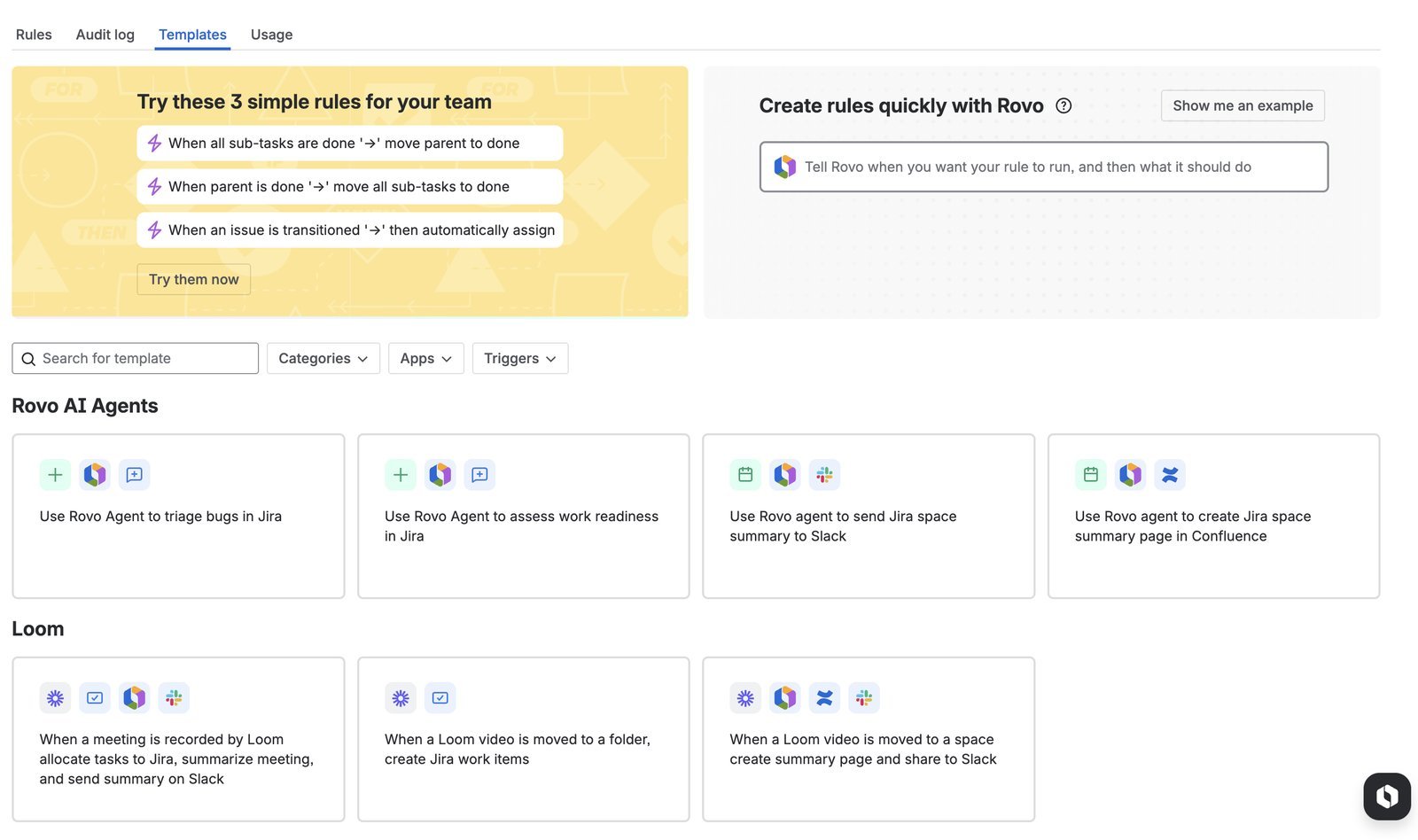
Jira’s Rovo AI agents are built into the Atlassian Intelligence suite and focus on engineering workflow acceleration. Rovo can summarize ticket histories, suggest similar resolved issues when a new bug is filed, draft acceptance criteria based on a story description, and help teams detect dependency conflicts across sprints. For a developer working inside Jira all day, Rovo is genuinely useful — but it operates within the bounded context of software delivery. It does not reach out to external data sources or populate information autonomously.

The verdict on AI: Airtable’s Field Agents represent a more architecturally ambitious AI integration and will deliver more visible productivity gains for product and operations teams. Jira’s Rovo is more narrowly useful but very well-executed within its scope. Neither AI feature set should be the primary driver of your platform decision — they are genuine value-adds, not the core product.

Pricing Breakdown: The True Cost at Scale

Pricing is a genuine differentiator in this comparison, and it becomes more significant as team size grows. Let us be specific.

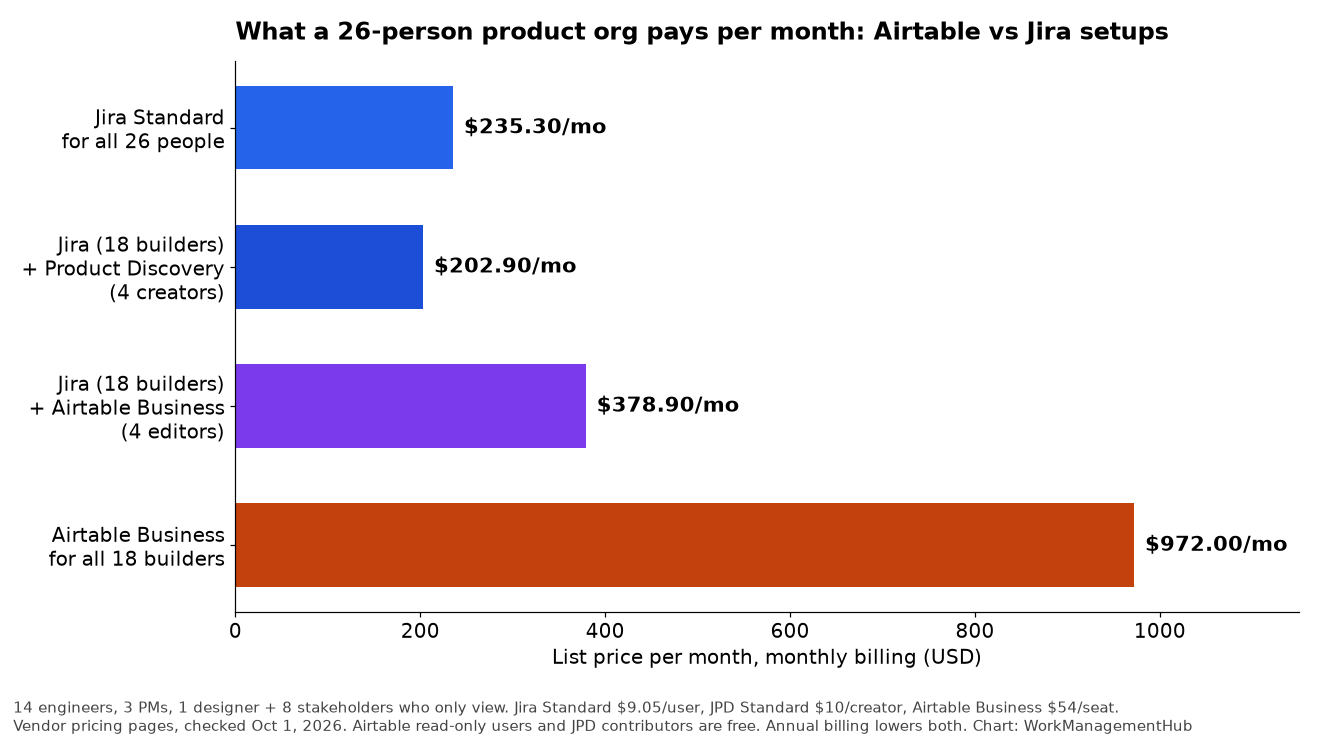
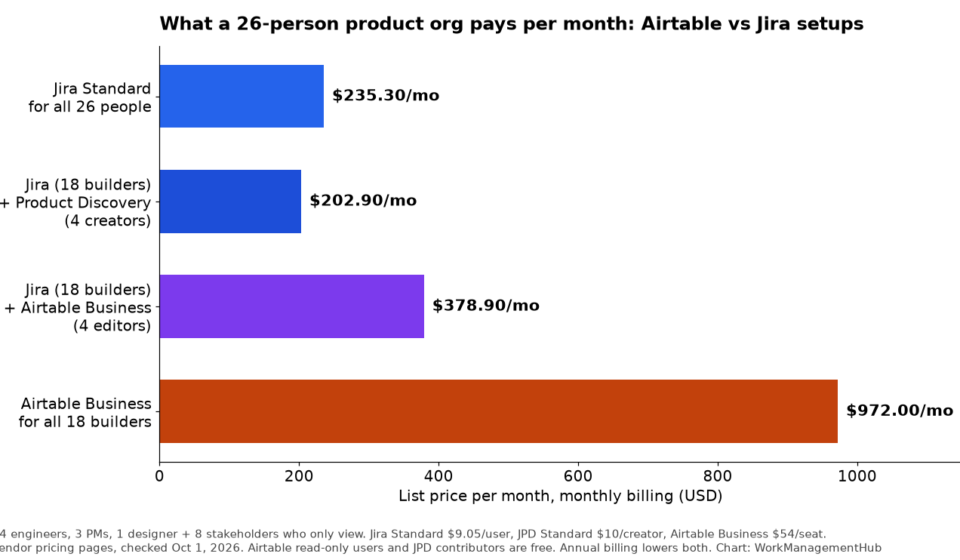
Jira Standard is priced at $7.75/user/month (billed annually) as of 2026. For a team of 50 engineers, that is $4,650/month or $55,800/year. Jira Premium, which adds advanced roadmaps, unlimited automation, and Atlassian Intelligence features, runs approximately $15.25/user/month at scale.

Airtable Team is priced at $20/user/month (billed annually). For the same team of 50, that is $12,000/month or $144,000/year — nearly three times the cost of Jira Standard. Airtable Business, which unlocks advanced admin controls, increased automation runs, and full Field Agent access, runs $45/user/month.

However, this cost comparison is only valid if you are comparing like-for-like use cases. A team that uses Airtable to consolidate what would otherwise be five separate tools — a roadmap tool, a research repository, a project tracker, a content calendar, and a stakeholder dashboard — may find that the Airtable investment pays for itself in eliminated software costs and reduced coordination overhead.

The bottom line on pricing: if your team is primarily engineers and the primary use case is sprint management, Jira’s pricing advantage is decisive. If your team is mixed — PMs, designers, researchers, writers, and engineers — Airtable’s all-in-one flexibility can justify the premium. See our Jira vs. Linear comparison for additional context on how Jira’s pricing stacks up against modern alternatives.

Integrations: Native Code Tools vs. Third-Party Connectors

Integration depth is another area where the two platforms diverge sharply — and where Jira has a structural advantage for engineering teams.

Jira’s code integrations are native and bidirectional. The connections with GitHub, GitLab, and Bitbucket are built and maintained by Atlassian. A developer opening a pull request can reference a Jira ticket number in the branch name or commit message, and Jira automatically updates the ticket status, links the PR, and shows deployment status directly on the issue. Engineering managers can see which tickets have open PRs, which have merged code awaiting deployment, and which are blocked — without switching context. This level of integration is not achievable through third-party middleware; it requires native platform support at the API level. Jira’s official GitHub integration documentation covers the full configuration.

Airtable relies on third-party connectors for most code tool integrations. Connections to GitHub or GitLab typically run through Zapier, Make (formerly Integromat), or custom API scripts. These integrations work, but they introduce latency, maintenance overhead, and dependency on a third-party service. For a product manager who needs to display sprint progress from GitHub on an Airtable roadmap, a Zapier automation is entirely workable. For a staff engineer who needs live, bidirectional code traceability on every ticket, it is not an adequate substitute. Airtable’s official automation documentation outlines what is and is not natively supported.

On the non-code integration side, Airtable holds the advantage. Its native connections to Salesforce, HubSpot, Slack, Notion, and Google Workspace are more sophisticated and better suited to cross-functional teams whose work touches multiple business systems beyond the codebase.

Full Feature Comparison Table

FeatureAirtableJira
Core modelRelational databaseIssue tracker / Agile board
Sprint managementRequires manual setup; no native velocityNative — built-in velocity charts, burndown
Custom views for stakeholdersInterface Designer — no-code, audience-specificAdmin-configured boards; limited customization
GitHub / GitLab integrationThird-party (Zapier, Make, API)Native, bidirectional, real-time
AI capabilities (2026)Field Agents: web browsing, doc extraction, cell auto-fillRovo: ticket summaries, similar issues, acceptance criteria drafts
Pricing (mid tier, annual)$20/user/month (Team)$7.75/user/month (Standard)
No-code automationStrong — visual builder, 750+ runs/month (Team)Moderate — rule-based triggers within Jira context
Cross-functional data linkingNative relational links across any record typeLimited to issue links within Atlassian ecosystem
Setup complexityMedium — requires schema design thinkingLow for dev teams; high for custom workflows
Best for team size5–100; cross-functional orgs10–500+; engineering-heavy orgs
Release / version managementRequires manual field setupNative versions with release notes generation
Admin requirement for configLow — PMs can self-serve most changesHigh — most schema changes require admin access

Which Tool for Which Team? Real Scenarios

Abstract comparisons are useful, but let us get specific. Here is how we would advise different team configurations.

Scenario 1: Pure engineering team, 25+ developers, shipping code daily. Choose Jira. The native sprint tooling, GitHub integration, velocity tracking, and release management are not replicable in Airtable without significant ongoing maintenance. At $7.75/user/month, the cost is reasonable, and the developer experience is designed for your workflow. Jira Standard will cover the vast majority of engineering team needs; only upgrade to Premium if you need advanced roadmaps or unlimited automation runs.

Scenario 2: B2B SaaS product team (PMs, designers, researchers, engineers). Consider Airtable for product operations and Jira for engineering execution. Connect them via a lightweight integration. PMs manage roadmaps, user research, and launch coordination in Airtable; engineers pull tickets into Jira sprints. This “two-layer” architecture is how many successful mid-market product organizations operate, and it avoids the worst of both worlds: forcing engineers into Airtable’s less-native sprint experience, or forcing PMs to manage all cross-functional work in Jira’s constrained data model.

Scenario 3: Early-stage startup, 5–15 people, mixed functions. Start with Airtable. A small team does not yet know what its processes will look like, and Airtable’s flexibility allows you to iterate rapidly on how you track work. Once the engineering team grows beyond 10 developers and Agile ceremonies become a real part of your process, evaluate adding Jira for the engineering org specifically.

Scenario 4: Agency or consulting firm managing client deliverables. Airtable is the stronger choice. Client work management requires tracking deliverables, feedback, approvals, and billing alongside task execution — a multi-domain problem that Airtable’s flexible data model handles naturally. Jira’s software delivery framing creates friction in non-engineering contexts.

Scenario 5: Enterprise engineering organization, 100+ developers, Atlassian stack. Jira is almost certainly the right choice, and you are likely already using it. The question in this context is not Jira vs. Airtable — it is whether Jira Premium’s advanced features (including Atlassian Intelligence and advanced roadmaps) are worth the step up from Standard pricing.

🏆 Verdict

Jira is the clear winner for engineering teams of 25 or more developers where daily code shipping, sprint velocity, and Git integration are the primary requirements. At $7.75/user/month, the cost is hard to argue with, and no competing tool replicates Jira’s native Agile infrastructure. Airtable is the clear winner for cross-functional product teams that need to manage roadmaps, research, content, and stakeholder coordination alongside development work — the Interface Designer, relational data model, and Field Agents make it the most capable platform for product operations in 2026. For teams that span both contexts, the answer is not to force a choice: run Jira for engineering execution and Airtable for product coordination, connected by a lightweight integration. This two-layer architecture delivers the best of both platforms without compromise.

Frequently Asked Questions

Can I use Airtable as a Jira replacement for my engineering team?

Technically yes, but it is not advisable for engineering teams beyond 10 developers doing serious Agile work. Airtable lacks native sprint velocity tracking, burndown charts, and the bidirectional GitHub/GitLab integrations that development teams depend on. You would spend significant setup time recreating functionality that Jira provides out of the box. The better question is whether your engineering team actually needs the full Jira feature set — small teams in early stages often do fine with lighter tools, including Airtable, before Agile ceremonies become a daily reality.

Is Jira too complex for non-technical users like product managers?

Jira’s complexity reputation is partly earned and partly outdated. Jira’s core board and backlog experience is straightforward for anyone who has used a project tracker. The complexity surfaces when you need custom workflows, multiple project configurations, or admin-level changes — and that is where Airtable genuinely has the advantage. In Airtable, a PM can restructure a data model in minutes without touching admin settings. In Jira, adding a new custom field or modifying a workflow screen typically requires administrative access and knowledge of Jira’s configuration hierarchy. For mixed teams, this operational friction adds up.

How do Airtable Field Agents differ from Jira’s Rovo AI?

Airtable Field Agents are proactive data workers: they browse external websites, read uploaded documents, and autonomously fill in structured data in your Airtable bases. They operate as autonomous agents that expand your data without manual input. Jira’s Rovo, by contrast, is a reactive AI assistant: it responds to queries, summarizes existing ticket data, and offers suggestions within the Jira interface. Rovo does not go out to gather new information from the web or from external documents. Both are genuinely useful, but they serve different productivity needs — Field Agents are most powerful for research and operational data enrichment, while Rovo excels at navigating and synthesizing existing engineering ticket history.

What is the best way to integrate Airtable and Jira if we use both?

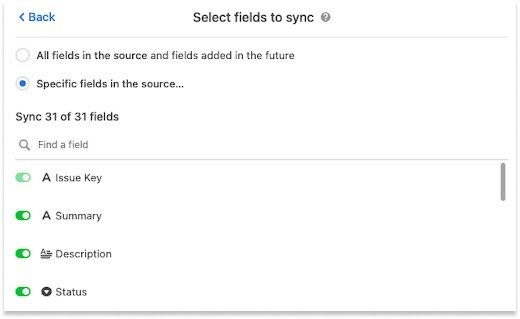
The most reliable integration approach for teams running both platforms is a one-way sync from Jira to Airtable using Zapier or Make, triggered when ticket status changes. This allows PMs to see engineering progress in Airtable roadmaps without requiring engineers to maintain data in two places. Airtable’s native Jira sync app (available on Business and Enterprise plans) provides a more direct connection and does not require a third-party middleware service. For lightweight needs, a simple Zapier zap that creates or updates an Airtable record whenever a Jira issue reaches “Done” status is sufficient and takes under 30 minutes to configure.

Which platform has better reporting and analytics?

Jira wins on engineering-specific reporting: velocity charts, sprint burndown, cumulative flow diagrams, and release reports are native and require no setup. Airtable wins on custom and cross-domain reporting: its chart blocks, summary fields, and Interface Designer allow you to build exactly the dashboard any stakeholder needs, combining data from across your entire operation. If you primarily need to answer “how is the engineering team performing against sprint commitments,” Jira’s reports are superior. If you need to answer “how is this quarter’s product initiative tracking across roadmap, research, marketing, and engineering,” Airtable gives you the data model to build that view.

Author

Shaik KB

Follow Me
Other Articles
Previous

How to Create Jira Dashboards and Custom Gadgets in 2026: Complete Setup Guide

Next

Wrike Blueprints 2026: How to Create Project Templates That Launch Instantly

No Comment! Be the first one.

    Leave a Reply Cancel reply

    Your email address will not be published. Required fields are marked *

    Sponsored Smartsheet Expert Services – Implementation, Automation, Training
    Sponsored Power BI & Tableau Analytics – Dashboards, Reporting, Insights
    Sponsored AI Agents for Work Management – Automate Tasks, Integrate Tools

    Categories

    • Airtable (12)
    • Alternatives (12)
    • Asana (33)
    • ClickUp (39)
    • How-To Guides (133)
    • Integrations (16)
    • Jira (27)
    • Monday.com (38)
    • Notion (25)
    • Pricing Guides (11)
    • Project Management (74)
    • Smartsheet (28)
    • Tool Comparisons (44)
    • Wrike (11)

    Recent Post

    • ClickUp Sprints Not Working? Here’s How to Fix It (2026)
    • Notion Formulas 2.0: The Complete Guide to Functions and Syntax (2026)
    • Linear vs GitHub Issues: Which Should Your Team Use in 2026?
    • Smartsheet WorkApps: How to Build No-Code Apps in 2026
    • Asana Custom Fields: Complete Setup Guide for 2026
    Work Management Hub

    Independent expert reviews & comparisons of work management tools — helping 50,000+ teams choose the right software.

    Tools We Cover

    • Smartsheet
    • Monday.com
    • ClickUp
    • Asana
    • Notion
    • Jira
    • Wrike
    • Airtable

    Company

    • About Us
    • Contact Us
    • Privacy Policy
    Copyright 2026 — Work Management Hub. All rights reserved. Blogsy WordPress Theme