Jira vs Linear 2026: Which Is Better for Software Development Teams?
- Linear loads in under 100ms (local-first architecture); Jira averages 2–5 seconds per page load — a material daily friction difference for engineering teams.
- Jira offers 3,000+ integrations via Atlassian Marketplace; Linear offers 200+ curated integrations with tighter quality control.
- Linear Plus costs $8/user/month versus Jira Advanced at $15.05/user/month — a 47% cost difference at scale.
- 30% of teams switching to Linear cite speed and UI simplicity as primary drivers, not missing features in Jira.
- Under 25 people: Linear wins. 25–100: depends on org complexity. 100+: Jira’s depth and compliance tooling become necessary.
For small-to-mid engineering teams (under 25 people) that value speed and developer experience, Linear wins decisively in 2026. For teams above 100 people with complex compliance, cross-team reporting, and deep Atlassian ecosystem dependencies, Jira remains the stronger choice. The 47% pricing advantage and sub-100ms load times make Linear the default recommendation for any team that doesn’t have a specific enterprise requirement locking them to Jira.
Jira vs Linear 2026: The Core Difference
Jira and Linear solve the same problem — software issue tracking and sprint management — from fundamentally different architectural and philosophical starting points. Understanding that difference is more important than comparing feature lists.
Jira was built in 2002 as an enterprise bug tracker and has accumulated 24 years of feature additions, workflow customizations, and enterprise compliance capabilities. It is the most configurable issue tracker in existence, which is simultaneously its greatest strength and its most common complaint. Every workflow can be customized, every field can be scripted, every permission can be granularly controlled. The cost is complexity: Jira instances at scale require dedicated Jira administrators, and simple tasks like creating a sprint or archiving a project often require navigating multiple settings layers.
Linear was founded in 2019 with an explicit design philosophy: build for the developer experience that Jira sacrificed in pursuit of enterprise configurability. Linear’s architecture is local-first — issues sync to a local database on the user’s machine, which is why pages load in under 100 milliseconds regardless of internet latency. It ships with strong opinions baked in: issues have cycles (sprints), projects have roadmaps, teams have triage queues. The configurability ceiling is lower than Jira’s, but the default configuration is production-ready for most engineering teams out of the box.
In 2026, the gap has narrowed in some areas (Linear has added more enterprise features) and widened in others (Linear’s AI Agent now supports MCP for codebase-aware issue triage). The decision framework has not fundamentally changed: team size, org complexity, and Atlassian ecosystem dependency remain the three decisive variables.
Speed and User Experience
The performance gap between Linear and Jira is not marginal — it is an order of magnitude, and it has real productivity consequences at the team level.
Linear’s local-first architecture means that when you open a project, navigate between issues, or update a sprint board, you are reading from a local database rather than making a round-trip to a remote server. Measured load times for Linear page transitions average under 100 milliseconds. By contrast, Jira’s server-rendered pages (including Jira Cloud, which runs on Atlassian’s infrastructure) average 2 to 5 seconds per navigation action in independent performance benchmarks.
The cumulative effect on a developer who switches contexts between their IDE and the issue tracker 20 times per day is significant. At 3 seconds per navigation, that is 60 seconds of daily waiting — 20 hours per year, per developer, just on Jira load times. For a 20-person engineering team, that is 400 developer-hours annually. Against a $8/user/month pricing differential, the math shifts quickly.
Beyond raw speed, Linear’s UI reflects a different set of design values. The keyboard-shortcut system is comprehensive and consistent — most actions available via mouse click have a keyboard equivalent that experienced users commit to muscle memory within a week. Jira’s keyboard shortcut support exists but is incomplete and inconsistently documented.
Linear’s issue editor uses a Notion-style block editor with markdown support. Jira’s rich text editor has improved in recent versions but remains heavier and slower, particularly when loading issues with many attachments or long comment threads.
Feature Comparison: Sprints, Backlog, and Reporting
Both tools support the full standard software development workflow. The differences are in depth of customization, reporting fidelity, and workflow enforcement.
Sprints and Cycles: Jira’s Sprint functionality is the industry reference implementation — burn-down charts, velocity tracking, sprint goal tracking, and retrospective templates are all built in with enterprise-grade reporting. Linear’s Cycles (their term for sprints) cover the core workflow with cleaner UI but shallower reporting. Linear does not natively support story points — it uses a simpler priority-based estimation system. Teams that need strict velocity tracking across multiple teams should note this limitation.
Backlog Management: Jira’s backlog view is powerful but can become unwieldy at scale. Linear’s triage queue is a standout design decision — incoming issues land in a triage inbox before being assigned to a project or cycle, preventing backlog pollution. For fast-moving teams that receive high volumes of bug reports, Linear’s triage model is operationally superior.
Reporting: Jira Advanced includes Atlassian Analytics, which provides cross-project reporting with custom dashboards and SQL-like query capabilities. Linear’s reporting is project-scoped and does not yet offer the same cross-team analytics depth. For engineering leaders who need multi-team velocity comparisons or cross-project dependency reports, Jira’s reporting layer is materially more complete.
Roadmaps: Both tools offer roadmap views. Jira’s Advanced Roadmaps (included in Jira Advanced) supports multi-team dependency visualization and capacity planning. Linear’s Roadmap view is cleaner and faster but does not support multi-team dependency overlays at the same fidelity.
Integrations and Ecosystem
This is one of the sharpest contrasts between the two platforms, and it matters more for some organizations than others.
Jira’s Atlassian Marketplace contains over 3,000 integrations. This includes purpose-built connectors for every major DevOps tool, compliance framework, and enterprise software category. Critically, Jira integrates natively with Confluence (documentation), Bitbucket (source control), Opsgenie (incident management), and the rest of the Atlassian suite. For organizations already running the Atlassian stack, Jira’s integration depth creates genuine lock-in value — not in the predatory sense, but in the sense that the ecosystem coherence is a real productivity asset.
Linear offers over 200 curated integrations. The curation is intentional — Linear’s team actively maintains integration quality, whereas the Marketplace model creates inconsistent quality across Jira’s 3,000+ options. Linear’s native integrations with GitHub, GitLab, Figma, Slack, and Zapier cover the core workflows for most modern engineering teams. The integration gap matters most for organizations with legacy enterprise tools (ServiceNow, SAP, older ITSM platforms) that require connectors not yet available in Linear’s catalog.
One 2026 development worth noting: Linear’s API and webhook architecture is developer-friendly and well-documented, making custom integrations relatively straightforward. Teams with engineering capacity to build custom integrations may find the quality of Linear’s API compensates for the smaller native catalog.
AI Capabilities in 2026
Both platforms have invested heavily in AI in 2026, and the approaches are meaningfully different.
Linear’s Linear Agent is the more technically sophisticated AI implementation. It supports the Model Context Protocol (MCP), which means it can connect directly to your codebase, pull context from pull requests, commit messages, and code changes, and use that context to automatically triage incoming issues — assigning them to the correct team, estimating complexity, and suggesting related issues. For engineering teams where issue quality and triage speed are significant bottlenecks, Linear Agent’s MCP support is a genuine differentiator.
Jira’s AI implementation centers on Atlassian Intelligence, which provides AI-assisted issue summarization, automatic sprint planning suggestions, and natural language query for JQL (Jira Query Language). The cross-product intelligence — where Atlassian Intelligence can summarize related Confluence pages and Jira issues together — is uniquely valuable for teams running both products. However, Jira’s AI does not yet offer the codebase-connected triage capability that Linear Agent provides via MCP.
Pricing Comparison
The pricing gap is significant and should be a named factor in any evaluation.
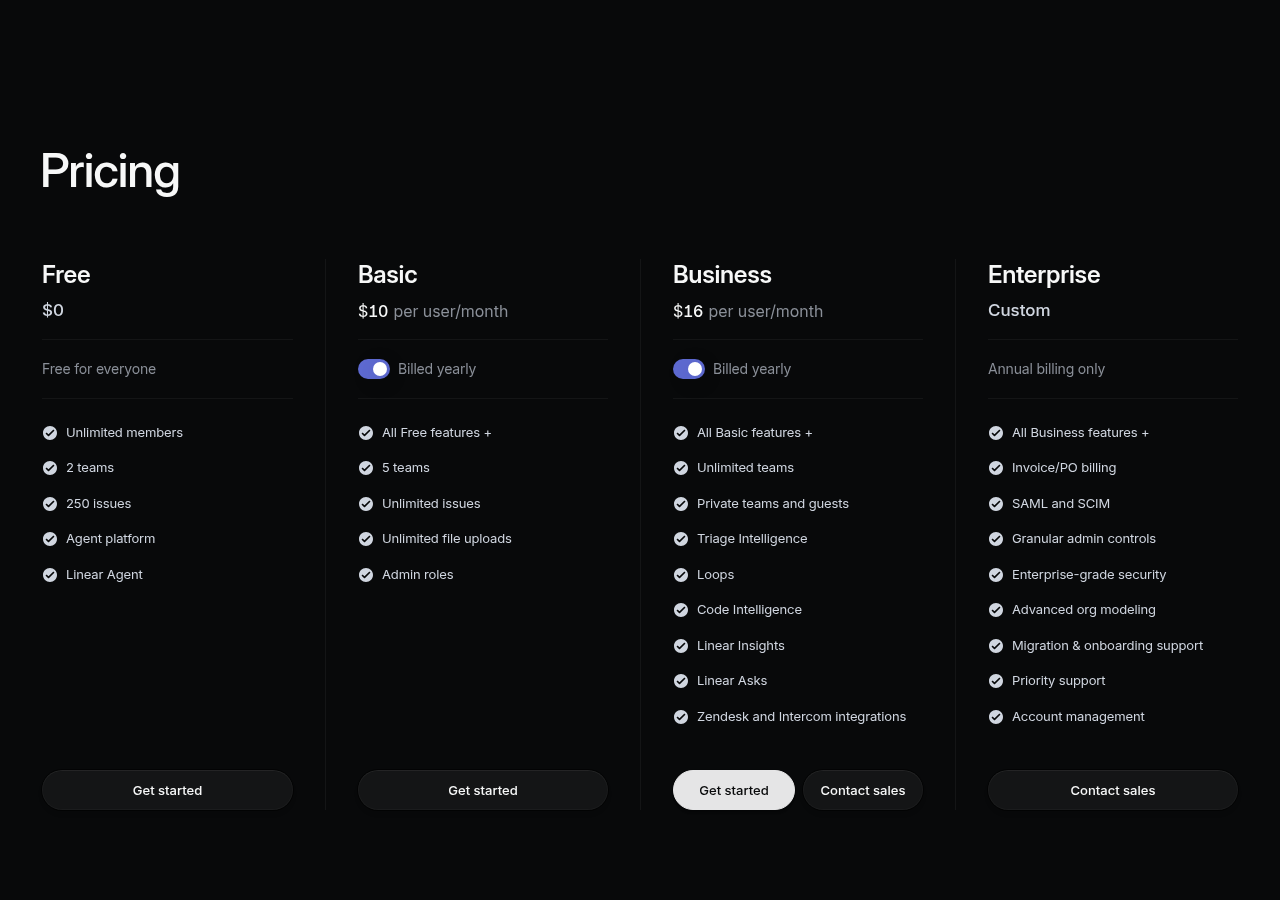
- Linear Free: Up to 250 issues, unlimited members — genuinely useful for small teams.
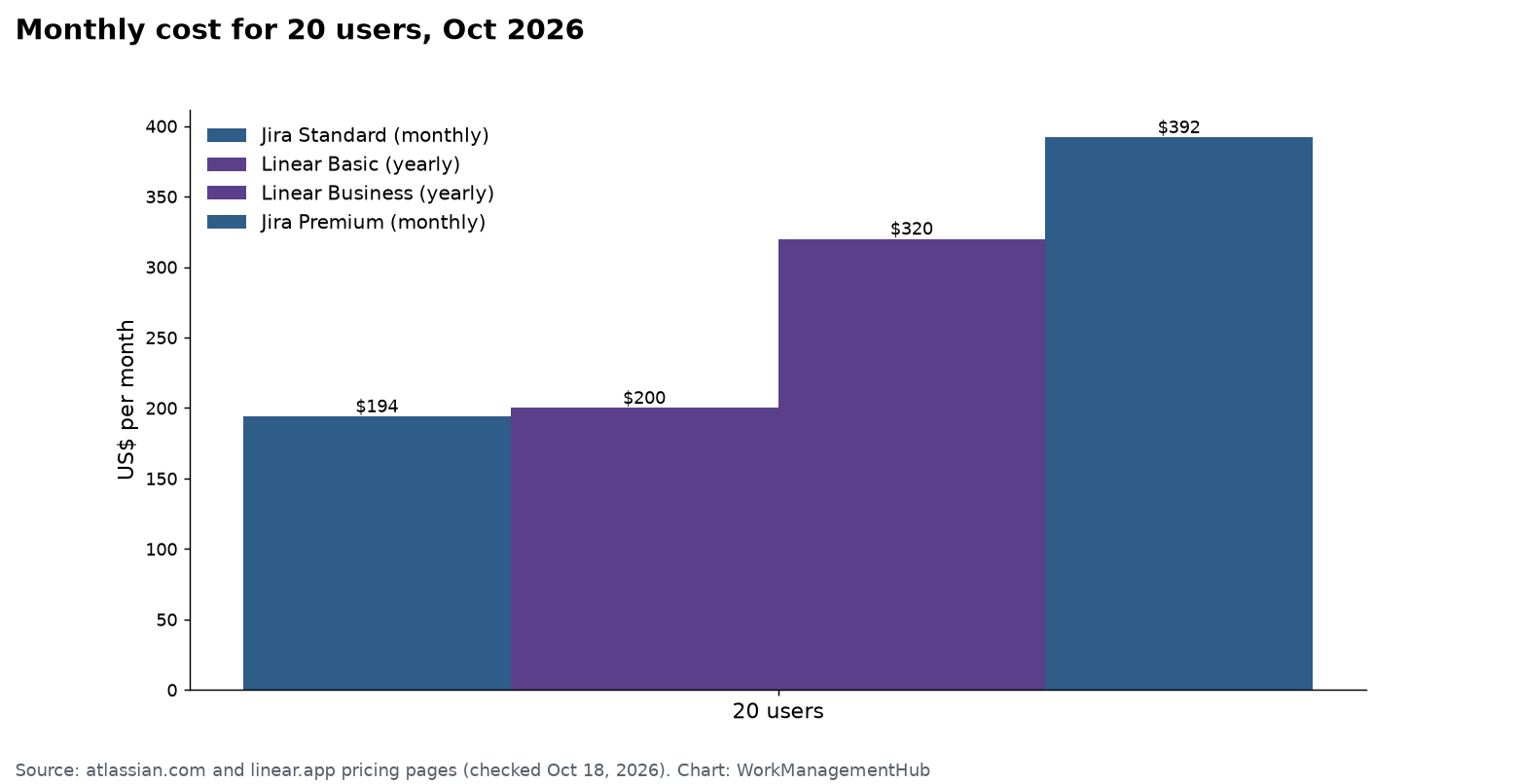
- Linear Plus: $8/user/month — unlimited issues, project roadmaps, advanced analytics, guest access.
- Linear Business: $14/user/month — SSO, SAML, priority support, advanced security.
- Jira Free: Up to 10 users, 2GB storage — significant limitations.
- Jira Standard: $8.15/user/month — project-level permissions, audit log.
- Jira Premium: $16/user/month — Advanced Roadmaps, global automation, 99.9% SLA.
- Jira Advanced (Enterprise): $15.05/user/month (minimum 801 users) — full enterprise governance.
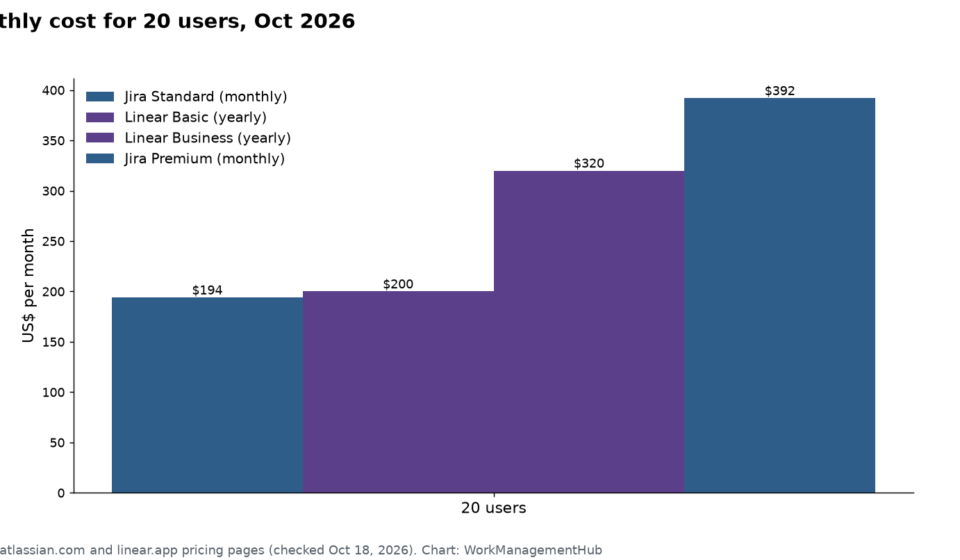
The meaningful comparison for most teams is Linear Plus ($8) vs. Jira Premium ($16) — a 50% cost advantage for Linear at equivalent feature sets for mid-size teams. At 50 users, that is $4,800 annually. At 200 users, it is $19,200 annually. The savings are real, though organizations with large Atlassian footprints should weigh them against potential ecosystem consolidation benefits.
Head-to-Head Comparison Table
| Category | Jira | Linear | Winner |
|---|---|---|---|
| Page Load Speed | 2–5 seconds avg | <100ms (local-first) | Linear |
| Integrations | 3,000+ (Marketplace) | 200+ (curated) | Jira (breadth) |
| Pricing (mid-tier) | $16/user/month (Premium) | $8/user/month (Plus) | Linear (47% cheaper) |
| AI Capabilities | Atlassian Intelligence (cross-product) | Linear Agent + MCP codebase triage | Linear (dev-focused) |
| Sprint/Velocity Reporting | Advanced (burn-down, velocity) | Basic (no story points) | Jira |
| Onboarding Time | Days–weeks for full setup | Hours (opinionated defaults) | Linear |
| Enterprise Compliance | SOC2, FedRAMP, HIPAA, IP Allow | SOC2, SAML SSO, SCIM | Jira |
| Keyboard-first UX | Partial, inconsistent | Comprehensive, consistent | Linear |
| Multi-team Roadmaps | Advanced Roadmaps (Premium+) | Single-team roadmaps only | Jira |
| Atlassian Ecosystem Fit | Native (Confluence, Bitbucket) | Integration via third-party | Jira |
Which to Choose by Team Size
Team size is the single most reliable predictor of which tool fits. Here is the framework.
Under 25 people: Choose Linear. The onboarding speed, pricing, developer experience, and AI triage capabilities are decisive advantages that Jira cannot match at this scale. The compliance and multi-team reporting limitations are non-issues for small teams. Linear’s opinionated defaults will cover 95% of your workflow needs without requiring admin configuration work.
25 to 100 people: Evaluate based on org complexity. If your team is primarily software engineers working in a relatively flat structure with modern DevOps tooling, Linear remains the better choice. If you have cross-functional teams (product, design, QA, security) requiring different workflow configurations, role-based permissions, and cross-team dependency reporting, Jira’s configurability starts to justify its complexity premium.
100+ people: Default to Jira unless you have a specific reason not to. At this scale, you will need the compliance capabilities (FedRAMP, HIPAA, IP allowlisting), the multi-team Advanced Roadmaps, the cross-team analytics, and the Atlassian Marketplace integrations for enterprise tooling. Linear’s feature ceiling becomes a constraint rather than a feature above this threshold.
Migrating from Jira to Linear
For the 30% of teams switching, the migration process is manageable but requires planning.
- Export Jira data via the CSV export — Navigate to Project Settings → Export in Jira and export your backlog as CSV. Include all custom fields you need to preserve.
- Map Jira issue types to Linear issue types — Jira Stories become Linear Issues. Jira Epics become Linear Projects. Jira Bugs can be tagged with a “bug” label in Linear. Subtasks become Linear sub-issues.
- Use Linear’s native Jira import tool — Linear provides a dedicated Jira importer at linear.app/import. It connects to your Jira Cloud instance via OAuth and maps projects, statuses, assignees, and priorities automatically.
- Run both tools in parallel for two weeks — Continue closing Jira tickets for work in-flight while starting all new work in Linear. This prevents data fragmentation during active sprints.
- Migrate historical data last — If you need closed historical issues in Linear for audit or reporting purposes, import them in a final batch after the active workflow has stabilized.
Linear is the better tool for most engineering teams in 2026. The 47% pricing advantage, sub-100ms performance, and MCP-powered AI triage are not incremental improvements over Jira — they represent a fundamentally better developer experience. Jira retains a clear advantage for organizations above 100 people with deep Atlassian ecosystem dependencies, compliance requirements above SOC2, or multi-team roadmap reporting needs that Linear’s feature set cannot yet satisfy. For the other 70% of engineering teams, Linear’s combination of speed, simplicity, and aggressive AI investment makes it the default recommendation.
FAQ
Is Linear faster than Jira in 2026?
Yes. Linear uses a local-first architecture that stores issues on the user’s device and syncs in the background. Page loads average under 100ms. Jira Cloud averages 2–5 seconds per navigation — a meaningful daily friction difference for engineering teams context-switching frequently between their IDE and issue tracker.
How much cheaper is Linear than Jira?
Linear Plus costs $8/user/month versus Jira Premium at $16/user/month — approximately 47% cheaper for comparable feature sets at the mid-tier. Jira Advanced (Enterprise) is $15.05/user/month but requires a minimum of 801 users.
Can Linear replace Jira for a large enterprise team?
For teams above 100 people with deep Atlassian ecosystem dependencies, compliance requirements beyond SOC2, or multi-team Advanced Roadmap reporting needs, Jira remains the stronger choice. Linear’s feature ceiling — particularly around multi-team dependency mapping and enterprise compliance tooling — is a real constraint at large scale.
Does Linear support story points?
Linear does not natively support story points. It uses a priority-based estimation system instead. Teams that require strict velocity tracking across multiple teams using story points should note this as a meaningful gap versus Jira’s comprehensive sprint metrics.
What is Linear Agent and does it work with codebases?
Linear Agent is Linear’s AI system that supports MCP (Model Context Protocol) in 2026, enabling it to connect directly to your codebase. It reads pull requests, commit messages, and code context to automatically triage incoming issues — assigning them to the right team, estimating complexity, and surfacing related tickets without manual input.