Skip to content
Wm logo graphic Work Management Hub

Expert Reviews, Comparisons & Guides for Smartsheet, Monday.com, Asana, ClickUp & More

Wm logo graphic Work Management Hub

Expert Reviews, Comparisons & Guides for Smartsheet, Monday.com, Asana, ClickUp & More

  • Smartsheet
  • ClickUp
  • Asana
  • monday.com
  • Other tools
    • Jira
    • Notion
    • Wrike
    • Airtable
  • Comparisons
  • Guides
  • About
  • Smartsheet
  • ClickUp
  • Asana
  • monday.com
  • Other tools
    • Jira
    • Notion
    • Wrike
    • Airtable
  • Comparisons
  • Guides
  • About
Close

Search

Table of Notion automation failure symptoms and checks
How-To GuidesNotion

Notion Automations Not Working 2026: Fix by Symptom

Photo of Khasim Basha Shaik
By Khasim Basha Shaik
May 23, 2026 3 Min Read
0

Home - How-To Guides - Notion Automations Not Working 2026: Fix by Symptom

Notion database automations stop for boring reasons: the page no longer matches the view the automation watches, someone lost Full access, a Slack/Gmail connection expired, or you are on Free trying to edit a non-Slack automation. Notion will not always toast an error.

I re-checked Notion’s database automations help on October 13, 2026. Paid plan users with Full access create/edit/delete automations. Free users can create Slack notification automations only, and can use (not edit) automations that arrive via templates. Slack channel notifications on edit require Plus+. Plus is $10/user/month; Business $20 (pricing).

Table of Contents

Toggle
  • Critical platform rules (read once)
  • Symptom: never fires
  • Symptom: fires but nothing changes
  • Symptom: died after a database change
  • Symptom: Slack quiet
  • Prevention
  • Common questions
    • Can Free Notion users build automations?
    • Why didn’t creating a page from another automation fire mine?
    • Who can edit a Slack automation?
    • Do button properties help?
  • Related guides

Critical platform rules (read once)

  • Automations do not trigger other automations (no chains).
  • Button actions can trigger a database automation.
  • Recurring template inserts do not trigger database automations.
  • Pages outside the automation’s view filter never fire it.
  • Restricted pages the automation cannot access are skipped.
  • Multi-trigger “all must happen” windows are about three seconds — prefer one precise trigger.
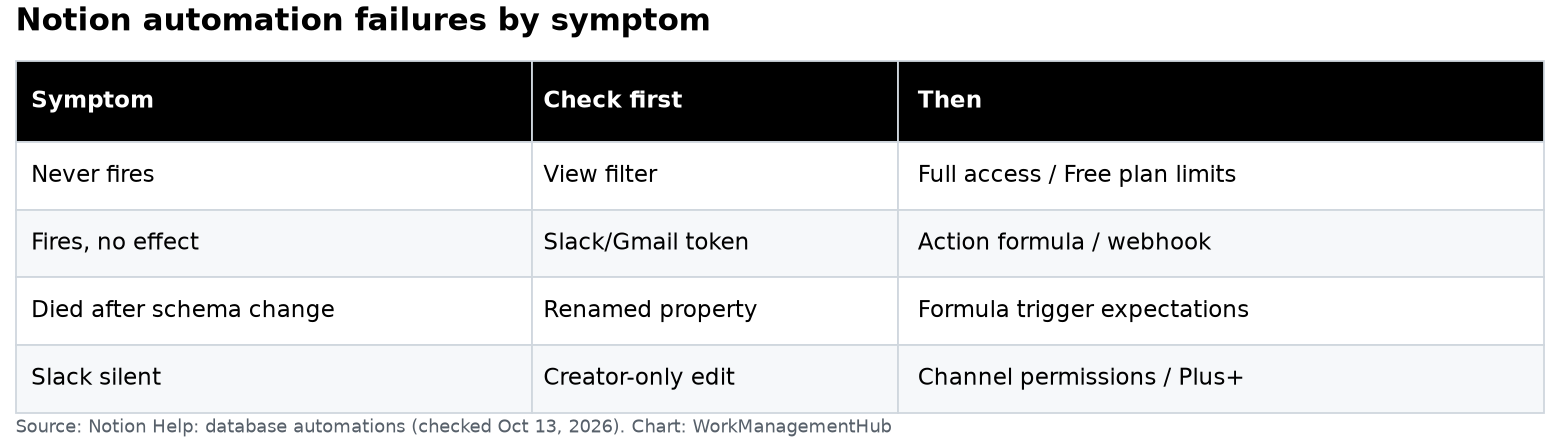
Notion automation failure checklist
View filter and Full access fix most 'silent' failures. Chart: WorkManagementHub.

Symptom: never fires

  1. View filter — open the automation; confirm the view. A status the filter excludes will never match.
  2. Permissions — builder needs Full access; destination pages/databases must be reachable.
  3. Wrong trigger — property renamed/deleted; recurring trigger paired incorrectly.
  4. Free plan — you cannot maintain non-Slack automations; upgrade or recreate on a paid seat.

Symptom: fires but nothing changes

  1. Slack/Gmail token — reconnect; Slack edits are creator-only.
  2. Action formula/variable failed — simplify the action.
  3. Webhook endpoint changed or rate-limited.
  4. Trying to chain automations — use a button or a single multi-action automation instead.

Symptom: died after a database change

  1. Trigger property renamed — reopen and rebind.
  2. You expected a formula/rollup change to trigger — use a writable property as the trigger.
  3. Database moved to a teamspace with tighter permissions.

Symptom: Slack quiet

  1. Only the original creator can edit Slack automations — that person must fix it.
  2. Private channels / DM targets the bot cannot see.
  3. Creator lost Full access to the database.
  4. Plan: Slack channel notification actions need Plus+.

Prevention

  • Name automations with the outcome and owner (Notify CS on Escalated — Maya).
  • Prefer Status equals X triggers over vague “any property edit.”
  • Keep a cheap “heartbeat” row in a staging database when you change schema.
  • Document who owns Slack-connected automations before that person leaves.
  • For deeper database design, see the Notion database guide and Notion pricing.

Books and laptop on a desk
When Slack goes quiet, find the automation creator first.

Common questions

Can Free Notion users build automations?

Only Slack notification automations (create). Other types need a paid plan. Template automations can run but Free users cannot edit them.

Why didn’t creating a page from another automation fire mine?

Notion blocks automation-to-automation triggers. Use a button or have a human/API create the page.

Who can edit a Slack automation?

The creator. If they left, recreate the automation with a shared owner account.

Do button properties help?

Yes — buttons can run actions and can trigger database automations when they create/edit pages in ways Notion allows.


Verified against notion.so/help/database-automations and notion.so/pricing on October 13, 2026.

Sponsored

OneSMAR for Smartsheet Teams - Available on the App Store

Related guides

Asana vs Notion 2026: Which Runs Your Team Better?
Asana
Asana vs Notion 2026: Which Runs Your Team Better?
7 Best Notion Alternatives in 2026, Compared by Price and Real Limits
Alternatives
7 Best Notion Alternatives in 2026, Compared by Price and Real Limits
Notion vs ClickUp 2026: An Honest Comparison for Docs, Tasks and Teams
ClickUp
Notion vs ClickUp 2026: An Honest Comparison for Docs, Tasks and Teams
Photo of Khasim Basha Shaik
Author

Khasim Basha Shaik

Khasim is a work management expert and entrepreneur with a deep passion for project management tools. He works hands-on with platforms like Smartsheet, Monday.com, Asana, ClickUp, Jira, Notion, Wrike and Airtable every day, and loves automating workflows to save teams and customers a ton of time. On WorkManagementHub he shares practical setup guides, honest tool comparisons, and real-world troubleshooting drawn from daily use.

Follow Me
Other Articles
Table of Data Shuttle replace, merge, delete unmatched and dropdown update actions with row limits
Previous

Smartsheet Data Shuttle Setup Guide 2026: Upload Workflows, Merge Keys, and Limits

Developer working on a laptop with code on screen while holding a phone
Next

Jira Slack Integration 2026: Setup, @Jira Tickets and Channels Without the Noise

No Comment! Be the first one.

    Leave a Reply Cancel reply

    Your email address will not be published. Required fields are marked *

    KB
    Khasim Basha Shaik

    Khasim is a work management expert and entrepreneur with a deep passion for project management tools. He works hands-on with platforms like Smartsheet, Monday.com, Asana, ClickUp, Jira, Notion, Wrike and Airtable every day, and loves automating workflows to save teams and customers a ton of time. On WorkManagementHub he shares practical setup guides, honest tool comparisons, and real-world troubleshooting drawn from daily use.

    About Work Management Hub →

    Popular reviews & guides

    • Table matching ten team types to the project management tool to start with, a runner-up and the reasonBest Project Management Software 2026: 10 Tools Compared by Team Type, Real Monthly Cost and the Limits That Matter
    • Team meeting around a long conference table with laptops openJira Pricing 2026: Standard vs Premium, Annual Tiers and the Oct 13 Increase
    • Developer working on a laptop with code on screen while holding a phoneJira Slack Integration 2026: Setup, @Jira Tickets and Channels Without the Noise
    • Laptop covered in developer stickers on a deskLinear vs GitHub Issues (2026): Who Should Track the Work?
    • Person typing on a laptop at a small round tableLinear-GitHub Sync Broken? Fix Every Failure Mode
    • Three people collaborating around a laptop at a meeting tableGitHub Stacked PRs Are GA: What Changed Oct 6, 2026 (and How to Roll Them Out)

    Browse by tool

    • Smartsheet33
    • Monday.com28
    • Asana34
    • ClickUp30
    • Notion29
    • Jira31
    • Wrike16
    • Airtable16
    • Integrations12

    Sponsored OneSMAR – Everything you need for Smartsheet in one place

    Independent reviews, comparisons, and hands-on guides for work management tools — Smartsheet, Monday.com, Asana, ClickUp, Notion, Jira, Wrike, and Airtable — written from daily, real-world use of these platforms.

    Topics

    • Smartsheet
    • Monday.com
    • ClickUp
    • Asana
    • Notion
    • Jira
    • Wrike
    • Airtable
    • Comparisons

    Company

    • About
    • Contact
    • Editorial Policy
    • Author

    Legal

    • Privacy Policy
    • Terms of Use
    • Disclaimer
    • Affiliate Disclosure
    Copyright 2026 — Work Management Hub. All rights reserved. Blogsy WordPress Theme