
Linear and Shortcut (formerly Clubhouse) sit in the same aisle: modern issue tracking for software teams that find Jira too heavy. They are close enough that buying on vibes is a mistake. Linear is keyboard-first and opinionated about how issues, projects and cycles should feel. Shortcut is more traditional in layout, with iterations, roadmaps and reporting that open up as you climb plans.
I implement work-management platforms for a living through SSPM, a Smartsheet Premier Aligned Partner. I do not treat either tool as “Jira but prettier.” I treat them as bets on how much process your engineers will tolerate — and whether GitHub is the center of gravity.
Prices below are from Linear pricing and Shortcut pricing, checked October 4, 2026. Related reads: Jira vs Linear, Linear vs GitHub Issues and Smartsheet vs Linear.
The short answer
- Pick Linear if engineers live on keyboard shortcuts, you want Cycles and a strongly guided issue model, and GitHub PR automation is a daily habit.
- Pick Shortcut if you want iterations/sprints with stronger built-in reporting earlier, or you are price-sensitive on Team seats at yearly billing.
- Stay on Shortcut Free only while you fit 10 users. Linear Free allows unlimited members but caps you at 2 teams and 250 issues.
- Neither replaces Jira for audit-heavy, multi-scheme enterprise workflows. If that is you, read Jira vs Linear before you migrate.
Linear vs Shortcut at a glance
| Linear | Shortcut | |
|---|---|---|
| Built for | Fast, opinionated issue tracking for product/engineering | Agile issue tracking with iterations, roadmaps and reports |
| Free plan | Unlimited members, 2 teams, 250 issues, agent features listed on Free | Up to 10 users, Kanban, roadmap, iterations, docs, GitHub/Slack/Figma |
| Mid plan (yearly list) | Basic $10/user/mo — 5 teams, unlimited issues, admin roles | Team $8.50/user/mo — reports suite, WIP limits, multiple workflows, automations, all integrations |
| Upper plan (yearly list) | Business $16/user/mo — unlimited/private teams, guests, Insights, Asks, Code Intelligence, Zendesk/Intercom | Business $12/user/mo — unlimited teams/workspaces, OKRs, advanced custom fields/reports |
| Enterprise | Custom (SAML/SCIM, advanced admin, annual) | Custom (SSO/SCIM, SLAs, volume pricing) |
| Sprint analog | Cycles | Iterations |
| GitHub | First-party PR linking, status automation, optional Issues sync (Linear GitHub docs) | GitHub / GitLab / Bitbucket on Free; more controls on paid |
Shortcut’s pricing page also shows monthly billing (higher than yearly). Linear’s public cards emphasize yearly rates for Basic and Business. Compare on the same billing period.
What a 12-person engineering team pays
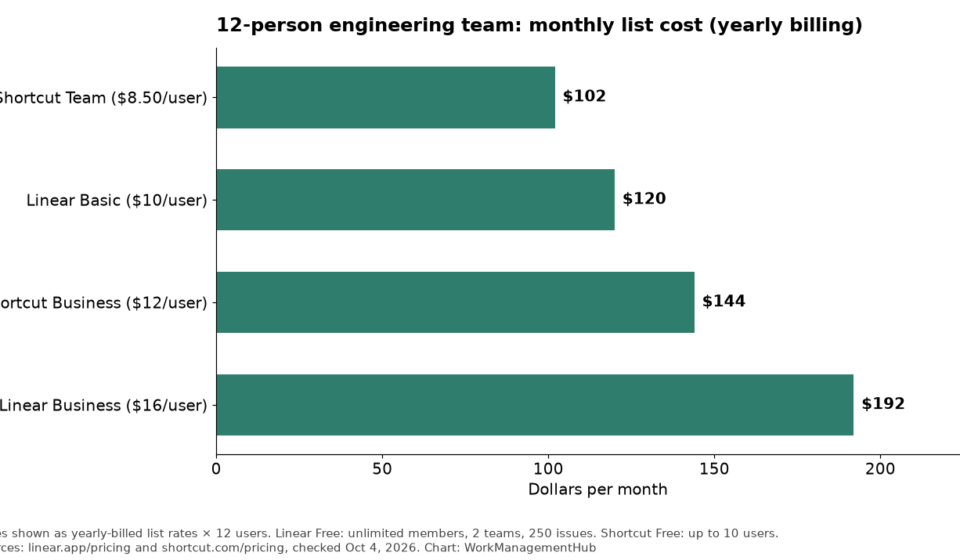
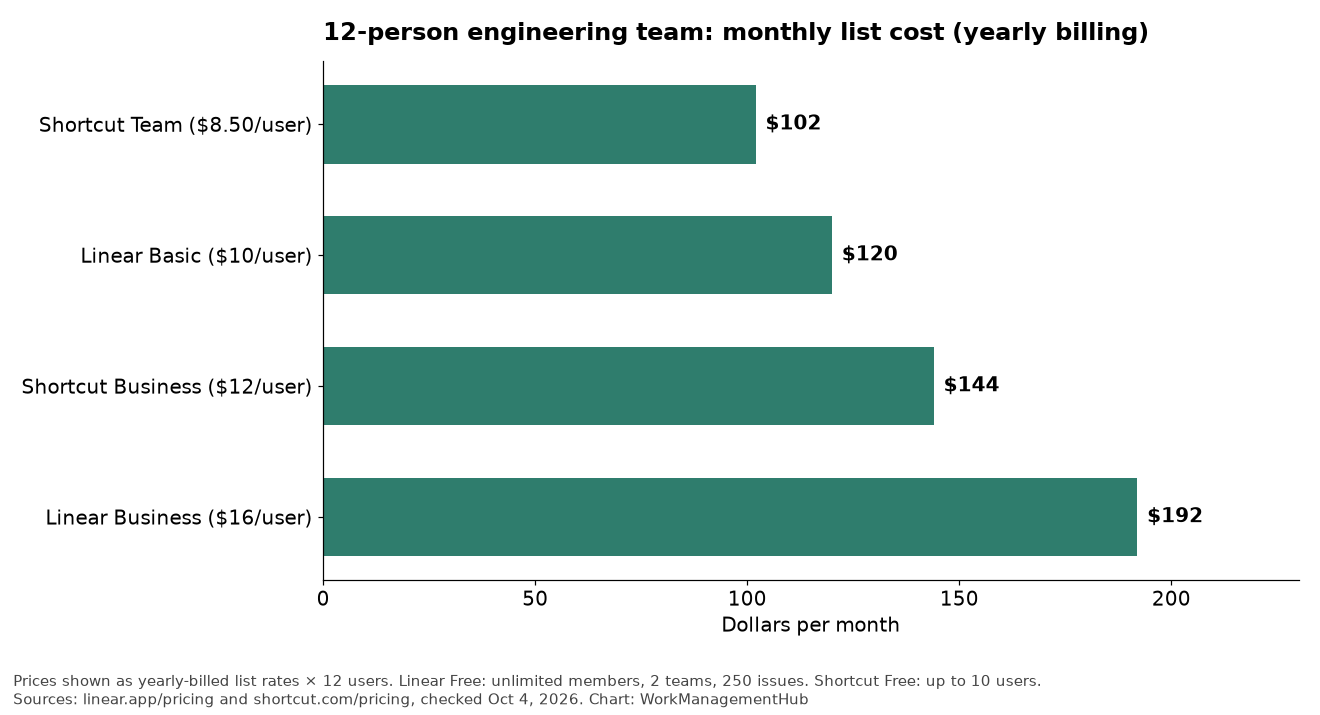
| Plan | Monthly list (yearly billing × 12 users) |
|---|---|
| Shortcut Team | $102 (12 × $8.50) |
| Linear Basic | $120 (12 × $10) |
| Shortcut Business | $144 (12 × $12) |
| Linear Business | $192 (12 × $16) |
Shortcut Free stops at 10 users, so this roster is already on a paid plan either way. Linear Free could host 12 people, but 250 active issues and 2 teams usually break down once you have more than a single squad with a real backlog.
Linear Business adds private teams, guests, Insights, Asks, Code Intelligence and customer-support integrations. Shortcut Business adds OKRs, advanced custom fields, advanced reports and multiple workspaces. Buy the tier for the feature you will use weekly — not the logo on the pricing grid.
Cycles vs iterations (sprints)
Linear Cycles are time-boxed containers for issues. Teams that like a fixed cadence (one or two weeks) drop work into the active cycle and review what finished. The product nudges you toward that rhythm.
Shortcut Iterations play the same role: time-boxed development periods tied to stories, with iteration reports on paid plans. If your coaches still say “sprint,” Shortcut’s language will feel familiar. If your team already thinks in cycles and keyboard commands, Linear will feel like home.
Neither forces Scrum theater. Both can run continuous Kanban-style flow. The difference is default UX gravity: Linear toward speed and opinionated structure; Shortcut toward boards, roadmaps and report pages.
GitHub sync and developer workflow
For Linear, use the current docs at linear.app/docs/github (the old /docs/integrations URL now 404s). You get:
- PR and commit linking (branch name, issue ID in title, magic words in description),
- issue status automation from PR lifecycle,
- optional GitHub Issues sync (one-way or two-way for new issues; historical import is separate),
- personal GitHub account linking so activity maps to the right Linear user.
Install needs a GitHub org owner (or repo admin for narrower installs). Each engineer should connect their personal GitHub account under Connected accounts.
Shortcut documents GitHub, GitLab and Bitbucket on its integrations page. Free includes those VCS links plus Slack and Figma; Team opens the wider integration set and automations. Overlapping-PR helpers show up on Business. If you are multi-forge (GitHub + Bitbucket), Shortcut’s broader VCS list is a practical plus.
Speed, UX and team-size fit
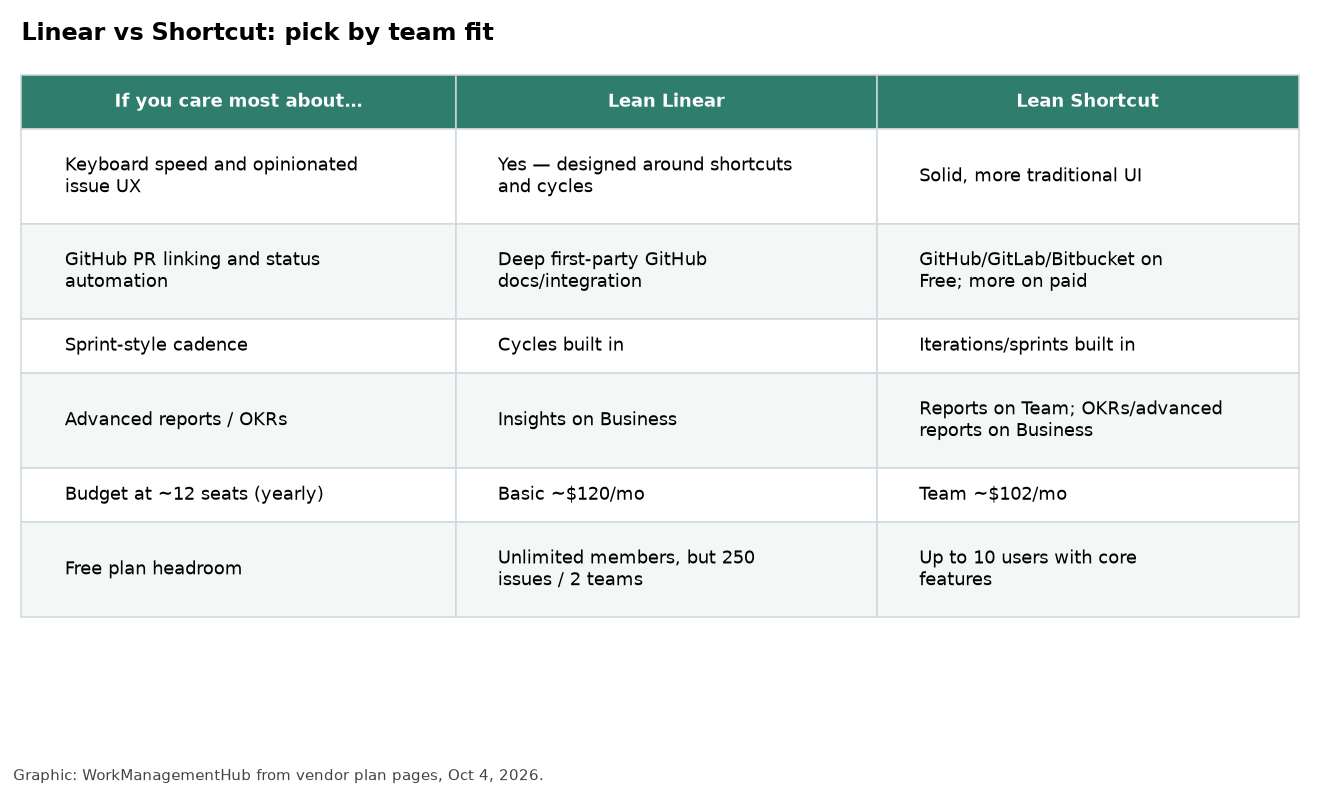
Linear’s reputation is deserved: creating and triaging issues from the keyboard is faster once the team learns the shortcuts (C / N patterns and command menu). The tradeoff is less patience for teams that want heavily customized workflows or non-engineering work jammed into the same tool.
Shortcut feels closer to a classic agile tracker with Spaces/boards, epics, docs and roadmaps. It is easier to hand to a mixed product-design-engineering group without a “learn our philosophy” week. Power users who refuse to leave the keyboard may still prefer Linear.
Rough fit by size:
- 5–10 people: Either Free tier works as a trial. Linear Free’s issue cap is the tripwire. Shortcut Free’s user cap is the tripwire.
- 10–25 people: Shortcut Team vs Linear Basic is the real contest — Shortcut is cheaper on yearly Team; Linear Basic buys unlimited issues and a sharper UX bet.
- 25+ with security needs: Compare Business/Enterprise (SSO/SCIM). Linear lists SAML/SCIM on Enterprise; Shortcut includes SSO/SCIM on Enterprise and offers them as Business add-ons.
What I’d actually set up
GitHub-native product squad that hates ceremony. Linear Basic (or Business if you need private teams, Insights or Asks). Wire GitHub per the GitHub docs, turn on PR status automation, keep cycles short.
Team that wants reports and OKRs without jumping to Enterprise. Shortcut Business — especially if finance already liked the Team seat price and you outgrew Free’s 10-user cap.
Still deciding between Linear and Jira. If you need required-field workflows and audit transitions, stay on Jira (Jira vs Linear). If you want less admin and GitHub is the source of truth, Linear (or Shortcut) wins.
Ops or cross-functional work beside engineering. Neither is Smartsheet. For grid-heavy portfolio work beside a Linear eng tracker, see Smartsheet vs Linear.

FAQ
Is Shortcut still Clubhouse?
Yes. Clubhouse rebranded to Shortcut. Same product line; use shortcut.com for pricing and docs.
Is Linear cheaper than Shortcut?
Not on the mid tiers at yearly billing: Shortcut Team is $8.50/user/mo versus Linear Basic at $10. Linear Free can be cheaper for tiny teams that fit 250 issues. Always match billing period (Shortcut publishes monthly rates too).
Does Linear integrate with GitHub?
Yes. Official setup and behavior are documented at linear.app/docs/github. Prefer that URL over older /docs/integrations links.
Can either replace Jira?
For many startup and mid-market eng orgs, yes. For enterprises with complex schemes, compliance gates and heavy marketplace apps, usually no — or not without keeping Jira for some teams.
Pricing and plan limits checked against Linear and Shortcut public pages on October 4, 2026. Confirm current quotes before you buy.
Sponsored