Jira vs Azure DevOps 2026: Which Is Right for Your Team?
- Jira supports up to 10 users free and scales at $9.05/user/month (Standard) or $18.30/user/month (Premium); Azure DevOps provides 5 free Basic users with a pricing model built around service bundles rather than flat per-seat tiers — making cost comparisons genuinely complex at scale.
- Azure DevOps has native GitHub Copilot integration that converts work items directly into working code via agentic workflows; Jira added GitHub Copilot coding agent integration in public preview on the Atlassian Marketplace in early 2026 — Azure DevOps holds a meaningful lead on depth of AI-assisted code generation.
- Jira dramatically expanded its scope in 2025–2026 via Jira Work Management to serve marketing, HR, operations, finance, and legal teams; Azure DevOps remains fundamentally a software development lifecycle platform with little relevance outside engineering organizations.
- Organizations on Jira Data Center face a significant migration decision in 2026: moving to Jira Cloud, switching to Azure DevOps, or staying on Data Center each carries substantial cost and risk implications that must be modeled before any platform decision is made.
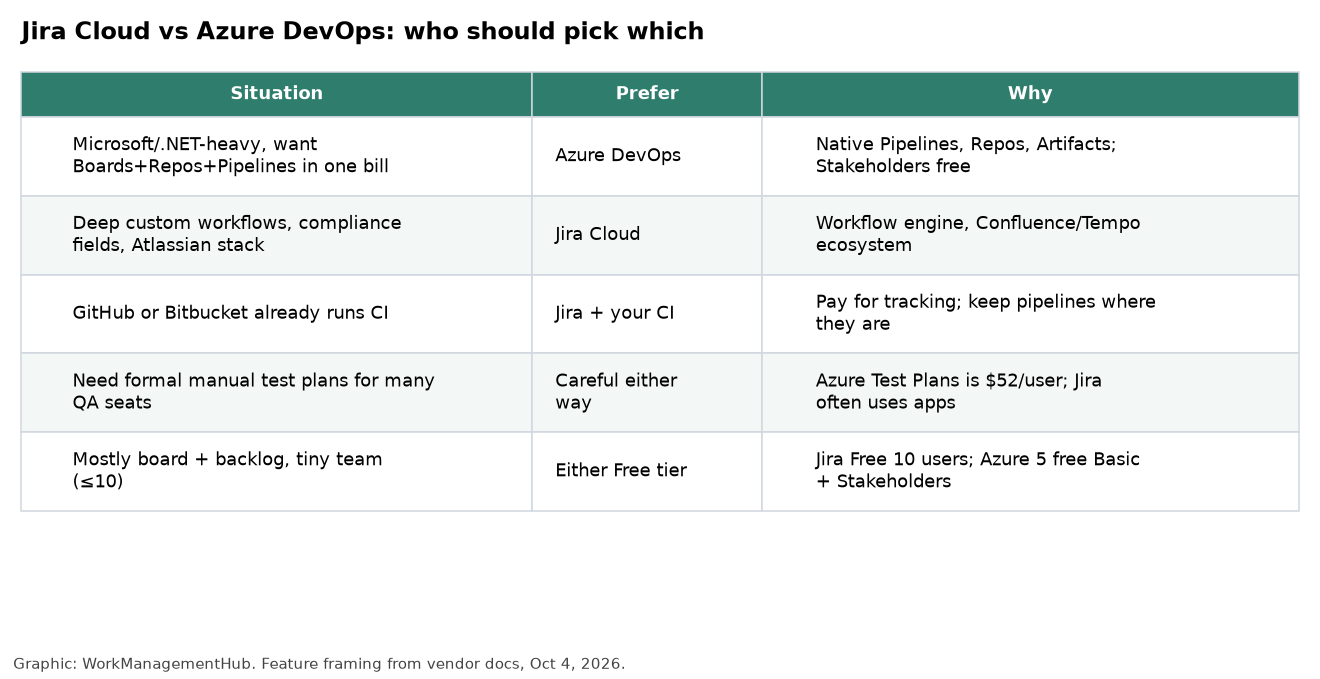
- If your organization already runs Microsoft 365, Azure, Active Directory, and Visual Studio, Azure DevOps integration is structurally unbeatable. If your organization values ecosystem breadth — 3,000+ integrations — and serves non-engineering teams on the same platform, Jira is the stronger choice.
Choose Jira if your organization serves multiple departments beyond engineering, values a massive third-party marketplace, or needs cross-functional work management on one platform. Choose Azure DevOps if you are a Microsoft-native engineering organization where deep Active Directory, Azure cloud, and GitHub Copilot integration will deliver compounding returns from day one.
- What This Comparison Is Really About
- Jira vs Azure DevOps 2026: At a Glance
- Pricing and True Cost of Ownership
- Jira vs Azure DevOps: AI Agent Capabilities in 2026
- Scope and Audience Fit: Engineering Tool vs Work Management Platform
- Integrations and Ecosystem
- Workflow Depth, Agile Support, and DevOps Pipeline
- The Jira Data Center Migration Decision in 2026
- Who Should Choose Jira
- Who Should Choose Azure DevOps
- Verdict
- FAQ
Jira vs Azure DevOps 2026: Which Is Right for Your Team?
The Jira vs Azure DevOps debate is one of the highest-stakes platform decisions an engineering organization makes in 2026. Both tools are mature, enterprise-grade, and backed by industry giants — Atlassian and Microsoft, respectively. Both support Agile workflows, backlog management, sprint planning, and CI/CD pipeline integration. And yet, choosing the wrong one for your organization’s context can cost you twelve to eighteen months of productivity, significant migration expense, and organizational trust. I have worked through this evaluation with enterprise clients across financial services, software product companies, and government contractors. The answer is never generic — it is always specific to your Microsoft footprint, your team structure beyond engineering, and your 2026 AI integration priorities.
This guide gives you the unhedged, data-grounded comparison you need to make that call confidently. We will cover pricing structures that are genuinely difficult to compare apples-to-apples, AI coding agent capabilities that are moving fast, and the critical enterprise context of the Jira Data Center migration decision that is forcing thousands of organizations into a platform re-evaluation right now.
What This Comparison Is Really About
Most Jira vs Azure DevOps comparisons focus on feature parity: does each tool have kanban boards, does each support Scrum, how many integrations does each offer. Those comparisons are not wrong — they just answer the wrong question. The right question is: which platform creates compounding returns for your specific organizational context over a three-to-five-year horizon?
Here is the structural reality. Azure DevOps is a deeply integrated Microsoft product. If your organization runs Microsoft 365, uses Azure cloud infrastructure, manages identities through Active Directory, and has developers working in Visual Studio or VS Code, Azure DevOps is not just another SaaS tool — it is an extension of your existing enterprise architecture. Single sign-on works out of the box. Azure Pipelines connects directly to your Azure deployments. GitHub Copilot integrates into work item workflows natively. The integration overhead is near zero.
Jira, by contrast, is a platform play. It works inside any technical stack, integrates with over 3,000 third-party tools via the Atlassian Marketplace, and in 2025–2026 expanded far beyond software teams to serve marketing, HR, operations, finance, and legal via Jira Work Management. It is the better choice when your organization cannot be described purely as a Microsoft shop, or when you need a single platform that serves non-engineering departments alongside your dev teams.
Understanding this axis — Microsoft-native integration depth versus cross-functional platform breadth — is the key that makes every other comparison point fall into place.
Jira vs Azure DevOps 2026: At a Glance
Before diving into each dimension, here is the full feature-by-feature comparison across the metrics that matter most to enterprise buyers in 2026.
| Category | Jira (Atlassian) | Azure DevOps (Microsoft) |
|---|---|---|
| Free Tier | Up to 10 users free; unlimited projects; 2GB storage | 5 free Basic users; unlimited private projects; includes Pipelines (1,800 min/month) |
| Paid Pricing | Standard: $9.05/user/month; Premium: $18.30/user/month; Enterprise: custom | Basic: $6/user/month; Basic + Test Plans: $52/user/month; service-bundle pricing for Pipelines, Artifacts |
| AI Features | Atlassian Intelligence (Rovo); GitHub Copilot coding agent integration in public preview (Marketplace, early 2026) | Native GitHub Copilot integration converting work items to code via agentic workflows; Azure OpenAI embedded in boards and pipelines |
| Integrations | 3,000+ via Atlassian Marketplace; strong with GitHub, Slack, Salesforce, Google Workspace, Figma | Deep native integration with Azure, Active Directory, Visual Studio, Microsoft 365, GitHub; 1,000+ Marketplace extensions |
| Best For | Cross-functional orgs; mixed tech stacks; teams beyond engineering (marketing, ops, HR, legal) | Microsoft-native engineering organizations; Azure cloud deployments; enterprise with Active Directory |
| Learning Curve | Moderate for developers; high for non-technical users without Jira Work Management setup | Moderate to high; straightforward for Microsoft-familiar teams; steep for non-engineers |
| Hosting Options | Cloud (SaaS), Data Center (self-managed); Server support ended February 2024 | Cloud SaaS only (Azure DevOps Services); Azure DevOps Server for on-premises |
| Agile Support | Scrum, Kanban, SAFe; deep sprint mechanics; native backlog and velocity charts | Scrum, Kanban, CMMI; flexible process templates; delivery plans for portfolio-level planning |
| CI/CD Pipeline | Via integrations (GitHub Actions, Jenkins, CircleCI, etc.); not native to Jira itself | Azure Pipelines is a native, enterprise-grade CI/CD system included in the platform |
| Enterprise Support | Enterprise plan includes 24/7 support, SLA guarantees, unlimited storage, data residency controls | Microsoft Premier Support available; backed by Azure SLA (99.9% uptime guarantee); government cloud options |
Pricing and True Cost of Ownership
Pricing is where the Jira vs Azure DevOps comparison becomes genuinely complicated — and where many organizations make expensive assumptions. Let me break this down with the specificity it requires.
Jira Pricing in 2026
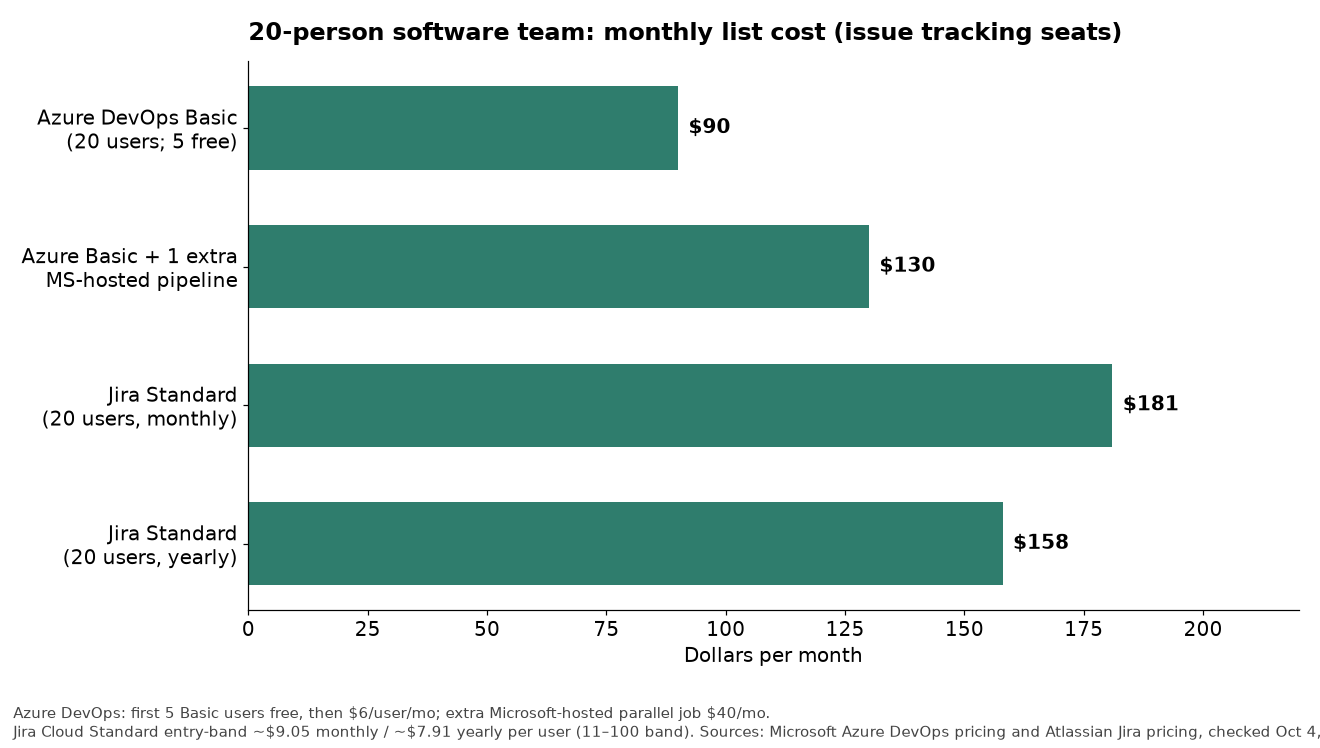
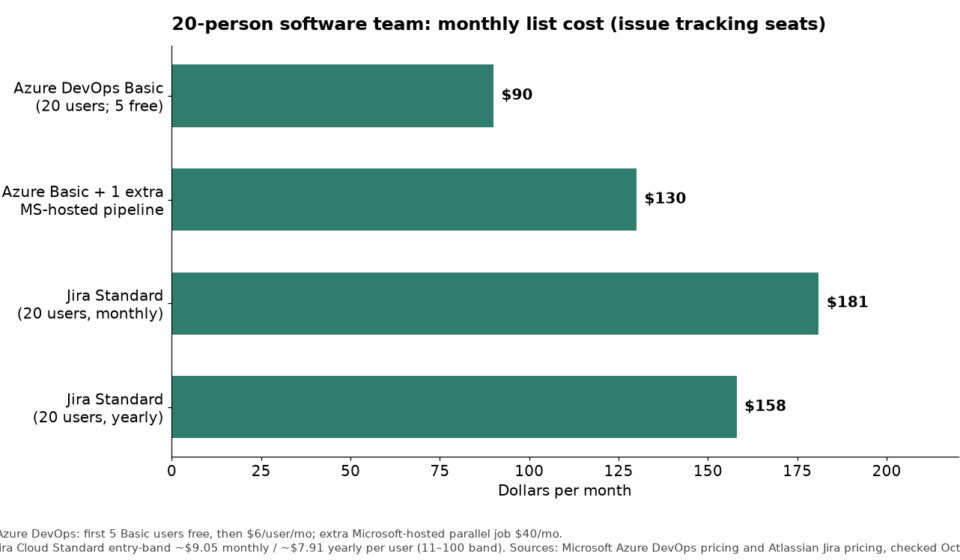
Jira’s free tier is the most generous in this comparison: up to 10 users with unlimited projects, 2GB of storage, and access to core Agile boards and automation rules. For early-stage teams, this is a real competitive advantage. Once you scale beyond 10 users, Jira charges on a per-seat basis that tiers down as team size increases — a meaningful benefit for larger organizations.
- Free: Up to 10 users, unlimited projects, 2GB storage
- Standard: $9.05/user/month — includes 250GB storage, audit logs, project-level permissions, and the full Agile feature set
- Premium: $18.30/user/month — adds Atlassian Intelligence, advanced roadmaps, IP allowlisting, admin insights, and 24/7 premium support
- Enterprise: Custom pricing — multi-site, unlimited storage, data residency, global 24/7 SLA-backed support
At 50 users on the Standard plan, you are paying approximately $5,430/month or $65,160/year. At Premium, that doubles to roughly $10,980/month. These are predictable, budget-able numbers — an advantage Jira holds over Azure DevOps’s more complex service-bundle model. See the official Jira pricing page for current tier details and volume discounts.
Azure DevOps Pricing in 2026
Azure DevOps pricing is structurally different from Jira, and that difference can work for or against you depending on how your team uses the platform. The Basic plan starts at $6/user/month — cheaper than Jira Standard — but this covers only boards, backlogs, and repos. If you need test plans, you jump to $52/user/month for Basic + Test Plans, which is dramatically more expensive.
Beyond user seats, Azure DevOps charges by service consumption:
- Azure Pipelines: The first Microsoft-hosted parallel job is free at 1,800 minutes/month. Additional parallel jobs cost $40/month each. Self-hosted agents are free but require your own infrastructure.
- Azure Artifacts: The first 2GB of artifact storage is free; additional storage is billed at $2/GB/month.
- Azure Test Plans: $52/user/month for the test-plans-enabled tier — a significant cost for QA teams.
For a 50-person engineering team with QA and meaningful pipeline usage, Azure DevOps total cost of ownership often exceeds the Jira Premium figure when all service bundles are included. The cost advantage Azure DevOps appears to have at the Basic level evaporates quickly for mature engineering organizations. Review the Azure DevOps pricing calculator and model your specific usage before drawing conclusions.
The Hidden Cost: Ecosystem Lock-In
Neither tool’s sticker price captures the real cost of the ecosystem decision. Jira’s 3,000+ Marketplace apps mean many organizations pay for multiple third-party integrations on top of the base subscription — Tempo Timesheets, Advanced Roadmaps add-ons, and scriptrunner licenses can add 30–60% to base costs. Azure DevOps’s native Microsoft integrations reduce this overhead for Microsoft shops, but organizations running Google Workspace or non-Azure infrastructure will face their own integration tax.
Jira vs Azure DevOps: AI Agent Capabilities in 2026
This is the fastest-moving dimension of the Jira vs Azure DevOps comparison in 2026, and it is where the two platforms have taken genuinely different architectural bets. Understanding those bets matters because they will shape which platform delivers more AI-driven productivity value over the next two to three years.
Azure DevOps: Native GitHub Copilot Integration
Azure DevOps holds a structural AI advantage for one specific and significant capability: native GitHub Copilot integration that converts work items into working code via agentic workflows. This is not a chatbot-style assist feature. It is an agentic loop where Copilot reads an Azure Boards work item, understands the acceptance criteria and linked context, writes code to satisfy the ticket, opens a pull request, and links the PR back to the work item — with minimal developer intervention.
For engineering organizations already paying for GitHub Copilot Enterprise licenses, this integration is essentially zero marginal cost and can meaningfully compress the distance between a story being accepted in sprint planning and the first PR being opened. Microsoft has invested deeply in this workflow because it sits at the center of their AI-first software development narrative — and as of 2026, the execution is genuinely impressive for well-scoped, clearly specified tickets.
Azure DevOps also embeds Azure OpenAI capabilities into its boards and pipelines for natural-language work item creation, automated test suggestion, and pipeline failure root cause analysis — all running natively within the Microsoft cloud without third-party connectors.
Jira: GitHub Copilot Integration in Public Preview
Jira moved to close this gap in early 2026, adding GitHub Copilot coding agent integration as a public preview on the Atlassian Marketplace. The functional premise is similar: developers can trigger Copilot directly from a Jira issue to generate code, open PRs, and link them back to the source issue. As of the time of writing, this integration is still in public preview, meaning enterprise reliability guarantees and full feature parity with the Azure DevOps native implementation are not yet there.
What Jira does have at general availability is Atlassian Intelligence — the Rovo-powered AI suite built into the Premium and Enterprise tiers. Rovo delivers issue summarization, intelligent search across Confluence and Jira simultaneously, automated sprint retrospective synthesis, dependency conflict detection, and natural-language issue creation. For teams who spend significant time navigating Jira’s information architecture — searching across projects, synthesizing linked tickets, reviewing sprint history — Rovo delivers measurable time savings today.
For deeper coverage of Jira’s AI agent setup and capabilities, see our guide to Jira automation rules and setup for 2026, which covers both native automation and the AI-assisted workflow features available at each pricing tier.
The AI Verdict for 2026
On AI-assisted code generation specifically, Azure DevOps leads — the native Copilot integration is more mature and more deeply embedded than Jira’s preview-stage Marketplace implementation. On broader AI-assisted work management — issue management, cross-project search, retrospective synthesis, dependency analysis — Jira’s Rovo is competitive and improving rapidly. The gap will narrow through 2026 as Jira’s Copilot integration exits preview. But for organizations where AI-accelerated code delivery is the primary decision driver today, Azure DevOps has the edge.
Scope and Audience Fit: Engineering Tool vs Work Management Platform
This dimension is where the two platforms have diverged most sharply, and it is arguably the most important factor in the 2026 evaluation.
Azure DevOps: Committed to the SDLC
Azure DevOps has remained deliberately focused on the software development lifecycle. It is not trying to be a work management platform for HR or marketing. Its five core services — Azure Boards, Repos, Pipelines, Test Plans, and Artifacts — all serve the engineering organization. This focus is a genuine strength: every feature, every integration, every UI decision is calibrated for developers and engineering managers. There is no complexity tax from features designed for other audiences. For organizations that want a pure-play engineering platform with no ambiguity about what it is for, Azure DevOps’s focused scope is an asset.
The limitation is equally clear: if your organization needs non-engineering teams to work alongside developers in the same platform — legal tracking compliance requirements tied to features, marketing coordinating launch plans with product, HR managing headcount tied to roadmap capacity — Azure DevOps cannot accommodate those teams meaningfully. They will require separate tools, creating coordination overhead and data silos.
Jira: The Cross-Functional Expansion
Jira’s 2025–2026 expansion via Jira Work Management is a strategic bet that organizations want a single platform across their entire enterprise, not separate tools for engineering and business operations. The results are compelling: marketing teams use Jira for campaign planning and content calendars; legal teams track contract review workflows and compliance checklists; HR uses it for recruiting pipelines and onboarding tasks; finance coordinates budget approval processes. All of this sits alongside the engineering team’s sprint boards in the same Jira environment, with cross-team visibility, unified reporting, and shared automation.
For a detailed look at how business teams can leverage Jira Work Management, see our post on Jira Work Management for business teams in 2026. The practical implications for the platform decision are significant: if your CTO is the only executive who cares which work management tool the company uses, Azure DevOps is fine. If your COO, CMO, and CHRO also have a stake in consolidating to a single work platform, Jira is the platform that can serve all of them.
Integrations and Ecosystem
The integration dimension of Jira vs Azure DevOps is a true asymmetry — but it cuts differently depending on your organization’s existing technology stack.
Jira: The 3,000+ App Marketplace
Jira’s Atlassian Marketplace is one of the largest third-party integration ecosystems in enterprise software. With over 3,000 apps covering everything from Salesforce CRM connectors and Tempo time-tracking to advanced reporting engines and AI-powered estimation tools, Jira can be extended to fit almost any workflow or toolchain. For organizations running diverse, best-of-breed technology stacks — AWS not Azure, Google Workspace not Microsoft 365, GitHub not Azure Repos — this breadth is practically important.
Native integrations include GitHub, GitLab, Bitbucket (Atlassian’s own), Slack, Google Workspace, Zoom, Salesforce, Figma, Zendesk, PagerDuty, and dozens more at a level of depth that requires no third-party middleware. The Marketplace also means that niche industry-specific connectors — for example, JIRA-to-ServiceNow integrations for ITSM, or legal matter management connectors — almost always exist as commercial apps.
Our guide to Jira dashboards and custom gadgets setup for 2026 covers how to pull cross-tool data into unified reporting views — a common requirement for organizations that integrate Jira with their CRM, finance, or customer support platforms.
Azure DevOps: Deep Microsoft Native Integration
Azure DevOps’s integration story is not about breadth — it is about depth within the Microsoft ecosystem. The integration with Azure Active Directory means identity management, role-based access control, and group membership flow automatically from your existing enterprise directory. Microsoft 365 integration means work item discussions can be surfaced in Teams channels, sprint boards can be accessed from Teams tabs, and pipeline notifications arrive in Teams without any configuration. Visual Studio and VS Code have built-in Azure DevOps extensions that let developers manage work items, review PRs, and trigger pipelines without leaving the IDE.
For Microsoft-native organizations, this integration depth reduces toolchain friction to near zero. The setup overhead that typically accompanies a new SaaS tool — SSO configuration, directory sync, notification routing — is handled automatically by the Microsoft identity layer. This is a genuine and underappreciated advantage. If your organization pays for Microsoft 365 E3 or E5 licensing, Azure DevOps Basic is effectively subsidized by your existing enterprise agreements in many cases — worth validating with your Microsoft account team before any pricing comparison.
Workflow Depth, Agile Support, and DevOps Pipeline
Both platforms are genuinely strong on Agile workflow support, and both have shipped meaningful improvements in 2025–2026. The differences are real but more nuanced than most comparisons acknowledge.
Jira’s Agile Depth
Jira was built for Agile — it is not an adaptation of a general project management tool. Sprint boards, backlog grooming, velocity charts, burndown tracking, epic hierarchies, and story point management are all first-class native features that have been refined over two decades of engineering team feedback. The automation engine — covered in detail in our Jira automation rules setup guide — allows engineering teams to build sophisticated no-code workflow automations: auto-assigning tickets based on component, automatically transitioning parent epics when all child stories close, triggering Slack notifications when sprint capacity thresholds are hit.
The Jira issue type hierarchy — Epics, Stories, Tasks, Subtasks, Bugs, each with distinct workflows — is more granular than Azure DevOps’s work item model for teams running strict Scrum. For organizations implementing SAFe (Scaled Agile Framework), Jira Premium’s Advanced Roadmaps provides PI planning views, dependency mapping across teams, and capacity planning that Azure DevOps does not match without significant customization.
Azure DevOps: End-to-End Pipeline Ownership
Where Azure DevOps has a clear functional advantage is in end-to-end pipeline integration. Azure Pipelines is a native, enterprise-grade CI/CD system — not an integration, not a third-party connector, but a first-class service built into the platform. For engineering organizations that want their work items, code repositories, build pipelines, test execution, and deployment tracking all in a single unified system with native traceability, Azure DevOps delivers this without any integration overhead.
In Jira, achieving the equivalent requires integrating with GitHub Actions, Jenkins, CircleCI, or another CI/CD system — which is entirely feasible and widely done, but introduces connector maintenance, webhook configuration, and potential data fidelity issues in cross-system reporting. For organizations where DevOps traceability — the ability to trace a deployed feature back through its pipeline run, test results, code review, and originating work item — is a compliance or audit requirement, Azure DevOps’s native pipeline integration is a meaningful structural advantage.
Delivery Plans and Portfolio Management
Azure DevOps’s Delivery Plans feature provides multi-team, multi-sprint timeline views that are useful for engineering program managers coordinating across several squads. Jira Premium’s Advanced Roadmaps covers similar territory with arguably more flexibility for dependency visualization. At the Enterprise level, both platforms require additional configuration to support true portfolio-level planning at scale. Neither platform out-of-the-box handles enterprise portfolio management without customization — a point worth acknowledging honestly before committing to either.
The Jira Data Center Migration Decision in 2026
This section addresses a specific organizational context that is directly relevant to thousands of enterprise clients in 2026: organizations currently running Jira Data Center that are evaluating their options.
Atlassian ended support for Jira Server in February 2024, which forced organizations onto one of three paths: migrate to Jira Cloud, stay on Jira Data Center (the supported self-managed option), or switch platforms entirely. Each path carries real cost and risk:
- Migrate to Jira Cloud: Loss of some Data Center-specific customizations, potential data residency reconfiguration, retraining on cloud-specific features. Atlassian’s migration tooling has improved significantly, but for organizations with heavy marketplace app dependencies, app-by-app cloud compatibility validation is required. Cloud also means moving from capital expenditure (license + infrastructure) to operating expenditure (per-seat subscription), which changes budget category.
- Stay on Jira Data Center: Data Center licensing is expensive — starting at approximately $33,100/year for 500 users and scaling up. It maintains self-managed control, data residency, and the ability to run customizations that are not cloud-compatible. But it delays access to AI features (Atlassian Intelligence is Cloud-only) and continues to accumulate technical debt relative to the Cloud roadmap.
- Switch to Azure DevOps: A platform migration of this scale carries 6–18 months of implementation overhead, workflow redesign, user retraining, and Jira Marketplace app replacement costs. For organizations already on Microsoft Azure infrastructure, this path may offer the best long-term architecture — but the transition cost is real and must be modeled, not assumed.
My recommendation for Data Center organizations in 2026: do not let the migration pressure force a rushed platform decision. Model the three-year total cost of each path before deciding. For most organizations that are not predominantly Microsoft-native shops, migrating to Jira Cloud and gaining access to Atlassian Intelligence is the lowest-risk path. For organizations deeply embedded in the Azure ecosystem, the Data Center migration moment is the right time to evaluate Azure DevOps seriously — because the migration cost is a sunk cost regardless of destination.
If you are evaluating whether Jira still fits your organization or exploring alternatives, our roundup of the best Jira alternatives for 2026 covers the full competitive landscape including Azure DevOps, Linear, and Notion alongside more granular use case guidance.
Who Should Choose Jira
Choose Jira if one or more of the following describes your organization:
- Your organization serves teams beyond engineering on the same platform. If marketing, legal, HR, finance, or operations need to work in the same system as your engineering teams — and you want cross-functional visibility without multiple tool stacks — Jira Work Management makes this possible in a way Azure DevOps simply does not support.
- You run a non-Microsoft technology stack. Organizations on AWS or Google Cloud, using Google Workspace, with GitHub (not Azure Repos) as their version control, will find Jira’s 3,000+ integrations and vendor-agnostic positioning dramatically more practical than Azure DevOps’s Microsoft-centric architecture.
- You need SAFe or large-scale Agile support. Jira Premium’s Advanced Roadmaps and PI planning capabilities, combined with the rich SAFe-specific Marketplace apps, make it the stronger choice for organizations implementing Scaled Agile Framework across multiple engineering teams.
- Marketplace ecosystem depth matters. When your organization needs niche connectors — vertical industry tools, compliance management integrations, custom-built Atlassian apps — the 3,000+ Marketplace catalog offers options that Azure DevOps’s smaller extension library cannot match.
- You are migrating off Jira Server/Data Center and want to stay in the Atlassian ecosystem. If your team’s institutional knowledge, workflow configurations, and Confluence documentation are all Atlassian-native, migrating to Jira Cloud is almost always a faster, lower-risk path than switching platforms entirely.
Who Should Choose Azure DevOps
Choose Azure DevOps if one or more of the following describes your organization:
- You are a Microsoft-native organization. If your organization runs Microsoft 365, Azure cloud infrastructure, Active Directory, and Visual Studio or VS Code as primary developer tooling, Azure DevOps is not just another SaaS product — it is a native extension of your existing enterprise architecture. The integration overhead that costs Jira users configuration time is eliminated before your first ticket is created.
- AI-assisted code generation via GitHub Copilot is a strategic priority. Azure DevOps’s native GitHub Copilot integration — converting work items into working code via agentic workflows — is more mature than Jira’s early 2026 preview-stage equivalent. For engineering leadership that has made GitHub Copilot Enterprise a central productivity investment, Azure DevOps maximizes the return on that investment.
- End-to-end pipeline traceability is a compliance or audit requirement. Regulated industries — financial services, healthcare, government contracting — that require native traceability from work item to code commit to pipeline run to deployment record will find Azure DevOps’s native Pipelines integration structurally simpler to audit than Jira’s cross-tool approach.
- Your engineering team is pure-play software development with no cross-functional platform requirements. If the only stakeholders who will ever need to access your project management platform are developers, engineers, and technical program managers, Azure DevOps’s focused scope is a feature, not a limitation. You get a highly polished tool calibrated exactly for your audience without any complexity tax from features designed for non-technical users.
- You are evaluating a move from Jira Data Center and are deeply embedded in Azure infrastructure. The migration moment is the right time to evaluate Azure DevOps seriously. If your infrastructure team is already running Azure, the long-term architecture argument for Azure DevOps becomes compelling even if the short-term migration cost is real.
After evaluating both platforms across pricing, AI capabilities, integration ecosystems, and audience fit, my recommendation is this: Jira is the better default choice for most organizations in 2026, with one clear exception. The exception is Microsoft-native engineering organizations where Azure infrastructure, Active Directory, Microsoft 365, and GitHub Copilot Enterprise are already central to the technology strategy. For those organizations, Azure DevOps delivers structural integration advantages that Jira cannot match regardless of Marketplace breadth. For every other organization — mixed tech stacks, cross-functional platform needs, non-Microsoft cloud infrastructure — Jira’s larger ecosystem, broader audience fit via Jira Work Management, and rapidly improving AI capabilities make it the stronger long-term platform bet. The Jira Data Center migration decision in 2026 should not be a forced choice — if you are an Atlassian shop today, model the cloud migration path honestly before assuming Azure DevOps is cheaper or simpler. It rarely is when total cost of ownership is calculated across three years.
Frequently Asked Questions
Is Jira better than Azure DevOps for Agile development?
Both platforms are strong for Agile development, but they excel in different aspects. Jira has deeper native Agile mechanics — refined sprint boards, velocity charts, backlog management, and SAFe support via Advanced Roadmaps — that have been iterated on for over two decades. Azure DevOps is equally capable for Scrum and Kanban and adds the advantage of native CI/CD pipeline integration through Azure Pipelines, which Jira achieves only through third-party connectors. For pure Agile workflow depth, Jira has a slight edge. For end-to-end DevOps traceability from ticket to deployment, Azure DevOps wins. The right choice depends on which of those two priorities is more important to your engineering organization.
Can non-technical teams use Jira or Azure DevOps?
Jira is the clear winner here. Through Jira Work Management, Atlassian has built tailored experiences for marketing, HR, legal, finance, and operations teams — with board views, list views, timeline views, and form-based intake that non-technical users can adopt without any understanding of Agile or software development concepts. Azure DevOps was not designed for non-engineering audiences and has made no significant investments in serving them. If your organization needs a single platform that serves both engineering and business teams, Jira is the only viable option of these two.
How does GitHub Copilot integration compare between Jira and Azure DevOps in 2026?
Azure DevOps has native GitHub Copilot integration that enables agentic workflows — work items can be converted directly into working code, with Copilot autonomously writing code, opening PRs, and linking them back to the source ticket. This integration is production-ready and deeply embedded in the Microsoft AI ecosystem. Jira added GitHub Copilot coding agent integration as a public preview on the Atlassian Marketplace in early 2026. The functionality is similar in premise but the Jira implementation is earlier-stage, and enterprise reliability guarantees are not yet equivalent to the Azure DevOps native integration. For organizations where AI-assisted code generation is a primary evaluation criterion today, Azure DevOps holds a meaningful lead. Expect this gap to narrow as Jira’s integration exits preview in late 2026.
What are the real pricing differences between Jira and Azure DevOps at enterprise scale?
The pricing comparison is more complex than sticker prices suggest. Jira’s per-seat pricing is transparent: $9.05/user/month (Standard) or $18.30/user/month (Premium), with volume discounts at scale. Azure DevOps starts at $6/user/month for Basic, but that figure climbs sharply to $52/user/month if Test Plans are required, and pipeline usage incurs additional per-parallel-job fees. For a 50-person engineering organization with QA and meaningful CI/CD usage, total Azure DevOps cost often matches or exceeds Jira Premium when all service bundles are accounted for. Microsoft 365 enterprise agreement holders should validate whether Azure DevOps is partially covered by existing licensing — it often is — which can change the comparison materially. Model your specific team composition and usage pattern before drawing conclusions from surface-level pricing.
Should organizations on Jira Data Center switch to Azure DevOps in 2026?
Switching from Jira Data Center to Azure DevOps is a major platform migration that carries 6–18 months of implementation overhead, workflow redesign, user retraining, and Marketplace app replacement cost. It is the right choice only if your organization is already deeply embedded in the Microsoft Azure ecosystem and the long-term architecture argument for native integration outweighs the transition cost. For most organizations, migrating to Jira Cloud is the lower-risk path: it preserves institutional workflow knowledge, gives access to Atlassian Intelligence and cloud-native AI features, and avoids the full platform migration overhead. Do not let the Data Center migration deadline force a rushed platform decision — model the three-year total cost of each path, including transition costs, before deciding. Our guide to the best Jira alternatives for 2026 covers the full competitive landscape for organizations that are genuinely evaluating a platform switch.