
Jira and Trello are both Atlassian products. That fact causes more bad buying decisions than it prevents. People assume “same vendor” means “same product at two price points.” It doesn’t. Trello is a board you can teach in ten minutes. Jira is a workflow engine built for software delivery that happens to include boards.
I implement work-management platforms for a living through SSPM, a Smartsheet Premier Aligned Partner. When a client asks “Jira or Trello?” I ask what fails if a card moves without the right fields filled in. If the answer is “nothing much,” pick Trello. If the answer is “a release, an audit, or a customer SLA,” pick Jira.
List prices below come from Jira Cloud pricing and Trello pricing, checked October 3, 2026. Deeper seat math lives in our Jira pricing guide.
The short answer
- Pick Jira for engineering (and any team that needs required fields, transitions, permissions and an audit trail).
- Pick Trello for marketing, ops, agencies and leadership work that should stay visible without a Jira admin.
- Stay on Trello Free only while you fit 10 collaborators and 10 boards per Workspace. Past that, budget for Standard before you invent a Power-Up maze.
- Don’t “upgrade” from Trello to Jira as a loyalty move. Migrate when the process outgrew cards — not because Atlassian sells both.
If you’re comparing Jira to other engineering trackers, see Airtable vs Jira and monday.com vs Jira. For Trello’s plugin layer, use our Trello Power-Ups guide.
Jira vs Trello at a glance
| Jira | Trello | |
|---|---|---|
| Built for | Issue tracking, agile delivery, enforceable workflows | Lightweight boards, lists and cards |
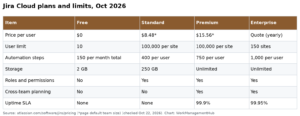
| Free plan | Up to 10 users, 2 GB storage, 150 automation steps/month (subscription) | Up to 10 collaborators, 10 boards/Workspace, unlimited cards, unlimited Power-Ups, 10 MB/file, 250 Workspace command runs |
| Paid entry (per user/mo) | Standard about $7.91 yearly / $9.05 monthly (entry band) | Standard $5 yearly / $6 monthly |
| Mid tier | Premium about $14.54 yearly / $18.30 monthly (entry band) | Premium $10 yearly / $12.50 monthly |
| Top tier | Enterprise (custom; Atlassian targets large orgs) | Enterprise $17.50/user/mo yearly |
| Killer feature | Workflows, backlogs, sprints, releases, Git links | Speed to clarity — anyone can run a board |
| When it hurts | Overkill (and admin cost) for simple boards | Weak when you need required fields, SLAs or complex permissions |
Jira’s per-user rate falls as seat count climbs past Atlassian’s volume bands. The $7.91 / $9.05 and $14.54 / $18.30 figures are the entry-band rates Atlassian publishes for smaller teams (the same band used in our recent comparisons for roughly 11–100 users on monthly billing). Confirm the quote for your exact headcount on Atlassian’s pricing page — especially around the October 13, 2026 Cloud list-price changes Atlassian has announced.
What an 18-person team pays
Concrete roster: 12 people who need to change work, 6 who mostly watch status. On Jira, internal viewers still need paid seats (Atlassian free guests are for people outside your organization). On Trello, Workspace members are what you pay for once you’re on a paid plan.
| Setup | Yearly billing | Monthly billing | Notes |
|---|---|---|---|
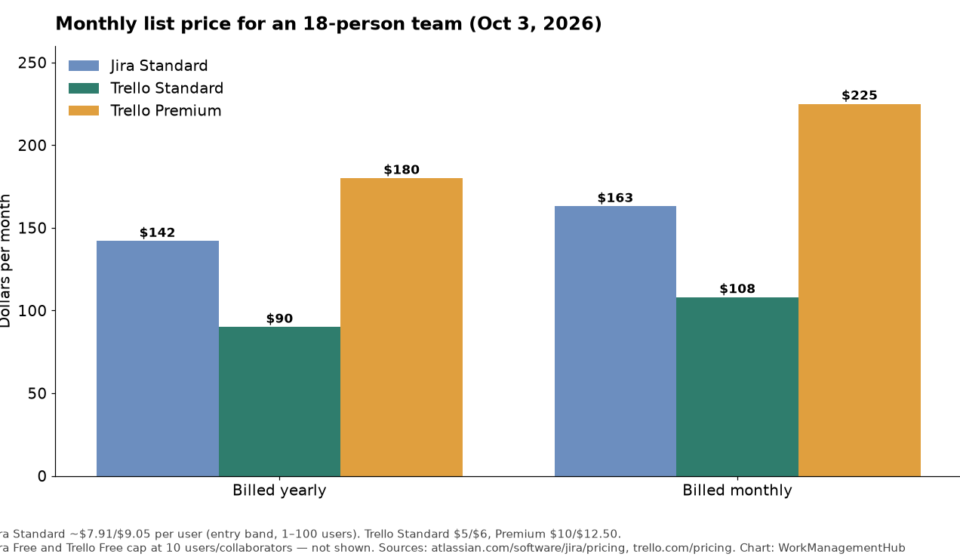
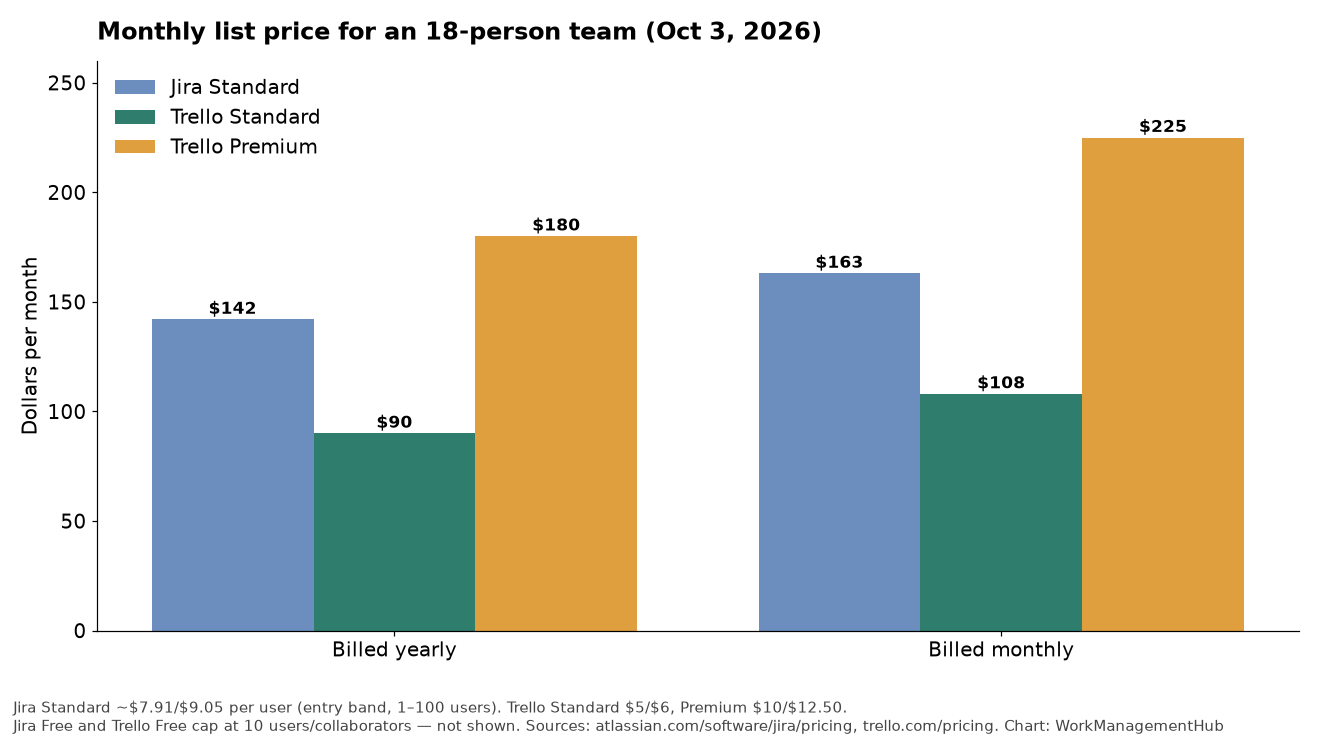
| Jira Standard × 18 | ~$142 | ~$163 | Entry-band list rates ($7.91 / $9.05) |
| Trello Standard × 18 | $90 | $108 | Unlimited boards; Planner; AI on Standard per Trello’s page |
| Trello Premium × 18 | $180 | $225 | Calendar, Timeline, Table, Dashboard, Map views |
Jira Free and Trello Free both top out around 10 people, so neither Free plan covers this roster. Trello Standard is the clear budget win if boards are enough. Jira Standard costs more because you’re buying workflow enforcement, not prettier cards.
Premium Trello at $180/year-billed can exceed Jira Standard for the same headcount. Pay for Premium only when you need the advanced views bundle — not because “Premium” sounds safer.
Where Jira wins
Workflows that refuse to be casual
Jira lets you require fields on transition, limit who can move an issue from “In review” to “Done,” and keep a history compliance teams can read. Trello can mimic stages with lists. It cannot match that control without a pile of Power-Ups and still won’t feel like Jira.
Engineering toolchain fit
Scrum and Kanban boards, backlogs, sprints, releases and native Git integrations (GitHub, GitLab, Bitbucket) are why engineering orgs standardize on Jira. You can paste a commit URL into a Trello card. That is not the same as seeing PRs on the issue.
Automation at team scale (with a meter)
Jira automation now counts steps (trigger, condition, action, branch, loop). Allowances are pooled: 150 steps/month on Free for the subscription, then per-user pools on paid plans (400 Standard, 750 Premium, 1,000 Enterprise per Atlassian’s automation docs). Extra-usage billing is scheduled to start December 3, 2026. Audit noisy rules now — our Jira automation rules guide shows where waste usually hides.
Where Trello wins
Adoption beats configuration
I’ve watched teams abandon half-built Jira projects because nobody wanted to file a “simple request” as an issue type. Trello cards get used. For campaign calendars, hiring pipelines, editorial boards and event checklists, that usage gap matters more than workflow theory.
Free is honestly useful — until the caps
Trello Free includes unlimited cards, unlimited Power-Ups per board, Inbox, and mobile apps, with the hard walls at 10 boards and 10 collaborators per Workspace (plus 10 MB per file and 250 Workspace command runs). Those caps are clear. Jira Free’s 10-user cap is clear too; its 2 GB storage and automation step pool run out less obviously.
Power-Ups instead of a second admin career
Need calendar overlays, time tracking or a light CRM sync? Power-Ups cover a lot before you graduate to Jira. Just remember: Trello may include unlimited Power-Ups, but many partner Power-Ups bill separately. Details in the Power-Ups guide. For a database-shaped alternative to boards, see Airtable vs Trello.

When teams outgrow Trello
You have outgrown Trello when any of these become weekly pain:
- Cards need required data (customer ID, severity, environment) before they can move.
- Multiple teams share one process and permissions must differ by role.
- Releases and versions matter more than list names.
- Reporting needs sprint burndown, cumulative flow or SLA age — not a Dashboard view screenshot.
- Audit asks who changed status and when, with field-level history.
At that point, moving to Jira (or another issue tracker) is cheaper than bolting enterprise process onto boards. Moving earlier “just in case” usually creates empty Jira projects and a shadow Trello that still runs the work.
What I’d actually set up
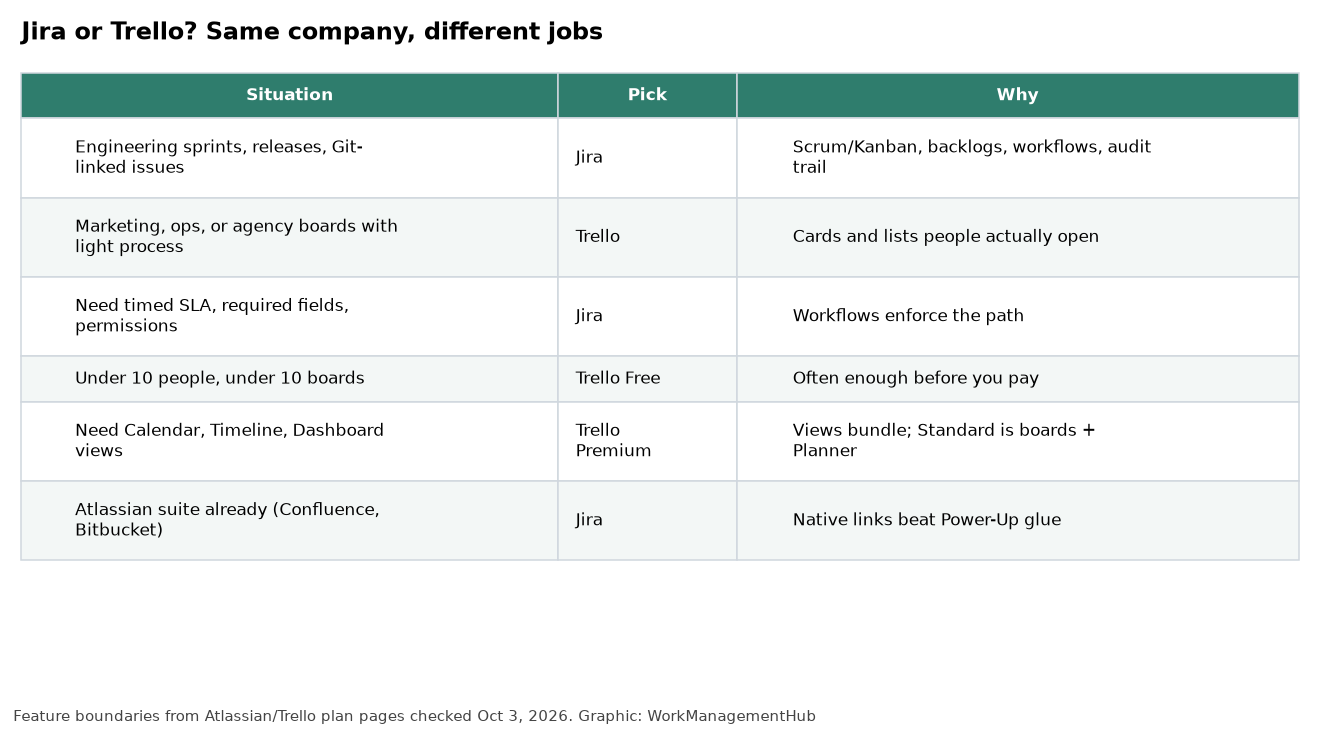
Startup eng team under 10. Jira Free if you’re shipping software. Trello Free if you’re mostly coordinating non-code work. Don’t buy Premium Trello to look like Jira.
Marketing + eng company of 20–50. Jira Standard for engineering. Trello Standard for marketing/ops boards. Connect with a thin integration or a weekly export — not a mandatory dual-entry culture.
Agency or consulting shop. Trello Standard or Premium. Jira only if clients demand it or you run software delivery as a product line.
Regulated or enterprise engineering. Jira Premium or Enterprise for sandbox, advanced roadmaps, stronger support/SLA and admin controls. Trello can still exist for non-engineering programs.
FAQ
Are Jira and Trello interchangeable?
No. Shared branding is marketing. Trello optimizes for speed and openness. Jira optimizes for controlled delivery. Swapping them without changing how the team works usually fails.
Is Trello Free enough for a small business?
Yes, while you stay within 10 collaborators and 10 boards. Many five-person teams never leave Free. Plan for Standard when the 11th person or 11th board is a when, not an if.
Is Jira overkill for non-software teams?
Often. Non-software teams can succeed in Jira with heavy simplification, but Trello (or another lightweight tool) usually reaches adoption faster. Use Jira when the process needs teeth.
Can I use Jira and Trello together?
Yes. Keep systems of record separate: engineering issues in Jira, campaign boards in Trello. Mirror selectively. Avoid making people update both for the same piece of work.
Pricing and plan limits checked against Atlassian and Trello pages on October 3, 2026. Atlassian Cloud list prices and automation metering are changing through late 2026 — confirm on the vendor pages before you buy.
Sponsored