Notion vs Airtable 2026: Docs-First Workspace or Real Database? Pricing, Limits and Which to Choose

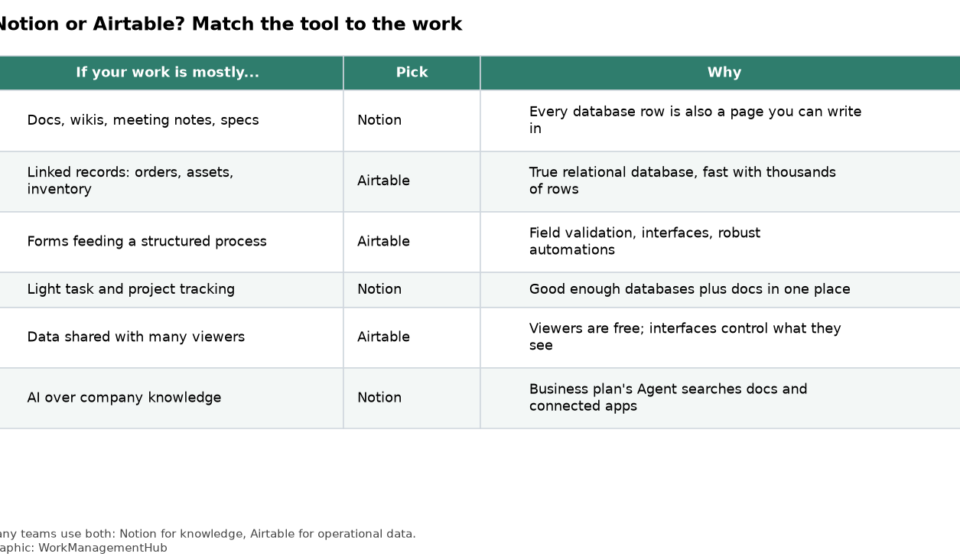
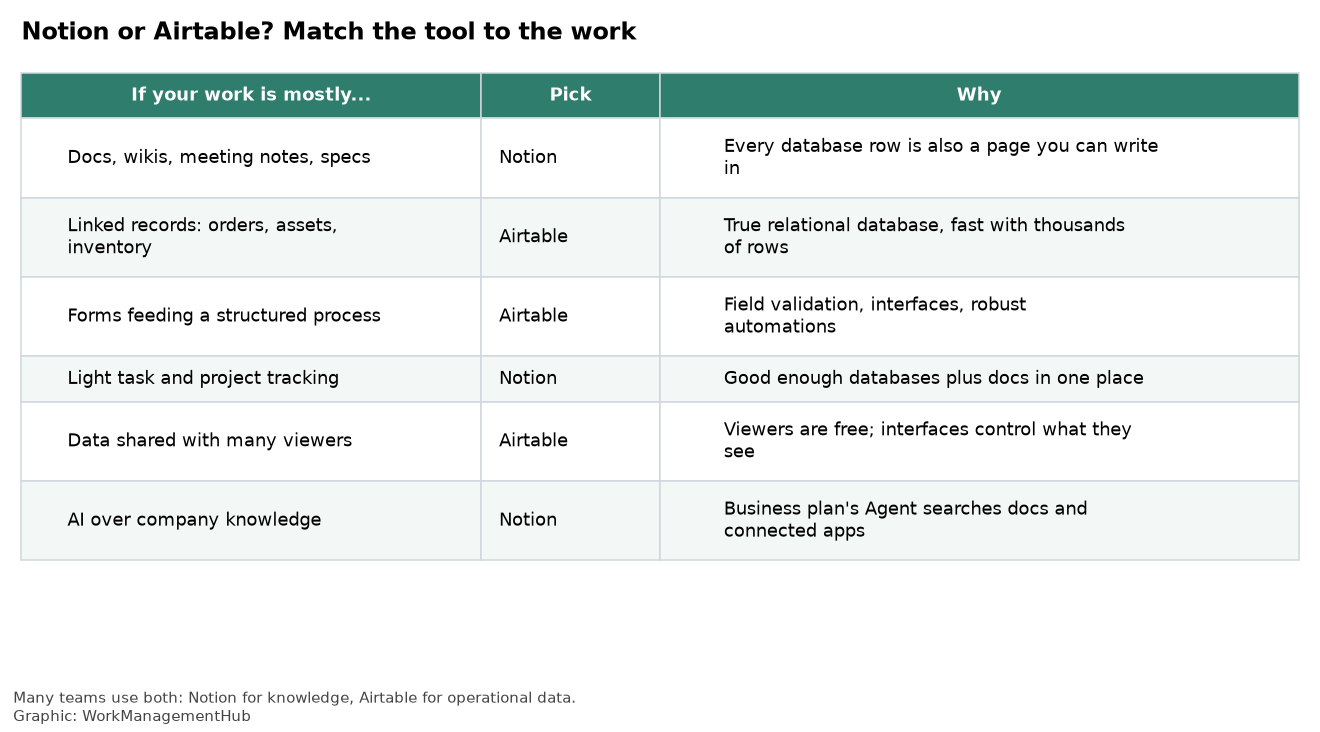
Notion is a document workspace that happens to have databases. Airtable is a database that happens to let you build simple apps on top. That one difference explains almost every comparison below: Notion wins when the work is mostly writing, and Airtable wins when the work is mostly records that link to other records.
Pricing works differently too. Notion bills every member of the workspace ($10 a month on Plus, $20 on Business, billed yearly). Airtable bills only people who can edit ($20 on Team, $45 on Business, billed yearly), and read-only collaborators are free. So which tool costs less depends on how many of your people only need to look.
Prices and limits come from Notion’s pricing page and Airtable’s pricing page, checked October 1, 2026.
The core difference in one minute
In Notion, every database row is a page. Open a task and you can write a full spec inside it, embed a whiteboard, add a checklist and link to other pages. Databases support relations, rollups, formulas and views (table, board, timeline, calendar, gallery, list, chart and form), but they exist to organize documents.
In Airtable, every row is a record with typed fields. You get linked records across tables, lookups, rollups, field validation, and Interfaces, which turn a base into a simple app with buttons, filters and permissions on what each person can see. The long-text field exists, but nobody writes a company wiki in Airtable.
If you picture your work as “pages people write and read”, start with Notion. If you picture it as “rows that move through a process”, start with Airtable.
Pricing compared (2026)
| Notion | Airtable | |
|---|---|---|
| Free plan | Yes. Unlimited pages for one person; limited block trial once 2+ members join; 10 guests | Yes. Up to 5 editors, 1,000 records per base |
| First paid plan | Plus: $10/member/month yearly, $12 monthly | Team: $20/editor/month yearly, $24 monthly |
| Business plan | $20/member/month yearly, $24 monthly | $45/editor/month yearly, $54 monthly |
| Enterprise | Custom | Enterprise Scale, custom |
| Who counts as a paid seat | Every workspace member. Guests (outside people invited to specific pages) are free, unlimited on paid plans | Only editors. Read-only collaborators and form submitters are free |
| AI included | Free and Plus get a trial of Notion AI. Business adds Notion Agent and AI Meeting Notes | AI credits pooled across the workspace on paid plans (15,000 per Team editor per month) |
Notion’s guest rule matters: guests are meant for clients and contractors who get access to particular pages, not for your own staff. Internal colleagues who need to read a wiki are normally members, and members are billed. See Notion’s guide to members and guests for how each role works.
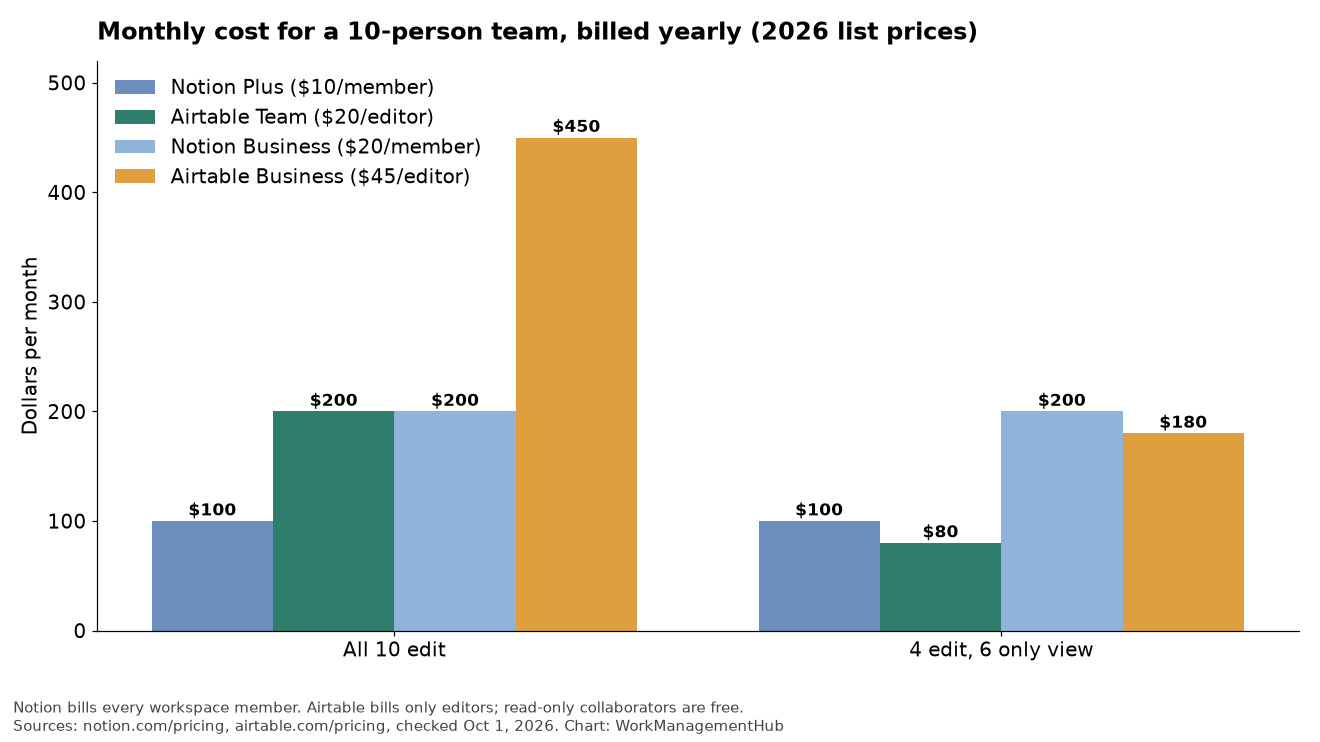
The chart shows the switch point. If everyone on a 10-person team edits, Notion Plus ($100 a month) is half the price of Airtable Team ($200). If only 4 people build and the other 6 just view, Airtable Team drops to $80 and becomes the cheaper option. For full plan detail, see our Notion pricing guide and Airtable pricing guide.
Data and databases: where Airtable pulls ahead
Both tools let you link tables and roll up values, so on a feature checklist they look close. In daily use they are not.
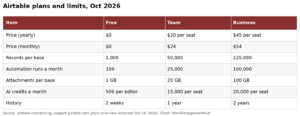
- Scale. Airtable states hard limits per base: 1,000 records on Free, 50,000 on Team and 125,000 on Business. Within those limits it stays responsive. Notion doesn’t publish a row cap, but databases with many thousands of rows, heavy relations and rollups get noticeably slower to load and filter.
- Field types and validation. Airtable fields are strictly typed and its forms feed records with consistent data. Notion properties are looser, which is fine for teams and painful for reporting.
- Building apps. Airtable Interfaces let you give a sales rep a screen with only their deals and two buttons. Notion can’t restrict what a member sees inside a database as precisely, although Business adds granular database permissions.
- Views. Notion’s views cover most project needs, including timelines with dependencies. Airtable adds a Gantt view, a richer reporting setup through Interfaces, and more ways to slice the same data.
If you’re choosing between Airtable and a spreadsheet instead, our Airtable vs Google Sheets comparison covers that line.
Docs and knowledge: where Notion wins clearly
Notion’s editor handles headings, toggles, callouts, code blocks, synced blocks, embeds and nested pages. You can build a company wiki, meeting notes linked to projects, and specs that sit inside the task that tracks them. Page history lasts 7 days on Free, 30 on Plus, 90 on Business and is unlimited on Enterprise.
Airtable has no comparable document layer. Teams that try to keep SOPs in long-text fields usually end up adding a separate docs tool within months.
Automations and AI
Airtable automations run on triggers such as a record being created, a field changing or a form being submitted. Monthly run limits are 100 on Free, 25,000 on Team and 100,000 on Business, which is enough for most operations teams.
Notion automations live on databases and buttons: when a property changes, do something. Database automations need a paid plan. They cover status changes and notifications well, and multi-step processes less well.
AI follows the same split. Notion AI is strongest at searching, summarizing and drafting from your workspace; on Business, Notion Agent can also work across connected apps. Airtable’s AI works on records: categorizing, extracting fields from text and summarizing linked data. Airtable pools AI credits across paid editors, while Notion gives Free and Plus users only a trial and puts its full AI on Business.

Which should you choose?
Choose Notion if your team mainly writes and reads: wikis, onboarding, meeting notes, specs, light project tracking. It’s also the cheaper choice when most people edit.
Choose Airtable if your work is operational data: content calendars with many linked assets, inventory, orders, CRMs, request intake. It’s often cheaper when only a few people build and many only view.
Use both if you have both kinds of work. A common setup puts the knowledge base in Notion and the operational data in Airtable, with links between them or a sync through Zapier or Make. Paying for two tools is cheaper than forcing one tool to do a job it handles badly.
Researchers have a different set of trade-offs (citations, literature tracking, free academic plans), so we cover them in Notion vs Airtable for academic research.
Frequently asked questions
Can Notion replace Airtable?
For small databases and project tracking, yes. For tens of thousands of records, strict field types, multi-step automations or app-style interfaces for different roles, no.
Is Airtable more expensive than Notion?
Per seat, yes: $20 versus $10 on the entry paid plans. Per team, it depends. Airtable doesn’t charge for viewers, so a team where few people edit can pay less on Airtable.
Are Notion guests free?
Yes. Free workspaces get 10 guests and paid plans get unlimited guests. Guests can only access the pages shared with them and are meant for people outside your organization.
Does Notion have an Airtable-style interface builder?
Not in the same way. Notion pages can combine linked database views, buttons and forms into something dashboard-like, but Airtable Interfaces give more control over layout and what each user can change.
Which is better for project management?
For document-heavy projects with a small team, Notion. For projects that depend on structured data, such as production pipelines or request queues, Airtable.
Sponsored

Related guides