Jira vs Wrike 2026: Which Is Right for Your Team?
- Jira starts at $7.53/user/month and is purpose-built for Agile software engineering teams; Wrike starts at $10/user/month and is designed for cross-functional operational departments — these are fundamentally different tools aimed at fundamentally different buyers.
- Wrike scores higher on user satisfaction (71% positive vs 58% for Jira) and ease-of-use; Jira wins decisively on workflow depth, developer-tool integrations, and ecosystem breadth via the Atlassian Marketplace.
- Both platforms now have native AI agents at general availability: Jira’s Spring 2026 release introduced AI that autonomously moves work forward within sprints; Wrike’s AI Agents reached GA in March 2026 with multi-action triggers for operational workflows.
- The choice is not about which tool is objectively better — it is about audience fit. Engineering organizations should choose Jira; marketing, PMO, and operational departments should choose Wrike. Forcing either tool into the wrong context is expensive and slow.
In the Jira vs Wrike 2026 comparison, neither tool is universally better. Jira wins for software development and Agile engineering teams that need deep sprint tooling, CI/CD integrations, and the Atlassian ecosystem. Wrike wins for marketing, PMO, and operations teams that need flexible views, resource management, and cross-functional workflows. Match the tool to your department’s primary workload.
- The Comparison Most Articles Get Wrong
- Jira vs Wrike 2026 at a Glance
- Pricing, Plans, and True Cost of Ownership
- Jira vs Wrike 2026: AI Agents Compared — Spring Release vs Wrike GA
- Workflow Depth and Methodology Support
- Integrations and Ecosystem
- Ease of Use and User Satisfaction
- Who Should Choose Jira
- Who Should Choose Wrike
- Verdict
- FAQ
Jira vs Wrike 2026: Which Is Right for Your Team?
Every published comparison of Jira vs Wrike makes the same foundational error: it treats both tools as generic project managers competing on feature parity. That framing produces balanced, hedged conclusions that help no one. It misses the core point that these platforms were built for categorically different buyers — and in 2026, with both platforms having shipped native AI agents, the stakes of choosing the wrong tool have increased, not decreased.
I have deployed both platforms across enterprise clients in financial services, SaaS product development, professional services, and marketing agencies. My position is direct: Jira and Wrike serve different organizational layers, and the fastest path to a bad implementation is letting a software engineering team evaluate Wrike as a Jira alternative, or letting a marketing operations director dismiss Jira because it looks complicated. This guide cuts through that noise with data current as of Q2 2026.
The Comparison Most Articles Get Wrong
The Jira vs Wrike debate has a structural problem that most comparisons inherit rather than solve. Both tools occupy the “project management software” category on G2 and Gartner. Both appear in the same procurement shortlists. Both have kanban boards, task assignments, and dashboards. The surface-level similarity creates the illusion of a direct competition — and that illusion is where bad purchasing decisions live.
The reality is more useful: Jira is a software development lifecycle tool that also handles project management. Wrike is an enterprise work management platform that handles cross-functional operational workflows, with project management as one output. The overlap is real but the centers of gravity are different, and those centers determine everything from onboarding speed to long-term ROI.
The 2026 AI agent question adds a new dimension that existing comparisons almost entirely miss. Both platforms reached AI agent general availability before the end of Q1 2026 — but the agent architectures reflect their underlying platform priorities. Jira’s AI agents are optimized for engineering workflows: moving tickets through sprint stages, surfacing blocked items, and triggering automation within the Atlassian Intelligence layer. Wrike’s AI Agents, which reached GA in March 2026, are built for multi-action operational triggers — cross-department request routing, resource conflict resolution, and status escalation. Same category label, very different execution. For a deeper look at each platform’s AI capabilities, see our dedicated guides: Jira AI Agents setup guide and Wrike AI Agents deep dive.
Jira vs Wrike 2026 at a Glance
The table below is a direct category-by-category comparison. I have called winners where the data supports it and noted genuine ties where the platforms are functionally equivalent.
| Category | Jira | Wrike | Winner |
|---|---|---|---|
| Starting price | $7.53/user/month (Standard) | $10/user/month (Team) | Jira |
| Free plan | Yes — up to 10 users | Yes — up to 5 users, limited features | Jira |
| Primary audience | Software engineering, Agile teams | Marketing, PMO, operations, agencies | Context-dependent |
| User satisfaction | 58% positive reviews | 71% positive reviews | Wrike |
| Ease of use | Steep learning curve | Rated higher for ease of adoption | Wrike |
| Agile / Scrum tooling | Native backlog, sprints, velocity charts, burndowns | Basic sprint views, not methodology-native | Jira |
| Resource management | Basic — requires plugins | Built-in workload view, resource allocation | Wrike |
| Native AI agents | Spring 2026 release — moves work forward autonomously | GA March 2026 — multi-action triggers | Tie — different strengths |
| Developer integrations | GitHub, GitLab, Bitbucket, PagerDuty, Jenkins, CI/CD pipelines | GitHub, GitLab (limited depth) | Jira |
| Business integrations | Marketplace depth but less out-of-box business fit | Salesforce, Hubspot, Adobe, Slack, MS Teams native | Wrike |
| Total marketplace apps | 3,000+ (Atlassian Marketplace) | 400+ integrations | Jira (volume) |
| Workflow customization | Extremely deep — custom workflows, screen schemes, issue types | Flexible but simpler — forms, request types, blueprints | Jira (for engineering); Wrike (for ops speed) |
| Reporting and dashboards | Strong for sprint metrics; weaker for cross-department reporting | Advanced analytics, cross-project rollup reporting | Wrike |
| Enterprise security / compliance | SOC 2, ISO 27001, FedRAMP (Government plan) | SOC 2, ISO 27001, HIPAA, FedRAMP | Wrike (broader compliance) |
Pricing, Plans, and True Cost of Ownership
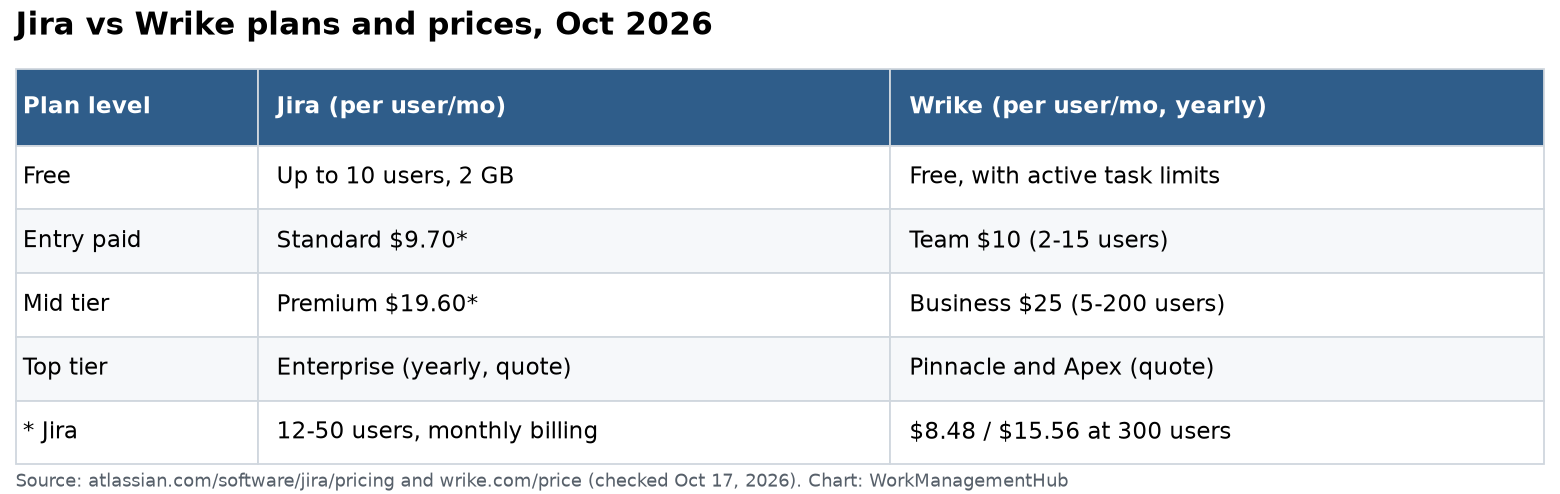
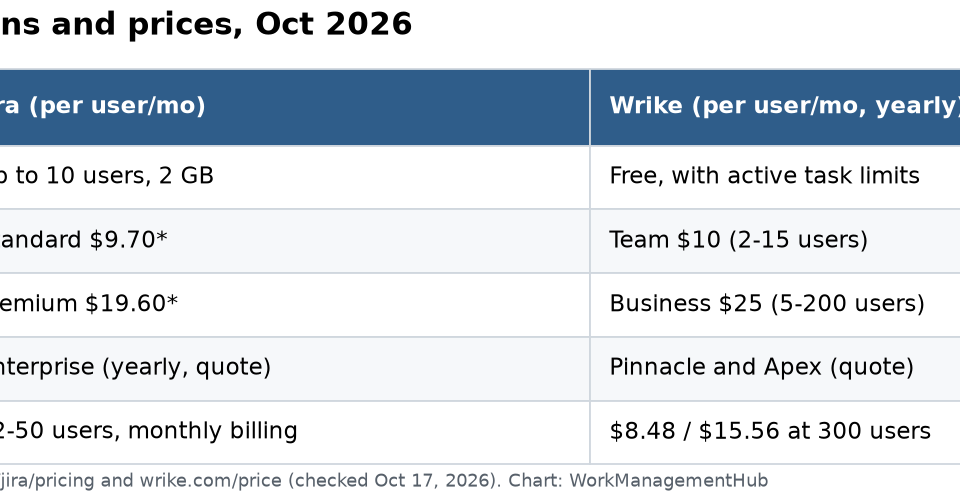
Jira’s pricing advantage at entry level is real, not manufactured. At $7.53/user/month for the Standard plan, it undercuts Wrike’s Team plan at $10/user/month by a meaningful margin, particularly for teams in the 25–100 seat range where per-user costs compound quickly. Jira also maintains a free plan that supports up to 10 users — generous enough for small engineering teams to run genuine sprint cycles before committing to a paid subscription.
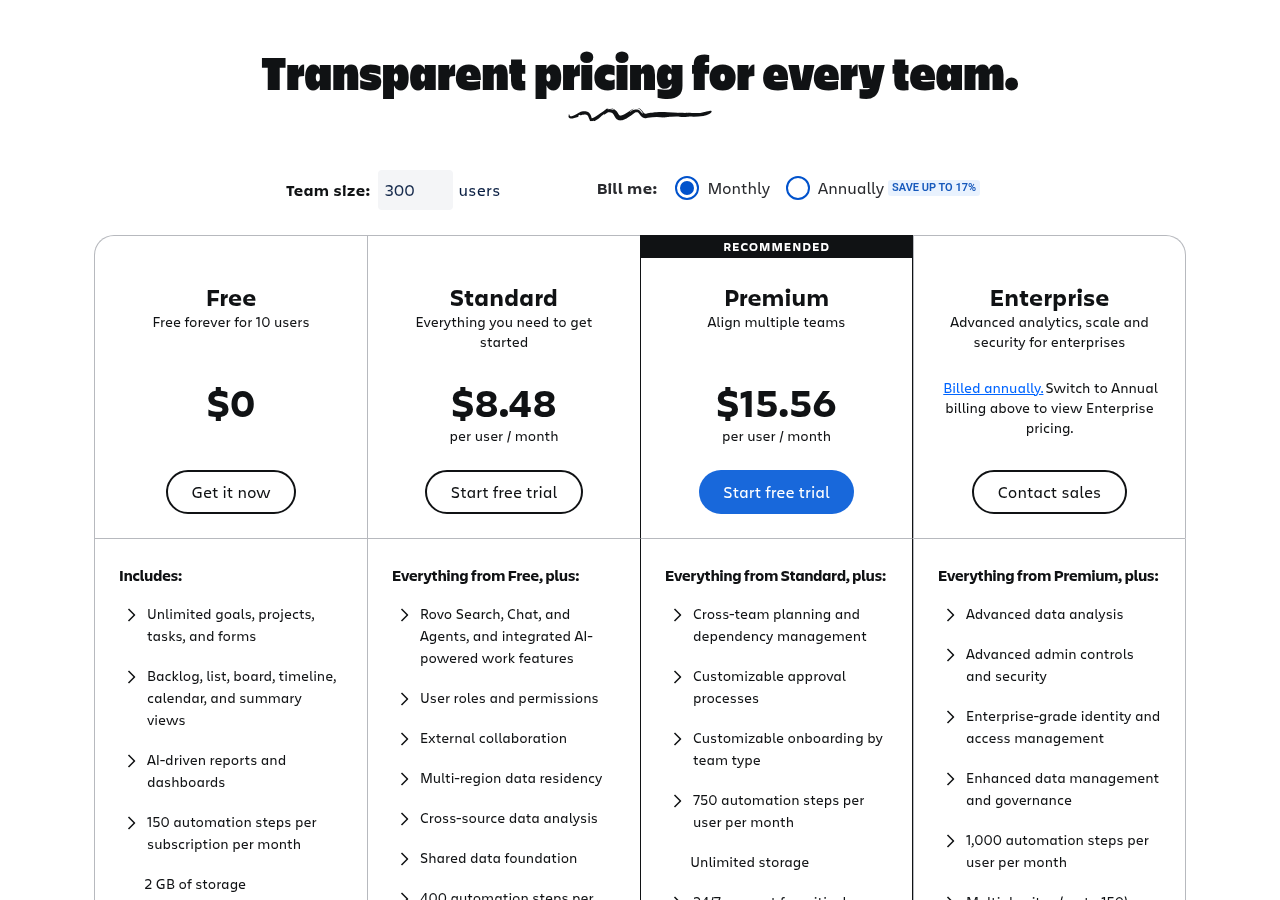
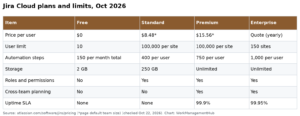
Jira Pricing Tiers (2026)
- Free: Up to 10 users; unlimited projects; backlog management; basic automations
- Standard: $7.53/user/month; advanced permissions; audit logs; 250GB storage
- Premium: $13.53/user/month; Atlassian Intelligence (AI features); advanced roadmaps; global automation rules
- Enterprise: Custom pricing; unlimited sites; Atlassian Access; centralized admin; enhanced SLAs
AI access in Jira requires the Premium or Enterprise tier. At $13.53/user/month, that is the realistic entry point for teams intending to use the Spring 2026 AI agent capabilities. For a 50-person engineering team, that translates to approximately $8,118/year — a predictable, bundled cost with no per-action metering. See Atlassian’s official Jira pricing page for current rates.
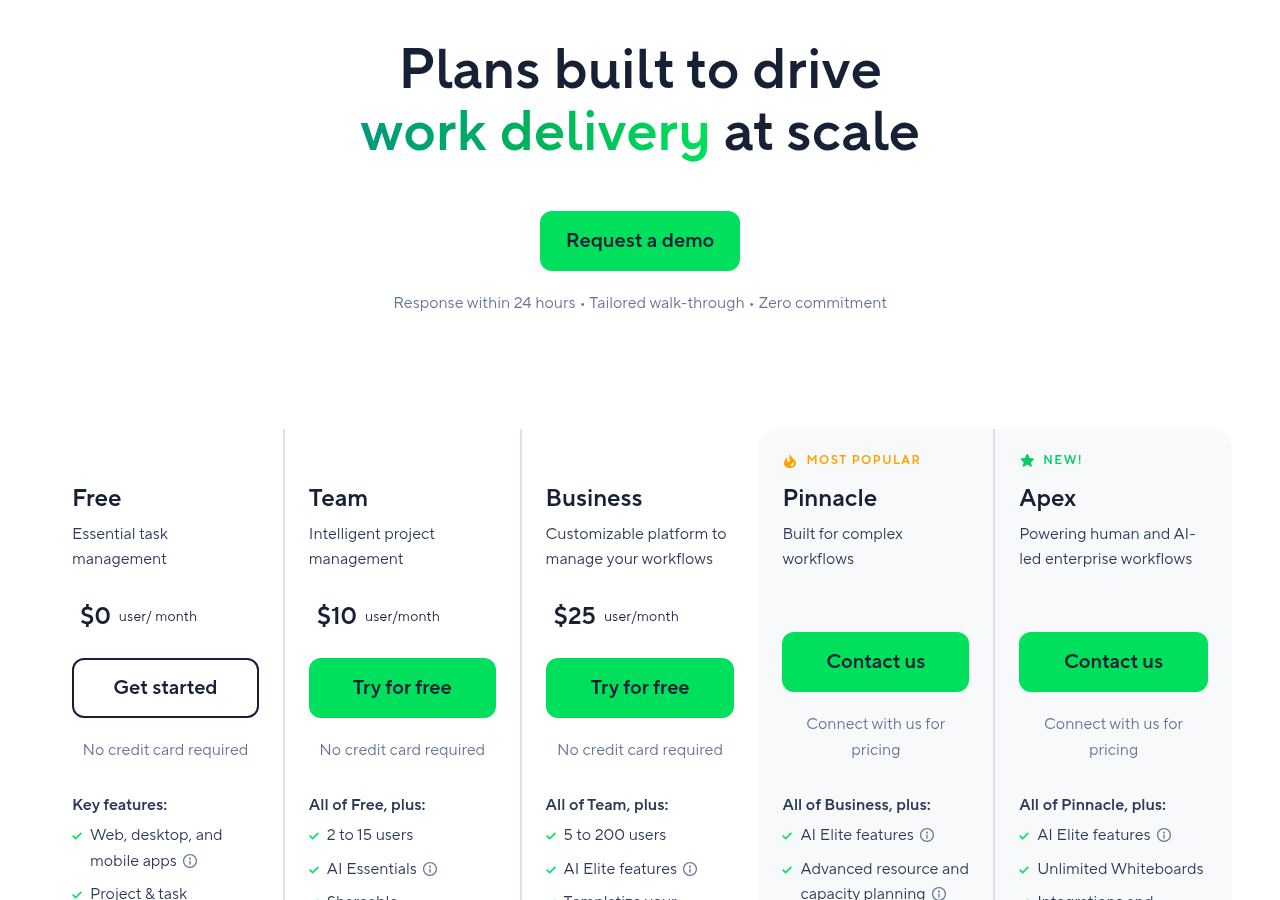
Wrike Pricing Tiers (2026)
- Free: Up to 5 users; basic tasks and boards; limited integrations
- Team: $10/user/month; unlimited projects; 2GB storage per user; 200 automation actions/month
- Business: $24.80/user/month; custom workflows; resource management; project portfolios; 5GB storage per user; 200 automation actions/month
- Enterprise: Custom pricing; advanced security; unlimited automations; admin controls; HIPAA compliance available
- Pinnacle: Custom pricing; advanced analytics; team utilization dashboards; locked budgets
Wrike’s Business plan at $24.80/user/month is where most mid-market operational teams actually land. The Team plan’s 200 automation actions per month is too restrictive for departments running active intake workflows or cross-departmental handoffs. This creates a real pricing gap: operations teams that need Wrike’s full feature set pay roughly 3.3x more than an engineering team running Jira Standard. See Wrike’s official pricing page for current plan details.
| Plan Level | Jira | Wrike |
|---|---|---|
| Entry paid | $7.53/user/month (Standard) | $10/user/month (Team) |
| Mid-market | $13.53/user/month (Premium) | $24.80/user/month (Business) |
| AI included at | Premium tier and above | Business tier and above |
| Enterprise | Custom — typically negotiated for 100+ seats | Custom — Pinnacle tier adds advanced analytics |
| Free tier limit | 10 users | 5 users |
The pricing story favors Jira for engineering teams and small-to-mid-market technology companies. It favors Wrike primarily at Enterprise, where the compliance certifications and advanced analytics justify the cost for regulated industries or large marketing organizations. For teams also evaluating Monday.com as a Wrike alternative, our monday.com vs Jira 2026 comparison provides additional context on that three-way market.
Jira vs Wrike 2026: AI Agents Compared — Spring Release vs Wrike GA
The AI agent question is where the 2026 competitive landscape genuinely shifted. Both platforms delivered on their AI roadmaps before mid-year — but the implementations reflect their core product philosophies more than any other feature category.
Jira’s Spring 2026 AI Release
Atlassian’s Spring 2026 release introduced what the company describes as AI that “moves work forward” — a deliberate shift from AI that answers questions to AI that takes action. In practice, this means Jira’s agents can autonomously transition issue statuses, reassign blocked tickets, generate sprint summaries, surface at-risk items based on comment sentiment, and trigger cross-project automation chains within the Atlassian Intelligence layer. The integration with Rovo — Atlassian’s knowledge and search agent — means the AI can act on context drawn from Confluence pages, prior sprint data, and linked Bitbucket commits, not just the current ticket state.
For engineering teams, this is meaningful automation. A developer does not need to manually update every issue after a deployment — the agent monitors the connected CI/CD pipeline and propagates status changes. Blocked items surface automatically before they become sprint failures. The practical gain is in reducing the administrative overhead that Jira historically imposed on developers who found the tool powerful but friction-heavy to maintain. For a full walkthrough of how to configure these agents, see our Jira AI agents setup guide.
Wrike’s AI Agents: GA March 2026
Wrike’s AI Agents reached general availability in March 2026, with a multi-action trigger architecture that is purpose-built for operational workflows. Where Jira’s agents optimize the path of a single ticket through a sprint, Wrike’s agents are designed for cross-functional handoffs — the kind of workflow where a creative brief triggers a request form, which auto-assigns a project owner, notifies a legal reviewer, and schedules a kickoff meeting based on resource availability. That chain of events is exactly what operational and marketing teams deal with daily, and Wrike’s agents handle it without requiring each step to be manually initiated.
The agent capabilities also include intake automation: Wrike can now process incoming requests from forms or emails, classify them against existing project templates, and either auto-create the project or flag it for human review based on configurable confidence thresholds. This is genuinely useful for PMO teams managing high request volumes. For a detailed breakdown of what Wrike’s agents can do in practice, our Wrike AI agents deep dive covers the full configuration.
The AI Parity Question
Are these platforms at AI parity? Functionally no — but only because they are solving different problems. Jira’s AI agents are deeper for engineering workflows; Wrike’s are broader for operational ones. If you try to use Jira’s AI to manage a marketing campaign intake process, it will underperform. If you try to use Wrike’s AI to manage a sprint backlog, it will underperform. The 2026 AI releases reinforce the audience split rather than resolving it.
Workflow Depth and Methodology Support
This is the category where the audience split becomes impossible to ignore. Jira was built from the ground up around software development methodologies. Every structural element — issue types, epics, sprints, story points, velocity charts, burndown charts, cumulative flow diagrams — maps directly to Scrum and Kanban practices. When a company asks “does this tool support Agile?” and the honest answer is “Jira essentially is Agile” — that is not marketing copy, it is architectural fact.
Wrike supports sprints and kanban boards, and it would be inaccurate to call its agile support non-existent. But the platform was not designed with a sprint as its core unit of work. Its core unit is the task within a project, with flexible views (Gantt, board, table, calendar, workload) applied on top. For a team running Scrum, this means Wrike requires more configuration to approximate what Jira delivers natively — and that configuration gap is a real onboarding cost that disappears from most comparison articles.
Wrike’s structural advantage is on the other side of the workflow spectrum: operational and cross-functional project management. Its Gantt chart is among the best in the category — interactive, dependency-aware, and baseline-capable. Its workload view gives managers genuine visibility into individual capacity across projects and departments simultaneously. Its request forms and blueprint templates handle intake workflows that Jira was never designed to manage. For PMO teams coordinating multiple departments, agencies managing client deliverables, or marketing operations teams running campaign workflows, Wrike’s native capabilities are substantially better than Jira’s — without plugins.
Integrations and Ecosystem
Jira’s integration advantage is not subtle: the Atlassian Marketplace hosts over 3,000 apps, making it one of the largest third-party ecosystems in the work management category. More importantly for engineering teams, the native depth of those developer-tool integrations goes well beyond a basic API connection. Jira’s integration with Bitbucket, GitHub, and GitLab surfaces commit references, pull request statuses, and deployment events directly inside issue views. A developer can see the full development lifecycle of a feature — from backlog to merge to production deployment — without leaving the ticket. Connections to PagerDuty, Jenkins, CircleCI, and similar tools make Jira a genuine hub for the engineering toolchain, not just a task tracker sitting beside it.
Wrike’s 400+ integrations are fewer in number but more intentionally matched to its buyer profile. Native connectors to Salesforce, HubSpot, Adobe Creative Cloud, Slack, Microsoft Teams, Box, and Google Workspace cover the operational and marketing technology stack. The Adobe Creative Cloud integration in particular — which allows designers to share assets and receive feedback without leaving their creative environment — is a genuine differentiator that Jira cannot match without significant custom configuration. For agencies and in-house creative teams, this integration alone justifies a Wrike evaluation.
The honest summary: Jira wins on volume and depth for developer toolchains. Wrike wins on fit for business and operational toolchains. If your team’s primary external tools are GitHub and PagerDuty, Jira is the correct choice. If your team’s primary external tools are Salesforce and Adobe CC, Wrike is the correct choice. This is not a close call in either direction.
Ease of Use and User Satisfaction
The user satisfaction gap between these platforms is significant and directionally important. Wrike holds a 71% positive review rate versus 58% for Jira — a 13-point difference that reflects a real and persistent pattern in how each tool’s users experience it day-to-day.
Jira’s satisfaction problem is well-documented and largely attributable to configuration complexity. The platform is extraordinarily powerful, but that power comes with administrative overhead that scales with organizational complexity. Custom workflows require screen schemes, permission schemes, and issue type configurations that are non-trivial to set up correctly. Non-technical users — particularly in product, design, or operations roles who are pulled into engineering Jira boards — frequently find the tool confusing without investment in onboarding and training. The 58% satisfaction rate does not mean Jira is a bad tool; it means Jira is a tool that rewards organizations willing to invest in proper configuration and governance.
Wrike’s higher satisfaction rating is consistent with its design philosophy. The platform prioritizes a visual, low-configuration experience that non-technical users can navigate from day one. Multiple views of the same work (list, board, Gantt, calendar, table) mean users can adopt the format they prefer without administrator intervention. Request forms route work to the right place automatically. Onboarding friction is materially lower, which produces higher adoption rates and therefore higher satisfaction scores in review aggregators.
The practical implication for buyers: if your team has a dedicated Jira administrator and engineering-literate users, the satisfaction gap narrows considerably. If your team is adopting a work management tool with limited technical resources and needs high adoption velocity — particularly across non-technical departments — the satisfaction data points clearly toward Wrike. This connects directly to how Jira compares with other tools popular among engineering teams; our Jira vs Linear 2026 guide covers that developer-focused comparison in detail.
Who Should Choose Jira
Jira is the correct choice if your organization meets any of the following conditions:
- You are running Scrum or Kanban for software development. Jira’s sprint tooling, backlog management, velocity charts, and story point tracking are native and mature. No other tool in the market matches Jira’s depth for teams running textbook Scrum at scale.
- You are embedded in the Atlassian ecosystem. If your team already uses Confluence for documentation, Bitbucket for code hosting, or Atlassian Access for identity management, Jira’s integrations are additive without incremental cost. Breaking out of the ecosystem to evaluate Wrike means paying for cross-tool connections you currently get for free.
- Your team uses GitHub, GitLab, or other CI/CD tools as a primary workflow surface. Jira’s depth of integration with developer toolchains — including commit linking, deployment tracking, and build status surfacing — is not replicated by Wrike at the same level.
- You need highly customizable workflow automation at the issue level. Jira’s automation engine supports complex multi-condition rules that go deeper than Wrike’s current automation builder for engineering-specific logic.
- Budget is a primary constraint and your team is under 50 people. At $7.53/user/month on the Standard plan, Jira’s cost advantage over Wrike is material for smaller organizations not yet requiring AI features.
- You have or plan to hire a Jira administrator. The ROI on Jira’s configuration depth is high — but it requires someone who can unlock it. Organizations with the technical resources to configure Jira properly get a tool that grows with their engineering complexity for years.
Who Should Choose Wrike
Wrike is the correct choice if your organization matches one or more of the following profiles:
- You are managing cross-functional operational workflows. Marketing campaigns, agency deliverables, client project management, and PMO-led portfolio governance are Wrike’s native territory. The platform was designed for these workflows in a way that Jira simply was not.
- You need strong resource management without plugins. Wrike’s built-in workload view and resource allocation tools allow managers to see team capacity across all active projects in a single view. Jira requires third-party apps to approach this capability.
- You want faster adoption across non-technical teams. If your rollout includes marketing coordinators, account managers, HR, legal, or finance stakeholders who will push back on complexity, Wrike’s ease-of-use advantage translates directly into adoption velocity. The 71% satisfaction rate is a leading indicator of successful deployment.
- You work in a regulated industry requiring HIPAA compliance. Wrike’s Enterprise plan supports HIPAA compliance, making it a viable option for healthcare-adjacent organizations. This is not available on Jira’s commercial plans.
- Your creative team uses Adobe Creative Cloud. Wrike’s native Adobe integration creates a feedback and asset management loop that eliminates the round-trip between design tools and project management tools. This is a concrete workflow improvement with no Jira equivalent at the same level of depth.
- You need advanced cross-project portfolio reporting out of the box. Wrike’s reporting capabilities — including cross-project rollup dashboards and the advanced analytics available on Pinnacle — are stronger for executive-level visibility than Jira’s default reporting suite.
- You are running AI-powered operational intake workflows. Wrike’s March 2026 AI agents with multi-action triggers are purpose-built for the kind of high-volume request management that operational teams deal with daily. If automated intake classification is on your roadmap, Wrike’s current agent capabilities are ahead for this use case.
Jira wins for engineering organizations running Agile software development — its sprint tooling, developer integrations, Atlassian ecosystem depth, and lower starting price make it the correct choice for technical teams willing to invest in proper configuration. Wrike wins for cross-functional operational teams in marketing, PMO, agencies, and regulated industries — its higher user satisfaction, built-in resource management, AI-powered intake automation, and broader compliance certifications make it the better fit where adoption speed and operational breadth matter more than engineering depth. The 13-point user satisfaction gap and the $2.47/user/month price premium are the two numbers that should anchor your decision: if you can justify the cost and have non-technical stakeholders who need to adopt the tool, Wrike’s investment pays back in adoption and capability. If you have technical users running sprints and a budget constraint, Jira is the answer.
Frequently Asked Questions
Is Jira or Wrike better for non-technical teams?
Wrike is the clear winner for non-technical teams. Jira’s power comes with configuration complexity that creates friction for users without Agile or engineering backgrounds — which is why Jira’s user satisfaction rate sits at 58% while Wrike’s is 71%. Wrike’s visual interface, flexible views, and lower-configuration workflow templates are built for the kind of cross-functional, non-technical teams that populate marketing departments, PMO functions, and agency project management. If your team does not have a dedicated Jira administrator and the majority of users are non-technical, Wrike will achieve faster and higher adoption.
Can Wrike replace Jira for software development teams?
For most software development teams running Scrum or Kanban, Wrike is not a viable replacement for Jira. Wrike supports basic agile views and sprints, but it lacks the native backlog management, velocity tracking, burndown charts, story point estimation, and CI/CD pipeline integrations that Jira delivers out of the box. A dedicated engineering team would need to configure Wrike significantly to approximate Jira’s Scrum tooling, and the result would still fall short on developer-tool integration depth. The exception is a small engineering team with minimal process requirements that prioritizes ease of use over workflow depth — in that narrow case, Wrike’s lower friction may outweigh the feature gap.
How do Jira and Wrike compare on AI features in 2026?
Both platforms reached AI agent general availability in early 2026, but with different focuses. Jira’s Spring 2026 AI release introduced agents that autonomously move work forward within engineering workflows — transitioning issues, surfacing blocked tickets, and triggering automation chains based on CI/CD events. Wrike’s AI Agents, which reached GA in March 2026, are optimized for multi-action operational triggers: request intake classification, cross-department routing, and resource conflict escalation. AI access requires Premium tier or above on Jira ($13.53/user/month) and Business tier or above on Wrike ($24.80/user/month). Neither platform has a clear AI advantage over the other — they are each well-matched to their respective audience’s workflow needs.
What is the real price difference between Jira and Wrike in 2026?
At entry-level paid plans, Jira Standard ($7.53/user/month) is $2.47 cheaper per user per month than Wrike Team ($10/user/month). However, the more meaningful comparison is at the tier where each platform delivers its full feature set for its target audience: Jira Premium at $13.53/user/month versus Wrike Business at $24.80/user/month. For a 50-person team, that is a difference of approximately $6,762/year. Jira’s cost advantage is real and should be a factor in budget-constrained decisions, but Wrike’s higher price reflects genuine additional capability in resource management, compliance certifications, and cross-project reporting that engineering-focused Jira does not deliver at that tier.
Which tool is better for agencies and client-facing project management?
Wrike is the stronger choice for agencies and client-facing project management. Its request forms, blueprint templates, proofing and approval workflows, and cross-project portfolio dashboards are directly relevant to agency operations in a way that Jira’s engineering-centered architecture is not. The Wrike Pinnacle plan adds budget tracking and advanced team utilization analytics that are genuinely useful for agencies managing billable capacity. Jira can be configured for client project management, but it requires significant customization to replicate what Wrike delivers natively — and the result is a tool that still feels like a developer tracker rather than a client-management platform.