
Jira Cloud’s old workflow editor is gone. Atlassian removed it between July 13 and July 26, 2026. Your workflows did not need migrating and still run. What changed is how you edit them: there are no more drafts, and conditions, validators and post-functions now have new names. If you are an admin, the big habit change is making your own backup before you edit.
I have helped teams clean up Jira workflows that grew for years. The new editor is faster once you learn it. But the missing draft step has bitten more than one admin. This guide is based on Atlassian’s workflow editor docs, its final deprecation notice, and the developer docs, checked on October 15, 2026.
What happened and when
- Before 2026: Jira had two editors side by side. The old one spread changes across several pages and held them in a draft.
- Atlassian’s notice: over 95% of customers already published global workflows from the new editor.
- July 13 to 26, 2026: the final removal rolled out. The “Open workflow in old editor” option disappeared.
- Now: all workflow editing happens in the new editor. There is no switch back.
Atlassian was clear on one point: you do not need to migrate your workflows. Existing workflows keep working and stay editable. If you are new to Jira admin work, our Jira ultimate guide covers the basics first.
The rules were renamed, not removed
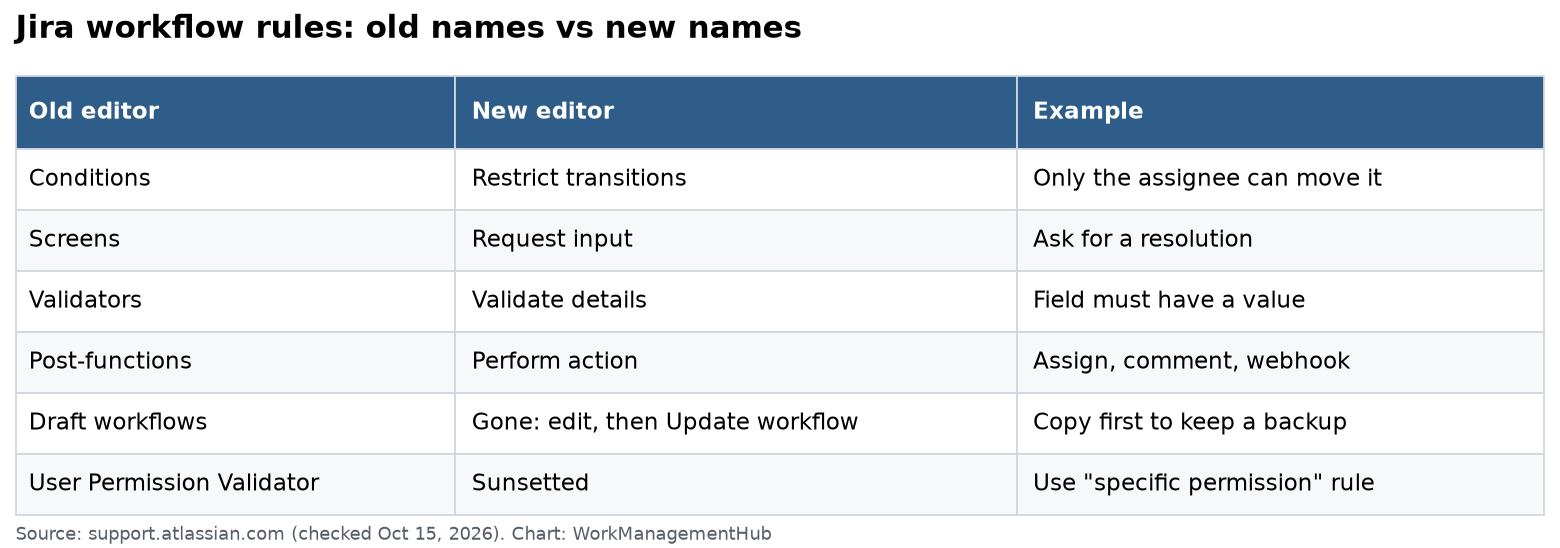
Every old condition, validator and post-function maps to a new rule category. Here is the short version of Atlassian’s mapping table.
| Old editor | New editor | Example |
|---|---|---|
| Conditions | Restrict transitions | Only the assignee can move the work item |
| Screens on a transition | Request input (Show a screen) | Ask for a resolution when moving to Done |
| Validators | Validate details | A field must have a value |
| Post-functions | Perform action | Assign, add a comment, update a field, trigger a webhook |
| Draft workflows | Gone | Edit, then select Update workflow |
A few specific mappings worth knowing:
- Sub-Task Blocking Condition became “Restrict based on the status of subtasks.”
- Field Required Validator became “Validate a field.”
- Copy Value From Other Field became “Copy the value of one field to another.”
- User Permission Validator was sunsetted. Use “Validate that people have a specific permission” instead.
How editing works now
The editor is one screen: a toolbar, a diagram, a details panel, and a Relevant spaces panel that shows which spaces use the workflow before you publish.
Open a workflow
From a company-managed space:
- Select Settings, then Work items.
- Select Workflows and find your workflow.
- Select More actions (•••), then Edit.
From a team-managed space: go to Space settings, then Work types, pick a work type, and select Edit workflow.
Add a rule to a transition
- Select the transition line or label to open its details.
- Select Add in the Rules panel.
- Pick a rule under Restrict transitions, Request input, Validate details or Perform action.
- Configure it, then select Add.
When you are done, select Update workflow. Changes go live right away. Or discard them to return to the previous state.
New things you can do
- Delete statuses in an active workflow. Jira walks you through moving work items out of the deleted status.
- Add outgoing transitions to a status that had none.
- Share one transition across several “From” statuses with one set of rules.
- Switch to Text view with the Text / Diagram toggle. It helps with big, tangled workflows.
- Ask Rovo. Open Rovo Chat and type /manage-jira-workflows to explain a workflow or change statuses, transitions and rules in plain language.
What you lost: the safety net
In the old editor, publishing a draft could keep your original as an inactive backup. The new editor has Discard before you publish, but once you select Update workflow, the change is live. There is no automatic copy of the old version.
My rule for any busy workflow:
- Copy the workflow first. That copy is your rollback point.
- Make the change.
- Test one transition on a test work item.
- Then tell the team.
Admins in Atlassian’s notice thread also asked about the missing XML export. Atlassian staff pointed them to the REST API instead: fetch the workflow as JSON, change it, and send it back through the workflow create or update endpoints. If you keep workflow history in a repo, script that.
Check your marketplace apps and scripts
Most standard workflows needed nothing. The risk sits in app-provided rules, like scripted post-functions or validators from apps such as ScriptRunner or JMWE.
- Atlassian says you can now preview marketplace transition rules in the new editor, with a fuller “View all” view coming.
- Open each workflow that uses app rules and confirm they show and run as expected.
- Watch the order of actions. Atlassian’s example: to clear Resolution when reopening, add an Update a work item field action to that transition so it runs in the right sequence.
- Watch validators. A wrong Validate details rule can block items from being created or moved.
One more date for app developers: in the workflow transition rules API, the draft parameter in WorkflowId is deprecated and will be removed on November 2, 2026. That makes sense, since drafts no longer exist. If you maintain a Connect or Forge app that sends draft, update it before then.
Move complex logic to Automation, but count your steps
Long stacks of post-functions are hard to read. I often move that logic into Jira Automation, where each rule has a clear trigger and audit log. Our Jira automation guide shows how.
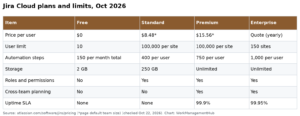
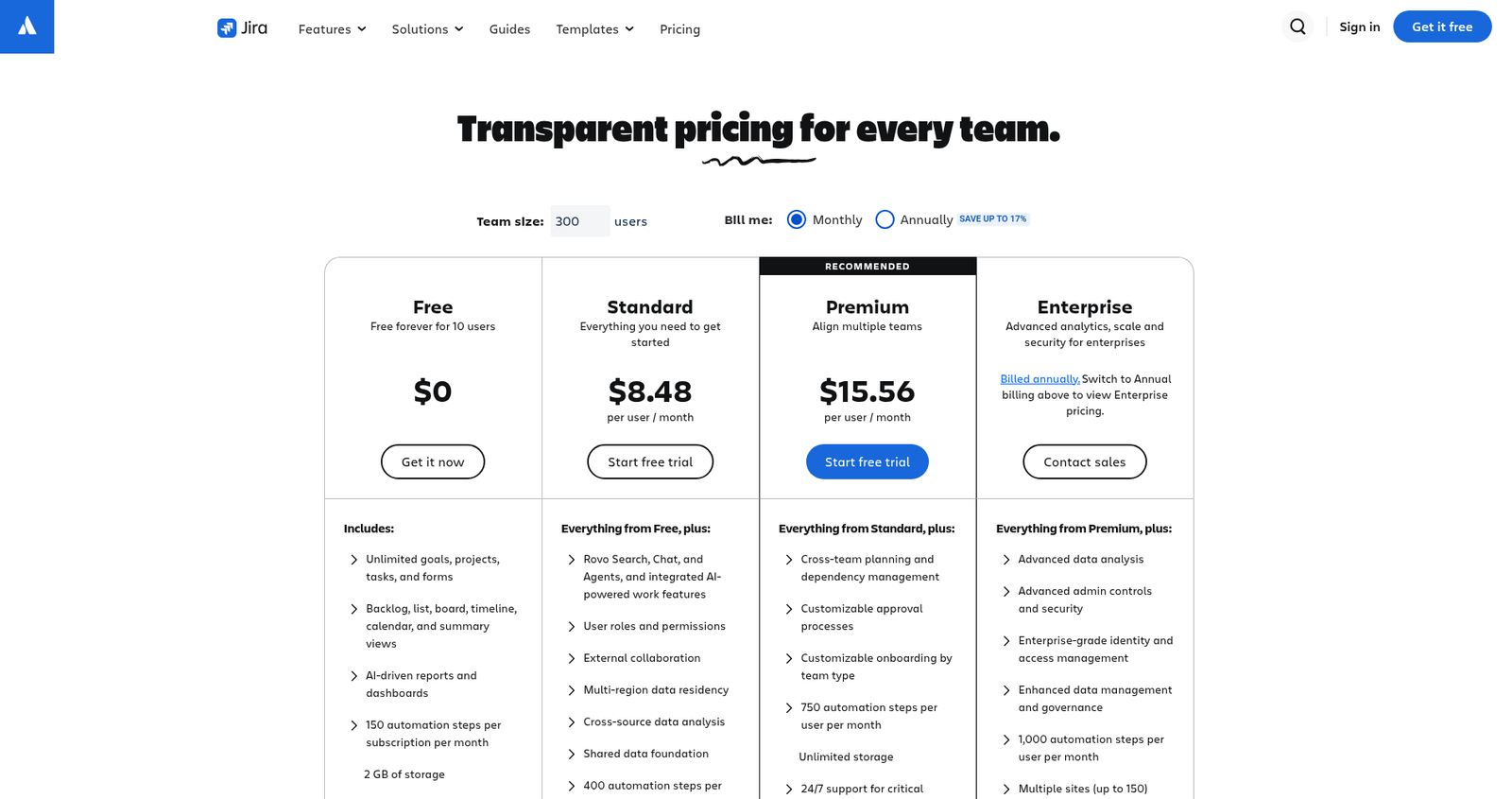
Just know that Automation is metered. Jira’s pricing page lists 150 automation steps per month for the whole Free site, 400 per user on Standard, 750 per user on Premium and 1,000 per user on Enterprise. Our Atlassian fall 2026 pricing breakdown explains how steps are counted.
Troubleshooting the new editor
- “I can’t find post-functions.” Look under Perform action on the transition.
- “Built-in workflow won’t edit.” Copy it and edit the copy.
- “My change hit the wrong project.” Check Relevant spaces before you select Update workflow.
- “People can’t move items anymore.” Check new Restrict transitions and Validate details rules first. Then check permissions with our Jira permissions fix guide.
Honest take
Better: one screen, instant publishing, delete statuses in live workflows, shared transitions, text view and Rovo help.
Worse: no automatic backup, no XML export button, and long-time admins say the new rule names take time to learn. Some admins in Atlassian’s thread still prefer the old layout. That is fair. But the switch is done, so learn the new map and build the backup habit.
Common questions
Do I need to migrate my Jira workflows?
No. Atlassian says existing workflows keep working and can be edited in the new editor. No migration is needed.
When was Jira’s old workflow editor removed?
Atlassian rolled out the final removal from July 13 to July 26, 2026, through Jira’s seasonal releases.
Where did post-functions go?
They are now Perform action rules on a transition. Conditions are Restrict transitions, and validators are Validate details.
Does the new editor still use draft workflows?
No. You edit the published workflow and select Update workflow, or discard your changes. Copy the workflow first if you want a backup.
What changes on November 2, 2026?
The draft parameter in WorkflowId is removed from Jira’s workflow transition rules API. Apps that still send it need an update.
Checked against support.atlassian.com, community.atlassian.com, developer.atlassian.com and atlassian.com/software/jira/pricing on October 15, 2026.
Sponsored