Notion Workers Troubleshooting 2026: Fixing Database Sync, Agent Errors & Credit Issues
Updated May 2026 • Platform: Notion Developer Platform v3.5 • By WorkManagementHub Editorial
- Notion Workers require a Business or Enterprise plan to deploy — Free and Plus users get CLI access only and will hit a
PLAN_TIER_INSUFFICIENTerror on deploy. - Sync Workers own and lock their own databases — attempting to target a pre-existing database will always fail; use a standard or webhook Worker instead.
- Workers are free during beta but switch to Notion Credits billing on August 11, 2026 — configure budgets now or face workflow interruptions when billing goes live.
- Most “no output” issues trace to missing environment variable bindings or a handler that exits without returning a valid response object.
- External integrations (Salesforce, Postgres) fail most often due to hardcoded secrets or missing outbound network allowlist entries — both fixable in the Worker config.
- Timeout errors (
ERR_EXECUTION_TIMEOUT) require either batching your operations or increasing the timeout ceiling innotion.config.js.
Most Notion Workers failures in 2026 come down to three root causes: running on a Free or Plus plan (upgrade to Business/Enterprise to deploy), trying to write a Sync Worker into an existing database (use a standard Worker instead), or missing credit budget configuration ahead of the August 11, 2026 billing cutover. Check plan tier first, then Worker type, then billing.
- What Are Notion Workers? A 2026 Platform Recap
- Workers Won’t Deploy: Plan Tier Errors
- Sync Worker Can’t Write to Existing Database
- Worker Runs But Produces No Output
- Credits / Billing Errors After August 2026
- External Integration (Salesforce / Postgres) Not Connecting
- Worker Times Out or Returns Error Codes
- Verdict
- FAQ
What Are Notion Workers? A 2026 Platform Recap
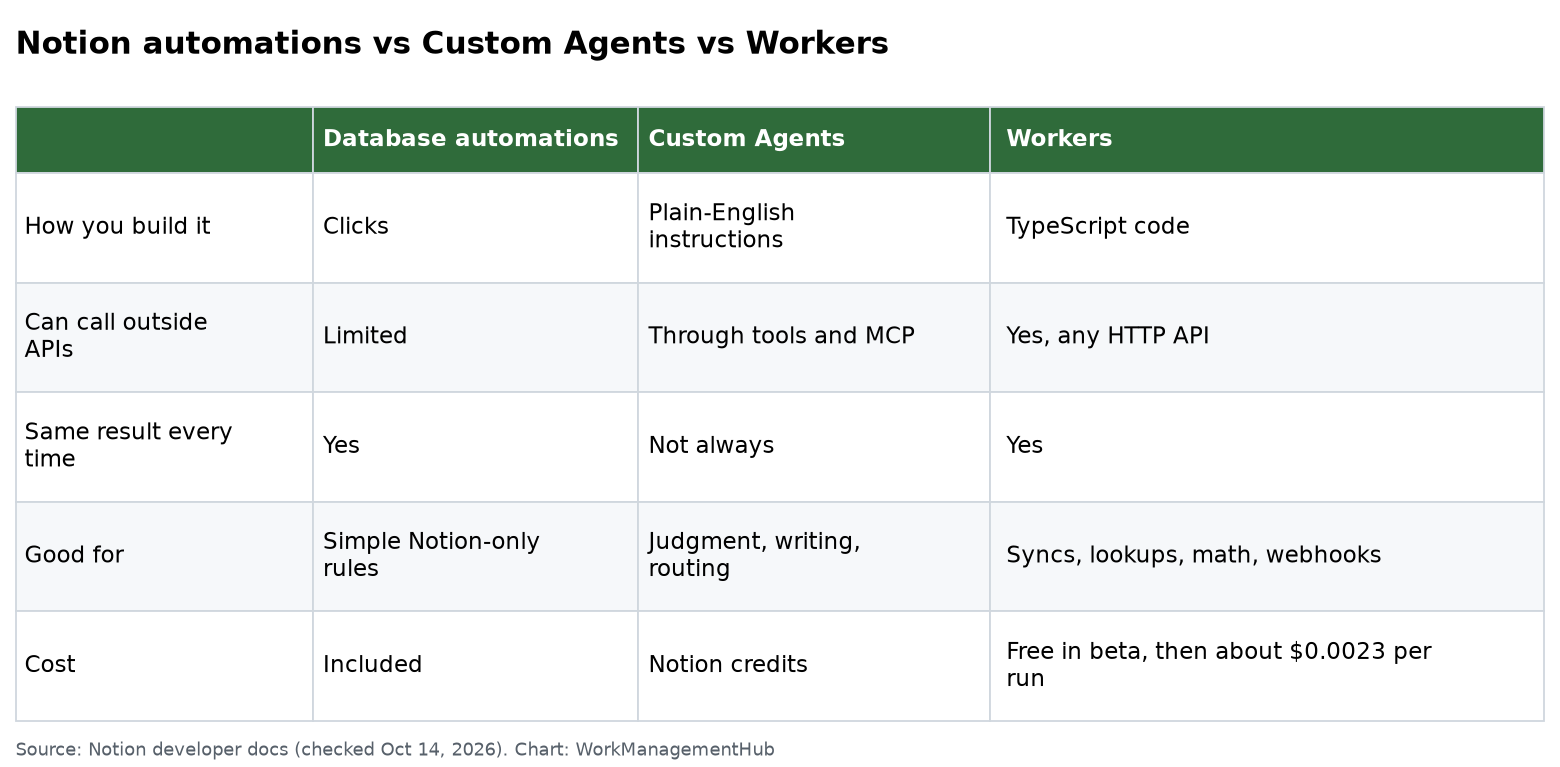
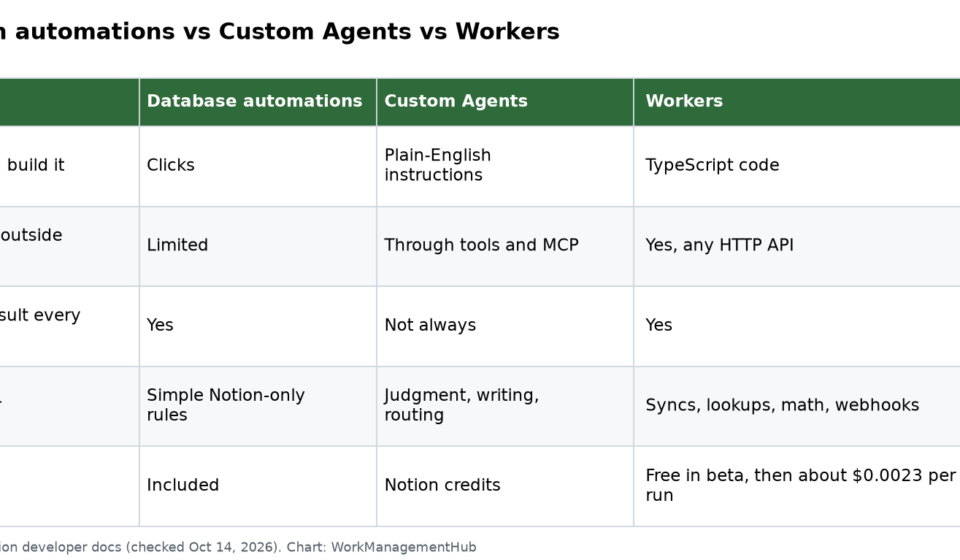
Notion Workers launched on May 13, 2026 as a cornerstone of the Developer Platform v3.5 release. They are serverless compute units that run inside the Notion runtime environment — think Cloudflare Workers or AWS Lambda, but natively aware of your Notion workspace graph. Workers can respond to triggers (HTTP webhooks, database events, scheduled crons), read and write Notion data, and call external APIs without you managing any infrastructure.
Three Worker types shipped at launch:
- Standard Workers — general-purpose, HTTP-triggered compute. Read and write any database you authorize.
- Sync Workers — specialized for external data ingestion. They create and own a locked Notion database where they write synced records. They cannot write to databases they did not create.
- Webhook Workers — event-driven Workers that fire on Notion database changes, page edits, or comment events. Can write to existing databases.
The CLI commands you will use most during troubleshooting are notion deploy, notion workers list, notion workers logs <name>, and notion workers delete <name>. All CLI commands require the Notion CLI v2.0+ installed and an active API token scoped to your workspace. Full reference lives at developers.notion.com.
For a broader look at what Notion’s agent platform can do in 2026, see our Notion Custom Agents 2026 Feature Guide. If you are evaluating whether Notion Workers or a competing developer platform is the right fit, our Notion vs. Linear comparison for developer and product teams covers the tradeoffs in depth.
Workers Won’t Deploy: Plan Tier Errors
Symptoms: Running notion deploy returns Error: PLAN_TIER_INSUFFICIENT — Workers deployment requires Business or Enterprise plan. The Worker appears in notion workers list with status DRAFT but never transitions to ACTIVE.
Root cause: Notion Workers are only deployable on Business and Enterprise plan workspaces. Free and Plus plan users can install the CLI, author Workers locally, and run them with notion dev for local testing, but the deploy and remote run commands are gated at the platform level.
Fix steps:
- Open your Notion workspace and navigate to Settings & Members > Plans.
- Confirm your current plan. If it shows Free or Plus, Workers deployment is not available without an upgrade.
- If you are on Business or Enterprise but still getting the error, verify that your API token was generated inside the correct workspace — tokens are workspace-scoped, and a token from a personal Free workspace will fail even if your team workspace is on Business plan.
- Re-generate your token: go to Settings > My connections > Develop or manage integrations, create a new internal integration, and copy the token.
- Update your local environment: run
notion auth --token <your-new-token>. - Re-run
notion deploy. The status should move toACTIVEwithin 30–60 seconds. - If the deploy still fails, run
notion workers list --verboseand share therequestIdfrom the error output with Notion support — plan-gate enforcement bugs do occur during platform beta.
Sync Worker Can’t Write to Existing Database
Symptoms: Your Sync Worker deploys successfully and shows ACTIVE, but on first execution it returns Error: SYNC_TARGET_LOCKED — cannot write to database not owned by this Sync Worker. No data appears in the target database.
Root cause: This is by design, not a bug. Sync Workers create and manage their own locked databases as part of their initialization lifecycle. The architecture ensures referential integrity — a Sync Worker is the sole writer to its managed database, preventing data corruption from concurrent writes. They cannot be pointed at a database that already exists in your workspace, regardless of permissions.
Fix steps:
- Decide which architecture fits your use case:
- You need a fresh database populated by an external source — keep your Sync Worker. It will auto-create the correct database schema on first run. Reference the created database ID from the Worker logs and link it wherever needed in your workspace.
- You need to write to an existing database — you must use a Standard Worker or a Webhook Worker instead of a Sync Worker. Proceed to step 2.
- Delete your current Sync Worker:
notion workers delete <worker-name>. - In your project, open
notion.config.jsand changetype: "sync"totype: "standard"(ortype: "webhook"for event-driven writes). - In your handler, use the Notion SDK’s
notion.pages.create({ parent: { database_id: "<your-db-id>" }, ... })directly — no sync lifecycle methods. - Add the target database ID to your Worker’s environment variables in
notion.config.jsunder theenvblock so it is not hardcoded. - Run
notion deployand verify the new Worker appears innotion workers listwithACTIVEstatus before testing a write.
For teams building complex data pipelines, the official Notion Workers documentation at notion.so/help/workers has a detailed comparison of all three Worker type architectures with schema diagrams.
Worker Runs But Produces No Output
Symptoms: notion workers list shows the Worker status as ACTIVE and invocations are logged, but no pages are created, no database rows appear, and no HTTP response body is returned. The Worker appears to run silently and do nothing.
Root cause: Silent Worker failures fall into three categories: (1) the handler function exits without returning a valid response object, (2) required environment variables are undefined at runtime, or (3) the Notion API calls succeed but are writing to a database the Worker does not have page-level access to.
Fix steps:
- Stream live logs immediately:
notion workers logs <worker-name> --follow. Trigger your Worker again while watching the log stream. Look for any uncaught exceptions swallowed by a broadcatchblock that logs nothing. - Verify your handler returns a response. Every Standard Worker handler must return an object with at least
{ status: 200 }. A handler that returnsundefinedor nothing will complete without error but also without doing any work — the runtime interprets a missing return as an empty no-op response. - Check environment variable binding: run
notion workers env list <worker-name>. Confirm every variable your code references (API keys, database IDs, external endpoints) appears in the output. - Add a missing variable:
notion workers env set <worker-name> MY_DB_ID=<value>. Environment changes take effect on the next invocation — no redeploy needed. - Confirm the integration has been granted access to the target database in Notion. In Notion, open the database, click the three-dot menu, go to Connections, and verify your internal integration is listed. Worker runtime inherits the integration’s access scopes, not the deploying user’s permissions.
- Add a top-level
console.logat the very start of your handler as a smoke test. If that log line does not appear, the Worker is not being invoked at all — check your trigger configuration (webhook URL, cron expression, or database event binding).
Credits / Billing Errors After August 2026
Symptoms: After August 11, 2026, Workers that were running fine in beta stop executing. The error returned is Error: CREDIT_BUDGET_EXHAUSTED or Error: BILLING_NOT_CONFIGURED — no credit budget assigned to this Worker. Scheduled Workers skip their next run silently.
Root cause: Notion Workers are free during the beta period. On August 11, 2026, billing transitions to the Notion Credits model. Teams that have not configured a credit budget will have their Workers suspended at the billing cutover, because the platform cannot charge executions against an unconfigured budget. This is not a bug — it is an intentional hard stop to prevent unexpected charges, but it does interrupt running workflows.
Fix steps (do this before August 11, 2026):
- Go to Settings & Members > Credits & Billing in your Notion workspace.
- Review the credit consumption estimate — Notion shows projected monthly spend based on your beta usage history. Use this to size your budget.
- Click Configure Worker Budget and set a monthly credit ceiling. If you have multiple Workers, you can assign per-Worker budgets or a shared pool from this screen.
- Enable usage alerts: set an alert threshold at 70% and 90% of your budget so you get email notifications before Workers are suspended.
- For Enterprise plans: work with your Notion account executive to negotiate credit block purchases, which are cheaper than pay-as-you-go at scale.
- If Workers are already suspended post-cutover: navigate to Settings > Credits & Billing > Suspended Workers, configure the budget, then click Resume All. Workers will resume within 2–5 minutes of budget activation.
- Verify resumption:
notion workers listshould show all Workers returning toACTIVEstatus.
External Integration (Salesforce / Postgres) Not Connecting
Symptoms: Workers that connect to Salesforce, PostgreSQL, or other external data sources fail with Error: NETWORK_FETCH_BLOCKED, connection refused, or OAuth token errors. The Worker executes locally with notion dev but fails after deployment.
Root cause: The Notion Workers runtime enforces an outbound network allowlist. Any host not explicitly added to the allowlist in notion.config.js will be blocked. Additionally, secrets (API keys, OAuth tokens, connection strings) must be stored in Worker environment variables — values hardcoded in source files are stripped at deploy time for security compliance.
Fix steps:
- Open
notion.config.jsand add the external host to theallowedHostsarray. For Salesforce this is typically*.salesforce.comand*.force.com. For Postgres, add the hostname or IP of your database server. - Move all secrets out of source code and into environment variables:
notion workers env set <worker-name> SF_CLIENT_SECRET=<value>. - In your handler, reference secrets via
process.env.SF_CLIENT_SECRET— never inline the value as a string literal. - For Salesforce OAuth: verify your Connected App’s callback URL includes the Notion Workers runtime callback endpoint. Check your OAuth token expiry — long-lived Workers may need token refresh logic if the Salesforce session expires mid-run.
- For PostgreSQL: confirm the database server accepts connections from Notion’s outbound IP ranges. Notion publishes these in the Developer Platform documentation under the Workers network reference. You will need to add these CIDRs to your Postgres firewall or security group rules.
- For SSL/TLS errors with Postgres: ensure you are passing
ssl: { rejectUnauthorized: true }in your connection config and that your Postgres instance is running a valid certificate. The Workers runtime enforces strict TLS — it will not connect to servers with self-signed certificates unless you explicitly pass the CA cert as an environment variable. - Redeploy after any
notion.config.jschange:notion deploy. Environment variable changes (vianotion workers env set) do not require a redeploy.
If you are comparing Notion Workers as an integration layer against Linear’s agent platform for developer workflows, our Linear Agent Feature Deep Dive 2026 is a useful reference. For teams using Asana alongside Notion for automation, see How to Use Asana AI Rules & Automation in 2026.
Worker Times Out or Returns Error Codes
Symptoms: Workers return ERR_EXECUTION_TIMEOUT after 30 seconds, or intermittently return 429 Too Many Requests, 500 Internal Server Error, or 503 Service Unavailable. Workers processing large datasets partially complete and leave data in an inconsistent state.
Root cause: The default Worker execution timeout is 30 seconds. Long-running database reads, paginated API calls, or large batch writes frequently exceed this. The 429 error indicates the Worker is hitting Notion API rate limits (3 requests/second per integration). 500 and 503 are platform-side errors that warrant retry logic.
Fix steps:
- For timeout errors, first increase the timeout ceiling in
notion.config.js:export default { type: "standard", timeout: 120, // seconds; max varies by plan ... }Business plan maximum is 120 seconds. Enterprise plans can configure up to 300 seconds.
- For large dataset operations, implement pagination rather than fetching all records in one call. Use Notion SDK’s cursor-based pagination: process a page, store the cursor, and either loop within the timeout or use a scheduled follow-up Worker invocation.
- Break write operations into batches of 50 or fewer pages/rows per Worker execution. For datasets of thousands of records, use a queue pattern — write pending IDs to a Notion database and process them with a recurring scheduled Worker.
- For 429 errors, implement exponential backoff. A simple pattern:
async function withRetry(fn, retries = 3, delay = 1000) { try { return await fn(); } catch (e) { if (e.status === 429 && retries > 0) { await new Promise(r => setTimeout(r, delay)); return withRetry(fn, retries - 1, delay * 2); } throw e; } } - For 500/503 errors, apply the same retry wrapper with a maximum of 3 attempts. Log the Notion
requestIdfrom the error response — you will need it if you open a support ticket. - Use
notion workers logs <name> --since 1hto retrieve the last hour of execution logs and identify whether timeout errors are consistent or intermittent, which changes the fix priority. - Run
notion workers list --verboseafter applying changes to confirm the new timeout ceiling is reflected in the Worker’s metadata before testing.
Notion Workers are genuinely powerful, and most of the issues teams hit in 2026 are not platform bugs — they are architecture decisions that require you to match Worker type to use case, manage credentials correctly, and plan for billing ahead of the August 11 credit cutover. The plan-tier gate is the single most common blocker and the fastest to resolve: confirm Business or Enterprise plan, regenerate your token in the right workspace, and redeploy. Sync Worker database conflicts are the second most common issue and require switching to a Standard or Webhook Worker — a five-minute config change. If you get these two right and configure your credit budget before the billing transition, Notion Workers are a reliable, low-maintenance compute layer for workspace automation. The timeout and rate-limit issues are solvable with standard async patterns; they are not unique to Notion and any developer familiar with serverless platforms will handle them quickly. Overall: ship with Standard Workers first, introduce Sync Workers only for external data ingestion pipelines, and budget your credits before August 11. See also our full Notion Workers agent troubleshooting guide for ongoing updates as the platform matures out of beta.
Frequently Asked Questions
Last reviewed: May 2026. Platform version: Notion Developer Platform v3.5. Information is current as of the Workers beta period. Notion Credits billing details may be updated by Notion Inc. before the August 11, 2026 cutover — check developers.notion.com for the latest billing documentation.