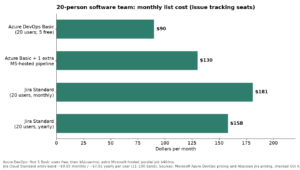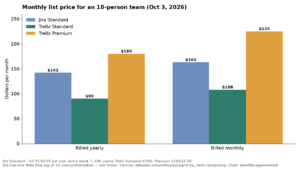

Jira Cloud in 2026 runs Free for teams under 10 people, Standard at $7.91 per user monthly on annual billing, and Premium at $14.54 per user monthly on annual billing. Enterprise is custom-quoted and generally starts around 800+ users. A 25-person team on Standard runs about $198/month; the same team on Premium runs closer to $364/month. Monthly (non-annual) billing costs more per seat than annual on every paid tier.
What each Jira plan actually costs
Atlassian buries the per-tier breakdown behind a seat-count slider on its own pricing page. Here’s the plan structure as of mid-2026, pulled from Atlassian’s published rate card and checked against actual client invoices.
| Plan | Annual (per user/mo) | Monthly billing (per user/mo) | User cap | Standout inclusions |
|---|---|---|---|---|
| Free | $0 | $0 | 10 | Unlimited projects, 2 GB storage, community support only |
| Standard | $7.91 | Higher than annual rate | 100,000 | 250 GB storage, audit logs, business-hours support |
| Premium | $14.54 | Higher than annual rate | 100,000 | Advanced roadmaps, sandbox, 24/7 support, 99.9% SLA, Atlassian Intelligence |
| Enterprise | Custom quote | Annual only | 100,000 per instance, up to 150 instances | 99.95% SLA, centralized multi-site admin, Atlassian Guard included |
Those Standard and Premium numbers are entry-band rates for smaller rosters. Atlassian uses tiered per-user pricing, meaning the rate per seat drops as your total user count climbs past certain thresholds — more on why that matters below. Atlassian’s Jira Cloud plan comparison doc is the most reliable place to check feature inclusions, and the official pricing page has the exact number for your account, since list prices get revised a couple of times a year.
Free plan: fine until it isn’t
The Free tier is a legitimately usable product, not a crippled trial. You get unlimited projects and issues, Scrum and Kanban boards, backlog management, and basic timeline views. I’ve set teams of 4-6 up on Free for internal tooling projects, and they’ve stayed there for a year without complaint.
The 10-user cap is a hard wall — the moment you try to invite an eleventh person, Jira blocks the invite until you upgrade or remove someone. The bigger practical constraint is usually the 100 automation runs per month. That sounds like plenty until you wire up two or three rules that fire on every status change across an active sprint board. Teams burn through that allotment by the third week of the month and don’t notice until automations silently stop firing.
Standard: where most engineering teams actually live
Standard is the plan I put most client teams on by default, and it’s not close. At $7.91/user/month annually, you get real file storage (250 GB instead of 2 GB), audit logs for compliance conversations, and business-hours support that’s staffed enough to be useful for anything short of an outage.
What people underestimate is the automation ceiling. Standard’s automation allowance is a site-wide pool, not per-user, so a 40-person team sharing one automation budget runs out much faster than the same team on Premium, where the allowance scales per seat. If your team leans on Jira automation for CI/CD status updates, Slack notifications, or auto-assignment rules, model your actual rule-execution volume before committing to Standard. I’ve had clients hit automation warnings by week two of a new quarter because nobody accounted for a QA workflow that fires on every build.
Premium: the AI and roadmaps upsell, and when it’s worth it
Premium roughly doubles your per-seat cost over Standard, and the sales conversation will lean hard on two things: Atlassian Intelligence (their AI layer, now bundled into Premium rather than sold separately) and Advanced Roadmaps for cross-project planning. Both are real capabilities, not vaporware, but neither is universally worth the markup.
Advanced Roadmaps earns its cost when you’re running three or more concurrent projects with cross-team dependencies — a mobile team blocked on a backend team blocked on an infra team, say. If you’re running one team’s sprint board, it’s a feature you paid for and will open twice. Atlassian Intelligence is genuinely useful for issue summarization and smart search once you have a few thousand issues in the backlog, but for a 15-person team with a clean backlog, the AI layer won’t move the needle enough to justify the jump.
The reason to upgrade that sales won’t lead with: the 99.9% uptime SLA and 24/7 support. Standard has no contractual uptime guarantee — if Jira goes down during sprint planning, you get a status page and a shrug. If Jira is load-bearing for how your team ships software, that alone can justify Premium regardless of whether you ever touch Advanced Roadmaps.
Enterprise: not really a per-user pricing tier at all
Enterprise isn’t published pricing — it’s a negotiated contract, built for organizations running multiple Jira instances (up to 150 sites under one license) that need centralized admin, a 99.95% SLA, and Atlassian Guard bundled in rather than billed separately. Historically the practical entry point has been around 800 or more users; below that, Atlassian’s sales team will typically push you toward Premium with add-ons instead.
If your procurement team is chasing Enterprise pricing for a 150-person company, push back first. You’re likely better served by Premium plus Atlassian Guard purchased separately — the math rarely favors Enterprise until you’re managing multiple business units on separate Jira sites.
The billing mechanic that catches people off guard: tier cliffs and true-ups
This is the part of Jira billing that generic pricing roundups skip, and it’s the part that actually changes what you pay. Atlassian’s per-user rate isn’t flat — it steps down as your total user count crosses certain volume thresholds. The complication isn’t the discount itself; it’s what happens when headcount moves in the other direction, or fluctuates during the year.
On annual contracts, Atlassian does a “true-up”: add seats mid-term and you’re billed the prorated difference rather than waiting for renewal. What catches teams off guard is that crossing a volume threshold mid-year by adding a batch of contractors can reprice your entire seat count at the new blended rate at renewal, not just the incremental seats. Budget owners who assumed a flat per-seat number get a renewal invoice that doesn’t match their spreadsheet.
On monthly billing, Atlassian bills based on peak concurrent users during the period, not an average or end-of-month snapshot. Onboard 15 contractors for a two-week crunch and offboard them before month-end, and you still pay for all 15 for the full cycle. Teams with seasonal or contractor-heavy headcount should default to annual billing with a deliberately padded seat count — it’s usually cheaper even accounting for unused seats.
What sales will and won’t discount
Atlassian’s self-serve checkout has no negotiation room below a few hundred seats — the price in the cart is the price you pay. Real negotiating room shows up on multi-year annual commitments north of roughly 200-300 seats, where account reps have discretion on both per-seat rate and payment terms. If you’re at that size and paying list price, you’re leaving money on the table.
What reps consistently won’t discount: Marketplace app pricing (a separate vendor relationship entirely), Atlassian Guard, and anything on Enterprise below your first renewal — they’d rather hold the line year one and negotiate once you’re dependent on the platform.
The add-on costs everyone forgets to budget
The sticker price is never the real number. Three costs show up on every Jira TCO conversation I’ve had with a client that didn’t plan for them:
- Marketplace apps. Test management (Zephyr, Xray), timesheets (Tempo), and scripting (ScriptRunner) are third-party subscriptions billed on top of your Jira license, typically $2-$8 per user per month each. A team running three “essential” marketplace apps can quietly double their per-seat spend.
- Atlassian Guard. If you need SSO, SCIM provisioning, or Active Directory sync on Standard or Premium, that requires a separate Atlassian Guard Standard subscription — it is not bundled until you reach Enterprise. Plenty of teams discover this only when their security team mandates SSO company-wide.
- Confluence, if you’re pairing it. Most engineering orgs running Jira also run Confluence for documentation, and that’s a fully separate per-user license on its own tier structure. Budget it as a second line item, not a rounding error.
Does Data Center still make sense in 2026?
Atlassian stopped selling new Data Center licenses in early 2026, and existing Data Center customers are on a fixed runway before migrating to Cloud. If you’re still on Data Center, you’re in one of two camps: hard data-residency or air-gapped infrastructure requirements that Cloud genuinely can’t satisfy, or you simply haven’t migrated yet.
For the first camp, Data Center (or a private Cloud region under Enterprise) remains the only real option. For the second, treat the clock as real — waiting doesn’t make migration cheaper, and Atlassian’s tooling gets more capable every quarter, so migrating sooner tends to cost less than migrating under deadline pressure later.
Worked example: what a 25-person and 100-person team actually pay
Numbers below use the published annual per-user rates for the entry band. Actual invoices for larger teams will land slightly lower once volume pricing kicks in.
| Team size | Standard (monthly) | Standard (annual) | Premium (monthly) | Premium (annual) |
|---|---|---|---|---|
| 25 users | ~$198 | ~$2,373 | ~$364 | ~$4,362 |
| 100 users | ~$791 | ~$9,492 | ~$1,454 | ~$17,448 |
Add Confluence for either team and you’re looking at roughly another $6/user/month. Add two Marketplace apps and admin overhead, and the realistic total cost of running Jira for a 100-person engineering org lands well above the license line alone — plan your budget around the fully loaded number, not the plan price on Atlassian’s homepage.
How to estimate your actual bill
- Go to Settings, then Billing, then Manage subscriptions to see your current active user count — this is your real billable seat count, not your total invited users.
- Check which volume pricing band that count falls into, since the per-seat rate steps down past certain thresholds rather than staying flat.
- Add any Marketplace apps you’re running by opening the Apps section in admin and totting up their listed per-user costs.
- Add Atlassian Guard if your team requires SSO or SCIM and you’re not on Enterprise.
- Multiply your projected peak headcount (not your average) by the per-seat rate if you’re on monthly billing, since Atlassian bills on peak concurrent users for that cycle.
- Compare the annual total against your current monthly run rate — for most teams past 15-20 seats, annual billing wins even with some seat buffer built in.
How Jira’s price compares to the alternatives
Jira isn’t the cheapest tool here, and it isn’t trying to be. Linear undercuts it slightly for pure dev teams that don’t need Jira’s configurability. ClickUp and Monday.com compete on price for less technical teams that don’t need issue-level Git integration. If you’re weighing whether Jira’s complexity is worth its cost, our Jira vs Asana comparison and our roundup of the best Jira alternatives in 2026 go deeper on where Jira wins and where it doesn’t. If Monday.com is on your shortlist, our Monday.com pricing breakdown runs the same per-seat math for that platform.
Where Jira earns its premium: deep Git and CI/CD integration, JQL for teams that actually write queries, and a Marketplace ecosystem that plugs real gaps. Where it’s overpriced: teams that just want a Kanban board and a backlog with no development pipeline to integrate against. If that’s you, you’re paying for infrastructure you’ll never touch.
For the full picture of how Jira fits into a broader work management stack — not just pricing — see our complete Jira guide hub.
Frequently asked questions
Is Jira actually free forever, or is the Free plan a trial?
It’s genuinely free forever for up to 10 users, with no time limit and no credit card required. You’re capped at 2 GB storage and 100 automation runs per month, and support is community-only. It’s a real product, not a disguised trial — just a narrow one.
Does Jira charge for deactivated users?
No. Jira bills active users only. Once you deactivate someone’s account, they stop counting against your seat total and your bill going forward. On annual plans, Atlassian reconciles your actual active count periodically rather than charging for every seat you’ve ever provisioned.
What’s the real difference between Standard and Premium?
Premium adds Advanced Roadmaps for cross-project planning, a 99.9% uptime SLA, 24/7 support, unlimited storage, a sandbox environment, and Atlassian Intelligence. Standard has none of those. The automation allowance also changes structure — site-wide on Standard, per-user on Premium — which matters more than most comparisons mention.
Can I switch plans without losing my data?
Yes. Upgrades apply immediately and you keep everything. Downgrades take effect at your next billing cycle, and Atlassian will block a downgrade to Free if you’re currently over the 10-user limit — you’ll need to deactivate users first.
Is Jira Data Center still an option for new customers in 2026?
No — Atlassian stopped selling new Data Center licenses in early 2026. Existing Data Center customers keep running on their current terms for a defined transition window before Atlassian expects everyone on Cloud. If you’re not already on Data Center, Cloud is your only path in.
Sponsored