Skip to content
-
Subscribe to our newsletter & never miss our best posts. Subscribe Now!
Work Management Hub Work Management Hub

Expert Reviews, Comparisons & Guides for Smartsheet, Monday.com, Asana, ClickUp & More

Work Management Hub Work Management Hub

Expert Reviews, Comparisons & Guides for Smartsheet, Monday.com, Asana, ClickUp & More

  • Airtable
  • Asana
  • ClickUp
  • Jira
  • Monday.com
  • Notion
  • Smartsheet
  • Wrike
  • About
  • Contact
  • Airtable
  • Asana
  • ClickUp
  • Jira
  • Monday.com
  • Notion
  • Smartsheet
  • Wrike
  • About
  • Contact
Close

Search

  • https://www.facebook.com/
  • https://twitter.com/
  • https://t.me/
  • https://www.instagram.com/
  • https://youtube.com/
JiraTool Comparisons

Jira vs Trello 2026: Which Atlassian Tool Is Right for Your Team?

By Shaik KB
May 24, 2026 9 Min Read
0

Key Takeaways

  • Both Jira and Trello are Atlassian products — they share billing, SSO, and admin console, making them easier to run side-by-side than any cross-vendor comparison.
  • Trello is the right pick for teams under 20, non-technical workflows, and anyone who needs visual task management without configuration overhead.
  • Jira is the right pick for software development teams, agile ceremonies (sprints, velocity, backlog refinement), and complex issue hierarchies.
  • At scale, the answer is often both — Trello for stakeholder-facing boards, Jira for engineering execution.
  • Pricing gap is real: Jira Premium costs 52% more per user than Trello Premium ($15.25 vs $10/user/month).

Quick Answer

Jira vs Trello 2026: Trello suits small, non-technical teams needing simple Kanban boards. Jira suits software teams running sprints, managing backlogs, and tracking bugs. Both are Atlassian products with shared billing. Trello starts at $5/user/month; Jira at $7.75/user/month.

In This Article

  1. The Atlassian family: why it matters that both tools share a vendor
  2. What is Trello and who is it actually for?
  3. What is Jira and who is it actually for?
  4. Pricing comparison: Jira vs Trello 2026
  5. Feature-by-feature comparison
  6. Which tool wins by use case?
  7. Using Jira and Trello together
  8. Final verdict and recommendation
  9. FAQ

I have managed engineering teams in Jira and run marketing operations in Trello — sometimes simultaneously, on the same Atlassian account, billed from the same credit card. That dual perspective is exactly what most “Jira vs Trello 2026” comparisons miss: they treat these as rival products from competing companies, when the reality is that Atlassian acquired Trello back in January 2017 and has spent the years since positioning them as complementary tools rather than substitutes.

That context changes the comparison entirely. The question isn’t “Atlassian vs Trello.” The question is “which Atlassian product fits my team’s complexity level?” — and in some cases, the honest answer is both. Here is how I break it down after years of daily use.

The Atlassian family: why it matters that both tools share a vendor

Most comparison articles skip this entirely. They shouldn’t. Because Jira and Trello both run under the Atlassian umbrella, your team gets a unified experience in several important ways:

  • Single Atlassian account: Users log in with the same identity across both products. No separate credential management.
  • Shared admin console: Organisation admins can manage user provisioning and security policies for both tools from one location.
  • Consolidated billing: One invoice. One renewal cycle. One vendor relationship to manage.
  • SSO integration: Both tools support the same enterprise SSO configuration, including SAML 2.0 and Google Workspace.

This matters when your team grows or your toolset evolves. If you start on Trello and need to migrate work to Jira, you’re not switching vendors — you’re upgrading within a product family. That reduces friction significantly compared to moving from, say, Asana to Jira.

It also means the “vs” framing of this post is somewhat artificial. Real teams should think of this as a spectrum: Trello at one end for simplicity, Jira at the other for complexity, and a legitimate middle ground where both run side by side.

What is Trello and who is it actually for?

Trello launched in 2011 and built its reputation on one thing: the Kanban board. Drag a card from “To Do” to “In Progress” to “Done.” That’s the core loop, and for millions of users it remains genuinely excellent.

Trello’s power comes from its low cognitive overhead. A new user can be productive in Trello within 15 minutes. There is no concept of issue hierarchy, no sprint configuration, no velocity chart to interpret. Cards live on boards, boards live in workspaces, and Power-Ups handle everything else.

The Power-Up ecosystem now includes 800+ integrations covering everything from time tracking to calendar sync to Salesforce. But here is the honest limitation: Power-Ups are addons, not native features. Every capability beyond the basic board requires either a Power-Up or a paid tier, and Power-Up quality varies significantly. When Atlassian changed the Free plan to allow only one Power-Up per board (a policy change that frustrated many long-time users), it made the gap between Free and Standard ($5/user/month) much more meaningful.

Trello is the right tool for:

  • Teams of 1–20 people managing non-technical workflows
  • Marketing, HR, content, and operations teams
  • Project managers who need stakeholder-friendly boards
  • Anyone who values setup speed and visual clarity over depth
  • Teams that need basic task tracking but don’t run agile ceremonies

Trello is not the right tool for software teams that need sprint planning, backlog grooming, bug tracking with custom fields, or developer tool integrations. For a deep dive into its extension capabilities, see our guide to the best Trello Power-Ups.

What is Jira and who is it actually for?

Jira has been the backbone of software development project management for over two decades. Atlassian originally built it as a bug tracker; it has since expanded into a full agile project management platform supporting Scrum, Kanban, and hybrid workflows.

The depth is both the product’s greatest strength and its most common complaint. A Jira implementation done well — with properly configured issue hierarchies (Epic → Story → Subtask), thoughtful workflow states, and integrated CI/CD pipelines — is genuinely powerful. A Jira implementation done poorly becomes a productivity tax that teams resent daily.

What Jira does that Trello cannot:

  • Sprint management: Create, plan, and close sprints. Move stories between sprints. Burn-down charts included natively.
  • Backlog management: Prioritise stories in a ranked backlog. Estimate with story points. Track velocity across sprints.
  • Issue hierarchy: Initiatives → Epics → Stories → Subtasks. Each level links upward, giving leadership a portfolio view and engineers a task view.
  • Dev tool integrations: Native GitHub, GitLab, Bitbucket, and CI/CD pipeline connections. View commits, branches, pull requests, and deployment status directly on Jira issues.
  • Custom workflows: Define exactly which status transitions are allowed and who can perform them. Add mandatory fields for certain transitions.
  • Advanced Roadmaps (Premium): Cross-project planning with dependency tracking, capacity management, and team-level timeline views.

For a complete breakdown of what each tier includes and costs, see our Jira pricing guide. And if you’re considering alternatives to Jira for your specific team, our Jira alternatives roundup covers the best options in 2026.

Pricing comparison: Jira vs Trello 2026

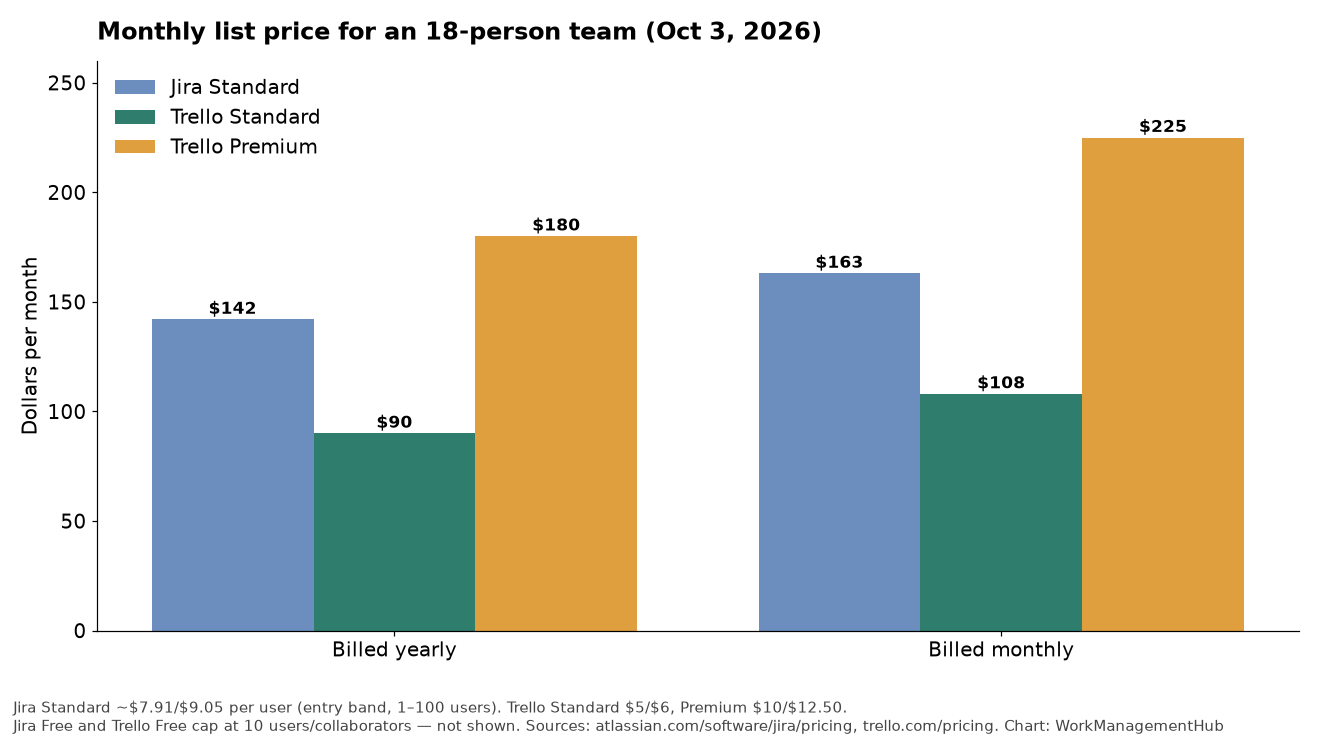
Both tools offer Free tiers, but the constraints differ significantly. Here is the full breakdown:

PlanTrelloJira
FreeUnlimited cards, 10 boards/workspace, 1 Power-Up/board, 10MB file limitUp to 10 users, unlimited projects, basic roadmaps, 2GB storage
Standard$5/user/month — unlimited Power-Ups, custom fields, saved searches, 250MB files$7.75/user/month — user roles, audit logs, advanced permissions, 250GB storage
Premium$10/user/month — Timeline (Gantt), Dashboard, Calendar, Map, Table views, unlimited automation$15.25/user/month — Advanced Roadmaps, Jira Plans, cross-project dependencies, unlimited storage
EnterpriseCustom pricing — unlimited workspaces, org-wide permissions, SAML SSOCustom pricing — unlimited sites, SAML SSO, advanced compliance

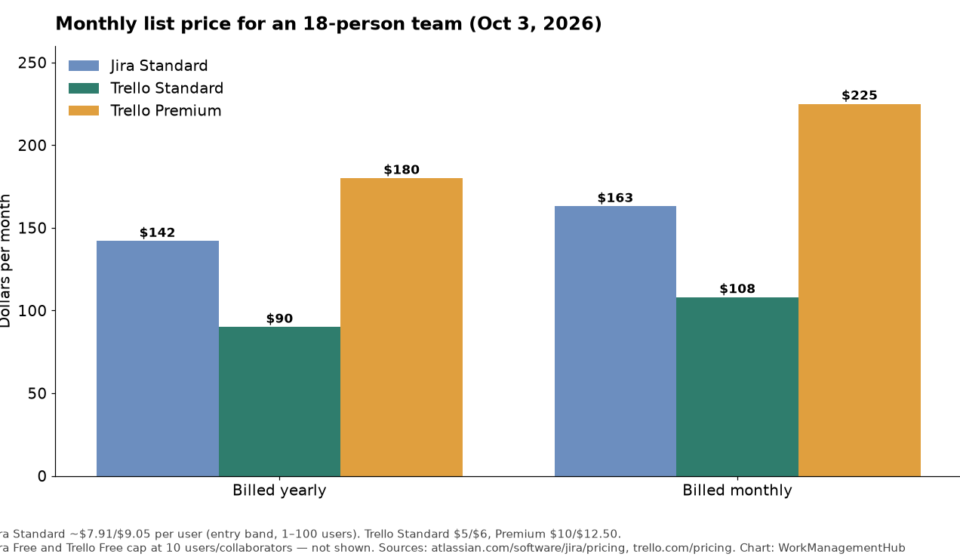
The bottom line on pricing: For a 15-person team on Premium, Jira costs $228.75/month versus Trello’s $150/month — a $78.75/month gap. That’s real money, and it’s only justified if your team actually uses the sprint management, Advanced Roadmaps, and dev tool integrations that Jira Premium provides. A marketing team paying Jira Premium rates for features they’ll never use is throwing money away. See our full Trello pricing breakdown for a tier-by-tier analysis.

Feature-by-feature comparison

FeatureTrelloJira
Kanban board✓ Native & excellent✓ Available
Scrum / Sprint planning✗ Not supported✓ Native & excellent
Timeline / Gantt view△ Premium only△ Free tier (basic)
Custom fields△ Standard+ only✓ All paid plans
Issue hierarchy (Epics)✗ Not supported✓ Native
Velocity & burn-down charts✗ Not available✓ Native
GitHub / GitLab integration△ Via Power-Up✓ Native
Automation△ Limited on Free✓ Available all plans
Cross-project roadmaps✗ Not available△ Premium only
Setup complexityVery lowMedium–High
Mobile experienceExcellentFunctional

The pattern is clear: Trello wins on simplicity, setup speed, and Kanban-first workflows. Jira wins on every dimension related to software development — sprints, backlogs, dev tool integrations, and issue depth. If your team needs velocity charts and Jira sprint planning, there is no Trello Power-Up that adequately substitutes for native Scrum functionality.

Which tool wins by use case?

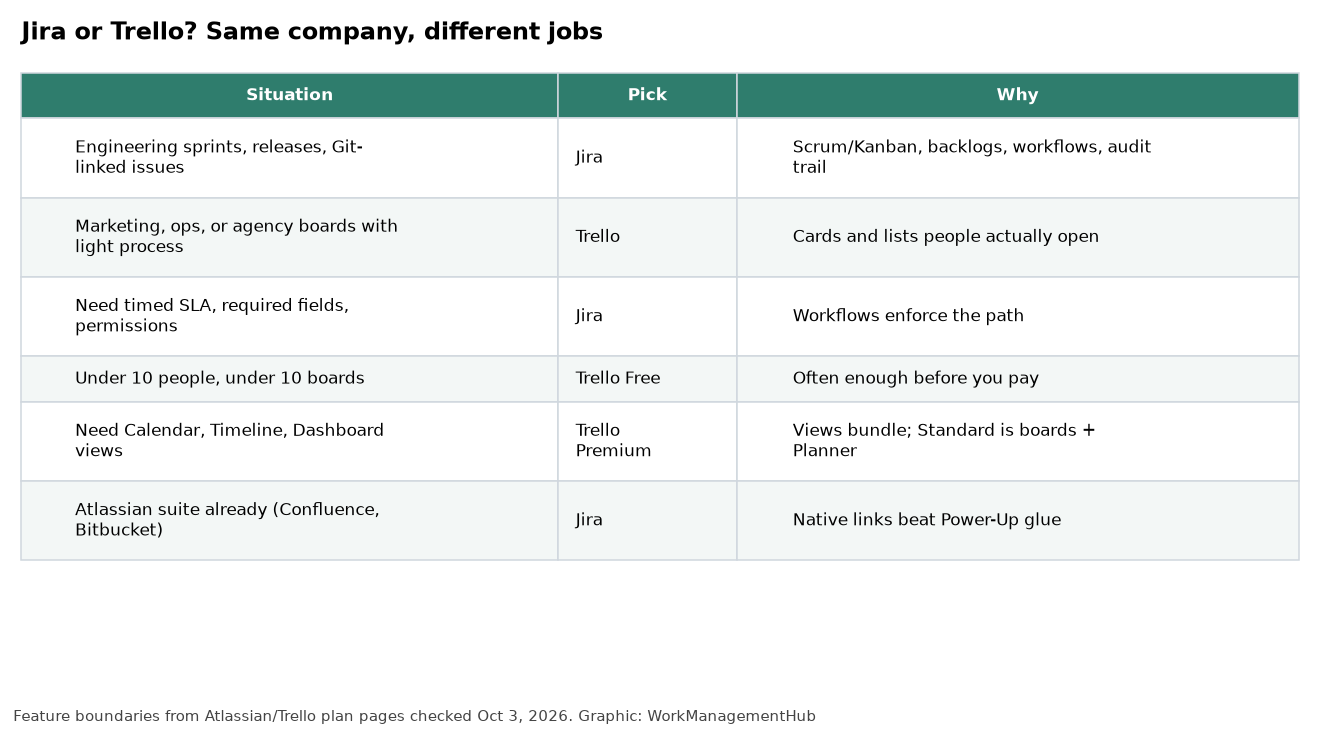
Use CaseWinnerReason
Software development teamJiraSprints, backlog, velocity, dev integrations
Marketing teamTrelloLow overhead, visual boards, fast onboarding
Product management (roadmaps)JiraJira Plans, cross-project roadmaps (Premium)
Freelancer / solo operatorTrelloGenerous Free plan, zero config required
HR / RecruitingTrelloPipeline boards, candidate cards, simplicity
IT / DevOps teamJiraCI/CD integration, custom workflows, audit logs
Agency managing client projectsTrelloClient-friendly, easy sharing, low learning curve
Cross-functional team (eng + non-eng)BothTrello for stakeholder comms, Jira for execution

Using Jira and Trello together

This is the part that almost no comparison article addresses, and it’s the reality for many mid-size organisations: they run both tools simultaneously, for different audiences.

A common pattern I’ve seen work well:

  • Engineering team lives in Jira — sprints, backlog, velocity, CI/CD integrations, the whole stack.
  • The wider business (marketing, sales, leadership) gets Trello boards for cross-functional initiatives — roadmap milestones, launch checklists, stakeholder-facing status boards.
  • A lightweight integration (via Zapier, the official Trello Power-Up for Jira, or Atlassian’s own automation) keeps key items in sync — a Jira Epic reaching “Done” triggers a Trello card to move to the “Shipped” column.

This works because the audience requirements genuinely differ. Non-technical stakeholders find Jira overwhelming — the issue hierarchy, the workflow statuses, the sprint terminology. Trello’s drag-and-drop board is intuitive enough that you can brief an executive on it in five minutes. Meanwhile, trying to run a proper sprint retrospective in Trello is genuinely painful — there’s no velocity data, no sprint history, no burn-down chart to anchor the conversation.

Because both tools share an Atlassian account and billing, the administrative overhead of running both is lower than you’d expect. There’s no second SSO to configure, no second vendor to negotiate with, and users who need access to both can be managed from a single admin console. This is a genuine competitive advantage over mixing tools from different vendors — and according to Atlassian’s own product documentation, this shared infrastructure is an intentional design decision, not an accident of acquisition.

The Jira Software Cloud documentation also covers how Atlassian account management works across the product family — useful reading if you’re setting up both tools under a managed organisation.

Verdict

Final Verdict: Jira vs Trello 2026

Choose Trello if…

  • Your team is under 20 people
  • Work is non-technical (marketing, ops, HR)
  • You need boards running within an hour
  • Budget is tight and Free/Standard covers needs
  • Stakeholder readability matters more than depth

Choose Jira if…

  • You run agile sprints or Scrum ceremonies
  • Engineering team needs dev tool integrations
  • You need cross-project planning or roadmaps
  • Complex workflows or approval gates are required
  • You need velocity data and capacity planning

My definitive recommendation: start with Trello if you’re unsure. The Free plan is generous enough to validate whether your team will adopt a project management tool at all. If you hit the ceiling — needing sprint planning, issue hierarchy, or proper dev integrations — migrating to Jira within the same Atlassian account is a relatively smooth transition. Don’t pay Jira Premium prices for Trello-level needs.

FAQ: Jira vs Trello 2026

Is Trello part of Jira?

Trello is not part of Jira, but both are products of the same company: Atlassian. Atlassian acquired Trello in January 2017. They remain separate products with different interfaces, pricing, and use cases, but they share Atlassian account infrastructure, billing, and admin console.

Can Trello replace Jira for a software team?

No, not adequately. Trello lacks native sprint management, backlog ranking, velocity charts, burn-down reporting, and developer tool integrations (GitHub, GitLab, CI/CD pipelines). You can approximate some of these with Power-Ups, but Power-Ups are third-party addons with varying quality. For a software team running proper agile ceremonies, Jira is the correct tool.

Which is cheaper: Jira or Trello?

Trello is cheaper at every comparable tier. Trello Standard costs $5/user/month versus Jira Standard at $7.75/user/month. Trello Premium costs $10/user/month versus Jira Premium at $15.25/user/month. For a team of 15, that’s a difference of $78.75/month at Premium tier. Both offer free plans, though Jira’s Free plan has a hard cap of 10 users.

Can I use Jira and Trello at the same time?

Yes — and many organisations do. Because both tools run under the same Atlassian account, they share user identities and admin configuration. A common pattern is Jira for engineering execution and Trello for stakeholder-facing boards. You can connect them via Zapier or the Jira Power-Up for Trello to keep key items in sync.

Is Jira too complex for small teams?

Often, yes. Jira’s depth is a feature for engineering teams but a liability for teams that just need basic task management. The configuration overhead — project templates, workflow states, issue types, permission schemes — can create more friction than value for teams under 10 people doing non-technical work. Start with Trello; upgrade to Jira when the complexity pays for itself.


Author

Shaik KB

Follow Me
Other Articles
Previous

How to Use Wrike for Marketing Teams in 2026: Campaign Management & Content Calendar Setup

Next

Monday.com WorkDocs 2026: Complete Guide to Collaborative Docs, AI Writing & Board Integration

No Comment! Be the first one.

    Leave a Reply Cancel reply

    Your email address will not be published. Required fields are marked *

    Sponsored Smartsheet Expert Services – Implementation, Automation, Training
    Sponsored Power BI & Tableau Analytics – Dashboards, Reporting, Insights
    Sponsored AI Agents for Work Management – Automate Tasks, Integrate Tools

    Categories

    • Airtable (10)
    • Alternatives (12)
    • Asana (32)
    • ClickUp (38)
    • How-To Guides (125)
    • Integrations (16)
    • Jira (25)
    • Monday.com (37)
    • Notion (24)
    • Pricing Guides (11)
    • Project Management (73)
    • Smartsheet (27)
    • Tool Comparisons (42)
    • Wrike (10)

    Recent Post

    • ClickUp Notifications Not Working? 7 Fixes for the Most Common Issues in 2026
    • Notion Charts 2026: How to Add Charts to Any Database View and Visualize Your Data
    • Linear vs ClickUp 2026: Which Is Better for Product and Dev Teams?
    • How to Use Smartsheet Dynamic View in 2026: Secure Data Sharing Without Exposing Your Sheet
    • How to Use Asana Forms for Project Intake in 2026: Complete Setup Guide
    Work Management Hub

    Independent expert reviews & comparisons of work management tools — helping 50,000+ teams choose the right software.

    Tools We Cover

    • Smartsheet
    • Monday.com
    • ClickUp
    • Asana
    • Notion
    • Jira
    • Wrike
    • Airtable

    Company

    • About Us
    • Contact Us
    • Privacy Policy
    Copyright 2026 — Work Management Hub. All rights reserved. Blogsy WordPress Theme