
Notion Workers are small TypeScript programs that Notion hosts and runs for you. They do three jobs: sync outside data into Notion databases on a schedule, give Custom Agents new tools to call, and receive webhooks from services like GitHub or Stripe. You need a Business or Enterprise plan. You build and deploy them with Notion’s command-line tool, ntn.
Workers fill the gap between click-based automations and AI agents. An agent decides what to do. A Worker does the exact step the same way every time. I have built a few for syncing CRM data and checking records, and the setup took under an hour. This guide follows Notion’s Workers developer docs and help center, checked in October 2026.
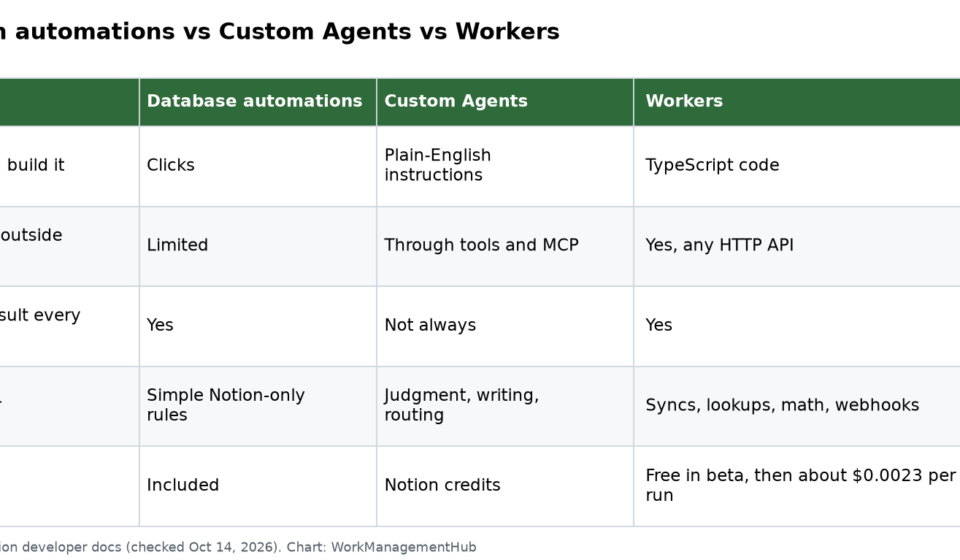
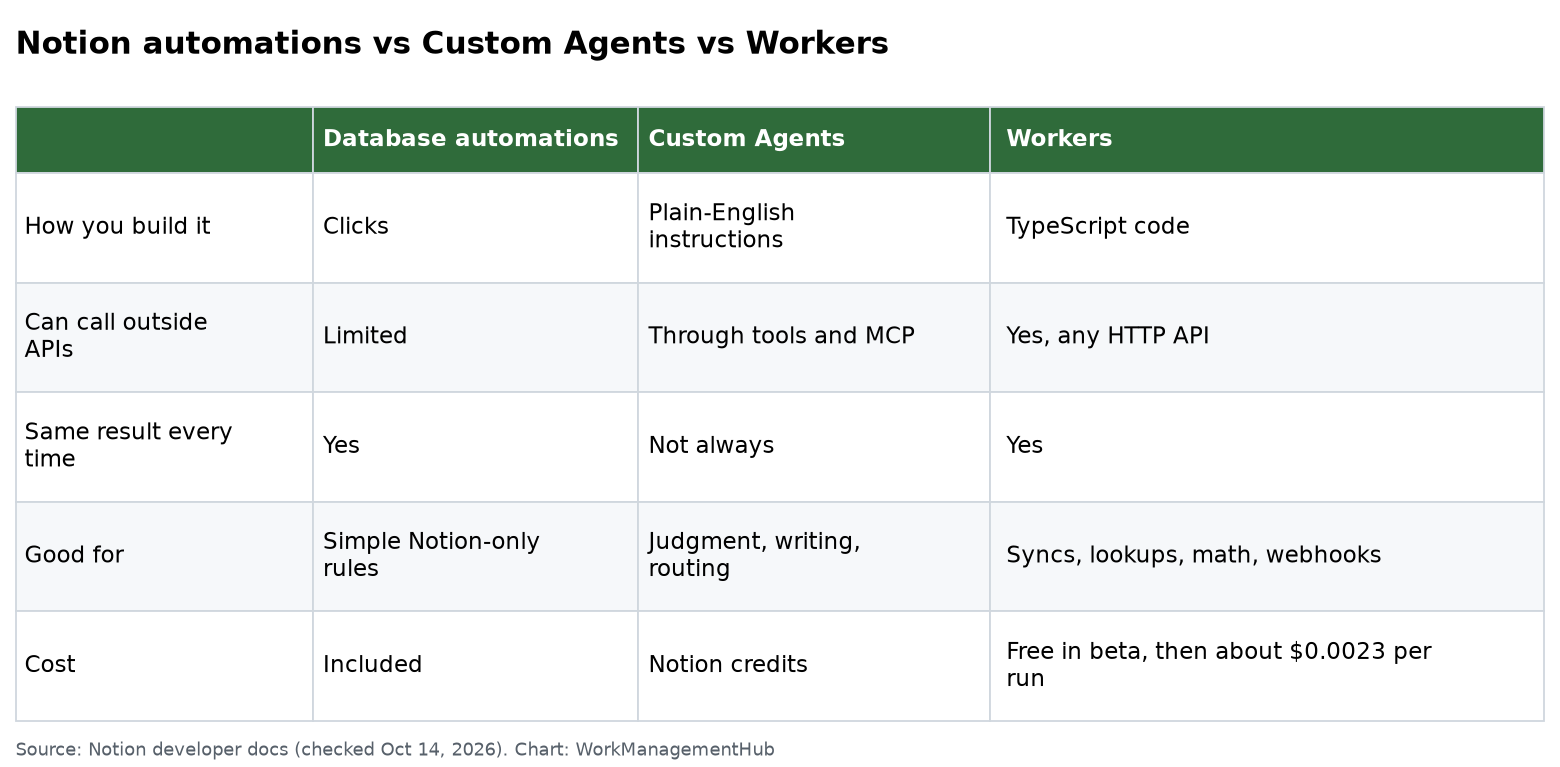
Workers vs automations vs agents
| Database automations | Custom Agents | Workers | |
|---|---|---|---|
| How you build it | Clicks | Plain-English instructions | TypeScript code |
| Can call outside APIs | Limited | Through tools and MCP | Yes, any HTTP API |
| Same result every time | Yes | Not always | Yes |
| Good for | Simple Notion-only rules | Judgment, writing, routing | Syncs, lookups, math, webhooks |
| Cost | Included | Notion credits | Free in beta, then about $0.0023 per run |
What you need first
- Plan: Business or Enterprise. Workers are not on Free or Plus. Business trials count.
- Permission: By default, only workspace owners can create Workers. Owners can allow specific members or groups, or turn Workers off. This is under Settings > Workers, per Notion’s Workers help page.
- Node.js 22 or newer on your computer.
- Basic TypeScript, or an AI coding tool to write it for you. Notion designed Workers to be built with tools like Claude Code or Codex.
Step-by-step setup
These steps follow Notion’s Workers quickstart.
- Install the CLI. Run
curl -fsSL https://ntn.dev | bash. - Create a project. Run
ntn workers new my-worker, thencd my-worker. - Look at the code. Everything lives in
src/index.ts. It exports oneWorkerand comes with a sample tool calledsayHello. - Deploy. Run
ntn workers deploy. The CLI asks you to sign in to your workspace, bundles your code and uploads it. - Test it. Run
ntn workers exec sayHello -d '{"name": "World"}'. You should get “Hello, World!” back. - Share it (optional). In the Developer portal, give teammates Can connect (they can add it to agents) or Full access (they can edit and deploy).
To test before you deploy, run ntn workers exec --local. When you test locally, Notion’s built-in client is not there. Put a personal access token in NOTION_API_TOKEN in your .env file.
The three things a Worker can do
1. Syncs (scheduled)
A sync pulls data from another system and writes it to a Notion database. By default it runs every 30 minutes. Example: copy deal stages from your CRM into a Notion sales tracker.
2. Agent tools
A tool is a function a Custom Agent can call, like “look up a customer” or “create a Jira ticket.” After you deploy, add the tool in the agent’s tool settings. The agent decides when to call it. Your code decides exactly what happens.
3. Webhooks
A webhook lets an outside service send events to your Worker. Example: when a Stripe subscription is cancelled, update the customer’s row in Notion. Webhooks were still marked alpha in October 2026.
What Workers cost
During the beta, Workers are free on Business and Enterprise plans. Later they will use Notion credits, which admins buy as an add-on. Notion’s Workers pricing page gives these numbers:
- A typical run costs about $0.0023.
- 1,000 credits cost $10 and cover about 4,348 runs.
- Each sync run, each agent tool call and each webhook event counts as one run.
Real examples using that rate:
| Worker | Runs per month | Cost per month |
|---|---|---|
| Sync every 15 minutes, all day | 2,880 | About $6.62 |
| Agent making 4 tool calls, 50 times a day | 6,000 | About $13.80 |
| Webhook with 300 events a day | 9,000 | About $20.70 |
To see when the free period ends for your workspace, go to Settings > Access & billing > Notion credits and hover over the Free badge. You can also check usage for the last 30 days in the CLI.
Gotcha: the free beta covers Workers only. Custom Agent actions still use credits. An agent that calls your Worker 4 times still pays for its own thinking.

Fixing common problems
“I cannot deploy.” Check three things in order. Is the workspace on Business or Enterprise? Has an owner left Workers turned on? Do you have permission to create Workers? You can often view pages in a workspace without being allowed to deploy to it.
“The Worker does not show in my agent.” Make sure it deployed without errors. Then add the tool from the agent’s tool configuration. If a teammate built it, they must share it with you as Can connect.
“My sync runs but writes nothing.” Run the sync logic with --local and print what the outside API returns. The usual cause is an empty result, an expired secret, or a property name that does not match the database.
“I get errors from the outside API.” Store keys as secrets with the CLI, not in code. Many APIs limit how often you can call them. Notion’s runtime includes a “Pacer” helper for staying under those limits.
“Who turned it off?” Turn on Developer Mode to view Workers in Notion, read logs, and switch Workers off or delete them.
What experienced builders do
- Keep each Worker small. One sync or a few related tools. Small Workers are easier to fix.
- Let the agent think and the Worker act. Do not put judgment calls in code. Do not put exact math in the agent.
- Sync less often than you think. Every 30 minutes is plenty for most dashboards. Every 5 minutes costs 6 times more.
- Use the free beta to measure. Run real workflows now and size your credits before billing starts.
Also new: Notion 3.8 (October 13, 2026) lets outside agents connect to Notion through MCP and gives Notion Agents 150+ MCP connections. See our Notion 3.8 update guide for what changed.
When NOT to use Workers
- A database automation can do it. Do not write code for “when status is Done, set date.”
- No one on the team can read the code. Someone must maintain it when an API changes.
- You need it on Plus. Workers are Business and Enterprise only.
- Zapier or Make already does it well. Moving a working Zap gives you little unless cost or speed is the problem.
Common questions
Which Notion plans include Workers?
Business and Enterprise, including Business trials. Free and Plus do not have Workers.
Do I need to know how to code?
Some. Workers are TypeScript. Notion built them to work well with AI coding tools, so you can describe what you want and have the tool write it. You still need to test and maintain it.
How much do Notion Workers cost?
They are free during the beta. After that, a typical run costs about $0.0023, so $10 of credits covers about 4,348 runs.
How often do syncs run?
Every 30 minutes by default. You can change the schedule in your code.
Can members create Workers, or only owners?
By default only owners. Owners can allow specific members or groups under Settings > Workers.
What is the CLI command to deploy?
Run ntn workers deploy from your project folder. It signs you in, bundles the code and uploads it.
Steps, limits and prices checked against Notion’s developer docs and help center on October 14, 2026. Beta features change often; confirm in your workspace.
Sponsored