Notion vs Airtable for Academic Research (2026): Which One Fits Your Lab or Thesis?

For most academic work, Notion is the better research notebook and Airtable is the better research database. If your work is mostly reading, writing and thinking (a thesis, a literature review, lab notes, meeting minutes), Notion fits more naturally. If your work is mostly structured records that link to each other (samples, participants, interviews, coded sources, field sites), Airtable is the stronger tool.
Students on a budget should start with Notion’s free Education plan. Small labs that track lots of linked records should look hard at Airtable, ideally with its education discount. And anyone handling identifiable health data should stop and read the HIPAA section below before putting anything into either tool.
How research work splits between the two
Academic research has two very different kinds of information, and each tool is built for one of them.
Narrative information is notes, drafts, protocols, decisions, reading summaries and supervisor feedback. It’s mostly text, it changes constantly, and it needs to link to other notes. Notion handles this well because every database entry is also a page you can write in.
Structured information is anything with consistent fields: a source with author, year, method and findings; a sample with ID, collection date and storage location; an interview with participant code, date and transcript status. Airtable handles this well because it’s a real relational database, with linked records, lookups, rollups and views that filter thousands of rows instantly.
Most research projects have both. The question is which one is the bigger, messier problem for you.
What it costs: education plans and real prices
This is where academic users get a better deal than most, if they qualify.
Notion
- Education plan (free): Notion gives individual students and educators at accredited colleges and universities a free plan for a one-member workspace. You must sign in with your school email as your main Notion email, and you re-verify once a year. K-12 students and teachers aren’t eligible, and student IDs aren’t accepted. Details are in Notion’s education help article.
- Student organizations can apply for a free plan with unlimited members.
- Plus for a lab: $10 per member per month billed yearly, or $12 monthly. Business is $20 yearly and $24 monthly, and that’s where Notion’s AI agent and meeting notes live.
Airtable
- Student plan (free): Airtable offers qualifying college and university students 6 to 24 months of complimentary access, based on expected graduation date. The student plan caps records at 50,000 per base and attachments at 20GB per base, and doesn’t include script automation actions.
- Educators and nonprofits: a 50% monthly discount per user on Team plans, which brings Team from $24 to $12 per editor per month.
- Trial: anyone with a .edu address gets a 120-day Team trial on signup, before any discount is approved.
- All of this is laid out in Airtable’s education plans FAQ. Standard Team pricing is $20 per seat billed yearly or $24 monthly, and read-only collaborators are free.
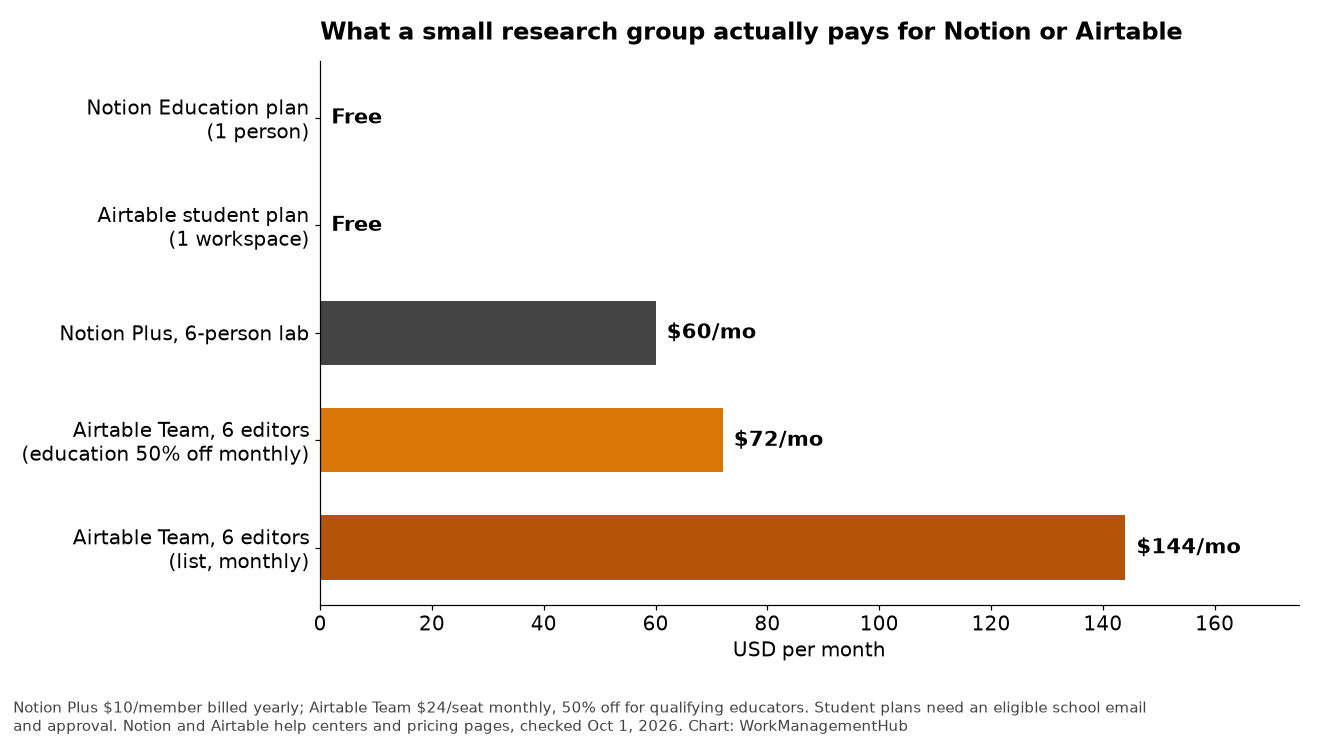
For a six-person lab, Notion Plus runs $60 a month on annual billing. Airtable Team for six editors runs $144 a month at list price, or $72 with the educator discount. If only two people actually edit the database and the rest just look, Airtable gets cheaper still. More detail in our Notion pricing guide and Airtable pricing guide.
Head to head on research tasks
Literature review
Both work, in different ways. In Notion, a sources database where each entry is a page lets you write a summary, paste key quotes and link related sources. In Airtable, a sources table with fields for method, sample size, outcome and quality rating lets you filter and group, which is a real advantage when you’re coding 200 papers for a systematic review.
Neither one replaces a citation manager. Keep Zotero, EndNote or Mendeley for references and in-text citations, and use Notion or Airtable for your thinking about the sources.
Thesis and paper writing
Notion, comfortably. You can draft chapters, keep an outline, track supervisor comments and link to your notes. Airtable’s long text fields aren’t a writing environment.
Lab, sample and participant tracking
Airtable. Linked records (participant to visit to sample to result) are exactly what it’s built for, and forms make data entry consistent. Notion relations can handle simple versions, but in my experience they get awkward once you have thousands of linked rows and several levels of links. Our Airtable views guide shows how to give each person in a lab the view they need.
Collaboration with a supervisor or co-authors
Notion makes it easy to share a page with comments. Airtable makes it easy to share a read-only view or interface. Both offer guest access, so pick based on what you’re sharing: documents (Notion) or data (Airtable).
Getting your data out
Plan your exit before you start. Notion lets you export pages, databases or a whole workspace as PDF, HTML, or Markdown and CSV. Airtable exports any view as CSV. Either is fine for archiving, but keep your raw research data in your university’s approved storage too, not only in a SaaS tool.
Data protection: read this before you store participant data
This is the part most comparisons skip. If your project involves identifiable health information, HIPAA may apply, and neither tool’s standard plans are set up for it.
- Notion says that to be eligible to sign its Business Associate Agreement, you must be on the Enterprise plan, per its HIPAA configuration guide.
- Airtable offers its BAA only to Enterprise Scale customers, according to Airtable’s HIPAA documentation.
Beyond HIPAA, your IRB approval and your university’s data classification rules decide where data can live. A free student plan almost certainly isn’t approved for identifiable participant data. Use participant codes in Notion or Airtable, and keep the key that links codes to identities in approved institutional storage. When in doubt, ask your IRB or research IT office first.
What I’d set up
PhD student, solo: Notion Education plan. One workspace with a Sources database (one page per paper), a Notes database linked to Sources, a Thesis section with a page per chapter, and a Meetings database for supervisor sessions. Free, and it’ll last the whole degree. Our Notion database guide covers the relations you’ll need.
Systematic review team: Airtable. A Sources table with screening status, reviewer, inclusion decision and coded fields, plus a form for consistent screening. Grouping and filtering at the screening stage is where Airtable earns its keep.
Small wet lab: Airtable for samples, reagents and experiments, Notion for protocols and lab meeting notes. Link from each Airtable experiment record to its protocol page in Notion. Don’t try to sync them.
Still weighing the two tools outside an academic setting? Our general Notion vs Airtable comparison covers business use.
FAQ
Is Notion or Airtable better for academic research?
Notion is better for writing, notes and thesis work. Airtable is better for structured, linked records like samples, participants or coded sources. Many labs use both.
Is Notion free for students?
Yes, if you’re a student or educator at an accredited college or university and use your school email as your main Notion email. The Education plan covers a one-member workspace, and you re-verify each year.
Is Airtable free for students?
Qualifying college and university students can get 6 to 24 months of free access based on graduation date. Educators get 50% off Team plans billed monthly.
Can I store participant data in Notion or Airtable?
Not identifiable health data on standard or education plans. Notion requires Enterprise and Airtable requires Enterprise Scale to sign a HIPAA Business Associate Agreement. Follow your IRB and university data rules, and use coded identifiers.
Can either replace Zotero?
No. Neither formats citations or plugs into your word processor the way a reference manager does. Use them alongside Zotero or EndNote, not instead of them.
Sponsored