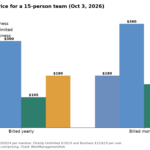
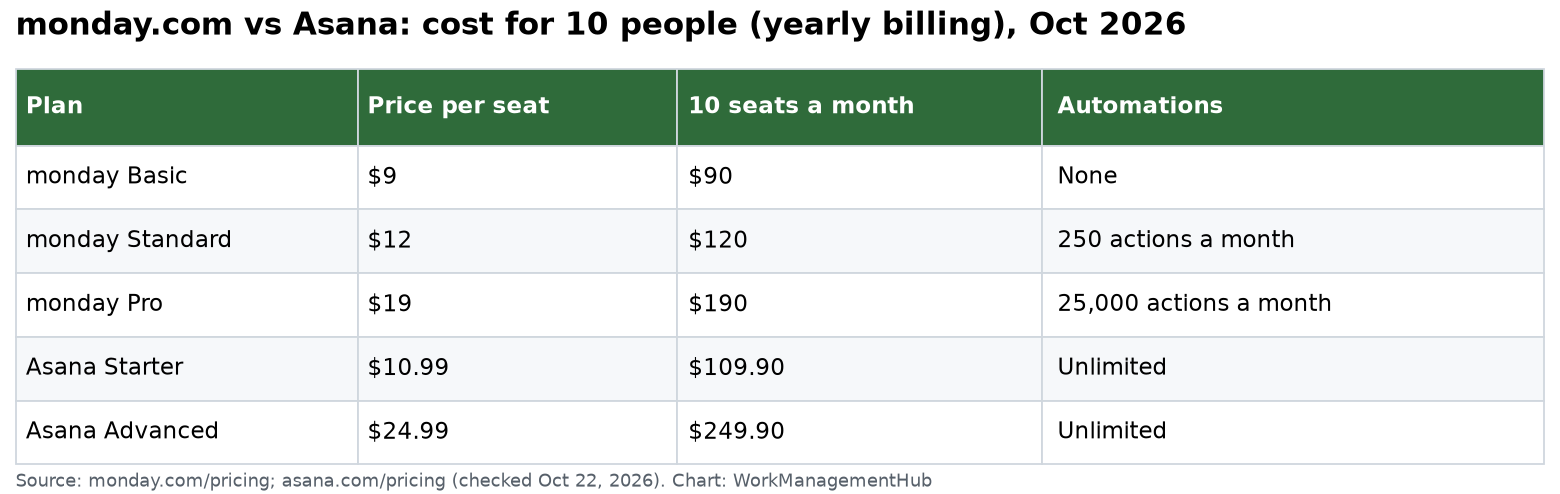
Pick Asana if your team runs many projects with dependencies and wants unlimited automations from the first paid plan. Pick monday.com if you track work as rows of data, such as requests, leads or assets, and want a flexible board you can shape into almost anything. For 10 people on yearly billing, Asana Starter costs $109.90 a month and monday Standard costs $120.
I checked monday.com’s pricing page and Asana’s pricing page on October 22, 2026. All prices are per seat per month, billed yearly, in US dollars.
The short version
| monday.com | Asana | |
|---|---|---|
| Free plan | Up to 2 seats, 3 boards | Up to 2 users |
| Entry paid plan | Basic $9 (no automations) | Starter $10.99 |
| Main team plan | Standard $12 or Pro $19 | Starter $10.99 or Advanced $24.99 |
| Minimum seats | 3 on paid plans | None |
| Automations | 250 actions a month (Standard), 25,000 (Pro) | Unlimited from Starter |
| Free outside users | Guest access from Standard | Unlimited free guests from Starter |
| Timeline and Gantt | Standard and up | Starter and up |
How each tool thinks
monday.com starts from a board. A board is a table. Each row is an item and each column holds data like status, owner, date or number. You can show the same board as a Kanban, a timeline or a chart. It feels like a smart spreadsheet you can bend into a CRM, an asset tracker or a project plan.
Asana starts from a task. Tasks live in projects. A task can sit in several projects at once. Dependencies, subtasks, approvals and goals are built around that task model. It feels like a to-do list that grew into a project system.
Neither is better in general. The question is whether your work is mostly records (monday.com) or mostly projects with steps (Asana).
Pricing: where the real costs hide
monday.com plans (yearly):
- Free: up to 2 seats, 3 boards, 3 Docs.
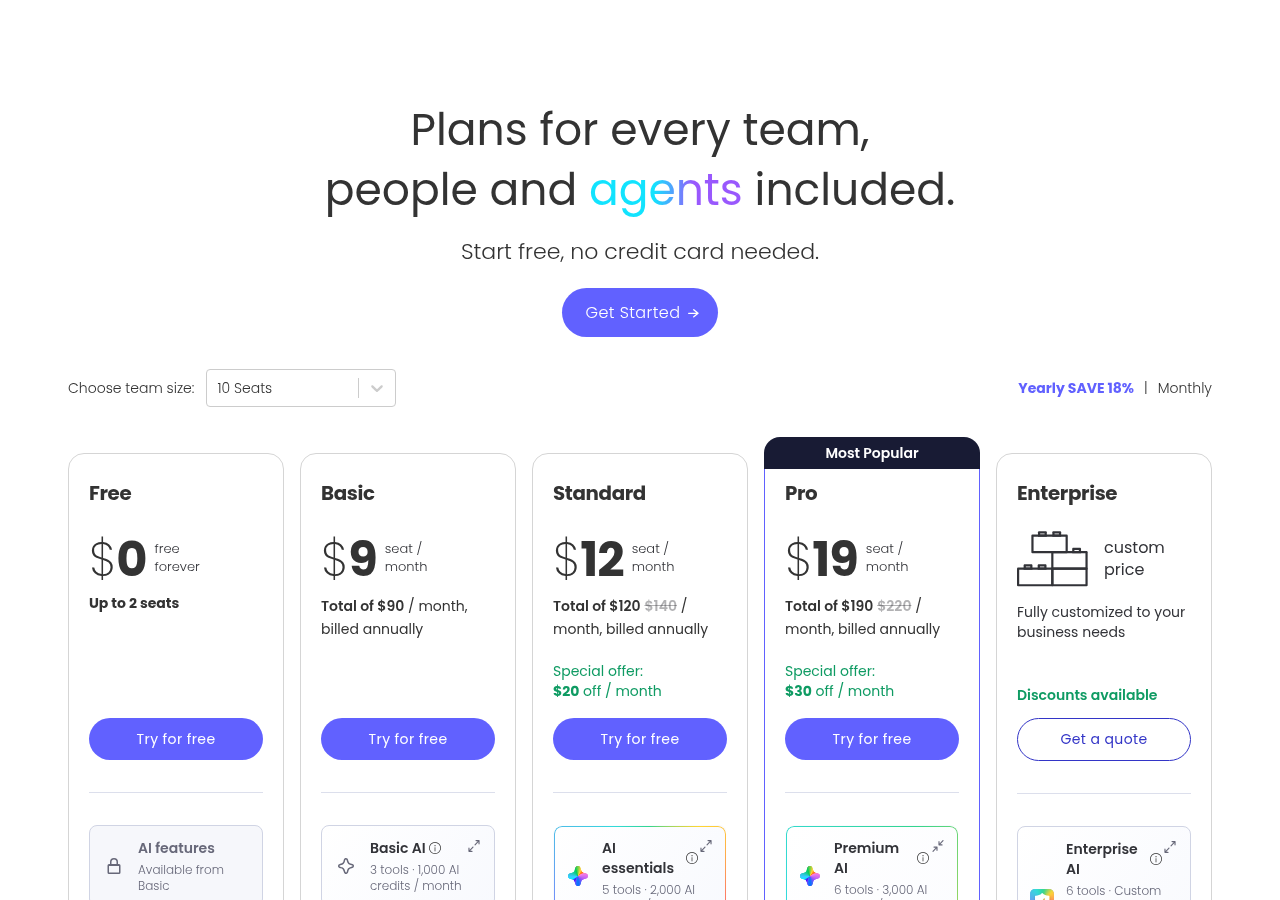
- Basic ($9): unlimited items and free viewers, 1,000 AI credits a month. No automations, no timeline, no guests.
- Standard ($12): timeline and Gantt, calendar, guest access, 250 automation actions and 250 integration actions a month, 2,000 AI credits.
- Pro ($19): private boards, time tracking, 25,000 automation actions a month, 3,000 AI credits.
- Enterprise: quote.
When I checked, monday.com showed a special offer of $20 off a month on Standard and $30 off on Pro for 10 seats. Treat promos as temporary.
Asana plans (yearly):
- Personal: free for up to 2 users.
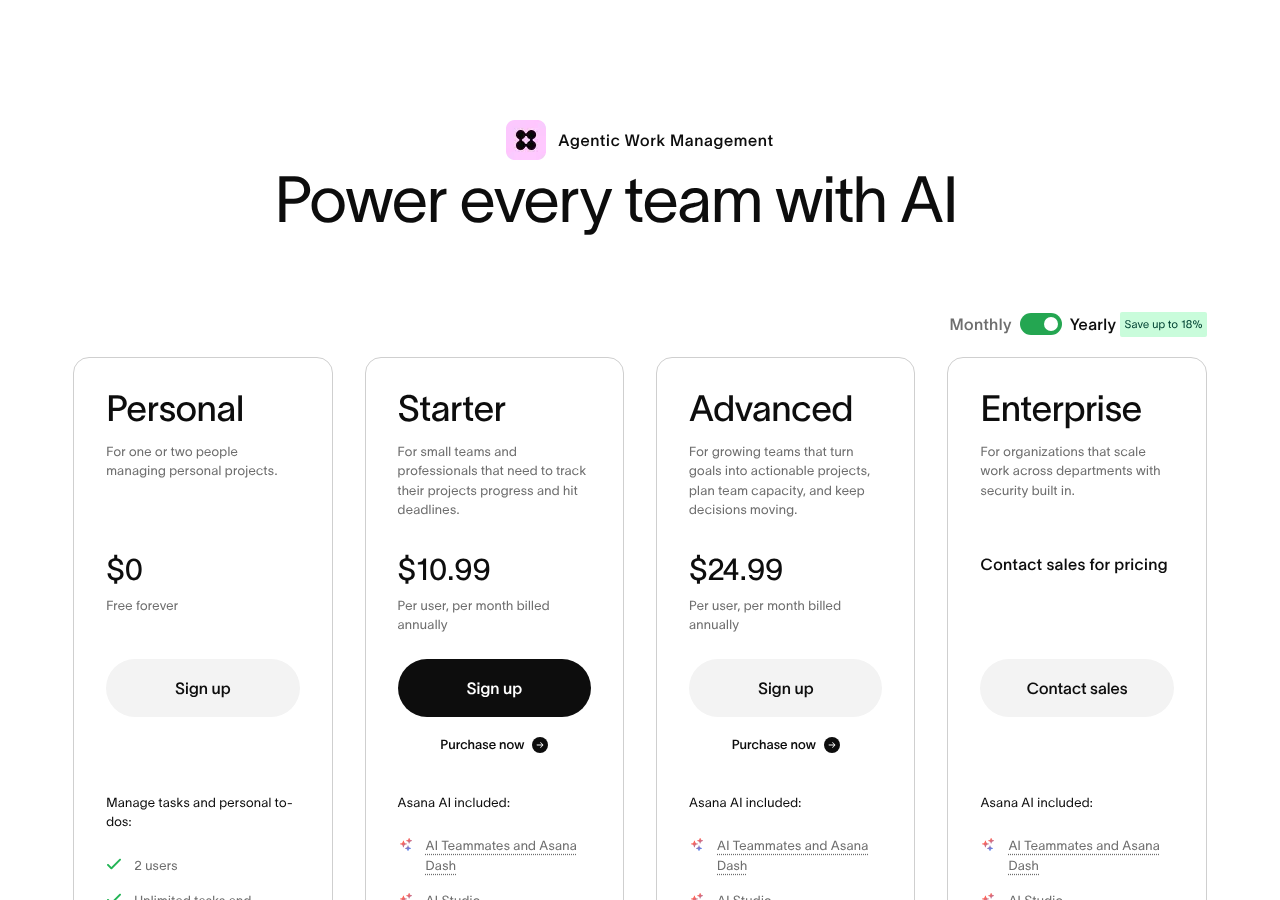
- Starter ($10.99): timeline and Gantt, dashboards, unlimited automations, forms, custom fields, unlimited free guests.
- Advanced ($24.99): portfolios, goals, resource management, approvals and proofing, form branching, time tracking.
- Enterprise: quote. Adds SAML, SCIM, view-only licenses and org-wide workload.
Three traps to check before you buy:
- monday’s 3-seat minimum. A 2-person team still pays for 3 seats on any paid plan.
- monday’s 250-action cap on Standard. One rule that fires 10 times a day uses that up in under a month. The first time you hit it, monday only warns you and rolls the overage into next month. After that, automations pause 72 hours after you reach 100%, until you upgrade or the quota renews.
- Asana’s jump to Advanced. If you need portfolios or approvals, the bill more than doubles, from $10.99 to $24.99 a seat.
Automations
This is the biggest practical gap.
Asana gives unlimited rules from Starter. A rule has a trigger (the event that starts it) and one or more actions. Examples: when a task moves to “Done”, mark the subtask complete; when a form comes in, assign it to the triage owner.
monday.com counts actions. Standard has 250 a month, Pro has 25,000. Every time a recipe runs and does something, it uses an action. Integrations like Slack or Gmail have their own separate 250 or 25,000 count.
My view: if you plan to automate a lot, Asana Starter is the safer buy. On monday.com, budget for Pro, not Standard.
Outside people: clients and freelancers
Asana: unlimited free guests on Starter and up. A guest is someone outside your email domain.
monday.com: guest access starts on Standard. Basic has unlimited free viewers, who can see boards but not edit them.
For agencies and marketing teams with many freelancers, Asana is cheaper here.
Reporting and portfolios
monday.com dashboards pull widgets from many boards. That is strong for ops teams who track numbers. Portfolio and resource management sit on Enterprise.
Asana Starter has dashboards. Portfolios, goals and resource management are on Advanced. For a PMO that wants every project’s status on one page, Asana Advanced is cheaper than monday Enterprise.
AI in 2026
Both now sell AI on credits or requests.
- monday.com: Basic includes 1,000 AI credits a month, Standard 2,000, Pro 3,000. Credits run AI columns, Sidekick and agents.
- Asana: Starter and Advanced include 5 AI requests per user a month, up to 50 per account. Extra requests cost $0.50 each prepaid or $0.60 on demand. AI Studio credits are separate: 50,000 a month on Starter and 75,000 on Advanced.
Neither allowance covers heavy daily AI use. Pick the tool for the core workflow, not the AI.
Switching later
Both tools export to CSV, and both import from spreadsheets. What doesn’t move cleanly: automations, dependencies, comments and file history. Plan on rebuilding rules by hand. For a 10-person team, I budget about two weeks of part-time work for a careful move.
Verdict
Choose Asana if:
- You run projects with dependencies and fixed dates.
- You want unlimited automations without counting actions.
- You work with many freelancers or clients who need free access.
Choose monday.com if:
- Your work is lists of records: requests, leads, assets, orders.
- You want one tool your ops, sales and marketing teams can each shape their own way.
- You are happy to buy Pro to get real automation room.
Who should skip both: software teams that live in sprints and pull requests. Look at Jira or Linear instead.
Related guides
- monday.com pricing 2026
- Asana pricing 2026
- monday.com vs ClickUp
- Asana vs monday vs ClickUp AI features
- monday.com automations not working
Common questions
Is monday.com cheaper than Asana?
At the entry level, yes: monday Basic is $9 against Asana Starter at $10.99. But Basic has no automations or guests. For like-for-like features, monday Standard at $12 costs more than Asana Starter.
Does monday.com have a minimum number of seats?
Yes. Paid plans start at 3 seats, so a 2-person team pays for 3.
Which has better automations, monday.com or Asana?
Asana. Its Starter plan has unlimited rules. monday Standard caps automations at 250 actions a month and Pro at 25,000.
Can clients use Asana or monday.com for free?
On Asana Starter and up, guests are free and unlimited. On monday.com, viewers are free from Basic and guest access starts on Standard.
Which is easier to learn?
Most people learn Asana’s task lists faster. monday.com’s boards are easy too, but the freedom to add any column means setup takes more planning.
Sources
- monday.com pricing (checked Oct 22, 2026)
- Asana pricing (checked Oct 22, 2026)
- Asana Help: Approvals
- monday.com Support: Automation and integration actions and limits
Sponsored