
If your team lives in pull requests, Linear is the cleanest way off Jira. Mixed teams of product, marketing and ops usually do better on ClickUp or Asana. Small teams tired of per-seat bills should price out Basecamp. And engineering teams with deep Jira automation and reporting should often stay put.
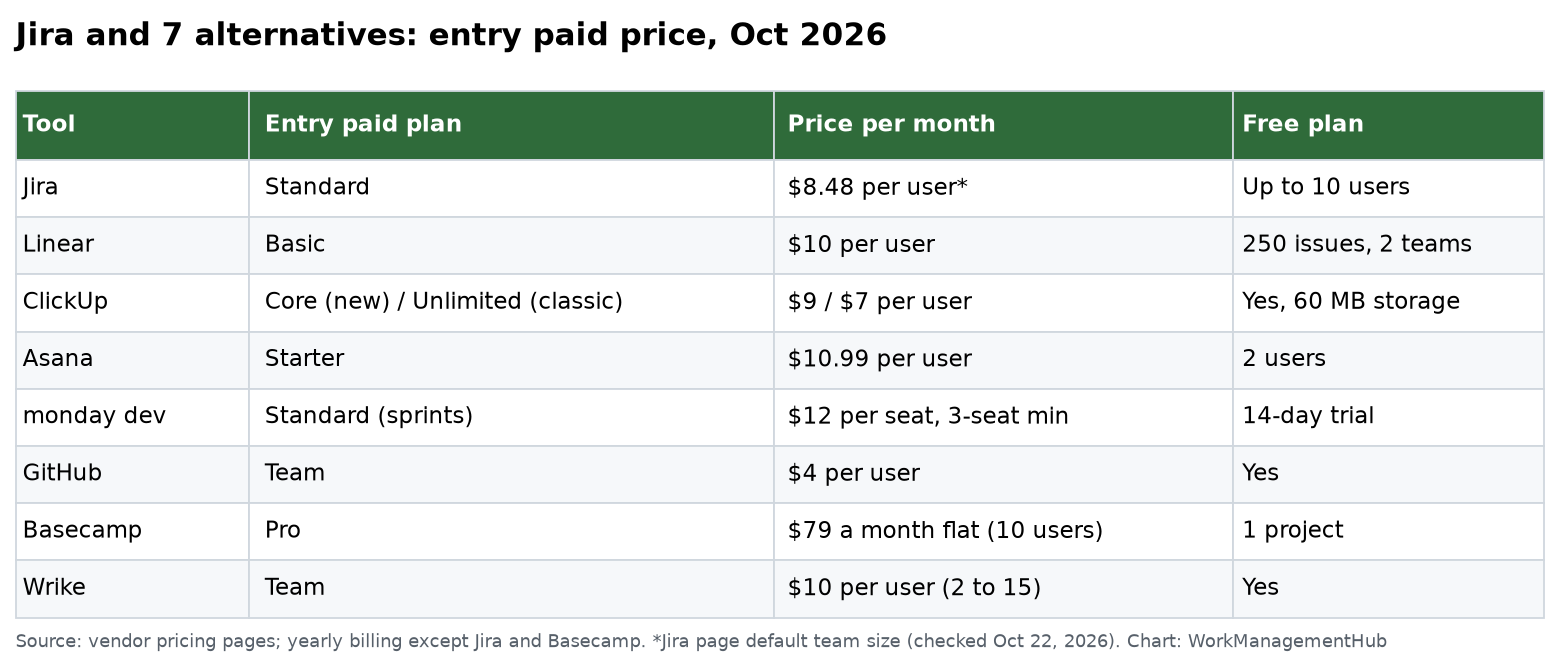
I checked each vendor’s pricing page on October 22, 2026, including Jira, Linear, ClickUp, monday dev, GitHub, Basecamp and Wrike. Prices are per user per month on yearly billing unless noted.
One honest warning before the list. Teams often blame Jira for process problems. A new tool fixes clutter, slowness and license cost. It does not fix a team that never closes tickets.
What Jira costs today
For a fair baseline: Jira Free covers up to 10 users with 150 automation steps a month and 2 GB of storage. Standard showed $8.48 per user and Premium $15.56 at the page’s default team size. Standard adds roles and permissions and 400 automation steps per user a month. Premium adds cross-team planning and 750 steps per user.
So Jira is not expensive per seat. People leave it for speed, simplicity and fit, not price.
1. Linear: the developer’s clean break
Linear is where many ex-Jira engineering teams land. It is fast, keyboard-driven and opinionated about issues and cycles (Linear’s word for sprints). Git branch and pull request links work well out of the box.
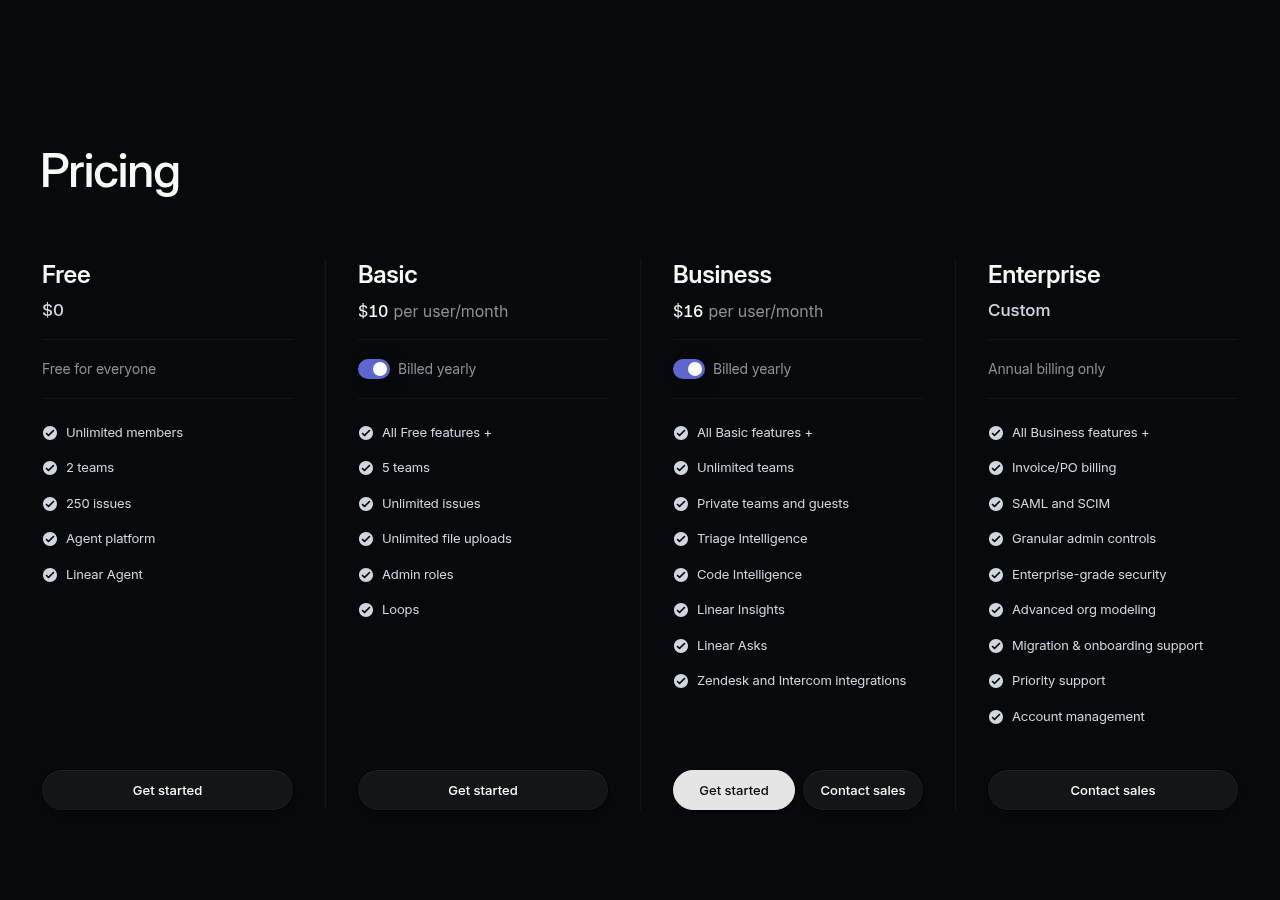
- Free: unlimited members, 2 teams, 250 issues.
- Basic ($10): 5 teams, unlimited issues and uploads, admin roles.
- Business ($16): unlimited teams, private teams and guests, Linear Insights, Triage Intelligence, Zendesk and Intercom integrations.
Trade-off: less control. If compliance needs a 14-step approval workflow with required fields, Linear will frustrate you. Reporting is lighter than Jira dashboards.
2. ClickUp: one tool for mixed teams
ClickUp fits when engineering, marketing and ops want one system. It has sprints, docs, whiteboards, dashboards and forms. It has two plan lineups right now:
- New (yearly): Free Forever, Core ($9), Business ($17), Enterprise, Max ($100). Core includes 1,000 automations a month and 1,000 AI credits per user, pooled.
- Classic (yearly): Free Forever, Unlimited ($7), Business ($12), Enterprise.
Free Forever has only 60 MB of storage. Trade-off: feature sprawl. Budget a week of setup to hide what you don’t need.
3. Asana: for project work, not bug tracking
Asana suits teams that plan in projects and timelines, not story points. Dependencies, rules and dashboards are strong, and non-technical staff learn it fast.
- Personal: free for 2 users.
- Starter ($10.99): timeline and Gantt, unlimited rules, forms, free guests.
- Advanced ($24.99): portfolios, goals, approvals, workload.
Trade-off: bug tracking and sprint reports are basic. Don’t move a pure software team here.
4. monday dev: sprints on a visual board
monday dev is monday.com’s product for development teams. Sprint management with story points, roadmaps and a two-way GitHub sync start on Standard at $12 a seat. Basic is $9 but has no sprint management. Pro at $20 adds epics, time tracking, agile reporting and 25,000 automation actions a month.
Trade-offs: plans start at 3 seats, so a 2-person team pays for 3. Standard has only 250 automation actions a month. There is a 14-day trial, not a free plan.
5. GitHub Projects: free if your code is on GitHub
If your code already lives on GitHub, Projects costs nothing extra. It comes with Free, Team ($4) and Enterprise ($21). Issues sit next to the code, so links between work and commits are tight.
Trade-off: it is a planning layer, not a full agile suite. Reporting is basic, and non-engineers find it unfriendly. Read our Jira vs GitHub Projects comparison for the details.
6. Basecamp: flat pricing and calmer defaults
Basecamp skips sprints and tickets. It gives each project a message board, to-dos, a schedule, docs, chat and Card Tables for Kanban.
- Free: 1 project. Freelancer: $29 a month, 3 projects, 5 users.
- Pro: $79 a month, 8 projects, 10 users. Pro Plus: $99, 12 projects, 15 users.
- Pro Unlimited: $199 a month billed yearly, unlimited projects and users.
Trade-off: not built for software sprints at all. Pick it to calm a small team down, not to run engineering.
7. Wrike: structured work for services teams
Wrike suits marketing, PMO and professional services teams that need forms, approvals and resource planning.
- Free: basic task management.
- Team ($10): 2 to 15 users, Gantt charts, dashboards, custom fields and workflows.
- Business ($25): 5 to 200 users, templates, resource and capacity planning.
Trade-off: heavier setup, and not built for developers first.
When staying on Jira is the right call
Stay if two or more of these are true:
- You have dozens of automation rules and custom workflows that the business depends on.
- Leaders rely on Jira dashboards, velocity and release reports.
- Your support team runs on Jira Service Management and links tickets to dev work.
- You need audit trails, permission schemes and data residency.
In that case, clean up Jira instead. Archive old projects, cut custom fields and simplify workflows. That often fixes the “Jira is slow and confusing” complaint for far less effort than a move.
How to move off Jira without losing history
- Export first. Save a full CSV export of every project, even closed ones. Keep it for audits.
- Use the built-in importer. Linear, ClickUp, Asana and monday dev all offer Jira imports. Test with one small project.
- Map fields before you import. Decide which statuses, issue types and custom fields survive. Drop the rest.
- Rebuild automations by hand. No importer moves Jira rules.
- Run both for one sprint. Then make Jira read-only and keep it for a few months as an archive.
For a 20-person team, plan on two to four weeks for a careful move.
Related guides
Common questions
What is the best free alternative to Jira?
GitHub Projects if your code is on GitHub. Linear’s free plan also works for small teams, but it caps you at 250 issues and 2 teams.
Which Jira alternative is easiest for non-technical teams?
Asana and Basecamp. Both are quick to learn and don’t use developer terms.
Can I keep my Jira history when I switch?
Most of it. Importers bring over issues, comments and attachments in many cases. Automations and custom workflows must be rebuilt. Keep a full CSV export.
Is Linear or ClickUp better as a Jira replacement?
Linear for pure software teams. ClickUp when engineering shares a tool with marketing, ops or sales.
Is Jira more expensive than the alternatives?
Not per seat. Jira Standard showed $8.48 per user, similar to or cheaper than most alternatives. Teams usually leave for fit, not price.
Sources
- Jira pricing (checked Oct 22, 2026)
- Linear pricing (checked Oct 22, 2026)
- ClickUp pricing
- monday dev pricing
- GitHub pricing
- Basecamp pricing
- Wrike pricing
Sponsored