

Most teams asking “Linear or GitHub Issues?” already ship code on GitHub. The real question is whether issue tracking should stay next to the code, or move into a dedicated product tool.
Short answer: stay on GitHub Issues if your team is under a few hundred open issues, lives in one or two repos, and doesn’t need cross-team Cycles. Move to Linear when Cycles, triage and multi-team roadmaps are the daily job, and treat GitHub as the PR layer. Running both only works if someone owns the Linear-GitHub sync.
I implement work-management platforms for a living (my firm, SSPM, is a Smartsheet partner), so I read these tools as “what will this cost, and where does it break in month three?” Prices below are what the vendors’ own pages showed on October 9, 2026.
The short answer
- Pick GitHub Issues if engineering already lives in GitHub, stakeholders can live with Projects views, and you don’t want another seat tax.
- Pick Linear if you run real Cycles across multiple teams, care about triage queues, and want a keyboard-first issue tracker that isn’t tied to one repo.
- Run both only with a deliberate sync: Linear for planning, GitHub for PRs. Budget time for sync failures.
Linear vs GitHub Issues at a glance
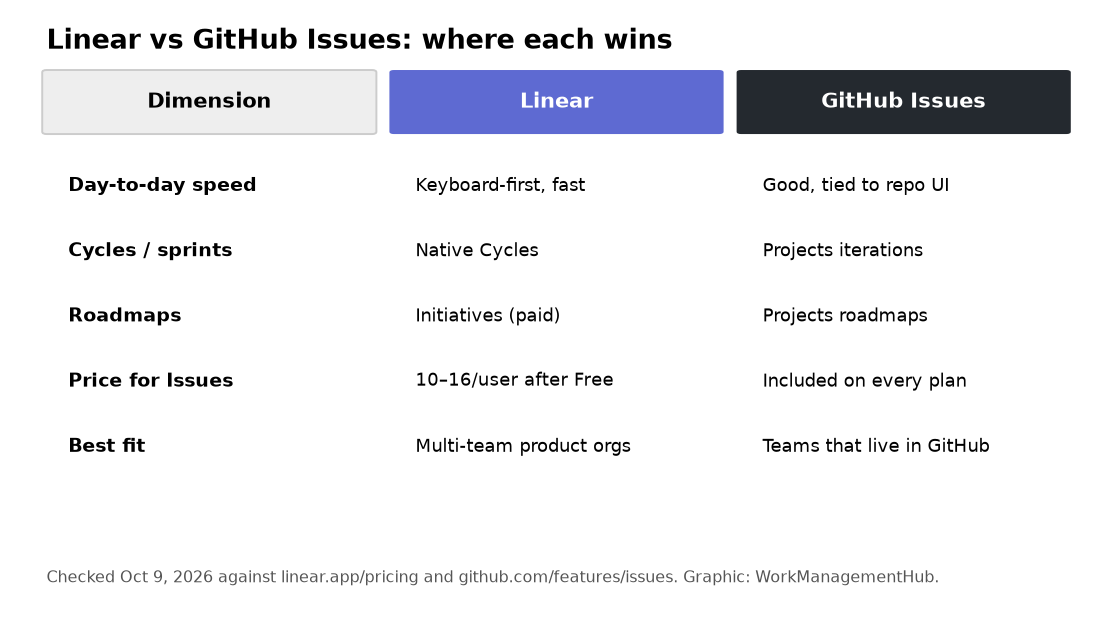
| Linear | GitHub Issues / Projects | |
|---|---|---|
| Built for | Product and engineering issue tracking with Cycles | Issues next to code, with Projects for boards and roadmaps |
| Free plan | Unlimited members, 2 teams, 250 issues; Agent platform included | Issues and Projects on every GitHub plan, including Free |
| Main paid tiers | Basic $10, Business $16 per user/month billed yearly | Team $4 per user/month (repo collaboration features; Issues already free) |
| Planning | Native Cycles, projects, initiatives | Projects tables, boards, roadmaps; iterations via custom fields/views |
| Dev link | GitHub PR linking, status automation, optional Issues sync | Native; no second tool |
| Best at | Multi-team product delivery | Teams that refuse another SaaS seat |
Sources: Linear pricing, GitHub pricing, GitHub Issues. Linear’s yearly rates are the ones shown on the pricing page; monthly billing is higher (commonly $12 / $18 on third-party write-ups – confirm the toggle on Linear’s page before you buy).
What it actually costs a 12-person eng team
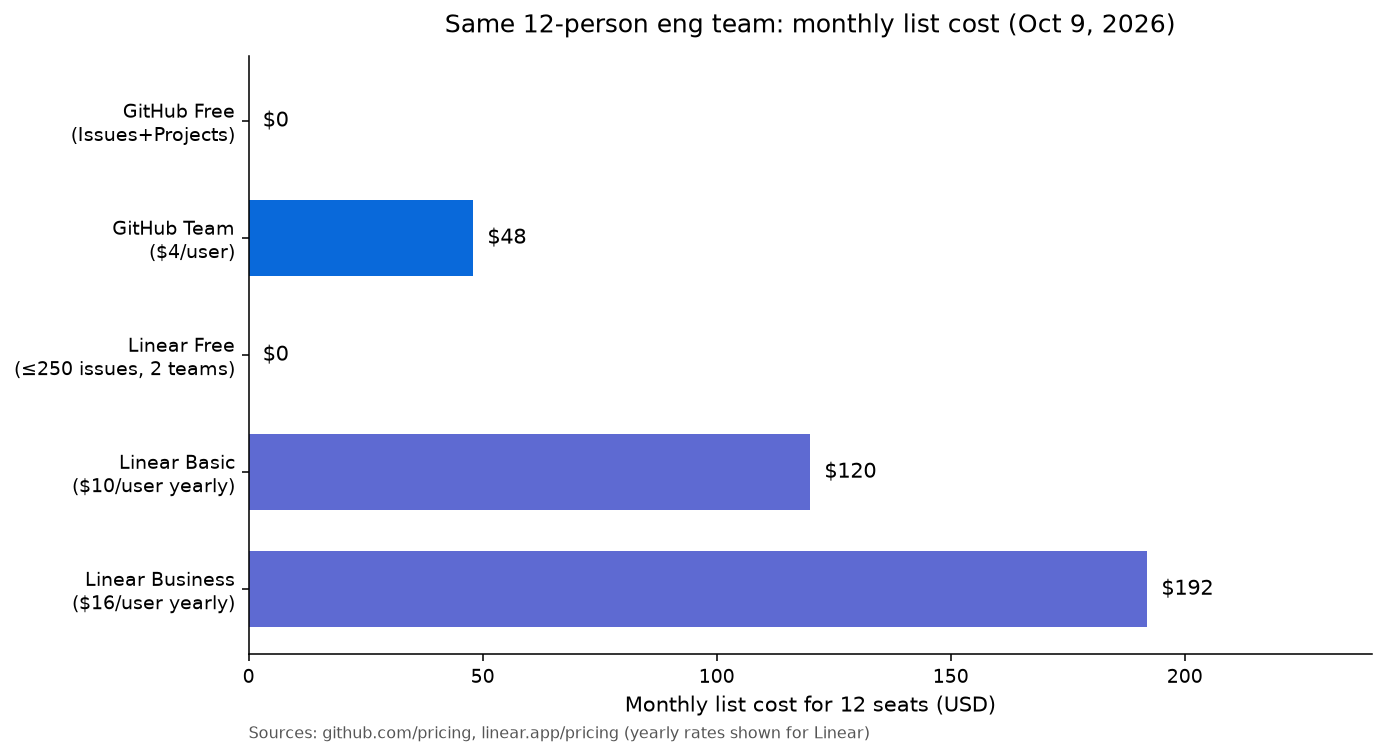
Per-seat math for 12 people at list prices:
| Setup | Monthly list | What you get |
|---|---|---|
| GitHub Free | $0 for Issues | Issues + Projects; limited private-repo collaboration features |
| GitHub Team | $48 | Same Issues/Projects, plus Team collaboration (required reviewers, CODEOWNERS, etc.) |
| Linear Free | $0 | Fine until you hit 250 issues or need a 3rd team |
| Linear Basic | $120 | Unlimited issues, 5 teams (yearly rate) |
| Linear Business | $192 | Unlimited teams, private teams, guests, Insights, Asks, Code Intelligence |
Two takeaways. First, GitHub does not charge for Issues. Team’s $4 is for org collaboration, not for a better issue tracker. Second, Linear Free is genuinely usable until the 250-issue or 2-team cap. Crossing that line for a 12-person team is $120–$192 a month before any AI credit spend.
For a deeper Linear seat breakdown, see our Linear pricing guide. If you’re weighing Jira instead, our Jira vs Linear and Jira vs GitHub Projects comparisons cover that path.
Where Linear wins
Speed and day-to-day UX
Linear is built around keyboard shortcuts, a global command menu and a feed that stays fast with thousands of issues. GitHub Issues is fine; it is not the same product. If your PMs and eng managers live in the tracker all day, that difference shows up every hour.
Cycles instead of homemade sprints
Linear Cycles are first-class: start/end dates, cooldown, carry-over, capacity. You can fake iterations in GitHub Projects with a custom field and a view. You will rebuild the same board every quarter. If Cycles are how you run delivery, Linear is the better home.
Triage, Asks and cross-team roadmaps
Business adds triage intelligence, private teams, guests, Linear Asks (Slack/email intake) and Insights. That’s the layer GitHub Projects still approximates with views and workflows. For intake-heavy product orgs, see our Linear Asks deep dive.
Where GitHub Issues wins
Price, for issue tracking
Issues and Projects ship on Free. You only pay Team or Enterprise when you need org controls, not when you need a backlog. For a startup that already pays for GitHub, adding Linear is a new line item. That alone is a valid reason to stay.
The work is already next to the code
Sub-issues, issue types, parent/child, Projects roadmaps and built-in automations closed a lot of the 2023–2024 gap. If your “project management” is mostly “which PRs and issues are in this release,” GitHub is enough. You’re not leaving context to open another app.
One less sync to babysit
Every Linear-GitHub setup eventually hits a broken webhook, a missing magic word or a team automation that points at a status you renamed. Staying on GitHub Issues deletes that class of failure.
The sync option (and when I’d use it)
Linear’s GitHub integration can link PRs to issues (branch name, PR title, or magic words in the description) and optionally sync GitHub Issues one-way or two-way into a Linear team. PR linking is the part almost every Linear shop should turn on. Full Issues sync is for open-source intake or a temporary migration, not for dual-writing every bug forever.
If the sync is already broken, don’t debug it from this page – use the Linear-GitHub sync troubleshooting guide.

What I’d actually pick
A 6–15 person startup on GitHub Team. Stay on GitHub Issues + Projects. Spend the Linear money on someone owning the backlog.
A multi-team product company (20+ eng). Linear Business for product/eng planning, GitHub for PRs, PR linking on, Issues sync off unless you have a concrete intake reason.
A Smartsheet / ops-heavy company with a small eng pod. Eng can stay on GitHub Issues. Don’t drag the whole company into Linear. If you need portfolio Gantt and resource views, that’s Smartsheet vs Linear territory – and yes, that’s my home turf, so weigh the bias.
FAQ
Does GitHub Issues have sub-issues now?
Yes. GitHub supports parent/child issues and issue types on Issues. That closed one of the old reasons to leave for Linear. Cycles and triage are still Linear’s clearer strengths.
Is Linear Agent only on paid plans?
Linear’s pricing page lists the Agent platform and Linear Agent on Free. Paid plans add more AI/agent workflow capacity (Loops, Code Intelligence and related Business features). Check linear.app/pricing for the current feature grid before you budget credits.
Can Linear replace GitHub Issues entirely?
For planning, yes. For PRs, no – you’ll still open pull requests on GitHub. Most Linear teams keep GitHub as the code host and link PRs back to Linear issues.
How does this change if we’re also considering Jira?
Jira wins when you need compliance-grade workflows, advanced roadmaps across many issue types, or you’re already in Atlassian. Linear wins on speed. GitHub Issues wins on “we’re not buying another tracker.” See Jira vs Linear.
Pricing and limits checked against vendor pages on October 9, 2026. Vendors change plans often, so confirm before you buy.
Sponsored