Linear Asks Deep Dive 2026: Slack Intake, Web Forms & Triage Intelligence Explained
- Linear Asks turns scattered requests into tracked Linear issues through three intake surfaces: Slack, email, and — since the April 2, 2026 release — public web forms.
- Asks created from Slack keep a fully synced comment thread, so requesters get updates in Slack while your team works entirely in Linear.
- Every Ask lands in the receiving team’s Triage inbox, giving you one review gate for prioritization, assignment, and duplicate control.
- Triage Intelligence proactively suggests assignees, teams, projects, and labels from historical patterns, and flags similar or duplicate issues before you accept them.
- Asks is a paid-plan capability — budget for it if internal request intake is currently living in DMs, spreadsheets, or an aging Jira Service Management instance.
Linear Asks is Linear’s request intake system. It converts requests submitted via Slack, email, or web forms into tracked Linear issues, routes them to a team’s Triage inbox for review and assignment, and keeps a synced comment thread with the requester so status updates flow back automatically.
- What Is Linear Asks and Who Is It For?
- The Three Intake Surfaces of Linear Asks: Slack, Email, and Web Forms
- The Triage Inbox: Where Every Ask Lands
- Triage Intelligence: AI Routing and Duplicate Detection
- Plan Requirements and Pricing Context
- Real Workflows: 20-Person Startup vs 200-Person Engineering Org
- Linear Asks vs Jira Service Management and ClearFeed
- Frequently Asked Questions
What Is Linear Asks and Who Is It For?
Linear Asks solves a problem every operations lead recognizes: the requests that actually consume your engineering, IT, and design capacity rarely arrive through your project tool. They arrive as Slack DMs, hallway asks, and forwarded emails — untracked, unprioritized, and impossible to report on. Linear Asks converts those requests into real Linear issues at the moment they’re made, without forcing the requester to open Linear or even have a license.
The business case is straightforward. If your team fields more than a handful of inbound requests per week — bug reports from sales, access requests to IT, asset requests to design — you are either paying a “shadow work” tax that never shows up in capacity planning, or you’re running a separate ticketing tool (Jira Service Management, Zendesk, a Google Form feeding a spreadsheet) that fragments your workflow. Asks eliminates both problems by making intake a native feature of the tool your team already works in. According to Linear’s official Asks documentation, requests become full Linear issues with all the standard machinery: statuses, assignees, labels, projects, SLAs, and automations.
Who is it for? Three groups, concretely:
- Engineering teams receiving bug reports and feature requests from go-to-market colleagues who live in Slack.
- Internal service teams — IT, security, design, data — that need a lightweight helpdesk without a helpdesk product.
- Product operations teams that want customer-facing feedback funneled into the same backlog as planned work, so prioritization happens in one place. (If you run structured sprints, see our Linear Cycles sprint planning guide for how triaged Asks flow into cycle planning.)
The Three Intake Surfaces of Linear Asks: Slack, Email, and Web Forms
As of 2026, Linear Asks supports three intake surfaces, and most published third-party coverage still only describes two. Slack and email have been available since Asks launched; web forms shipped in the April 2, 2026 changelog, and they materially change who can adopt Asks — because you no longer need every requester in your Slack workspace.
| Surface | Best For | Setup Effort | Sync Behavior |
|---|---|---|---|
| Slack | Internal teammates already in your workspace; high-frequency, conversational requests | Medium — workspace integration plus per-channel configuration | Two-way: comment thread stays synced between the Linear issue and the Slack thread |
| External requesters, vendors, and teams that live in email; forwarded customer reports | Low — generate an intake address and share it | Replies on the issue can notify the requester by email | |
| Web form | Structured intake with required fields; requesters outside Slack; linking from wikis and portals | Low — build the form in Linear, share a URL | Submissions create issues directly in Triage with form fields mapped to issue properties |
Setting Up Slack Intake
Slack is the flagship surface, and the sync behavior is the differentiator: when someone creates an Ask from a Slack message, Linear maintains a synced comment thread between the resulting issue and the original Slack thread. Your engineer comments in Linear; the requester sees it in Slack. Nobody chases anyone for status. Setup:
- Settings → Integrations → Slack — as a workspace admin, open Linear settings and connect the Slack integration, authorizing it for your Slack workspace.
- Enable Asks — in the Slack integration settings, turn on the Asks capability so the Linear app can create issues from Slack messages and shortcuts.
- Add Linear to a channel — in Slack, type /invite @Linear in each channel that should accept requests (e.g., #help-engineering, #it-requests).
- Configure the channel’s Ask template — in Linear’s Asks settings, map the channel to a receiving team and choose which template and fields (priority, labels, required description) requesters see.
- Create an Ask — requesters use the message shortcut (⋮ More actions → Create Ask) on any message, or the /linear ask command, fill the modal, and submit. The issue appears in the receiving team’s Triage instantly.
Setting Up Email Intake
Email intake is the lowest-friction surface and the right choice when requesters aren’t in your Slack workspace at all — agency partners, vendors, or customers whose reports get forwarded by account managers. Setup:
- Settings → Features → Asks — open the Asks configuration area in your Linear workspace settings.
- Create email intake — generate a dedicated intake email address bound to a receiving team.
- Set defaults — assign the default labels, priority, and template applied to issues created from inbound mail.
- Share or alias the address — publish the address directly, or point a friendly alias (support@yourco.com) at it via your mail provider’s forwarding rules.
Setting Up Web Forms (New in April 2026)
Web forms are the newest surface and the one that closes Linear Asks’ biggest historical gap: structured intake from people with no Slack access and no Linear seat. A form gives you required fields and dropdowns, which means cleaner data hitting Triage and fewer back-and-forth clarification cycles. Setup:
- Settings → Features → Asks → Forms — open the web forms section of Asks settings.
- New form — create a form and bind it to the receiving team whose Triage inbox should collect submissions.
- Add fields — configure title, description, and custom fields; map dropdowns to labels, priority, or projects so submissions arrive pre-structured.
- Set visibility — choose whether the form is public or restricted, per your intake policy.
- Copy link — grab the shareable URL and embed it in your internal wiki, help center, or website footer.
The Triage Inbox: Where Every Ask Lands
Whichever surface a request comes through, the destination is the same: the receiving team’s Triage inbox. This is the design decision that makes Asks work at scale. Intake without a review gate just moves the chaos from Slack into your backlog. Triage is that gate — a dedicated queue, separate from the backlog, where a designated reviewer (or rotating triage duty) processes each new Ask before it touches planned work.
The triage workflow per issue is a fast, keyboard-driven loop:
- Open Triage — select the team’s Triage view in the sidebar; new Asks appear at the top with their source (Slack thread, email, or form) attached.
- Accept, Decline, or Merge — accept legitimate requests into the team’s workflow, decline out-of-scope ones (the requester is notified through the original surface), or merge duplicates into the existing issue.
- Set priority and assignee — apply priority, assign an owner, and attach the issue to a project or cycle where relevant.
- Route misdelivered Asks — move requests that belong to another team; the Ask lands in that team’s Triage without breaking the requester’s synced thread.
The discipline this enforces is worth stating plainly: no request skips review, and no request disappears. For teams coming from ad-hoc Slack intake, that alone typically recovers hours of weekly “wait, who asked for this?” archaeology. If notification reliability has burned you in other tools, note that Linear’s model here is far more deterministic than, say, Smartsheet’s — see our Smartsheet notifications troubleshooting guide for the contrast.
Triage Intelligence: AI Routing and Duplicate Detection
Manual triage scales linearly with request volume; Triage Intelligence is Linear’s answer to that ceiling. Per Linear’s intake documentation, Triage Intelligence proactively suggests — and can apply — assignees, teams, projects, and labels based on your workspace’s historical patterns. If database-related bugs have historically gone to your platform team and a specific engineer, a new Ask mentioning a database error arrives pre-routed with those suggestions attached.
The second capability matters even more at volume: similar-issue and duplicate detection. Triage Intelligence flags incoming Asks that resemble existing issues, so your triage reviewer can merge the fourth report of the same login bug in two clicks instead of investigating it fresh. In practice, this converts triage from an investigative task into an approval task — the reviewer confirms or corrects suggestions rather than building context from scratch.
Two consultant’s caveats. First, the suggestions are only as good as your historical hygiene: workspaces with consistent labeling and team routing get sharp suggestions; workspaces with chaotic metadata get noise, so clean up your label taxonomy before you lean on it. Second, keep a human in the loop for the first month. Review the acceptance rate of its suggestions before letting auto-application run unattended on anything customer-facing.
Plan Requirements and Pricing Context
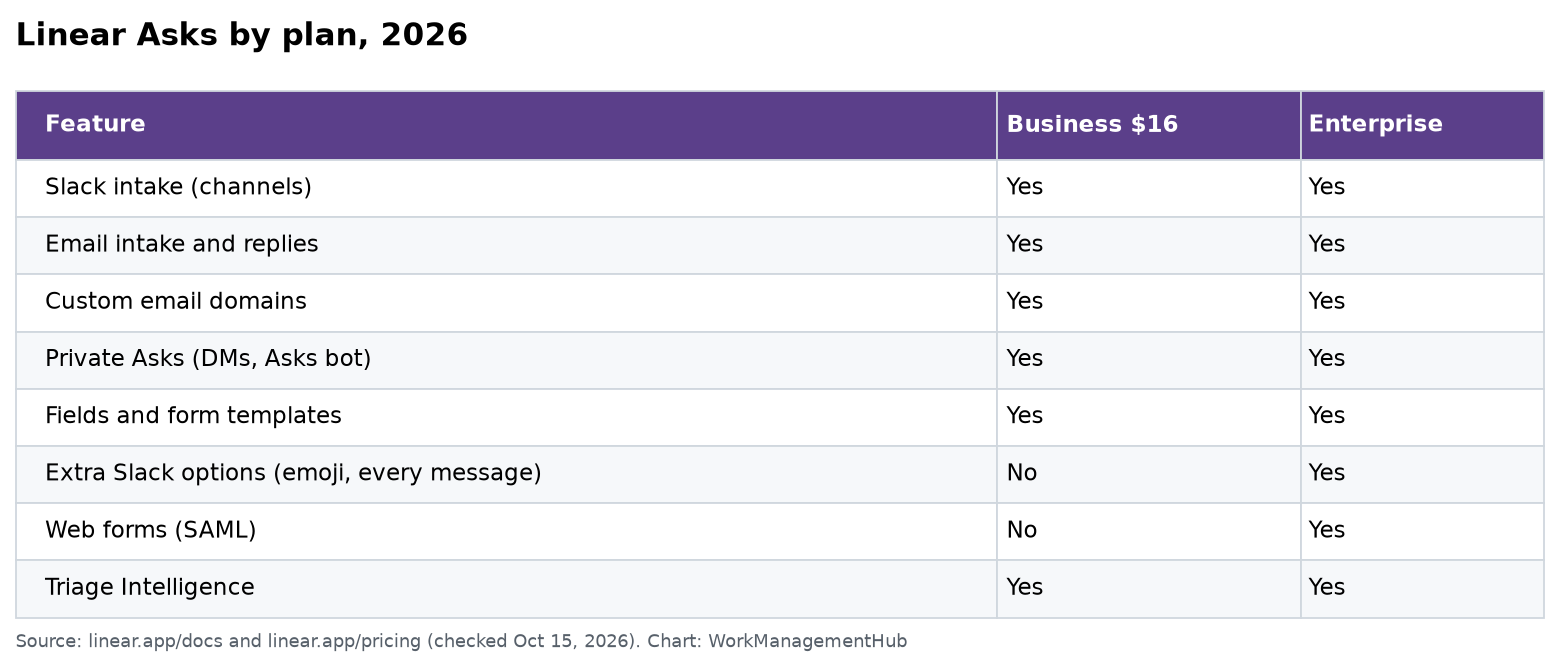
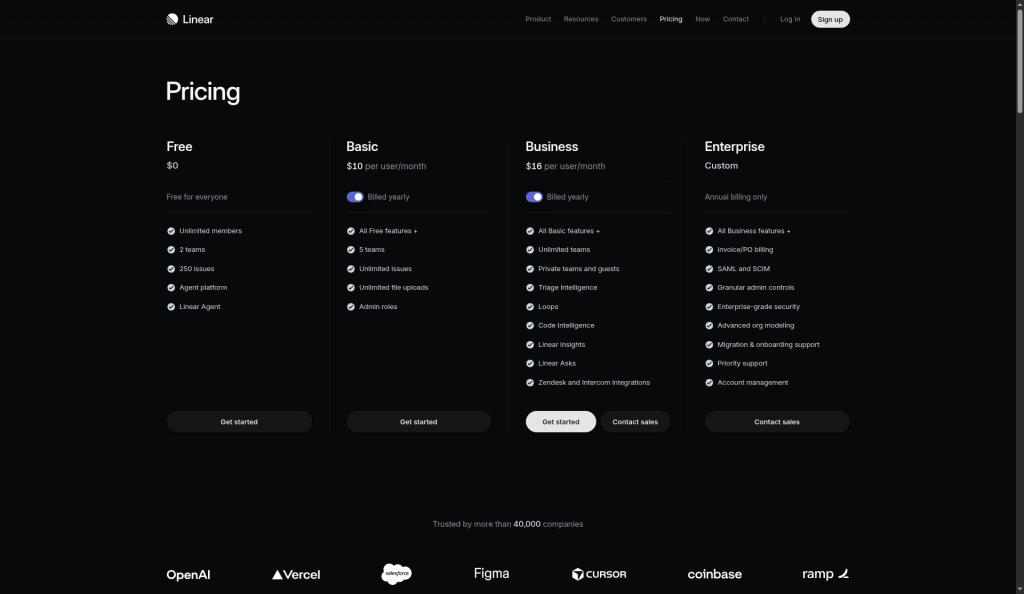
Linear Asks is not a free-tier feature — it’s positioned as part of Linear’s paid offering, and Triage Intelligence sits with Linear’s AI-powered capabilities on upper tiers. The budgeting question isn’t really “what does Asks cost” but “what does it replace.” If Asks lets a 50-person company avoid a separate helpdesk tool at $20-plus per agent per month, the consolidation usually pays for the Linear plan upgrade by itself. Requesters submitting via Slack, email, or web forms don’t need to be issue-creating Linear users in the traditional sense, which is exactly the point: your paying seats are the people doing the work, not the people asking for it.
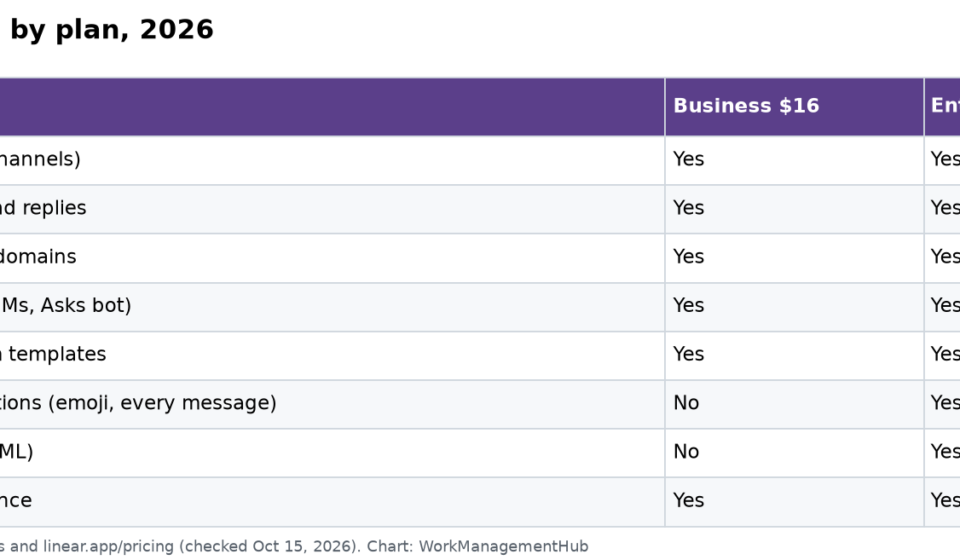
Plan boundaries and per-seat numbers shift, so verify the current tier matrix before committing — we maintain a current breakdown in our Linear pricing guide for 2026, including which Asks capabilities land on Business versus Enterprise.
Real Workflows: 20-Person Startup vs 200-Person Engineering Org
The 20-Person Startup: IT and Engineering Intake in One Channel
At 20 people, you don’t need routing sophistication; you need requests to stop dying in DMs. The pattern that works: one #help channel with the Linear app installed, Asks mapped to a single “Ops” team, and the founder-adjacent operator running Triage once a day. Email intake catches vendor and contractor requests. Total setup time is under an hour, and the payoff is a complete, reportable record of every internal request — which becomes the hiring justification when you eventually need a dedicated IT person. Skip web forms at this size unless you have external requesters; Slack covers everyone.
The 200-Person Engineering Org: Multi-Team Routing with Intelligence On
At 200 people, the failure mode inverts: intake works, but routing and duplication drown the triage rotation. The pattern here: per-function Slack channels (#ask-platform, #ask-security, #ask-data) each mapped to its own team’s Triage; a public web form linked from the internal wiki for structured requests with required fields; email intake reserved for external-facing aliases. Triage Intelligence carries real weight at this scale — pre-routing across a dozen teams and deduplicating the inevitable repeat reports. Each team runs a weekly triage rotation, and accepted Asks flow into cycle planning alongside roadmap work. Compare this to bolting a form tool onto your tracker with formula-based routing — the kind of gymnastics we document in our Monday.com formula column guide — and the native approach wins on maintenance cost alone.
Linear Asks vs Jira Service Management and ClearFeed
Versus Jira Service Management: JSM is a full ITSM suite — SLAs, service catalogs, change management, ITIL workflows. If you need those, Asks won’t replace it. But most software companies running JSM use perhaps 20% of it as an internal request queue, and pay full agent pricing plus the context-switching cost of a second tool. For that majority, Asks is “JSM-lite” in the best sense: intake, triage, routing, and requester communication, natively inside the tracker your engineers already live in. The position to take: adopt JSM for regulated ITIL processes; adopt Asks for everything else.
Versus ClearFeed: ClearFeed is a strong Slack-native request layer that can front several trackers, and it makes sense if your organization is split across Jira and Linear or needs Slack-side SLA management today. But it’s another vendor, another sync surface, and another bill. If Linear is your system of record, Asks’ native synced threads, Triage inbox, and Triage Intelligence remove the middleware entirely. Third-party comparisons written before April 2026 also miss that web forms erased ClearFeed’s “non-Slack requesters” advantage over Asks.
Adopt Linear Asks if Linear is already your system of record and your teams field recurring internal or lightweight external requests — it will replace a standalone helpdesk for most software companies under a few hundred people, and the April 2026 web forms release removed the last structural gap. Skip it if you need formal ITIL change management, deep SLA contracts, or if your organization’s work lives primarily in Jira or Zendesk — bolting Asks onto a non-Linear stack buys you nothing. The teams that win biggest: 20–300 person companies consolidating Slack-DM chaos and a barely-used ticketing tool into one triaged pipeline.
Frequently Asked Questions
Do requesters need a Linear account to use Linear Asks?
No — that’s the core value proposition. Requesters can submit via Slack, email, or a web form without opening Linear. Slack requesters receive status updates through the synced comment thread in their original Slack thread, so the whole request lifecycle happens where they already work.
What happens after someone submits an Ask?
The Ask becomes a Linear issue and lands in the receiving team’s Triage inbox. A triage reviewer accepts, declines, merges, or reroutes it, then sets priority and assignee. From that point it behaves like any other Linear issue and can join projects and cycles.
Can Linear Asks handle requests from people outside our Slack workspace?
Yes. Email intake has always covered external requesters, and the web forms released on April 2, 2026 added structured public intake with required fields and dropdowns. You can link a form from your wiki, help center, or website without granting anyone workspace access.
How does Triage Intelligence decide what to suggest?
It learns from your workspace’s historical patterns — which teams, assignees, projects, and labels similar past issues received — and proactively suggests or applies them to new Asks. It also flags similar and duplicate issues so reviewers can merge repeats quickly. Suggestion quality tracks your historical labeling hygiene.
Is Linear Asks a full replacement for Jira Service Management?
For internal request intake and lightweight service desks, yes, and with far less overhead. For regulated ITSM — formal change management, ITIL workflows, contractual SLA tooling — JSM remains the deeper product. Most software teams need the former, not the latter.